Unlocking special features-Windows 7 (build 6801)

NormCameron

@ Tenforums.com
Pro User
VIP
Local time
8:02 PM
Messages
576
Location
Gladstone, Queensland
"Windows 7 build 6801 was released into the wild shortly after PDC this year. You may have found and installed a copy simply to find the regular (so last summer) Vista taskbar and wondering what all the fuss is about. There have been some tutorials on how to fix these issues, but they are not all that easy to follow. For example, Rafael Rivera posted a great fix, which allows you to unlock the protected/hidden enhanced Windows 7 taskbar. However, the instructions were a little short and required you to use a command line interface, which simply isn’t necessary. The issues that will be solved are:

- Unlocking the protected/hidden Windows 7 features that were shown at PDC but were not made available in the 6801 build to those who aren’t close to the development of Windows 7. This includes the enhanced Windows 7 taskbar.

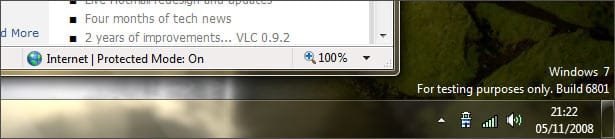
- At the bottom right hand side of your desktop is stated, “For testing purposes only. Build 6801″, as discussed in a recent article, Windows 7 is finished at anyone point in time, so you may want to use build 6801 as your primary PC until a newer build is released.

- When you installed Windows 7 build 6801 you probably left the serial/activation key blank. This leaves you with only 30 days to tryout Windows 7.

First things first, we’d recommend that you completely disable UAC for the duration of this process and then you can choose to switch it back on afterwards. You can do this by visiting Control Panel -> User Accounts -> Turn User Account Control on or off and then move the slider to the lowest point and restart your computer.

So firstly you will want to unlock the hidden Windows features, Rafael Rivera created an executable to help with this, most likely you are on a 32 bit computer, so download x86. If you are using a 64 bit version of Windows 7 then download x64. (See Brinks Tutorial) Download and extract, inside you’ll find ’unlockProtectedFeatures.exe’, move or copy this file to C:\Windows (My Computer -> C Drive -> Windows). Now restart your computer, just before the Windows loading screen occurs press F8 repeatedly until a text screen displays, navigate to “Safe Mode”. Once you’re in safe mode, hold down the keys Ctrl - Alt - Del on your keyboard, open Task Manager. Choose the tab which states “Processes”, find explorer.exe and Kill task. Navigate to File -> New Task. Browse to C:\Windows. Rename explorer.exe to Explorer.exe and then locate unlockProtectedFeatures.exe, right click this file and Run as administrator. A window should open that allows you to unlock protected features. Once you have completed the form and submitted the new taskbar should dsiplay itself. However it will be hardely noticable in safe mode. Once you have restarted you should now have the new and improved enchanced taskbar.
windows7watermarkon.jpg

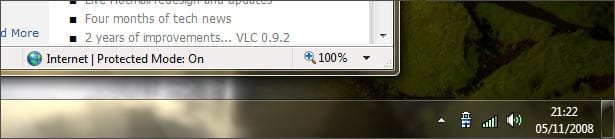
This fix is one that we worked out all by ourselves (pat on the back). The file in Windows which contains the text that displays at the bottom of Windows 7 build 6801 (shown in the image above) is stored in C:\Windows\System32\en-US\user32.dll.mui. Visit this location, right click the file and select the Security tab, click the “Advanced” button and then visit the owner tab, click the edit button and make yourself the owner of the file. Exit that dialog, saving changes and then click the “Edit…” button, select Users and give yourself Full Control. Exit properties saving changes. Rename user32.dll.mui to user32-backup.dll.mui. We’ve edited the version that was bundled with build 6801 and uploaded it. You can download it here. Once you have unpacked it, place it in the directory C:\Windows\System32\en-US\ and restart your computer.
windows7watermarkoff.jpg

To activate your copy of Windows and remove the 30 day trial, visit the Start Menu and right click My Computer -> Properties. Scroll to the bottom, you will notice that you have a number of days left to activate your copy. As we officially tested Vista in RC1 stage Microsoft provided us with a serial key a long… long time ago. We simply did a search for RC1 in Outlook and found the key. Typing this key into Windows 7 activation dialog activated our copy."

Unlocking special/protected features and taskbar, removing 30 day trial and watermark on Windows 7 (build 6801) | Tutorial What
 

My Computer My Computer

Computer Manufacturer/Model Number
Self Built
OS
Vista X32. Windows 7 32bit
CPU
Intel Quad Core 6600
Motherboard
Asus P5B
Memory
4096 MB Xtreme-Dark 800mhz
Graphics Card(s)
Zotac Amp Edition 8800GT - 512MB DDR3, O/C 700mhz
Monitor(s) Displays
Samsung 206BW
Screen Resolution
1680 X 1024
Hard Drives
4 X Samsung 500GB 7200rpm Serial ATA-II HDD w. 16MB Cache .
PSU
550 w
Case
Thermaltake
Cooling
3 x octua NF-S12-1200 - 120mm 1200RPM Sound Optimised Fans
Keyboard
Microsoft
Mouse
Targus
Internet Speed
1500kbs
Thanks Norm!
 

My Computer My Computer

Computer Manufacturer/Model Number
Self build
OS
Windows 7 Ultimate x64
CPU
AMD Phenom II x4
Motherboard
Gigabyte 880
Memory
8GB
Graphics Card(s)
NVIDIA GeForce HD
Sound Card
Realtek HD Audio
Screen Resolution
1920 x 1080
Hard Drives
2 x 1TB
PSU
Thermalake 550w
Case
XCase
Internet Speed
8MB
Thanks now I don't have to see that anymore.
 

My Computer My Computer

Computer Manufacturer/Model Number
HP Compaq Presario/SR5113WM
OS
Windows 7 Ultimate x64/ Windows Vista Ultimate x64
CPU
AMD Athlon 64 X2 3600+ 1.9Ghz
Motherboard
Asus M2N68-LA
Memory
PNY Optima Memory DDR2 2GB 2x1 kit
Graphics Card(s)
PNY Nvidia 8400 GS 256MB
Sound Card
On board RealTek
Monitor(s) Displays
Acer X163W LCD
Screen Resolution
1366x768
Hard Drives
Western Digital 160 GB SATA 3G (3.0Gb/sec)
7200 rpm
Western Digital 160 GB IDE
PSU
Dynex 400w
Case
Nothin Special
Cooling
Stock
Keyboard
Standard 102 key with volume and sleep buttons
Mouse
Wireless Logitech LX7
Internet Speed
Comcrap 10mb cable
Other Info
Insignia 2.1 speakers, wireless Xbox 360 controller w/plug n play charger, Belkin wireless G + mimo usb network adapter.
Cool. Removing that watermark was one of my projects for tonight. You've just saved me a lot of 'leg work' :)
 

My Computer My Computer

Computer type
PC/Desktop
Computer Manufacturer/Model Number
Systems by SmartEyeball
OS
8 Pro x64
CPU
i7 3770K 4.6GHz
Motherboard
ASUS P8Z77 WS
Memory
16GB G.Skill Trident X 2666mhz
Graphics Card(s)
x2 EVGA 780 Ti Superclocked SLI
Sound Card
SB X-FI Surround 5.1 PRO USB / ATH-AD900 Headphones
Monitor(s) Displays
x3 Dell U2410 / 58" Samsung
Screen Resolution
5760*1200/ 1920*1200
Hard Drives
2x Intel 520 240GB (RAID 0) * 2x WD Caviar Blacks 2TB (RAID 0) * 2TB WD Caviar Black * Sony Optirac DVD
PSU
Silverstone Strider Evolution 1200W
Case
Thermaltake Level 10 GT Snow Edition
Cooling
Noctua NH-D14
Keyboard
Topre Realforce // Ducky Shine MX Black // Filco Ninja TKL
Mouse
Thermaltake Theron (Highly Recommended) + Razer Imperator
Antivirus
MSE
Browser
IE, FF, WaterFox
Other Info
GT Extreme V2 Sim Racing Cockpit + 40" LCD and K/B Mouse stand ▼
Fanatec CSR Elite Wheel + Clubsport V1 Pedals + CSR shifter/7G-H ▼Saitek X52 Pro ▼ TrackIR 5 Pro
Buttkicker v2 Seat Rumbler with Dedicated 5.1 and Sub Woofer attached to frame ▼
=
Bloody Big Grin
The file in Windows which contains the text that displays at the bottom of Windows 7 build 6801 (shown in the image above) is stored in C:\Windows\System32\en-US\user32.dll.mui. Visit this location, right click the file and select the Security tab, click the “Advanced” button and then visit the owner tab, click the edit button and make yourself the owner of the file. Exit that dialog, saving changes and then click the “Edit…” button, select Users and give yourself Full Control. Exit properties saving changes. Rename user32.dll.mui to user32-backup.dll.mui.

First: Thanks Norm for this information....;)

I gave this a go yesterday to almost utter failure. I did get the "Testing Purposes" text removed; but when I opened anything it would default to the second monitor and then freeze, and there was nothing I could think of to get out of it. Then system restore occurred to me; which did the trick!

I'm going to try it again with only one monitor hooked up to see if it'll work that way.
I'm going to start a thread about this HERE. I'll post back at the thread with the outcome.

So please don't reply here.


Later :shock: Ted
 

My Computer My Computer

Computer Manufacturer/Model Number
* BFK Customs *
OS
W 7 64-bit Ultimate
CPU
Intel Q9550 Yorkfield
Motherboard
ASUS P5Q Pro
Memory
8GB Dominator 8500C5D
Graphics Card(s)
ATI : XFX 5870
Sound Card
Realtek HD Audio 7-1
Monitor(s) Displays
1x 47" LCD HDMI & 3x 26" LCD HDMI
Screen Resolution
1920x1080P & 1920x1200
Hard Drives
1x 80GB Intel X25-M G2 SSD : 1x 500GB & 1x 640GB WD Caviar Black(s)
PSU
Corsair 620HX
Case
Cooler Master RC-690
Cooling
Tuniq Tower 120, 2x 140mm and 3x 120mm case fans
Keyboard
Microsoft 500
Mouse
Razer Diamondback 3G
Internet Speed
14 Mb/s
Other Info
1x Koutech 3Gb/s SATA HDD Hot Swap Rack
I just gave it a go and cannot get it to work either.... must be for x86 systems and not x64.
 

My Computer My Computer

Computer Manufacturer/Model Number
Self build
OS
Windows 7 Ultimate x64
CPU
AMD Phenom II x4
Motherboard
Gigabyte 880
Memory
8GB
Graphics Card(s)
NVIDIA GeForce HD
Sound Card
Realtek HD Audio
Screen Resolution
1920 x 1080
Hard Drives
2 x 1TB
PSU
Thermalake 550w
Case
XCase
Internet Speed
8MB
Yeah, I believe x64 users are out of luck for the time being.
 

My Computer My Computer

Computer type
PC/Desktop
Computer Manufacturer/Model Number
Systems by SmartEyeball
OS
8 Pro x64
CPU
i7 3770K 4.6GHz
Motherboard
ASUS P8Z77 WS
Memory
16GB G.Skill Trident X 2666mhz
Graphics Card(s)
x2 EVGA 780 Ti Superclocked SLI
Sound Card
SB X-FI Surround 5.1 PRO USB / ATH-AD900 Headphones
Monitor(s) Displays
x3 Dell U2410 / 58" Samsung
Screen Resolution
5760*1200/ 1920*1200
Hard Drives
2x Intel 520 240GB (RAID 0) * 2x WD Caviar Blacks 2TB (RAID 0) * 2TB WD Caviar Black * Sony Optirac DVD
PSU
Silverstone Strider Evolution 1200W
Case
Thermaltake Level 10 GT Snow Edition
Cooling
Noctua NH-D14
Keyboard
Topre Realforce // Ducky Shine MX Black // Filco Ninja TKL
Mouse
Thermaltake Theron (Highly Recommended) + Razer Imperator
Antivirus
MSE
Browser
IE, FF, WaterFox
Other Info
GT Extreme V2 Sim Racing Cockpit + 40" LCD and K/B Mouse stand ▼
Fanatec CSR Elite Wheel + Clubsport V1 Pedals + CSR shifter/7G-H ▼Saitek X52 Pro ▼ TrackIR 5 Pro
Buttkicker v2 Seat Rumbler with Dedicated 5.1 and Sub Woofer attached to frame ▼
=
Bloody Big Grin
Hello all!...:geek:

I just got it to work....:p

Test Text Gone.JPG


Later ;) Ted
 

My Computer My Computer

Computer Manufacturer/Model Number
* BFK Customs *
OS
W 7 64-bit Ultimate
CPU
Intel Q9550 Yorkfield
Motherboard
ASUS P5Q Pro
Memory
8GB Dominator 8500C5D
Graphics Card(s)
ATI : XFX 5870
Sound Card
Realtek HD Audio 7-1
Monitor(s) Displays
1x 47" LCD HDMI & 3x 26" LCD HDMI
Screen Resolution
1920x1080P & 1920x1200
Hard Drives
1x 80GB Intel X25-M G2 SSD : 1x 500GB & 1x 640GB WD Caviar Black(s)
PSU
Corsair 620HX
Case
Cooler Master RC-690
Cooling
Tuniq Tower 120, 2x 140mm and 3x 120mm case fans
Keyboard
Microsoft 500
Mouse
Razer Diamondback 3G
Internet Speed
14 Mb/s
Other Info
1x Koutech 3Gb/s SATA HDD Hot Swap Rack
Let us know what you did ....:cry:
 

My Computer My Computer

Computer Manufacturer/Model Number
Self build
OS
Windows 7 Ultimate x64
CPU
AMD Phenom II x4
Motherboard
Gigabyte 880
Memory
8GB
Graphics Card(s)
NVIDIA GeForce HD
Sound Card
Realtek HD Audio
Screen Resolution
1920 x 1080
Hard Drives
2 x 1TB
PSU
Thermalake 550w
Case
XCase
Internet Speed
8MB
great info Norm......:D

i have been away from here a while, are you all on W7 now..???, 6801..??

it seems everyone is running it but me :sarc: whatever is going on...lol :eek::eek::eek:

:)SK
 

My Computer My Computer

Computer Manufacturer/Model Number
myself
OS
SEVEN x64
CPU
Q9450 @ 3.6GHZ 1.34v
Motherboard
ASUS P5K PREMIUM P35
Memory
8GB 1066 buffalo firestix @ 1152mhz CL5
Graphics Card(s)
Sapphire HD 5970 + GTX260 (physX)
Sound Card
Creative X-FI Xtreme Gamer
Monitor(s) Displays
SAMSUNG 20'' & SAMSUNG 23'' (dual screens)
Screen Resolution
2048x1152 & 1680x1050
Hard Drives
1x seagate 160gb IDE & 1x seagate 160gb SATA
PSU
XCILIO 850w (78A)
Case
CM590 1x 120x38mm & 2x92x38mm / 4x 120x25mm
Cooling
AC7 PRO @ 92x38mm blower, Lamptron military bus bay controll
Keyboard
LOGITECH E110
Mouse
logitech NX5
Internet Speed
2MB
Other Info
its a continual ''work in progress''....
Hello SK....:)

How have you been doing? I've been wondering where you've been.


Later ;) Ted
 

My Computer My Computer

Computer Manufacturer/Model Number
* BFK Customs *
OS
W 7 64-bit Ultimate
CPU
Intel Q9550 Yorkfield
Motherboard
ASUS P5Q Pro
Memory
8GB Dominator 8500C5D
Graphics Card(s)
ATI : XFX 5870
Sound Card
Realtek HD Audio 7-1
Monitor(s) Displays
1x 47" LCD HDMI & 3x 26" LCD HDMI
Screen Resolution
1920x1080P & 1920x1200
Hard Drives
1x 80GB Intel X25-M G2 SSD : 1x 500GB & 1x 640GB WD Caviar Black(s)
PSU
Corsair 620HX
Case
Cooler Master RC-690
Cooling
Tuniq Tower 120, 2x 140mm and 3x 120mm case fans
Keyboard
Microsoft 500
Mouse
Razer Diamondback 3G
Internet Speed
14 Mb/s
Other Info
1x Koutech 3Gb/s SATA HDD Hot Swap Rack
haha yeah you should get it skunksmash!!

And where is that file that you say Download Here. THere is no link to click!
 

My Computer My Computer

Computer Manufacturer/Model Number
Dell M1330 XPS - Laptop
OS
Windows 7 Build 7100
CPU
Core 2 Duo T7250
Motherboard
Dell Inc. 0U8042
Memory
2GB PC2-5300
Graphics Card(s)
NVIDIA 8400M GS
Sound Card
Standard HD Audio
Monitor(s) Displays
13" LCD Widescreen
Screen Resolution
1280x800
Hard Drives
160GB
Internet Speed
25 Mbit
great info Norm......:D

i have been away from here a while, are you all on W7 now..???, 6801..??

it seems everyone is running it but me :sarc: whatever is going on...lol :eek::eek::eek:

:)SK

Hi Mitch,

I running Vista 64 bit, Windows 7 32 bit, and Windows 7 64 bit as a triple boot setup. You should definitely give Windows 7 a try.
 

My Computer My Computer

Computer type
PC/Desktop
Computer Manufacturer/Model Number
Self built custom
OS
64-bit Windows 11 Pro for Workstations
CPU
Intel i7-8700K OC'd to 5 GHz
Motherboard
ASUS ROG Maximus XI Formula Z390
Memory
64 GB (4x16GB) G.SKILL TridentZ RGB DDR4 3600 MHz
Graphics Card(s)
ASUS ROG-STRIX-GTX1080TI-O11G-GAMING
Sound Card
Integrated
Monitor(s) Displays
2 x Samsung Odyssey G7 27"
Screen Resolution
2560x1440
Hard Drives
1TB Samsung 990 PRO M.2,
4TB Samsung 990 PRO PRO M.2,
TerraMaster F8 SSD Plus NAS
PSU
Seasonic Prime Titanium 850W
Case
Thermaltake Core P3
Cooling
Corsair Hydro H115i
Keyboard
Logitech wireless K800
Mouse
Logitech MX Master 4
Internet Speed
2 Gb/s Download and 100 Mb/s Upload
Antivirus
Malwarebyte Anti-Malware Premium
Browser
Google Chrome
Other Info
Logitech Z625 speaker system,
Logitech BRIO 4K Pro webcam,
HP Color LaserJet Pro MFP M477fdn,
APC SMART-UPS RT 1000 XL - SURT1000XLI,
Galaxy S23 Plus phone
Hello SK....:)

How have you been doing? I've been wondering where you've been.

Later ;) Ted

Hi Ted.... hope your well

lovin the new plaques ;)

haha yeah you should get it skunksmash!!

And where is that file that you say Download Here. THere is no link to click!

what download mate...??? im a little dense at the moment :)

Hi Mitch,

I running Vista 64 bit, Windows 7 32 bit, and Windows 7 64 bit as a triple boot setup. You should definitely give Windows 7 a try.

now that sounds like a sweet setup Shawn, how did you all get W7 ?? torrents?
im interested in a dual boot now you lot are running it with no probs!!

or could i run it like john did on a virtual PC..??

:)SK
 

My Computer My Computer

Computer Manufacturer/Model Number
myself
OS
SEVEN x64
CPU
Q9450 @ 3.6GHZ 1.34v
Motherboard
ASUS P5K PREMIUM P35
Memory
8GB 1066 buffalo firestix @ 1152mhz CL5
Graphics Card(s)
Sapphire HD 5970 + GTX260 (physX)
Sound Card
Creative X-FI Xtreme Gamer
Monitor(s) Displays
SAMSUNG 20'' & SAMSUNG 23'' (dual screens)
Screen Resolution
2048x1152 & 1680x1050
Hard Drives
1x seagate 160gb IDE & 1x seagate 160gb SATA
PSU
XCILIO 850w (78A)
Case
CM590 1x 120x38mm & 2x92x38mm / 4x 120x25mm
Cooling
AC7 PRO @ 92x38mm blower, Lamptron military bus bay controll
Keyboard
LOGITECH E110
Mouse
logitech NX5
Internet Speed
2MB
Other Info
its a continual ''work in progress''....
I would go the dual boot option, I only used it in a VPC to assess the stability.
 

My Computer My Computer

Computer type
PC/Desktop
OS
Windows 11
ahh... ok then mate

:)SK
 

My Computer My Computer

Computer Manufacturer/Model Number
myself
OS
SEVEN x64
CPU
Q9450 @ 3.6GHZ 1.34v
Motherboard
ASUS P5K PREMIUM P35
Memory
8GB 1066 buffalo firestix @ 1152mhz CL5
Graphics Card(s)
Sapphire HD 5970 + GTX260 (physX)
Sound Card
Creative X-FI Xtreme Gamer
Monitor(s) Displays
SAMSUNG 20'' & SAMSUNG 23'' (dual screens)
Screen Resolution
2048x1152 & 1680x1050
Hard Drives
1x seagate 160gb IDE & 1x seagate 160gb SATA
PSU
XCILIO 850w (78A)
Case
CM590 1x 120x38mm & 2x92x38mm / 4x 120x25mm
Cooling
AC7 PRO @ 92x38mm blower, Lamptron military bus bay controll
Keyboard
LOGITECH E110
Mouse
logitech NX5
Internet Speed
2MB
Other Info
its a continual ''work in progress''....
I agree Mitch. Dual boot runs better. I also have it setup in a VM, but only for the screenshots that I otherwise could not get.
 

My Computer My Computer

Computer type
PC/Desktop
Computer Manufacturer/Model Number
Self built custom
OS
64-bit Windows 11 Pro for Workstations
CPU
Intel i7-8700K OC'd to 5 GHz
Motherboard
ASUS ROG Maximus XI Formula Z390
Memory
64 GB (4x16GB) G.SKILL TridentZ RGB DDR4 3600 MHz
Graphics Card(s)
ASUS ROG-STRIX-GTX1080TI-O11G-GAMING
Sound Card
Integrated
Monitor(s) Displays
2 x Samsung Odyssey G7 27"
Screen Resolution
2560x1440
Hard Drives
1TB Samsung 990 PRO M.2,
4TB Samsung 990 PRO PRO M.2,
TerraMaster F8 SSD Plus NAS
PSU
Seasonic Prime Titanium 850W
Case
Thermaltake Core P3
Cooling
Corsair Hydro H115i
Keyboard
Logitech wireless K800
Mouse
Logitech MX Master 4
Internet Speed
2 Gb/s Download and 100 Mb/s Upload
Antivirus
Malwarebyte Anti-Malware Premium
Browser
Google Chrome
Other Info
Logitech Z625 speaker system,
Logitech BRIO 4K Pro webcam,
HP Color LaserJet Pro MFP M477fdn,
APC SMART-UPS RT 1000 XL - SURT1000XLI,
Galaxy S23 Plus phone
Hello Mitch!

Someone helped me cot a copy and I'm running my first dual boot; it's not as fearful as I expected. Actually it's a piece of cake; it was installed and running in about fifteen minutes. I'm sure as knowledgeable as you are you'll have it up and running in no time. Give it a whirl....;)


Later :) Ted
 

My Computer My Computer

Computer Manufacturer/Model Number
* BFK Customs *
OS
W 7 64-bit Ultimate
CPU
Intel Q9550 Yorkfield
Motherboard
ASUS P5Q Pro
Memory
8GB Dominator 8500C5D
Graphics Card(s)
ATI : XFX 5870
Sound Card
Realtek HD Audio 7-1
Monitor(s) Displays
1x 47" LCD HDMI & 3x 26" LCD HDMI
Screen Resolution
1920x1080P & 1920x1200
Hard Drives
1x 80GB Intel X25-M G2 SSD : 1x 500GB & 1x 640GB WD Caviar Black(s)
PSU
Corsair 620HX
Case
Cooler Master RC-690
Cooling
Tuniq Tower 120, 2x 140mm and 3x 120mm case fans
Keyboard
Microsoft 500
Mouse
Razer Diamondback 3G
Internet Speed
14 Mb/s
Other Info
1x Koutech 3Gb/s SATA HDD Hot Swap Rack
Hi everyone, could someone with an x64 Windows 7 copy please post their C:\Windows\System32\en-US\user32.dll.mui file (so it can be edited and uploaded). The downloadable one on DoesWhat only works for x86 machines.
 

My Computer My Computer

Computer Manufacturer/Model Number
Mac Pro
OS
Windows 7 Ultimate
CPU
Quad-Core Intel Xeon
Memory
6 GB DDR2 FB-DIMM
Graphics Card(s)
512 MB NVIDIA GeForce 8800 GT
Monitor(s) Displays
1
Screen Resolution
2560 x 1680
Back
Top