Windows Aero (Tahoma Font)

Eric G

New member
Member
Local time
10:31 AM
Messages
15
Windows Aero (Tahoma Font)
(Completely disable ClearType and remove Segoe UI from the Windows interface.)


In Windows 7 and Vista, one has the option to change portions of the user interface (UI) to whatever font one desires. Unfortunately it is not an option to change the font on certain parts of the interface. Segoe UI, the default UI font in Windows Vista and Windows 7, looks particularly bad after ClearType is completely disabled. However, ClearType itself looks very bad on older and/or cheaper monitors, previously forcing users with such monitors to either deal with the ugliness of ClearType or the ugliness of Segoe UI when ClearType is disabled. That's where Windows Aero (Tahoma Font) comes in. It replaces all instances of Segoe UI with Tahoma, the default UI font in Windows 2000 and Windows XP.

At the bottom of this post are two downloads. One for the installer and one containing all the files required to manually implement/install Windows Aero (Tahoma Font). The manual installation is included for those who wish to use Windows Aero (Tahoma Font) in addition to the original copy of Windows Aero. The installer, however, replaces the original aero.msstyles file for the sake of ease-of-use. Bare in mind that the Installation Instructions for the manual installation are sparse, however I will be happy to answer any questions. The manual installation should only be done by advanced users.

For more information, please read the following Readme:

Windows Aero (Tahoma Font)
(Supports Windows Vista and Windows 7)

-----------------------------------------------------------------------------------------------------------------------------------
IMPORTANT: On all user accounts other than the one from which Windows Aero (Tahoma Font) is installed/uninstalled, you must manually switch themes in order for the changes to appear.
-----------------------------------------------------------------------------------------------------------------------------------

Windows Aero (Tahoma Font) is a modified version of the original aero.msstyles file. The aero.msstyles file is used by all Aero-based themes. This modified aero.msstyles fully removes all instances of Segoe UI within any Aero-based themes and replaces them with Tahoma. Tahoma at 8pt was the default UI font in Windows 2000 and Windows XP. Windows Aero (Tahoma Font) was created using Vista Style Builder 1.4 by Andreas Verhoeven.

The following modifications were made:

  • Segoe UI changed to Tahoma.
    • All instances of Segoe UI at 9pt were changed to Tahoma at 8pt.
      • Exception: Title Bar font was changed to Trebuchet MS at 10pt.
    • All other instances of Segoe UI were left at their original point size after being changed to Tahoma.
  • Antialiasing Quality changed from ClearType to Standard on all fonts in aero.msstyles.


Third-Party Programs Included:

  • Universal Theme Patcher v1.5, Build 20090409
    • In order to use Windows Aero (Tahoma Font), the Windows system files that control themes must be patched to allow the usage of unsigned themes. The installer takes care of this automatically by running the Universal Theme Patcher by deepxw if it is selected on the Components page.
  • NoSegoe
    • If Windows Aero (Tahoma Font) is installed by itself, external programs that are hard coded to use Segoe UI, even ones included with Windows, such as Resource Monitor and Windows 7's Calculator, will continue to use Segoe UI. In order to avoid this, the installer incorporates NoSegoe by Steve Halpern. The version included in this is installer is slightly modified in order to remove the new variants of Segoe UI that come with Windows 7, in addition to the old ones.
      • NOTE: Some Adobe programs must be run in XP SP3 compatibility mode or older after installing NoSegoe.


NOTES:

  • The installer can be run again to add/remove components. However, please use the Uninstaller to remove all components.
  • The installer must temporarily switch your Windows theme in order to install Windows Aero (Tahoma Font). Sometimes, due to timing issues, the installer fails to automatically switch you back to your originally selected theme after restarting. If this happens, simply manually switch themes.
  • The "Disable ClearType" component only affects the administrator account whose credentials are used to run the installer. ClearType must be manually disabled/enabled on all other accounts.


Thanks to Andreas Verhoeven, deepxw, and Steve Halpern!

-Eric G.


MD5 Sums
:
A37E82AC35E826398A3F84F94B8A82F6: Windows Aero (Tahoma Font) Setup
D71D7D581DCDB4DA241F1F4D5A7A989B: Windows Aero (Tahoma Font) Manual Installation

Downloads:
[Replace the asterisks in the URLs with "mediafire .com" (without quotes and without the space).]
Windows Aero (Tahoma Font) Setup
Windows Aero (Tahoma Font) Manual Installation
 
Last edited:

My Computer My Computer

OS
Windows 7 x64
Hi again, thank you for effort,i have some trouble using installer to apply fixes automaticly, the instaler freeze after massage "The system need to change theme to clasic... and theme is not changed. The only way i sucesfuly installed it is to change compatibility mode to vista sp2. I dont know is this right way to install it or not(or is it fully working).Can u fix installer? btw i use x86 Win7. Thank you!
 

My Computer My Computer

Computer Manufacturer/Model Number
Custom
OS
Windows 7 Pro
CPU
I7 920 @ 3.2
Motherboard
ASUS P6T Deluxe v1
Memory
Kingston 3GB DDR3 1600 MHZ
Graphics Card(s)
Ati Radeon HD 4870
Sound Card
Onboard
Monitor(s) Displays
Samsung T-200
Hard Drives
2x Raptor 36GB raid0
PSU
Silverstone 750W
Case
Thermaltake Soprano
Cooling
Stock
Hi dphreak,

My only guess is that it has something to do with you having previously used modified msstyles files. The only thing I can recommend is trying the manual installation. Sorry that I can't be of more help. Let me know how it goes though, please.

Edit: Changing compatibility mode might prevent the installer from working properly. It's something I haven't tested. The installer does use slightly different methods in Vista and 7, so if it thinks it's in Vista when it's really not, it wouldn't install properly I'm sure.
 
Last edited:

My Computer My Computer

OS
Windows 7 x64
Thank you for trying to fix error,i have apply manualy and works great!, probably my system is rejecting instalation as you suggested because i have done some modifications to theme and system files before i found your solution.I will try it on virtual machine with fresh install of win 7 and see how it goes.Is it only me or you hate too segoe and antialised fonts?
ps: i have followed your guide on editing msstyles file with style builder to make some modifications on clasic themes with sucess.:)
 

My Computer My Computer

Computer Manufacturer/Model Number
Custom
OS
Windows 7 Pro
CPU
I7 920 @ 3.2
Motherboard
ASUS P6T Deluxe v1
Memory
Kingston 3GB DDR3 1600 MHZ
Graphics Card(s)
Ati Radeon HD 4870
Sound Card
Onboard
Monitor(s) Displays
Samsung T-200
Hard Drives
2x Raptor 36GB raid0
PSU
Silverstone 750W
Case
Thermaltake Soprano
Cooling
Stock
Glad to hear it all worked out, dphreak. Actually, I don't hate ClearType and Segoe UI. They look great if you have a monitor that renders ClearType properly. My monitor does not, however, which is why I took to the time to make Windows Aero (Tahoma Font). Windows' standard font antialiasing looks pretty good too. In fact, when you disable ClearType in Windows 7, it automatically sets you to Standard antialiasing mode. As far as I can tell, the only way to completely disable font antialiasing in Windows 7 is to change a Registry value. I've tried turning antialiasing entirely off on my own system and found that things were way too jagged.

By the way, I'm surprised you needed to edit the Windows Classic theme. As far as I can tell, all of the Basic and High Contrast Themes already use Tahoma, with the exception of Windows 7 Basic, but that's covered by Windows Aero (Tahoma Font). Either way, I'm glad that I was able to help.
 

My Computer My Computer

OS
Windows 7 x64
Many Thanks,

I've just run your program and it all went seamlessly.

I still use a CRT monitor and was begining to reget my change from XP as graphicllay it was such a step back.


Thanks again.
 

My Computer My Computer

OS
Windows 7
Close!

Excellent work. Very impressed.

One thing though - I actually like ClearType, I think it looks really good on Tahoma 8pt. Sadly there's no option to have Segoe UI 9pt replaced by Tahoma 8pt on all parts that the user can't change with ClearType on rather than off. With NoSegoe you can have everything Tahoma with ClearType, but Start Menu for example is obviously 9pt. So sadly neither quite does the job right in this particular case.
 

My Computer My Computer

OS
Windows 7 Ultimate 32-Bit
Excellent work. Very impressed.

One thing though - I actually like ClearType, I think it looks really good on Tahoma 8pt. Sadly there's no option to have Segoe UI 9pt replaced by Tahoma 8pt on all parts that the user can't change with ClearType on rather than off. With NoSegoe you can have everything Tahoma with ClearType, but Start Menu for example is obviously 9pt. So sadly neither quite does the job right in this particular case.
Welcome to the Seven Forums
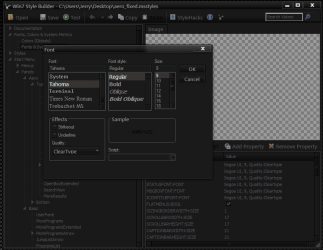
With Windows Style Builder Ave's Windows7 Style Builder you can change 90%+ of the fonts to your liking. Here is an example in the screenshot.
Jerry
 

Attachments

  • Capture.PNG
    Capture.PNG
    28.2 KB · Views: 793

My Computer My Computer

Computer type
Laptop
Computer Manufacturer/Model Number
Sager NP9170
OS
Win 7 Pro x64 / Win 10 Pro
CPU
Intel(R) Core(TM) i7-3630QM CPU @ 2.40GHz
Motherboard
CLEVO P170EM
Memory
12 GB
Graphics Card(s)
(1) Intel(R) HD Graphics 4000 (2) NVIDIA GeForce GTX 675M
Sound Card
(1) Realtek High Definition Audio (2) Intel(R) Display Aud
Monitor(s) Displays
17.3
Screen Resolution
1920x1080
Hard Drives
(1) Samsung 860 EVO 500GB(OS) (1) Samsung 860 EVO 500GB(Data)
Keyboard
Backlite
Antivirus
MSE, Malwarebytes Pro
Browser
Firefox
Other Info
DESKTOP: Custom-built.
OS: Win 10 Pro x64.
CASE: Rosewill R5.
CPU: Intel I5 4670K CPU @ 3.40GHz.
CPU COOLER: Cool Master Hyper 212 EVO.
MOTHERBOARD: Asus Z87-A.
MEMORY: Kingston HyperX 2x4 GB.
GPU: Nvidia Geforce 650 TI.
PSU: Corsair TX750.
DRIVES: (1) Samsung 840 120 GB SSD (2) Western Digital blue 500 GB 7200 RPM.

My Computer My Computer

Computer type
Laptop
Computer Manufacturer/Model Number
Sager NP9170
OS
Win 7 Pro x64 / Win 10 Pro
CPU
Intel(R) Core(TM) i7-3630QM CPU @ 2.40GHz
Motherboard
CLEVO P170EM
Memory
12 GB
Graphics Card(s)
(1) Intel(R) HD Graphics 4000 (2) NVIDIA GeForce GTX 675M
Sound Card
(1) Realtek High Definition Audio (2) Intel(R) Display Aud
Monitor(s) Displays
17.3
Screen Resolution
1920x1080
Hard Drives
(1) Samsung 860 EVO 500GB(OS) (1) Samsung 860 EVO 500GB(Data)
Keyboard
Backlite
Antivirus
MSE, Malwarebytes Pro
Browser
Firefox
Other Info
DESKTOP: Custom-built.
OS: Win 10 Pro x64.
CASE: Rosewill R5.
CPU: Intel I5 4670K CPU @ 3.40GHz.
CPU COOLER: Cool Master Hyper 212 EVO.
MOTHERBOARD: Asus Z87-A.
MEMORY: Kingston HyperX 2x4 GB.
GPU: Nvidia Geforce 650 TI.
PSU: Corsair TX750.
DRIVES: (1) Samsung 840 120 GB SSD (2) Western Digital blue 500 GB 7200 RPM.
Hi, I registered just to express my gratitude. I have w7 on my netbook and for some reason, I don´t mind the cleartype there at all. But my PC (main computer) is a completely different story. I just couldn´t stand cleartype, it still felt fuzzy, blurry, it hurt my eyes (22" LCD). This "tool" is exactly what I needed. Shame you can´t turn this on easily in w7. So anyway my point is; thank you so much!!!
 

My Computer My Computer

OS
w7 x64
It works! and a question

This app just works! GREAT! I´m so happy I found it!!
I just have one small problem... the clock on the corner is now smaller and it´s showing also the date, though there is no actual place for both time and date. So it´s looking kind of akward. Any idea on how to fix this?
Many thanks!!!!!
 

My Computer My Computer

OS
BARCELONA
This app just works! GREAT! I´m so happy I found it!!
I just have one small problem... the clock on the corner is now smaller and it´s showing also the date, though there is no actual place for both time and date. So it´s looking kind of akward. Any idea on how to fix this?
Many thanks!!!!!
Welcome to the Seven Forums
See if any of these tutorials will help.
http://www.sevenforums.com/tutorial...ar-system-tray-show-full-day-month-names.html
http://www.sevenforums.com/tutorials/3530-time-format-change.html
http://www.sevenforums.com/tutorials/3529-date-format-change.html
Are you talking about the app in the 1st post?
Jerry
 

My Computer My Computer

Computer type
Laptop
Computer Manufacturer/Model Number
Sager NP9170
OS
Win 7 Pro x64 / Win 10 Pro
CPU
Intel(R) Core(TM) i7-3630QM CPU @ 2.40GHz
Motherboard
CLEVO P170EM
Memory
12 GB
Graphics Card(s)
(1) Intel(R) HD Graphics 4000 (2) NVIDIA GeForce GTX 675M
Sound Card
(1) Realtek High Definition Audio (2) Intel(R) Display Aud
Monitor(s) Displays
17.3
Screen Resolution
1920x1080
Hard Drives
(1) Samsung 860 EVO 500GB(OS) (1) Samsung 860 EVO 500GB(Data)
Keyboard
Backlite
Antivirus
MSE, Malwarebytes Pro
Browser
Firefox
Other Info
DESKTOP: Custom-built.
OS: Win 10 Pro x64.
CASE: Rosewill R5.
CPU: Intel I5 4670K CPU @ 3.40GHz.
CPU COOLER: Cool Master Hyper 212 EVO.
MOTHERBOARD: Asus Z87-A.
MEMORY: Kingston HyperX 2x4 GB.
GPU: Nvidia Geforce 650 TI.
PSU: Corsair TX750.
DRIVES: (1) Samsung 840 120 GB SSD (2) Western Digital blue 500 GB 7200 RPM.
Hi Bongo,
Thanks for your reply. Yes, I meant the application at the beginning of the forum thread. It works great.
I don´t think the info you sent me about how to format date and time is related to my issue, because it just changed because the tahoma solution did not "draw" the time correctly. That´s the only thing showing akward. I hope you could understand me.
If anyone could provide any solution, that would be great.

Thanks a lot!
 

My Computer My Computer

OS
BARCELONA
Eric,
can you tell me what program you used to edit the aero theme?
I have a XP luna theme that doesn't seem to change the fonts when I choose that theme and want to manually change the fonts used by the theme.
or I can send to you to edit?

Thanks!
 

My Computer My Computer

OS
XP
Eric,
can you tell me what program you used to edit the aero theme?
I have a XP luna theme that doesn't seem to change the fonts when I choose that theme and want to manually change the fonts used by the theme.
or I can send to you to edit?

Thanks!

I used Vista Style Builder. I get the feeling that it won't allow you to create/modify themes for Windows XP, though I'm not sure.
 

My Computer My Computer

OS
Windows 7 x64
Hi,

work this patch also in windows 8?

Thanx
 

My Computer My Computer

OS
Windows 7 ultiamte 64bit
Unfortunately it doesn't work in Windows 8 yet. I'm waiting for Vista Style Builder to be updated to a stable build that supports Windows 8 before I make the necessary modifications.
 

My Computer My Computer

OS
Windows 7 x64
Great to hear that you're planing to do the patch for windows 8. Windows 7 ware terrible to work with until I used your patch.

Thanx
 
Last edited:

My Computer My Computer

OS
Windows 7 ultiamte 64bit
I just hope the Tahoma version of Win 8 coming soon... recently check this post quite often :D with the knowing that update edition of this tweak not available yet :p

Again, thanks Eric C, this's one of most first tweak I apply whenever I get myself into a new Win 7 system :D ... Can't stand Cleartype and SegoeUI at all.

* EDIT 26/11/2012:
I've found the passable solution for Windows 8 Tahoma 8pt without Cleartype. You can I use it while waiting Eric come up with Win8 supported version of this tweak. I tested in my PC win 8 pro (secondary OS in PC), and it works, at least the best I see at the moment for Win8.
http://www.sevenforums.com/customization/46464-any-ideas-how-replace-segoe-ui-9pt-tahoma-8-a-2.html
sevenforums.com/customization/46464-any-ideas-how-replace-segoe-ui-9pt-tahoma-8-a-2.html
 
Last edited:

My Computer My Computer

OS
Windows 7 Ultimate x64
CPU
Intel(R) Core(TM) i5-6402P Skylake (14nm) 1151 LGA
Motherboard
MSI B150M MORTAR (MS-7972) 2.0
Memory
8.00 GB single DDR4 @ 1066MHz
Graphics Card(s)
Intel(R) HD Graphics 510 (rev6)
Sound Card
High Definition Audio Device
Monitor(s) Displays
HP S2032 1600x900 (60Hz)
Hard Drives
Model ST1000DM 003-1SB10C SCSI Disk Device
Back
Top