Hotmail Calendar in WLM

Roderunner

Exterminator
Guru
Gold Member
VIP
Local time
2:47 PM
Messages
2,362
Location
Scotland
Hi Folks,
I have tried every setting to get 'Reminders' sent in email using my Hotmail account in WLM, and failed. I sign-in to WLM using that account.
 

My Computer My Computer

Computer Manufacturer/Model Number
Look in my Signature.
OS
Win7 H.Prem. 32bit+SP1

My Computer My Computer

Computer type
PC/Desktop
Computer Manufacturer/Model Number
OQO 2+
OS
Windows 8 Pro w/MC 32-bit
CPU
Intel Atom 1.86 GHz
Motherboard
OQO 2+
Memory
2 GB
Graphics Card(s)
Intel GMA 500
Sound Card
IDT
Monitor(s) Displays
LCD
Screen Resolution
800 x 480 (portable) 1280 x 1024 (docked)
Hard Drives
64 GB SSD
PSU
9 Ah Battery (portable) or OQO Brick (docked)
Case
Shirt Pocket Sized
Cooling
Tiny Fan
Keyboard
Slide out (portable) DiNovo Edge (docked)
Mouse
Eraser head (portable) Logitech Bluetooth (docked)
Internet Speed
WWAN or 802.11G (portable) T1 (docked)
Browser
IE 10
Other Info
DVD-RW OQO Docking Station
Hi roncerr, both your links take me to the same page and, as far as I know all details are correct.
 

My Computer My Computer

Computer Manufacturer/Model Number
Look in my Signature.
OS
Win7 H.Prem. 32bit+SP1
Hi roncerr, both your links take me to the same page and, as far as I know all details are correct.
I noticed you said the problem was "using my Hotmail account in WLM". I assume you have no problem getting the email sent and received when you set the Event up on the Hotmail website using your browser. At least that's what I noticed: It won't happen when set up using the WLM calendar but does using the Hotmail website. Maybe we need to make sure the calendar is synced after setting the event on WLM.

[Yes that did it. In WLM 2009, after setting up the event in the calendar I used Tools/"Sync all calendars" (while still in the calendar pane) and closed WLM.]
 

My Computer My Computer

Computer type
PC/Desktop
Computer Manufacturer/Model Number
OQO 2+
OS
Windows 8 Pro w/MC 32-bit
CPU
Intel Atom 1.86 GHz
Motherboard
OQO 2+
Memory
2 GB
Graphics Card(s)
Intel GMA 500
Sound Card
IDT
Monitor(s) Displays
LCD
Screen Resolution
800 x 480 (portable) 1280 x 1024 (docked)
Hard Drives
64 GB SSD
PSU
9 Ah Battery (portable) or OQO Brick (docked)
Case
Shirt Pocket Sized
Cooling
Tiny Fan
Keyboard
Slide out (portable) DiNovo Edge (docked)
Mouse
Eraser head (portable) Logitech Bluetooth (docked)
Internet Speed
WWAN or 802.11G (portable) T1 (docked)
Browser
IE 10
Other Info
DVD-RW OQO Docking Station
Hi roncerr, thanks for your assistance and have got it to work although i'm not sure of it's time settings. I will make images to try to explain it clearly. Back soon.
 

My Computer My Computer

Computer Manufacturer/Model Number
Look in my Signature.
OS
Win7 H.Prem. 32bit+SP1
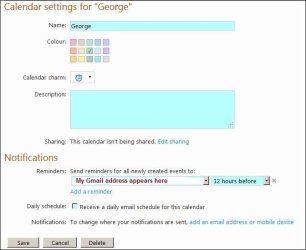
First, I accessed the Hotmail calendar directly, and set the options how I wanted, with reminders sent to my Gmail address, see PDF. View attachment Hotmail Calendar - Options.pdf

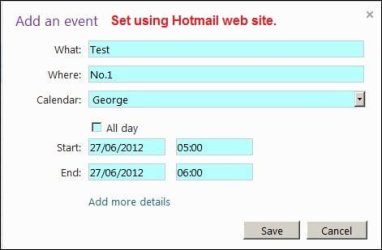
I then set a test in Hotmail.

1.JPG

After clicking 'Add more details'

2.JPG

This is what happens in WLM

3.jpg
 

My Computer My Computer

Computer Manufacturer/Model Number
Look in my Signature.
OS
Win7 H.Prem. 32bit+SP1
The times as well as the advance notice are also different. I wonder if is has something to do with the title being "New Event" i.e. letting you set up a new event or change it rather than simply viewing your initially set up event.
 

My Computer My Computer

Computer type
PC/Desktop
Computer Manufacturer/Model Number
OQO 2+
OS
Windows 8 Pro w/MC 32-bit
CPU
Intel Atom 1.86 GHz
Motherboard
OQO 2+
Memory
2 GB
Graphics Card(s)
Intel GMA 500
Sound Card
IDT
Monitor(s) Displays
LCD
Screen Resolution
800 x 480 (portable) 1280 x 1024 (docked)
Hard Drives
64 GB SSD
PSU
9 Ah Battery (portable) or OQO Brick (docked)
Case
Shirt Pocket Sized
Cooling
Tiny Fan
Keyboard
Slide out (portable) DiNovo Edge (docked)
Mouse
Eraser head (portable) Logitech Bluetooth (docked)
Internet Speed
WWAN or 802.11G (portable) T1 (docked)
Browser
IE 10
Other Info
DVD-RW OQO Docking Station
In normal circumstances, I just write a short message i.e. Doctor @ 1400hrs in the box on the day of my appointment then leave it.
I am currently testing the exact same time frame in Gmail & Hotmail calendars. I know Gmail will inform me 12 hours before the event. Will see what happens at 1100hrs as the event was set for 2300hrs today.
 

My Computer My Computer

Computer Manufacturer/Model Number
Look in my Signature.
OS
Win7 H.Prem. 32bit+SP1
Perhaps I'm beginning to see the problem: WLM allows you to set up an advance notice duration before the event, called a "reminder" but there is only one selection possible. Hotmail Events display and allow you to set two advance reminders (e.g. an email address and mobile calendar) which can be different. WLM sets only one but leaves the other set for the Hotmail default when viewed in Hotmail for the user's (green) calendar. So the question is will the email be sent at the only time specified in WLM or at the default email time displayed in Hotmail. In the tests I did yesterday, after syncing the calendar in WLM, the email notice came at the intended WLM time but I don't remember checking to see what Hotmail said it was set for. I guess we'll both be doing further tests.
 
Last edited:

My Computer My Computer

Computer type
PC/Desktop
Computer Manufacturer/Model Number
OQO 2+
OS
Windows 8 Pro w/MC 32-bit
CPU
Intel Atom 1.86 GHz
Motherboard
OQO 2+
Memory
2 GB
Graphics Card(s)
Intel GMA 500
Sound Card
IDT
Monitor(s) Displays
LCD
Screen Resolution
800 x 480 (portable) 1280 x 1024 (docked)
Hard Drives
64 GB SSD
PSU
9 Ah Battery (portable) or OQO Brick (docked)
Case
Shirt Pocket Sized
Cooling
Tiny Fan
Keyboard
Slide out (portable) DiNovo Edge (docked)
Mouse
Eraser head (portable) Logitech Bluetooth (docked)
Internet Speed
WWAN or 802.11G (portable) T1 (docked)
Browser
IE 10
Other Info
DVD-RW OQO Docking Station
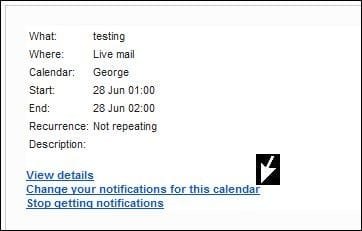
This is what I got on opening WLM @ 1125hrs

RR.JPG

Take another look at my last image in post #06, it shows as 15 minutes, and that was how it was set for my last test as in this post's image.
 

My Computer My Computer

Computer Manufacturer/Model Number
Look in my Signature.
OS
Win7 H.Prem. 32bit+SP1
Perhaps I'm beginning to see the problem: WLM allows you to set up an advance notice duration before the event, called a "reminder" but there is only one selection possible. Hotmail Events display and allow you to set two advance reminders (e.g. an email address and mobile calendar) which can be different. WLM sets only one but leaves the other set for the Hotmail default when viewed in Hotmail for the user's (green) calendar...

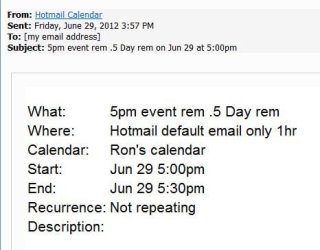
I suspect that does explain the strange "Reminder" time WLM Calendar seems to cause for "email" reminders, i.e. it (WLM) doesn't allow one to choose the type of reminder but it's not the "email reminder" type. Email reminders actually happen at the default time(s) specified in the Hotmail "User's" Calendar for email reminders, which applies to all events. The time set for the WLM Calendar reminder probably applies to the other choice (calendar on your phone). Here I set the Hotmail default email reminder to 1 hour but the WLM Calendar single event reminder was set for 12 hours (0.5 Days). The reminder was sent at the 1 hr. default, not the 12 hr. WLM single-event reminder:
 

Attachments

  • Calendar-7Forums.JPG
    Calendar-7Forums.JPG
    31.1 KB · Views: 1

My Computer My Computer

Computer type
PC/Desktop
Computer Manufacturer/Model Number
OQO 2+
OS
Windows 8 Pro w/MC 32-bit
CPU
Intel Atom 1.86 GHz
Motherboard
OQO 2+
Memory
2 GB
Graphics Card(s)
Intel GMA 500
Sound Card
IDT
Monitor(s) Displays
LCD
Screen Resolution
800 x 480 (portable) 1280 x 1024 (docked)
Hard Drives
64 GB SSD
PSU
9 Ah Battery (portable) or OQO Brick (docked)
Case
Shirt Pocket Sized
Cooling
Tiny Fan
Keyboard
Slide out (portable) DiNovo Edge (docked)
Mouse
Eraser head (portable) Logitech Bluetooth (docked)
Internet Speed
WWAN or 802.11G (portable) T1 (docked)
Browser
IE 10
Other Info
DVD-RW OQO Docking Station
If you click the arrowed link in the message you have, you can set type and time of your 'Reminders' but it will still show as 15 minutes in WLM 2009. I wonder what occurs in the newest version.

RR.JPG
 

My Computer My Computer

Computer Manufacturer/Model Number
Look in my Signature.
OS
Win7 H.Prem. 32bit+SP1
If you click the arrowed link in the message you have, you can set type and time of your 'Reminders' but it will still show as 15 minutes in WLM 2009. I wonder what occurs in the newest version.

View attachment 218981
That link takes you to the Hotmail Calendar. (The options for the WHOLE calendar not just the event.) That's where I changed the Default EMAIL time to 1 hr and from then on all EMAIL reminders happened 1 hr in advance of any event. There are 2 types of reminders (email address and calendar-phone sync) and WLM only affects the calendar-phone sync but leaves the email reminders set to the Hotmail default. (At least that's how it's looking so far.) In other words you can't change email reminder times unless you use your browser to go to the Hotmail website.
 

My Computer My Computer

Computer type
PC/Desktop
Computer Manufacturer/Model Number
OQO 2+
OS
Windows 8 Pro w/MC 32-bit
CPU
Intel Atom 1.86 GHz
Motherboard
OQO 2+
Memory
2 GB
Graphics Card(s)
Intel GMA 500
Sound Card
IDT
Monitor(s) Displays
LCD
Screen Resolution
800 x 480 (portable) 1280 x 1024 (docked)
Hard Drives
64 GB SSD
PSU
9 Ah Battery (portable) or OQO Brick (docked)
Case
Shirt Pocket Sized
Cooling
Tiny Fan
Keyboard
Slide out (portable) DiNovo Edge (docked)
Mouse
Eraser head (portable) Logitech Bluetooth (docked)
Internet Speed
WWAN or 802.11G (portable) T1 (docked)
Browser
IE 10
Other Info
DVD-RW OQO Docking Station
In other words you can't change email reminder times unless you use your browser to go to the Hotmail website.
That was how I did mine. I also changed the address for email reminders to be sent to my Gmail address.
 

My Computer My Computer

Computer Manufacturer/Model Number
Look in my Signature.
OS
Win7 H.Prem. 32bit+SP1
In other words you can't change email reminder times unless you use your browser to go to the Hotmail website.
That was how I did mine. I also changed the address for email reminders to be sent to my Gmail address.
I'm confused about your problem:
1) Is it with Hotmail's Calendar? (Whether you got there thorugh a web link in WLM Calendar or directly through your browser shouldn't matter.)
2) Or, is it with the WLM 2009 calendar where you can set a single item called "Reminder", "sync all calendars", and close WLM Calendar without ever going to the Hotmail Calendar website?

If you did both, I imagine the way you left the website's 2 types of reminders (Phone/PC Calendar or email) would determine how it should work. There is also a Messenger pop-up listed but we may not be using Messenger due to it's incompatibility with WLM 2009.
 

My Computer My Computer

Computer type
PC/Desktop
Computer Manufacturer/Model Number
OQO 2+
OS
Windows 8 Pro w/MC 32-bit
CPU
Intel Atom 1.86 GHz
Motherboard
OQO 2+
Memory
2 GB
Graphics Card(s)
Intel GMA 500
Sound Card
IDT
Monitor(s) Displays
LCD
Screen Resolution
800 x 480 (portable) 1280 x 1024 (docked)
Hard Drives
64 GB SSD
PSU
9 Ah Battery (portable) or OQO Brick (docked)
Case
Shirt Pocket Sized
Cooling
Tiny Fan
Keyboard
Slide out (portable) DiNovo Edge (docked)
Mouse
Eraser head (portable) Logitech Bluetooth (docked)
Internet Speed
WWAN or 802.11G (portable) T1 (docked)
Browser
IE 10
Other Info
DVD-RW OQO Docking Station
I have got it to work as I want it, regardless of the settings shown when doing so in WLM.
 

My Computer My Computer

Computer Manufacturer/Model Number
Look in my Signature.
OS
Win7 H.Prem. 32bit+SP1
Hi roncerr,
just to let you know, I have made a few reminder tests using WLM and Hotmail website. NO reminders in my inbox.
 

My Computer My Computer

Computer Manufacturer/Model Number
Look in my Signature.
OS
Win7 H.Prem. 32bit+SP1
Back
Top