
are these PC protection shareware superfluous?

Lykho

New member
Member
VIP
Local time
9:14 AM
Messages
115
Location
New Zealand
my shutdown takes an awful long time, and I'm also curious if I can speed up the start-up, and one thing I'm curious about is how wasteful/pointless my free protection software is.

I have Avast!, ThreatFire, SUPERAntiSpyware, and Malwarebytes all running on start-up. I assume Windows Firewall also does whatever it does. (I used to have ZoneAlarm before switching to Win7, and I figured that would be superfluous now).

do I not need to have any of this running in the background? (I thiiink one or two of these offer no active protection but only scanning)

is there any list of what free software is worth getting to supplement the operating system you use and what is redundant in light of the protections already offered?

I've never had virus issues, so I don't know much about this software, including how much of it is just useless lag on my system. any insight would be appreciated.
 

My Computer My Computer

Computer type
PC/Desktop
Computer Manufacturer/Model Number
custom
OS
Windows 7 Home Premium 32bit
CPU
AMD Athlon II X2 250 Processor 3.00 GHz
Motherboard
Gigabyte
Memory
2Gb DDR2
Graphics Card(s)
onboard
Sound Card
onboard
Monitor(s) Displays
Viewsonic VA2448m-LED 23.6" LED
Screen Resolution
1920 x 1080
Hard Drives
internal: 1.5 TB Samsung Spinpoint
external: Samsung 2TB USB3.0; 1.5TB Samsung G3 Station
PSU
350w
Case
CoolerMaster
Keyboard
Microsoft Desktop 800
Mouse
Microsoft Desktop 800
Internet Speed
1Mbps
Antivirus
MSE
Browser
Firefox
Other Info
3.4 rating on the "Windows Experience Index"
Hi,

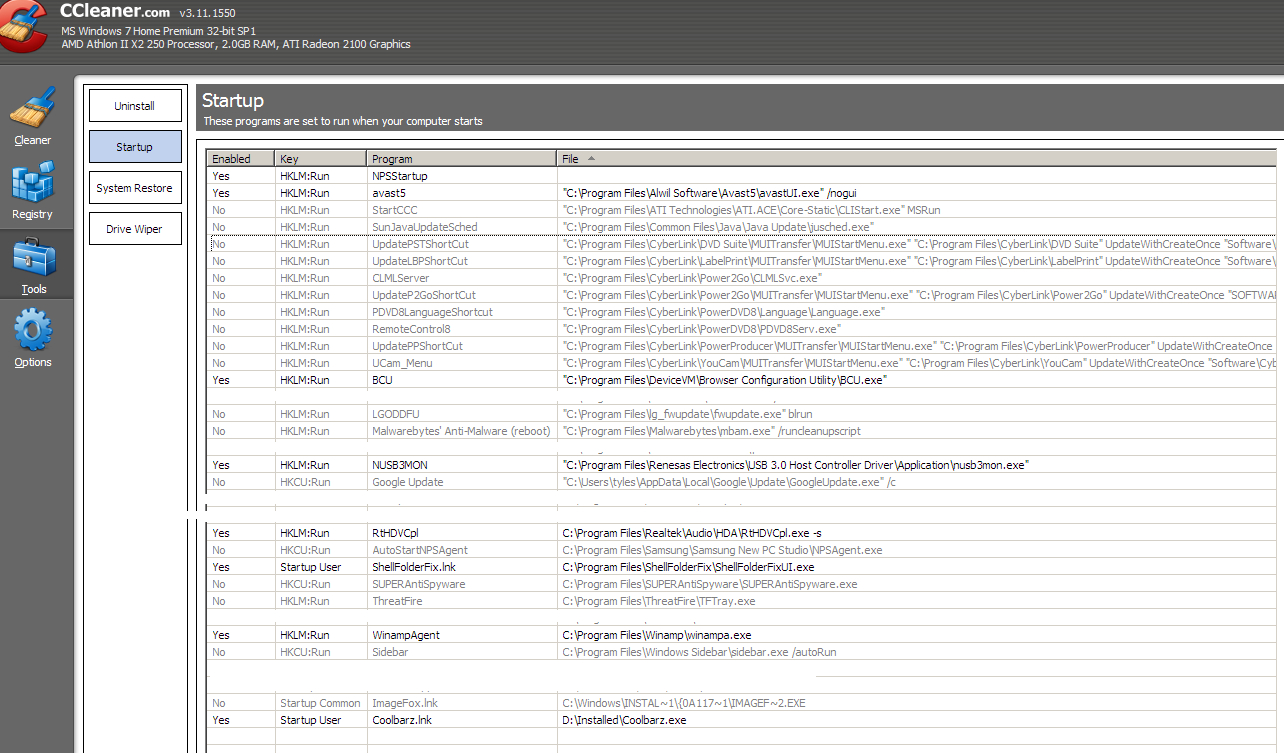
Avast and Malwarebytes resident at startup is fine, and quite light - I would remove the rest. Perhaps your lag issues are due to something else?

Which items are sitting in your Startup?

Regards,
Golden
 

My Computer My Computer

Computer type
PC/Desktop
Computer Manufacturer/Model Number
Golden Mk. I.4
OS
Windows 10 Pro x64 ; Xubuntu x64
CPU
Intel i7 860 @ 2.80 GHz O/C'ed to 4.0GHz
Motherboard
Gigabyte P55A-UD3R Rev.1. Award BIOS F13
Memory
16GB Corsair Vengance DDR3 @ 661 MHz Dual Channel (9-9-9-24)
Graphics Card(s)
EVGA NVidia GTX 560 1024MB
Sound Card
Realtek Integrated
Monitor(s) Displays
Dual Samsung SyncMaster 2494HS
Screen Resolution
1920*1080 and 1920*1080
Hard Drives
1*Samsung 840 EVO 120GB SSD;
1*OCZ Vertex 2 60GB SSD;
2*Samsung F3 SpinPoint 1TB in RAID0;
1*Samsung F1 SpinPoint 1TB;
2*Western Digital 1TB External USB 3.0
1*Western Digital 500GB External USB 3.0
1*Seagate 500GB External USB 2.0
PSU
Thermaltake ToughPower QFan 750W
Case
Thermaltake Element S VK60001W2Z
Cooling
Corsair H60 Water Cooling, 2*230mm and 2*80mm case fans
Keyboard
Logitech G110
Mouse
Logitech MX518
Hi,
Avast and Malwarebytes resident at startup is fine, and quite light - I would remove the rest. Perhaps your lag issues are due to something else?

Which items are sitting in your Startup?

thanks.
no idea what else might cause the lag. indexing rarely runs, and recently I realized monthly defragging took place near when I would shut-down sometimes, but obviously it doesn't explain what seems like an unusually long daily shut-down time (~5 minutes)

here's a clip from CCleaner
eTN6N.png
 

My Computer My Computer

Computer type
PC/Desktop
Computer Manufacturer/Model Number
custom
OS
Windows 7 Home Premium 32bit
CPU
AMD Athlon II X2 250 Processor 3.00 GHz
Motherboard
Gigabyte
Memory
2Gb DDR2
Graphics Card(s)
onboard
Sound Card
onboard
Monitor(s) Displays
Viewsonic VA2448m-LED 23.6" LED
Screen Resolution
1920 x 1080
Hard Drives
internal: 1.5 TB Samsung Spinpoint
external: Samsung 2TB USB3.0; 1.5TB Samsung G3 Station
PSU
350w
Case
CoolerMaster
Keyboard
Microsoft Desktop 800
Mouse
Microsoft Desktop 800
Internet Speed
1Mbps
Antivirus
MSE
Browser
Firefox
Other Info
3.4 rating on the "Windows Experience Index"
Hi,

In MSCONFIG, I would disbale everything except the Microsoft Services, measure the bootup and shutdown time, then start loading up the other services one at a time, and again measuring startup and shutdown times until you identify the culprit.

The issue could be the bloatware that comes as part of your OEM installation too. Have a read here:

http://www.sevenforums.com/tutorials/219576-clean-up-factory-bloatware.html
http://www.sevenforums.com/tutorials/219487-clean-reinstall-factory-oem-windows-7-a.html

Regards,
Golden
 

My Computer My Computer

Computer type
PC/Desktop
Computer Manufacturer/Model Number
Golden Mk. I.4
OS
Windows 10 Pro x64 ; Xubuntu x64
CPU
Intel i7 860 @ 2.80 GHz O/C'ed to 4.0GHz
Motherboard
Gigabyte P55A-UD3R Rev.1. Award BIOS F13
Memory
16GB Corsair Vengance DDR3 @ 661 MHz Dual Channel (9-9-9-24)
Graphics Card(s)
EVGA NVidia GTX 560 1024MB
Sound Card
Realtek Integrated
Monitor(s) Displays
Dual Samsung SyncMaster 2494HS
Screen Resolution
1920*1080 and 1920*1080
Hard Drives
1*Samsung 840 EVO 120GB SSD;
1*OCZ Vertex 2 60GB SSD;
2*Samsung F3 SpinPoint 1TB in RAID0;
1*Samsung F1 SpinPoint 1TB;
2*Western Digital 1TB External USB 3.0
1*Western Digital 500GB External USB 3.0
1*Seagate 500GB External USB 2.0
PSU
Thermaltake ToughPower QFan 750W
Case
Thermaltake Element S VK60001W2Z
Cooling
Corsair H60 Water Cooling, 2*230mm and 2*80mm case fans
Keyboard
Logitech G110
Mouse
Logitech MX518
Unless the OS is caught in an endless loop during shutdown, it would be logging events as they occur. Pay a visit to the Event Viewer and see if there are any commonalities during shutdowns.

The free version of MBAM is an on-demand scanner. Therefore, it does not need to start at boot, unless you wish to run a scan after the boot. Still, it's just a few seconds to cold-launch a program.

I'm not familiar with the other securities but one shouldn't have two active anti-virus programs running concurrently. Having two doesn't make one doubly secure. A conflict and a power struggle between the two programs could occur.
 

My Computer My Computer

OS
Windows 7 Home Premium x64
Unless the OS is caught in an endless loop during shutdown, it would be logging events as they occur. Pay a visit to the Event Viewer and see if there are any commonalities during shutdowns.

aah, excellent. I knew there was a bootlog and hoped there might be something like that for shutdown, too.

EDIT: I followed the 'view-details-last-shutdown-computer' tutorial, but can't find anywhere that will give me any details on what programs where doing what/when, etc.
EDIT2: scratch that, I understand how the log works, now (I've been expecting to see a list of events in a file, not each individual event separately logged as it is). According to the log, from the first to the last 'shutdown' related processes displayed, it only takes 1:30 to shutdown the PC. ...I'm going to have to time it tonight, 'cause it seems much much longer than that.


also, if you don't mind, I have two tangential questions:

- what's the best way to go about learning more about what Event Viewer tells me (specifically about 'kernal-power' critical events? -- I got a blue screen that auto-rebooted this morning before I could finish reading it, and these logs don't seem to tell _me_ anything helpful, it's always just 'kernal-power'. ... I don't know if that means my power supply fluctuated too much, or if kernal-power relates to the improper shutdown that followed the event, rather than the cause of the event.)

- also in Event Viewer is listed a few "controller error on \Device\Harddisk2\DR2" (which I assume means an external drive, since I only have one local disk (unless this is referring to my D: partition?). An error I thought was resolved which I made a thread about a few weeks back has been persisting lately, where my external takes a notable amount of time to display in my computer (it typically is visible as a 'device' in TrueCrypt sooner than Computer displays its unencrypted partition, that's how slow Windows 'autorun' type responses are being to its connection) and I also can't get my external drive to safely eject. ... not sure if this is what these disk error messages are about.
 
Last edited:

My Computer My Computer

Computer type
PC/Desktop
Computer Manufacturer/Model Number
custom
OS
Windows 7 Home Premium 32bit
CPU
AMD Athlon II X2 250 Processor 3.00 GHz
Motherboard
Gigabyte
Memory
2Gb DDR2
Graphics Card(s)
onboard
Sound Card
onboard
Monitor(s) Displays
Viewsonic VA2448m-LED 23.6" LED
Screen Resolution
1920 x 1080
Hard Drives
internal: 1.5 TB Samsung Spinpoint
external: Samsung 2TB USB3.0; 1.5TB Samsung G3 Station
PSU
350w
Case
CoolerMaster
Keyboard
Microsoft Desktop 800
Mouse
Microsoft Desktop 800
Internet Speed
1Mbps
Antivirus
MSE
Browser
Firefox
Other Info
3.4 rating on the "Windows Experience Index"
"- also in Event Viewer is listed a few "controller error on \Device\Harddisk2\DR2" (which I assume means an external drive, since I only have one local disk (unless this is referring to my D: partition?). An error I thought was resolved which I made a thread about a few weeks back has been persisting lately, where my external takes a notable amount of time to display in my computer (it typically is visible as a 'device' in TrueCrypt sooner than Computer displays its unencrypted partition, that's how slow Windows 'autorun' type responses are being to its connection) and I also can't get my external drive to safely eject. ... not sure if this is what these disk error messages are about."

This may not be tangential. External drives are hard-wired to go to sleep after a pre-determined time of inactivity regardless of OS power settings. If an attempt to shutdown occurs while the drive is asleep, the delay will accrue during this interaction between the OS and the drive via the (third-party?) controller.

Also, if the external is not continuously active, try to access the external without doing any input/output, then safely eject. In other words, wake up the giant before putting it back to sleep.

"- what's the best way to go about learning more about what Event Viewer tells me (specifically about 'kernal-power' critical events?"

I tried to get help in the bottom right column for my critical "error 3-kernel-eventtracing" and Microsoft returned zero search result. So laughable I could cry.
 

My Computer My Computer

OS
Windows 7 Home Premium x64
The free version of MBAM is an on-demand scanner. Therefore, it does not need to start at boot, unless you wish to run a scan after the boot. Still, it's just a few seconds to cold-launch a program.

The paid version of Malwarebytes is the only one with a real time option. It is designed to run alongside other AVs so it is fine to use with Avast.
 

My Computer My Computer

Computer type
Laptop
Computer Manufacturer/Model Number
Hewlett-Packard/G62-107SA Notebook
OS
Microsoft Windows 7 Home Premium 64-bit Service Pack 1
CPU
Intel(R) Core(TM) i3 CPU M 330 @ 2.13GHz
Motherboard
Hewlett-Packard 1425
Memory
8 GB DDR3
Graphics Card(s)
Intel(R) HD Graphics
Sound Card
Realtek High Definition Audio
Monitor(s) Displays
Builtin
Screen Resolution
1366 x 768 x 32 bits (4294967296 colors) @ 60 Hz
Hard Drives
250 GB SATA Hard Disk Drive 7200 rpm
2TB Seagate GoFlex USB 2 Drive
1TB Iomega Prestige USB 2 Drive
1.5TB Iomega Prestige USB 2 Drive (Samsung)
2TB WD MyBook Live NAS.
Mouse
Logitech Anywhere MX
Internet Speed
152 Mbs download 10 Mbs upload
Antivirus
Norton 360
Browser
Chrome
This may not be tangential. External drives are hard-wired to go to sleep after a pre-determined time of inactivity regardless of OS power settings. If an attempt to shutdown occurs while the drive is asleep, the delay will accrue during this interaction between the OS and the drive via the (third-party?) controller.

my external drives are rarely used (they're not expansion but only back-up, so I only load them for short periods), they don't boot up/shut down with the PC itself -- I always eject them before shutting down the PC (unless I'm getting the 'still in use cannot eject' message and need to reboot in order to eject).

Also, if the external is not continuously active, try to access the external without doing any input/output, then safely eject. In other words, wake up the giant before putting it back to sleep.

yea, I do that (though I suspect opening it in explorer to cause it to wake up is no different to causing it to wake up by prompting it to eject)
that's why I'm so puzzled it can tell me something is still using it and so it can't eject, because I hear it spin-down to idle.
 

My Computer My Computer

Computer type
PC/Desktop
Computer Manufacturer/Model Number
custom
OS
Windows 7 Home Premium 32bit
CPU
AMD Athlon II X2 250 Processor 3.00 GHz
Motherboard
Gigabyte
Memory
2Gb DDR2
Graphics Card(s)
onboard
Sound Card
onboard
Monitor(s) Displays
Viewsonic VA2448m-LED 23.6" LED
Screen Resolution
1920 x 1080
Hard Drives
internal: 1.5 TB Samsung Spinpoint
external: Samsung 2TB USB3.0; 1.5TB Samsung G3 Station
PSU
350w
Case
CoolerMaster
Keyboard
Microsoft Desktop 800
Mouse
Microsoft Desktop 800
Internet Speed
1Mbps
Antivirus
MSE
Browser
Firefox
Other Info
3.4 rating on the "Windows Experience Index"
You have ThreatFire and Avast running at the same time. My understanding is they are both Anti Virus. You should not run two Anti Virus at the same time. One Anti Virus and one firewall at one time. I also use MSE and Windows 7 built in firewall.
 

My Computer My Computer

Computer type
PC/Desktop
Computer Manufacturer/Model Number
Home made Desktop
OS
Windows 10 Pro. 64/ version 1709 Windows 7 Pro/64
CPU
Intel i7-6800K @ 4.3
Motherboard
ASUS X-99 Deluxe II
Memory
Corsair Platinum 16 gig @2400
Graphics Card(s)
EVGA GTX 1070 OC
Monitor(s) Displays
Asus 27" LED LCD/VE278Q
Screen Resolution
1920-1080 or 1280-720 HDMI
Hard Drives
INTEL SSD 730-240 Gb Sata 3.0/
PSU
EVGA Platium 1200W
Case
Phanteks Luxe Tempered Glass 8 fans/ one radiator
Cooling
XSPC/ Water Cooled CPU
Keyboard
Das 4 Professional
Mouse
Logitech M705/MX Anywhere 2-S
Internet Speed
100 mbits
Antivirus
Microsoft Security Essentials/ Malwarebytes Premium 3.0/ SAS
Browser
I.E. 11 default/Firefox/ ISP Time Warner Cable/Spectrum
Other Info
LG BluRay Burner/
Sound system-KLipsch-THX/
Icy Dock ssd Hot Swap bays.
I also only use, only recommend and only install MSE which automatically sets up Windows Firewall.

You need nothing more.
 

My Computer My Computer

Computer Manufacturer/Model Number
Toshiba Satellite S875D-S7239 laptop
OS
MS Windows 7 Ultimate SP1 64-bit
CPU
AMD A10-4600M
Motherboard
AMD Pumori (Socket FT1)
Memory
6.00 GB Dual-Channel DDR3 @ 798MHz (11-11-12-28)
Graphics Card(s)
AMD Radeon HD 7660G
Sound Card
High Definition Audio Device
Monitor(s) Displays
Generic PnP Monitor (1600x900@60Hz)
Screen Resolution
1600x900@60Hz
Hard Drives
SSD 119GB Corsair CSSD-V128GB2 ATA Device
Keyboard
Standard PS/2 Keyboard
Mouse
HP Wireless Optical Mobile Mouse Model FHA-3410
Internet Speed
What the local pub, local coffee shop offers.
Other Info
Optical Drive:MATSHITA BD-CMB UJ160B ATA Device


Also have an Asus ha1002xp netbook with Win 7 Ultimate installed.
Simply removing ALL of your anti stuff and using MSE should solve your problem.

If not, then please:

Install CCleaner:
CCleaner - PC Optimization and Cleaning - Free Download

list of STARTUP PROGRAMS

CCleaner | Tools
icon | Startup button | Windows tab |
click on Save to text file button (bottom right side) |
accept Startup.txt as file name | SAVE button

list of SCHEDULED TASKS

CCleaner | Tools
icon | Startup button | Scheduled Tasks tab |
click on Save to text file button (bottom right side) |
enter Scheduled Tasks as File name | Save button

List of INSTALLED PROGRAMS

CCleaner | Tools
icon | Uninstall button |
click on Save to text file button (bottom right side) |
accept install.txt as File name | Save button


UPLOAD, as an attachment, the startup.txt file
UPLOAD, as an attachment, the Scheduled Tasks.txt file
UPLOAD, as an attachment, the install.txt file.

HOW TO UPLOAD
Post a File or Screenshot in Seven Forums

===========================
thanks
karl
 

My Computer My Computer

Computer Manufacturer/Model Number
Toshiba Satellite S875D-S7239 laptop
OS
MS Windows 7 Ultimate SP1 64-bit
CPU
AMD A10-4600M
Motherboard
AMD Pumori (Socket FT1)
Memory
6.00 GB Dual-Channel DDR3 @ 798MHz (11-11-12-28)
Graphics Card(s)
AMD Radeon HD 7660G
Sound Card
High Definition Audio Device
Monitor(s) Displays
Generic PnP Monitor (1600x900@60Hz)
Screen Resolution
1600x900@60Hz
Hard Drives
SSD 119GB Corsair CSSD-V128GB2 ATA Device
Keyboard
Standard PS/2 Keyboard
Mouse
HP Wireless Optical Mobile Mouse Model FHA-3410
Internet Speed
What the local pub, local coffee shop offers.
Other Info
Optical Drive:MATSHITA BD-CMB UJ160B ATA Device


Also have an Asus ha1002xp netbook with Win 7 Ultimate installed.
Sometimes problems are solved by uninstalling Avast to replace it with Microsoft Security Essentials.

There are reasons most here have stopped recommending Avast.

funnily enough Avast has started pestering me right now while I'm uninstalling ThreatFire (and everything else, ready to install MSE). (looks like a rootkit false positive related to a restart-needed uninstall)
 

My Computer My Computer

Computer type
PC/Desktop
Computer Manufacturer/Model Number
custom
OS
Windows 7 Home Premium 32bit
CPU
AMD Athlon II X2 250 Processor 3.00 GHz
Motherboard
Gigabyte
Memory
2Gb DDR2
Graphics Card(s)
onboard
Sound Card
onboard
Monitor(s) Displays
Viewsonic VA2448m-LED 23.6" LED
Screen Resolution
1920 x 1080
Hard Drives
internal: 1.5 TB Samsung Spinpoint
external: Samsung 2TB USB3.0; 1.5TB Samsung G3 Station
PSU
350w
Case
CoolerMaster
Keyboard
Microsoft Desktop 800
Mouse
Microsoft Desktop 800
Internet Speed
1Mbps
Antivirus
MSE
Browser
Firefox
Other Info
3.4 rating on the "Windows Experience Index"
oh, I also have Spybot and "anvir task manager free"

is the latter superfluous since I have CCleaner?

I've used Spybot in the past to get rid of tracking cookies, I don't think I have any other program that seems to get those.
 

My Computer My Computer

Computer type
PC/Desktop
Computer Manufacturer/Model Number
custom
OS
Windows 7 Home Premium 32bit
CPU
AMD Athlon II X2 250 Processor 3.00 GHz
Motherboard
Gigabyte
Memory
2Gb DDR2
Graphics Card(s)
onboard
Sound Card
onboard
Monitor(s) Displays
Viewsonic VA2448m-LED 23.6" LED
Screen Resolution
1920 x 1080
Hard Drives
internal: 1.5 TB Samsung Spinpoint
external: Samsung 2TB USB3.0; 1.5TB Samsung G3 Station
PSU
350w
Case
CoolerMaster
Keyboard
Microsoft Desktop 800
Mouse
Microsoft Desktop 800
Internet Speed
1Mbps
Antivirus
MSE
Browser
Firefox
Other Info
3.4 rating on the "Windows Experience Index"
Spybot is old school. Nobody here recommends it any more, except to uninstall.
 
Spybot is old school. Nobody here recommends it any more, except to uninstall.

cool.
hadn't even heard of MSE before today.

are there any 'exclusions' recommended (relatively safe to not scan, worth it for a performance increase)? (or, at least, after scanning the entire PC once, is it pretty safe to ignore some unchanging archives of files like one's music/etc., or is it common for newer definitions to eventually catch something it had missed for a long time?)
 

My Computer My Computer

Computer type
PC/Desktop
Computer Manufacturer/Model Number
custom
OS
Windows 7 Home Premium 32bit
CPU
AMD Athlon II X2 250 Processor 3.00 GHz
Motherboard
Gigabyte
Memory
2Gb DDR2
Graphics Card(s)
onboard
Sound Card
onboard
Monitor(s) Displays
Viewsonic VA2448m-LED 23.6" LED
Screen Resolution
1920 x 1080
Hard Drives
internal: 1.5 TB Samsung Spinpoint
external: Samsung 2TB USB3.0; 1.5TB Samsung G3 Station
PSU
350w
Case
CoolerMaster
Keyboard
Microsoft Desktop 800
Mouse
Microsoft Desktop 800
Internet Speed
1Mbps
Antivirus
MSE
Browser
Firefox
Other Info
3.4 rating on the "Windows Experience Index"
oh, I also have Spybot and "anvir task manager free"

is the latter superfluous since I have CCleaner?

I've used Spybot in the past to get rid of tracking cookies, I don't think I have any other program that seems to get those.

Oh man, I remember when I installed Anvir Task Manager Free. It secretly put toolbars on all my browsers and hijacked my home pages. It also installed a silly instant messenger gizmo.
 

My Computer My Computer

OS
Windows 7 Home Premium x64
Spybot is old school. Nobody here recommends it any more, except to uninstall.

cool.
hadn't even heard of MSE before today.

are there any 'exclusions' recommended (relatively safe to not scan, worth it for a performance increase)? (or, at least, after scanning the entire PC once, is it pretty safe to ignore some unchanging archives of files like one's music/etc., or is it common for newer definitions to eventually catch something it had missed for a long time?)


The best practices I've found for reinstalling and maintaining Win7 are in Clean Reinstall - Factory OEM Windows 7.

You can implement them with your current install using Clean Up Factory Bloatware.

It's easy to get behind the curve with the best shareware unless you work every day in the top online forum. I was listening to Kim Kommando on the radio Saturday and she recommended AVG and Avast. No one has recommended AVG here since Win7 beta, probably ever. Somebody got to her during commercial because she came back touting MSE and Avast and suddenly didn't mention AVG's crappy bloatware again.
 
So that we can get your system running smoothly:

Install CCleaner:
CCleaner - PC Optimization and Cleaning - Free Download

list of STARTUP PROGRAMS

CCleaner | Tools
icon | Startup button | Windows tab |
click on Save to text file button (bottom right side) |
accept Startup.txt as file name | SAVE button

list of SCHEDULED TASKS

CCleaner | Tools
icon | Startup button | Scheduled Tasks tab |
click on Save to text file button (bottom right side) |
enter Scheduled Tasks as File name | Save button

List of INSTALLED PROGRAMS

CCleaner | Tools
icon | Uninstall button |
click on Save to text file button (bottom right side) |
accept install.txt as File name | Save button


UPLOAD, as an attachment, the startup.txt file
UPLOAD, as an attachment, the Scheduled Tasks.txt file
UPLOAD, as an attachment, the install.txt file.

HOW TO UPLOAD
Post a File or Screenshot in Seven Forums
 

My Computer My Computer

Computer Manufacturer/Model Number
Toshiba Satellite S875D-S7239 laptop
OS
MS Windows 7 Ultimate SP1 64-bit
CPU
AMD A10-4600M
Motherboard
AMD Pumori (Socket FT1)
Memory
6.00 GB Dual-Channel DDR3 @ 798MHz (11-11-12-28)
Graphics Card(s)
AMD Radeon HD 7660G
Sound Card
High Definition Audio Device
Monitor(s) Displays
Generic PnP Monitor (1600x900@60Hz)
Screen Resolution
1600x900@60Hz
Hard Drives
SSD 119GB Corsair CSSD-V128GB2 ATA Device
Keyboard
Standard PS/2 Keyboard
Mouse
HP Wireless Optical Mobile Mouse Model FHA-3410
Internet Speed
What the local pub, local coffee shop offers.
Other Info
Optical Drive:MATSHITA BD-CMB UJ160B ATA Device


Also have an Asus ha1002xp netbook with Win 7 Ultimate installed.
Back
Top