ISP says computer to blame for slow internet

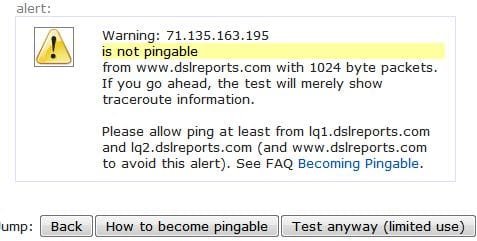
The ping test says that I'm not pingable.

Odd. Don't recall ever seeing that. Check out a test from dslreports.
 

My Computer My Computer

At a glance

Windows 7 Ultimate x64
OS
Windows 7 Ultimate x64
Clicking on test anyway gives me this alert: Turing tested you were found wanting.

I also didn't see MSE under "How to become pingable."

I might be able to go buy that NIC today. I plan on going to my local Best Buy. Are there any brands that I should steer clear from?
 

Attachments

  • ping test.JPG
    ping test.JPG
    25.2 KB · Views: 5

My Computer My Computer

At a glance

Windows 7 64bitIntel Core i7 920 @ 2.67GHz15 GB512MB ATI Radeon HD 4850
Computer type
PC/Desktop
Computer Manufacturer/Model Number
Dell XPS 435T
OS
Windows 7 64bit
CPU
Intel Core i7 920 @ 2.67GHz
Memory
15 GB
Graphics Card(s)
512MB ATI Radeon HD 4850
Monitor(s) Displays
Dell S2409W 24in. Widescreen
Hard Drives
Seagate Barracuda 7200.12 SATA 3Gb/s 1TB
Antivirus
MSE
Browser
Firefox
Nevermind, Best Buy doesn't sell NICs in the store. I guess I'll just buy it from Newegg. Are either of these what I need?
 

My Computer My Computer

At a glance

Windows 7 64bitIntel Core i7 920 @ 2.67GHz15 GB512MB ATI Radeon HD 4850
Computer type
PC/Desktop
Computer Manufacturer/Model Number
Dell XPS 435T
OS
Windows 7 64bit
CPU
Intel Core i7 920 @ 2.67GHz
Memory
15 GB
Graphics Card(s)
512MB ATI Radeon HD 4850
Monitor(s) Displays
Dell S2409W 24in. Widescreen
Hard Drives
Seagate Barracuda 7200.12 SATA 3Gb/s 1TB
Antivirus
MSE
Browser
Firefox
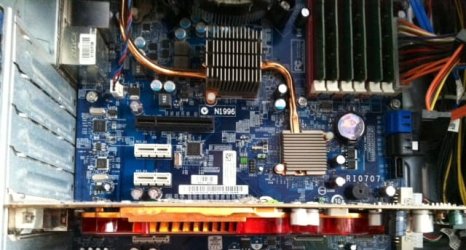
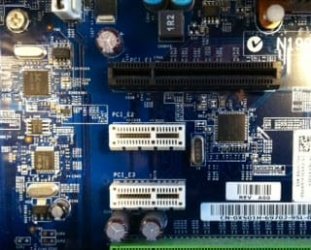
Physically open and look at the PCI-express slots to see that you have an open slot and enough room to install it.
 
I do have some open.
 

Attachments

  • pci.jpg
    pci.jpg
    25.8 KB · Views: 78

My Computer My Computer

At a glance

Windows 7 64bitIntel Core i7 920 @ 2.67GHz15 GB512MB ATI Radeon HD 4850
Computer type
PC/Desktop
Computer Manufacturer/Model Number
Dell XPS 435T
OS
Windows 7 64bit
CPU
Intel Core i7 920 @ 2.67GHz
Memory
15 GB
Graphics Card(s)
512MB ATI Radeon HD 4850
Monitor(s) Displays
Dell S2409W 24in. Widescreen
Hard Drives
Seagate Barracuda 7200.12 SATA 3Gb/s 1TB
Antivirus
MSE
Browser
Firefox
Either of those will work. Reviews on the cheaper one are positive. But I couldn't tell you from experience which ones to steer clear of or which ones I'd recommend. As Greg mentioned, make sure you've got enough room. It appears to be a little longer than I would've expected, and there are a couple of comments about length in some user reviews. It looks as though it may fit; if you had taken the picture from a little further away it would've been a little easier to confirm.
 

My Computer My Computer

At a glance

Windows 7 Ultimate x64
OS
Windows 7 Ultimate x64
Here's a wider view. I don't the specific size of the NIC but it looks like I have a lot of room. *shrugs*

Is one NIC better than the other in terms of features?

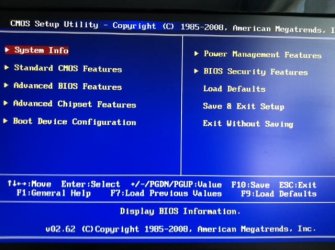
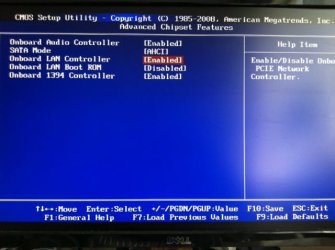
I had almost forgotten to check the BIOS. I couldn't seem to find anything that would make a difference.

Just to make sure, it's not 100% that my problem is hardware related? Correct?
 

Attachments

  • pci2.jpg
    pci2.jpg
    52.1 KB · Views: 3
  • bios01.jpg
    bios01.jpg
    47.3 KB · Views: 6
  • bios02.jpg
    bios02.jpg
    39.5 KB · Views: 4

My Computer My Computer

At a glance

Windows 7 64bitIntel Core i7 920 @ 2.67GHz15 GB512MB ATI Radeon HD 4850
Computer type
PC/Desktop
Computer Manufacturer/Model Number
Dell XPS 435T
OS
Windows 7 64bit
CPU
Intel Core i7 920 @ 2.67GHz
Memory
15 GB
Graphics Card(s)
512MB ATI Radeon HD 4850
Monitor(s) Displays
Dell S2409W 24in. Widescreen
Hard Drives
Seagate Barracuda 7200.12 SATA 3Gb/s 1TB
Antivirus
MSE
Browser
Firefox
Any NIC would do, even the cheap ones are ok. Your only paying for the brand name in thoses two.
 

My Computer My Computer

At a glance

Genuine Windows 7 SP1 Home Premium 64BitIntel Core i5-450m 2.40Ghz (4 Threads)4GB ASint DDR3 1333Mhz (2X2GB Sticks)ATI Mobility Radeon HD 5870 (1GB Dedicated DDR5)
Computer Manufacturer/Model Number
MSi GX740 Gaming Laptop
OS
Genuine Windows 7 SP1 Home Premium 64Bit
CPU
Intel Core i5-450m 2.40Ghz (4 Threads)
Motherboard
MSI MegaBook GT740 (MS-1727)
Memory
4GB ASint DDR3 1333Mhz (2X2GB Sticks)
Graphics Card(s)
ATI Mobility Radeon HD 5870 (1GB Dedicated DDR5)
Sound Card
Realtek HD Audio 7.1 SRS Premium Sourround With Sub Woofer
Monitor(s) Displays
Samsung 170MT02-M01 17" Widescreen
Screen Resolution
1680 X 1050
Hard Drives
Western Digital 640GB 7200Rpm SATA2
PSU
Battery and Mains Powered
Case
Generic Laptop Casing
Cooling
Air Cooling + Targus Laptop Cooler
Keyboard
Standard
Mouse
JSCO Quite Click Mouse USB
Internet Speed
Virgin Media 30MB Broadband
I chose those two because they had 5 eggs. I looked again and choose a few more options with at least 4 eggs and many reviews. The $15 Rosewill NIC had 5 eggs but it's a PCI connection. I read somewhere that PCI express is better. Does it matter?
 

My Computer My Computer

At a glance

Windows 7 64bitIntel Core i7 920 @ 2.67GHz15 GB512MB ATI Radeon HD 4850
Computer type
PC/Desktop
Computer Manufacturer/Model Number
Dell XPS 435T
OS
Windows 7 64bit
CPU
Intel Core i7 920 @ 2.67GHz
Memory
15 GB
Graphics Card(s)
512MB ATI Radeon HD 4850
Monitor(s) Displays
Dell S2409W 24in. Widescreen
Hard Drives
Seagate Barracuda 7200.12 SATA 3Gb/s 1TB
Antivirus
MSE
Browser
Firefox
PCI is the older standard, and I only see PCI-express slots on your motherboard anyway.

Yes, looks like you have plenty of room.

Just to make sure, it's not 100% that my problem is hardware related? Correct?

No, not 100%. But after trying two different OS's and getting the same speeds certainly seems to point there. That's why I asked if you could get hold of a NIC just for testing.

You might check if there are any small computer repair shops in your area. I've got a few around me where I could pick up a used NIC for about $2 or $3.
 

My Computer My Computer

At a glance

Windows 7 Ultimate x64
OS
Windows 7 Ultimate x64
PCI is the older standard, and I only see PCI-express slots on your motherboard anyway.
Good point. Well, I bought the Intel NIC with the most reviews. It came with free shipping (4-7 days) at least. I could always just send it back if it doesn't fix my situation.
 

My Computer My Computer

At a glance

Windows 7 64bitIntel Core i7 920 @ 2.67GHz15 GB512MB ATI Radeon HD 4850
Computer type
PC/Desktop
Computer Manufacturer/Model Number
Dell XPS 435T
OS
Windows 7 64bit
CPU
Intel Core i7 920 @ 2.67GHz
Memory
15 GB
Graphics Card(s)
512MB ATI Radeon HD 4850
Monitor(s) Displays
Dell S2409W 24in. Widescreen
Hard Drives
Seagate Barracuda 7200.12 SATA 3Gb/s 1TB
Antivirus
MSE
Browser
Firefox
Sounds good. Post back when you're ready!!
 

My Computer My Computer

At a glance

Windows 7 Ultimate x64
OS
Windows 7 Ultimate x64
I'm back and I wish I had good news to share. Sadly, the new NIC didn't fix my problem. What a gigantic bummer! I was really hoping that it would be a hardware issue.
 

My Computer My Computer

At a glance

Windows 7 64bitIntel Core i7 920 @ 2.67GHz15 GB512MB ATI Radeon HD 4850
Computer type
PC/Desktop
Computer Manufacturer/Model Number
Dell XPS 435T
OS
Windows 7 64bit
CPU
Intel Core i7 920 @ 2.67GHz
Memory
15 GB
Graphics Card(s)
512MB ATI Radeon HD 4850
Monitor(s) Displays
Dell S2409W 24in. Widescreen
Hard Drives
Seagate Barracuda 7200.12 SATA 3Gb/s 1TB
Antivirus
MSE
Browser
Firefox
This problem seems kind of strange to me. Have you tried clearing the cmos on this machine?
 

My Computer My Computer

At a glance

Windows 7 Ult, Windows 8.1 Pro,Q9650-4.275GHz, E8600 4.5GHz, E6750-3.8GHzG.Skill PC2 9600 1200Mhz 5 5 5 15 2TGTX480
Computer type
PC/Desktop
Computer Manufacturer/Model Number
Home built
OS
Windows 7 Ult, Windows 8.1 Pro,
CPU
Q9650-4.275GHz, E8600 4.5GHz, E6750-3.8GHz
Motherboard
Evga 780i FTW
Memory
G.Skill PC2 9600 1200Mhz 5 5 5 15 2T
Graphics Card(s)
GTX480
Sound Card
Asus Xonar D2
Monitor(s) Displays
HannsG
Screen Resolution
1680X1050
Hard Drives
GSkill Phoenix Pro 120GB SSD
PSU
ThermalTake Toughpower 1000Watt modular
Case
ThermalTake XaserV
Cooling
Xigmatek S1283
Keyboard
Logitech G15
Mouse
Logitech G9
Internet Speed
T1
No, I haven't. I've only changed the boot order in Bios but then I changed it right back. I haven't made any other changes.
 

My Computer My Computer

At a glance

Windows 7 64bitIntel Core i7 920 @ 2.67GHz15 GB512MB ATI Radeon HD 4850
Computer type
PC/Desktop
Computer Manufacturer/Model Number
Dell XPS 435T
OS
Windows 7 64bit
CPU
Intel Core i7 920 @ 2.67GHz
Memory
15 GB
Graphics Card(s)
512MB ATI Radeon HD 4850
Monitor(s) Displays
Dell S2409W 24in. Widescreen
Hard Drives
Seagate Barracuda 7200.12 SATA 3Gb/s 1TB
Antivirus
MSE
Browser
Firefox
No, I haven't. I've only changed the boot order in Bios but then I changed it right back. I haven't made any other changes.

Seems like that is one of the few options left at this point. I've seen this fix networking problems in the past.

It would help to take note of any special settings that bios is using before clearing the cmos so you can set them back to how they were.
 

My Computer My Computer

At a glance

Windows 7 Ult, Windows 8.1 Pro,Q9650-4.275GHz, E8600 4.5GHz, E6750-3.8GHzG.Skill PC2 9600 1200Mhz 5 5 5 15 2TGTX480
Computer type
PC/Desktop
Computer Manufacturer/Model Number
Home built
OS
Windows 7 Ult, Windows 8.1 Pro,
CPU
Q9650-4.275GHz, E8600 4.5GHz, E6750-3.8GHz
Motherboard
Evga 780i FTW
Memory
G.Skill PC2 9600 1200Mhz 5 5 5 15 2T
Graphics Card(s)
GTX480
Sound Card
Asus Xonar D2
Monitor(s) Displays
HannsG
Screen Resolution
1680X1050
Hard Drives
GSkill Phoenix Pro 120GB SSD
PSU
ThermalTake Toughpower 1000Watt modular
Case
ThermalTake XaserV
Cooling
Xigmatek S1283
Keyboard
Logitech G15
Mouse
Logitech G9
Internet Speed
T1
What I find strange about my situation is that my speed was slow from the very beginning. I tested my speed only a few days of upgrading to Win7. In between that time, all I did was install programs and transfer files from my external hard drives. I wish I had a speed test from day one of upgrading to Win7 just to see if there was a big difference.

I guess if clearing the cmos will somehow help me, I'll give it a shot later when I come back home.
 

My Computer My Computer

At a glance

Windows 7 64bitIntel Core i7 920 @ 2.67GHz15 GB512MB ATI Radeon HD 4850
Computer type
PC/Desktop
Computer Manufacturer/Model Number
Dell XPS 435T
OS
Windows 7 64bit
CPU
Intel Core i7 920 @ 2.67GHz
Memory
15 GB
Graphics Card(s)
512MB ATI Radeon HD 4850
Monitor(s) Displays
Dell S2409W 24in. Widescreen
Hard Drives
Seagate Barracuda 7200.12 SATA 3Gb/s 1TB
Antivirus
MSE
Browser
Firefox
Okay, I've read up on how to clear the CMOS and I found that the easiest way to do it is inside BIOS. Is there anything that I should know before doing this? Like maybe what not to do? Or is it fool proof?
 

My Computer My Computer

At a glance

Windows 7 64bitIntel Core i7 920 @ 2.67GHz15 GB512MB ATI Radeon HD 4850
Computer type
PC/Desktop
Computer Manufacturer/Model Number
Dell XPS 435T
OS
Windows 7 64bit
CPU
Intel Core i7 920 @ 2.67GHz
Memory
15 GB
Graphics Card(s)
512MB ATI Radeon HD 4850
Monitor(s) Displays
Dell S2409W 24in. Widescreen
Hard Drives
Seagate Barracuda 7200.12 SATA 3Gb/s 1TB
Antivirus
MSE
Browser
Firefox
I thought that speed test you did after installing was twice as fast as what you're getting now. Am I wrong about that?
 

My Computer My Computer

At a glance

Windows 7 Ultimate x64
OS
Windows 7 Ultimate x64
Back
Top