Solved Windows Firewall and Windows Security Center can't be started

The registry changes I made (listed in that link) were made on the recommendation of HonorGamer, listed as "Power User" - should I undo them, and if so, can you take a look at that link & tell me how to?
 

My Computer My Computer

At a glance

Windows 7 Home Premium 64bit4GB
Computer Manufacturer/Model Number
Acer Aspire Timeline X
OS
Windows 7 Home Premium 64bit
Memory
4GB
please see post #16.

Use Control Panel | Programs and Features | rt-click on a file to uninstall

The only other approach I can recommend is RevoUninstaller Pro.
 

My Computer My Computer

At a glance

MS Windows 7 Ultimate SP1 64-bitAMD A10-4600M6.00 GB Dual-Channel DDR3 @ 798MHz (11-11-12-28)AMD Radeon HD 7660G
Computer Manufacturer/Model Number
Toshiba Satellite S875D-S7239 laptop
OS
MS Windows 7 Ultimate SP1 64-bit
CPU
AMD A10-4600M
Motherboard
AMD Pumori (Socket FT1)
Memory
6.00 GB Dual-Channel DDR3 @ 798MHz (11-11-12-28)
Graphics Card(s)
AMD Radeon HD 7660G
Sound Card
High Definition Audio Device
Monitor(s) Displays
Generic PnP Monitor (1600x900@60Hz)
Screen Resolution
1600x900@60Hz
Hard Drives
SSD 119GB Corsair CSSD-V128GB2 ATA Device
Keyboard
Standard PS/2 Keyboard
Mouse
HP Wireless Optical Mobile Mouse Model FHA-3410
Internet Speed
What the local pub, local coffee shop offers.
Other Info
Optical Drive:MATSHITA BD-CMB UJ160B ATA Device


Also have an Asus ha1002xp netbook with Win 7 Ultimate installed.
The registry changes I made (listed in that link) were made on the recommendation of HonorGamer, listed as "Power User" - should I undo them, and if so, can you take a look at that link & tell me how to?

If possible, then Undo those changes.

We will fix you problem without causing more problems from registry twiddling.
 

My Computer My Computer

At a glance

MS Windows 7 Ultimate SP1 64-bitAMD A10-4600M6.00 GB Dual-Channel DDR3 @ 798MHz (11-11-12-28)AMD Radeon HD 7660G
Computer Manufacturer/Model Number
Toshiba Satellite S875D-S7239 laptop
OS
MS Windows 7 Ultimate SP1 64-bit
CPU
AMD A10-4600M
Motherboard
AMD Pumori (Socket FT1)
Memory
6.00 GB Dual-Channel DDR3 @ 798MHz (11-11-12-28)
Graphics Card(s)
AMD Radeon HD 7660G
Sound Card
High Definition Audio Device
Monitor(s) Displays
Generic PnP Monitor (1600x900@60Hz)
Screen Resolution
1600x900@60Hz
Hard Drives
SSD 119GB Corsair CSSD-V128GB2 ATA Device
Keyboard
Standard PS/2 Keyboard
Mouse
HP Wireless Optical Mobile Mouse Model FHA-3410
Internet Speed
What the local pub, local coffee shop offers.
Other Info
Optical Drive:MATSHITA BD-CMB UJ160B ATA Device


Also have an Asus ha1002xp netbook with Win 7 Ultimate installed.
these were the changes I made - I downloaded the registry center files, base filtering engine, security center service and windows defender that you see linked below. Can you be more specific as to how I should uninstall them or undo what I did?

narenxp replied on
Hi
Make sure that PC is clean(free from zero access rootkit before trying this fixes)

This firewall issue is commonly found on vista and windows 7 (64 BIT OS)
This is symptom for rootkit on 64 bit systems

if you find a folder called system64
C:/WINDOWS/SYSTEM64(not the sysWOW64)


and a file called consrv.dll
C:/WINDOWS/SYSTEM32/CONSRV.DLL
You're infected by zero access rootkit.It is recommended to contact malware removal forums to remove it first and try the fix


Download both the registry files

http://download.bleepingcomputer.com/win-services/7/MpsSvc.reg

Base filtering engine

http://download.bleepingcomputer.com/win-services/7/BFE.reg

Launch them and click YES when you get a UAC prompt

Restart your PC

Now,open RUN and type

regedit and click ok

go to

HKEY_LOCAL_MACHINE\SYSTEM\CurrentControlSet\services\BFE

Right click on it-permissions

Click on ADD and type

Everyone and click ok

Now Click on Everyone

Below you have permission for users

Select full control and click ok

Now,open RUN and type

services.msc and click ok

start base filtering engine service and then windows firewall service


You may also be missing security center and windows defender service
Download
Security center service
http://download.bleepingcomputer.com/win-services/7/wscsvc.reg


windows defender
http://download.bleepingcomputer.com/win-services/7/WinDefend.reg

Launch it and click YES when you get a UAC prompt
 

My Computer My Computer

At a glance

Windows 7 Home Premium 64bit4GB
Computer Manufacturer/Model Number
Acer Aspire Timeline X
OS
Windows 7 Home Premium 64bit
Memory
4GB
P.S. I do have a System Restore point on CCleaner dated 7/18 at 10:37pm EST - which I believe is just before I did the registry and other changes recommended by HonorGamer (17 hrs ago, which would be just before or after then I think. Should I try doing system restore to that point? If I do, I'll need your help to see if it got rid of those changes
 

My Computer My Computer

At a glance

Windows 7 Home Premium 64bit4GB
Computer Manufacturer/Model Number
Acer Aspire Timeline X
OS
Windows 7 Home Premium 64bit
Memory
4GB
Don't ever listen to someone who tells you to muck around with the registry with the two exceptions which I gave.

you will never find me advising anyone to muck around with the registry.

Now with all of that said, we are going to find out if there is a restore point which pre-dates your registry changing.

Even if the restore point indicates that other software will be uninstalled, then still use the restore point.

I'm trying to avoid you needing to perform a 100% clean install just to get a stable system.

Believe it or not, unless you have been using one of those super-duper speedup your computer programs or the likes thereof, then you have restore points.

CCleaner can show you restore points, Win 7 can show you your restore points, I've a little on-liner PowerShell script that show your restore points.

We've got a nice tutorial on how to restore to a previous restore point.

Here is a synopsis:
RESTORE TO A PREVIOUS SYSTEM RESTORE POINT
1) WIN | type SYSTEM RESTORE | ENTER | NEXT
| Choose a different restore point radio button | NEXT
2) Show more restore points checkbox (lower left)
3) Highlight the desired restore point
4) Scan for affected programs (lower right)make a note of affected programs
5) CLOSE | NEXT | FINISH


WIN = key with the wavy Microsoft flag on top.
=========================================

Learn to ALWAYS create a restore point before undertaking changes.

karl
 

My Computer My Computer

At a glance

MS Windows 7 Ultimate SP1 64-bitAMD A10-4600M6.00 GB Dual-Channel DDR3 @ 798MHz (11-11-12-28)AMD Radeon HD 7660G
Computer Manufacturer/Model Number
Toshiba Satellite S875D-S7239 laptop
OS
MS Windows 7 Ultimate SP1 64-bit
CPU
AMD A10-4600M
Motherboard
AMD Pumori (Socket FT1)
Memory
6.00 GB Dual-Channel DDR3 @ 798MHz (11-11-12-28)
Graphics Card(s)
AMD Radeon HD 7660G
Sound Card
High Definition Audio Device
Monitor(s) Displays
Generic PnP Monitor (1600x900@60Hz)
Screen Resolution
1600x900@60Hz
Hard Drives
SSD 119GB Corsair CSSD-V128GB2 ATA Device
Keyboard
Standard PS/2 Keyboard
Mouse
HP Wireless Optical Mobile Mouse Model FHA-3410
Internet Speed
What the local pub, local coffee shop offers.
Other Info
Optical Drive:MATSHITA BD-CMB UJ160B ATA Device


Also have an Asus ha1002xp netbook with Win 7 Ultimate installed.
P.S. I do have a System Restore point on CCleaner dated 7/18 at 10:37pm EST - which I believe is just before I did the registry and other changes recommended by HonorGamer (17 hrs ago, which would be just before or after then I think. Should I try doing system restore to that point? If I do, I'll need your help to see if it got rid of those changes

The system restore will restore the registry. You will be ok. Use the Restore Point which pre-dates the changes.
 

My Computer My Computer

At a glance

MS Windows 7 Ultimate SP1 64-bitAMD A10-4600M6.00 GB Dual-Channel DDR3 @ 798MHz (11-11-12-28)AMD Radeon HD 7660G
Computer Manufacturer/Model Number
Toshiba Satellite S875D-S7239 laptop
OS
MS Windows 7 Ultimate SP1 64-bit
CPU
AMD A10-4600M
Motherboard
AMD Pumori (Socket FT1)
Memory
6.00 GB Dual-Channel DDR3 @ 798MHz (11-11-12-28)
Graphics Card(s)
AMD Radeon HD 7660G
Sound Card
High Definition Audio Device
Monitor(s) Displays
Generic PnP Monitor (1600x900@60Hz)
Screen Resolution
1600x900@60Hz
Hard Drives
SSD 119GB Corsair CSSD-V128GB2 ATA Device
Keyboard
Standard PS/2 Keyboard
Mouse
HP Wireless Optical Mobile Mouse Model FHA-3410
Internet Speed
What the local pub, local coffee shop offers.
Other Info
Optical Drive:MATSHITA BD-CMB UJ160B ATA Device


Also have an Asus ha1002xp netbook with Win 7 Ultimate installed.
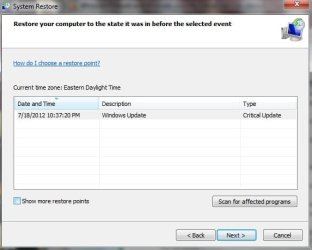
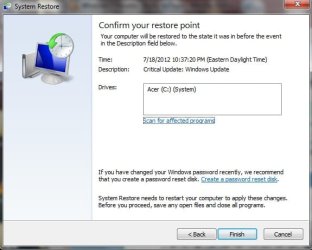
It seems that's the only restore point listed (see 1st attached pic). When I click the "Show more restore points" button, nothing happens. With that button clicked, when I click Next it gets me to a screen to enact the one restore point (see 2nd pic). Is there a way to get an earlier restore point, or is that the only one available?
 

Attachments

  • Restore Point 1.jpg
    Restore Point 1.jpg
    24.1 KB · Views: 9
  • Restore Point 2.jpg
    Restore Point 2.jpg
    31.8 KB · Views: 9

My Computer My Computer

At a glance

Windows 7 Home Premium 64bit4GB
Computer Manufacturer/Model Number
Acer Aspire Timeline X
OS
Windows 7 Home Premium 64bit
Memory
4GB
...or should I click the click the "Show more restore points" button and then click the "Scan for affected programs" button (instead of clicking "Next" to check if there are more restore points?
 

My Computer My Computer

At a glance

Windows 7 Home Premium 64bit4GB
Computer Manufacturer/Model Number
Acer Aspire Timeline X
OS
Windows 7 Home Premium 64bit
Memory
4GB
I'm afraid with all of the actions you have taken that you'v eliminated some restore points.

Let's see what this one-liner powershell script says which will put a file on your desktop listing restore points. Upload the file.

# STEP 1 ** RUN POWERSHELL AS ADMINISTRATOR
WIN key | type POWERSHELL | do NOT hit ENTER |
in the PROGRAMS list, right-click on WINDOWS POWERSHELL |
choose "Run as administrator" |
Click on the YES button (if such appears)

# STEP 2 ** COPY AND PASTE
COPY the script using CTRL+C,
PASTE into Powershell
---Right-Click at the PowerShell Prompt
---(Ctrl+V does not work)

WIN key = key with Microsoft log on top


PHP:
get-computerrestorepoint |sort -descending sequencenumber > $env:userprofile\desktop\RestorePoints.TXT
 

My Computer My Computer

At a glance

MS Windows 7 Ultimate SP1 64-bitAMD A10-4600M6.00 GB Dual-Channel DDR3 @ 798MHz (11-11-12-28)AMD Radeon HD 7660G
Computer Manufacturer/Model Number
Toshiba Satellite S875D-S7239 laptop
OS
MS Windows 7 Ultimate SP1 64-bit
CPU
AMD A10-4600M
Motherboard
AMD Pumori (Socket FT1)
Memory
6.00 GB Dual-Channel DDR3 @ 798MHz (11-11-12-28)
Graphics Card(s)
AMD Radeon HD 7660G
Sound Card
High Definition Audio Device
Monitor(s) Displays
Generic PnP Monitor (1600x900@60Hz)
Screen Resolution
1600x900@60Hz
Hard Drives
SSD 119GB Corsair CSSD-V128GB2 ATA Device
Keyboard
Standard PS/2 Keyboard
Mouse
HP Wireless Optical Mobile Mouse Model FHA-3410
Internet Speed
What the local pub, local coffee shop offers.
Other Info
Optical Drive:MATSHITA BD-CMB UJ160B ATA Device


Also have an Asus ha1002xp netbook with Win 7 Ultimate installed.
Yes, it appears to be just that one - hopefully that was before the changes (makes sense that Windows would make a restore point before then)

I'll go ahead and restore to that restore point. Pleae let me know if I should run any of what I've run before again (like Windows Defender Offline or anything else you recommend) & repost the new results
 

Attachments

My Computer My Computer

At a glance

Windows 7 Home Premium 64bit4GB
Computer Manufacturer/Model Number
Acer Aspire Timeline X
OS
Windows 7 Home Premium 64bit
Memory
4GB

My Computer My Computer

At a glance

MS Windows 7 Ultimate SP1 64-bitAMD A10-4600M6.00 GB Dual-Channel DDR3 @ 798MHz (11-11-12-28)AMD Radeon HD 7660G
Computer Manufacturer/Model Number
Toshiba Satellite S875D-S7239 laptop
OS
MS Windows 7 Ultimate SP1 64-bit
CPU
AMD A10-4600M
Motherboard
AMD Pumori (Socket FT1)
Memory
6.00 GB Dual-Channel DDR3 @ 798MHz (11-11-12-28)
Graphics Card(s)
AMD Radeon HD 7660G
Sound Card
High Definition Audio Device
Monitor(s) Displays
Generic PnP Monitor (1600x900@60Hz)
Screen Resolution
1600x900@60Hz
Hard Drives
SSD 119GB Corsair CSSD-V128GB2 ATA Device
Keyboard
Standard PS/2 Keyboard
Mouse
HP Wireless Optical Mobile Mouse Model FHA-3410
Internet Speed
What the local pub, local coffee shop offers.
Other Info
Optical Drive:MATSHITA BD-CMB UJ160B ATA Device


Also have an Asus ha1002xp netbook with Win 7 Ultimate installed.
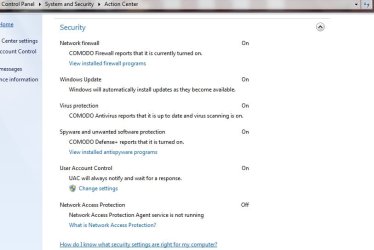
Did the System Restore, but based on the look of the Action Center's Security window, it looks like it was restored to a point after I made the reg & other changes. (Instead of the one Windows Security Center Service button that was there in the past, there was a list of separate functions - see attached)

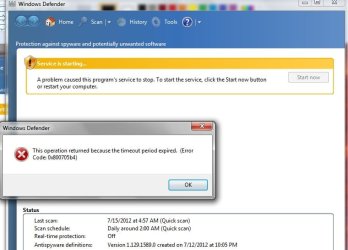
First it asked if I wanted to activate Windows Defender - when I tried an error came up (see other attached jpeg) & it defaulted to Comodo's.

Before I redo your initial recommendations, I wanted to get your advice on how to undo the registry & other steps I did - the steps all listed below. (Earlier you mentioned something about "Use Control Panel | Programs and Features | rt-click on a file to uninstall" and "The only other approach I can recommend is RevoUninstaller Pro." -- but I'm not sure what exactly I should be looking to uninstall and what to do when I find those files - a neophyte with this stuff)

Here's what I did:

Download both the registry files

http://download.bleepingcomputer.com...s/7/MpsSvc.reg

Base filtering engine

http://download.bleepingcomputer.com...ices/7/BFE.reg

Launch them and click YES when you get a UAC prompt

Restart [COLOR=#3485bd !important][COLOR=#3485bd !important]your [COLOR=#3485bd !important]PC[/COLOR][/COLOR][/COLOR]

Now,open RUN and type

regedit and click ok

go to

HKEY_LOCAL_MACHINE\SYSTEM\CurrentControlSet\services\BFE

Right click on it-permissions

Click on ADD and type

Everyone and click ok

Now Click on Everyone

Below you have permission for users

Select full control and click ok

Now,open RUN and type

services.msc and click ok

start base filtering engine service and then [COLOR=#3485bd !important][COLOR=#3485BD ! important]windows [COLOR=#3485BD ! important]firewall[/COLOR][/COLOR][/COLOR] service


You may also be missing security center and windows defender service
Download
Security center service
http://download.bleepingcomputer.com...s/7/wscsvc.reg


windows defender
http://download.bleepingcomputer.com.../WinDefend.reg
 

Attachments

  • Windows Action Center - Security window 7-19 505pm.jpg
    Windows Action Center - Security window 7-19 505pm.jpg
    34.5 KB · Views: 8
  • Windows defender error 7-19 505pm.jpg
    Windows defender error 7-19 505pm.jpg
    43.8 KB · Views: 21

My Computer My Computer

At a glance

Windows 7 Home Premium 64bit4GB
Computer Manufacturer/Model Number
Acer Aspire Timeline X
OS
Windows 7 Home Premium 64bit
Memory
4GB
follow post #32.

Let me know when the reinstall is complete.
karl
 

My Computer My Computer

At a glance

MS Windows 7 Ultimate SP1 64-bitAMD A10-4600M6.00 GB Dual-Channel DDR3 @ 798MHz (11-11-12-28)AMD Radeon HD 7660G
Computer Manufacturer/Model Number
Toshiba Satellite S875D-S7239 laptop
OS
MS Windows 7 Ultimate SP1 64-bit
CPU
AMD A10-4600M
Motherboard
AMD Pumori (Socket FT1)
Memory
6.00 GB Dual-Channel DDR3 @ 798MHz (11-11-12-28)
Graphics Card(s)
AMD Radeon HD 7660G
Sound Card
High Definition Audio Device
Monitor(s) Displays
Generic PnP Monitor (1600x900@60Hz)
Screen Resolution
1600x900@60Hz
Hard Drives
SSD 119GB Corsair CSSD-V128GB2 ATA Device
Keyboard
Standard PS/2 Keyboard
Mouse
HP Wireless Optical Mobile Mouse Model FHA-3410
Internet Speed
What the local pub, local coffee shop offers.
Other Info
Optical Drive:MATSHITA BD-CMB UJ160B ATA Device


Also have an Asus ha1002xp netbook with Win 7 Ultimate installed.
I'll call Microsoft first, have them read this thread/data and let me know if it's something they can fix without a reinstall. It's worth the $99 not to have to do that
 

My Computer My Computer

At a glance

Windows 7 Home Premium 64bit4GB
Computer Manufacturer/Model Number
Acer Aspire Timeline X
OS
Windows 7 Home Premium 64bit
Memory
4GB
First, you don't need (or really should have) more than one firewall. Second, You shouldn't have more than one active antivirus so I disagree with the recommendation to install MSE and another antivirus. Now I don't know about Comodo but some antivirus suites disable Windows firewall and possibly Windows defender. I know that MSE disables Windows defender.
 

My Computers My Computers

  • At a glance

    Windows 7 pro/Windows 10 ProIntel i7 860 Quad core 2.8 ghz8 gbATI Radeon HD 5770 1 gb ram
    Computer type
    PC/Desktop
    Computer Manufacturer/Model Number
    HP Pavillion Elite HPE-250f
    OS
    Windows 7 pro/Windows 10 Pro
    CPU
    Intel i7 860 Quad core 2.8 ghz
    Memory
    8 gb
    Graphics Card(s)
    ATI Radeon HD 5770 1 gb ram
    Monitor(s) Displays
    Alienware 25 AW2521HF & Viewsonic
    Screen Resolution
    1920 x1080 & 1680x1050
    Hard Drives
    WD blue 1 tb & 500 gb.
    Browser
    FF of course.
    Other Info
    https://www.bestbuy.com/site/hp-pavilion-elite-desktop-intel-core-i7-processor-8gb-memory-1tb-hard-drive/9921493.p?skuId=9921493
  • At a glance

    Windows 2012 R2 Data center/Linux Minti3 9100 3.6GHz, 8M cache, 4C/4T8GB 2666MT/s DDR4 ECC UDIMM
    Computer type
    PC/Desktop
    System Manufacturer/Model Number
    Dell Poweredge T140
    OS
    Windows 2012 R2 Data center/Linux Mint
    CPU
    i3 9100 3.6GHz, 8M cache, 4C/4T
    Memory
    8GB 2666MT/s DDR4 ECC UDIMM
    Monitor(s) Displays
    Viewsonic
    Screen Resolution
    1680x1050
    Hard Drives
    1 TB & 750 GB
    Other Info
    https://www.dell.com/en-us/work/shop/productdetailstxn/poweredge-t140?~ck=bt
problem solved

Called Microsoft support - they were able to find & fix the problem without a reinstall, and run a program to remove the four registry entries I was incorrectly encouraged to install early on in this thread. They're calling back tomorrow to make sure the OS is running smoothly.

What caused my Windows Firewall and Windows Security Center to shut down (and what prevented them from starting again) were two trojans:

Trojan:Win64/Sirefef
Trojan:Win64/Sirefef.AA

I'd caution Adblock/Adblock Lite users: the plugin may stop popups, but instead the ads may flip over web pages within Firefox windows. One of them flipped over a page I had open--clicking on it by accident brought in the trojan.

The free Microsoft Safety Scanner I downloaded a few days ago said it detected 5 problems, but listed only 4 as being removed, including those two. The Microsoft rep (who, despite less-than-perfect English, was very thorough & smart) saw this on my post & said this was the problem - she said these trojans can attach to any program on the computer. While an antivirus/antimalware program may say they've been removed, remnants can remain. She said they need to be carefully deleted since it's possible a program may be deleted along with it.

I tried to call Kaspersky & have them simply look at the info I posted here to determine whether or not they could fix the problem--if they thought they could, I'd have signed on for a year. But one tech there replied to my email (similar to my first post here) by telling me what I needed to do to remove programs to install Comodo. When I pointed out this wasn't the question I asked, she replied a day later by just saying that Kaspersky and Defender wouldn't run simultaneously, ignoring the question of whether or not they could solve the root problem. When I called them, the phone rep who looked at my ReportMaker report said there was nothing that appeared to be a problem -- when I asked for a supervisor to review it, I was told only customers could talk to them (never mind that I was figuring out if I should become one).

Once the Microsoft rep told me she solved 6 of 6 similar cases without requiring a reinstall, I figured it was worth the risk, She went through folder by folder with a Microsoft program and removed the trojans from several folders. Also ran the Kaspersky TDSS Killer and ESET online scanner (which found an additional "variant of Win32/Adware.Yontoo.B application," but she said that wasn't a major issue).

I really do appreciate Karl's help. I'd also encourage any board members to question the reasoning behind any advice, and for those giving it not to take offense when someone questions it (as long as it's done politely). Both approaches will foster an environment here that's more fail safe.

Let me explain: after my initial post, I was directed to a Microsoft site with an answer that advised making registry changes--yet when I posted here that I didn't have the symptoms that fit the problem on that page, I was encouraged to make the registry changes anyway by the same "power user". Ultimately it was my fault for taking the advice--If I'd been more questioning, I wouldn't have gone along with it, and maybe without the resulting complications I would've been able to solve it with Karl or someone else for free.

Thanks again to everyone who helps on this board & runs it!

 
Last edited:

My Computer My Computer

At a glance

Windows 7 Home Premium 64bit4GB
Computer Manufacturer/Model Number
Acer Aspire Timeline X
OS
Windows 7 Home Premium 64bit
Memory
4GB
Well despite the "in a way insult" I am happy you solved the problem. I am still learning, so I made a mistake. I will accept that. Sorry for having you do registry changes. Now I learned that registry changes are never good(IMO now atleast).
 

My Computer My Computer

At a glance

Windows 8.1 Pro x64Intel Core i5-4570 CPU @ 3.20GHz8GB DDR3-1596 - Dual ChannelNVIDIA GeForce GTX 750 Ti SC
Computer type
PC/Desktop
Computer Manufacturer/Model Number
Custom
OS
Windows 8.1 Pro x64
CPU
Intel Core i5-4570 CPU @ 3.20GHz
Motherboard
Gigabyte Z87-D3HP-CF
Memory
8GB DDR3-1596 - Dual Channel
Graphics Card(s)
NVIDIA GeForce GTX 750 Ti SC
Sound Card
Onboard
Monitor(s) Displays
Samsung
Screen Resolution
1920x1080
Hard Drives
SSD - 120GB
Second - 1TB
Antivirus
MSE
Browser
Chrome
Your initially directing me to a Microsoft site that solved a similar problem with the same error code was a fine thing to do, and helpful to check out whether it was ultimately the right solution or not- thanks for that.

It was only the follow-up nudging to try the solution they gave--after I said my computer didn't have the two files that matched the problem that described--that was a step too far. The lesson for us both to take from this isn't just about not making registry changes (and I had no idea about that, either)--it's making sure the problem & solution are an exact fit, since one error code can cover multiple issues with very different solutions. Also, in case it comes up in the future, I saw other posts about making registry changes that put a big warning up top first (with instructions) to backup your current registry before making changes. In any event, that part was no problem for Microsoft to fix.
 

My Computer My Computer

At a glance

Windows 7 Home Premium 64bit4GB
Computer Manufacturer/Model Number
Acer Aspire Timeline X
OS
Windows 7 Home Premium 64bit
Memory
4GB
Well i still feel bad for giving bad instructions. In the future i will not suggest registry changes. Way to dangourous to try and do.
 

My Computer My Computer

At a glance

Windows 8.1 Pro x64Intel Core i5-4570 CPU @ 3.20GHz8GB DDR3-1596 - Dual ChannelNVIDIA GeForce GTX 750 Ti SC
Computer type
PC/Desktop
Computer Manufacturer/Model Number
Custom
OS
Windows 8.1 Pro x64
CPU
Intel Core i5-4570 CPU @ 3.20GHz
Motherboard
Gigabyte Z87-D3HP-CF
Memory
8GB DDR3-1596 - Dual Channel
Graphics Card(s)
NVIDIA GeForce GTX 750 Ti SC
Sound Card
Onboard
Monitor(s) Displays
Samsung
Screen Resolution
1920x1080
Hard Drives
SSD - 120GB
Second - 1TB
Antivirus
MSE
Browser
Chrome
Back
Top