
Getting your Nikon Coolscan to work on W7 x64

does your solution provide a Twain driver so that I can call up the scanner from Photoshop and other software?

It doesn't. :(

Many thanks for a quick reply- I suspected as much. I have been using the .exe file and saving the scan so I will continue that way.

I suppose it is too much to ask but do you by any chance have any win 7 solutions to using the CanoScan 5000F scanner?

Once I got my CoolScan V running properly (thanks to this thread), I added VueScan (VueScan Scanner Software for Windows 7, Mac OS X Lion, Linux, iPhone, iPad, iPod) as one of my scan apps. This can see both my CoolScan as well as my Epson CX scanner. The app is outstanding (IMHO).

ed. Found this regarding Photoshop: VueScan for Photoshop Users | Shutterbug

Ok, having owned a copy of Vuescan since 2002 I just downloaded the latest version 9.0.93 (both 32 and 64-bit) and gave both (32 and 64-bit) a try and they worked....

1- Yes, you can import scanned files into Photoshop through Vuescan if you have at least version 8.6.66. However this is not a Twain (WIA) driver per se - that is you still can't use the scanner under Devices and Printers.....
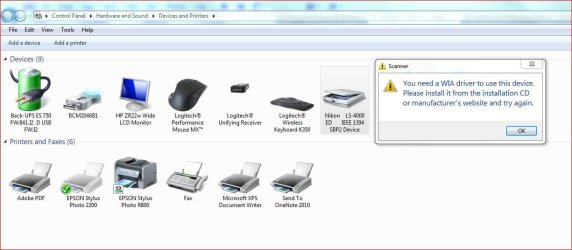
WIA driver for scanner.JPG

However you can use it under Photoshop CS5.... open, click File, Import, choose Vuescan and Vuescan will open and allow you to scan and import to PS....
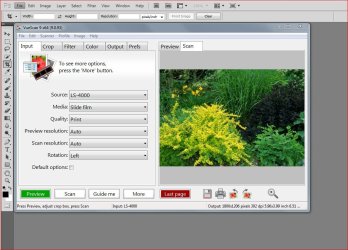
Vuescan under CS5.JPG

So yes, you can do this if you use Vuescan.

With regards to Vuescan though.....

As I've said, I've owned a copy since 2002 and when I purcahsed mine I bought the Professional version that comes with lifetime updates. Today that version costs 79.95 for Pro, 39.95 for Standard. Standard comes with a 1 (one) year upgrade subscription - VueScan Scanner Software for Windows 7, Mac OS X Lion, Linux, iPhone, iPad, iPod. I believe you can also try it out for 30 days (used to be) but I'm not sure now.

BTW even though I have Vuescan I don't use it. Never really liked the way it worked. I keep my scans simple, just scan and edit in PS.

Anyway that's the deal. Later.
 

My Computer My Computer

At a glance

Windows 10 ProIntel Core i7-4770K (3.5Ghz)32 gig Corsair Dominator Platinum (4x8Gig)Sapphire Tri-X R9 Fury
Computer type
PC/Desktop
Computer Manufacturer/Model Number
Custom built by me.
OS
Windows 10 Pro
CPU
Intel Core i7-4770K (3.5Ghz)
Motherboard
Gigabyte G1 Sniper 5 (F10 Bios)
Memory
32 gig Corsair Dominator Platinum (4x8Gig)
Graphics Card(s)
Sapphire Tri-X R9 Fury
Sound Card
Soundblaster ZXR
Monitor(s) Displays
NEC PA242W 24" LCD Monitor
Screen Resolution
1920 x 1200
Hard Drives
Primary - Samsung 850 Pro (512gig), Samsung 840 Pro (256gig), 2TB WD Caviar Black.
PSU
EVGA Supernova 1000 G2
Case
Cooler Master HAF X
Cooling
Corsair H100i with Corsair Air Series SP120 Quiet Fans
Keyboard
Logitech Wireless Wave
Mouse
Logitech Performance MX
Internet Speed
High Speed Cable
Antivirus
Norton Security
Browser
IE11
Other Info
Memory Timings - 1866MHz @ 9-9-9-27-1T @ 1.5 volts
BTW even though I have Vuescan I don't use it. Never really liked the way it worked. I keep my scans simple, just scan and edit in PS.

Agree.
But many people do not.
Now it's said to scan Kodachromes far better than NikonScan ...don't know, I've already scanned and dusted off (edited in PS, healing tool) all of my KMs using my Coolscan 4000ED, and won't do that twice ... life's too short. :mad:
 

My Computer My Computer

At a glance

Windows 7 Ultimate x64i78 GBnVidia Quadro
Computer Manufacturer/Model Number
Asus
OS
Windows 7 Ultimate x64
CPU
i7
Motherboard
Asus Sabertooth P67
Memory
8 GB
Graphics Card(s)
nVidia Quadro
Sound Card
Realtek
Monitor(s) Displays
Samsung SyncMaster P2370
Hard Drives
Western Digital Caviar Blue
PSU
CoolerMaster
Case
CoolerMaster
Cooling
CoolerMaster V6
Completely agree Sygnus. Reality is, these older devices are just lucky to get to perform with Win 7. But they are great scanners, and little work arounds aren't the worst thing. I picked up on the PS piece, and wanted to be sure that the OP knew of the option. It isn't Twain, but it's at least it works.
 

My Computer My Computer

At a glance

Windows 7 Professional 64bitIntel® Core™ i5-760 2.8GHz8GB (2x4GB) Patriot DDR3 1333MHzATI® Radeon™ HD 5770 1GB GDDR5 DX11
Computer Manufacturer/Model Number
West Coast Custom Computer
OS
Windows 7 Professional 64bit
CPU
Intel® Core™ i5-760 2.8GHz
Motherboard
Asus P7P55D-E-LX
Memory
8GB (2x4GB) Patriot DDR3 1333MHz
Graphics Card(s)
ATI® Radeon™ HD 5770 1GB GDDR5 DX11
Sound Card
ATI + VIA
Monitor(s) Displays
#1) HP (LG) ZR22W #2) Optiquest Q1wb
Hard Drives
Kingston 128GB MLC SSD SATA II (C: boot)
1.0TB Western Digital Caviar Black SATA II
PSU
Corsair CMPSU-650TX
Case
Lian-Li PC-A06B
Cooling
XTS 100H Heatpipe Cooler
It still works

Borrowed a Super Coolscan5000 ED from one of my customers who's using it on XP.
I have W-7 Pro.

Took me a couple of tries to finally get the scanner.inf and the NKScnUSD.dll in the right spot but once I did it works like a champ.

Many thanks,
Pete
 

My Computer My Computer

At a glance

Windows 7 ProfessionalAMD 64 Athlon X2 Dual Core6 GigNvidia GeForce 8800GTS
Computer Manufacturer/Model Number
Home Built
OS
Windows 7 Professional
CPU
AMD 64 Athlon X2 Dual Core
Motherboard
Asus M3A
Memory
6 Gig
Graphics Card(s)
Nvidia GeForce 8800GTS
Hard Drives
500GB Seagate (2)
Other Info
Laptop is Gateway NV52 with Windows 7 Home Premium
Thanks :)

BTW....

Took me a couple of tries to finally get the scanner.inf and the NKScnUSD.dll in the right spot but once I did it works like a champ.

Many thanks,
Pete

Was it something you didn't understand at first?
 

My Computer My Computer

At a glance

Windows 10 ProIntel Core i7-4770K (3.5Ghz)32 gig Corsair Dominator Platinum (4x8Gig)Sapphire Tri-X R9 Fury
Computer type
PC/Desktop
Computer Manufacturer/Model Number
Custom built by me.
OS
Windows 10 Pro
CPU
Intel Core i7-4770K (3.5Ghz)
Motherboard
Gigabyte G1 Sniper 5 (F10 Bios)
Memory
32 gig Corsair Dominator Platinum (4x8Gig)
Graphics Card(s)
Sapphire Tri-X R9 Fury
Sound Card
Soundblaster ZXR
Monitor(s) Displays
NEC PA242W 24" LCD Monitor
Screen Resolution
1920 x 1200
Hard Drives
Primary - Samsung 850 Pro (512gig), Samsung 840 Pro (256gig), 2TB WD Caviar Black.
PSU
EVGA Supernova 1000 G2
Case
Cooler Master HAF X
Cooling
Corsair H100i with Corsair Air Series SP120 Quiet Fans
Keyboard
Logitech Wireless Wave
Mouse
Logitech Performance MX
Internet Speed
High Speed Cable
Antivirus
Norton Security
Browser
IE11
Other Info
Memory Timings - 1866MHz @ 9-9-9-27-1T @ 1.5 volts
Getting the NKScnUSD.dll and the scanners.inf files into one folder, then into the NkScan4 folder.

Something wasn't right in my mind but after deleting everything 3 times and then just follow your instructions, it fell into place.

I think I was dizzy from reading all the "other fixes".

I don't do any imaging work at all and my techie imaging software is Picasa.:o

Thanks again.

Pete
 

My Computer My Computer

At a glance

Windows 7 ProfessionalAMD 64 Athlon X2 Dual Core6 GigNvidia GeForce 8800GTS
Computer Manufacturer/Model Number
Home Built
OS
Windows 7 Professional
CPU
AMD 64 Athlon X2 Dual Core
Motherboard
Asus M3A
Memory
6 Gig
Graphics Card(s)
Nvidia GeForce 8800GTS
Hard Drives
500GB Seagate (2)
Other Info
Laptop is Gateway NV52 with Windows 7 Home Premium
Getting the NKScnUSD.dll and the scanners.inf files into one folder, then into the NkScan4 folder.

You can actually put those files anywhere you want as long as they're in the same folder and you point to it when looking for the driver (step 9). I just used the "Nikon Files" folder as an example.

Anyway thanks, and good luck.

Peace :cool:
 

My Computer My Computer

At a glance

Windows 10 ProIntel Core i7-4770K (3.5Ghz)32 gig Corsair Dominator Platinum (4x8Gig)Sapphire Tri-X R9 Fury
Computer type
PC/Desktop
Computer Manufacturer/Model Number
Custom built by me.
OS
Windows 10 Pro
CPU
Intel Core i7-4770K (3.5Ghz)
Motherboard
Gigabyte G1 Sniper 5 (F10 Bios)
Memory
32 gig Corsair Dominator Platinum (4x8Gig)
Graphics Card(s)
Sapphire Tri-X R9 Fury
Sound Card
Soundblaster ZXR
Monitor(s) Displays
NEC PA242W 24" LCD Monitor
Screen Resolution
1920 x 1200
Hard Drives
Primary - Samsung 850 Pro (512gig), Samsung 840 Pro (256gig), 2TB WD Caviar Black.
PSU
EVGA Supernova 1000 G2
Case
Cooler Master HAF X
Cooling
Corsair H100i with Corsair Air Series SP120 Quiet Fans
Keyboard
Logitech Wireless Wave
Mouse
Logitech Performance MX
Internet Speed
High Speed Cable
Antivirus
Norton Security
Browser
IE11
Other Info
Memory Timings - 1866MHz @ 9-9-9-27-1T @ 1.5 volts
thanks so much for this fix. Having nightmares with my move to win 7 from XP Pro. At least I can check this one off.
 

My Computer My Computer

At a glance

Win 7 64 bit
OS
Win 7 64 bit
Corrupted registry?

Andrew,

I just completed a new build, upgrading from XP to 7 Pro x64. I installed my Coolscan 9000 per your instructions and got it it working immediately. Did a couple of scans to prove the point and went on to other things. When I came back a couple of days later, I got a positive POST but NikonScan did not find the scanner, although it shows up in Device Manager. When I checked Properties, I got the following message:
Nikon SUPER COOLSCAN 9000 ED Properties
General
Driver
Details
Nikon SUPER COOLSCAN 9000 ED
Device type:
Manufacturer:
Location:
Imaging devices
DIY Software
LUN0
Device status
^Windows cannot start this hardware device because its configuration
information (in the registry) is incomplete or damaged. (Code 19)
OK
Cancel


I uninstalled and reinstalled NikonScan to no avail. I did not do any registry editing during this period. Any thoughts about how to proceed?

Joe
 

My Computer My Computer

At a glance

Win 7 Pro x64
OS
Win 7 Pro x64
Hi cdiem, welcome to sevenforums.

Sorry to hear about your issue. Don't know why that happened unless the scanner sudenly went bad. Is it possible to test in on another PC, possibly an XP PC?

The other thing you can do is make sure the cable is secure at both ends. Sometimes a loose cable can cause problems.

Let me know. I'll keep an eye out for you.

Later.
 

My Computer My Computer

At a glance

Windows 10 ProIntel Core i7-4770K (3.5Ghz)32 gig Corsair Dominator Platinum (4x8Gig)Sapphire Tri-X R9 Fury
Computer type
PC/Desktop
Computer Manufacturer/Model Number
Custom built by me.
OS
Windows 10 Pro
CPU
Intel Core i7-4770K (3.5Ghz)
Motherboard
Gigabyte G1 Sniper 5 (F10 Bios)
Memory
32 gig Corsair Dominator Platinum (4x8Gig)
Graphics Card(s)
Sapphire Tri-X R9 Fury
Sound Card
Soundblaster ZXR
Monitor(s) Displays
NEC PA242W 24" LCD Monitor
Screen Resolution
1920 x 1200
Hard Drives
Primary - Samsung 850 Pro (512gig), Samsung 840 Pro (256gig), 2TB WD Caviar Black.
PSU
EVGA Supernova 1000 G2
Case
Cooler Master HAF X
Cooling
Corsair H100i with Corsair Air Series SP120 Quiet Fans
Keyboard
Logitech Wireless Wave
Mouse
Logitech Performance MX
Internet Speed
High Speed Cable
Antivirus
Norton Security
Browser
IE11
Other Info
Memory Timings - 1866MHz @ 9-9-9-27-1T @ 1.5 volts
Thanks for the fast response. I moved the scanner back to my old XP machine where it worked fine. So the problem seems to be with Win 7, not the scanner. Leaving the scanner on XP is a possibility, but it isn't desirable.
 

My Computer My Computer

At a glance

Win 7 Pro x64
OS
Win 7 Pro x64
We there's no reason it shouldn't be working under Windows 7 so you need to double check that all is well there. I haven't used my scanner in ages yet I just turned it on to see if it still works and it does. In fact I just scanned a slide.

I forget, is yor scanner firewire or USB? If it's USB, did you pay attention to the note in step 4....

4- Now install the Nikon Scan software you downloaded and after the installation, go to....

C:\Program Files (x86)\Common Files\Nikon\Driver\Scan1394 (see note) and copy this file NKScnUSD.dll to the same folder (Example: Nikon Files) that the scanners.inf file is in.

Thus the Nikon Files folder should now contain these two files... NKScnUSD.dll and scanners.inf

NOTE: If your scanner is USB than the folder will be ScanUSB instead of Scan1394.

I assume you did because you said the scanner worked than quit, but....


At any rate as I said before it should be working; and I know the file includes the info Coolscan 9000 because I included it a while back. See this post and my respons below it - http://www.sevenforums.com/drivers/44994-getting-your-nikon-coolscan-work-w7-x64-4.html#post600369

Oh, and make sure Windows 7 is fully updated to include the service pack.

Let me know.
 

My Computer My Computer

At a glance

Windows 10 ProIntel Core i7-4770K (3.5Ghz)32 gig Corsair Dominator Platinum (4x8Gig)Sapphire Tri-X R9 Fury
Computer type
PC/Desktop
Computer Manufacturer/Model Number
Custom built by me.
OS
Windows 10 Pro
CPU
Intel Core i7-4770K (3.5Ghz)
Motherboard
Gigabyte G1 Sniper 5 (F10 Bios)
Memory
32 gig Corsair Dominator Platinum (4x8Gig)
Graphics Card(s)
Sapphire Tri-X R9 Fury
Sound Card
Soundblaster ZXR
Monitor(s) Displays
NEC PA242W 24" LCD Monitor
Screen Resolution
1920 x 1200
Hard Drives
Primary - Samsung 850 Pro (512gig), Samsung 840 Pro (256gig), 2TB WD Caviar Black.
PSU
EVGA Supernova 1000 G2
Case
Cooler Master HAF X
Cooling
Corsair H100i with Corsair Air Series SP120 Quiet Fans
Keyboard
Logitech Wireless Wave
Mouse
Logitech Performance MX
Internet Speed
High Speed Cable
Antivirus
Norton Security
Browser
IE11
Other Info
Memory Timings - 1866MHz @ 9-9-9-27-1T @ 1.5 volts
The scanner is a CS 9000 -- Firewire -- and I have Win 7 Pro SP1 recently installed and updated.

I compared Property Details for the 1394 dll in Common Files and the file I moved to the "Nikon files" folder. They are identical. I downloaded scanners.inf from the first post in this thread.
 

My Computer My Computer

At a glance

Win 7 Pro x64
OS
Win 7 Pro x64
I'm confused here....

I compared Property Details for the 1394 dll in Common Files and the file I moved to the "Nikon files" folder. They are identical. I downloaded scanners.inf from the first post in this thread.

You need to get the NKScnUSD.dll from the Scan1394 folder in C:\Program Files (x86)\Common Files\Nikon\Driver\Scan1394 and put that file in the same folder that the scanners.inf file is in.

And, just to double check, make sure you extracted the scanners.inf file from the zip file you downloaded.

Other than that you may have to check your system cause the scanner certainly works under Windows 7.

The other thing you can do is downlowd the trial version of Vuescan (64-bit version) and see if that works, if it does, then you more then likely did something wrong in my instructions since the scanner is now working. The point being that the scanner is working under the OS.

Let me know.
 

My Computer My Computer

At a glance

Windows 10 ProIntel Core i7-4770K (3.5Ghz)32 gig Corsair Dominator Platinum (4x8Gig)Sapphire Tri-X R9 Fury
Computer type
PC/Desktop
Computer Manufacturer/Model Number
Custom built by me.
OS
Windows 10 Pro
CPU
Intel Core i7-4770K (3.5Ghz)
Motherboard
Gigabyte G1 Sniper 5 (F10 Bios)
Memory
32 gig Corsair Dominator Platinum (4x8Gig)
Graphics Card(s)
Sapphire Tri-X R9 Fury
Sound Card
Soundblaster ZXR
Monitor(s) Displays
NEC PA242W 24" LCD Monitor
Screen Resolution
1920 x 1200
Hard Drives
Primary - Samsung 850 Pro (512gig), Samsung 840 Pro (256gig), 2TB WD Caviar Black.
PSU
EVGA Supernova 1000 G2
Case
Cooler Master HAF X
Cooling
Corsair H100i with Corsair Air Series SP120 Quiet Fans
Keyboard
Logitech Wireless Wave
Mouse
Logitech Performance MX
Internet Speed
High Speed Cable
Antivirus
Norton Security
Browser
IE11
Other Info
Memory Timings - 1866MHz @ 9-9-9-27-1T @ 1.5 volts
You need to get the NKScnUSD.dll from the Scan1394 folder in C:\Program Files (x86)\Common Files\Nikon\Driver\Scan1394 and put that file in the same folder that the scanners.inf file is in.
Yes, that's what I was trying to say in my preceding post.
And, just to double check, make sure you extracted the scanners.inf file from the zip file you downloaded.
Yes, it's extracted.
Other than that you may have to check your system cause the scanner certainly works under Windows 7.
What do you mean by "check your system"?

I'll try the Vuescan approach when I get a chance.
 

My Computer My Computer

At a glance

Win 7 Pro x64
OS
Win 7 Pro x64
You're a genius!

Thanks a thousand times Sygnus. It works perfectly for my Super Coolscan LS4000 in Win 7 Professional 64-bit.
I had spent hours and hours on this until I found your solution.
 

My Computer My Computer

At a glance

Windows 7 Professional 64-bit8192MBAMD Radeon HD 7770 2GB DDR5
Computer Manufacturer/Model Number
DellXPS 8500
OS
Windows 7 Professional 64-bit
Memory
8192MB
Graphics Card(s)
AMD Radeon HD 7770 2GB DDR5
Hard Drives
2 x 2TB 7200rpm SATA Raid 1 Mirror
Thanks, appreciate that :)

Happy scanning.

Peace :cool:
 

My Computer My Computer

At a glance

Windows 10 ProIntel Core i7-4770K (3.5Ghz)32 gig Corsair Dominator Platinum (4x8Gig)Sapphire Tri-X R9 Fury
Computer type
PC/Desktop
Computer Manufacturer/Model Number
Custom built by me.
OS
Windows 10 Pro
CPU
Intel Core i7-4770K (3.5Ghz)
Motherboard
Gigabyte G1 Sniper 5 (F10 Bios)
Memory
32 gig Corsair Dominator Platinum (4x8Gig)
Graphics Card(s)
Sapphire Tri-X R9 Fury
Sound Card
Soundblaster ZXR
Monitor(s) Displays
NEC PA242W 24" LCD Monitor
Screen Resolution
1920 x 1200
Hard Drives
Primary - Samsung 850 Pro (512gig), Samsung 840 Pro (256gig), 2TB WD Caviar Black.
PSU
EVGA Supernova 1000 G2
Case
Cooler Master HAF X
Cooling
Corsair H100i with Corsair Air Series SP120 Quiet Fans
Keyboard
Logitech Wireless Wave
Mouse
Logitech Performance MX
Internet Speed
High Speed Cable
Antivirus
Norton Security
Browser
IE11
Other Info
Memory Timings - 1866MHz @ 9-9-9-27-1T @ 1.5 volts
Code 19 Update

As promised, I tried Vuescan to see if it would correct my problem, but it did not detect the scanner either. I spent some time researching Code 19 issues and found that they are not uncommon but are usually related to CD/DVD drives. Repairing these problems can be simple (rolling back the registry using System Restore), somewhat risky (editing the registry, provided the problem line(s) are understood), or painful (reinstalling Windows). I started with System Restore and found that I had to go back to a point before the initial install of the hacked scanner driver to erase the Code 19 issue in the registry. I reinstalled the driver using the same process as I had originally used, and the scanner once again works normally. Of course, all the other app installs and Windows updates I had done after the System Restore point had to be repeated for my new build. Why did Code 19 happen? Not a clue, but it was not because I installed the scanner driver incorrectly. It was probably related to one of my app installs that I did shortly after the driver install. The one that I suspect was the only one that I chose not to reinstall again.

Thanks for enabling the use of Nikon scanners in Win 7! I hope my experience may help someone in the future that encounters the same problem.
 

My Computer My Computer

At a glance

Win 7 Pro x64
OS
Win 7 Pro x64
Happy to hear you got it working.

I've had many many updates and software installs since initially doing this fix in 2009 and have never had an issue. This is not to say things can't happen, there are hundreds of thousands of software out there that could cause a problem, but it is also to say that many problems don't arise.

Repairing these problems can be simple (rolling back the registry using System Restore), somewhat risky (editing the registry, provided the problem line(s) are understood), or painful (reinstalling Windows). I started with System Restore and found that I had to go back to a point before the initial install of the hacked scanner driver to erase the Code 19 issue in the registry.

Here's a tutorial on using system restore and what it does should you need it in the future - http://www.sevenforums.com/tutorials/700-system-restore.html?ltr=S. And no, system restore does not involve the "user" messing with the registry.

Happy scanning.

Peace :cool:
 

My Computer My Computer

At a glance

Windows 10 ProIntel Core i7-4770K (3.5Ghz)32 gig Corsair Dominator Platinum (4x8Gig)Sapphire Tri-X R9 Fury
Computer type
PC/Desktop
Computer Manufacturer/Model Number
Custom built by me.
OS
Windows 10 Pro
CPU
Intel Core i7-4770K (3.5Ghz)
Motherboard
Gigabyte G1 Sniper 5 (F10 Bios)
Memory
32 gig Corsair Dominator Platinum (4x8Gig)
Graphics Card(s)
Sapphire Tri-X R9 Fury
Sound Card
Soundblaster ZXR
Monitor(s) Displays
NEC PA242W 24" LCD Monitor
Screen Resolution
1920 x 1200
Hard Drives
Primary - Samsung 850 Pro (512gig), Samsung 840 Pro (256gig), 2TB WD Caviar Black.
PSU
EVGA Supernova 1000 G2
Case
Cooler Master HAF X
Cooling
Corsair H100i with Corsair Air Series SP120 Quiet Fans
Keyboard
Logitech Wireless Wave
Mouse
Logitech Performance MX
Internet Speed
High Speed Cable
Antivirus
Norton Security
Browser
IE11
Other Info
Memory Timings - 1866MHz @ 9-9-9-27-1T @ 1.5 volts
I have followed all the instructions by SYGNUS 21 starting with a clean install but Nikon Scan still refuses to run - the program opens but freezes immediately.

I checked the drivers and they are showing as c:windows/system32/drivers/kskhunk.sys and
c:windows/system32/drivers/usbscan.sys

This despite having updated the driver from the Nikon Files folder as instructed where the scanners.inf and NKScnUSD.dll files are located

Any ideas ??
 

My Computer My Computer

At a glance

windows 7 home premium 64 bit
Computer Manufacturer/Model Number
ZT
OS
windows 7 home premium 64 bit
Back
Top