Getting your Nikon Coolscan to work on W7 x64

Sometimes you'll see this happen to the OS (Windows) and/or drivers when there is a rapid or sudden shutdown and startup of the system. It usually take more that one time for this to happen, though once is enough.

Yes, two years ago I had to reinstall XP due to a sudden ( less than 1 second ! ) blackout.
Didn't know that a single driver could become corrupt, for the same reason, while the OS remains stable.

Always learning :rolleyes:
 

My Computer My Computer

At a glance

Windows 7 Ultimate x64i78 GBnVidia Quadro
Computer Manufacturer/Model Number
Asus
OS
Windows 7 Ultimate x64
CPU
i7
Motherboard
Asus Sabertooth P67
Memory
8 GB
Graphics Card(s)
nVidia Quadro
Sound Card
Realtek
Monitor(s) Displays
Samsung SyncMaster P2370
Hard Drives
Western Digital Caviar Blue
PSU
CoolerMaster
Case
CoolerMaster
Cooling
CoolerMaster V6
Thank you very much

sygnus21,

I was about to purchase Vuescan when I came across this thread. Needless to say it made for a lot of interesting reading. It took just 15 minutes to follow your directions and install the driver to get my Nikon LS 4000 working. The scanner has been collecting dust for several years, as I thought it became a very expensive paper weight. Everything is working fine and I'm real happy about being able to use Nikon Scan again.
 

My Computer My Computer

At a glance

Windows 7 Home Premium 64-bitCore i7 - 950DDR3 1600 8GBSapphire Radeon HD 5770
Computer Manufacturer/Model Number
Home built
OS
Windows 7 Home Premium 64-bit
CPU
Core i7 - 950
Motherboard
Asus P6X58D
Memory
DDR3 1600 8GB
Graphics Card(s)
Sapphire Radeon HD 5770
Sound Card
Creative Soundblaster Audigy SE
Monitor(s) Displays
Samsung SA350
Hard Drives
OCZ 90 GB SSD
Samsung 2T
PSU
Antec EA650
Case
Antec 900
Cooling
Corsair CAFA70
Thanks. Glad I was able to help.

Happy scanning.
 

My Computer My Computer

At a glance

Windows 10 ProIntel Core i7-4770K (3.5Ghz)32 gig Corsair Dominator Platinum (4x8Gig)Sapphire Tri-X R9 Fury
Computer type
PC/Desktop
Computer Manufacturer/Model Number
Custom built by me.
OS
Windows 10 Pro
CPU
Intel Core i7-4770K (3.5Ghz)
Motherboard
Gigabyte G1 Sniper 5 (F10 Bios)
Memory
32 gig Corsair Dominator Platinum (4x8Gig)
Graphics Card(s)
Sapphire Tri-X R9 Fury
Sound Card
Soundblaster ZXR
Monitor(s) Displays
NEC PA242W 24" LCD Monitor
Screen Resolution
1920 x 1200
Hard Drives
Primary - Samsung 850 Pro (512gig), Samsung 840 Pro (256gig), 2TB WD Caviar Black.
PSU
EVGA Supernova 1000 G2
Case
Cooler Master HAF X
Cooling
Corsair H100i with Corsair Air Series SP120 Quiet Fans
Keyboard
Logitech Wireless Wave
Mouse
Logitech Performance MX
Internet Speed
High Speed Cable
Antivirus
Norton Security
Browser
IE11
Other Info
Memory Timings - 1866MHz @ 9-9-9-27-1T @ 1.5 volts
Finally Tried It

Hello Sygnus21

I've been trying to do this for years now unsuccessfully. I just found your instructions and got the Coolscan 5000 to work on my Win7 64bit system. Thank you for that.

It took me a while to figure out that the Nikon Scan software when executed made 2 Nikon folders in Program Files (x86). That threw me a bit. (Or was it VueScan that made one of them?).

I've kept an XP laptop around just to run that software and scanner. Now I can get rid of that.

Thanks again for you help!

Regards
Steve
 

My Computer My Computer

At a glance

Windows 7 Home Premium 64biti712GB
Computer Manufacturer/Model Number
Dell XPS 9200
OS
Windows 7 Home Premium 64bit
CPU
i7
Memory
12GB
Thanks Rotorhead.

Yeah I looked high and low in coming across a fix for this. Thanks to this post that I was able to consolidate the file and instructions to help those in getting their scanner to work on 7. Wish Nikon did this themselves though.

Happy scanning :cool:
 

My Computer My Computer

At a glance

Windows 10 ProIntel Core i7-4770K (3.5Ghz)32 gig Corsair Dominator Platinum (4x8Gig)Sapphire Tri-X R9 Fury
Computer type
PC/Desktop
Computer Manufacturer/Model Number
Custom built by me.
OS
Windows 10 Pro
CPU
Intel Core i7-4770K (3.5Ghz)
Motherboard
Gigabyte G1 Sniper 5 (F10 Bios)
Memory
32 gig Corsair Dominator Platinum (4x8Gig)
Graphics Card(s)
Sapphire Tri-X R9 Fury
Sound Card
Soundblaster ZXR
Monitor(s) Displays
NEC PA242W 24" LCD Monitor
Screen Resolution
1920 x 1200
Hard Drives
Primary - Samsung 850 Pro (512gig), Samsung 840 Pro (256gig), 2TB WD Caviar Black.
PSU
EVGA Supernova 1000 G2
Case
Cooler Master HAF X
Cooling
Corsair H100i with Corsair Air Series SP120 Quiet Fans
Keyboard
Logitech Wireless Wave
Mouse
Logitech Performance MX
Internet Speed
High Speed Cable
Antivirus
Norton Security
Browser
IE11
Other Info
Memory Timings - 1866MHz @ 9-9-9-27-1T @ 1.5 volts
Any chance of a solution for Windows 7 x32?

I tried all your instructions (very detailed, thank you) , but I have Windows 7 Home Premium 32 not 64. Everything works fine until step 5... I power up my scanner and then... nothing. No unknown device with yellow triangle anywhere.
I have a Nikon Super Coolscan 4000 ED. I have checked the firewire cable and connection all working fine.
Any suggestions?

Thanks
 

My Computer My Computer

At a glance

Windows 7 Home Premium 32bit
OS
Windows 7 Home Premium 32bit
Hmmm... 32 bit should work.

Unfortunately it's going to be some time before I can get back to you but what you could do to help yourself is to go through this thread to see if something will be able to help you. I'm pretty sure I've helped someone here who had a 32-bit OS so that answer should be here.

Sorry I can't be of any quicker help right now but I'll check back later when I get a chance.

Until then.
 

My Computer My Computer

At a glance

Windows 10 ProIntel Core i7-4770K (3.5Ghz)32 gig Corsair Dominator Platinum (4x8Gig)Sapphire Tri-X R9 Fury
Computer type
PC/Desktop
Computer Manufacturer/Model Number
Custom built by me.
OS
Windows 10 Pro
CPU
Intel Core i7-4770K (3.5Ghz)
Motherboard
Gigabyte G1 Sniper 5 (F10 Bios)
Memory
32 gig Corsair Dominator Platinum (4x8Gig)
Graphics Card(s)
Sapphire Tri-X R9 Fury
Sound Card
Soundblaster ZXR
Monitor(s) Displays
NEC PA242W 24" LCD Monitor
Screen Resolution
1920 x 1200
Hard Drives
Primary - Samsung 850 Pro (512gig), Samsung 840 Pro (256gig), 2TB WD Caviar Black.
PSU
EVGA Supernova 1000 G2
Case
Cooler Master HAF X
Cooling
Corsair H100i with Corsair Air Series SP120 Quiet Fans
Keyboard
Logitech Wireless Wave
Mouse
Logitech Performance MX
Internet Speed
High Speed Cable
Antivirus
Norton Security
Browser
IE11
Other Info
Memory Timings - 1866MHz @ 9-9-9-27-1T @ 1.5 volts
Thanks! I'll go through the thread... slowly. Lots of stuff here.
 

My Computer My Computer

At a glance

Windows 7 Home Premium 32bit
OS
Windows 7 Home Premium 32bit
Hi Sygnus21
I couldn't find much on the thread. Some 32 bit examples, but not the same problem. I am starting to worry that my scanner is actually broken. It does not make that connection/disconnection sound for peripherals.... I tried to connect some other old thing (a DVD writer) with a firewire on the same slot and the using the same cable and it worked fine. So maybe my scanner is toast....
 

My Computer My Computer

At a glance

Windows 7 Home Premium 32bit
OS
Windows 7 Home Premium 32bit
Some 32 bit examples, but not the same problem.

Well at least you know the scanner works with 32-bit OS's.

Anyway do you have access to a Windows XP machine? SInce there are drivers for XP you could try hooking it up to an XP machine to see if it works. If it still doesn't work, than yeah, the scanner may be toast. In that case you could send it in for repair, but be aware that that could be expensive. See this http://www.sevenforums.com/drivers/44994-getting-your-nikon-coolscan-work-w7-x64-8.html and the post before it.

Oh, be aware that since you have a 32-bit OS, you'll be looking for C:\Program Files\Common Files\Nikon\Driver\Scan1394 Instead of C:\Program Files (x86)\Common Files\Nikon\Driver\Scan1394

And since you have a firewire Scanner make sure you are looking for the Scan1394 within the directory above (C:\Program Files\Common.... )

Hey, I was crusing through this thread and came upon this post - http://www.sevenforums.com/drivers/44994-getting-your-nikon-coolscan-work-w7-x64-13.html#post906930. With that in mind, do you know if you updated your firmware? If not, you may need to do that as I'm not sure the driver package I told you to get from Nikon's site works with the old (original) firmware on that scanner. And if you DO have to update the firmware, you'll very very likely need to do it on an XP machine. Basically what the link is saying is that the poster had to update his firmware to get the scanner working with with the drivers Nikon supplies.

Hope the helps as I won't be able to check in till sometime late tomorrow evening.

Later.
 

My Computer My Computer

At a glance

Windows 10 ProIntel Core i7-4770K (3.5Ghz)32 gig Corsair Dominator Platinum (4x8Gig)Sapphire Tri-X R9 Fury
Computer type
PC/Desktop
Computer Manufacturer/Model Number
Custom built by me.
OS
Windows 10 Pro
CPU
Intel Core i7-4770K (3.5Ghz)
Motherboard
Gigabyte G1 Sniper 5 (F10 Bios)
Memory
32 gig Corsair Dominator Platinum (4x8Gig)
Graphics Card(s)
Sapphire Tri-X R9 Fury
Sound Card
Soundblaster ZXR
Monitor(s) Displays
NEC PA242W 24" LCD Monitor
Screen Resolution
1920 x 1200
Hard Drives
Primary - Samsung 850 Pro (512gig), Samsung 840 Pro (256gig), 2TB WD Caviar Black.
PSU
EVGA Supernova 1000 G2
Case
Cooler Master HAF X
Cooling
Corsair H100i with Corsair Air Series SP120 Quiet Fans
Keyboard
Logitech Wireless Wave
Mouse
Logitech Performance MX
Internet Speed
High Speed Cable
Antivirus
Norton Security
Browser
IE11
Other Info
Memory Timings - 1866MHz @ 9-9-9-27-1T @ 1.5 volts
Will look for XP

Sygnus21

Ok, I'll be on a quest to find a computer with firewire and Windows XP. That should be interesting! Thank you so far for all your input! I'll let you know as soon as I find the machine and test the scanner.
Thanks!
 

My Computer My Computer

At a glance

Windows 7 Home Premium 32bit
OS
Windows 7 Home Premium 32bit
Sygnus21

Ok, I'll be on a quest to find a computer with firewire and Windows XP. That should be interesting! Thank you so far for all your input! I'll let you know as soon as I find the machine and test the scanner.
Thanks!

Please make note that I also asked you about the firmware update? Hate to see you hunt down an XP machine, only to have to do it again becaues you forgot the update :o

Anyway if you haven't done it, and you should, it can be found here - Super Coolscan LS4000 1.10 firmware update
 

My Computer My Computer

At a glance

Windows 10 ProIntel Core i7-4770K (3.5Ghz)32 gig Corsair Dominator Platinum (4x8Gig)Sapphire Tri-X R9 Fury
Computer type
PC/Desktop
Computer Manufacturer/Model Number
Custom built by me.
OS
Windows 10 Pro
CPU
Intel Core i7-4770K (3.5Ghz)
Motherboard
Gigabyte G1 Sniper 5 (F10 Bios)
Memory
32 gig Corsair Dominator Platinum (4x8Gig)
Graphics Card(s)
Sapphire Tri-X R9 Fury
Sound Card
Soundblaster ZXR
Monitor(s) Displays
NEC PA242W 24" LCD Monitor
Screen Resolution
1920 x 1200
Hard Drives
Primary - Samsung 850 Pro (512gig), Samsung 840 Pro (256gig), 2TB WD Caviar Black.
PSU
EVGA Supernova 1000 G2
Case
Cooler Master HAF X
Cooling
Corsair H100i with Corsair Air Series SP120 Quiet Fans
Keyboard
Logitech Wireless Wave
Mouse
Logitech Performance MX
Internet Speed
High Speed Cable
Antivirus
Norton Security
Browser
IE11
Other Info
Memory Timings - 1866MHz @ 9-9-9-27-1T @ 1.5 volts
04/04/2012 Works!

My XP Tower experienced a sudden death. Picked up a Gateway W7 Tower, found out my Imageprint was not W7 compliant. Was able to get the 50% price as upgrade.
Needed a PCIe Firewire card, put that in, Coolscan 9000ed came up but would not
scan, tried burning incense and exaltation's to Maltar of Titan, to no avail. Considered ritual sacrifice (goat, etc) opted out because of the neighbors.
Searched Coolscan windows 7 and came up with you guys. Tried the fix a couple of times, made a small mistake, no dice. Considered looking for a XP tower but gave it another shot. This time no problem, works perfectly. Thanks All!
 

My Computer My Computer

At a glance

Win7 x64
OS
Win7 x64
Glad you got it working.

BTW there were procedures on the net on how to get ImagePrint 6 working under Windows 7. I used them and they worked like a charm. That was a while ago though some I'm not sure the files needed still exist as I'm sure Colorbyte is probably way beyond 6 now. Haven't looked cause the version I have still works for my Epson 2200.

Anyway happy scanning.

Peace.
 

My Computer My Computer

At a glance

Windows 10 ProIntel Core i7-4770K (3.5Ghz)32 gig Corsair Dominator Platinum (4x8Gig)Sapphire Tri-X R9 Fury
Computer type
PC/Desktop
Computer Manufacturer/Model Number
Custom built by me.
OS
Windows 10 Pro
CPU
Intel Core i7-4770K (3.5Ghz)
Motherboard
Gigabyte G1 Sniper 5 (F10 Bios)
Memory
32 gig Corsair Dominator Platinum (4x8Gig)
Graphics Card(s)
Sapphire Tri-X R9 Fury
Sound Card
Soundblaster ZXR
Monitor(s) Displays
NEC PA242W 24" LCD Monitor
Screen Resolution
1920 x 1200
Hard Drives
Primary - Samsung 850 Pro (512gig), Samsung 840 Pro (256gig), 2TB WD Caviar Black.
PSU
EVGA Supernova 1000 G2
Case
Cooler Master HAF X
Cooling
Corsair H100i with Corsair Air Series SP120 Quiet Fans
Keyboard
Logitech Wireless Wave
Mouse
Logitech Performance MX
Internet Speed
High Speed Cable
Antivirus
Norton Security
Browser
IE11
Other Info
Memory Timings - 1866MHz @ 9-9-9-27-1T @ 1.5 volts
Scanner is broken

Sygnus21

Ok, I'll be on a quest to find a computer with firewire and Windows XP. That should be interesting! Thank you so far for all your input! I'll let you know as soon as I find the machine and test the scanner.
Thanks!

Please make note that I also asked you about the firmware update? Hate to see you hunt down an XP machine, only to have to do it again becaues you forgot the update :o

Anyway if you haven't done it, and you should, it can be found here - Super Coolscan LS4000 1.10 firmware update


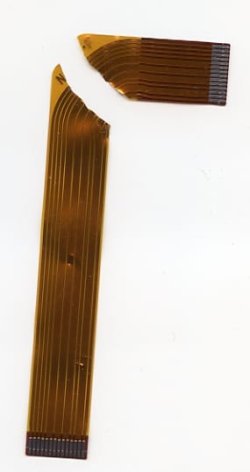
Hello Signus 21...well, I found a computer and the scanner still did not work. Not a peep. So we opened it up and found one of the Flat Flex Cables inside completely torn. Now to the task of finding one of those cables...:confused: I don't think it will be easy.:)
But thanks for all the help anyway
 

Attachments

  • Flat Cable Nikon002.jpg
    Flat Cable Nikon002.jpg
    19.5 KB · Views: 19

My Computer My Computer

At a glance

Windows 7 Home Premium 32bit
OS
Windows 7 Home Premium 32bit
Wow. How'd that happen?

Anyway unless you find another scanner with that strip, you'll probably have to get it from Nikon since I don't think you'll find one laying around in any repair shop.

Good luck and let me know what you find.

Peace :cool:
 

My Computer My Computer

At a glance

Windows 10 ProIntel Core i7-4770K (3.5Ghz)32 gig Corsair Dominator Platinum (4x8Gig)Sapphire Tri-X R9 Fury
Computer type
PC/Desktop
Computer Manufacturer/Model Number
Custom built by me.
OS
Windows 10 Pro
CPU
Intel Core i7-4770K (3.5Ghz)
Motherboard
Gigabyte G1 Sniper 5 (F10 Bios)
Memory
32 gig Corsair Dominator Platinum (4x8Gig)
Graphics Card(s)
Sapphire Tri-X R9 Fury
Sound Card
Soundblaster ZXR
Monitor(s) Displays
NEC PA242W 24" LCD Monitor
Screen Resolution
1920 x 1200
Hard Drives
Primary - Samsung 850 Pro (512gig), Samsung 840 Pro (256gig), 2TB WD Caviar Black.
PSU
EVGA Supernova 1000 G2
Case
Cooler Master HAF X
Cooling
Corsair H100i with Corsair Air Series SP120 Quiet Fans
Keyboard
Logitech Wireless Wave
Mouse
Logitech Performance MX
Internet Speed
High Speed Cable
Antivirus
Norton Security
Browser
IE11
Other Info
Memory Timings - 1866MHz @ 9-9-9-27-1T @ 1.5 volts
Getting Nikon Coolscan to work on W7 x64

I know this thread is old but I hope you are still out there sygnus21 to answer questions.
Thanks to you I have not had to bin my Nikon CoolScan on moving to Win 7 however ............ does your solution provide a Twain driver so that I can call up the scanner from Photoshop and other software? I cannot find the scanner under File, Import in Photoshop.
Here's hoping you have a solution.
 

My Computer My Computer

At a glance

Windows 7 Home Premium 64bitIntel i7-26008 GbAMD Radeon 6800
Computer Manufacturer/Model Number
Home prepared
OS
Windows 7 Home Premium 64bit
CPU
Intel i7-2600
Motherboard
Asus P8Z68-V
Memory
8 Gb
Graphics Card(s)
AMD Radeon 6800
Sound Card
on board
Monitor(s) Displays
Eizo FlexScan L768
Hard Drives
500mb Seagate SATA
1Tb Seagate SATA
750mb Western Digital
does your solution provide a Twain driver so that I can call up the scanner from Photoshop and other software?

It doesn't. :(

I think the only OS that supported it for the scannere was Windows XP. Even Vista 32 bit with the driver Nikon did release for Vista didn't allow for twain.

At any rate there's no need looking for a twain driver for the scanner because there is none. If you want to use the Nikon scan software you'll have launch it on it's own - launch it's exe.

Bottom line is you can't use twain because there is no twain driver included. Not sure if that belongs to Nikon or Microsoft but there is none :(

Sorry.
 

My Computer My Computer

At a glance

Windows 10 ProIntel Core i7-4770K (3.5Ghz)32 gig Corsair Dominator Platinum (4x8Gig)Sapphire Tri-X R9 Fury
Computer type
PC/Desktop
Computer Manufacturer/Model Number
Custom built by me.
OS
Windows 10 Pro
CPU
Intel Core i7-4770K (3.5Ghz)
Motherboard
Gigabyte G1 Sniper 5 (F10 Bios)
Memory
32 gig Corsair Dominator Platinum (4x8Gig)
Graphics Card(s)
Sapphire Tri-X R9 Fury
Sound Card
Soundblaster ZXR
Monitor(s) Displays
NEC PA242W 24" LCD Monitor
Screen Resolution
1920 x 1200
Hard Drives
Primary - Samsung 850 Pro (512gig), Samsung 840 Pro (256gig), 2TB WD Caviar Black.
PSU
EVGA Supernova 1000 G2
Case
Cooler Master HAF X
Cooling
Corsair H100i with Corsair Air Series SP120 Quiet Fans
Keyboard
Logitech Wireless Wave
Mouse
Logitech Performance MX
Internet Speed
High Speed Cable
Antivirus
Norton Security
Browser
IE11
Other Info
Memory Timings - 1866MHz @ 9-9-9-27-1T @ 1.5 volts
Many thanks for a quick reply- I suspected as much. I have been using the .exe file and saving the scan so I will continue that way.

I suppose it is too much to ask but do you by any chance have any win 7 solutions to using the CanoScan 5000F scanner?
 

My Computer My Computer

At a glance

Windows 7 Home Premium 64bitIntel i7-26008 GbAMD Radeon 6800
Computer Manufacturer/Model Number
Home prepared
OS
Windows 7 Home Premium 64bit
CPU
Intel i7-2600
Motherboard
Asus P8Z68-V
Memory
8 Gb
Graphics Card(s)
AMD Radeon 6800
Sound Card
on board
Monitor(s) Displays
Eizo FlexScan L768
Hard Drives
500mb Seagate SATA
1Tb Seagate SATA
750mb Western Digital
Last edited:

My Computer My Computer

At a glance

Windows 7 Professional 64bitIntel® Core™ i5-760 2.8GHz8GB (2x4GB) Patriot DDR3 1333MHzATI® Radeon™ HD 5770 1GB GDDR5 DX11
Computer Manufacturer/Model Number
West Coast Custom Computer
OS
Windows 7 Professional 64bit
CPU
Intel® Core™ i5-760 2.8GHz
Motherboard
Asus P7P55D-E-LX
Memory
8GB (2x4GB) Patriot DDR3 1333MHz
Graphics Card(s)
ATI® Radeon™ HD 5770 1GB GDDR5 DX11
Sound Card
ATI + VIA
Monitor(s) Displays
#1) HP (LG) ZR22W #2) Optiquest Q1wb
Hard Drives
Kingston 128GB MLC SSD SATA II (C: boot)
1.0TB Western Digital Caviar Black SATA II
PSU
Corsair CMPSU-650TX
Case
Lian-Li PC-A06B
Cooling
XTS 100H Heatpipe Cooler
Back
Top