Solved Windows NO LONGER backing up

Let's focus on the VSS problem. Really no other entries related to VSS in eventlog?
 

My Computer My Computer

Computer type
Laptop
Computer Manufacturer/Model Number
ACER ASPIRE 5742G
OS
Microsoft Windows 7 Home Premium 64-bits 7601 Multiprocessor Free Service Pack 1
CPU
Intel(R) Core(TM) i3 CPU M 370 @ 2.40GHz
Motherboard
Acer Aspire 5742G
Memory
4,00 GB
Graphics Card(s)
ATI Mobility Radeon HD 5400 Series
Sound Card
(1) AMD High Definition Audio Device (2) Realtek High Defi
Screen Resolution
1366 x 768 x 32 bits (4294967296 colors) @ 60 Hz
Hard Drives
WDC WD5000BEVT-22ZAT0
it says somethig about VSS error
2,3,4 just a result of problem 1

windows update... hmmm maybe also a vss problem ... don't know can you install updates succesfully now without errors?
===

funny i see now that last updates installed was on 12 july.
seems a long tim ago...? Yet windows says no new updates available


If attached directly to win7 backup is always succesfully now?
===

No, the backup from last night was direct & failed. i think file backup went ok,
but it failed on image.

i'm now running a backup again WITHOUT system image...
 

My Computer My Computer

OS
Windows 7 Ultimate x64
Sh*t....; problems remain same!

direct backup: can read shadow copy,
wireless back: path not correct

this is getting quite desperate...?
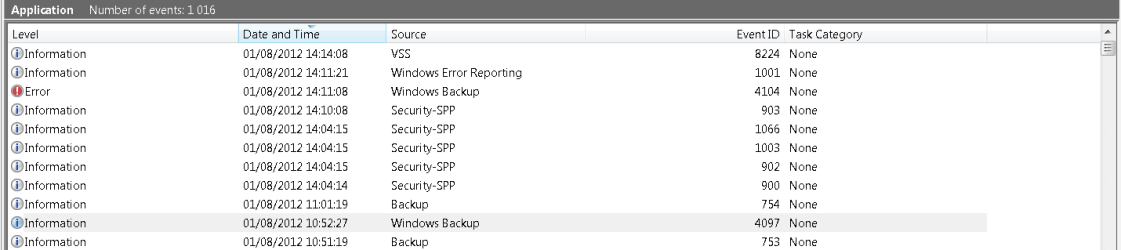
Can you sees relevant information in eventlog at time of failure?

overnight i did a full backup, including system image: (IE DIRECT BACKUP VIA USB)

these are the massages in order of appearance:

1)
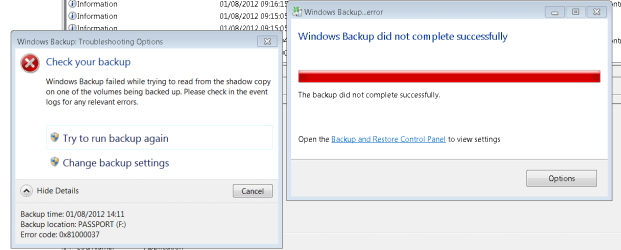
The backup was not successful. The error is: Windows Backup failed while trying to read from the shadow copy on one of the volumes being backed up. Please check in the event logs for any relevant errors. (0x81000037).

2)
Fault bucket 1084420110, type 5
Event Name: WindowsBackupFailure
Response: Not available
Cab Id: 0
Problem signature:
P1: Backup
P2: 6.1.7601
P3: 0x81000037
P4: 11
P5:
P6:
P7:
P8:
P9:
P10:
Attached files:
C:\WINDOWS\Logs\WindowsBackup\WindowsBackup.1.etl
These files may be available here:
C:\ProgramData\Microsoft\Windows\WER\ReportArchive\NonCritical_Backup_37c94a3f7f9dc50e1a69c36b71e2ccbefec74cf_22ec2ca2
Analysis symbol:
Rechecking for solution: 0
Report Id: 97049d07-db90-11e1-adaa-00217063082d
Report Status: 0

3)
The VSS service is shutting down due to idle timeout.

4)
The Block Level Backup Engine service has stopped.

5)
Fault bucket , type 0
Event Name: WindowsUpdateFailure
Response: Not available
Cab Id: 0
Problem signature:
P1: 7.6.7600.256
P2: 80072ee2
P3: 00000000-0000-0000-0000-000000000000
P4: Scan
P5: 101
P6: Unmanaged
P7:
P8:
P9:
P10:
Attached files:
These files may be available here:

Analysis symbol:
Rechecking for solution: 0
Report Id: 01946a6f-db99-11e1-adaa-00217063082d
Report Status: 0

6)
Fault bucket , type 0
Event Name: WindowsUpdateFailure
Response: Not available
Cab Id: 0
Problem signature:
P1: 7.6.7600.256
P2: 80072ee2
P3: 00000000-0000-0000-0000-000000000000
P4: Scan
P5: 101
P6: Unmanaged
P7:
P8:
P9:
P10:
Attached files:
These files may be available here:
C:\ProgramData\Microsoft\Windows\WER\ReportQueue\NonCritical_7.6.7600.256_d657698cc2203130accf771c18dbe77b92e59fa7_cab_1daf4744
Analysis symbol:
Rechecking for solution: 0
Report Id: 01946a6f-db99-11e1-adaa-00217063082d
Report Status: 4

7)
Fault bucket , type 0
Event Name: WindowsUpdateFailure
Response: Not available
Cab Id: 0
Problem signature:
P1: 7.6.7600.256
P2: 80072ee2
P3: 00000000-0000-0000-0000-000000000000
P4: Scan
P5: 101
P6: Unmanaged
P7:
P8:
P9:
P10:
Attached files:
These files may be available here:
C:\ProgramData\Microsoft\Windows\WER\ReportQueue\NonCritical_7.6.7600.256_d657698cc2203130accf771c18dbe77b92e59fa7_cab_1daf4744
Analysis symbol:
Rechecking for solution: 0
Report Id: 01946a6f-db99-11e1-adaa-00217063082d
Report Status: 0

8)

I didn't read your post right, sorry. So directly attached to USB also fails?! use another disk and usb port
 

My Computer My Computer

Computer type
Laptop
Computer Manufacturer/Model Number
ACER ASPIRE 5742G
OS
Microsoft Windows 7 Home Premium 64-bits 7601 Multiprocessor Free Service Pack 1
CPU
Intel(R) Core(TM) i3 CPU M 370 @ 2.40GHz
Motherboard
Acer Aspire 5742G
Memory
4,00 GB
Graphics Card(s)
ATI Mobility Radeon HD 5400 Series
Sound Card
(1) AMD High Definition Audio Device (2) Realtek High Defi
Screen Resolution
1366 x 768 x 32 bits (4294967296 colors) @ 60 Hz
Hard Drives
WDC WD5000BEVT-22ZAT0
1)
The backup was not successful. The error is: Windows Backup failed while trying to read from the shadow copy on one of the volumes being backed up. Please check in the event logs for any relevant errors. (0x81000037).
My native language is not english... but if I read corrrect it refers to the source of backup so C? Do I read it right?

I think you are Dutch (like me :) ) ?

"one of the volumes being backed" up means indeed C
cos that IS the ONLY volume i'm trying to backup...
 

My Computer My Computer

OS
Windows 7 Ultimate x64
Let's focus on the VSS problem. Really no other entries related to VSS in eventlog?

yes only a few times "The VSS service is shutting down due to idle timeout"
 

My Computer My Computer

OS
Windows 7 Ultimate x64
""I didn't read your post right, sorry. So directly attached to USB also fails?! use another disk and usb port ""


to clarify: i test:

- with 2 different discs
- both discs i try in 2 different formats NTFS & FAT32
- i use random USB ports
- i try to backup only system image
- i try to backup only files
- i try to backup both

its seems to just randomly fail or succeed...

and i don't get why i have 2 different problems which seem unrelated, yet started at the same time
(meaning: 1) can't read shadow copy & 2) path not correct
 

My Computer My Computer

OS
Windows 7 Ultimate x64
""I didn't read your post right, sorry. So directly attached to USB also fails?! use another disk and usb port ""


to clarify: i test:

- with 2 different discs
- both discs i try in 2 different formats NTFS & FAT32
- i use random USB ports
- i try to backup only system image
- i try to backup only files
- i try to backup both

its seems to just randomly fail or succeed...

and i don't get why i have 2 different problems which seem unrelated, yet started at the same time
(meaning: 1) can't read shadow copy & 2) path not correct
You tried all kind of disks and usb ports... good work. A shadow copy is just a snapshot of the situation as it is now! So you can backup as it is now. No problem with open files. The shadow copy is just a fake C drive at some moment in time. "path not correct" means path to shadow copy not accessible (i assume). It doens't say something like "network path" and you can always access it on air as you told before. And if attach it directly it isn't even a network path.

I think:
-usb's are fine
-disk where you put backup on is fine
-shadowsets have been deleted and recreated so must be fine

Unless... C drive has bad sectors.

in elevated command prompt

Code:
chkdsk/f c:
It takes about 10 minuten to complete. Post errors
What disk is C? Any other partitions on that disk (give drive letter).
 

My Computer My Computer

Computer type
Laptop
Computer Manufacturer/Model Number
ACER ASPIRE 5742G
OS
Microsoft Windows 7 Home Premium 64-bits 7601 Multiprocessor Free Service Pack 1
CPU
Intel(R) Core(TM) i3 CPU M 370 @ 2.40GHz
Motherboard
Acer Aspire 5742G
Memory
4,00 GB
Graphics Card(s)
ATI Mobility Radeon HD 5400 Series
Sound Card
(1) AMD High Definition Audio Device (2) Realtek High Defi
Screen Resolution
1366 x 768 x 32 bits (4294967296 colors) @ 60 Hz
Hard Drives
WDC WD5000BEVT-22ZAT0
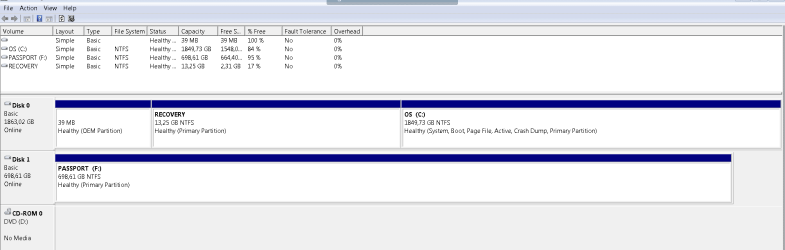
please post screenshot of disk management
 

My Computer My Computer

Computer type
Laptop
Computer Manufacturer/Model Number
ACER ASPIRE 5742G
OS
Microsoft Windows 7 Home Premium 64-bits 7601 Multiprocessor Free Service Pack 1
CPU
Intel(R) Core(TM) i3 CPU M 370 @ 2.40GHz
Motherboard
Acer Aspire 5742G
Memory
4,00 GB
Graphics Card(s)
ATI Mobility Radeon HD 5400 Series
Sound Card
(1) AMD High Definition Audio Device (2) Realtek High Defi
Screen Resolution
1366 x 768 x 32 bits (4294967296 colors) @ 60 Hz
Hard Drives
WDC WD5000BEVT-22ZAT0
). It doens't say something like "network path" and you can always access it on air as you told before. And if attach it directly it isn't even a network path.

sorry i do mean NETWORK path

HD directly connected = can't access some files on shadow copy

HD via wireless = network path not correct
 

My Computer My Computer

OS
Windows 7 Ultimate x64
). It doens't say something like "network path" and you can always access it on air as you told before. And if attach it directly it isn't even a network path.

sorry i do mean NETWORK path

HD directly connected = can't access some files on shadow copy

HD via wireless = network path not correct
Let's concentrate on the VSS error first. Maybe "NETWORK path" is a wrong error message form backup(?)

Post screenshot of disk management please
 

My Computer My Computer

Computer type
Laptop
Computer Manufacturer/Model Number
ACER ASPIRE 5742G
OS
Microsoft Windows 7 Home Premium 64-bits 7601 Multiprocessor Free Service Pack 1
CPU
Intel(R) Core(TM) i3 CPU M 370 @ 2.40GHz
Motherboard
Acer Aspire 5742G
Memory
4,00 GB
Graphics Card(s)
ATI Mobility Radeon HD 5400 Series
Sound Card
(1) AMD High Definition Audio Device (2) Realtek High Defi
Screen Resolution
1366 x 768 x 32 bits (4294967296 colors) @ 60 Hz
Hard Drives
WDC WD5000BEVT-22ZAT0
Te C drive is my computer
As you can see it also has a part without name and a part called recovery.
the F drive is my external HD
 

Attachments

  • Capture.PNG
    Capture.PNG
    11.5 KB · Views: 3

My Computer My Computer

OS
Windows 7 Ultimate x64
Make your C-partition much smaller let's say shrink it to 1000GB. Otherwise the max windows 7 allowes you. Rightclick on C in disk manangement. Right click on it than "shrink volume". Of succeeded succesfully, then

In elevated command prompt:

Code:
diskpart
sel dis 0
create partition extended
exit

Now reopen disk management again. You see C is smaller and the unallocated space has a green border. Correct? Create a new partition in that green part. Right click in that green part and "create simple volume". Of course NTFS and assign drive letter to it.

Post screenshot when done
 

My Computer My Computer

Computer type
Laptop
Computer Manufacturer/Model Number
ACER ASPIRE 5742G
OS
Microsoft Windows 7 Home Premium 64-bits 7601 Multiprocessor Free Service Pack 1
CPU
Intel(R) Core(TM) i3 CPU M 370 @ 2.40GHz
Motherboard
Acer Aspire 5742G
Memory
4,00 GB
Graphics Card(s)
ATI Mobility Radeon HD 5400 Series
Sound Card
(1) AMD High Definition Audio Device (2) Realtek High Defi
Screen Resolution
1366 x 768 x 32 bits (4294967296 colors) @ 60 Hz
Hard Drives
WDC WD5000BEVT-22ZAT0
Already done?
chkdsk/f c:
chkdsk/f/r c: (takes very long to complete!)
Do it at night
Internal is a seagate disk or western digital?
 

My Computer My Computer

Computer type
Laptop
Computer Manufacturer/Model Number
ACER ASPIRE 5742G
OS
Microsoft Windows 7 Home Premium 64-bits 7601 Multiprocessor Free Service Pack 1
CPU
Intel(R) Core(TM) i3 CPU M 370 @ 2.40GHz
Motherboard
Acer Aspire 5742G
Memory
4,00 GB
Graphics Card(s)
ATI Mobility Radeon HD 5400 Series
Sound Card
(1) AMD High Definition Audio Device (2) Realtek High Defi
Screen Resolution
1366 x 768 x 32 bits (4294967296 colors) @ 60 Hz
Hard Drives
WDC WD5000BEVT-22ZAT0
Already done?
chkdsk/f c:
chkdsk/f/r c: (takes very long to complete!)
Do it at night

I'M RUNNING A BACKUP NOW & THIS SEEMS TO BLOCK ABOVE PROCESS?
(message i get is: C is in use) WILL RUN AFTER THE BACKUP

**********

Internal is a seagate disk or western digital?

it only show hl-dt-st dvdrwbd ct30n. which when i google it, seems to be LG
 

My Computer My Computer

OS
Windows 7 Ultimate x64
I'm not so comfortable in splitting the C disc, as do not want to have 2 seperate discs.
 

My Computer My Computer

OS
Windows 7 Ultimate x64
Backup to direct HD (in NTFS) failed again. i tried only files (not system image)
 

Attachments

  • Capture.PNG
    Capture.PNG
    17.1 KB · Views: 4
  • Capture2.PNG
    Capture2.PNG
    11.8 KB · Views: 1

My Computer My Computer

OS
Windows 7 Ultimate x64
Already done?
chkdsk/f c:
chkdsk/f/r c: (takes very long to complete!)
Do it at night

I'M RUNNING A BACKUP NOW & THIS SEEMS TO BLOCK ABOVE PROCESS?
(message i get is: C is in use) WILL RUN AFTER THE BACKUP

**********

Internal is a seagate disk or western digital?

it only show hl-dt-st dvdrwbd ct30n. which when i google it, seems to be LG
hl-dt-st dvdrwbd is a dvd drive... not what I meant
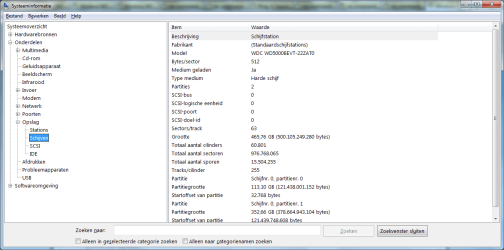
run msinfo32
Then see picture. It tells you the disk model
 

Attachments

  • Naamloos.png
    Naamloos.png
    34.8 KB · Views: 3

My Computer My Computer

Computer type
Laptop
Computer Manufacturer/Model Number
ACER ASPIRE 5742G
OS
Microsoft Windows 7 Home Premium 64-bits 7601 Multiprocessor Free Service Pack 1
CPU
Intel(R) Core(TM) i3 CPU M 370 @ 2.40GHz
Motherboard
Acer Aspire 5742G
Memory
4,00 GB
Graphics Card(s)
ATI Mobility Radeon HD 5400 Series
Sound Card
(1) AMD High Definition Audio Device (2) Realtek High Defi
Screen Resolution
1366 x 768 x 32 bits (4294967296 colors) @ 60 Hz
Hard Drives
WDC WD5000BEVT-22ZAT0
I'm not so comfortable in splitting the C disc, as do not want to have 2 seperate discs.
I understand you're cautious. But it's just a shrink and very safe.
But I can understand you don't want it.

I wanna prove it's not an usb issue and not an issue with external disk. I know you have used multiple disks and usb ports already.

Macrium Reflect FREE Edition - Information and download
The best free backup software there is!! Even better and flexible as win7 own backup! All famous supporters on sevenforums reccomend it. Give it a try. You can even mount the image as explained here How to browse an Image or 'File and Folder' Backup in Windows Explorer

Fails as well?

How to troubleshoot Microsoft Volume Shadow copy Service errors (VSS errors)
 
Last edited by a moderator:

My Computer My Computer

Computer type
Laptop
Computer Manufacturer/Model Number
ACER ASPIRE 5742G
OS
Microsoft Windows 7 Home Premium 64-bits 7601 Multiprocessor Free Service Pack 1
CPU
Intel(R) Core(TM) i3 CPU M 370 @ 2.40GHz
Motherboard
Acer Aspire 5742G
Memory
4,00 GB
Graphics Card(s)
ATI Mobility Radeon HD 5400 Series
Sound Card
(1) AMD High Definition Audio Device (2) Realtek High Defi
Screen Resolution
1366 x 768 x 32 bits (4294967296 colors) @ 60 Hz
Hard Drives
WDC WD5000BEVT-22ZAT0
Already done?
chkdsk/f c:
Internal is a seagate disk or western digital?

As C is busy i have to run it when i restart the system.
that worked, however where to i find the results afterwards....?

disc = no brand...? (see pic)
 

Attachments

  • Capture.PNG
    Capture.PNG
    17.6 KB · Views: 1

My Computer My Computer

OS
Windows 7 Ultimate x64
ah here it is;

A disk check has been scheduled.
Windows will now check the disk.
CHKDSK is verifying files (stage 1 of 3)...
392704 file records processed. File verification completed.
2453 large file records processed. 0 bad file records processed. 0 EA records processed. 60 reparse records processed. CHKDSK is verifying indexes (stage 2 of 3)...
514890 index entries processed. Index verification completed.
0 unindexed files scanned. 0 unindexed files recovered. CHKDSK is verifying security descriptors (stage 3 of 3)...
392704 file SDs/SIDs processed. Cleaning up 14 unused index entries from index $SII of file 0x9.
Cleaning up 14 unused index entries from index $SDH of file 0x9.
Cleaning up 14 unused security descriptors.
Security descriptor verification completed.
61094 data files processed. CHKDSK is verifying Usn Journal...
36447864 USN bytes processed. Usn Journal verification completed.
Windows has checked the file system and found no problems.
1939580927 KB total disk space.
319903564 KB in 238729 files.
150472 KB in 61095 indexes.
0 KB in bad sectors.
554995 KB in use by the system.
65536 KB occupied by the log file.
1618971896 KB available on disk.
4096 bytes in each allocation unit.
484895231 total allocation units on disk.
404742974 allocation units available on disk.
Internal Info:
00 fe 05 00 3c 93 04 00 5b 43 08 00 00 00 00 00 ....<...[C......
a5 37 00 00 3c 00 00 00 00 00 00 00 00 00 00 00 .7..<...........
00 00 00 00 00 00 00 00 00 00 00 00 00 00 00 00 ................
Windows has finished checking your disk.
Please wait while your computer restarts.
 

My Computer My Computer

OS
Windows 7 Ultimate x64
Back
Top