Solved Windows NO LONGER backing up

Attachments

  • Capture.PNG
    Capture.PNG
    29.2 KB · Views: 12

My Computer

OS
Windows 7 Ultimate x64
airport drives aren't shown because it's accessed via network. You only see local drives.

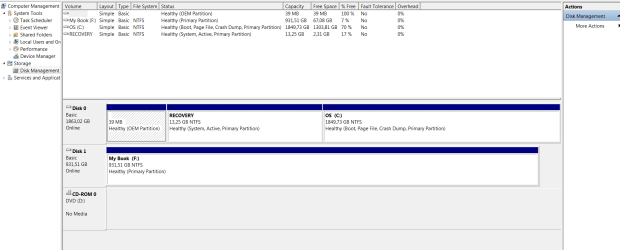
I see you boot from recovery partition! Please assign a drive letter (Q for example) to it. Then try to access it using explorer. Just a test. Post results
 

My Computer

Computer type
Laptop
Computer Manufacturer/Model Number
ACER ASPIRE 5742G
OS
Microsoft Windows 7 Home Premium 64-bits 7601 Multiprocessor Free Service Pack 1
CPU
Intel(R) Core(TM) i3 CPU M 370 @ 2.40GHz
Motherboard
Acer Aspire 5742G
Memory
4,00 GB
Graphics Card(s)
ATI Mobility Radeon HD 5400 Series
Sound Card
(1) AMD High Definition Audio Device (2) Realtek High Defi
Screen Resolution
1366 x 768 x 32 bits (4294967296 colors) @ 60 Hz
Hard Drives
WDC WD5000BEVT-22ZAT0

My Computer

Computer type
Laptop
Computer Manufacturer/Model Number
ACER ASPIRE 5742G
OS
Microsoft Windows 7 Home Premium 64-bits 7601 Multiprocessor Free Service Pack 1
CPU
Intel(R) Core(TM) i3 CPU M 370 @ 2.40GHz
Motherboard
Acer Aspire 5742G
Memory
4,00 GB
Graphics Card(s)
ATI Mobility Radeon HD 5400 Series
Sound Card
(1) AMD High Definition Audio Device (2) Realtek High Defi
Screen Resolution
1366 x 768 x 32 bits (4294967296 colors) @ 60 Hz
Hard Drives
WDC WD5000BEVT-22ZAT0
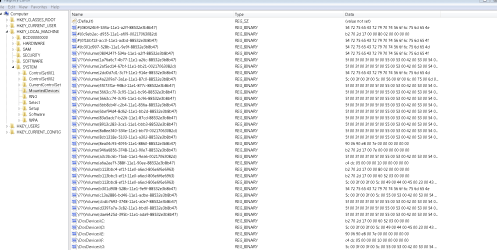
Now I had a closer look at your regedit output mounteddevices. Problem partition Q is not on same disk as C. Problem partition is on same physical disk as D! What is or was D (it's not shown anymore). Maybe it's the drive letter of airport physical disk if attached directly to laptop. test it please
 

My Computer

Computer type
Laptop
Computer Manufacturer/Model Number
ACER ASPIRE 5742G
OS
Microsoft Windows 7 Home Premium 64-bits 7601 Multiprocessor Free Service Pack 1
CPU
Intel(R) Core(TM) i3 CPU M 370 @ 2.40GHz
Motherboard
Acer Aspire 5742G
Memory
4,00 GB
Graphics Card(s)
ATI Mobility Radeon HD 5400 Series
Sound Card
(1) AMD High Definition Audio Device (2) Realtek High Defi
Screen Resolution
1366 x 768 x 32 bits (4294967296 colors) @ 60 Hz
Hard Drives
WDC WD5000BEVT-22ZAT0
hope this is correct?
Yes it was correct... but also fails

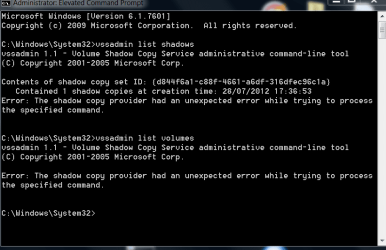
After deleting drive letter Q and a reboot: Enter elevated command prompt again

Code:
vssadmin list shadows
still waiting for output.
Did you delete drive letter Q or wasn't it assigned at all?

Q isn't listed there so can not delete it.

when i assign a leter to RECOVERY i can indeed access it.
(IE it show up under "computer")

However, Q is also still listed under "computer", so Q & recovery are 2 different partions i guess?
 

My Computer

OS
Windows 7 Ultimate x64

My Computer

Computer type
Laptop
Computer Manufacturer/Model Number
ACER ASPIRE 5742G
OS
Microsoft Windows 7 Home Premium 64-bits 7601 Multiprocessor Free Service Pack 1
CPU
Intel(R) Core(TM) i3 CPU M 370 @ 2.40GHz
Motherboard
Acer Aspire 5742G
Memory
4,00 GB
Graphics Card(s)
ATI Mobility Radeon HD 5400 Series
Sound Card
(1) AMD High Definition Audio Device (2) Realtek High Defi
Screen Resolution
1366 x 768 x 32 bits (4294967296 colors) @ 60 Hz
Hard Drives
WDC WD5000BEVT-22ZAT0
when i assign a leter to RECOVERY i can indeed access it.
(IE it show up under "computer")

However, Q is also still listed under "computer", so Q & recovery are 2 different partions i guess?
Deassign that drive letter in disk management. Be sure it's gone! than reboot your machine and open explorer. Q still listed there???? If so, what happens if you doubleclick on it?
 

My Computer

Computer type
Laptop
Computer Manufacturer/Model Number
ACER ASPIRE 5742G
OS
Microsoft Windows 7 Home Premium 64-bits 7601 Multiprocessor Free Service Pack 1
CPU
Intel(R) Core(TM) i3 CPU M 370 @ 2.40GHz
Motherboard
Acer Aspire 5742G
Memory
4,00 GB
Graphics Card(s)
ATI Mobility Radeon HD 5400 Series
Sound Card
(1) AMD High Definition Audio Device (2) Realtek High Defi
Screen Resolution
1366 x 768 x 32 bits (4294967296 colors) @ 60 Hz
Hard Drives
WDC WD5000BEVT-22ZAT0
Now I had a closer look at your regedit output mounteddevices. Problem partition Q is not on same disk as C. Problem partition is on same physical disk as D! What is or was D (it's not shown anymore). Maybe it's the drive letter of airport physical disk if attached directly to laptop. test it please

D is the dvd rom...
 

My Computer

OS
Windows 7 Ultimate x64
when i assign a leter to RECOVERY i can indeed access it.
(IE it show up under "computer")

However, Q is also still listed under "computer", so Q & recovery are 2 different partions i guess?
Deassign that drive letter in disk management. Be sure it's gone! than reboot your machine and open explorer. Q still listed there???? If so, what happens if you doubleclick on it?

Q does not show up in disk management. only under "computer"
it has always been there. and i never could access it. so that situation has not changed
 

My Computer

OS
Windows 7 Ultimate x64

My Computer

Computer type
Laptop
Computer Manufacturer/Model Number
ACER ASPIRE 5742G
OS
Microsoft Windows 7 Home Premium 64-bits 7601 Multiprocessor Free Service Pack 1
CPU
Intel(R) Core(TM) i3 CPU M 370 @ 2.40GHz
Motherboard
Acer Aspire 5742G
Memory
4,00 GB
Graphics Card(s)
ATI Mobility Radeon HD 5400 Series
Sound Card
(1) AMD High Definition Audio Device (2) Realtek High Defi
Screen Resolution
1366 x 768 x 32 bits (4294967296 colors) @ 60 Hz
Hard Drives
WDC WD5000BEVT-22ZAT0
Use Programs and Features in Control Panel to uninstall Microsoft Office 2010 software, also uninstall "Microsoft Application Virtualization Desktop Client.", the latter should remove the Q drive.

Reboot the PC when done removing them.
 

My Computer

Computer type
Laptop
Computer Manufacturer/Model Number
ACER ASPIRE 5742G
OS
Microsoft Windows 7 Home Premium 64-bits 7601 Multiprocessor Free Service Pack 1
CPU
Intel(R) Core(TM) i3 CPU M 370 @ 2.40GHz
Motherboard
Acer Aspire 5742G
Memory
4,00 GB
Graphics Card(s)
ATI Mobility Radeon HD 5400 Series
Sound Card
(1) AMD High Definition Audio Device (2) Realtek High Defi
Screen Resolution
1366 x 768 x 32 bits (4294967296 colors) @ 60 Hz
Hard Drives
WDC WD5000BEVT-22ZAT0
Use Programs and Features in Control Panel to uninstall Microsoft Office 2010 software, also uninstall "Microsoft Application Virtualization Desktop Client.", the latter should remove the Q drive.

Reboot the PC when done removing them.
If Office 2010 Click-to-Run does not meet your needs, you can uninstall it. Then, install Office 2010 by using a method other than Click-to-Run. To do this, follow these steps:

  1. Uninstall the Click-to-Run version of Office 2010 from Control Panel.
  2. Visit the site where you purchased Office 2010, and sign in with the same Live ID that you used when you first purchased Office 2010.
  3. Click the My Account link at the top of the home page to access your Office downloads.
  4. Click the Download button for the suite that you purchased, and then click the Advanced Options link under the Download Now button.
  5. There is a version of Office 2010 listed that is not Click-to-Run and that does not require an available Q: drive.
 

My Computer

Computer type
Laptop
Computer Manufacturer/Model Number
ACER ASPIRE 5742G
OS
Microsoft Windows 7 Home Premium 64-bits 7601 Multiprocessor Free Service Pack 1
CPU
Intel(R) Core(TM) i3 CPU M 370 @ 2.40GHz
Motherboard
Acer Aspire 5742G
Memory
4,00 GB
Graphics Card(s)
ATI Mobility Radeon HD 5400 Series
Sound Card
(1) AMD High Definition Audio Device (2) Realtek High Defi
Screen Resolution
1366 x 768 x 32 bits (4294967296 colors) @ 60 Hz
Hard Drives
WDC WD5000BEVT-22ZAT0
Hi.

Before doing the above, please note that back up is now works again
when a HD is directly attached to the pc.

It works with a HD in NTFS format, as well as FAT32

(I don't know why it started working again, as so far have not changed anything...?)

However the problem remains when trying to backup wireless to the airport:

either

A) when i try to configure a backup it won't let me choose the network
drive/airport,saying the path is incorrect. so impossible to even start a backup

or

B) i CAN choose the network/airport and i can start the backup.
only it fails after a while, saying the path is not correct.

(A & B happen random)

For me it's not a problem to delete office 2010, but do you really think this is
creating the problem?
 

My Computer

OS
Windows 7 Ultimate x64
"create system image" backup works as well (directly attached disk)?
In elevated command prompt

Code:
vssadmin list shadows
vssadmin list volumes
Still vss errors? Check eventlog
 

My Computer

Computer type
Laptop
Computer Manufacturer/Model Number
ACER ASPIRE 5742G
OS
Microsoft Windows 7 Home Premium 64-bits 7601 Multiprocessor Free Service Pack 1
CPU
Intel(R) Core(TM) i3 CPU M 370 @ 2.40GHz
Motherboard
Acer Aspire 5742G
Memory
4,00 GB
Graphics Card(s)
ATI Mobility Radeon HD 5400 Series
Sound Card
(1) AMD High Definition Audio Device (2) Realtek High Defi
Screen Resolution
1366 x 768 x 32 bits (4294967296 colors) @ 60 Hz
Hard Drives
WDC WD5000BEVT-22ZAT0
"create system image" backup works as well (directly attached disk)?
In elevated command prompt

Code:
vssadmin list shadows
vssadmin list volumes
Still vss errors? Check eventlog

yes:

1)
Volume Shadow Copy Service warning: VSS was denied access to the root of volume \\?\Volume{4a2209a7-3a1e-11e1-87c0-88532e3b8b47}\. Denying administrators from accessing volume roots can cause many unexpected failures, and will prevent VSS from functioning properly. Check security on the volume, and try the operation again.

2)
Volume Shadow Copy Service error: Unexpected error calling routine Error calling CreateFile on volume '\\?\Volume{4a2209a7-3a1e-11e1-87c0-88532e3b8b47}\'. hr = 0x8000ffff, Catastrophic failure

3)
Volume Shadow Copy Service error: Error calling a routine on a Shadow Copy Provider {b5946137-7b9f-4925-af80-51abd60b20d5}. Routine details IVssSnapshotProvider::QueryVolumesSupportedForSnapshots(ProviderId,-1,...) [hr = 0x80042302, A Volume Shadow Copy Service component encountered an unexpected error.
Check the Application event log for more information.
 

Attachments

  • Capture.PNG
    Capture.PNG
    14.8 KB · Views: 6

My Computer

OS
Windows 7 Ultimate x64

My Computer

Computer type
Laptop
Computer Manufacturer/Model Number
ACER ASPIRE 5742G
OS
Microsoft Windows 7 Home Premium 64-bits 7601 Multiprocessor Free Service Pack 1
CPU
Intel(R) Core(TM) i3 CPU M 370 @ 2.40GHz
Motherboard
Acer Aspire 5742G
Memory
4,00 GB
Graphics Card(s)
ATI Mobility Radeon HD 5400 Series
Sound Card
(1) AMD High Definition Audio Device (2) Realtek High Defi
Screen Resolution
1366 x 768 x 32 bits (4294967296 colors) @ 60 Hz
Hard Drives
WDC WD5000BEVT-22ZAT0

My Computer

Computer type
Laptop
Computer Manufacturer/Model Number
ACER ASPIRE 5742G
OS
Microsoft Windows 7 Home Premium 64-bits 7601 Multiprocessor Free Service Pack 1
CPU
Intel(R) Core(TM) i3 CPU M 370 @ 2.40GHz
Motherboard
Acer Aspire 5742G
Memory
4,00 GB
Graphics Card(s)
ATI Mobility Radeon HD 5400 Series
Sound Card
(1) AMD High Definition Audio Device (2) Realtek High Defi
Screen Resolution
1366 x 768 x 32 bits (4294967296 colors) @ 60 Hz
Hard Drives
WDC WD5000BEVT-22ZAT0
Just uninstall office 2010 (all stuff) Remove Office 2010 Beta and Reinstall Office 2007 - How-To Geek

And test the vssadmin commands again. Almost sure Q drive is gone and commands work fine. Now try to backup

uninstalled & Q is indeed gone.

however, even before & still now backup sometimes works & sometimes fails.
(even without trying to create a system image)
did several tests on 2 different HD discs.
tried complete new backups & tried to recommence a failed backup.


VSS command output:

Microsoft Windows [Version 6.1.7601]
Copyright (c) 2009 Microsoft Corporation. All rights reserved.
C:\Windows\System32>vssadmin list shadows
vssadmin 1.1 - Volume Shadow Copy Service administrative command-line tool
(C) Copyright 2001-2005 Microsoft Corp.
Contents of shadow copy set ID: {3aeaeddd-044e-4931-9e52-c72ac046a866}
Contained 2 shadow copies at creation time: 31/07/2012 14:56:36
Shadow Copy ID: {26898370-65ba-4af1-af29-4002864728c6}
Original Volume: (\\?\Volume{b113bbc4-ef1f-11e0-a6ed-806e6f6e6963}\)\\?
\Volume{b113bbc4-ef1f-11e0-a6ed-806e6f6e6963}\
Shadow Copy Volume: \\?\GLOBALROOT\Device\HarddiskVolumeShadowCopy17
Originating Machine: Egon-PC-HOME
Service Machine: Egon-PC-HOME
Provider: 'Microsoft Software Shadow Copy provider 1.0'
Type: ClientAccessibleWriters
Attributes: Persistent, Client-accessible, No auto release, Differentia
l, Auto recovered
Shadow Copy ID: {b03b1c99-1af4-47af-b3a2-82f20633adbf}
Original Volume: (C:)\\?\Volume{b113bbc5-ef1f-11e0-a6ed-806e6f6e6963}\
Shadow Copy Volume: \\?\GLOBALROOT\Device\HarddiskVolumeShadowCopy18
Originating Machine: Egon-PC-HOME
Service Machine: Egon-PC-HOME
Provider: 'Microsoft Software Shadow Copy provider 1.0'
Type: ClientAccessibleWriters
Attributes: Persistent, Client-accessible, No auto release, Differentia
l, Auto recovered
Contents of shadow copy set ID: {0731f660-6147-4b61-a68e-64fe73da410e}
Contained 1 shadow copies at creation time: 31/07/2012 11:19:34
Shadow Copy ID: {2bb2b794-7188-41cb-8db2-616ef20fce5c}
Original Volume: (F:)\\?\Volume{a6a2ee7f-388f-11e1-90ee-88532e3b8b47}\
Shadow Copy Volume: \\?\GLOBALROOT\Device\HarddiskVolumeShadowCopy15
Originating Machine: Egon-PC-HOME
Service Machine: Egon-PC-HOME
Provider: 'Microsoft Software Shadow Copy provider 1.0'
Type: DataVolumeRollback
Attributes: Persistent, No auto release, No writers, Differential
Contents of shadow copy set ID: {3addd4a3-b3f9-48b0-9121-e85afe75d85d}
Contained 1 shadow copies at creation time: 29/07/2012 10:20:23
Shadow Copy ID: {a0cbfa6d-8727-4186-940f-f11624da7b8f}
Original Volume: (C:)\\?\Volume{b113bbc5-ef1f-11e0-a6ed-806e6f6e6963}\
Shadow Copy Volume: \\?\GLOBALROOT\Device\HarddiskVolumeShadowCopy1
Originating Machine: Egon-PC-HOME
Service Machine: Egon-PC-HOME
Provider: 'Microsoft Software Shadow Copy provider 1.0'
Type: ClientAccessibleWriters
Attributes: Persistent, Client-accessible, No auto release, Differentia
l, Auto recovered
Contents of shadow copy set ID: {ef58da98-b778-4cb6-9e29-5c72f9ff8b80}
Contained 1 shadow copies at creation time: 29/07/2012 11:21:10
Shadow Copy ID: {99919a99-f493-46fb-84a6-6b6499a29bb0}
Original Volume: (C:)\\?\Volume{b113bbc5-ef1f-11e0-a6ed-806e6f6e6963}\
Shadow Copy Volume: \\?\GLOBALROOT\Device\HarddiskVolumeShadowCopy2
Originating Machine: Egon-PC-HOME
Service Machine: Egon-PC-HOME
Provider: 'Microsoft Software Shadow Copy provider 1.0'
Type: ClientAccessibleWriters
Attributes: Persistent, Client-accessible, No auto release, Differentia
l, Auto recovered
Contents of shadow copy set ID: {9f05e627-319a-49e8-9c90-42a4bebb68f6}
Contained 1 shadow copies at creation time: 29/07/2012 17:32:29
Shadow Copy ID: {da0e8758-ed13-42b8-812e-697fce52ad7a}
Original Volume: (C:)\\?\Volume{b113bbc5-ef1f-11e0-a6ed-806e6f6e6963}\
Shadow Copy Volume: \\?\GLOBALROOT\Device\HarddiskVolumeShadowCopy3
Originating Machine: Egon-PC-HOME
Service Machine: Egon-PC-HOME
Provider: 'Microsoft Software Shadow Copy provider 1.0'
Type: ClientAccessibleWriters
Attributes: Persistent, Client-accessible, No auto release, Differentia
l, Auto recovered
Contents of shadow copy set ID: {92fdb757-aa0b-4802-aa23-61c367268110}
Contained 2 shadow copies at creation time: 29/07/2012 17:34:54
Shadow Copy ID: {509ee7fe-4869-4e56-8665-8e7484f4dc8c}
Original Volume: (C:)\\?\Volume{b113bbc5-ef1f-11e0-a6ed-806e6f6e6963}\
Shadow Copy Volume: \\?\GLOBALROOT\Device\HarddiskVolumeShadowCopy4
Originating Machine: Egon-PC-HOME
Service Machine: Egon-PC-HOME
Provider: 'Microsoft Software Shadow Copy provider 1.0'
Type: ClientAccessibleWriters
Attributes: Persistent, Client-accessible, No auto release, Differentia
l, Auto recovered
Contents of shadow copy set ID: {c120ee72-af6a-4a12-9cdd-68c0eb3df9bd}
Contained 1 shadow copies at creation time: 29/07/2012 21:47:30
Shadow Copy ID: {1f9b9d5b-b4a3-4ceb-a31f-1d981b01bd86}
Original Volume: (C:)\\?\Volume{b113bbc5-ef1f-11e0-a6ed-806e6f6e6963}\
Shadow Copy Volume: \\?\GLOBALROOT\Device\HarddiskVolumeShadowCopy5
Originating Machine: Egon-PC-HOME
Service Machine: Egon-PC-HOME
Provider: 'Microsoft Software Shadow Copy provider 1.0'
Type: ClientAccessibleWriters
Attributes: Persistent, Client-accessible, No auto release, Differentia
l, Auto recovered
Contents of shadow copy set ID: {09f34085-a45d-40e4-9fa1-b88276e2643d}
Contained 1 shadow copies at creation time: 29/07/2012 22:23:55
Shadow Copy ID: {4acfd172-d079-4a5f-899d-f63ed45ecc4b}
Original Volume: (C:)\\?\Volume{b113bbc5-ef1f-11e0-a6ed-806e6f6e6963}\
Shadow Copy Volume: \\?\GLOBALROOT\Device\HarddiskVolumeShadowCopy6
Originating Machine: Egon-PC-HOME
Service Machine: Egon-PC-HOME
Provider: 'Microsoft Software Shadow Copy provider 1.0'
Type: ClientAccessibleWriters
Attributes: Persistent, Client-accessible, No auto release, Differentia
l, Auto recovered
Contents of shadow copy set ID: {f98eb151-14f5-4e2b-ad8a-12ed7f517f42}
Contained 1 shadow copies at creation time: 30/07/2012 07:59:07
Shadow Copy ID: {2c047c02-4e6f-4bdf-bbb4-fe7f7740d761}
Original Volume: (C:)\\?\Volume{b113bbc5-ef1f-11e0-a6ed-806e6f6e6963}\
Shadow Copy Volume: \\?\GLOBALROOT\Device\HarddiskVolumeShadowCopy7
Originating Machine: Egon-PC-HOME
Service Machine: Egon-PC-HOME
Provider: 'Microsoft Software Shadow Copy provider 1.0'
Type: ClientAccessibleWriters
Attributes: Persistent, Client-accessible, No auto release, Differentia
l, Auto recovered
Contents of shadow copy set ID: {f0a92aea-df59-4dae-a386-b7c0cc1bf6eb}
Contained 1 shadow copies at creation time: 30/07/2012 14:03:52
Shadow Copy ID: {f1652280-81bb-4e10-9cf0-7906c3c1de46}
Original Volume: (C:)\\?\Volume{b113bbc5-ef1f-11e0-a6ed-806e6f6e6963}\
Shadow Copy Volume: \\?\GLOBALROOT\Device\HarddiskVolumeShadowCopy8
Originating Machine: Egon-PC-HOME
Service Machine: Egon-PC-HOME
Provider: 'Microsoft Software Shadow Copy provider 1.0'
Type: ClientAccessibleWriters
Attributes: Persistent, Client-accessible, No auto release, Differentia
l, Auto recovered
Contents of shadow copy set ID: {b88ba5ec-0dfb-461c-8278-dc22e287ec5f}
Contained 1 shadow copies at creation time: 30/07/2012 15:54:05
Shadow Copy ID: {63cbeee4-1cb7-40f3-8162-538e392d75db}
Original Volume: (C:)\\?\Volume{b113bbc5-ef1f-11e0-a6ed-806e6f6e6963}\
Shadow Copy Volume: \\?\GLOBALROOT\Device\HarddiskVolumeShadowCopy9
Originating Machine: Egon-PC-HOME
Service Machine: Egon-PC-HOME
Provider: 'Microsoft Software Shadow Copy provider 1.0'
Type: ClientAccessibleWriters
Attributes: Persistent, Client-accessible, No auto release, Differentia
l, Auto recovered
Contents of shadow copy set ID: {9536216a-1fda-49c0-8fbb-2032bd8786f4}
Contained 2 shadow copies at creation time: 31/07/2012 07:49:17
Shadow Copy ID: {d904e09b-2f21-4192-867b-2cf76e0baa56}
Original Volume: (C:)\\?\Volume{b113bbc5-ef1f-11e0-a6ed-806e6f6e6963}\
Shadow Copy Volume: \\?\GLOBALROOT\Device\HarddiskVolumeShadowCopy10
Originating Machine: Egon-PC-HOME
Service Machine: Egon-PC-HOME
Provider: 'Microsoft Software Shadow Copy provider 1.0'
Type: ClientAccessibleWriters
Attributes: Persistent, Client-accessible, No auto release, Differentia
l, Auto recovered
Contents of shadow copy set ID: {4a7cc460-3ed2-49d4-8ff0-da609abb1166}
Contained 1 shadow copies at creation time: 31/07/2012 12:14:43
Shadow Copy ID: {16172b62-f36c-472f-927d-9beaad8bacea}
Original Volume: (C:)\\?\Volume{b113bbc5-ef1f-11e0-a6ed-806e6f6e6963}\
Shadow Copy Volume: \\?\GLOBALROOT\Device\HarddiskVolumeShadowCopy11
Originating Machine: Egon-PC-HOME
Service Machine: Egon-PC-HOME
Provider: 'Microsoft Software Shadow Copy provider 1.0'
Type: ClientAccessibleWriters
Attributes: Persistent, Client-accessible, No auto release, Differentia
l, Auto recovered
Contents of shadow copy set ID: {67684ad0-b204-4a37-bd43-896a851c8423}
Contained 1 shadow copies at creation time: 31/07/2012 14:21:20
Shadow Copy ID: {ef0685c7-62e6-468e-8cbb-c22e12adb84d}
Original Volume: (C:)\\?\Volume{b113bbc5-ef1f-11e0-a6ed-806e6f6e6963}\
Shadow Copy Volume: \\?\GLOBALROOT\Device\HarddiskVolumeShadowCopy12
Originating Machine: Egon-PC-HOME
Service Machine: Egon-PC-HOME
Provider: 'Microsoft Software Shadow Copy provider 1.0'
Type: ClientAccessibleWriters
Attributes: Persistent, Client-accessible, No auto release, Differentia
l, Auto recovered
Contents of shadow copy set ID: {1097f76d-a0a4-4c87-8bd3-fc4edb66c352}
Contained 1 shadow copies at creation time: 31/07/2012 14:22:29
Shadow Copy ID: {26e136ec-1772-48d9-8e0a-874bc2c9cb67}
Original Volume: (C:)\\?\Volume{b113bbc5-ef1f-11e0-a6ed-806e6f6e6963}\
Shadow Copy Volume: \\?\GLOBALROOT\Device\HarddiskVolumeShadowCopy13
Originating Machine: Egon-PC-HOME
Service Machine: Egon-PC-HOME
Provider: 'Microsoft Software Shadow Copy provider 1.0'
Type: ClientAccessibleWriters
Attributes: Persistent, Client-accessible, No auto release, Differentia
l, Auto recovered
Contents of shadow copy set ID: {9bee7f52-b64d-4430-aeea-5072f59b7ca0}
Contained 1 shadow copies at creation time: 31/07/2012 14:30:18
Shadow Copy ID: {6dd6fc6b-25f1-4432-9240-386eac38d096}
Original Volume: (C:)\\?\Volume{b113bbc5-ef1f-11e0-a6ed-806e6f6e6963}\
Shadow Copy Volume: \\?\GLOBALROOT\Device\HarddiskVolumeShadowCopy14
Originating Machine: Egon-PC-HOME
Service Machine: Egon-PC-HOME
Provider: 'Microsoft Software Shadow Copy provider 1.0'
Type: ClientAccessibleWriters
Attributes: Persistent, Client-accessible, No auto release, Differentia
l, Auto recovered
Contents of shadow copy set ID: {7636b7cb-e93f-491b-b64f-9d5509208bca}
Contained 1 shadow copies at creation time: 31/07/2012 14:43:54
Shadow Copy ID: {fde9308d-33e6-47c8-b993-a18bab1df6db}
Original Volume: (C:)\\?\Volume{b113bbc5-ef1f-11e0-a6ed-806e6f6e6963}\
Shadow Copy Volume: \\?\GLOBALROOT\Device\HarddiskVolumeShadowCopy16
Originating Machine: Egon-PC-HOME
Service Machine: Egon-PC-HOME
Provider: 'Microsoft Software Shadow Copy provider 1.0'
Type: ClientAccessibleWriters
Attributes: Persistent, Client-accessible, No auto release, Differentia
l, Auto recovered

C:\Windows\System32>vssadmin list volumes
vssadmin 1.1 - Volume Shadow Copy Service administrative command-line tool
(C) Copyright 2001-2005 Microsoft Corp.
Volume path: \\?\Volume{b113bbc4-ef1f-11e0-a6ed-806e6f6e6963}\
Volume name: \\?\Volume{b113bbc4-ef1f-11e0-a6ed-806e6f6e6963}\
Volume path: F:\
Volume name: \\?\Volume{a6a2ee7f-388f-11e1-90ee-88532e3b8b47}\
Volume path: C:\
Volume name: \\?\Volume{b113bbc5-ef1f-11e0-a6ed-806e6f6e6963}\
C:\Windows\System32>

 

My Computer

OS
Windows 7 Ultimate x64

My Computer

Computer type
Laptop
Computer Manufacturer/Model Number
ACER ASPIRE 5742G
OS
Microsoft Windows 7 Home Premium 64-bits 7601 Multiprocessor Free Service Pack 1
CPU
Intel(R) Core(TM) i3 CPU M 370 @ 2.40GHz
Motherboard
Acer Aspire 5742G
Memory
4,00 GB
Graphics Card(s)
ATI Mobility Radeon HD 5400 Series
Sound Card
(1) AMD High Definition Audio Device (2) Realtek High Defi
Screen Resolution
1366 x 768 x 32 bits (4294967296 colors) @ 60 Hz
Hard Drives
WDC WD5000BEVT-22ZAT0
Back
Top