Solved Windows NO LONGER backing up

what VSS error does it give in registry now btw?
 

My Computer My Computer

Computer type
Laptop
Computer Manufacturer/Model Number
ACER ASPIRE 5742G
OS
Microsoft Windows 7 Home Premium 64-bits 7601 Multiprocessor Free Service Pack 1
CPU
Intel(R) Core(TM) i3 CPU M 370 @ 2.40GHz
Motherboard
Acer Aspire 5742G
Memory
4,00 GB
Graphics Card(s)
ATI Mobility Radeon HD 5400 Series
Sound Card
(1) AMD High Definition Audio Device (2) Realtek High Defi
Screen Resolution
1366 x 768 x 32 bits (4294967296 colors) @ 60 Hz
Hard Drives
WDC WD5000BEVT-22ZAT0
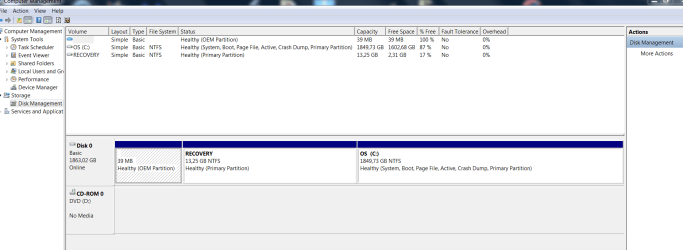
Please do this http://www.sevenforums.com/tutorials/209885-bootmgr-move-c-easybcd.html
And reboot. Post disk management screenshot afterwards
Also after reboot
vssadmin list volumes

Microsoft Windows [Version 6.1.7601]
Copyright (c) 2009 Microsoft Corporation. All rights reserved.
C:\Windows\System32>vssadmin list volumes
vssadmin 1.1 - Volume Shadow Copy Service administrative command-line tool
(C) Copyright 2001-2005 Microsoft Corp.
Volume path: C:\
Volume name: \\?\Volume{b113bbc5-ef1f-11e0-a6ed-806e6f6e6963}\
Volume path: \\?\Volume{b113bbc4-ef1f-11e0-a6ed-806e6f6e6963}\
Volume name: \\?\Volume{b113bbc4-ef1f-11e0-a6ed-806e6f6e6963}\
C:\Windows\System32>
 

Attachments

  • Capture.PNG
    Capture.PNG
    33.8 KB · Views: 13

My Computer My Computer

OS
Windows 7 Ultimate x64
what VSS error does it give in registry now btw?

you mean after i've tried a backup?

cos right now (when i do nothing) the only reference given is
"The VSS service is shutting down due to idle timeout. "
 

My Computer My Computer

OS
Windows 7 Ultimate x64
Are you very sure restore points are not enabled on recovery partition? Only C is enabled?
If so:
in elevated command prompt:
Code:
vssadmin delete shadows /all
And then create a manual restore point. If completed:
Code:
vssadmin list shadows
only 1 shadowset listed and pointing to volume C?
Post output
 

My Computer My Computer

Computer type
Laptop
Computer Manufacturer/Model Number
ACER ASPIRE 5742G
OS
Microsoft Windows 7 Home Premium 64-bits 7601 Multiprocessor Free Service Pack 1
CPU
Intel(R) Core(TM) i3 CPU M 370 @ 2.40GHz
Motherboard
Acer Aspire 5742G
Memory
4,00 GB
Graphics Card(s)
ATI Mobility Radeon HD 5400 Series
Sound Card
(1) AMD High Definition Audio Device (2) Realtek High Defi
Screen Resolution
1366 x 768 x 32 bits (4294967296 colors) @ 60 Hz
Hard Drives
WDC WD5000BEVT-22ZAT0

My Computer My Computer

Computer type
Laptop
Computer Manufacturer/Model Number
ACER ASPIRE 5742G
OS
Microsoft Windows 7 Home Premium 64-bits 7601 Multiprocessor Free Service Pack 1
CPU
Intel(R) Core(TM) i3 CPU M 370 @ 2.40GHz
Motherboard
Acer Aspire 5742G
Memory
4,00 GB
Graphics Card(s)
ATI Mobility Radeon HD 5400 Series
Sound Card
(1) AMD High Definition Audio Device (2) Realtek High Defi
Screen Resolution
1366 x 768 x 32 bits (4294967296 colors) @ 60 Hz
Hard Drives
WDC WD5000BEVT-22ZAT0
Hello,

Everything worked fine until recent.

I backup wireless to a external HD drive which is connected to an airport extreme.

All of a sudden backup started to fail because:

The network path was either typed incorrectly, does not exist, or th network provider is not currently available. Please try retyping the path or contact your network administrator. (0x800704b3)

However, I CAN access the HD directly from my pc

I then hooked up the HD DIRECTLY to my pc and tried to run backup.

Only now it fails for a diferent reason:
The backup was not successful. The error is: Windows Backup failed while trying to read from the shadow copy on one of the volumes being backed up. Please check in the event logs for any relevant errors. (0x81000037).

- I tried with a different HD
- I tried a completely new backup
- i tried switching off McAfee anti virus & firewal
- no new software was installed on my Pc or any other changes were made to the system

I reeally am lost, especially as there seems to be 2 diferent problems between wireless backup & via direct USB port...?

herebelow 3 error messages that windows gives when trying to back up
to the HD when connected DIRECTLY to the pc:

1)

The backup was not successful. The error is: Windows Backup failed while trying to read from the shadow copy on one of the volumes being backed up. Please check in the event logs for any relevant errors. (0x81000037).


-<Event xmlns="http://schemas.microsoft.com/win/2004/08/events/event">
-<System>
<ProviderName="Windows Backup" />
<EventID Qualifiers="0">4104</EventID>
<Level>2</Level>
<Task>0</Task>
<Keywords>0x80000000000000</Keywords>
<TimeCreatedSystemTime="2012-07-28T04:48:07.000000000Z" />
<EventRecordID>38237</EventRecordID>
<Channel>Application</Channel>
<Computer>Egon-PC-HOME</Computer>
<Security/>
</System>
-<EventData>
<Data>Windows Backup failed while trying to read from the shadow copy on one of the volumes being backed up. Please check in the event logs for any relevant errors. (0x81000037)</Data>
<Binary>37000081E30500003F0900005B090000420ED1665C2BEE174B64529CB14610EA71000000</Binary>
</EventData>
</Event>


2)

Fault bucket 1084420110, type 5
Event Name: WindowsBackupFailure
Response: Not available
Cab Id: 0

Problem signature:
P1: Backup
P2: 6.1.7601
P3: 0x81000037
P4: 11
P5:
P6:
P7:
P8:
P9:
P10:

Attached files:
C:\WINDOWS\Logs\WindowsBackup\WindowsBackup.1.etl

These files may be available here:
C:\ProgramData\Microsoft\Windows\WER\ReportArchive\NonCritical_Backup_37c94a3f7f9dc50e1a69c36b71e2ccbefec74cf_83ec3204

Analysis symbol:
Rechecking for solution: 0
Report Id: 6f370672-d86f-11e1-ae70-88532e3b8b47
Report Status: 0

-<Event xmlns="http://schemas.microsoft.com/win/2004/08/events/event">
-<System>
<ProviderName="Windows Error Reporting" />
<EventID Qualifiers="0">1001</EventID>
<Level>4</Level>
<Task>0</Task>
<Keywords>0x80000000000000</Keywords>
<TimeCreatedSystemTime="2012-07-28T04:48:16.000000000Z" />
<EventRecordID>38238</EventRecordID>
<Channel>Application</Channel>
<Computer>Egon-PC-HOME</Computer>
<Security/>
</System>
-<EventData>
<Data>1084420110</Data>
<Data>5</Data>
<Data>WindowsBackupFailure</Data>
<Data>Not available</Data>
<Data>0</Data>
<Data>Backup</Data>
<Data>6.1.7601</Data>
<Data>0x81000037</Data>
<Data>11</Data>
<Data/>
<Data/>
<Data/>
<Data/>
<Data/>
<Data/>
<Data>C:\WINDOWS\Logs\WindowsBackup\WindowsBackup.1.etl</Data>
<Data>C:\ProgramData\Microsoft\Windows\WER\ReportArchive\NonCritical_Backup_37c94a3f7f9dc50e1a69c36b71e2ccbefec74cf_83ec3204</Data>
<Data/>
<Data>0</Data>
<Data>6f370672-d86f-11e1-ae70-88532e3b8b47</Data>
<Data>0</Data>
</EventData>
</Event>


3)

Volume Shadow Copy Service warning: VSS was denied access to the root of volume \\?\Volume{4a2209a7-3a1e-11e1-87c0-88532e3b8b47}\. Denying administrators from accessing volume roots can cause many unexpected failures, and will prevent VSS from functioning properly. Check security on the volume, and try the operation again.

Operation:
Removing auto-release shadow copies
Loading provider

Context:
Execution Context: System Provider


-<Event xmlns="http://schemas.microsoft.com/win/2004/08/events/event">
-<System>
<ProviderName="VSS" />
<EventID Qualifiers="0">12348</EventID>
<Level>3</Level>
<Task>0</Task>
<Keywords>0x80000000000000</Keywords>
<TimeCreatedSystemTime="2012-07-28T05:11:49.000000000Z" />
<EventRecordID>38240</EventRecordID>
<Channel>Application</Channel>
<Computer>Egon-PC-HOME</Computer>
<Security/>
</System>
-<EventData>
<Data>\\?\Volume{4a2209a7-3a1e-11e1-87c0-88532e3b8b47}\</Data>
<Data>Operation: Removing auto-release shadow copies Loading provider Context: Execution Context: System Provider</Data>
<Binary>2D20436F64653A2053505250524F564330303030323333312D2043616C6C3A2053505250524F564330303030323237332D205049443A202030303131393233322D205449443A202030303131393730342D20434D443A2020433A5C57696E646F77735C53797374656D33325C737663686F73742E657865202D6B2073777072762D20557365723A204E616D653A204E5420415554484F524954595C53595354454D2C205349443A532D312D352D313820</Binary>
</EventData>
</Event>


Any help would be appreciated...

Krgds
Egon
Windows Backup failed while trying to read from the shadow copy on one of the volumes being backed up. 1) refers to shadow copy problems so VSS
2) is just windows error reporting. Not a real problem

3) This is the real problem: Volume Shadow Copy Service warning: VSS was denied access to the root of volume \\?\Volume{4a2209a7-3a1e-11e1-87c0-88532e3b8b47}\

\\?\Volume{4a2209a7-3a1e-11e1-87c0-88532e3b8b47}\ is Q-drive. And Q-drive is gone now!
 

My Computer My Computer

Computer type
Laptop
Computer Manufacturer/Model Number
ACER ASPIRE 5742G
OS
Microsoft Windows 7 Home Premium 64-bits 7601 Multiprocessor Free Service Pack 1
CPU
Intel(R) Core(TM) i3 CPU M 370 @ 2.40GHz
Motherboard
Acer Aspire 5742G
Memory
4,00 GB
Graphics Card(s)
ATI Mobility Radeon HD 5400 Series
Sound Card
(1) AMD High Definition Audio Device (2) Realtek High Defi
Screen Resolution
1366 x 768 x 32 bits (4294967296 colors) @ 60 Hz
Hard Drives
WDC WD5000BEVT-22ZAT0
Ok i have not followed your last instructions yet as i was running a test backup again.

I ONLY backedup a system image this time, which worked perfectly well.

there is 1 error message though;

Fault bucket 1090646835, type 5
Event Name: WindowsBackupFailure
Response: Not available
Cab Id: 0
Problem signature:
P1: Backup
P2: 6.1.7601
P3: 0x810000e2
P4: 11
P5:
P6:
P7:
P8:
P9:
P10:
Attached files:
C:\WINDOWS\Logs\WindowsBackup\WindowsBackup.1.etl
These files may be available here:
C:\ProgramData\Microsoft\Windows\WER\ReportArchive\NonCritical_Backup_680d91d1d4b161328a09ece3cdf2080dee85620_47961999
Analysis symbol:
Rechecking for solution: 0
Report Id: a7273488-db42-11e1-b6ce-88532e3b8b47
Report Status: 0


However i tried again to backup wirelles and it stil says "path not correct"
 

My Computer My Computer

OS
Windows 7 Ultimate x64
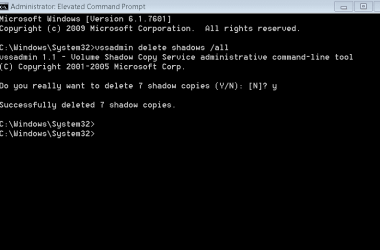
Are you very sure restore points are not enabled on recovery partition? Only C is enabled?

YES


If so:
in elevated command prompt:
vssadmin delete shadows /all
 

Attachments

  • Capture.PNG
    Capture.PNG
    5.2 KB · Views: 5

My Computer My Computer

OS
Windows 7 Ultimate x64
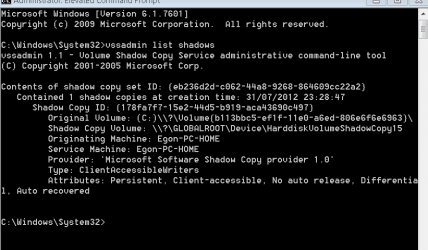
If completed:
Code:
vssadmin list shadows
only 1 shadowset listed and pointing to volume C?
Post output[/QUOTE]
 

Attachments

  • Capture.PNG
    Capture.PNG
    10.4 KB · Views: 7

My Computer My Computer

OS
Windows 7 Ultimate x64
restarted system & can now connect to wireless HD.
did 1 smal backup test (only pictures) which went ok.

will now test all different backup "types" (to NTFS, FAT32, System image etc)
and report back here. (it'll probably take a day or 2 to make 100pct sure)
 

My Computer My Computer

OS
Windows 7 Ultimate x64
restarted system & can now connect to wireless HD.
did 1 smal backup test (only pictures) which went ok.

will now test all different backup "types" (to NTFS, FAT32, System image etc)
and report back here. (it'll probably take a day or 2 to make 100pct sure)
Good luck
 

My Computer My Computer

Computer type
Laptop
Computer Manufacturer/Model Number
ACER ASPIRE 5742G
OS
Microsoft Windows 7 Home Premium 64-bits 7601 Multiprocessor Free Service Pack 1
CPU
Intel(R) Core(TM) i3 CPU M 370 @ 2.40GHz
Motherboard
Acer Aspire 5742G
Memory
4,00 GB
Graphics Card(s)
ATI Mobility Radeon HD 5400 Series
Sound Card
(1) AMD High Definition Audio Device (2) Realtek High Defi
Screen Resolution
1366 x 768 x 32 bits (4294967296 colors) @ 60 Hz
Hard Drives
WDC WD5000BEVT-22ZAT0
Sh*t....; problems remain same!

direct backup: can read shadow copy,
wireless back: path not correct

this is getting quite desperate...?
 

My Computer My Computer

OS
Windows 7 Ultimate x64
Sh*t....; problems remain same!

direct backup: can read shadow copy,
wireless back: path not correct

this is getting quite desperate...?
Can you sees relevant information in eventlog at time of failure?
 

My Computer My Computer

Computer type
Laptop
Computer Manufacturer/Model Number
ACER ASPIRE 5742G
OS
Microsoft Windows 7 Home Premium 64-bits 7601 Multiprocessor Free Service Pack 1
CPU
Intel(R) Core(TM) i3 CPU M 370 @ 2.40GHz
Motherboard
Acer Aspire 5742G
Memory
4,00 GB
Graphics Card(s)
ATI Mobility Radeon HD 5400 Series
Sound Card
(1) AMD High Definition Audio Device (2) Realtek High Defi
Screen Resolution
1366 x 768 x 32 bits (4294967296 colors) @ 60 Hz
Hard Drives
WDC WD5000BEVT-22ZAT0
it's a network path like \\air\sharename ?
 

My Computer My Computer

Computer type
Laptop
Computer Manufacturer/Model Number
ACER ASPIRE 5742G
OS
Microsoft Windows 7 Home Premium 64-bits 7601 Multiprocessor Free Service Pack 1
CPU
Intel(R) Core(TM) i3 CPU M 370 @ 2.40GHz
Motherboard
Acer Aspire 5742G
Memory
4,00 GB
Graphics Card(s)
ATI Mobility Radeon HD 5400 Series
Sound Card
(1) AMD High Definition Audio Device (2) Realtek High Defi
Screen Resolution
1366 x 768 x 32 bits (4294967296 colors) @ 60 Hz
Hard Drives
WDC WD5000BEVT-22ZAT0
Sh*t....; problems remain same!

direct backup: can read shadow copy,
wireless back: path not correct

this is getting quite desperate...?
Can you sees relevant information in eventlog at time of failure?

overnight i did a full backup, including system image: (IE DIRECT BACKUP VIA USB)

these are the massages in order of appearance:

1)
The backup was not successful. The error is: Windows Backup failed while trying to read from the shadow copy on one of the volumes being backed up. Please check in the event logs for any relevant errors. (0x81000037).

2)
Fault bucket 1084420110, type 5
Event Name: WindowsBackupFailure
Response: Not available
Cab Id: 0
Problem signature:
P1: Backup
P2: 6.1.7601
P3: 0x81000037
P4: 11
P5:
P6:
P7:
P8:
P9:
P10:
Attached files:
C:\WINDOWS\Logs\WindowsBackup\WindowsBackup.1.etl
These files may be available here:
C:\ProgramData\Microsoft\Windows\WER\ReportArchive\NonCritical_Backup_37c94a3f7f9dc50e1a69c36b71e2ccbefec74cf_22ec2ca2
Analysis symbol:
Rechecking for solution: 0
Report Id: 97049d07-db90-11e1-adaa-00217063082d
Report Status: 0

3)
The VSS service is shutting down due to idle timeout.

4)
The Block Level Backup Engine service has stopped.

5)
Fault bucket , type 0
Event Name: WindowsUpdateFailure
Response: Not available
Cab Id: 0
Problem signature:
P1: 7.6.7600.256
P2: 80072ee2
P3: 00000000-0000-0000-0000-000000000000
P4: Scan
P5: 101
P6: Unmanaged
P7:
P8:
P9:
P10:
Attached files:
These files may be available here:

Analysis symbol:
Rechecking for solution: 0
Report Id: 01946a6f-db99-11e1-adaa-00217063082d
Report Status: 0

6)
Fault bucket , type 0
Event Name: WindowsUpdateFailure
Response: Not available
Cab Id: 0
Problem signature:
P1: 7.6.7600.256
P2: 80072ee2
P3: 00000000-0000-0000-0000-000000000000
P4: Scan
P5: 101
P6: Unmanaged
P7:
P8:
P9:
P10:
Attached files:
These files may be available here:
C:\ProgramData\Microsoft\Windows\WER\ReportQueue\NonCritical_7.6.7600.256_d657698cc2203130accf771c18dbe77b92e59fa7_cab_1daf4744
Analysis symbol:
Rechecking for solution: 0
Report Id: 01946a6f-db99-11e1-adaa-00217063082d
Report Status: 4

7)
Fault bucket , type 0
Event Name: WindowsUpdateFailure
Response: Not available
Cab Id: 0
Problem signature:
P1: 7.6.7600.256
P2: 80072ee2
P3: 00000000-0000-0000-0000-000000000000
P4: Scan
P5: 101
P6: Unmanaged
P7:
P8:
P9:
P10:
Attached files:
These files may be available here:
C:\ProgramData\Microsoft\Windows\WER\ReportQueue\NonCritical_7.6.7600.256_d657698cc2203130accf771c18dbe77b92e59fa7_cab_1daf4744
Analysis symbol:
Rechecking for solution: 0
Report Id: 01946a6f-db99-11e1-adaa-00217063082d
Report Status: 0

8)

 

My Computer My Computer

OS
Windows 7 Ultimate x64
it's a network path like \\air\sharename ?

Yes correct.

i can ALWAYS access the wireless drive directly via my pc using this path,
so i i know 100pct sure it's correct.


like i mentioned before, when i want to setup a backup to this drive,
windows sometimes immediately says path not valid & sometimes says this
during the backup...
 

My Computer My Computer

OS
Windows 7 Ultimate x64
All failures you posted are almost on same time so related?
1) is the oldest enrty in event log, then 2 then 3 etc?
 

My Computer My Computer

Computer type
Laptop
Computer Manufacturer/Model Number
ACER ASPIRE 5742G
OS
Microsoft Windows 7 Home Premium 64-bits 7601 Multiprocessor Free Service Pack 1
CPU
Intel(R) Core(TM) i3 CPU M 370 @ 2.40GHz
Motherboard
Acer Aspire 5742G
Memory
4,00 GB
Graphics Card(s)
ATI Mobility Radeon HD 5400 Series
Sound Card
(1) AMD High Definition Audio Device (2) Realtek High Defi
Screen Resolution
1366 x 768 x 32 bits (4294967296 colors) @ 60 Hz
Hard Drives
WDC WD5000BEVT-22ZAT0
1: it says somethig about VSS error
2,3,4 just a result of problem 1

windows update... hmmm maybe also a vss problem ... don't know can you install updates succesfully now without errors?

If attached directly to win7 backup is always succesfully now?
 

My Computer My Computer

Computer type
Laptop
Computer Manufacturer/Model Number
ACER ASPIRE 5742G
OS
Microsoft Windows 7 Home Premium 64-bits 7601 Multiprocessor Free Service Pack 1
CPU
Intel(R) Core(TM) i3 CPU M 370 @ 2.40GHz
Motherboard
Acer Aspire 5742G
Memory
4,00 GB
Graphics Card(s)
ATI Mobility Radeon HD 5400 Series
Sound Card
(1) AMD High Definition Audio Device (2) Realtek High Defi
Screen Resolution
1366 x 768 x 32 bits (4294967296 colors) @ 60 Hz
Hard Drives
WDC WD5000BEVT-22ZAT0
1)
The backup was not successful. The error is: Windows Backup failed while trying to read from the shadow copy on one of the volumes being backed up. Please check in the event logs for any relevant errors. (0x81000037).
My native language is not english... but if I read corrrect it refers to the source of backup so C? Do I read it right?
 

My Computer My Computer

Computer type
Laptop
Computer Manufacturer/Model Number
ACER ASPIRE 5742G
OS
Microsoft Windows 7 Home Premium 64-bits 7601 Multiprocessor Free Service Pack 1
CPU
Intel(R) Core(TM) i3 CPU M 370 @ 2.40GHz
Motherboard
Acer Aspire 5742G
Memory
4,00 GB
Graphics Card(s)
ATI Mobility Radeon HD 5400 Series
Sound Card
(1) AMD High Definition Audio Device (2) Realtek High Defi
Screen Resolution
1366 x 768 x 32 bits (4294967296 colors) @ 60 Hz
Hard Drives
WDC WD5000BEVT-22ZAT0
started teh backup around midnight & these errors appeared between 06.20-07.20hrs this morning

1 is the 1st that appeared & 7 the last (forget the no 8 i mentioned in my previous post)
 

My Computer My Computer

OS
Windows 7 Ultimate x64
Back
Top