step by step for adding a computer to a domain

lex123412

New member
Local time
1:49 PM
Messages
4
How do i set up the dns right? What other requirements do I need to meet before I can successfully add a computer to a domain? I am interning at a computer company and need to figure this out..... I don't speak much technology language yet so the more simple instructions the better!!!! THANKS!!!!
 

My Computer My Computer

OS
32 bit
Make sure you are connected to the network before attempting these instructions.

To add a computer to a domain you need to have that domain's admin username and password or your username should be a member of the domain admin group. (local admin will not work).

Your domain should be setup for DNS server and DHCP server to issue these values when a client computer attempts to connect it.

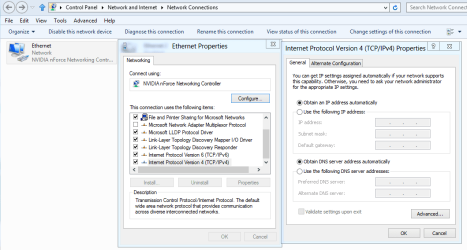
Before you attempt to connect to the Domain Server's Active Directory, go to the connected network adapter's IP settings and set "Obtain an IP address automatically" and "Obtain DNS server address automatically".

Right click on Computer icon either on desktop or inside start menu, and in the system properties, click on Advanced System Settings.

Go to the first tab (Computer name) and click on Network ID button. This will start a wizard, which will guide you through various steps involved in joining to an existing domain.

You can also use the Change button and enter the Domain name in the member of Domain field and click enter. This will ask you for the domain admin's username and password. Enter them and after authentication the computer will join the Domain and you will get a dialog box saying "Welcome to Domain (Domain name)". If the system could not find the domain's active directory then an error message will pops up. You need to fix the error and try again.

 

My Computer My Computer

Computer Manufacturer/Model Number
Toshiba Satellite P775-S7232
OS
MS Windows 7 Ultimate 64-bit SP1
CPU
i5-2410M 2.3GHz (2.9GHz Turbo-Boost) Sandy Bridge 32nm
Motherboard
Toshiba PHRAA ver. PSBY1U-00F003
Memory
4GB+4GB Samsung DDR3 PC3-10700 (1333 MHz)
Graphics Card(s)
Video Intel(R) HD Graphics Family, 1696MB available memory
Sound Card
Realtek High Definition Audio version=6.0.1.6323
Monitor(s) Displays
17.3 " Trubrite TFT LCD, LED Backlit
Screen Resolution
1600x900 32 bit, Native support for 720P content
Hard Drives
TOSHIBA MK6476GSXN
580.614 [GB] partitioned C: 80GB and D: 500GB with hidden recovery partitons.

Spare bay for 2nd HDD but no SATA connector :-(
PSU
Toshiba AC/DC Adapter
Case
Notebook
Cooling
Built-in Fan
Keyboard
Premium Raised Tile keyboard
Mouse
Logitech M215 wireless mouse
Internet Speed
Not fast enough
Other Info
Built-in Harman Kardon speakers with Dolby Advanced Audio, Waves MaxxAudio® 3. HDMI, 1xUSB3+3xUSB2 ports, WebCam, Battery life 4hrs 11mins, 4GB Readyboost SDHC card, WD My Book Essential Ext HDDs 2 TB, 2x1TB, My Passport SE 1TB and WDTV 1st Gen for Multimedia playing on a Sony Wega 32" LCD.
Recent addition to my toys are Asus Transformer Pad TF300T with 32GB onboard sd card + 32GB microsd card.
Before you attempt to connect to the Domain Server's Active Directory, go to the connected network adapter's IP settings and set "Obtain an IP address automatically" and "Obtain DNS server address automatically".

where is this?
 

My Computer My Computer

OS
32 bit

Attachments

  • IPv4 properties.PNG
    IPv4 properties.PNG
    27.1 KB · Views: 29

My Computer My Computer

Computer type
PC/Desktop
Computer Manufacturer/Model Number
Home built
OS
Windows 7 Ult, Windows 8.1 Pro,
CPU
Q9650-4.275GHz, E8600 4.5GHz, E6750-3.8GHz
Motherboard
Evga 780i FTW
Memory
G.Skill PC2 9600 1200Mhz 5 5 5 15 2T
Graphics Card(s)
GTX480
Sound Card
Asus Xonar D2
Monitor(s) Displays
HannsG
Screen Resolution
1680X1050
Hard Drives
GSkill Phoenix Pro 120GB SSD
PSU
ThermalTake Toughpower 1000Watt modular
Case
ThermalTake XaserV
Cooling
Xigmatek S1283
Keyboard
Logitech G15
Mouse
Logitech G9
Internet Speed
T1
Ik that I just want to know about properly setting up all of DNS settings
 

My Computer My Computer

OS
32 bit
If you want to setup the IPv4 values manually then you need the following values

Your client computer's IP address and Subnet Mask
Default Gateway IP of the domain Controller.

Primary DNS IP address
Alternate DNS IP address

If you know these values, then you may manually fill these details in the network adapter's IPv4 settings. If you do not know these values, then get them from your domain admin.

I am assuming you have fairly decent knowledge of networking principles. Otherwise you can not complete the job.
 

My Computer My Computer

Computer Manufacturer/Model Number
Toshiba Satellite P775-S7232
OS
MS Windows 7 Ultimate 64-bit SP1
CPU
i5-2410M 2.3GHz (2.9GHz Turbo-Boost) Sandy Bridge 32nm
Motherboard
Toshiba PHRAA ver. PSBY1U-00F003
Memory
4GB+4GB Samsung DDR3 PC3-10700 (1333 MHz)
Graphics Card(s)
Video Intel(R) HD Graphics Family, 1696MB available memory
Sound Card
Realtek High Definition Audio version=6.0.1.6323
Monitor(s) Displays
17.3 " Trubrite TFT LCD, LED Backlit
Screen Resolution
1600x900 32 bit, Native support for 720P content
Hard Drives
TOSHIBA MK6476GSXN
580.614 [GB] partitioned C: 80GB and D: 500GB with hidden recovery partitons.

Spare bay for 2nd HDD but no SATA connector :-(
PSU
Toshiba AC/DC Adapter
Case
Notebook
Cooling
Built-in Fan
Keyboard
Premium Raised Tile keyboard
Mouse
Logitech M215 wireless mouse
Internet Speed
Not fast enough
Other Info
Built-in Harman Kardon speakers with Dolby Advanced Audio, Waves MaxxAudio® 3. HDMI, 1xUSB3+3xUSB2 ports, WebCam, Battery life 4hrs 11mins, 4GB Readyboost SDHC card, WD My Book Essential Ext HDDs 2 TB, 2x1TB, My Passport SE 1TB and WDTV 1st Gen for Multimedia playing on a Sony Wega 32" LCD.
Recent addition to my toys are Asus Transformer Pad TF300T with 32GB onboard sd card + 32GB microsd card.
Ik that I just want to know about properly setting up all of DNS settings

Before you attempt to connect to the Domain Server's Active Directory, go to the connected network adapter's IP settings and set "Obtain an IP address automatically" and "Obtain DNS server address automatically".

where is this?


I'm pretty sure I gave you what you asked for about joining a Domain?

I also posted a picture of where to type the IP and DNS servers which is your IPv4 properties.

In fact both things you asked for are in my first post. ;)

For DNS just type in the preferred DNS servers addresses either into the IPv4 properties window or type them into your routers settings for DNS servers.
 

My Computer My Computer

Computer type
PC/Desktop
Computer Manufacturer/Model Number
Home built
OS
Windows 7 Ult, Windows 8.1 Pro,
CPU
Q9650-4.275GHz, E8600 4.5GHz, E6750-3.8GHz
Motherboard
Evga 780i FTW
Memory
G.Skill PC2 9600 1200Mhz 5 5 5 15 2T
Graphics Card(s)
GTX480
Sound Card
Asus Xonar D2
Monitor(s) Displays
HannsG
Screen Resolution
1680X1050
Hard Drives
GSkill Phoenix Pro 120GB SSD
PSU
ThermalTake Toughpower 1000Watt modular
Case
ThermalTake XaserV
Cooling
Xigmatek S1283
Keyboard
Logitech G15
Mouse
Logitech G9
Internet Speed
T1
Back
Top