Virtual memory - Pagefile problem: no drives in list!

My Computer My Computer

OS
Windows 7 beta 1
CPU
E8400 (sometimes @4Ghz)
Motherboard
Asus Maxiumus Formula
Memory
CORSAIR DDR2 4GB (2x2GB) Kit DOMINATOR PC2-8500 1066MHz CL
Graphics Card(s)
Nvidia 8800 GTS 512
I´ve got the same problem but can´t install Intel(R) Matrix Storage Manager since I´m on a Gigabyte GA-EP35-DS3 that has a non-raid chipset, ICH9 :(
 

My Computer My Computer

OS
Windows 7 x64 Build 7229
CPU
Intel Core 2 Duo E8200
Motherboard
Gigabyte GA-EP35-DS3
Memory
OCZ Reaper HPC DDR2 PC8500/1066MHz CL5 2x2GB
Graphics Card(s)
NVIDIA GeForce 8800 GT
Sound Card
Onboard sound, Realtek ALC889A
Monitor(s) Displays
Sony KDL-46D3000
Screen Resolution
1360x768
Hard Drives
Western Digital Caviar Blue WD5000AAKS 16MB 500GB
Western Digital Caviar SE16 WD5000KS 16MB 500GB
PSU
Corsair HX520W
Keyboard
Logitech Cordless Desktop S510
Mouse
Logitech LX5
For this board you do not need the Raid driver but the chipset device driver (or inf-update utility). Good luck. :geek:
 

My Computer My Computer

OS
windows 7 - 32
CPU
intel q9550
Motherboard
gigabyte ep45-ds3r
Memory
2gb ddr2 1150 ocz reaper
Graphics Card(s)
nvidia 8600gt
Sound Card
onboard
Monitor(s) Displays
eizo s1921
Hard Drives
seagate 250 gb
For this board you do not need the Raid driver but the chipset device driver (or inf-update utility). Good luck. :geek:

I know, I have those installed... still doesn´t let me see my drives in the list.
 

My Computer My Computer

OS
Windows 7 x64 Build 7229
CPU
Intel Core 2 Duo E8200
Motherboard
Gigabyte GA-EP35-DS3
Memory
OCZ Reaper HPC DDR2 PC8500/1066MHz CL5 2x2GB
Graphics Card(s)
NVIDIA GeForce 8800 GT
Sound Card
Onboard sound, Realtek ALC889A
Monitor(s) Displays
Sony KDL-46D3000
Screen Resolution
1360x768
Hard Drives
Western Digital Caviar Blue WD5000AAKS 16MB 500GB
Western Digital Caviar SE16 WD5000KS 16MB 500GB
PSU
Corsair HX520W
Keyboard
Logitech Cordless Desktop S510
Mouse
Logitech LX5
I know, I have those installed... still doesn´t let me see my drives in the list.

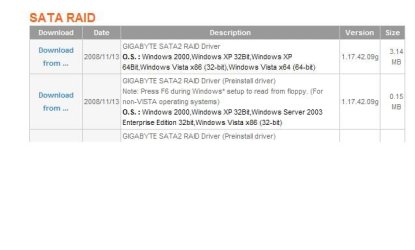
You will need this driver from Gigabyte:
 

Attachments

  • capture.JPG
    capture.JPG
    20.2 KB · Views: 37

My Computer My Computer

Computer Manufacturer/Model Number
ENIAC
OS
Windows 7 RC 7100 32bit/64bit
CPU
Intel Core2Duo E4500 2.20 GHz
Motherboard
ASUS P5LD2-X/1333
Memory
2x1GB Kinsgston DDR2 800MHz
Graphics Card(s)
Nvidia 8500GT
Sound Card
Onboard High Definition Audio Device
Monitor(s) Displays
Sony Bravia 42"
Case
LINKW 2222
Cooling
Standard Intel
Keyboard
Some cheap one
Mouse
Microsoft Intellimouse something
Internet Speed
24MBps ADSL
You will need this driver from Gigabyte:

I don´t use the Gigabyte raid controller, it´s disabled in the bios. My HD:s are connected to the Intel connectors. Thanks for trying to help out though :)
 

My Computer My Computer

OS
Windows 7 x64 Build 7229
CPU
Intel Core 2 Duo E8200
Motherboard
Gigabyte GA-EP35-DS3
Memory
OCZ Reaper HPC DDR2 PC8500/1066MHz CL5 2x2GB
Graphics Card(s)
NVIDIA GeForce 8800 GT
Sound Card
Onboard sound, Realtek ALC889A
Monitor(s) Displays
Sony KDL-46D3000
Screen Resolution
1360x768
Hard Drives
Western Digital Caviar Blue WD5000AAKS 16MB 500GB
Western Digital Caviar SE16 WD5000KS 16MB 500GB
PSU
Corsair HX520W
Keyboard
Logitech Cordless Desktop S510
Mouse
Logitech LX5
Were you having these problems when you first installed or have they just started?

Have you used any hacks to remove watermarks or the send feedback?

Do you have Photoshop installed?

Have you updated and installed all your motherboard drivers?
 

My Computer My Computer

Computer Manufacturer/Model Number
Home Brew
OS
Windows 7 Ultimate Vista Ultimate x64
CPU
Core 2 Duo E8500 3.16Ghz @ 3.8Ghz
Motherboard
eVGA 750i FTW
Memory
2x2Gigs Patriot PC2-6400 LL
Graphics Card(s)
Inno3D GeForce GTX260 216 SP
Monitor(s) Displays
ASUS VW222U 22" 2ms Response time
Screen Resolution
1680x1050
Hard Drives
SATA 150GB
SATA II 250GB
USB IDE 750GB Ext.
PSU
HYTEC 600W & Thermaltake 650W Toughpower Power Exp
Case
Thermaltake Armor LCS (Liquid Cooling System)
Cooling
Liquid Cooling System
Keyboard
Logitech G15 Gaming Keyboard
Mouse
Logitech G9 Gaming Mouse
Were you having these problems when you first installed or have they just started?

When I first installed.

Have you used any hacks to remove watermarks or the send feedback?

Nope.

Do you have Photoshop installed?

Nope.

Have you updated and installed all your motherboard drivers?

Yep.
 

My Computer My Computer

OS
Windows 7 x64 Build 7229
CPU
Intel Core 2 Duo E8200
Motherboard
Gigabyte GA-EP35-DS3
Memory
OCZ Reaper HPC DDR2 PC8500/1066MHz CL5 2x2GB
Graphics Card(s)
NVIDIA GeForce 8800 GT
Sound Card
Onboard sound, Realtek ALC889A
Monitor(s) Displays
Sony KDL-46D3000
Screen Resolution
1360x768
Hard Drives
Western Digital Caviar Blue WD5000AAKS 16MB 500GB
Western Digital Caviar SE16 WD5000KS 16MB 500GB
PSU
Corsair HX520W
Keyboard
Logitech Cordless Desktop S510
Mouse
Logitech LX5
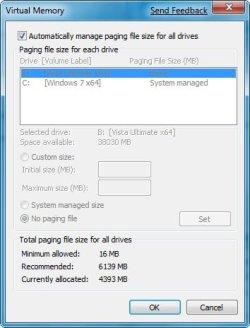
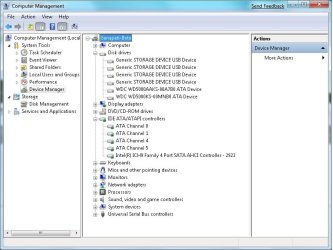
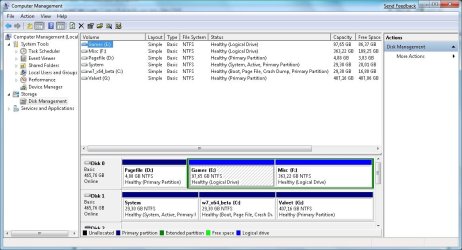
Can you post some pics of your pagefile, Disk management and device management?

2009-01-16_061703.jpg2009-01-16_061725.jpg2009-01-16_061756.jpg
 

My Computer My Computer

Computer Manufacturer/Model Number
Home Brew
OS
Windows 7 Ultimate Vista Ultimate x64
CPU
Core 2 Duo E8500 3.16Ghz @ 3.8Ghz
Motherboard
eVGA 750i FTW
Memory
2x2Gigs Patriot PC2-6400 LL
Graphics Card(s)
Inno3D GeForce GTX260 216 SP
Monitor(s) Displays
ASUS VW222U 22" 2ms Response time
Screen Resolution
1680x1050
Hard Drives
SATA 150GB
SATA II 250GB
USB IDE 750GB Ext.
PSU
HYTEC 600W & Thermaltake 650W Toughpower Power Exp
Case
Thermaltake Armor LCS (Liquid Cooling System)
Cooling
Liquid Cooling System
Keyboard
Logitech G15 Gaming Keyboard
Mouse
Logitech G9 Gaming Mouse
Can you post some pics of your pagefile, Disk management and device management?

"System" is my Vista partition, it stores its pagefile on D:
 

Attachments

  • CMDEVM.jpg
    CMDEVM.jpg
    64.8 KB · Views: 9
  • CMDISKM.jpg
    CMDISKM.jpg
    98.3 KB · Views: 10
  • VM.jpg
    VM.jpg
    21 KB · Views: 6
Last edited:

My Computer My Computer

OS
Windows 7 x64 Build 7229
CPU
Intel Core 2 Duo E8200
Motherboard
Gigabyte GA-EP35-DS3
Memory
OCZ Reaper HPC DDR2 PC8500/1066MHz CL5 2x2GB
Graphics Card(s)
NVIDIA GeForce 8800 GT
Sound Card
Onboard sound, Realtek ALC889A
Monitor(s) Displays
Sony KDL-46D3000
Screen Resolution
1360x768
Hard Drives
Western Digital Caviar Blue WD5000AAKS 16MB 500GB
Western Digital Caviar SE16 WD5000KS 16MB 500GB
PSU
Corsair HX520W
Keyboard
Logitech Cordless Desktop S510
Mouse
Logitech LX5

My Computer My Computer

Computer Manufacturer/Model Number
Home Brew
OS
Windows 7 Ultimate Vista Ultimate x64
CPU
Core 2 Duo E8500 3.16Ghz @ 3.8Ghz
Motherboard
eVGA 750i FTW
Memory
2x2Gigs Patriot PC2-6400 LL
Graphics Card(s)
Inno3D GeForce GTX260 216 SP
Monitor(s) Displays
ASUS VW222U 22" 2ms Response time
Screen Resolution
1680x1050
Hard Drives
SATA 150GB
SATA II 250GB
USB IDE 750GB Ext.
PSU
HYTEC 600W & Thermaltake 650W Toughpower Power Exp
Case
Thermaltake Armor LCS (Liquid Cooling System)
Cooling
Liquid Cooling System
Keyboard
Logitech G15 Gaming Keyboard
Mouse
Logitech G9 Gaming Mouse
Can you confirm that you have installed all the latest drivers from this website.

GIGABYTE - Support&Download - Motherboard - Driver - GA-EP35-DS3 (rev. 2.1)

In particular this one.
motherboard_driver_sata_gb_sata2raid.exe

And this one.
motherboard_driver_chipset_intel.exe

Yes, I have installed the latest Intel chipset drivers(INF Update Utility v9.0.0.1008), the ones on Gigabytes' site are outdated.

I have not installed any drivers for the Gigabyte sata2 raid controller since I don´t use it and have it disabled in the BIOS.

Is there anyone here that has a non-raid Intel southbridge chipset(ICH9, ICH10 etc.) that does not have this problem?
 

My Computer My Computer

OS
Windows 7 x64 Build 7229
CPU
Intel Core 2 Duo E8200
Motherboard
Gigabyte GA-EP35-DS3
Memory
OCZ Reaper HPC DDR2 PC8500/1066MHz CL5 2x2GB
Graphics Card(s)
NVIDIA GeForce 8800 GT
Sound Card
Onboard sound, Realtek ALC889A
Monitor(s) Displays
Sony KDL-46D3000
Screen Resolution
1360x768
Hard Drives
Western Digital Caviar Blue WD5000AAKS 16MB 500GB
Western Digital Caviar SE16 WD5000KS 16MB 500GB
PSU
Corsair HX520W
Keyboard
Logitech Cordless Desktop S510
Mouse
Logitech LX5
So all of your HDD's are IDE is that what your telling me? Also you say that the drivers from Gigabyte are outdated but that doesn't mean they aren't still the most compatible drivers for your hardware, I think it's still worth a shot and you have nothing to lose.
 

My Computer My Computer

Computer Manufacturer/Model Number
Home Brew
OS
Windows 7 Ultimate Vista Ultimate x64
CPU
Core 2 Duo E8500 3.16Ghz @ 3.8Ghz
Motherboard
eVGA 750i FTW
Memory
2x2Gigs Patriot PC2-6400 LL
Graphics Card(s)
Inno3D GeForce GTX260 216 SP
Monitor(s) Displays
ASUS VW222U 22" 2ms Response time
Screen Resolution
1680x1050
Hard Drives
SATA 150GB
SATA II 250GB
USB IDE 750GB Ext.
PSU
HYTEC 600W & Thermaltake 650W Toughpower Power Exp
Case
Thermaltake Armor LCS (Liquid Cooling System)
Cooling
Liquid Cooling System
Keyboard
Logitech G15 Gaming Keyboard
Mouse
Logitech G9 Gaming Mouse
No, my HDD's are SATA2 in AHCI-mode. The IHC9 chipset has 4 SATA connectors.
 

My Computer My Computer

OS
Windows 7 x64 Build 7229
CPU
Intel Core 2 Duo E8200
Motherboard
Gigabyte GA-EP35-DS3
Memory
OCZ Reaper HPC DDR2 PC8500/1066MHz CL5 2x2GB
Graphics Card(s)
NVIDIA GeForce 8800 GT
Sound Card
Onboard sound, Realtek ALC889A
Monitor(s) Displays
Sony KDL-46D3000
Screen Resolution
1360x768
Hard Drives
Western Digital Caviar Blue WD5000AAKS 16MB 500GB
Western Digital Caviar SE16 WD5000KS 16MB 500GB
PSU
Corsair HX520W
Keyboard
Logitech Cordless Desktop S510
Mouse
Logitech LX5
And also, the latest Intel drivers work without problems in Vista on the same computer.
 

My Computer My Computer

OS
Windows 7 x64 Build 7229
CPU
Intel Core 2 Duo E8200
Motherboard
Gigabyte GA-EP35-DS3
Memory
OCZ Reaper HPC DDR2 PC8500/1066MHz CL5 2x2GB
Graphics Card(s)
NVIDIA GeForce 8800 GT
Sound Card
Onboard sound, Realtek ALC889A
Monitor(s) Displays
Sony KDL-46D3000
Screen Resolution
1360x768
Hard Drives
Western Digital Caviar Blue WD5000AAKS 16MB 500GB
Western Digital Caviar SE16 WD5000KS 16MB 500GB
PSU
Corsair HX520W
Keyboard
Logitech Cordless Desktop S510
Mouse
Logitech LX5
I just reinstalled 7 (64 bit) today and I'm already hunting for bug fixes.

I have a AMD 780G mainboard from Asus and the latest Vista southbridge drivers don't install for me.

Another fix: Windows 7 must run in IDE mode, not AHCI in order for the drives to show up.

Check BIOS for Sata controller mode something, it should have IDE, S-ATA and on some mb RAID as options.

Pretty simple solution that worked for me... after that I switched back to AHCI... the drives were missing again, but I'm done with that setting and moving on to the next bug.
 
Last edited:

My Computer My Computer

OS
Windows 7 x64 Build 7000
For those with an AMD chipset motherboard (7xx series, and 6xx as well i think), i solved this downloading the RAID driver package from AMD site. It comes with drivers for both SATA RAID mode and AHCI mode.
I had this same problem in AHCI mode and after installing this driver i was able to see the disks on the virtual memory config window.

The Soutbridge driver is only for SATA IDE mode, but unlike with AHCI mode, the Windows default driver is enough to make the disks appear in the VM config window.

AMD RAID Driver for Vista x86
AMD RAID Driver for Vista x64
 

My Computer My Computer

OS
Windows 7 Beta 1 x64
CPU
Athlon X2 5600 AM2 Brisbane
Motherboard
Gigabyte GA-MA78GM-S2H
Memory
Corsair XMS2 Kit 2x2gb (4gb) 800MHz CL5
Graphics Card(s)
ATI Radeon HD3850HD 256mb
Sound Card
Creative X-Fi Xtremegamer Fatal1ty Pro
Back
Top