No Sound on HDMI out

tosunthex

New member
Local time
1:52 PM
Messages
7
hey there

first sry for my bad english
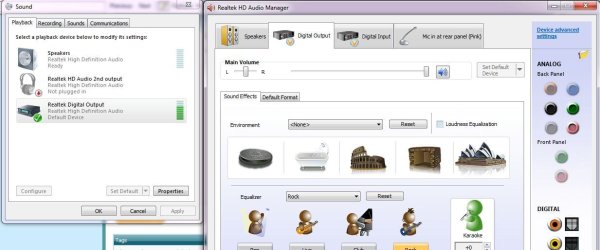
after searching google all day and upgrade my soundcard,motherboard and graphic drivers still i cant fixed my sound problem. Still i cant hear anything on Palit 9800 Hdmi out. i change my default playback device to "Realtek Digital Output" but still no sound on hdmi. when i use my pc speaker everything is working very good but i want to watch my MKV s on my tv.

i was upgrade from windows xp and when i using xp my system was worked very good

Capture.JPG
My Pc Spec
gigabyte p35c ds3r mobo with Realtek alc889
palit 9800gt
Windows 7 build 7600 64bit

My drivers
Realtek R229 "vista_win7_r229.exe"
Nvidia 190.38 "190.38_desktop_win7_winvista_64bit_english_whql"

My AV Reciever
Philips DFR 9000 "its support dts thx and other things"

How can i fix this problem ??
 

My Computer My Computer

Computer Manufacturer/Model Number
windows 7 7600
OS
windows 7 build7600
CPU
intel e 7200
Motherboard
gigabyte dsr-3r
Memory
2gb
Graphics Card(s)
palit 9800gt
Sound Card
realtek alc890
Monitor(s) Displays
samsung 223bw
Only some video cards carry audio over the HDMI port. The RealTek hi-def audio port is NOT on the HDMI cable. Coonect the RealTek digitial audio port directly to your TV/system.
 
You get a cable like this with your video card,

spdifcable-1.png


If not contact Palit and ask them about getting one, as no Nvidia card can do audio over HDMI without one of those cables going from the sound card to the video card.

Edit: And here is how you do it,

http://www.overclock.net/nvidia/441176-guide-8800gt-9800gt-9800gtx-sound-over.html#post5305349
 
Last edited:

My Computer My Computer

Computer type
PC/Desktop
Computer Manufacturer/Model Number
Me
OS
Win 7 Ultimate x64
CPU
FX-8350 @ 4.6 GHz so far
Motherboard
Asus M5A97 EVO
Memory
ADATA XPG V1 Series Black 8GB DDR3 1600
Graphics Card(s)
Sapphire R9 270x Dual-X
Sound Card
Xonar DGX w/ Corsair Vengence 1300
Monitor(s) Displays
Acer S232HL Abid
Screen Resolution
1920x1080
Hard Drives
120 GB OCZ Vertex 3
500 GB Seagate 7200.12
PSU
Antec Earthwatts 650W Green
Case
Antec Three Hundred
Cooling
Cooler Master 212 EVO
Keyboard
Logitech G510
Mouse
Logitech G500s
Internet Speed
35000/3000
thx for help guys but i have that cable and it works perfectly in windows xp . when i was upgrade to windows 7 my problems start. i m talking about working system guys still same cable still same card i make same connection like this only chage is windows 7. but now i cant transfer sound on hdmi port.
 

My Computer My Computer

Computer Manufacturer/Model Number
windows 7 7600
OS
windows 7 build7600
CPU
intel e 7200
Motherboard
gigabyte dsr-3r
Memory
2gb
Graphics Card(s)
palit 9800gt
Sound Card
realtek alc890
Monitor(s) Displays
samsung 223bw
You have it set to SPDIF/digital out in the Realtek controls as well as the Windows one?
 

My Computer My Computer

Computer type
PC/Desktop
Computer Manufacturer/Model Number
Me
OS
Win 7 Ultimate x64
CPU
FX-8350 @ 4.6 GHz so far
Motherboard
Asus M5A97 EVO
Memory
ADATA XPG V1 Series Black 8GB DDR3 1600
Graphics Card(s)
Sapphire R9 270x Dual-X
Sound Card
Xonar DGX w/ Corsair Vengence 1300
Monitor(s) Displays
Acer S232HL Abid
Screen Resolution
1920x1080
Hard Drives
120 GB OCZ Vertex 3
500 GB Seagate 7200.12
PSU
Antec Earthwatts 650W Green
Case
Antec Three Hundred
Cooling
Cooler Master 212 EVO
Keyboard
Logitech G510
Mouse
Logitech G500s
Internet Speed
35000/3000
thx for fast reply stormy
if you change one (in windows control or in realtek control panel) other one is automatically change but yes i did and check both of them again still no sound.
Capture2.JPG
 

My Computer My Computer

Computer Manufacturer/Model Number
windows 7 7600
OS
windows 7 build7600
CPU
intel e 7200
Motherboard
gigabyte dsr-3r
Memory
2gb
Graphics Card(s)
palit 9800gt
Sound Card
realtek alc890
Monitor(s) Displays
samsung 223bw
which version...200
 

My Computer My Computer

Computer Manufacturer/Model Number
Acer Aspire 8730-6951
OS
Windows 7 Build 7600 64bit/Ubuntu/Leopard
Memory
4 GB
Graphics Card(s)
NVidia Geforce 9600m GT
which version...200

i dont understand what r u asking for but you can check my first post for drivers and windows7 version
 

My Computer My Computer

Computer Manufacturer/Model Number
windows 7 7600
OS
windows 7 build7600
CPU
intel e 7200
Motherboard
gigabyte dsr-3r
Memory
2gb
Graphics Card(s)
palit 9800gt
Sound Card
realtek alc890
Monitor(s) Displays
samsung 223bw
if you have a digital input on your amp, try first if you can get sound using a spdif cable.

I myself don't use the hdmi for sound. I plug the spdif to my surround amp. And it worked even with a v186 Realtek driver.
 

My Computer My Computer

Computer Manufacturer/Model Number
me and myself
OS
vista x64/ win 7 x64
CPU
phenom 9950 BE
Motherboard
ASUS M2A-VM HDMI
Memory
8 gb
Graphics Card(s)
nvidia gts 250
Sound Card
realtek HD onboard
Monitor(s) Displays
dual hd 19" tft
Screen Resolution
1440x900
Hard Drives
2 x 500 gb WDC
1 x 500 gb Seagate
1 x 1000 gb Seagate
1 80 gb raptor
1 usb 160 gb
Cooling
standard issue
Keyboard
logitech g11
Mouse
usb wireless MS laser 6000
Internet Speed
18 mb (according to my provider :)
my system was work very good in xp and now why i need a new cable now :S if i transfer everything in one cable why i use 2 cable... and i think you cant give me guarantee for spdif is work when i will buy a new cable because they r same.. i think nothing is change taking out on mobo jumper or taking out from back of mobo spdif..
 

My Computer My Computer

Computer Manufacturer/Model Number
windows 7 7600
OS
windows 7 build7600
CPU
intel e 7200
Motherboard
gigabyte dsr-3r
Memory
2gb
Graphics Card(s)
palit 9800gt
Sound Card
realtek alc890
Monitor(s) Displays
samsung 223bw
the only thing i can come up with why it works with xp and not 7 is there's still a bug in the driver/windows interface which prevents the HDsignal to be passed along.

HDMI needs extra information ( mostly DRM related :mad: ) to process the video/audio stream.

Direct spdif doesn't. But for spdif any cable will do for a tryout if you a have cinch output.
Just take a stereo cinch audio cable and use just one of the wires.

If it works you know why. If it doesn't then you'll have to wait for the driver issues to be resolved. In that case be sure to report it.
 
Last edited:

My Computer My Computer

Computer Manufacturer/Model Number
me and myself
OS
vista x64/ win 7 x64
CPU
phenom 9950 BE
Motherboard
ASUS M2A-VM HDMI
Memory
8 gb
Graphics Card(s)
nvidia gts 250
Sound Card
realtek HD onboard
Monitor(s) Displays
dual hd 19" tft
Screen Resolution
1440x900
Hard Drives
2 x 500 gb WDC
1 x 500 gb Seagate
1 x 1000 gb Seagate
1 80 gb raptor
1 usb 160 gb
Cooling
standard issue
Keyboard
logitech g11
Mouse
usb wireless MS laser 6000
Internet Speed
18 mb (according to my provider :)
HDMI on my laptop works.
 

My Computer My Computer

Computer Manufacturer/Model Number
Acer Aspire 8730-6951
OS
Windows 7 Build 7600 64bit/Ubuntu/Leopard
Memory
4 GB
Graphics Card(s)
NVidia Geforce 9600m GT
i m still searching for answer some laptops and desktops have excatly same problem with me but no body have answer for that:(. so right now im using my old coaxial cable
 

My Computer My Computer

Computer Manufacturer/Model Number
windows 7 7600
OS
windows 7 build7600
CPU
intel e 7200
Motherboard
gigabyte dsr-3r
Memory
2gb
Graphics Card(s)
palit 9800gt
Sound Card
realtek alc890
Monitor(s) Displays
samsung 223bw
I have a HP G60-230US and my HDMI is working fine with sound. but at first it did not, the HDMI cable was not pushed in right , I have to make sure the cable is pushed in all the way for it to work, so maybe it's just your cable, I went out and got one of those cheap ones, so you get what you pay for.
 

My Computer My Computer

Computer Manufacturer/Model Number
HP G60-230US
OS
Windows 7 Ultimate X64
CPU
Intel Pentium Dual-Core T4200 @ 2.0 GHz
Memory
4GB's
Graphics Card(s)
Mobile Intel 45 Express
Sound Card
Conexant High Definition SmartAudio 221
Monitor(s) Displays
16"
Screen Resolution
1366X768
Hard Drives
320GB
Mouse
Logitech M305
Internet Speed
Cable
I have a very similar problem.

My computer is a Sony Vaio Z laptop. While on Vista, video and audio are outputted over HDMI to my LCD TV without any problems.

Once I upgraded to Windows 7, however, the audio no longer outputs. When I go to the Sound panel, it tells me the HDMI Output works, but that the cable is not plugged in (it is definitely plugged in as the video works).

I have an Nvidia GeForce 9300M GS and Realtek HD Audio.

Any ideas??

There is definitely a bug somewhere.
 

My Computer My Computer

OS
Windows 7
i think there was a recent update because when i first upgraded from vista to w7 my dell inspiron 1525 with sigmatel HDMI audio worked fine with both HDMI output audio and video... as of yesterday... after a windows update( it was automatic... i noticed the system was updated because i have new themes and wallpapers i did not download) my HDMI audio does not work but video works fine... it seems as if this problem was only affecting a small number of PCs at first but after a recent update MS somehow managed to mess it up for a lot of us....
 

My Computer My Computer

OS
Windows 7
to all, just be patient and don't wear yourself out looking for answers. It's the driver/audio sublayer interaction.

My system has a nice trick (7600 + realtek HD) if it wakes from sleep only the leftchannel works. Rebooting doesn't help. I have to take out the audiojack wait for a while and reinsert it and it works again till the next sleep.

Guess we'll have to live with it till this gets sorted out.
 

My Computer My Computer

Computer Manufacturer/Model Number
me and myself
OS
vista x64/ win 7 x64
CPU
phenom 9950 BE
Motherboard
ASUS M2A-VM HDMI
Memory
8 gb
Graphics Card(s)
nvidia gts 250
Sound Card
realtek HD onboard
Monitor(s) Displays
dual hd 19" tft
Screen Resolution
1440x900
Hard Drives
2 x 500 gb WDC
1 x 500 gb Seagate
1 x 1000 gb Seagate
1 80 gb raptor
1 usb 160 gb
Cooling
standard issue
Keyboard
logitech g11
Mouse
usb wireless MS laser 6000
Internet Speed
18 mb (according to my provider :)

My Computer My Computer

Computer Manufacturer/Model Number
windows 7 7600
OS
windows 7 build7600
CPU
intel e 7200
Motherboard
gigabyte dsr-3r
Memory
2gb
Graphics Card(s)
palit 9800gt
Sound Card
realtek alc890
Monitor(s) Displays
samsung 223bw
Back
Top