
Want to remove XP from dual boot

gevin20

New member
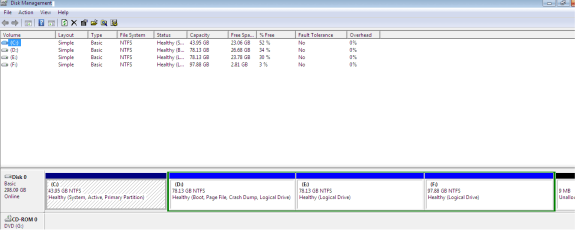
Please someOne help me..I want to remove XP(C) from my hard disk. i.e i want to format C drive ..i have dual boot with windows 7(D)..primary partition is C: and boot is on D ..wat should i do ? please give me steps..
 

Attachments
  • Untitled.png
    Untitled.png
    36.3 KB · Views: 27
Last edited:

My Computer

OS
Windows 7 ultimate 32bit
Honestly, you will have the fewest issues, just doing a clean install of Win 7.
 

My Computer

Computer type
PC/Desktop
Computer Manufacturer/Model Number
Me
OS
Windows 7 Home Premium x64 SP1
CPU
AMD FX-8350 Vishera 4.0GHz (4.2GHz Turbo) (stock speed)
Motherboard
ASUS SABERTOOTH 990FX R2.0 AM3+
Memory
CORSAIR Dominator Platinum 16GB (2 x 8GB) DDR3 1866Mhz
Graphics Card(s)
EVGA GeForce GTX 780 Ti (stock)
Sound Card
onboard
Monitor(s) Displays
DELL Ultrasharp U3011, 30" IPS monitor
Screen Resolution
2560 x 1600
Hard Drives
WD 500GB Velociraptor,
WD 2TB Caviar Black FZEX (2)
PSU
PC Power & Cooling Silencer 750W Quad EPS12V
Case
Coolermaster ATCS 840 Full Tower Case
Cooling
COOLER MASTER Hyper 212 EVO (push/pull), 7 case fans
Keyboard
Ducky DK9008 Shine II Blue LED Backlit Mechanical (MX Black)
Mouse
$15 Logiitech
Internet Speed
50/50 Verizon FIOS
Antivirus
Bitdefender Internet Security 2019 (paid)
Browser
Mozilla Firefox 67.0.2 x64

My Computer

Computer type
PC/Desktop
Computer Manufacturer/Model Number
Me
OS
Windows 7 Home Premium x64 SP1
CPU
AMD FX-8350 Vishera 4.0GHz (4.2GHz Turbo) (stock speed)
Motherboard
ASUS SABERTOOTH 990FX R2.0 AM3+
Memory
CORSAIR Dominator Platinum 16GB (2 x 8GB) DDR3 1866Mhz
Graphics Card(s)
EVGA GeForce GTX 780 Ti (stock)
Sound Card
onboard
Monitor(s) Displays
DELL Ultrasharp U3011, 30" IPS monitor
Screen Resolution
2560 x 1600
Hard Drives
WD 500GB Velociraptor,
WD 2TB Caviar Black FZEX (2)
PSU
PC Power & Cooling Silencer 750W Quad EPS12V
Case
Coolermaster ATCS 840 Full Tower Case
Cooling
COOLER MASTER Hyper 212 EVO (push/pull), 7 case fans
Keyboard
Ducky DK9008 Shine II Blue LED Backlit Mechanical (MX Black)
Mouse
$15 Logiitech
Internet Speed
50/50 Verizon FIOS
Antivirus
Bitdefender Internet Security 2019 (paid)
Browser
Mozilla Firefox 67.0.2 x64
If you were able to (I don't think it will let you) format C: Windows 7 will not boot/start as the "System" files, the files needed to boot Windows 7 are there and Windows 7 will not, is not able to boot independently from an Extended partition Logical drive.

If you need to save the Windows 7 installed to D: I suggest you create an independent "System Reserved" partition from part of the Primary that XP is now on and make that System Active to accomplish that.


Start with a look at these two tutorials linked below to get an idea of how to go about it and be sure to post back with any questions you may have.


Option One of this one
This one
For creating the new boot files to the new System partition.
 

My Computer

Computer Manufacturer/Model Number
* BFK Customs *
OS
W 7 64-bit Ultimate
CPU
Intel Q9550 Yorkfield
Motherboard
ASUS P5Q Pro
Memory
8GB Dominator 8500C5D
Graphics Card(s)
ATI : XFX 5870
Sound Card
Realtek HD Audio 7-1
Monitor(s) Displays
1x 47" LCD HDMI & 3x 26" LCD HDMI
Screen Resolution
1920x1080P & 1920x1200
Hard Drives
1x 80GB Intel X25-M G2 SSD : 1x 500GB & 1x 640GB WD Caviar Black(s)
PSU
Corsair 620HX
Case
Cooler Master RC-690
Cooling
Tuniq Tower 120, 2x 140mm and 3x 120mm case fans
Keyboard
Microsoft 500
Mouse
Razer Diamondback 3G
Internet Speed
14 Mb/s
Other Info
1x Koutech 3Gb/s SATA HDD Hot Swap Rack
Whenever you install Win7 be sure to boot the installer as shown in Clean Install Windows 7
so it will always be C when you are booted into it. Since you installed from XP you are now stuck with D as your drive letter. For many that would be enough reason to reinstall correctly.

If you wish to reinstall let us know so we can advise you how to use free Partition Wizard bootable CD to delete D and resize the Logical container to the right to make more room for Win7 install.

However if you want to keep your current install you can create the 200mb System Reserved boot partition since the Win7 boot files can only reside on a Primary partition, then resize D to the left to have more space.

Or you can use Partition Wizard CD to convert D to Primary, mark it Active to run 3 Startup Repairs to write the System boot files to the partition, resizing it at the same time all the way to the left if you desire.

Let us know which you wish to do and we'll give you any additional steps needed.
 
Do you have a Windows 7 dvd ?
 

My Computer

Computer type
PC/Desktop
Computer Manufacturer/Model Number
Skylake Special #666
OS
Windows 10 Pro x64
CPU
Intel Core i7 6700K
Motherboard
Asus Sabertooth Z170 Mark 1
Memory
GSkill TridentZ RGB 16GB 3600 16-16-16-36
Graphics Card(s)
EVGA GTX 980 Ti SC x2
Sound Card
Realtek High Definition
Monitor(s) Displays
AOC G2460PG
Screen Resolution
1920 x 1080 144Hz
Hard Drives
Samsung 860 Pro 256GB, Seagate Barracuda 4TB x2
PSU
EVGA 1000 P2, EVGA White Custom Braided Cables
Case
Corsair Vengeance C70 Gunmetal Black
Cooling
Corsair H100i v2, Corsair ML120 x2, Thermal Grizzly Kryonaut
Keyboard
Logitech G910 Orion Spectrum
Mouse
Logitech G700s
Internet Speed
Verizon Fios Quantum Gateway 75/75
Antivirus
Windows Defender, Malwarebytes Free 3.8.3
Browser
Chrome
Other Info
Corsair SP120 x4, LG Blu-ray Drive, Durabrand HT-395 100 Watt Dolby Digital Amp, Corsair H2100 Wireless 7.1 Headset

My Computer

Computer Manufacturer/Model Number
HP Pavilion Phoenix H9-1060sc
OS
Windows 8 Pro 64-Bit
CPU
Intel Core i7 (2nd Gen) 2600 / 3.4 GHz
Motherboard
IPISB-CH2 (Chicago)
Memory
16 GB
Graphics Card(s)
Nvidia GeForce GTX 580
Sound Card
Integrated IDT 92HD89E Audio
Monitor(s) Displays
Samsung 23" SyncMaster SA750D
Screen Resolution
1920 x 1080
Hard Drives
120 GB Solid State & 2 TB 7200 RPM 3.0 Gb/sec
PSU
Internal 600 Watt (100V-240V)
Case
HP Tower: Height: 41.3 cm Width: 17.3 cm
Keyboard
HP Wireless, Shipped with Computer
Mouse
Came with Keyboard as bundle
Internet Speed
Never Enough aka 8 mb/s
DanRex the problem is that the OP has remaining only Logical partitions which cannot host the System boot files. Hence he needs to either create a primary boot partition as suggested by BareFootKid, convert D to Primary to write the system boot files onto itself, or reinstall since he also has stuck himself with the letter D on Win7.

It isn't necessary to go outside to find resources on this because we are the forums which pioneered these operations in Win7, having helped countless thousands of users to successfully do them and many of our tutorials have over a million views.

Partition Recover Space Used by an Older OS
Startup Repair - Run 3 Separate Times
 
DanRex the problem is that the OP has remaining only Logical partitions which cannot host the System boot files. Hence he needs to either create a primary boot partition as suggested by BareFootKid, convert D to Primary to write the system boot files onto itself, or reinstall since he also has stuck himself with the letter D on Win7.

It isn't necessary to go outside to find resources on this because we are the forums which pioneered these operations in Win7, having helped countless thousands of users to successfully do them and many of our tutorials have over a million views.

Partition Recover Space Used by an Older OS
Startup Repair - Run 3 Separate Times
Yup, you're right.... Now... I seriously need to think about this...
 

My Computer

Computer Manufacturer/Model Number
HP Pavilion Phoenix H9-1060sc
OS
Windows 8 Pro 64-Bit
CPU
Intel Core i7 (2nd Gen) 2600 / 3.4 GHz
Motherboard
IPISB-CH2 (Chicago)
Memory
16 GB
Graphics Card(s)
Nvidia GeForce GTX 580
Sound Card
Integrated IDT 92HD89E Audio
Monitor(s) Displays
Samsung 23" SyncMaster SA750D
Screen Resolution
1920 x 1080
Hard Drives
120 GB Solid State & 2 TB 7200 RPM 3.0 Gb/sec
PSU
Internal 600 Watt (100V-240V)
Case
HP Tower: Height: 41.3 cm Width: 17.3 cm
Keyboard
HP Wireless, Shipped with Computer
Mouse
Came with Keyboard as bundle
Internet Speed
Never Enough aka 8 mb/s
Back
Top