I am not sure how to do this. I originally had XP and added another drive installing windows 7 professional (64 bit) and have a dual boot system. I transferred or saved all of the data from the XP drive and want to format it, however it will not allow me to format it.
I boot up on drive C: which is w7 but can select to boot up on drive D: which is XP.
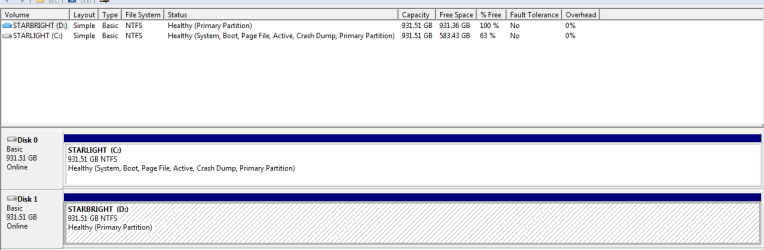
I have attached screen shot of the disk manager, but
Disk 0 is D: is NTFS Healthy (System, Active, Primary Partition) which is the windows XP drive.
Disk 1 is C: is NTFS Healthy (Boot, Page File, Active, Crash Dump, Primary Partition) which is the w7p drive.
Not sure how to do this without loosing the w7p drive. I thought about unplugging the w7p drive and booting from the w7p disk, but not sure how that would work when plugging the original w7p drive back in.
Thanks.
I boot up on drive C: which is w7 but can select to boot up on drive D: which is XP.
I have attached screen shot of the disk manager, but
Disk 0 is D: is NTFS Healthy (System, Active, Primary Partition) which is the windows XP drive.
Disk 1 is C: is NTFS Healthy (Boot, Page File, Active, Crash Dump, Primary Partition) which is the w7p drive.
Not sure how to do this without loosing the w7p drive. I thought about unplugging the w7p drive and booting from the w7p disk, but not sure how that would work when plugging the original w7p drive back in.
Thanks.
Attachments

My Computer
At a glance
windows 7 64 bit and windows xpintel core iS-4670 CPU @ 3.40GHz, 3400 Mhz, 4...32 GBAMD XFX
- Computer type
- PC/Desktop
- Computer Manufacturer/Model Number
- self built
- OS
- windows 7 64 bit and windows xp
- CPU
- intel core iS-4670 CPU @ 3.40GHz, 3400 Mhz, 4 cores, 4 logic
- Motherboard
- MSI Z87-G45
- Memory
- 32 GB
- Graphics Card(s)
- AMD XFX
- Hard Drives
- Disk 0 1TB 931.51GB (D:) Windows XP
Disk 1 1TB 931.51GB (C:) Windows 7 Professional
- Antivirus
- AVG free
- Browser
- Mozilla Firefox