Solved System Keeps rebooting when External Hard is attached to it

unknown01

New member
Member
Local time
2:54 AM
Messages
28
Hello,

I have 2 External hard and When they are attached to computer with the USB cable, system keeps rebooting and won't come up so I have to unplug both of them and then system will boot up.
Any help would be great.

Thank you.
~0UnknowN1

EDIT (SOLUTION):
Thanks to experts in this topic and this forum here is the solution:

If anyone have this problem try to disable "Legacy USB". It is in your BIOS feature.

Thanks again. These experts are awesome.
 
Last edited:

My Computer My Computer

OS
Windows 8 RTM Professional X64
CPU
Intel Core 2 Duo E8400 3.0GHz
Motherboard
Gigabyte EP43-DS3
Memory
4GB OCZ
Graphics Card(s)
EVGA GTX 275
Monitor(s) Displays
Samsung SyncMaster T200
Screen Resolution
1680x1050
Keyboard
Logitech
Mouse
Logitech
When you have them both attached, Boot up and then go into BIOS and make sure the correct hdd is selected to boot first.

Not sure if that is your issue or not.
 

My Computer My Computer

Computer type
PC/Desktop
Computer Manufacturer/Model Number
Evga X58
OS
Windows 7 Ultimate x64
CPU
Core i7 950 - 3.06 GHz
Motherboard
EVGA X58 SLI
Memory
Corsair XMS3 Dominator CMP12GX3M3A1600C9 12GB
Graphics Card(s)
eVGA GTX 550 TI-FPB 1GB
Sound Card
High Definition Audio
Monitor(s) Displays
ASUS VH242H 24 LCD
Screen Resolution
1920 X 1080
Hard Drives
2x - Seagate 1000GB Hard Drive SATA 3Gb/s 32MB Cache
Seagate 750GB Barracuda 7200.12 SATA II w/ 32MB Cache
WDC WD2500AAJB-00J3A0 ATA Device
PSU
OCZ ZX Series 1250W PSU
Case
ANTEC NINE HUNDRED TWO
Cooling
Zalman Reserator 3 MAX Dual CPU Cooler
Keyboard
Logitech
Mouse
Logitech
Other Info
2 x- HL-DT-ST DVDRAM GH24NS50 ATA Device
Questions.
1. What is on these hard drives?
2. If you only plug one in does it cause the same problem?
3. What is the boot order in your bios?
5. What does (system keeps rebooting and won't come up) mean?
------------------------------------------------------------------------------
Fill in your system specs completely. ((My System Specs))
Use this little program to get your specs.
Download Speccy 1.17.340 - FileHippo.com
 

My Computer My Computer

Computer type
PC/Desktop
Computer Manufacturer/Model Number
Home made Desktop
OS
Windows 10 Pro. 64/ version 1709 Windows 7 Pro/64
CPU
Intel i7-6800K @ 4.3
Motherboard
ASUS X-99 Deluxe II
Memory
Corsair Platinum 16 gig @2400
Graphics Card(s)
EVGA GTX 1070 OC
Monitor(s) Displays
Asus 27" LED LCD/VE278Q
Screen Resolution
1920-1080 or 1280-720 HDMI
Hard Drives
INTEL SSD 730-240 Gb Sata 3.0/
PSU
EVGA Platium 1200W
Case
Phanteks Luxe Tempered Glass 8 fans/ one radiator
Cooling
XSPC/ Water Cooled CPU
Keyboard
Das 4 Professional
Mouse
Logitech M705/MX Anywhere 2-S
Internet Speed
100 mbits
Antivirus
Microsoft Security Essentials/ Malwarebytes Premium 3.0/ SAS
Browser
I.E. 11 default/Firefox/ ISP Time Warner Cable/Spectrum
Other Info
LG BluRay Burner/
Sound system-KLipsch-THX/
Icy Dock ssd Hot Swap bays.
When you have them both attached, Boot up and then go into BIOS and make sure the correct hdd is selected to boot first.

Not sure if that is your issue or not.

Questions.
1. What is on these hard drives?
2. If you only plug one in does it cause the same problem?
3. What is the boot order in your bios?
5. What does (system keeps rebooting and won't come up) mean?
------------------------------------------------------------------------------
Fill in your system specs completely. ((My System Specs))
Use this little program to get your specs.
Download Speccy 1.17.340 - FileHippo.com

Thanks for the reply.
1.
In the first drive I have My "Documents, Music, Picture and Video Games"
In the second drive I have only "Videos"
2.
When I plug the first one the system Reboots 2 or 3 times and then comes up.
When I plug both of them it keeps rebooting and won't come up.
When I plug the second one the system keeps rebooting and won't come up.
3.
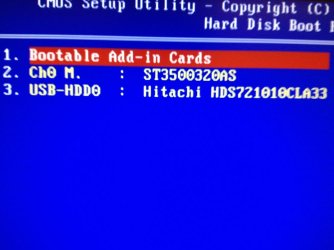
Hard Disk Boot Priority is (When both of the Hard Disks are unplugged):
1. Bootable Add-in Cards
2. Ch0 M. : ST3500320AS
Hard Disk Boot Priority is (When the first one in plugged)
1. Bootable Add-in Cards
2. Ch0 M. : ST3500320AS
3. USB-HDD0 : Hitachi HDS721010CLA33
Hard Disk Boot Priority is (When the second one in plugged)
NOTHING, I CAN'T GO TO BIOS SETUP (The keyboard won't work, I have two keyboards that one of them use USB and another one uses PS/2 to connect to the computer and both of them will not work.)
Hard Disk Boot Priority is (When both of the Hard Disks are plugged)
NOTHING, I CAN'T GO TO BIOS SETUP (The keyboard won't work, I have two keyboards that one of them use USB and another one uses PS/2 to connect to the computer and both of them will not work.)
4.
It means it keeps restarting.
The motherboard picture comes up and then restarts and again and again ... .

My system Specs:

Motherboard: Gigabyte EP43-DS3
CPU: Intel Core 2 Duo E8400 3.0GHz
RAM: 4GB
OS: Windows 8 RTM Professional(Build 9200)
--------------------------------------------------------

Thank you.
~0UnknowN1
 

My Computer My Computer

OS
Windows 8 RTM Professional X64
CPU
Intel Core 2 Duo E8400 3.0GHz
Motherboard
Gigabyte EP43-DS3
Memory
4GB OCZ
Graphics Card(s)
EVGA GTX 275
Monitor(s) Displays
Samsung SyncMaster T200
Screen Resolution
1680x1050
Keyboard
Logitech
Mouse
Logitech
I'm thinking that bootable add in cards as your first boot is the problem. Two ways most boots are set up.
1. Drive where operating system is located first boot, (in most cases C on disc 0, zero).
2. DVD/CD drive first boot and drive with operating system as 2nd boot.
Your computer is trying to boot from your external drives.
I have never used a Gigabyte motherboard so I really don't know it's bios setup procedure or terminology.
 

My Computer My Computer

Computer type
PC/Desktop
Computer Manufacturer/Model Number
Home made Desktop
OS
Windows 10 Pro. 64/ version 1709 Windows 7 Pro/64
CPU
Intel i7-6800K @ 4.3
Motherboard
ASUS X-99 Deluxe II
Memory
Corsair Platinum 16 gig @2400
Graphics Card(s)
EVGA GTX 1070 OC
Monitor(s) Displays
Asus 27" LED LCD/VE278Q
Screen Resolution
1920-1080 or 1280-720 HDMI
Hard Drives
INTEL SSD 730-240 Gb Sata 3.0/
PSU
EVGA Platium 1200W
Case
Phanteks Luxe Tempered Glass 8 fans/ one radiator
Cooling
XSPC/ Water Cooled CPU
Keyboard
Das 4 Professional
Mouse
Logitech M705/MX Anywhere 2-S
Internet Speed
100 mbits
Antivirus
Microsoft Security Essentials/ Malwarebytes Premium 3.0/ SAS
Browser
I.E. 11 default/Firefox/ ISP Time Warner Cable/Spectrum
Other Info
LG BluRay Burner/
Sound system-KLipsch-THX/
Icy Dock ssd Hot Swap bays.
I'm thinking that bootable add in cards as your first boot is the problem. Two ways most boots are set up.
1. Drive where operating system is located first boot, (in most cases C on disc 0, zero).
2. DVD/CD drive first boot and drive with operating system as 2nd boot.
Your computer is trying to boot from your external drives.
I have never used a Gigabyte motherboard so I really don't know it's bios setup procedure or terminology.

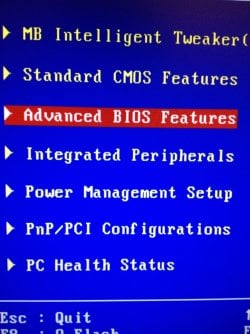
I have uploaded some images so could you explain more specifically
BIOS 01.JPGBIOS 02.JPGBIOS 03.JPG

Thank you.
~0UnknowN1
 

My Computer My Computer

OS
Windows 8 RTM Professional X64
CPU
Intel Core 2 Duo E8400 3.0GHz
Motherboard
Gigabyte EP43-DS3
Memory
4GB OCZ
Graphics Card(s)
EVGA GTX 275
Monitor(s) Displays
Samsung SyncMaster T200
Screen Resolution
1680x1050
Keyboard
Logitech
Mouse
Logitech
Usually you can change the order by pressing + or - on your keyboard, or it will say a different value on the right to change order.

You need to move 2. Ch0 M. : ST3500320AS to the 1. position.

Then press ESC to exit, and when in Main screen ' SAVE and EXIT' or hit F10
 

My Computer My Computer

Computer type
PC/Desktop
Computer Manufacturer/Model Number
Evga X58
OS
Windows 7 Ultimate x64
CPU
Core i7 950 - 3.06 GHz
Motherboard
EVGA X58 SLI
Memory
Corsair XMS3 Dominator CMP12GX3M3A1600C9 12GB
Graphics Card(s)
eVGA GTX 550 TI-FPB 1GB
Sound Card
High Definition Audio
Monitor(s) Displays
ASUS VH242H 24 LCD
Screen Resolution
1920 X 1080
Hard Drives
2x - Seagate 1000GB Hard Drive SATA 3Gb/s 32MB Cache
Seagate 750GB Barracuda 7200.12 SATA II w/ 32MB Cache
WDC WD2500AAJB-00J3A0 ATA Device
PSU
OCZ ZX Series 1250W PSU
Case
ANTEC NINE HUNDRED TWO
Cooling
Zalman Reserator 3 MAX Dual CPU Cooler
Keyboard
Logitech
Mouse
Logitech
Other Info
2 x- HL-DT-ST DVDRAM GH24NS50 ATA Device
Their be more than one place your have to select boot order. My Asus board is that way. I will let the Gigabyte people help you from here.
 

My Computer My Computer

Computer type
PC/Desktop
Computer Manufacturer/Model Number
Home made Desktop
OS
Windows 10 Pro. 64/ version 1709 Windows 7 Pro/64
CPU
Intel i7-6800K @ 4.3
Motherboard
ASUS X-99 Deluxe II
Memory
Corsair Platinum 16 gig @2400
Graphics Card(s)
EVGA GTX 1070 OC
Monitor(s) Displays
Asus 27" LED LCD/VE278Q
Screen Resolution
1920-1080 or 1280-720 HDMI
Hard Drives
INTEL SSD 730-240 Gb Sata 3.0/
PSU
EVGA Platium 1200W
Case
Phanteks Luxe Tempered Glass 8 fans/ one radiator
Cooling
XSPC/ Water Cooled CPU
Keyboard
Das 4 Professional
Mouse
Logitech M705/MX Anywhere 2-S
Internet Speed
100 mbits
Antivirus
Microsoft Security Essentials/ Malwarebytes Premium 3.0/ SAS
Browser
I.E. 11 default/Firefox/ ISP Time Warner Cable/Spectrum
Other Info
LG BluRay Burner/
Sound system-KLipsch-THX/
Icy Dock ssd Hot Swap bays.
Usually you can change the order by pressing + or - on your keyboard, or it will say a different value on the right to change order.

You need to move 2. Ch0 M. : ST3500320AS to the 1. position.

Then press ESC to exit, and when in Main screen ' SAVE and EXIT' or hit F10

I moved it but still nothing happens, it keeps rebooting.When I put the first boot device to "CDROM" the computer boots up but when the second drive is connected it won't even in "CDROM" boot.

Thank you.
 

My Computer My Computer

OS
Windows 8 RTM Professional X64
CPU
Intel Core 2 Duo E8400 3.0GHz
Motherboard
Gigabyte EP43-DS3
Memory
4GB OCZ
Graphics Card(s)
EVGA GTX 275
Monitor(s) Displays
Samsung SyncMaster T200
Screen Resolution
1680x1050
Keyboard
Logitech
Mouse
Logitech
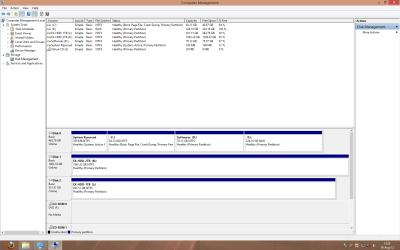
Did these drives boot ok with Windows 7, or what did you have installed before Windows 8 RTM?

Also are you able to connect the drives once you are booted.

Can you then go to Control Panel>Administrative Tools>Computer Management>Disk Management
Then take a screen shot, or look to see which drives show as Boot, or Active.
 

My Computer My Computer

Computer type
PC/Desktop
Computer Manufacturer/Model Number
Evga X58
OS
Windows 7 Ultimate x64
CPU
Core i7 950 - 3.06 GHz
Motherboard
EVGA X58 SLI
Memory
Corsair XMS3 Dominator CMP12GX3M3A1600C9 12GB
Graphics Card(s)
eVGA GTX 550 TI-FPB 1GB
Sound Card
High Definition Audio
Monitor(s) Displays
ASUS VH242H 24 LCD
Screen Resolution
1920 X 1080
Hard Drives
2x - Seagate 1000GB Hard Drive SATA 3Gb/s 32MB Cache
Seagate 750GB Barracuda 7200.12 SATA II w/ 32MB Cache
WDC WD2500AAJB-00J3A0 ATA Device
PSU
OCZ ZX Series 1250W PSU
Case
ANTEC NINE HUNDRED TWO
Cooling
Zalman Reserator 3 MAX Dual CPU Cooler
Keyboard
Logitech
Mouse
Logitech
Other Info
2 x- HL-DT-ST DVDRAM GH24NS50 ATA Device
I had the same problem with a WD 1TB external, but mine would never boot when it was on/attached, I think (from reading on this forum) it has something to do about legacy usb?, sorry to be confusing maybe someone knows what I'm on about.
 

My Computer My Computer

Computer type
PC/Desktop
Computer Manufacturer/Model Number
Home Build
OS
Windows 8.1 Pro
CPU
i5 3550 Ivy Bridge
Motherboard
Gigabyte Z77MX-D3H
Memory
8gb 1600 GSkill 9-9-9-24 xmp
Graphics Card(s)
Gigabyte GTX 760 OC
Sound Card
VIA VT2021 onboard
Monitor(s) Displays
BenQ GL2760H 27inch hdmi; LG Flatron E2351 23inch dvi
Screen Resolution
1920x1080
Hard Drives
1x Samsung 850 Evo 120GB
1x 4TB WD Green HDD
1x 3TB WD Green HDD
2x 2TB Seagate HDD
1x 1TB Seagate External HDD
PSU
Cooler Master V750
Case
Coolermaster HAF 912 Advanced
Cooling
Standard
Keyboard
Logitech K120 USB
Mouse
Razor Abyssus USB
Internet Speed
Broadband
Antivirus
MSE + Malwarebytes
Browser
Palemoon
Other Info
It's been the worst day since yesterday (thanks Flogging Molly) so apt!
Did these drives boot ok with Windows 7, or what did you have installed before Windows 8 RTM?

Also are you able to connect the drives once you are booted.

Can you then go to Control Panel>Administrative Tools>Computer Management>Disk Management
Then take a screen shot, or look to see which drives show as Boot, or Active.

The first one after two restarts, yes it boots OK.
The the second one is new and I haven't tried it on Windows 7.
Yes I am able to connect to them after the computer boots up.

Disk Management.png

Thank you.
~0UnknowN1
 

My Computer My Computer

OS
Windows 8 RTM Professional X64
CPU
Intel Core 2 Duo E8400 3.0GHz
Motherboard
Gigabyte EP43-DS3
Memory
4GB OCZ
Graphics Card(s)
EVGA GTX 275
Monitor(s) Displays
Samsung SyncMaster T200
Screen Resolution
1680x1050
Keyboard
Logitech
Mouse
Logitech
I had the same problem with a WD 1TB external, but mine would never boot when it was on/attached, I think (from reading on this forum) it has something to do about legacy usb?, sorry to be confusing maybe someone knows what I'm on about.

Could you explain what exactly is "Legacy USB"?

Thank you.
~0UnknowN1
 

My Computer My Computer

OS
Windows 8 RTM Professional X64
CPU
Intel Core 2 Duo E8400 3.0GHz
Motherboard
Gigabyte EP43-DS3
Memory
4GB OCZ
Graphics Card(s)
EVGA GTX 275
Monitor(s) Displays
Samsung SyncMaster T200
Screen Resolution
1680x1050
Keyboard
Logitech
Mouse
Logitech
Quick Review
This BIOS feature determines if the BIOS should provide legacy support for USB devices like the keyboard, mouse and floppy drive. This is a useful feature when using such USB devices with operating systems that do not natively support USB (e.g. Microsoft DOS or Windows NT).
When enabled, the BIOS will enable legacy support for USB keyboards, mice and floppy drives. You will be able to use these USB devices even with operating systems that do not support USB.
When disabled, the BIOS will not enable legacy support for USB keyboards, mice and floppy drives. You will not be able to use these USB devices with operating systems that do not support USB.


Sorry to be vague it was in the BIOS, there was an option about enabling/disabling legacy at startup, I'm not sure maybe someone could shed more light on it, but from what I remember of it some people disabled the option so there system started up with external drives attached and on.
 

My Computer My Computer

Computer type
PC/Desktop
Computer Manufacturer/Model Number
Home Build
OS
Windows 8.1 Pro
CPU
i5 3550 Ivy Bridge
Motherboard
Gigabyte Z77MX-D3H
Memory
8gb 1600 GSkill 9-9-9-24 xmp
Graphics Card(s)
Gigabyte GTX 760 OC
Sound Card
VIA VT2021 onboard
Monitor(s) Displays
BenQ GL2760H 27inch hdmi; LG Flatron E2351 23inch dvi
Screen Resolution
1920x1080
Hard Drives
1x Samsung 850 Evo 120GB
1x 4TB WD Green HDD
1x 3TB WD Green HDD
2x 2TB Seagate HDD
1x 1TB Seagate External HDD
PSU
Cooler Master V750
Case
Coolermaster HAF 912 Advanced
Cooling
Standard
Keyboard
Logitech K120 USB
Mouse
Razor Abyssus USB
Internet Speed
Broadband
Antivirus
MSE + Malwarebytes
Browser
Palemoon
Other Info
It's been the worst day since yesterday (thanks Flogging Molly) so apt!
Do you have anything bootable connected to the bootable add-on card(s)? If not try disabling booting from those cards, so that it doesn't even appear in the boot order.
 

My Computer My Computer

OS
Windows 7 Ultimate x64
Did these drives boot ok with Windows 7, or what did you have installed before Windows 8 RTM?

Also are you able to connect the drives once you are booted.

Can you then go to Control Panel>Administrative Tools>Computer Management>Disk Management
Then take a screen shot, or look to see which drives show as Boot, or Active.

The first one after two restarts, yes it boots OK.
The the second one is new and I haven't tried it on Windows 7.
Yes I am able to connect to them after the computer boots up.

View attachment 227026

Thank you.
~0UnknowN1


Have you always had your Main drive C: partioned into 3 different partitions?

I am maybe just guessing here if that is the issue or not. You have lots of external space so just curious why you would want to partition your Main Drive.
 

My Computer My Computer

Computer type
PC/Desktop
Computer Manufacturer/Model Number
Evga X58
OS
Windows 7 Ultimate x64
CPU
Core i7 950 - 3.06 GHz
Motherboard
EVGA X58 SLI
Memory
Corsair XMS3 Dominator CMP12GX3M3A1600C9 12GB
Graphics Card(s)
eVGA GTX 550 TI-FPB 1GB
Sound Card
High Definition Audio
Monitor(s) Displays
ASUS VH242H 24 LCD
Screen Resolution
1920 X 1080
Hard Drives
2x - Seagate 1000GB Hard Drive SATA 3Gb/s 32MB Cache
Seagate 750GB Barracuda 7200.12 SATA II w/ 32MB Cache
WDC WD2500AAJB-00J3A0 ATA Device
PSU
OCZ ZX Series 1250W PSU
Case
ANTEC NINE HUNDRED TWO
Cooling
Zalman Reserator 3 MAX Dual CPU Cooler
Keyboard
Logitech
Mouse
Logitech
Other Info
2 x- HL-DT-ST DVDRAM GH24NS50 ATA Device
Thank you all guys
I have disabled the Legacy USB (it was enable) and now both of them are working properly with no problem and computer boots up properly too.

Thank you,
~0UnknowN1
 

My Computer My Computer

OS
Windows 8 RTM Professional X64
CPU
Intel Core 2 Duo E8400 3.0GHz
Motherboard
Gigabyte EP43-DS3
Memory
4GB OCZ
Graphics Card(s)
EVGA GTX 275
Monitor(s) Displays
Samsung SyncMaster T200
Screen Resolution
1680x1050
Keyboard
Logitech
Mouse
Logitech
Back
Top