Solved New SSD C drive but what is accessing 3 old HDD's in turn every second

Your D:, G: and E: drives are all marked Active. You can use the Diskpart command to make them inactive. http://www.sevenforums.com/tutorials/197157-partition-mark-inactive.html == H: is marked as OS, but that is your old one is that correct? The SSD is your C: drive and that is where Win 7 is, right? Did you go into your Bios and change the boot order so that your DVD is the first to boot and the SSD is the second to boot? Let us know. == I don't know if this will be the answer to your problems, but this is a place to start and see how your PC operates after those three are marked inactive. Your 100 MB System Reserved should be Active.
E, F, G are marked as ACTIVE without any reason. But this is not the source of the problem.

Is system protection enabled on non SSD partitions? Is pagefile defined on non SSD partitions?

task manager->tab performance->source control (button at bottom). Now you can see who is accessing the disk. I translated from Dutch so I hope it's clear

Or just run: perfmon and click "source control"
 

My Computer My Computer

At a glance

Microsoft Windows 7 Home Premium 64-bits 7601...Intel(R) Core(TM) i3 CPU M 370 @ 2.40GHz4,00 GBATI Mobility Radeon HD 5400 Series
Computer type
Laptop
Computer Manufacturer/Model Number
ACER ASPIRE 5742G
OS
Microsoft Windows 7 Home Premium 64-bits 7601 Multiprocessor Free Service Pack 1
CPU
Intel(R) Core(TM) i3 CPU M 370 @ 2.40GHz
Motherboard
Acer Aspire 5742G
Memory
4,00 GB
Graphics Card(s)
ATI Mobility Radeon HD 5400 Series
Sound Card
(1) AMD High Definition Audio Device (2) Realtek High Defi
Screen Resolution
1366 x 768 x 32 bits (4294967296 colors) @ 60 Hz
Hard Drives
WDC WD5000BEVT-22ZAT0
I can't reply or quote, I get this message...The message you have entered is to short. Please lenghten your message to at least 3 characters?
 

My Computer My Computer

At a glance

Windows Seven Home Premium 64bitIntel i7-3770k LGA 115516GB G.Skill DDR3-1600Intergrated on MoBo
Computer Manufacturer/Model Number
Self Build
OS
Windows Seven Home Premium 64bit
CPU
Intel i7-3770k LGA 1155
Motherboard
Asus P8 Z77-V Pro
Memory
16GB G.Skill DDR3-1600
Graphics Card(s)
Intergrated on MoBo
Sound Card
Intergrated on MoBo
Monitor(s) Displays
Dell 2407WFP & LG1710B
Screen Resolution
1920x1200
Hard Drives
Intel 520 SSD 180GB (C Drive)
2x Seagate 200GB
1x Seagate 750GB
PSU
OCZ ZT 650W
Case
Antec P160
Cooling
2x Ultra Quiet 120mm
Keyboard
Logitech Di-Novo Edge
Mouse
Logitech MX Laser 1000
Internet Speed
DL 2800Kbps UL 430Kbps
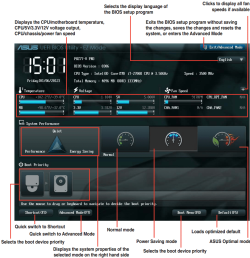
Snip below. Thinking about the bios, I was fiddling about in there exploring not long after install, and was confused over legacy and uefi settings not sure if I've changed stuf, I'll have to go through with the manual and check the default settings for things. I could reset everything to default settings but I have specifi items change to suit my set up, which I would like to indentify and keep.

I need to get to grips with exactly what to keep, I like my settings and of course any docs, apps etc.
 

Attachments

  • Asus Bios snip.PNG
    Asus Bios snip.PNG
    178.3 KB · Views: 10

My Computer My Computer

At a glance

Windows Seven Home Premium 64bitIntel i7-3770k LGA 115516GB G.Skill DDR3-1600Intergrated on MoBo
Computer Manufacturer/Model Number
Self Build
OS
Windows Seven Home Premium 64bit
CPU
Intel i7-3770k LGA 1155
Motherboard
Asus P8 Z77-V Pro
Memory
16GB G.Skill DDR3-1600
Graphics Card(s)
Intergrated on MoBo
Sound Card
Intergrated on MoBo
Monitor(s) Displays
Dell 2407WFP & LG1710B
Screen Resolution
1920x1200
Hard Drives
Intel 520 SSD 180GB (C Drive)
2x Seagate 200GB
1x Seagate 750GB
PSU
OCZ ZT 650W
Case
Antec P160
Cooling
2x Ultra Quiet 120mm
Keyboard
Logitech Di-Novo Edge
Mouse
Logitech MX Laser 1000
Internet Speed
DL 2800Kbps UL 430Kbps
If you have a EFI BIOS then it requires special steps to install to a GPT disk. UEFI (Unified Extensible Firmware Interface) - Install Windows 7 with - Windows 7 Forums

If you don't want to mess with GPT disks or EFI which is harder to install and repair, then make sure you have MBR drives. look at Disk Mgmt, right click panel next to each HD to see if it offers to convert to MBR or GPT to know which you have.

If so then Legacy BIOS has been enabled, and/or EFI Boot disk removed from Boot order in BIOS.

This may be presenting some kind of conflict. Our EFI expert Saltgrass may be able to spot it.
 
All the drives show, Convert to dymanic disk, and convert to GPT is greyed out. Not sure if I like the look of this...
 

My Computer My Computer

At a glance

Windows Seven Home Premium 64bitIntel i7-3770k LGA 115516GB G.Skill DDR3-1600Intergrated on MoBo
Computer Manufacturer/Model Number
Self Build
OS
Windows Seven Home Premium 64bit
CPU
Intel i7-3770k LGA 1155
Motherboard
Asus P8 Z77-V Pro
Memory
16GB G.Skill DDR3-1600
Graphics Card(s)
Intergrated on MoBo
Sound Card
Intergrated on MoBo
Monitor(s) Displays
Dell 2407WFP & LG1710B
Screen Resolution
1920x1200
Hard Drives
Intel 520 SSD 180GB (C Drive)
2x Seagate 200GB
1x Seagate 750GB
PSU
OCZ ZT 650W
Case
Antec P160
Cooling
2x Ultra Quiet 120mm
Keyboard
Logitech Di-Novo Edge
Mouse
Logitech MX Laser 1000
Internet Speed
DL 2800Kbps UL 430Kbps
The message you have entered is to short. Please lenghten your message to at least 3 characters?
This getting very frustrating, any ideas why it won't let me reply or quote, only quick reply?
 

My Computer My Computer

At a glance

Windows Seven Home Premium 64bitIntel i7-3770k LGA 115516GB G.Skill DDR3-1600Intergrated on MoBo
Computer Manufacturer/Model Number
Self Build
OS
Windows Seven Home Premium 64bit
CPU
Intel i7-3770k LGA 1155
Motherboard
Asus P8 Z77-V Pro
Memory
16GB G.Skill DDR3-1600
Graphics Card(s)
Intergrated on MoBo
Sound Card
Intergrated on MoBo
Monitor(s) Displays
Dell 2407WFP & LG1710B
Screen Resolution
1920x1200
Hard Drives
Intel 520 SSD 180GB (C Drive)
2x Seagate 200GB
1x Seagate 750GB
PSU
OCZ ZT 650W
Case
Antec P160
Cooling
2x Ultra Quiet 120mm
Keyboard
Logitech Di-Novo Edge
Mouse
Logitech MX Laser 1000
Internet Speed
DL 2800Kbps UL 430Kbps
E, F, G are marked as ACTIVE without any reason. But this is not the source of the problem.
Not now, deactivated.
Is system protection enabled on non SSD partitions? Is pagefile defined on non SSD partitions?
Don't know about these...or how to find out.
task manager->tab performance->source control (button at bottom). Now you can see who is accessing the disk.
 

My Computer My Computer

At a glance

Windows Seven Home Premium 64bitIntel i7-3770k LGA 115516GB G.Skill DDR3-1600Intergrated on MoBo
Computer Manufacturer/Model Number
Self Build
OS
Windows Seven Home Premium 64bit
CPU
Intel i7-3770k LGA 1155
Motherboard
Asus P8 Z77-V Pro
Memory
16GB G.Skill DDR3-1600
Graphics Card(s)
Intergrated on MoBo
Sound Card
Intergrated on MoBo
Monitor(s) Displays
Dell 2407WFP & LG1710B
Screen Resolution
1920x1200
Hard Drives
Intel 520 SSD 180GB (C Drive)
2x Seagate 200GB
1x Seagate 750GB
PSU
OCZ ZT 650W
Case
Antec P160
Cooling
2x Ultra Quiet 120mm
Keyboard
Logitech Di-Novo Edge
Mouse
Logitech MX Laser 1000
Internet Speed
DL 2800Kbps UL 430Kbps
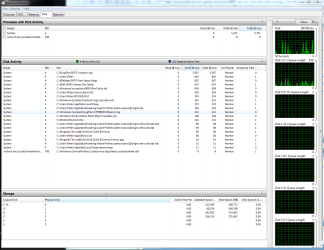
Whats accessing the disk?
 

Attachments

  • ResMon..PNG
    ResMon..PNG
    56.3 KB · Views: 12

My Computer My Computer

At a glance

Windows Seven Home Premium 64bitIntel i7-3770k LGA 115516GB G.Skill DDR3-1600Intergrated on MoBo
Computer Manufacturer/Model Number
Self Build
OS
Windows Seven Home Premium 64bit
CPU
Intel i7-3770k LGA 1155
Motherboard
Asus P8 Z77-V Pro
Memory
16GB G.Skill DDR3-1600
Graphics Card(s)
Intergrated on MoBo
Sound Card
Intergrated on MoBo
Monitor(s) Displays
Dell 2407WFP & LG1710B
Screen Resolution
1920x1200
Hard Drives
Intel 520 SSD 180GB (C Drive)
2x Seagate 200GB
1x Seagate 750GB
PSU
OCZ ZT 650W
Case
Antec P160
Cooling
2x Ultra Quiet 120mm
Keyboard
Logitech Di-Novo Edge
Mouse
Logitech MX Laser 1000
Internet Speed
DL 2800Kbps UL 430Kbps
You don't appear to have GPT disks so the issue isn't likely EFI BIOS.

Now that's out of the way unplug all three HD's, power up and check for the behavior.

If it's not present, power down and add each HD one at a time before powering up to check again for the behavior.

This should allow you to confirm or dismiss your assumption this is caused by the HD's, and isolate which one. We can proceed from there.
 
Last edited:
The message you have entered is to short. Please lenghten your message to at least 3 characters?
This getting very frustrating, any ideas why it won't let me reply or quote, only quick reply?

Maybe Chrome is causing this problem.
Try another browser (e.g. IE, FF, etc.).

Do you have some form of javascript blocker running?

As for the original question:
I don't know if this relates to your problem, but on my PC "dwm.exe" regularly activates my HDD (it's annoying).
 

My Computer My Computer

At a glance

W7 Ultimate SP1, LM19.2 MATE, W10 Home 1703, ...AMD Phenom II x6 1100T, 3.3 GHz12GB DDR3 1333 G-Skill (4GB x 2), G-Skill (2G...NVIDIA GeForce GTX 660
Computer type
PC/Desktop
Computer Manufacturer/Model Number
n/a
OS
W7 Ultimate SP1, LM19.2 MATE, W10 Home 1703, W10 Pro 1703 VM, #All 64 bit
CPU
AMD Phenom II x6 1100T, 3.3 GHz
Motherboard
ASUS M4A88T-M/USB3 (AM3)
Memory
12GB DDR3 1333 G-Skill (4GB x 2), G-Skill (2GB x 2)
Graphics Card(s)
NVIDIA GeForce GTX 660
Sound Card
Realtek?
Monitor(s) Displays
Samsung S23B350
Screen Resolution
1920x1080
Hard Drives
WD Green 2TB (SATA), WD Green 3TB (SATA), WD Blue 4TB (SATA), WD Blue 6TB (SATA)
PSU
Cooler Master
Case
Antec GX300 Tower
Cooling
3x Antec TRICOOL 120mm Fans
Mouse
Wired Optical
Internet Speed
DSL
Antivirus
Avast
Browser
Pale Moon (64 bit)
Other Info
2018-12-27 Upgraded HDDs
2015-12-10 Upgraded case, graphics card, storage
2015-08-15 Upgraded motherboard & RAM
2015-07-15 Upgraded LM17.1 to LM17.2

My Computer My Computer

At a glance

Microsoft Windows 7 Home Premium 64-bits 7601...Intel(R) Core(TM) i3 CPU M 370 @ 2.40GHz4,00 GBATI Mobility Radeon HD 5400 Series
Computer type
Laptop
Computer Manufacturer/Model Number
ACER ASPIRE 5742G
OS
Microsoft Windows 7 Home Premium 64-bits 7601 Multiprocessor Free Service Pack 1
CPU
Intel(R) Core(TM) i3 CPU M 370 @ 2.40GHz
Motherboard
Acer Aspire 5742G
Memory
4,00 GB
Graphics Card(s)
ATI Mobility Radeon HD 5400 Series
Sound Card
(1) AMD High Definition Audio Device (2) Realtek High Defi
Screen Resolution
1366 x 768 x 32 bits (4294967296 colors) @ 60 Hz
Hard Drives
WDC WD5000BEVT-22ZAT0
Whats accessing the disk?
As you can see on your own screenshot only C is accessed

Good point.

Oh dear no, still accessing every second, in this order H, G/F, E, milliseconds between them. I can can hear them, and feel them vibrate when they do, I've got the side cover off.
What do you think?

What else is telling you that the disks are being accessed this way? You must be seeing something other than what you've posted above, right?

I'm having a hard time understanding how you can make the determination you've made (quoted above) based on sound/vibration alone. Can you elaborate?
 

My Computer My Computer

At a glance

Windows 7 Ultimate x64
OS
Windows 7 Ultimate x64
As daft as it may sound, Are you the drives spinning up are not CD drives that you have left discs in?
 

My Computer My Computer

At a glance

Windows 7 Home Premium x64 SP1Core 2 Quad Q66008 GB OCZ PC2-6400 nVIDIA SLI-Ready Edition (4...AMP! GeForce GTX 260² 896MB 448-bit GDDR3 (65...
Computer Manufacturer/Model Number
Me :P
OS
Windows 7 Home Premium x64 SP1
CPU
Core 2 Quad Q6600
Motherboard
Abit IN9 32X MAX
Memory
8 GB OCZ PC2-6400 nVIDIA SLI-Ready Edition (4X2GB)
Graphics Card(s)
AMP! GeForce GTX 260² 896MB 448-bit GDDR3 (650MHz/2100MHz)
Sound Card
Realtek 7.1 CH HD Audio
Monitor(s) Displays
37" LG 1080p HD LCD TV
Screen Resolution
1280x1024 + 1360x768
Hard Drives
40GB Mushkin SSD
60GB Intel 520 SSD
150GB Raptor HDD
500GB Caviar HDD
PSU
Thermaltake W0133RB 1200W PSU
Case
Antec 900
Cooling
OCZ Vendetta 2 + Antec 900 case fans
Keyboard
Logitech G15 (full layout)
Mouse
R.A.T.9
Internet Speed
Not fast enough!

My Computer My Computer

At a glance

Windows Seven Home Premium 64bitIntel i7-3770k LGA 115516GB G.Skill DDR3-1600Intergrated on MoBo
Computer Manufacturer/Model Number
Self Build
OS
Windows Seven Home Premium 64bit
CPU
Intel i7-3770k LGA 1155
Motherboard
Asus P8 Z77-V Pro
Memory
16GB G.Skill DDR3-1600
Graphics Card(s)
Intergrated on MoBo
Sound Card
Intergrated on MoBo
Monitor(s) Displays
Dell 2407WFP & LG1710B
Screen Resolution
1920x1200
Hard Drives
Intel 520 SSD 180GB (C Drive)
2x Seagate 200GB
1x Seagate 750GB
PSU
OCZ ZT 650W
Case
Antec P160
Cooling
2x Ultra Quiet 120mm
Keyboard
Logitech Di-Novo Edge
Mouse
Logitech MX Laser 1000
Internet Speed
DL 2800Kbps UL 430Kbps
Latest News

I disconnected the HDD drives old win7, and my back up, then formatted the back up drive logical drive, with diskpart and then Disk Manager. The disk is now completely blank, and still grumbles/whirring every second, for milli seconds?
Perhaps this is a bios issue I've created by over enthusiastic tinkering?
I'll check over all the settings starting tonight.
pme2
 
Last edited:

My Computer My Computer

At a glance

Windows Seven Home Premium 64bitIntel i7-3770k LGA 115516GB G.Skill DDR3-1600Intergrated on MoBo
Computer Manufacturer/Model Number
Self Build
OS
Windows Seven Home Premium 64bit
CPU
Intel i7-3770k LGA 1155
Motherboard
Asus P8 Z77-V Pro
Memory
16GB G.Skill DDR3-1600
Graphics Card(s)
Intergrated on MoBo
Sound Card
Intergrated on MoBo
Monitor(s) Displays
Dell 2407WFP & LG1710B
Screen Resolution
1920x1200
Hard Drives
Intel 520 SSD 180GB (C Drive)
2x Seagate 200GB
1x Seagate 750GB
PSU
OCZ ZT 650W
Case
Antec P160
Cooling
2x Ultra Quiet 120mm
Keyboard
Logitech Di-Novo Edge
Mouse
Logitech MX Laser 1000
Internet Speed
DL 2800Kbps UL 430Kbps
Did you wipe the HD first with Diskpart Clean Command before formatting it Logical? Yes I used Diskpart, and will with the other 2 HD's

Reset your BIOS to defaults. Pending.

Run the HD maker's HD Diagnostic extended CD scan followed by Disk Check to confirm the HD. Pending.

Apologies for the delay, busy weekend and Monday, should have all this done on Tuesday night.
 

My Computer My Computer

At a glance

Windows Seven Home Premium 64bitIntel i7-3770k LGA 115516GB G.Skill DDR3-1600Intergrated on MoBo
Computer Manufacturer/Model Number
Self Build
OS
Windows Seven Home Premium 64bit
CPU
Intel i7-3770k LGA 1155
Motherboard
Asus P8 Z77-V Pro
Memory
16GB G.Skill DDR3-1600
Graphics Card(s)
Intergrated on MoBo
Sound Card
Intergrated on MoBo
Monitor(s) Displays
Dell 2407WFP & LG1710B
Screen Resolution
1920x1200
Hard Drives
Intel 520 SSD 180GB (C Drive)
2x Seagate 200GB
1x Seagate 750GB
PSU
OCZ ZT 650W
Case
Antec P160
Cooling
2x Ultra Quiet 120mm
Keyboard
Logitech Di-Novo Edge
Mouse
Logitech MX Laser 1000
Internet Speed
DL 2800Kbps UL 430Kbps
Update...could be a break through!

Just randomly closing down services in Process Haccker, and by terminating "SeagateDashboardService" the annoying disk accessing noise has stopped!
Investigations into this process will commence tomorrow, as it's now time for bed...
 

My Computer My Computer

At a glance

Windows Seven Home Premium 64bitIntel i7-3770k LGA 115516GB G.Skill DDR3-1600Intergrated on MoBo
Computer Manufacturer/Model Number
Self Build
OS
Windows Seven Home Premium 64bit
CPU
Intel i7-3770k LGA 1155
Motherboard
Asus P8 Z77-V Pro
Memory
16GB G.Skill DDR3-1600
Graphics Card(s)
Intergrated on MoBo
Sound Card
Intergrated on MoBo
Monitor(s) Displays
Dell 2407WFP & LG1710B
Screen Resolution
1920x1200
Hard Drives
Intel 520 SSD 180GB (C Drive)
2x Seagate 200GB
1x Seagate 750GB
PSU
OCZ ZT 650W
Case
Antec P160
Cooling
2x Ultra Quiet 120mm
Keyboard
Logitech Di-Novo Edge
Mouse
Logitech MX Laser 1000
Internet Speed
DL 2800Kbps UL 430Kbps
Just randomly closing down services in Process Haccker, and by terminating "SeagateDashboardService" the annoying disk accessing noise has stopped!
Investigations into this process will commence tomorrow, as it's now time for bed...

Not sure about whatever services you shut down, but you may have something with that "SeagateDashboardService". See a few references to this exact issue on the 'net. Based on the name I thought it might be a HD performance/health monitoring app, instead it appears it may be a backup utility.
 

My Computer My Computer

At a glance

Windows 7 Ultimate x64
OS
Windows 7 Ultimate x64
"SeagateDashboardService".
Yes it's part of my seagate Goflex backup system software, investigating on the seagate forums, there seems to be some discussion on the subject.
Pleased that I'm not imagining things...
 

My Computer My Computer

At a glance

Windows Seven Home Premium 64bitIntel i7-3770k LGA 115516GB G.Skill DDR3-1600Intergrated on MoBo
Computer Manufacturer/Model Number
Self Build
OS
Windows Seven Home Premium 64bit
CPU
Intel i7-3770k LGA 1155
Motherboard
Asus P8 Z77-V Pro
Memory
16GB G.Skill DDR3-1600
Graphics Card(s)
Intergrated on MoBo
Sound Card
Intergrated on MoBo
Monitor(s) Displays
Dell 2407WFP & LG1710B
Screen Resolution
1920x1200
Hard Drives
Intel 520 SSD 180GB (C Drive)
2x Seagate 200GB
1x Seagate 750GB
PSU
OCZ ZT 650W
Case
Antec P160
Cooling
2x Ultra Quiet 120mm
Keyboard
Logitech Di-Novo Edge
Mouse
Logitech MX Laser 1000
Internet Speed
DL 2800Kbps UL 430Kbps
Back
Top