E, F, G are marked as ACTIVE without any reason. But this is not the source of the problem.Your D:, G: and E: drives are all marked Active. You can use the Diskpart command to make them inactive. http://www.sevenforums.com/tutorials/197157-partition-mark-inactive.html == H: is marked as OS, but that is your old one is that correct? The SSD is your C: drive and that is where Win 7 is, right? Did you go into your Bios and change the boot order so that your DVD is the first to boot and the SSD is the second to boot? Let us know. == I don't know if this will be the answer to your problems, but this is a place to start and see how your PC operates after those three are marked inactive. Your 100 MB System Reserved should be Active.
Is system protection enabled on non SSD partitions? Is pagefile defined on non SSD partitions?
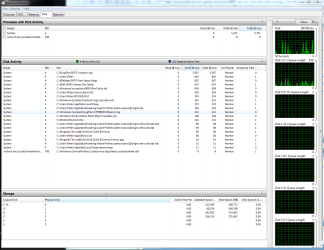
task manager->tab performance->source control (button at bottom). Now you can see who is accessing the disk. I translated from Dutch so I hope it's clear
Or just run: perfmon and click "source control"
My Computer
At a glance
Microsoft Windows 7 Home Premium 64-bits 7601...Intel(R) Core(TM) i3 CPU M 370 @ 2.40GHz4,00 GBATI Mobility Radeon HD 5400 Series
- Computer type
- Laptop
- Computer Manufacturer/Model Number
- ACER ASPIRE 5742G
- OS
- Microsoft Windows 7 Home Premium 64-bits 7601 Multiprocessor Free Service Pack 1
- CPU
- Intel(R) Core(TM) i3 CPU M 370 @ 2.40GHz
- Motherboard
- Acer Aspire 5742G
- Memory
- 4,00 GB
- Graphics Card(s)
- ATI Mobility Radeon HD 5400 Series
- Sound Card
- (1) AMD High Definition Audio Device (2) Realtek High Defi
- Screen Resolution
- 1366 x 768 x 32 bits (4294967296 colors) @ 60 Hz
- Hard Drives
- WDC WD5000BEVT-22ZAT0