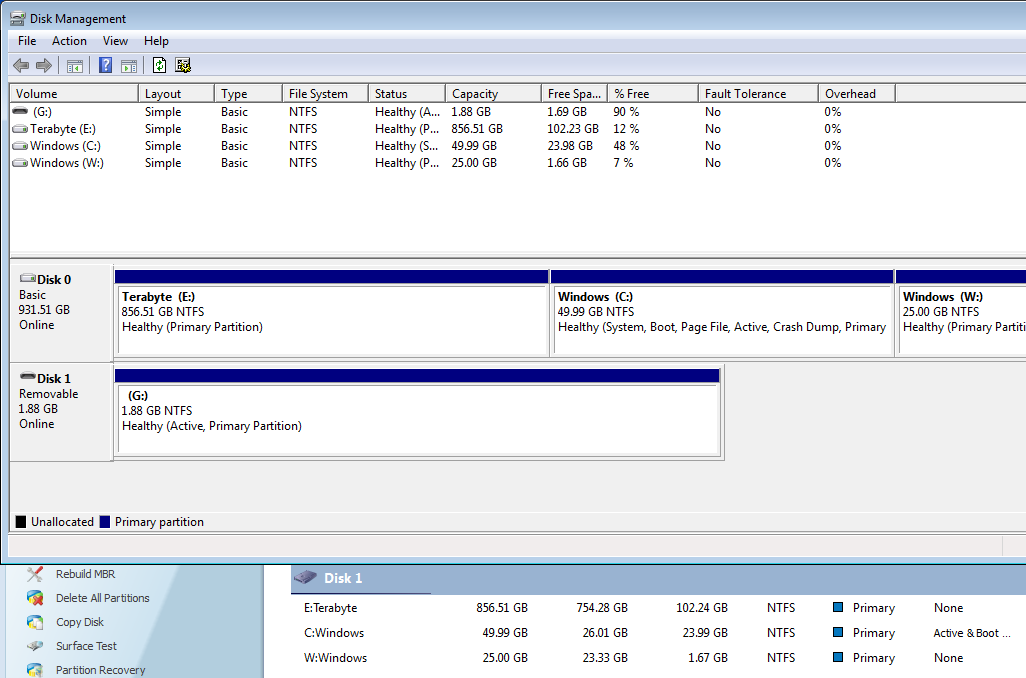
Solved 2 Windows 7 Installations on 2 partitions, can't delete old one.

mediaexpo

New member
Local time
11:23 AM
Messages
12
Hello, I've been looking around on the internet, and the seven forums, and I can't seem to find anyone with a similar problem.

I just re-installed Windows 7 to drive C: as I was having some problems with it being on W: (Some games just hate it apparently, I'm looking at you Sleeping Dogs)

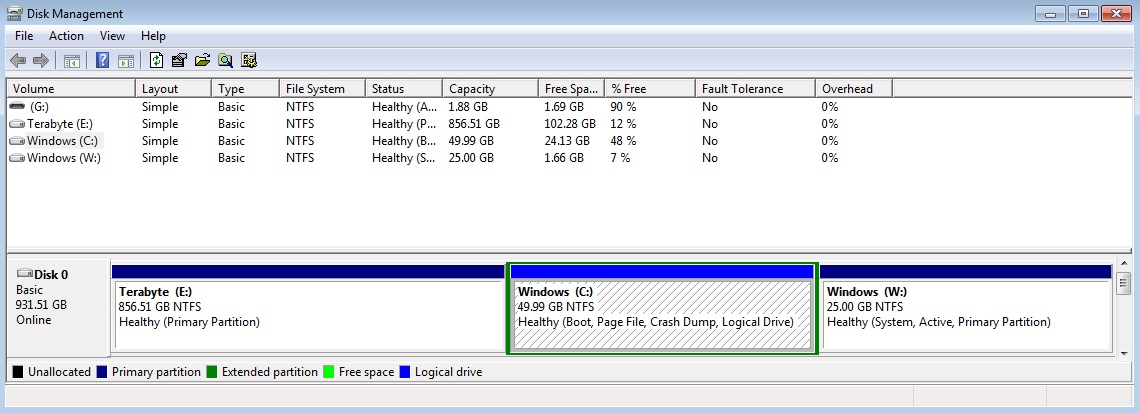
I've tried to format it but the option wasn't there and EaseUS has it listed as the system partition which I've also tried to fix but to no avail.

I've gotten the boot over to C: and that's about all I've been able to accomplish.

Any help would be greatly appreciated.

Also here's the image for Disk Management.
wUS0D.jpg
 
Last edited:

My Computer My Computer

At a glance

Windows 7 Ultimate x64
OS
Windows 7 Ultimate x64
Hello, I've been looking around on the internet, and the seven forums, and I can't seem to find anyone with a similar problem.

I just re-installed Windows 7 to drive C: as I was having some problems with it being on W: (Some games just hate it apparently, I'm looking at you Sleeping Dogs)

I've tried to format it but the option wasn't there and EaseUS has it listed as the system partition which I've also tried to fix but to no avail.

I've gotten the boot over to C: and that's about all I've been able to accomplish.

Any help would be greatly appreciated.

Also here's the image for Disk Management.

wUS0D.jpg
W has the bootmenu and the bootmgr!! First do this http://www.sevenforums.com/tutorials/209885-bootmgr-move-c-easybcd.html

Reboot and post disk management screenshot again
 

My Computer My Computer

At a glance

Microsoft Windows 7 Home Premium 64-bits 7601...Intel(R) Core(TM) i3 CPU M 370 @ 2.40GHz4,00 GBATI Mobility Radeon HD 5400 Series
Computer type
Laptop
Computer Manufacturer/Model Number
ACER ASPIRE 5742G
OS
Microsoft Windows 7 Home Premium 64-bits 7601 Multiprocessor Free Service Pack 1
CPU
Intel(R) Core(TM) i3 CPU M 370 @ 2.40GHz
Motherboard
Acer Aspire 5742G
Memory
4,00 GB
Graphics Card(s)
ATI Mobility Radeon HD 5400 Series
Sound Card
(1) AMD High Definition Audio Device (2) Realtek High Defi
Screen Resolution
1366 x 768 x 32 bits (4294967296 colors) @ 60 Hz
Hard Drives
WDC WD5000BEVT-22ZAT0
Hello mediaexpo, welcome to Seven Forums!


It's because the "new" Windows 7 is on an Extended partition / Logical drive and Windows OSs aren't capable of booting from an Extended partition, the boot files, the files needed to boot Windows must reside on a Primary partition.

Be sure to post back with any further questions you may have and to keep us informed.


To remedy this first the Extended must be converted to a Primary, have a look at Option One of this first tutorial linked below.

Then you will need to use this tutorial to add/create the boot files to the C: partition.


My Computer My Computer

At a glance

W 7 64-bit UltimateIntel Q9550 Yorkfield8GB Dominator 8500C5DATI : XFX 5870
Computer Manufacturer/Model Number
* BFK Customs *
OS
W 7 64-bit Ultimate
CPU
Intel Q9550 Yorkfield
Motherboard
ASUS P5Q Pro
Memory
8GB Dominator 8500C5D
Graphics Card(s)
ATI : XFX 5870
Sound Card
Realtek HD Audio 7-1
Monitor(s) Displays
1x 47" LCD HDMI & 3x 26" LCD HDMI
Screen Resolution
1920x1080P & 1920x1200
Hard Drives
1x 80GB Intel X25-M G2 SSD : 1x 500GB & 1x 640GB WD Caviar Black(s)
PSU
Corsair 620HX
Case
Cooler Master RC-690
Cooling
Tuniq Tower 120, 2x 140mm and 3x 120mm case fans
Keyboard
Microsoft 500
Mouse
Razer Diamondback 3G
Internet Speed
14 Mb/s
Other Info
1x Koutech 3Gb/s SATA HDD Hot Swap Rack
Thanks for the replies, I'll get back shortly after trying them.
 

My Computer My Computer

At a glance

Windows 7 Ultimate x64
OS
Windows 7 Ultimate x64
Hello mediaexpo, welcome to Seven Forums!


It's because the "new" Windows 7 is on an Extended partition / Logical drive and Windows OSs aren't capable of booting from an Extended partition, the boot files, the files needed to boot Windows must reside on a Primary partition.

Be sure to post back with any further questions you may have and to keep us informed.


To remedy this first the Extended must be converted to a Primary, have a look at Option One of this first tutorial linked below.

Then you will need to use this tutorial to add/create the boot files to the C: partition.

good point! I didn't notice C was a logical partition
 

My Computer My Computer

At a glance

Microsoft Windows 7 Home Premium 64-bits 7601...Intel(R) Core(TM) i3 CPU M 370 @ 2.40GHz4,00 GBATI Mobility Radeon HD 5400 Series
Computer type
Laptop
Computer Manufacturer/Model Number
ACER ASPIRE 5742G
OS
Microsoft Windows 7 Home Premium 64-bits 7601 Multiprocessor Free Service Pack 1
CPU
Intel(R) Core(TM) i3 CPU M 370 @ 2.40GHz
Motherboard
Acer Aspire 5742G
Memory
4,00 GB
Graphics Card(s)
ATI Mobility Radeon HD 5400 Series
Sound Card
(1) AMD High Definition Audio Device (2) Realtek High Defi
Screen Resolution
1366 x 768 x 32 bits (4294967296 colors) @ 60 Hz
Hard Drives
WDC WD5000BEVT-22ZAT0

My Computer My Computer

At a glance

W 7 64-bit UltimateIntel Q9550 Yorkfield8GB Dominator 8500C5DATI : XFX 5870
Computer Manufacturer/Model Number
* BFK Customs *
OS
W 7 64-bit Ultimate
CPU
Intel Q9550 Yorkfield
Motherboard
ASUS P5Q Pro
Memory
8GB Dominator 8500C5D
Graphics Card(s)
ATI : XFX 5870
Sound Card
Realtek HD Audio 7-1
Monitor(s) Displays
1x 47" LCD HDMI & 3x 26" LCD HDMI
Screen Resolution
1920x1080P & 1920x1200
Hard Drives
1x 80GB Intel X25-M G2 SSD : 1x 500GB & 1x 640GB WD Caviar Black(s)
PSU
Corsair 620HX
Case
Cooler Master RC-690
Cooling
Tuniq Tower 120, 2x 140mm and 3x 120mm case fans
Keyboard
Microsoft 500
Mouse
Razer Diamondback 3G
Internet Speed
14 Mb/s
Other Info
1x Koutech 3Gb/s SATA HDD Hot Swap Rack
I tried EasyBCD, and as suspected it won't change the boot to a logical drive.

My burner has been dead for a month so I can't burn anything to a CD. Is there anything I can do? Use a Flash Drive or mount it with MagicISO?
 

My Computer My Computer

At a glance

Windows 7 Ultimate x64
OS
Windows 7 Ultimate x64
Why would you put the OS at the opposite end of a huge HD from where the reader parks?

Using free Partition Wizard Bootable CD, I would make your intended OS partition at the left end of the HD by deleting C and W - which should have been deleted during reinstall - then grabbing E with mouse left click to drag it intact the the right.

Then boot the installer to create and format your install partition there.
 

My Computer My Computer

At a glance

W 7 64-bit UltimateIntel Q9550 Yorkfield8GB Dominator 8500C5DATI : XFX 5870
Computer Manufacturer/Model Number
* BFK Customs *
OS
W 7 64-bit Ultimate
CPU
Intel Q9550 Yorkfield
Motherboard
ASUS P5Q Pro
Memory
8GB Dominator 8500C5D
Graphics Card(s)
ATI : XFX 5870
Sound Card
Realtek HD Audio 7-1
Monitor(s) Displays
1x 47" LCD HDMI & 3x 26" LCD HDMI
Screen Resolution
1920x1080P & 1920x1200
Hard Drives
1x 80GB Intel X25-M G2 SSD : 1x 500GB & 1x 640GB WD Caviar Black(s)
PSU
Corsair 620HX
Case
Cooler Master RC-690
Cooling
Tuniq Tower 120, 2x 140mm and 3x 120mm case fans
Keyboard
Microsoft 500
Mouse
Razer Diamondback 3G
Internet Speed
14 Mb/s
Other Info
1x Koutech 3Gb/s SATA HDD Hot Swap Rack
Okay, I've got C: as a Primary Partition now and I've got the boot over onto it. W: is still listed as System in Disk Management, but in Partition Wizard it's listed as boot still.

vY0YM.jpg
 

My Computer My Computer

At a glance

Windows 7 Ultimate x64
OS
Windows 7 Ultimate x64
Okay, I've got C: as a Primary Partition now and I've got the boot over onto it. W: is still listed as System in Disk Management, but in Partition Wizard it's listed as boot still.

vY0YM.jpg
What is called system in win7 is called boot in partition wizard.
What is called system in partition wizard is called boot in win7.

Your system still boots from W! Do the easybcd trick to move boot files to C. Post screenshot afterwards
 

My Computer My Computer

At a glance

Microsoft Windows 7 Home Premium 64-bits 7601...Intel(R) Core(TM) i3 CPU M 370 @ 2.40GHz4,00 GBATI Mobility Radeon HD 5400 Series
Computer type
Laptop
Computer Manufacturer/Model Number
ACER ASPIRE 5742G
OS
Microsoft Windows 7 Home Premium 64-bits 7601 Multiprocessor Free Service Pack 1
CPU
Intel(R) Core(TM) i3 CPU M 370 @ 2.40GHz
Motherboard
Acer Aspire 5742G
Memory
4,00 GB
Graphics Card(s)
ATI Mobility Radeon HD 5400 Series
Sound Card
(1) AMD High Definition Audio Device (2) Realtek High Defi
Screen Resolution
1366 x 768 x 32 bits (4294967296 colors) @ 60 Hz
Hard Drives
WDC WD5000BEVT-22ZAT0
Okay, I've got C: as a Primary Partition now and I've got the boot over onto it. W: is still listed as System in Disk Management, but in Partition Wizard it's listed as boot still.

vY0YM.jpg
What is called system in win7 is called boot in partition wizard.
What is called system in partition wizard is called boot in win7.

Your system still boots from W! Do the easybcd trick to move boot files to C. Post screenshot afterwards
I misread your screenshot C is already active. You simple didn't boot yet. So reboot
 

My Computer My Computer

At a glance

Microsoft Windows 7 Home Premium 64-bits 7601...Intel(R) Core(TM) i3 CPU M 370 @ 2.40GHz4,00 GBATI Mobility Radeon HD 5400 Series
Computer type
Laptop
Computer Manufacturer/Model Number
ACER ASPIRE 5742G
OS
Microsoft Windows 7 Home Premium 64-bits 7601 Multiprocessor Free Service Pack 1
CPU
Intel(R) Core(TM) i3 CPU M 370 @ 2.40GHz
Motherboard
Acer Aspire 5742G
Memory
4,00 GB
Graphics Card(s)
ATI Mobility Radeon HD 5400 Series
Sound Card
(1) AMD High Definition Audio Device (2) Realtek High Defi
Screen Resolution
1366 x 768 x 32 bits (4294967296 colors) @ 60 Hz
Hard Drives
WDC WD5000BEVT-22ZAT0
Just get done what's needed for now and after make backups and delete the "old" W_7 and you can take care of whatever is needed; there's always this option for future storage, have a look at Method One of this one.


My Computer My Computer

At a glance

W 7 64-bit UltimateIntel Q9550 Yorkfield8GB Dominator 8500C5DATI : XFX 5870
Computer Manufacturer/Model Number
* BFK Customs *
OS
W 7 64-bit Ultimate
CPU
Intel Q9550 Yorkfield
Motherboard
ASUS P5Q Pro
Memory
8GB Dominator 8500C5D
Graphics Card(s)
ATI : XFX 5870
Sound Card
Realtek HD Audio 7-1
Monitor(s) Displays
1x 47" LCD HDMI & 3x 26" LCD HDMI
Screen Resolution
1920x1080P & 1920x1200
Hard Drives
1x 80GB Intel X25-M G2 SSD : 1x 500GB & 1x 640GB WD Caviar Black(s)
PSU
Corsair 620HX
Case
Cooler Master RC-690
Cooling
Tuniq Tower 120, 2x 140mm and 3x 120mm case fans
Keyboard
Microsoft 500
Mouse
Razer Diamondback 3G
Internet Speed
14 Mb/s
Other Info
1x Koutech 3Gb/s SATA HDD Hot Swap Rack
Okay, I've got C: as a Primary Partition now and I've got the boot over onto it. W: is still listed as System in Disk Management, but in Partition Wizard it's listed as boot still.

vY0YM.jpg
What is called system in win7 is called boot in partition wizard.
What is called system in partition wizard is called boot in win7.

Your system still boots from W! Do the easybcd trick to move boot files to C. Post screenshot afterwards
I misread your screenshot C is already active. You simple didn't boot yet. So reboot

Embarrassing. It's been a long day! Everything looks good now so it's safe to delete W:?

4Pdyh.png
 

My Computer My Computer

At a glance

Windows 7 Ultimate x64
OS
Windows 7 Ultimate x64
If you want to keep C then Mark Partition Active and run Startup Repair - Run 3 Separate Times so that WinRe is also written to the F8 Boot tools menu which won't happen with EasyBCD or Commands.

I would still resize E from the left to Move C there if you don't reinstall: How to Move/Resize Partition with partition manager? Partition Wizard Move/Resize Partition Video Help..

Then delete the old C and W and resize E to the right.

@Greg: correct me if I'm wrong please. Easybcd move bootmanager to C does:
  • copy bootmgr file to C:\
  • copy bcd store to C:\BOOT
  • adjusts some bcd entries. for example osdevice partition=boot (instead of C). Don't know why. But works of course.
  • marks partition C active.
I did it 3 times before and it didn't touch the recovery entries in bcd store.

What is called system in win7 is called boot in partition wizard.
What is called system in partition wizard is called boot in win7.

Your system still boots from W! Do the easybcd trick to move boot files to C. Post screenshot afterwards
I misread your screenshot C is already active. You simple didn't boot yet. So reboot

Embarrassing. It's been a long day! Everything looks good now so it's safe to delete W:?

4Pdyh.png
yes you can delet W now in "disk management" or partition wizard.
You can also extend C in one of both tools afterwards. But as greg already said.. C will be a little bit small

Can you still boot to http://www.sevenforums.com/tutorials/666-advanced-boot-options.html after deleting W drive? Does it list "repair your computer", and does that option work?
 
Last edited by a moderator:

My Computer My Computer

At a glance

Microsoft Windows 7 Home Premium 64-bits 7601...Intel(R) Core(TM) i3 CPU M 370 @ 2.40GHz4,00 GBATI Mobility Radeon HD 5400 Series
Computer type
Laptop
Computer Manufacturer/Model Number
ACER ASPIRE 5742G
OS
Microsoft Windows 7 Home Premium 64-bits 7601 Multiprocessor Free Service Pack 1
CPU
Intel(R) Core(TM) i3 CPU M 370 @ 2.40GHz
Motherboard
Acer Aspire 5742G
Memory
4,00 GB
Graphics Card(s)
ATI Mobility Radeon HD 5400 Series
Sound Card
(1) AMD High Definition Audio Device (2) Realtek High Defi
Screen Resolution
1366 x 768 x 32 bits (4294967296 colors) @ 60 Hz
Hard Drives
WDC WD5000BEVT-22ZAT0
I'll check it out right now.
 

My Computer My Computer

At a glance

Windows 7 Ultimate x64
OS
Windows 7 Ultimate x64

My Computer My Computer

At a glance

Microsoft Windows 7 Home Premium 64-bits 7601...Intel(R) Core(TM) i3 CPU M 370 @ 2.40GHz4,00 GBATI Mobility Radeon HD 5400 Series
Computer type
Laptop
Computer Manufacturer/Model Number
ACER ASPIRE 5742G
OS
Microsoft Windows 7 Home Premium 64-bits 7601 Multiprocessor Free Service Pack 1
CPU
Intel(R) Core(TM) i3 CPU M 370 @ 2.40GHz
Motherboard
Acer Aspire 5742G
Memory
4,00 GB
Graphics Card(s)
ATI Mobility Radeon HD 5400 Series
Sound Card
(1) AMD High Definition Audio Device (2) Realtek High Defi
Screen Resolution
1366 x 768 x 32 bits (4294967296 colors) @ 60 Hz
Hard Drives
WDC WD5000BEVT-22ZAT0
Nope. I was not able to get into it.
 

My Computer My Computer

At a glance

Windows 7 Ultimate x64
OS
Windows 7 Ultimate x64
Back
Top