
Solved 2 Windows 7 Installations on 2 partitions, can't delete old one.

If you want to keep C then Mark Partition Active and run Startup Repair - Run 3 Separate Times so that WinRe is also written to the F8 Boot tools menu which won't happen with EasyBCD or Commands.

I would still resize E from the left to Move C there if you don't reinstall: How to Move/Resize Partition with partition manager? Partition Wizard Move/Resize Partition Video Help..

Then delete the old C and W and resize E to the right.
@Greg: correct me if I'm wrong please. Easybcd move bootmanager to C does:
  • copy bootmgr file to C:\
  • copy bcd store to C:\BOOT
  • adjusts some bcd entries. for example osdevice partition=boot (instead of C). Don't know why. But works of course.
  • marks partition C active.
I did it 3 times before and it didn't touch the recovery entries in bcd store.

Yes, but unless something has changed it does not pro-actively write WinRe System Recovery Options to F8 Advanced Boot Options which requires up to three Startup Repairs to check all other variables and do the most complete job.

This is why it's been developed as the Best Practice here and used for three years, beginning before WIn7 was even released.
 

My Computer My Computer

At a glance

Microsoft Windows 7 Home Premium 64-bits 7601...Intel(R) Core(TM) i3 CPU M 370 @ 2.40GHz4,00 GBATI Mobility Radeon HD 5400 Series
Computer type
Laptop
Computer Manufacturer/Model Number
ACER ASPIRE 5742G
OS
Microsoft Windows 7 Home Premium 64-bits 7601 Multiprocessor Free Service Pack 1
CPU
Intel(R) Core(TM) i3 CPU M 370 @ 2.40GHz
Motherboard
Acer Aspire 5742G
Memory
4,00 GB
Graphics Card(s)
ATI Mobility Radeon HD 5400 Series
Sound Card
(1) AMD High Definition Audio Device (2) Realtek High Defi
Screen Resolution
1366 x 768 x 32 bits (4294967296 colors) @ 60 Hz
Hard Drives
WDC WD5000BEVT-22ZAT0
I did the start up repair and that fixed it. Now I just need to move C: Ahead of E: as per Greg's suggestion.

Thanks for all your help and time. I appreciate it.
 

My Computer My Computer

At a glance

Windows 7 Ultimate x64
OS
Windows 7 Ultimate x64
If you want to keep C then Mark Partition Active and run Startup Repair - Run 3 Separate Times so that WinRe is also written to the F8 Boot tools menu which won't happen with EasyBCD or Commands.

I would still resize E from the left to Move C there if you don't reinstall: How to Move/Resize Partition with partition manager? Partition Wizard Move/Resize Partition Video Help..

Then delete the old C and W and resize E to the right.


@Greg: correct me if I'm wrong please. Easybcd move bootmanager to C does:
  • copy bootmgr file to C:\
  • copy bcd store to C:\BOOT
  • adjusts some bcd entries. for example osdevice partition=boot (instead of C). Don't know why. But works of course.
  • marks partition C active.
I did it 3 times before and it didn't touch the recovery entries in bcd store.

Yes, but unless something has changed it does not pro-actively write WinRe System Recovery Options to F8 Advanced Boot Options which requires up to three Startup Repairs to check all other variables and do the most complete job.

This is why it's been developed as the Best Practice here and used for three years, beginning before WIn7 was even released.
@Greg: Assume someone has boot problems and has done bootrec/rebuildbcd

Does a startup repair 3 times... rebuild everything concerning bcd store? So winre, OS boot stuff, memory diagnostics, windows resume etc?

Wanna know it... just for my knowlegde

I did the start up repair and that fixed it. Now I just need to move C: Ahead of E: as per Greg's suggestion.

Thanks for all your help and time. I appreciate it.
Don't forget to delete the old boot menu entry! And make the current OS the default
 
Last edited by a moderator:

My Computer My Computer

At a glance

Microsoft Windows 7 Home Premium 64-bits 7601...Intel(R) Core(TM) i3 CPU M 370 @ 2.40GHz4,00 GBATI Mobility Radeon HD 5400 Series
Computer type
Laptop
Computer Manufacturer/Model Number
ACER ASPIRE 5742G
OS
Microsoft Windows 7 Home Premium 64-bits 7601 Multiprocessor Free Service Pack 1
CPU
Intel(R) Core(TM) i3 CPU M 370 @ 2.40GHz
Motherboard
Acer Aspire 5742G
Memory
4,00 GB
Graphics Card(s)
ATI Mobility Radeon HD 5400 Series
Sound Card
(1) AMD High Definition Audio Device (2) Realtek High Defi
Screen Resolution
1366 x 768 x 32 bits (4294967296 colors) @ 60 Hz
Hard Drives
WDC WD5000BEVT-22ZAT0
I did the start up repair and that fixed it. Now I just need to move C: Ahead of E: as per Greg's suggestion.

Thanks for all your help and time. I appreciate it.
Don't forget to delete the old boot menu entry! And make the current OS the default

Just did! Thanks.
 

My Computer My Computer

At a glance

Windows 7 Ultimate x64
OS
Windows 7 Ultimate x64
Use only the PW boot CD following the video tutorial. How to Move/Resize Partition with partition manager? Partition Wizard Move/Resize Partition Video Help.

After resizing D from the left, Move C there.

Before applying, click on HD to highlight it then from Disk tab Rebuild MBR, Apply. How to Rebuild MBR with partition magic? Partition Wizard Rebuild MBR Video Help.

I tried that and it couldn't resize while C: was active so it reboot and almost finished at 97% and then I heard a loud click from the hard drive and was met with a Disk I/O error.

Windows was loading forever and it never came up, so I tried the startup repair and that didn't load either. I managed to get into startup repair via USB drive and it couldn't fix it so it tried to system restore and that failed with the error code 0x8000ffff.

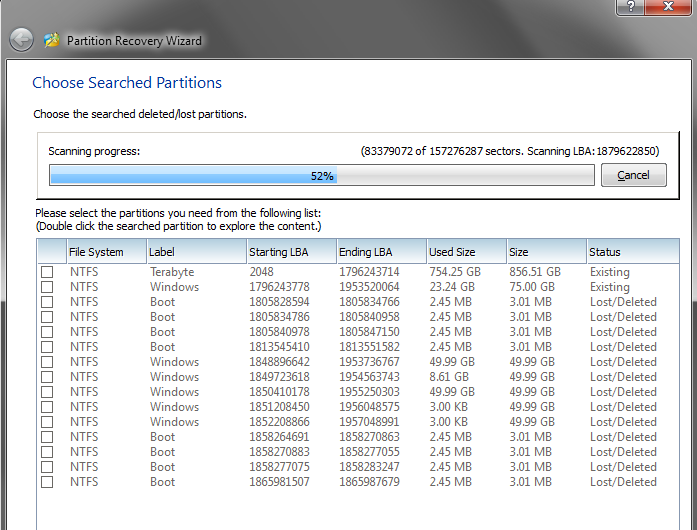
I just now threw in my old HDD and I'm running the Partition Recovery Wizard.

This is where I'm currently at.

iTQvp.png


I really shouldn't have tried to jump right in to moving partitions after spending so long fixing my other problem. I probably screwed something up being as tired as I am.
 

My Computer My Computer

At a glance

Windows 7 Ultimate x64
OS
Windows 7 Ultimate x64
I tried that and it couldn't resize while C: was active so it reboot and almost finished at 97% and then I heard a loud click from the hard drive and was met with a Disk I/O error.

=> Resizing/moving is not a failsafe operation! Always backup as you should do anyway.

You did it probably right...
Please listen carefully.

Did you do anything with partition Terrabyte? If not,... it's probably there

In post #1 I see a partition terabye and 2 other partitions both labelwd Windows. In your pw recovery screen I see some possible partitions named boot. Any idea what it is?

You used PW to get terabyte first and Windows adjacent to it using remaing of disk? So NO unallocated space?

Use only the PW boot CD following the video tutorial. How to Move/Resize Partition with partition manager? Partition Wizard Move/Resize Partition Video Help.

After resizing D from the left, Move C there.

Before applying, click on HD to highlight it then from Disk tab Rebuild MBR, Apply. How to Rebuild MBR with partition magic? Partition Wizard Rebuild MBR Video Help.

I tried that and it couldn't resize while C: was active so it reboot and almost finished at 97% and then I heard a loud click from the hard drive and was met with a Disk I/O error.

Windows was loading forever and it never came up, so I tried the startup repair and that didn't load either. I managed to get into startup repair via USB drive and it couldn't fix it so it tried to system restore and that failed with the error code 0x8000ffff.

I just now threw in my old HDD and I'm running the Partition Recovery Wizard.

This is where I'm currently at.

iTQvp.png


I really shouldn't have tried to jump right in to moving partitions after spending so long fixing my other problem. I probably screwed something up being as tired as I am.
terabyte partion and windows partition (75GB, 23 GB used). That you see as well in PW main screen I assume. What's the problem?

" so I tried the startup repair and that didn't load either."=> Be more specific please. Error message? Startup repair can take some time. I think it was performing a checkdisk
 
Last edited by a moderator:

My Computer My Computer

At a glance

Microsoft Windows 7 Home Premium 64-bits 7601...Intel(R) Core(TM) i3 CPU M 370 @ 2.40GHz4,00 GBATI Mobility Radeon HD 5400 Series
Computer type
Laptop
Computer Manufacturer/Model Number
ACER ASPIRE 5742G
OS
Microsoft Windows 7 Home Premium 64-bits 7601 Multiprocessor Free Service Pack 1
CPU
Intel(R) Core(TM) i3 CPU M 370 @ 2.40GHz
Motherboard
Acer Aspire 5742G
Memory
4,00 GB
Graphics Card(s)
ATI Mobility Radeon HD 5400 Series
Sound Card
(1) AMD High Definition Audio Device (2) Realtek High Defi
Screen Resolution
1366 x 768 x 32 bits (4294967296 colors) @ 60 Hz
Hard Drives
WDC WD5000BEVT-22ZAT0
In post #1 I see a partition terabye and 2 other partitions both labelwd Windows. In your pw recovery screen I see some possible partitions named boot. Any idea what it is?

You used PW to get terabyte first and Windows adjacent to it using remaing of disk? So NO unallocated space?

I took the unallocated space from W: when I deleted it and moved it into C:. Then I tried to take 25GB from C: and move it to E: but that failed.

Partition Recovery finished and I was able to get back into startup repair and finish the restore point. I'm back to having C: after E: but I don't care at this point. It hasn't been a problem before and I've spent too long on this.

Thanks for all your help again.

As to your reply above, it was just a cursor on a black screen for 30 minutes.
 

My Computer My Computer

At a glance

Windows 7 Ultimate x64
OS
Windows 7 Ultimate x64
Back
Top