Difficulty leaving my homegroup in windows 7

BiggestT4

New member
Local time
1:16 PM
Messages
12
Ok, so I have recently had a new computer in my house and so because it is a main desktop computer, I thought that I'd change my laptop from being the main homegroup provider. However doing this has caused me some issues. I have managed to get all of the other laptops off the homegroup and joined to the new homegroup I have created on the desktop computer.

The problem is that when I try to leave the homegroup it consistently comes up with the same message. "Windows cannot remove your computer from the homegroup." I have also found that I cannot change my password or even find this homegroup again on any other computer that is joined to my network.

I have already searched the windows 7 forum to see if there is any help, and the results have been promising in most cases. However not in mine.
I then followed this forum site to see if it could help
http://www.sevenforums.com/network-sharing/55781-cannot-leave-homegroup.html
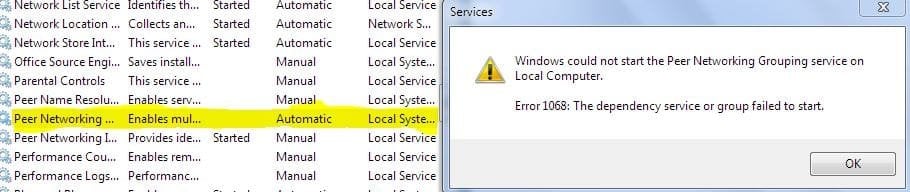
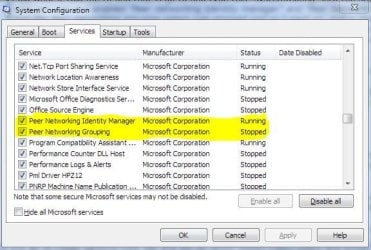
I did what it told me to and that is go to and type this "system.config" into the search start menu, go onto services and enabled "Peer networking Identity manager" and "Peer Networking grouping" I saw that the Peer networking grouping option was stopped and so I went on, and in the search start menu, I typed services.msc and hit enter. I then scrolled down and went onto Peer network grouping and attempted to start that. It unfortunately did not work. It came up with a message and an error:

"Error 1068: The dependency service or group failed to start"
So I tried restarting my computer at this point and followed on with the next instructions:

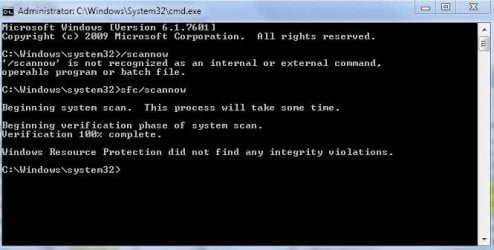
I then did a system scan (I did this by typing cmd into the start menu, running it as administrator, and then typing /scannow. The scan came back clear and said nothing was wrong. :)


After restarting I went to this location
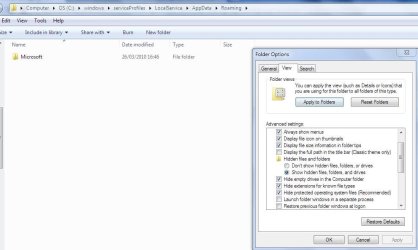
C:\windows\serviceProfiles\LocalService\AppData\Roaming\PeerNetworking
and I deleted the contents in it. And yet again I did another system restart. However the same outcome appears and I still cannot leave the homegroup. I have unfortunately had to empty the recycle bin as it was too large and the files that was in this location is now lost. :confused:

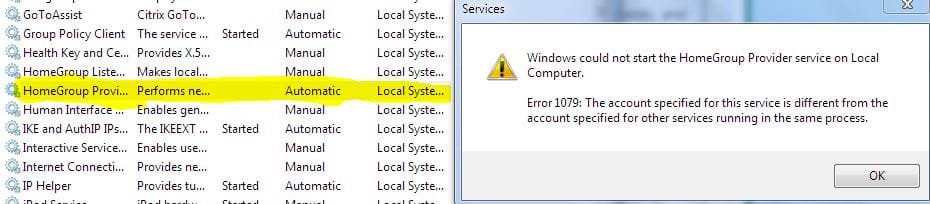
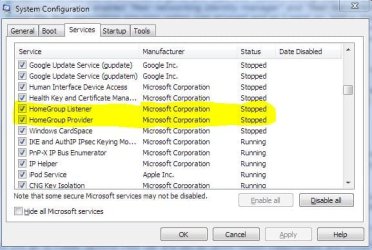
I have noticed recently though that when I type in system.config and go onto services, I have found that Homegroup listener and Provider are checked but are also stopped. < Could this be the case or have I done something else wrong in the process of getting to here? :mad:
 

My Computer My Computer

At a glance

Windows 7 Home Premium 32bit
OS
Windows 7 Home Premium 32bit
My Computer My Computer

At a glance

Windows 7 Ultimate 64 bitAMD Phenom II X4 965 Black EditionGSkill 4 X 2 GB PC 8500XFX Radeon HD 6790 D
Computer Manufacturer/Model Number
Custom built
OS
Windows 7 Ultimate 64 bit
CPU
AMD Phenom II X4 965 Black Edition
Motherboard
Gigabyte GA-MA790X-DS4
Memory
GSkill 4 X 2 GB PC 8500
Graphics Card(s)
XFX Radeon HD 6790 D
Sound Card
On board RealTek HD
Monitor(s) Displays
Dual monitors:Samsung SyncMaster S20B300
Screen Resolution
1600 X 900
Hard Drives
Seagate Barracuda 1TB (primary)
Seagate Barracuda 2 X 320 GB
PSU
Ultra X4 750 watt fully modular
Case
Thermaltake Overseer RX 1 full tower
Cooling
Core-Contact 92 mm CPU Cooler
Keyboard
Logitech G510
Mouse
Razor DeathAdder
Internet Speed
50/5 Mbps UL/DL
Other Info
Optical: Super Muliti DVD burner w/lightscribe, Hauppauge WinTV HVR-1800
Ok, so I have recently had a new computer in my house and so because it is a main desktop computer, I thought that I'd change my laptop from being the main homegroup provider. However doing this has caused me some issues. I have managed to get all of the other laptops off the homegroup and joined to the new homegroup I have created on the desktop computer.

The problem is that when I try to leave the homegroup it consistently comes up with the same message. "Windows cannot remove your computer from the homegroup." I have also found that I cannot change my password or even find this homegroup again on any other computer that is joined to my network.

I have already searched the windows 7 forum to see if there is any help, and the results have been promising in most cases. However not in mine.
I then followed this forum site to see if it could help
http://www.sevenforums.com/network-sharing/55781-cannot-leave-homegroup.html
I did what it told me to and that is go to and type this "system.config" into the search start menu, go onto services and enabled "Peer networking Identity manager" and "Peer Networking grouping" I saw that the Peer networking grouping option was stopped and so I went on, and in the search start menu, I typed services.msc and hit enter. I then scrolled down and went onto Peer network grouping and attempted to start that. It unfortunately did not work. It came up with a message and an error:

"Error 1068: The dependency service or group failed to start"
So I tried restarting my computer at this point and followed on with the next instructions:

I then did a system scan (I did this by typing cmd into the start menu, running it as administrator, and then typing /scannow. The scan came back clear and said nothing was wrong. :)


After restarting I went to this location
C:\windows\serviceProfiles\LocalService\AppData\Roaming\PeerNetworking
and I deleted the contents in it. And yet again I did another system restart. However the same outcome appears and I still cannot leave the homegroup. I have unfortunately had to empty the recycle bin as it was too large and the files that was in this location is now lost. :confused:

I have noticed recently though that when I type in system.config and go onto services, I have found that Homegroup listener and Provider are checked but are also stopped. < Could this be the case or have I done something else wrong in the process of getting to here? :mad:

Did you go to Folder Options/View tab and set to "Show Hidden Files,Folders and Drives" before you deleted the contents of C:\windows\serviceProfiles\LocalService\AppData\Roaming\PeerNetworking

I have a few more solved threads about this same problem. :confused:
http://www.sevenforums.com/network-sharing/62176-homegroup-not-working.html#post557185
 

My Computer My Computer

At a glance

Windows 7 Ult, Windows 8.1 Pro,Q9650-4.275GHz, E8600 4.5GHz, E6750-3.8GHzG.Skill PC2 9600 1200Mhz 5 5 5 15 2TGTX480
Computer type
PC/Desktop
Computer Manufacturer/Model Number
Home built
OS
Windows 7 Ult, Windows 8.1 Pro,
CPU
Q9650-4.275GHz, E8600 4.5GHz, E6750-3.8GHz
Motherboard
Evga 780i FTW
Memory
G.Skill PC2 9600 1200Mhz 5 5 5 15 2T
Graphics Card(s)
GTX480
Sound Card
Asus Xonar D2
Monitor(s) Displays
HannsG
Screen Resolution
1680X1050
Hard Drives
GSkill Phoenix Pro 120GB SSD
PSU
ThermalTake Toughpower 1000Watt modular
Case
ThermalTake XaserV
Cooling
Xigmatek S1283
Keyboard
Logitech G15
Mouse
Logitech G9
Internet Speed
T1

My Computer My Computer

At a glance

Windows 7 Home Premium 32bit
OS
Windows 7 Home Premium 32bit
Ok, so I have recently had a new computer in my house and so because it is a main desktop computer, I thought that I'd change my laptop from being the main homegroup provider. However doing this has caused me some issues. I have managed to get all of the other laptops off the homegroup and joined to the new homegroup I have created on the desktop computer.

The problem is that when I try to leave the homegroup it consistently comes up with the same message. "Windows cannot remove your computer from the homegroup." I have also found that I cannot change my password or even find this homegroup again on any other computer that is joined to my network.

I have already searched the windows 7 forum to see if there is any help, and the results have been promising in most cases. However not in mine.
I then followed this forum site to see if it could help
http://www.sevenforums.com/network-sharing/55781-cannot-leave-homegroup.html
I did what it told me to and that is go to and type this "system.config" into the search start menu, go onto services and enabled "Peer networking Identity manager" and "Peer Networking grouping" I saw that the Peer networking grouping option was stopped and so I went on, and in the search start menu, I typed services.msc and hit enter. I then scrolled down and went onto Peer network grouping and attempted to start that. It unfortunately did not work. It came up with a message and an error:

"Error 1068: The dependency service or group failed to start"
So I tried restarting my computer at this point and followed on with the next instructions:

I then did a system scan (I did this by typing cmd into the start menu, running it as administrator, and then typing /scannow. The scan came back clear and said nothing was wrong. :)


After restarting I went to this location
C:\windows\serviceProfiles\LocalService\AppData\Roaming\PeerNetworking
and I deleted the contents in it. And yet again I did another system restart. However the same outcome appears and I still cannot leave the homegroup. I have unfortunately had to empty the recycle bin as it was too large and the files that was in this location is now lost. :confused:

I have noticed recently though that when I type in system.config and go onto services, I have found that Homegroup listener and Provider are checked but are also stopped. < Could this be the case or have I done something else wrong in the process of getting to here? :mad:

Did you go to Folder Options/View tab and set to "Show Hidden Files,Folders and Drives" before you deleted the contents of C:\windows\serviceProfiles\LocalService\AppData\Roaming\PeerNetworking

I have a few more solved threads about this same problem. :confused:
http://www.sevenforums.com/network-sharing/62176-homegroup-not-working.html#post557185

No I did not show hidden files and folders, I'll try that..... I cannot find "PeerNetworking" Because I have deleted that folder, so therefore if there was anything in it, it has gone now. And as for hidden files and folders, there is nothing else that has popped up.
Any other advice you have for me?
 

My Computer My Computer

At a glance

Windows 7 Home Premium 32bit
OS
Windows 7 Home Premium 32bit
I have devised some screenshots to show you what is happening when I try to use your information. I am very sorry that there are so many of them, however I thought I'd better show you everything so that you know what is going on. I have highlighted the fields where the information is coming from. I hope that these screen captures will help you to help me on what to do, en route to having a proper, working Homegroup again. Thank you
 

Attachments

  • Issues i'm having2.JPG
    Issues i'm having2.JPG
    40.9 KB · Views: 17
  • Issues i'm having5.JPG
    Issues i'm having5.JPG
    53.6 KB · Views: 17
  • issues i'm having9.JPG
    issues i'm having9.JPG
    62.6 KB · Views: 14
  • issues i'm having8.JPG
    issues i'm having8.JPG
    92.8 KB · Views: 13
  • issues i'm having10.JPG
    issues i'm having10.JPG
    36.9 KB · Views: 21
  • Issues i'm having6.JPG
    Issues i'm having6.JPG
    44.2 KB · Views: 10
  • Issues i'm having6a.JPG
    Issues i'm having6a.JPG
    42.5 KB · Views: 9
  • Issues i'm having7.JPG
    Issues i'm having7.JPG
    90.4 KB · Views: 10
  • Issues i'm having4.JPG
    Issues i'm having4.JPG
    52.2 KB · Views: 11

My Computer My Computer

At a glance

Windows 7 Home Premium 32bit
OS
Windows 7 Home Premium 32bit
Last edited:

My Computer My Computer

At a glance

Windows 7 Ult, Windows 8.1 Pro,Q9650-4.275GHz, E8600 4.5GHz, E6750-3.8GHzG.Skill PC2 9600 1200Mhz 5 5 5 15 2TGTX480
Computer type
PC/Desktop
Computer Manufacturer/Model Number
Home built
OS
Windows 7 Ult, Windows 8.1 Pro,
CPU
Q9650-4.275GHz, E8600 4.5GHz, E6750-3.8GHz
Motherboard
Evga 780i FTW
Memory
G.Skill PC2 9600 1200Mhz 5 5 5 15 2T
Graphics Card(s)
GTX480
Sound Card
Asus Xonar D2
Monitor(s) Displays
HannsG
Screen Resolution
1680X1050
Hard Drives
GSkill Phoenix Pro 120GB SSD
PSU
ThermalTake Toughpower 1000Watt modular
Case
ThermalTake XaserV
Cooling
Xigmatek S1283
Keyboard
Logitech G15
Mouse
Logitech G9
Internet Speed
T1
Yes I have tried to do the system scan and there is a message that comes up saying

"Windows resource protection did not find any integritry violations"
 

My Computer My Computer

At a glance

Windows 7 Home Premium 32bit
OS
Windows 7 Home Premium 32bit

My Computer My Computer

At a glance

Windows 7 Home Premium 32bit
OS
Windows 7 Home Premium 32bit
Have you tried running the sfc/scannow command to see if there are any corrupted files?

Perhaps following the steps in the link below will help.

HomeGroup: error 0x80630203 / Leaving/joining the homegroup is not possible

Ok so I went onto the website you gave me, and unfortunately these solutions didn't work either. Is there anything else I can do to leave the homegroup

That covers most solution available for the problem you are describing.
 

My Computer My Computer

At a glance

Windows 7 Ult, Windows 8.1 Pro,Q9650-4.275GHz, E8600 4.5GHz, E6750-3.8GHzG.Skill PC2 9600 1200Mhz 5 5 5 15 2TGTX480
Computer type
PC/Desktop
Computer Manufacturer/Model Number
Home built
OS
Windows 7 Ult, Windows 8.1 Pro,
CPU
Q9650-4.275GHz, E8600 4.5GHz, E6750-3.8GHz
Motherboard
Evga 780i FTW
Memory
G.Skill PC2 9600 1200Mhz 5 5 5 15 2T
Graphics Card(s)
GTX480
Sound Card
Asus Xonar D2
Monitor(s) Displays
HannsG
Screen Resolution
1680X1050
Hard Drives
GSkill Phoenix Pro 120GB SSD
PSU
ThermalTake Toughpower 1000Watt modular
Case
ThermalTake XaserV
Cooling
Xigmatek S1283
Keyboard
Logitech G15
Mouse
Logitech G9
Internet Speed
T1
Ok. Thats not good. I'm going to try and do some of the options on some of the other forums you've helped with. I hope that this works once i've done it.

Thanks for your help anyway.
If there is anything else I can do without formatting my OS drive, that'd be great. Thank you
 

My Computer My Computer

At a glance

Windows 7 Home Premium 32bit
OS
Windows 7 Home Premium 32bit
I've now done 3 system scans and each time it has come up with the same message, which is that windows resource protection did not find any integrity violations. So i'm guessing there is nothing else I can do.
 

My Computer My Computer

At a glance

Windows 7 Home Premium 32bit
OS
Windows 7 Home Premium 32bit
Back
Top