Solved Windows 7 / Windows 8 Dual-Boot - Set Boot Default

Bare Foot Kid

R.I.P. August 13th 2014
SF Team
Local time
8:22 AM
Messages
22,809
Location
The Lowcountry
Hello all.


Here at Seven Forums in this thread there was a big confusion about the best way to set the default boot menu to use during PC start-up, I too was a part of this confusion.

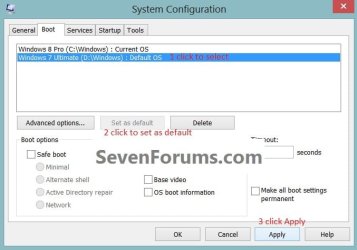
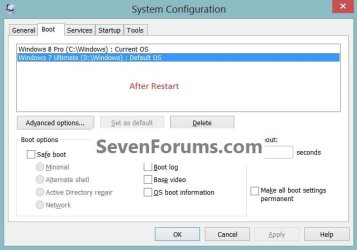
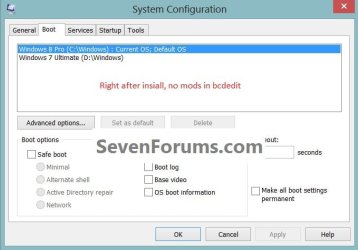
I fooled around and found MSCONFIG is still the best, easiest way to set the default boot-menu to use; in the search box (Windows 7 or Windows 8) type msconfig and it can be set there with a required system restart.

Our Windows 8 forums can be visited at this link below.
1.jpg2.jpg
3.jpg
 
Last edited:

My Computer My Computer

At a glance

W 7 64-bit UltimateIntel Q9550 Yorkfield8GB Dominator 8500C5DATI : XFX 5870
Computer Manufacturer/Model Number
* BFK Customs *
OS
W 7 64-bit Ultimate
CPU
Intel Q9550 Yorkfield
Motherboard
ASUS P5Q Pro
Memory
8GB Dominator 8500C5D
Graphics Card(s)
ATI : XFX 5870
Sound Card
Realtek HD Audio 7-1
Monitor(s) Displays
1x 47" LCD HDMI & 3x 26" LCD HDMI
Screen Resolution
1920x1080P & 1920x1200
Hard Drives
1x 80GB Intel X25-M G2 SSD : 1x 500GB & 1x 640GB WD Caviar Black(s)
PSU
Corsair 620HX
Case
Cooler Master RC-690
Cooling
Tuniq Tower 120, 2x 140mm and 3x 120mm case fans
Keyboard
Microsoft 500
Mouse
Razer Diamondback 3G
Internet Speed
14 Mb/s
Other Info
1x Koutech 3Gb/s SATA HDD Hot Swap Rack
I agree with your comments.

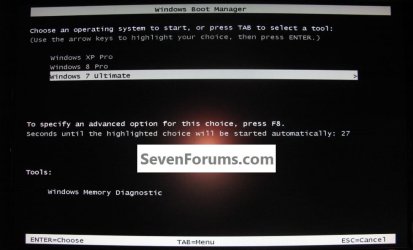
There is also another way to set the default OS. Everyone already knows about changing it from the Windows 8 boot GUI, but if you are using the Text boot menu, highlighting the Windows 8 entry and using the F8 key will get you into the Windows 8 GUI and you will have an option, from there, to select the default OS.

This may not work on all types installs.....
 

My Computer My Computer

At a glance

Windows 7 x64i7-2600K8 GGTX 480
Computer Manufacturer/Model Number
Homebuilt
OS
Windows 7 x64
CPU
i7-2600K
Motherboard
Asus P8Z77-v Pro
Memory
8 G
Graphics Card(s)
GTX 480
Sound Card
Onboard
Monitor(s) Displays
LG W2753V
Screen Resolution
1920x1080
Hard Drives
Crucial M4 128 G SSD
Good tip mate, thanks!


click to enlarge
4.jpg
 

My Computer My Computer

At a glance

W 7 64-bit UltimateIntel Q9550 Yorkfield8GB Dominator 8500C5DATI : XFX 5870
Computer Manufacturer/Model Number
* BFK Customs *
OS
W 7 64-bit Ultimate
CPU
Intel Q9550 Yorkfield
Motherboard
ASUS P5Q Pro
Memory
8GB Dominator 8500C5D
Graphics Card(s)
ATI : XFX 5870
Sound Card
Realtek HD Audio 7-1
Monitor(s) Displays
1x 47" LCD HDMI & 3x 26" LCD HDMI
Screen Resolution
1920x1080P & 1920x1200
Hard Drives
1x 80GB Intel X25-M G2 SSD : 1x 500GB & 1x 640GB WD Caviar Black(s)
PSU
Corsair 620HX
Case
Cooler Master RC-690
Cooling
Tuniq Tower 120, 2x 140mm and 3x 120mm case fans
Keyboard
Microsoft 500
Mouse
Razer Diamondback 3G
Internet Speed
14 Mb/s
Other Info
1x Koutech 3Gb/s SATA HDD Hot Swap Rack
:) Thanks but that thread wasn't about setting the default os in bootloader but to switch between GUI or Text based boot loader
 

My Computer My Computer

At a glance

Windows 8.1 Pro x64Intel Core i3 (3.0 GHZ)4 GB GDDR3Sapphire ATI Radeon 7790 HD 1 GB GDDR5
Computer type
PC/Desktop
Computer Manufacturer/Model Number
Custom Build
OS
Windows 8.1 Pro x64
CPU
Intel Core i3 (3.0 GHZ)
Motherboard
Asus P7H55-M LX
Memory
4 GB GDDR3
Graphics Card(s)
Sapphire ATI Radeon 7790 HD 1 GB GDDR5
Sound Card
Builtin AMD Hight Defination Audio Controller
Monitor(s) Displays
ASUS MS228H 21.5" Wide LED Monitor
Screen Resolution
1920x1080
Hard Drives
1 TB SATA Seagate
PSU
500W
Case
Orange
Cooling
None
Keyboard
A4TECH
Mouse
Who Cares?
Internet Speed
1 MB Shared Wateen Wireless
Antivirus
Kaspersky Internet Security
Browser
Mozilla Firefox
:) Thanks but that thread wasn't about setting the default os in bootloader but to switch between GUI or Text based boot loader


Hello mate, just a question if I may.

When you say "Text Based" the screen below is what you are referring to?


click to enlarge
Default_Boot.jpg
 

My Computer My Computer

At a glance

W 7 64-bit UltimateIntel Q9550 Yorkfield8GB Dominator 8500C5DATI : XFX 5870
Computer Manufacturer/Model Number
* BFK Customs *
OS
W 7 64-bit Ultimate
CPU
Intel Q9550 Yorkfield
Motherboard
ASUS P5Q Pro
Memory
8GB Dominator 8500C5D
Graphics Card(s)
ATI : XFX 5870
Sound Card
Realtek HD Audio 7-1
Monitor(s) Displays
1x 47" LCD HDMI & 3x 26" LCD HDMI
Screen Resolution
1920x1080P & 1920x1200
Hard Drives
1x 80GB Intel X25-M G2 SSD : 1x 500GB & 1x 640GB WD Caviar Black(s)
PSU
Corsair 620HX
Case
Cooler Master RC-690
Cooling
Tuniq Tower 120, 2x 140mm and 3x 120mm case fans
Keyboard
Microsoft 500
Mouse
Razer Diamondback 3G
Internet Speed
14 Mb/s
Other Info
1x Koutech 3Gb/s SATA HDD Hot Swap Rack
Yup
 

My Computer My Computer

At a glance

Windows 8.1 Pro x64Intel Core i3 (3.0 GHZ)4 GB GDDR3Sapphire ATI Radeon 7790 HD 1 GB GDDR5
Computer type
PC/Desktop
Computer Manufacturer/Model Number
Custom Build
OS
Windows 8.1 Pro x64
CPU
Intel Core i3 (3.0 GHZ)
Motherboard
Asus P7H55-M LX
Memory
4 GB GDDR3
Graphics Card(s)
Sapphire ATI Radeon 7790 HD 1 GB GDDR5
Sound Card
Builtin AMD Hight Defination Audio Controller
Monitor(s) Displays
ASUS MS228H 21.5" Wide LED Monitor
Screen Resolution
1920x1080
Hard Drives
1 TB SATA Seagate
PSU
500W
Case
Orange
Cooling
None
Keyboard
A4TECH
Mouse
Who Cares?
Internet Speed
1 MB Shared Wateen Wireless
Antivirus
Kaspersky Internet Security
Browser
Mozilla Firefox
That is the cause of the confusion in your thread, to set the "default" boot OS is to control which boot screen you get (W_7 or W_8) the method I posted above in this same thread is very easy to switch to one or the other as you like.
 

My Computer My Computer

At a glance

W 7 64-bit UltimateIntel Q9550 Yorkfield8GB Dominator 8500C5DATI : XFX 5870
Computer Manufacturer/Model Number
* BFK Customs *
OS
W 7 64-bit Ultimate
CPU
Intel Q9550 Yorkfield
Motherboard
ASUS P5Q Pro
Memory
8GB Dominator 8500C5D
Graphics Card(s)
ATI : XFX 5870
Sound Card
Realtek HD Audio 7-1
Monitor(s) Displays
1x 47" LCD HDMI & 3x 26" LCD HDMI
Screen Resolution
1920x1080P & 1920x1200
Hard Drives
1x 80GB Intel X25-M G2 SSD : 1x 500GB & 1x 640GB WD Caviar Black(s)
PSU
Corsair 620HX
Case
Cooler Master RC-690
Cooling
Tuniq Tower 120, 2x 140mm and 3x 120mm case fans
Keyboard
Microsoft 500
Mouse
Razer Diamondback 3G
Internet Speed
14 Mb/s
Other Info
1x Koutech 3Gb/s SATA HDD Hot Swap Rack
Back
Top