Firefox not running after latest update, error AppHangB1

Standard method for fixing what may well have been a faulty download or install, a quote from MozillaZine:

Close all applications and reboot the computer.
Delete any downloaded or partially downloaded installer files.
Clear the browser cache (of whatever browser you are using to download FF) and the Windows Temp directory.
Shutdown any anti-virus software you are running.
Download a new copy of the full installer from www.mozilla.com
Delete the directory C:\Program Files\Mozilla Firefox
Run the installer.
Restart the anti-virus program.

Download/install failures are not common (whatever "common" means mathmatically,) but they do happen, and the above instructions most often fix the malady.

Please ignore comments such as Firefox 15 may have a bug; were that true, there would be many complaints on such forums as MozillaZine to that effect, complaints that don't exist as of a few minutes ago. Rather than flail around, please try the proven and simple fix.

Will that work? Obviously I don't know; I only know that it has been demonstrated to be of use and, thus, likely to be worth trying.
 

My Computer My Computer

Computer type
PC/Desktop
Computer Manufacturer/Model Number
Intel(R) Core(TM) i5-2320 CPU @ 3.00GHz (Gateway computer)
OS
Microsoft Windows 7 Home Premium 64-bit 7601 Multiprocessor Free Service Pack 1
CPU
Intel(R) Core(TM) i5-2320 CPU @ 3.00GHz
Motherboard
Gateway IPISB-VR
Memory
8.00 GB
Graphics Card(s)
Intel(R) HD Graphics
Sound Card
(1) Realtek High Definition Audio (2) Intel(R) Display Aud
Monitor(s) Displays
ViewSonic 2250 Series
Screen Resolution
1920 x 1080 x 32 bits (4294967296 colors) @ 60 Hz
Hard Drives
(1) WDC WD10EADX-22TDHB0 (2) Generic Mini SD Reader USB Device (3) Generic USB CF Reader USB Device (4) Generic USB MS Reader USB Device (5) Generic USB SD Reader USB Device (6) Generic USB xD/SM Reader USB Device (7) Seagate FreeAgent Go
Keyboard
Gateway
Mouse
Logitech
Internet Speed
20 Mbps (Theoretical.)
Antivirus
Avast
Browser
Firefox
Standard method for fixing what may well have been a faulty download or install, a quote from MozillaZine:

Close all applications and reboot the computer.
Delete any downloaded or partially downloaded installer files.
Clear the browser cache (of whatever browser you are using to download FF) and the Windows Temp directory.
Shutdown any anti-virus software you are running.
Download a new copy of the full installer from www.mozilla.com
Delete the directory C:\Program Files\Mozilla Firefox
Run the installer.
Restart the anti-virus program.

Download/install failures are not common (whatever "common" means mathmatically,) but they do happen, and the above instructions most often fix the malady.

Please ignore comments such as Firefox 15 may have a bug; were that true, there would be many complaints on such forums as MozillaZine to that effect, complaints that don't exist as of a few minutes ago. Rather than flail around, please try the proven and simple fix.

Will that work? Obviously I don't know; I only know that it has been demonstrated to be of use and, thus, likely to be worth trying.

I am pretty sure the issue was caused by me. I probably fück*d up my Windows by uninstalling Microsoft Security Essentials using Your Uninstaller Pro. It probably messed up my windows registry.
 

My Computer My Computer

OS
Windows 7 Ultimate x64
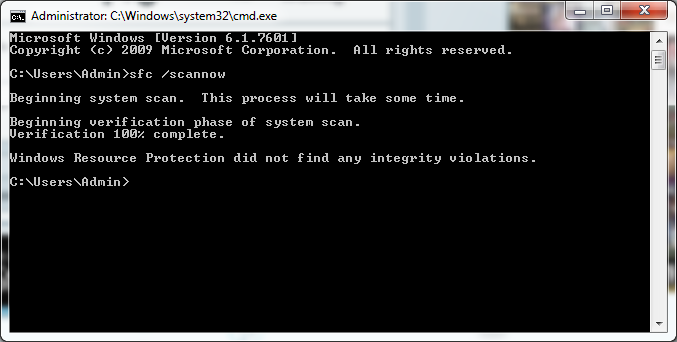
From the cmd prompt run sfc /scannow. It can't hurt but might help. Run it 3 time and boot after each.
 

My Computer My Computer

Computer type
PC/Desktop
Computer Manufacturer/Model Number
Home made Desktop
OS
Windows 10 Pro. 64/ version 1709 Windows 7 Pro/64
CPU
Intel i7-6800K @ 4.3
Motherboard
ASUS X-99 Deluxe II
Memory
Corsair Platinum 16 gig @2400
Graphics Card(s)
EVGA GTX 1070 OC
Monitor(s) Displays
Asus 27" LED LCD/VE278Q
Screen Resolution
1920-1080 or 1280-720 HDMI
Hard Drives
INTEL SSD 730-240 Gb Sata 3.0/
PSU
EVGA Platium 1200W
Case
Phanteks Luxe Tempered Glass 8 fans/ one radiator
Cooling
XSPC/ Water Cooled CPU
Keyboard
Das 4 Professional
Mouse
Logitech M705/MX Anywhere 2-S
Internet Speed
100 mbits
Antivirus
Microsoft Security Essentials/ Malwarebytes Premium 3.0/ SAS
Browser
I.E. 11 default/Firefox/ ISP Time Warner Cable/Spectrum
Other Info
LG BluRay Burner/
Sound system-KLipsch-THX/
Icy Dock ssd Hot Swap bays.
From the cmd prompt run sfc /scannow. It can't hurt but might help. Run it 3 time and boot after each.

zRdMv.png
 

My Computer My Computer

OS
Windows 7 Ultimate x64
Folks at PaleMoon.org reported some issues to the programmer/optimizer, Moonchild, and he addressed them in one of his posts at the forum.

In particular, the gecko 15 engine underneath Firefox 15 introduced some changes that played havoc with heavyweight custom themes and add-on's that haven't kept up with Mozilla's march towards "progress".

Options are: run in safe mode, create a new profile or disable all add-on's for the current profile and work with one add-on at a time to isolate the culprit.
 

My Computer My Computer

OS
Windows 7 Home Premium x64
Folks at PaleMoon.org reported some issues to the programmer/optimizer, Moonchild, and he addressed them in one of his posts at the forum.

In particular, the gecko 15 engine underneath Firefox 15 introduced some changes that played havoc with heavyweight custom themes and add-on's that haven't kept up with Mozilla's march towards "progress".

Options are: run in safe mode, create a new profile or disable all add-on's for the current profile and work with one add-on at a time to isolate the culprit.

oh look someone else mentions create a new profile, did you try this or not, i recently had issues with firefox, i created a new profile and it was fixed, i then copied the contents of my old profile into the new one and everything worked fine, add ons, theme the lot.
im not saying this is the solve in your case but you need to try it to rule it out, before re installing windows 7, that does seem like a sledgehammer to crack a nut.
 

My Computer My Computer

Computer Manufacturer/Model Number
Hewlett packard/p6512uk
OS
Microsoft Windows 7 Home Premium 64-bit 7600
CPU
IIx4 amd athelon 635 processor
Motherboard
FOXCONN 2AA9
Memory
2x2gb
Graphics Card(s)
ati radeon HD 5450
Sound Card
(1) Realtek High Definition Audio (2) AMD High Definition
Monitor(s) Displays
samsung lcd tv 32"
Screen Resolution
1360x 768
Hard Drives
(1) WDC WD10 01FAES-60Z2A0 SATA Disk Device (2) Maxtor OneTouch USB Device (3) ST310003 33AS USB Device (4) WD My Book 1111 USB Device
PSU
?
Cooling
air!
Keyboard
wireless hp
Mouse
wireless Hp,optical
Internet Speed
1.10mb/s
Antivirus
MSE
Browser
Firefox
Back
Top