Windows 7 HoPr Install Problems on x64 machine.

Tegewaldt

New member
Member
Local time
8:34 PM
Messages
61
Location
Jutland, Denmark
Hello everyone :geek:

( i am new to these forums, so bear with me in case i make a mistake or two )

I have recently had some quite serious problems with my system. I had the 41 kernel-power issue, due to an imcompatibility with my internet browser. After a while, it got worse, and when i turned my PC on, the ON light would almost instantly go away, as if it had stopped working. Then after a few moments it would suddenly come back to life and make the usual first BEEP, but it would just stop there, and my monitor would'nt even react to it. Then it would be luck based, whether or not it would load Windows. it did hoever, from this point always load the Packard bell startup screen, where i could enter Bios and such.

After a few minutes this morning, the computer was running fin, until suddenly a crash in IE. no big deal, as i was used to this, but when i tried to restart the computer, it turned itself off quickly, again and again...
After a long time of hopeless on/off'ing, it finally loaded up windows ( i suppose its actually loading the C: drive, as windows never ACTUALLY appeared ). Onstead of the ordinary Bios menu:

Start windows normally, safe mode blablabla, it came up with startup repair and start windows normally. i chose repair, fixed it, but none of the options had an impact on the startup. Finally, i decided "Whatever" and Told it to reinstall windows ( While backupping my files, that is ).

It seemed like a success, and when it finally finished, it came up with an error, saying that windows could'nt be installed to the drive. it then restarted, and i nervously waited. it then came with the message: Installation is starting sevices. (my translation )
Right after this, it would give me the message: Windows could not complete the installation. Restart The Installation to install Windows.

It has looped like this for a while now.
i decided not to turn it off in bios menu, as i would not benefit from it atm.

To Cut right to the chase: i need HELP installing windows. i WOULD PREFER if i could keep my data, but the alternative i can live with...
Before you say anything, the computer came with installed windows.
i have run RAM dianostics through a windows repair that i burned onto a disk.

Thank you for taking your time reading this post.

System Specs:
Intel Core i5
6gb. ddr3 RAM
nVidia geForce 460 GT
*No data regarding MOBO*
my tower has more than sufficient cooling, and i have not modified anything, except for an added ( clean ) HDD and a wireless internet card.

Again, Thank you for your Attention.


EDIT: I am currently not able to enter either Windows ( in safe mode or anything )
Or the original Startup repair which includes the install/uninstall tools.
(i am atleast not AWARE of any ways to open the installed repair )

EDIT - EDIT: I have acquired ADMIN CMD and a primitive version of windows EXPLORER, allowing me to open hidden folders, and backup more or less what i want to keep, to my Ext. Hard Drive.
According to my right click Options, i AM able to Format the Windows installation drive from here
( as far as i know ) however, i wont do it just yet, as i would like to hear your response(s) and perhaps i am making a huge mistake by doing it?

Thanks once more, for your Attention :P
 
Last edited:

My Computer My Computer

At a glance

Windows Home Premium 64bitIntel core i5 3.4Ghz Clarkdale Chipset6Gb DDR3nVidia Geforce GT 440
Computer Manufacturer/Model Number
Packardbell ixtreme m5801
OS
Windows Home Premium 64bit
CPU
Intel core i5 3.4Ghz Clarkdale Chipset
Motherboard
Packard Bell ipower G5800 Intel Havendale/Clarkdale
Memory
6Gb DDR3
Graphics Card(s)
nVidia Geforce GT 440
Sound Card
The unit High Definition Audio ( according to SIW )
Monitor(s) Displays
Samsung 22" and Phillips 24"
Screen Resolution
Samsung: 1680*1050. Phillips 1920*1280
Hard Drives
1TB Western digital HDD and 1 465GB Western digital HDD
PSU
Unable to locate in SIW
Case
Packard Bell ixtreme "hull" (it's quite heavy)
Cooling
Unnamed coolermaster fans
Keyboard
Logitech G110 Macro Gamer keyboard
Mouse
Logitech MX518
Internet Speed
10/1Mbips
Tegewaldt,

First, let's rescue your data.

One approach is to burn Puppy Linux to a CD and use Puppy Linux to copy your data over to an external usb drive or to a usb stick.
Puppy Linux Community Home - Getting Started

A more common approach is to use a Win 7 System Repair Disc.

Since your system is rather non-functional, then you will need to create the System Repair Disc on another Win 7 computer.

If your Win 7 is the 32 bit variety, then the other computer must also be 32-bit win 7.

If you are running Win 7 64 bit, then go to another 64 bit win 7 system to make the disc.

Making the disc is very simple:
CREATE A SYSTEM REPAIR DISC

[FONT=&quot]START[/FONT][FONT=&quot] | type System Repair | Enter key | Create Disc button

[/FONT]
---------------------------------------------------------------

You boot FROM the System Repair Disc, go to a command prompt and then use the good old dos copy command to copy everything dear to your heart to a usb stick or usb drive.

GO TO A COMMAND PROMPT USING A SYSTEM REPAIR DISC

1) Insert System Repair Disc into optical reader.
2) Shutdown computer.
3) Boot up computer from the System Repair Disc
4) A SYSTEM RECOVERY OPTIONS dialog appears.
5) NEXT button
6) select Use recovery tools that can help fix problems starting Windows
7) NEXT | Choose Command Prompt

Run desired commands and type EXIT when finished.
Remove the System Repair Disc.
Shutdown computer.
Power on computer.

NOTE:
If your computer doesn’t boot from the optical drive, then
Immediately after pushing your Power ON button,
start tapping the F2 key to get to the BIOS to change the boot order

On some computers, Immediately after pushing the Power ON button,
start tapping the F12 key and choose CD/DVD to change the boot order
only for this time.

============================================

After completing these steps, then we need to determine why your computer is not working correctly. I strongly suspect a hardware problem.

Let me know when the backup is finished.


My Computer My Computer

At a glance

MS Windows 7 Ultimate SP1 64-bitAMD A10-4600M6.00 GB Dual-Channel DDR3 @ 798MHz (11-11-12-28)AMD Radeon HD 7660G
Computer Manufacturer/Model Number
Toshiba Satellite S875D-S7239 laptop
OS
MS Windows 7 Ultimate SP1 64-bit
CPU
AMD A10-4600M
Motherboard
AMD Pumori (Socket FT1)
Memory
6.00 GB Dual-Channel DDR3 @ 798MHz (11-11-12-28)
Graphics Card(s)
AMD Radeon HD 7660G
Sound Card
High Definition Audio Device
Monitor(s) Displays
Generic PnP Monitor (1600x900@60Hz)
Screen Resolution
1600x900@60Hz
Hard Drives
SSD 119GB Corsair CSSD-V128GB2 ATA Device
Keyboard
Standard PS/2 Keyboard
Mouse
HP Wireless Optical Mobile Mouse Model FHA-3410
Internet Speed
What the local pub, local coffee shop offers.
Other Info
Optical Drive:MATSHITA BD-CMB UJ160B ATA Device


Also have an Asus ha1002xp netbook with Win 7 Ultimate installed.
Update:

I have successfully moved everything that i want to my External HDD. now i just need to know how to, and what drive i should format.

i Have run CMD and explorer exe, using the Repair disk i made from my laptop.

ooh, and additional info includes:

When i open the "Computer" folder in explorer, i can see rather many Drives.

SYSTEM RESERVED ( C: ) DATA ( D: )
RECOVER ( E: ) Packard Bell ( F: )
DATA ( G: ) PQSERVICE ( H: )
BUFFALO ( O: ) BOOT ( X: )
------------------------------------------------------
Before the Crash, i had 3 HDD's in my system.
i SUPPOSE the new ones, are "partitions" or
Ghost drives for installation purposes. etc.


( buffallo is my external HDD, and DATA D, DATA G and Packard Bell F are the original 456gb drives)

In case it matters, The backup i made was transferred to Packard Bell ( F: ), from which i moved what i needed to the External.
 

My Computer My Computer

At a glance

Windows Home Premium 64bitIntel core i5 3.4Ghz Clarkdale Chipset6Gb DDR3nVidia Geforce GT 440
Computer Manufacturer/Model Number
Packardbell ixtreme m5801
OS
Windows Home Premium 64bit
CPU
Intel core i5 3.4Ghz Clarkdale Chipset
Motherboard
Packard Bell ipower G5800 Intel Havendale/Clarkdale
Memory
6Gb DDR3
Graphics Card(s)
nVidia Geforce GT 440
Sound Card
The unit High Definition Audio ( according to SIW )
Monitor(s) Displays
Samsung 22" and Phillips 24"
Screen Resolution
Samsung: 1680*1050. Phillips 1920*1280
Hard Drives
1TB Western digital HDD and 1 465GB Western digital HDD
PSU
Unable to locate in SIW
Case
Packard Bell ixtreme "hull" (it's quite heavy)
Cooling
Unnamed coolermaster fans
Keyboard
Logitech G110 Macro Gamer keyboard
Mouse
Logitech MX518
Internet Speed
10/1Mbips
Did you know that underneath the area where you type in a reply, there is an "Additional Options" section.

One of the options is to disable smilies in text. eliminates the problems caused with drive letters.

Any way, carry out following so that I'm 100% certain of what partition is where.

HOW TO POST A SNAPSHOT OF DISK MANAGEMENT DISPLAY
Run disk management:
WIN |
type DISKMGMT.MSC | ENTER
This method gives you a display without the unneeded navigation pane.
WIN=key with Microsoft logo on top.

Maximize the output of Disk Management:
ALT-Spacebar key combo | X key (selects Maximize) |
Drag the field separators (such as between Status and Capacity) to show entire field.


Make a snapshot:
WIN |
type SNIPPING | ENTER | New
Drag the cursor around the area you want to snip.
File | Save as | select save location and name | Save


Post the snapshot:
Post a File or Screenshot in Seven Forums
 

My Computer My Computer

At a glance

MS Windows 7 Ultimate SP1 64-bitAMD A10-4600M6.00 GB Dual-Channel DDR3 @ 798MHz (11-11-12-28)AMD Radeon HD 7660G
Computer Manufacturer/Model Number
Toshiba Satellite S875D-S7239 laptop
OS
MS Windows 7 Ultimate SP1 64-bit
CPU
AMD A10-4600M
Motherboard
AMD Pumori (Socket FT1)
Memory
6.00 GB Dual-Channel DDR3 @ 798MHz (11-11-12-28)
Graphics Card(s)
AMD Radeon HD 7660G
Sound Card
High Definition Audio Device
Monitor(s) Displays
Generic PnP Monitor (1600x900@60Hz)
Screen Resolution
1600x900@60Hz
Hard Drives
SSD 119GB Corsair CSSD-V128GB2 ATA Device
Keyboard
Standard PS/2 Keyboard
Mouse
HP Wireless Optical Mobile Mouse Model FHA-3410
Internet Speed
What the local pub, local coffee shop offers.
Other Info
Optical Drive:MATSHITA BD-CMB UJ160B ATA Device


Also have an Asus ha1002xp netbook with Win 7 Ultimate installed.
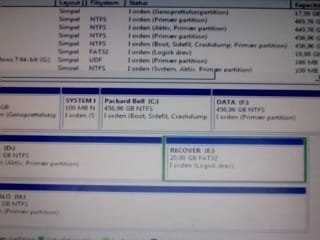
Screenshot, as requested:

Thank you for the tip, really helpful since i was a bit annoyed by the drive letter thing.

So Anyways, i noticed your reply and hit the power button, only to be greeted with... Nothing.

after 3 or 4 attempts it finally loaded my drive, and i opened cmd and typed in the diskmgmt.msc.

As usual, i did this while the "windows could not complete installation.... was open.

When i do the dskmgmt.msc enter ( holding down Win key ) it shuts down, as the enter key also hits the Ok option.

I therefore opened CMD and ran diskmgmt.msc. I could not get the WIN snipping stuff to work ( probably made a mistake ) BUT i did make the "screenshot" using my laptop Cam.

IF any relevant information is lacking, please let me know, as i can easily make the snapshot from another angle, with other information ( although not much is missing )
 

Attachments

  • Foto den 04-09-2012 kl. 15.23.jpeg
    Foto den 04-09-2012 kl. 15.23.jpeg
    12.9 KB · Views: 81

My Computer My Computer

At a glance

Windows Home Premium 64bitIntel core i5 3.4Ghz Clarkdale Chipset6Gb DDR3nVidia Geforce GT 440
Computer Manufacturer/Model Number
Packardbell ixtreme m5801
OS
Windows Home Premium 64bit
CPU
Intel core i5 3.4Ghz Clarkdale Chipset
Motherboard
Packard Bell ipower G5800 Intel Havendale/Clarkdale
Memory
6Gb DDR3
Graphics Card(s)
nVidia Geforce GT 440
Sound Card
The unit High Definition Audio ( according to SIW )
Monitor(s) Displays
Samsung 22" and Phillips 24"
Screen Resolution
Samsung: 1680*1050. Phillips 1920*1280
Hard Drives
1TB Western digital HDD and 1 465GB Western digital HDD
PSU
Unable to locate in SIW
Case
Packard Bell ixtreme "hull" (it's quite heavy)
Cooling
Unnamed coolermaster fans
Keyboard
Logitech G110 Macro Gamer keyboard
Mouse
Logitech MX518
Internet Speed
10/1Mbips
sorry , but that is rather useless.

try again with the snipping tool.
 

My Computer My Computer

At a glance

MS Windows 7 Ultimate SP1 64-bitAMD A10-4600M6.00 GB Dual-Channel DDR3 @ 798MHz (11-11-12-28)AMD Radeon HD 7660G
Computer Manufacturer/Model Number
Toshiba Satellite S875D-S7239 laptop
OS
MS Windows 7 Ultimate SP1 64-bit
CPU
AMD A10-4600M
Motherboard
AMD Pumori (Socket FT1)
Memory
6.00 GB Dual-Channel DDR3 @ 798MHz (11-11-12-28)
Graphics Card(s)
AMD Radeon HD 7660G
Sound Card
High Definition Audio Device
Monitor(s) Displays
Generic PnP Monitor (1600x900@60Hz)
Screen Resolution
1600x900@60Hz
Hard Drives
SSD 119GB Corsair CSSD-V128GB2 ATA Device
Keyboard
Standard PS/2 Keyboard
Mouse
HP Wireless Optical Mobile Mouse Model FHA-3410
Internet Speed
What the local pub, local coffee shop offers.
Other Info
Optical Drive:MATSHITA BD-CMB UJ160B ATA Device


Also have an Asus ha1002xp netbook with Win 7 Ultimate installed.
i just tried the snipping again, but without success.
i enter the error code installation screen and hold down WIn key.
While holding it, i type "diskmgmt.msc" and hit enter ( while still holding down the win key)
Instead of opening the diskmgmt, it takes the enter as-if i wanted to hit the Ok, and restart button in the error message.
I am clearly doing something wrong, so if you could do me the favor of a (slightly) more detailed guide, i'd be in deep joy.

Also, Thank you for the very quick responses. I am grateful, that you are taking the time helping me.
 

My Computer My Computer

At a glance

Windows Home Premium 64bitIntel core i5 3.4Ghz Clarkdale Chipset6Gb DDR3nVidia Geforce GT 440
Computer Manufacturer/Model Number
Packardbell ixtreme m5801
OS
Windows Home Premium 64bit
CPU
Intel core i5 3.4Ghz Clarkdale Chipset
Motherboard
Packard Bell ipower G5800 Intel Havendale/Clarkdale
Memory
6Gb DDR3
Graphics Card(s)
nVidia Geforce GT 440
Sound Card
The unit High Definition Audio ( according to SIW )
Monitor(s) Displays
Samsung 22" and Phillips 24"
Screen Resolution
Samsung: 1680*1050. Phillips 1920*1280
Hard Drives
1TB Western digital HDD and 1 465GB Western digital HDD
PSU
Unable to locate in SIW
Case
Packard Bell ixtreme "hull" (it's quite heavy)
Cooling
Unnamed coolermaster fans
Keyboard
Logitech G110 Macro Gamer keyboard
Mouse
Logitech MX518
Internet Speed
10/1Mbips
Sorry for this.

By other HD's, do you mean the Installed HDD's, or the external?

in either case, i had no external storage devices connected to the PC, while i was doing the reinstallation.
Neither have i "Wiped" any of my Hdd's, Though, the installation DID apparently do something.

obviously, for windows to be installed, it needs to clean the drive, and re-partition it. how it manages to make the backup, i do not know, however if i could just find a way to SAFELY Wipe the Drive ( and to know Which drive i need to wipe ), i could probably install it from startup.

Here's how i see the "dream scheme"

Wipe the HDD with corupted windows files.
Start up the computer, which will have no OS and AFAIK run the windows installation from the X: drive.
install windows, and if there are no Hardware failures, i can go back to my ordinary routine ( though i might spend a bit more time on this forum :D )

However, i am obviously prepared for any kind of "no no" and professional advice on how to do this.

Once again, sorry GregRocker
 

My Computer My Computer

At a glance

Windows Home Premium 64bitIntel core i5 3.4Ghz Clarkdale Chipset6Gb DDR3nVidia Geforce GT 440
Computer Manufacturer/Model Number
Packardbell ixtreme m5801
OS
Windows Home Premium 64bit
CPU
Intel core i5 3.4Ghz Clarkdale Chipset
Motherboard
Packard Bell ipower G5800 Intel Havendale/Clarkdale
Memory
6Gb DDR3
Graphics Card(s)
nVidia Geforce GT 440
Sound Card
The unit High Definition Audio ( according to SIW )
Monitor(s) Displays
Samsung 22" and Phillips 24"
Screen Resolution
Samsung: 1680*1050. Phillips 1920*1280
Hard Drives
1TB Western digital HDD and 1 465GB Western digital HDD
PSU
Unable to locate in SIW
Case
Packard Bell ixtreme "hull" (it's quite heavy)
Cooling
Unnamed coolermaster fans
Keyboard
Logitech G110 Macro Gamer keyboard
Mouse
Logitech MX518
Internet Speed
10/1Mbips
Yes, power down to open the case then pull the data or power plug on each of the other HD's except the target one.

You have illustrated tutorials for how to get a perfect reinstall, and how to wipe the HD first from the installer Command line accessed by pressing Shift + F10 at the first screen when booted.

If you have any questions you should ask back for immediate help. We have a 100% install rate for those who cooperate and interact closely to get the steps done.

 
Just wondering.

What drive will i need to wipe, in order to be able to reinstall Windows properly?
if it is the C: drive i am in a bit of confusion, as it apparently only has 100mb of space. ( according to the explorer, that is )

One more thing to mention ( i do not know whether this could have a potential influence to the possible ways of solving the problem or not) When i open the X: drive from explorer, i can run the Windows SETUP file.

It runs smoothly, until it tells me that a cd/dvd driver is missing.

Just saying, i will try pulling the plug to the HDD's in an hour or so.
 

My Computer My Computer

At a glance

Windows Home Premium 64bitIntel core i5 3.4Ghz Clarkdale Chipset6Gb DDR3nVidia Geforce GT 440
Computer Manufacturer/Model Number
Packardbell ixtreme m5801
OS
Windows Home Premium 64bit
CPU
Intel core i5 3.4Ghz Clarkdale Chipset
Motherboard
Packard Bell ipower G5800 Intel Havendale/Clarkdale
Memory
6Gb DDR3
Graphics Card(s)
nVidia Geforce GT 440
Sound Card
The unit High Definition Audio ( according to SIW )
Monitor(s) Displays
Samsung 22" and Phillips 24"
Screen Resolution
Samsung: 1680*1050. Phillips 1920*1280
Hard Drives
1TB Western digital HDD and 1 465GB Western digital HDD
PSU
Unable to locate in SIW
Case
Packard Bell ixtreme "hull" (it's quite heavy)
Cooling
Unnamed coolermaster fans
Keyboard
Logitech G110 Macro Gamer keyboard
Mouse
Logitech MX518
Internet Speed
10/1Mbips
The Diskpart command wipes the entire HD, so back up any data off of it first.

You should not be running Setup from Explorer. Boot the installer as instructed in the tutorial.

If you receive the driver request again when booting the installer, download a new ISO and write to stick or burn to DVD from Step 1 and 2 of tutorial.

You should be following these steps from the top as I stated earlier.
 
I know i may be pulling it a bit, but just to be sure.
Using the "Format Drive" Option In explorer will not work, or will not yield the same resukts as powering down the other drives, booting the primary drive and installing windows on it?
 

My Computer My Computer

At a glance

Windows Home Premium 64bitIntel core i5 3.4Ghz Clarkdale Chipset6Gb DDR3nVidia Geforce GT 440
Computer Manufacturer/Model Number
Packardbell ixtreme m5801
OS
Windows Home Premium 64bit
CPU
Intel core i5 3.4Ghz Clarkdale Chipset
Motherboard
Packard Bell ipower G5800 Intel Havendale/Clarkdale
Memory
6Gb DDR3
Graphics Card(s)
nVidia Geforce GT 440
Sound Card
The unit High Definition Audio ( according to SIW )
Monitor(s) Displays
Samsung 22" and Phillips 24"
Screen Resolution
Samsung: 1680*1050. Phillips 1920*1280
Hard Drives
1TB Western digital HDD and 1 465GB Western digital HDD
PSU
Unable to locate in SIW
Case
Packard Bell ixtreme "hull" (it's quite heavy)
Cooling
Unnamed coolermaster fans
Keyboard
Logitech G110 Macro Gamer keyboard
Mouse
Logitech MX518
Internet Speed
10/1Mbips
Please follow the directions, precisely as written, in that tutorial.

Do not deviate. Do not skip steps.

Do not skip steps.

Do not skip steps.

You get the idea.

That procedure works, assuming your hardware is in order.

If your hardware is not in order, then by following that procedure precisely as written, you will be able to receive directed advice.
 

My Computer My Computer

At a glance

MS Windows 7 Ultimate SP1 64-bitAMD A10-4600M6.00 GB Dual-Channel DDR3 @ 798MHz (11-11-12-28)AMD Radeon HD 7660G
Computer Manufacturer/Model Number
Toshiba Satellite S875D-S7239 laptop
OS
MS Windows 7 Ultimate SP1 64-bit
CPU
AMD A10-4600M
Motherboard
AMD Pumori (Socket FT1)
Memory
6.00 GB Dual-Channel DDR3 @ 798MHz (11-11-12-28)
Graphics Card(s)
AMD Radeon HD 7660G
Sound Card
High Definition Audio Device
Monitor(s) Displays
Generic PnP Monitor (1600x900@60Hz)
Screen Resolution
1600x900@60Hz
Hard Drives
SSD 119GB Corsair CSSD-V128GB2 ATA Device
Keyboard
Standard PS/2 Keyboard
Mouse
HP Wireless Optical Mobile Mouse Model FHA-3410
Internet Speed
What the local pub, local coffee shop offers.
Other Info
Optical Drive:MATSHITA BD-CMB UJ160B ATA Device


Also have an Asus ha1002xp netbook with Win 7 Ultimate installed.
Ignoring your steps is/was not my intention, especially because i need all the help i can get atm. I merely asked if it would be easier to do so, but assuming carefully following those steps is the only proper way to do it, i will carry on with the procedure.

Oka, so i aam at the Disk management screen, ready to wipe the HDD.
however, i am not quite sure what disk # i should clean out.

Obviously i'd want to clean the drive with the corrupted windows. but in the Diskmanagement screen, it says that disk #0 has 931gb ( which is odd, as i have 3x 465 gb HDD's installed )

it says that Disk 0 has 2 of the HDD's in it, and a recovery partition + a drive named SYSTEM RESERVED.
 

My Computer My Computer

At a glance

Windows Home Premium 64bitIntel core i5 3.4Ghz Clarkdale Chipset6Gb DDR3nVidia Geforce GT 440
Computer Manufacturer/Model Number
Packardbell ixtreme m5801
OS
Windows Home Premium 64bit
CPU
Intel core i5 3.4Ghz Clarkdale Chipset
Motherboard
Packard Bell ipower G5800 Intel Havendale/Clarkdale
Memory
6Gb DDR3
Graphics Card(s)
nVidia Geforce GT 440
Sound Card
The unit High Definition Audio ( according to SIW )
Monitor(s) Displays
Samsung 22" and Phillips 24"
Screen Resolution
Samsung: 1680*1050. Phillips 1920*1280
Hard Drives
1TB Western digital HDD and 1 465GB Western digital HDD
PSU
Unable to locate in SIW
Case
Packard Bell ixtreme "hull" (it's quite heavy)
Cooling
Unnamed coolermaster fans
Keyboard
Logitech G110 Macro Gamer keyboard
Mouse
Logitech MX518
Internet Speed
10/1Mbips
Have you read over all of the steps in Clean Reinstall - Factory OEM Windows 7 so you fully understand what is involved, your options, and are prepared to proceed.

Power down to unplug all other HD's except target HD for reinstall.

Boot the installation DVD, press Shift + F10 at the first screen to open a Command box, then begin at Step 3 to run Diskpart Clean Command .

Close the Command Box, click Install Now and finish the steps for Clean Reinstall.
 
Boot the installation DVD

Remember that this is a preinstalled windows, and i therefore don't have an installaton DVD. i have the REPAIR disk, if that is what you are referring to.

Also, i have fully read the guide, but i did not get the answer i was looking for.
The only thing i need to continue, is to know which drive i should clean out.
 

My Computer My Computer

At a glance

Windows Home Premium 64bitIntel core i5 3.4Ghz Clarkdale Chipset6Gb DDR3nVidia Geforce GT 440
Computer Manufacturer/Model Number
Packardbell ixtreme m5801
OS
Windows Home Premium 64bit
CPU
Intel core i5 3.4Ghz Clarkdale Chipset
Motherboard
Packard Bell ipower G5800 Intel Havendale/Clarkdale
Memory
6Gb DDR3
Graphics Card(s)
nVidia Geforce GT 440
Sound Card
The unit High Definition Audio ( according to SIW )
Monitor(s) Displays
Samsung 22" and Phillips 24"
Screen Resolution
Samsung: 1680*1050. Phillips 1920*1280
Hard Drives
1TB Western digital HDD and 1 465GB Western digital HDD
PSU
Unable to locate in SIW
Case
Packard Bell ixtreme "hull" (it's quite heavy)
Cooling
Unnamed coolermaster fans
Keyboard
Logitech G110 Macro Gamer keyboard
Mouse
Logitech MX518
Internet Speed
10/1Mbips
Remember that this is a preinstalled windows, and i therefore don't have an installaton DVD. i have the REPAIR disk, if that is what you are referring to.

Also, i have fully read the guide, but i did not get the answer i was looking for.
The only thing i need to continue, is to know which drive i should clean out.

Then you didn't read Clean Reinstall - Factory OEM Windows 7 because Step 1 and 2 provide the latest ISO and the tool to burn to DVD or write to flash stick.

You want the drive which had WIn7 installed on it. It would have been on C drive and likely had the System Reserved partition too.

If you want to try booting the installer to reinstall to C, that's fine too, but I thought you were having intsallation problems. If so the most common fix is to wipe the HD with Clean command.
 
Back
Top