Solved How to get a Samsung CRT monitor to work on 100 hz on Win7

momentvm

New member
Local time
11:37 PM
Messages
3
Hey guys,

I recently switched to Windows 7 not only on my laptop but also on my desktop PC and everything works great apart from one thing - the monitor. It's a Samsung SyncMaster 765MB, a CRT one.

When I was using Windows XP the monitor used to work perfectly fine at 100 hz at 1024 x 768, however:
Now (when using win 7) its maximum refresh rate is 85 hz at the same resolution.
It detects it as nothing more than a "Generic Plug&Play monitor"

I have installed the latest drivers for my NVIDIA GeForce 7600 GT and I tried installing the monitor drivers (which are for Win XP) but this turned out to be not quite possible. I tried looking for some Vista/7 drivers but there was no success there as well.

So if any of you guys know a solution to that issue (buying a newer monitor aside), I'd be really grateful.

Cheers!
 

My Computer My Computer

At a glance

Windows 7 Ultimate 32bitIntel Pentium 4, 3ghz3 GBNVIDIA GeForce 7600 GT
OS
Windows 7 Ultimate 32bit
CPU
Intel Pentium 4, 3ghz
Motherboard
Abit AA8
Memory
3 GB
Graphics Card(s)
NVIDIA GeForce 7600 GT
Monitor(s) Displays
Samsung SyncMaster 765MB
I guess that this is the sad reality - CRT monitors are completely written off and nobody at Microsoft gives a damn about them.
 

My Computer My Computer

At a glance

Windows 7 Ultimate 32bitIntel Pentium 4, 3ghz3 GBNVIDIA GeForce 7600 GT
OS
Windows 7 Ultimate 32bit
CPU
Intel Pentium 4, 3ghz
Motherboard
Abit AA8
Memory
3 GB
Graphics Card(s)
NVIDIA GeForce 7600 GT
Monitor(s) Displays
Samsung SyncMaster 765MB
I do not think there is a way to fix this, as CRTs are so out-of-date.
 

My Computer My Computer

At a glance

Dual-boot: Windows 7 HP 32-bit SP1 & Windows ...AMD Phenom X4 9550 2.8Ghz4.0GB RAM256MB On-board ATI Radeon X1200 Series
Computer Manufacturer/Model Number
Advent
OS
Dual-boot: Windows 7 HP 32-bit SP1 & Windows XP Pro 32-bit SP2.
CPU
AMD Phenom X4 9550 2.8Ghz
Motherboard
FOXCONN A6VMX (Socket 940)
Memory
4.0GB RAM
Graphics Card(s)
256MB On-board ATI Radeon X1200 Series
Sound Card
UnKnown
Monitor(s) Displays
19" TFT Mointor
Screen Resolution
1400 by 900
Hard Drives
500GB Western Digital WDC
Keyboard
HP Keyboard
Internet Speed
Dial-up via Mobile phone (Three)
Other Info
80GB External Hard-drive.

Also I have an old Windows XP Laptop for backup/occasional use etc.
Go back to the screen where you set the screen resolution and click "advanced settings". Then go to the monitor tab and uncheck the box next to "hide resolutions not supported by this monitor". Now see if are able to get 100Hz. Just be careful, it you select something that really isn't supported by your monitor it could be a pain to undo it again.
 

My Computer My Computer

At a glance

Windows 10 Education 64 bitAMD Phenom II X4 980 Black Edition Deneb 3.7GHz8GB 4GBx2 Kingston PC10600 DDR3 1333 MemoryZotac NVIDIA Geforce GT640 2 Gig DDR3 PCIe
Computer type
PC/Desktop
Computer Manufacturer/Model Number
Home Built
OS
Windows 10 Education 64 bit
CPU
AMD Phenom II X4 980 Black Edition Deneb 3.7GHz
Motherboard
Asus M4N68T-M V2 µATX Motherboard
Memory
8GB 4GBx2 Kingston PC10600 DDR3 1333 Memory
Graphics Card(s)
Zotac NVIDIA Geforce GT640 2 Gig DDR3 PCIe
Sound Card
VIA VT1708s High Definition Audio 8-channel Onboard
Monitor(s) Displays
22" LG E2242 1080p and 2 19" I-INC AG191D
Screen Resolution
1280x1024 - 1920x1080 - 1280x1024
Hard Drives
Crucial M100 256 GB SSD and 500 GB WD Blue SATA
PSU
Thermaltake TR 620
Case
Power Up Black ATX Mid-Tower Case
Cooling
Stock heatsink and fan
Keyboard
Logitech Wireless K350 Wave
Mouse
Logitech Wireless M570 Trackman Wheel
Internet Speed
80 Mbps Down 30 Mbps Up
Antivirus
Windows Defender
Browser
Internet Explorer 11
Other Info
HP DVD1040e Lightscribe - External USB2
I guess that this is the sad reality - CRT monitors are completely written off and nobody at Microsoft gives a damn about them.

Its not Microsoft. It is up to the graphics card and monitor manufacturers to supply the correct drivers to support the refresh rates.
 

My Computer My Computer

At a glance

Windows 10 Pro x64, Windows 8.1 Pro x64, Wind...INTEL i9-7920X LGA 206664 GB (4 X 16 GB) G-Skill V Series DDR4 3200 ...EVGA GTX 1060 SC 3 GB
Computer type
PC/Desktop
Computer Manufacturer/Model Number
Custom Built
OS
Windows 10 Pro x64, Windows 8.1 Pro x64, Windows 7 Ultimate x64 SP1,
CPU
INTEL i9-7920X LGA 2066
Motherboard
Gigabyte X299-WU8 F3
Memory
64 GB (4 X 16 GB) G-Skill V Series DDR4 3200 Quad Channel
Graphics Card(s)
EVGA GTX 1060 SC 3 GB
Sound Card
Realtek Onboard ALC1220
Monitor(s) Displays
2 x Samsung S27E310
Screen Resolution
1920x1080
Hard Drives
Samsung 2 x 970 EVO Plus 500 GB NVMe
1 x 6TB WD 6003FZBX SATA
1 x 6TB WD 60EFRX SATA
12 x 3TB WD 30EFRX SATA
PSU
Seasonic X-1050
Case
Thermaltake Armor+
Cooling
Corsair H80i V2 Liquid AOI Cooler
Keyboard
Logitech G510s
Mouse
Logitech MX Master 2S
Internet Speed
200 Mb/s
Antivirus
ESET NOD32 13.1
Browser
EDGE (Dev, Canary, Beta), Chrome
Other Info
ASUS RT-AC68U router
Malwarebytes 4.0.4
Yeah mate I have had loads of syncmasters i now settled with a newer syncmaster 2032 in the end lcd one :) nice thing.

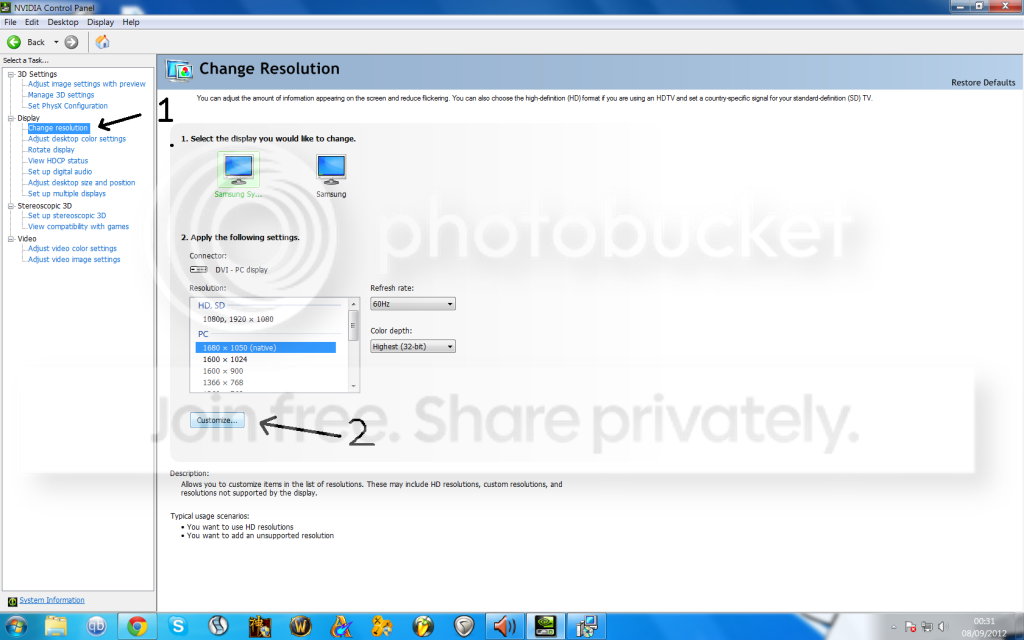
Anyway instead of getting the newest nvidia drivers i preferred older ones but if you go into NVIDIA control panel either right click desktop or control panel you will get this (or something there about depending on driver):

Step 1 : Click On Number 1 in image then number two

e7af6f85.png


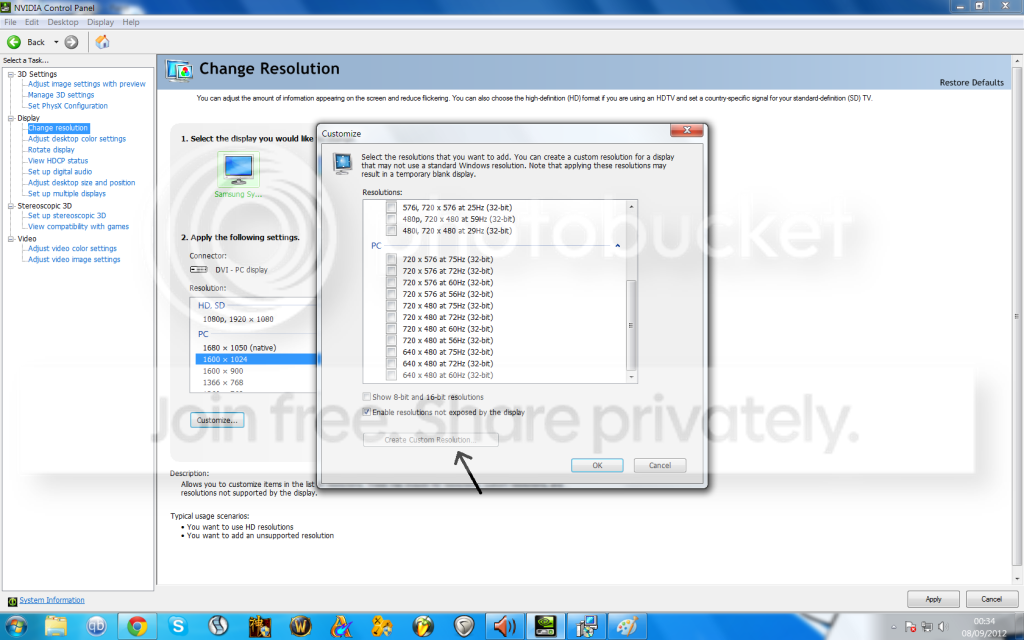
Step 2 : Click On Create Custom Resolution Mine isnt selectable as i have my resolution setup if yours isnt slectable try selecting a resolution from the box before you press. It does work eventually if not first time .

e30aef20.png


When inside this menu tell the graphics card what resolution you want you may have to resize it with border resize control in the control utility but in this option you can put what ever refresh rate you with your custom resolution and it will tell you if the monitor can handle it.

I have used this method with so many syncmasters .. world of advice the windows drivers for sync masters are PANTS!
 

My Computer My Computer

At a glance

Windows 7 Ultimate 64AMD FX - 8350 Oc16GB Corsair VengeanceHD 4870 1GB
Computer type
PC/Desktop
OS
Windows 7 Ultimate 64
CPU
AMD FX - 8350 Oc
Motherboard
ASUS Crosshair V Formula-Z AMD 990FX
Memory
16GB Corsair Vengeance
Graphics Card(s)
HD 4870 1GB
Sound Card
Onboard.
Monitor(s) Displays
Samsung Syncmaster 2032MW & ASUS p191
Screen Resolution
1680x1050
Hard Drives
1 TB WD
320gb WD
PSU
650w OCZ PSU
Case
Zalman Z11
Cooling
Antec H20 920 , 6x Antec Quiet
Keyboard
Logitech RAZ71 Keyboard
Mouse
Logitech RAZ71 Wireless Mouse
Internet Speed
120mb Virgin
Antivirus
Malwarebytes
Browser
Chrome
@dexislegend123 ,

Thank you so much mate! That worked like a charm and so does the monitor now!:thumbsup:
 

My Computer My Computer

At a glance

Windows 7 Ultimate 32bitIntel Pentium 4, 3ghz3 GBNVIDIA GeForce 7600 GT
OS
Windows 7 Ultimate 32bit
CPU
Intel Pentium 4, 3ghz
Motherboard
Abit AA8
Memory
3 GB
Graphics Card(s)
NVIDIA GeForce 7600 GT
Monitor(s) Displays
Samsung SyncMaster 765MB
Its ok mate happy to help :). Fellow Syncmaster user samsung made them a pain in the backside to use.

Feel free to rep and mark down as solved the thread so others know :)

Glad its sorted
 

My Computer My Computer

At a glance

Windows 7 Ultimate 64AMD FX - 8350 Oc16GB Corsair VengeanceHD 4870 1GB
Computer type
PC/Desktop
OS
Windows 7 Ultimate 64
CPU
AMD FX - 8350 Oc
Motherboard
ASUS Crosshair V Formula-Z AMD 990FX
Memory
16GB Corsair Vengeance
Graphics Card(s)
HD 4870 1GB
Sound Card
Onboard.
Monitor(s) Displays
Samsung Syncmaster 2032MW & ASUS p191
Screen Resolution
1680x1050
Hard Drives
1 TB WD
320gb WD
PSU
650w OCZ PSU
Case
Zalman Z11
Cooling
Antec H20 920 , 6x Antec Quiet
Keyboard
Logitech RAZ71 Keyboard
Mouse
Logitech RAZ71 Wireless Mouse
Internet Speed
120mb Virgin
Antivirus
Malwarebytes
Browser
Chrome
Back
Top