Time for a SSD (Toshiba Tecra R840 laptop)...

paulobao

New member
Member
VIP
Local time
2:39 AM
Messages
197
Hi all,

Yestarday my 6 month old Tecra R840 (win 7 pro, 64 bit, I7, 8GB Ram and 500 GB HDD) crashed for the first time with a BSOD!!! Nothing solve the problem so I restore it to factory state (toshiba have a special partition in disc C for that).
So I loose all my software and all the settings (and I had lot of sw installed for my hobbie...astyrophotography. I will need days to get everything working again...). I was really #$%& with that. Today I'm more calm :-)

So my question now is: since I've nothing installed in the computer other that the OS and drivers should I buy an SSD?

I allways have the idea of buying one, but I start installation of sw and then I quit!

Are SSD more reliable that HDD?
Even if I like speed, reliability is paramount for me!
Could you give advice in this respect?
Any model of SSD with good reliability tracking record?

I thought in a Kingston HyperX 3k 240B or 480GB but are they really good?

Regards,
paulo
 

My Computer My Computer

At a glance

Windows 7 Professional 64 bitI7 2640M8 GBAMD Radeo HD 6450M
Computer Manufacturer/Model Number
Toshiba Tecra R840
OS
Windows 7 Professional 64 bit
CPU
I7 2640M
Memory
8 GB
Graphics Card(s)
AMD Radeo HD 6450M
Monitor(s) Displays
HD+ 14 inch
Hard Drives
HDD 500GB 7200 rpm
Paulo, to give you one answer to your question.
Are SSD more reliable that HDD?
Even if I like speed, reliability is paramount for me!
Could you give advice in this respect?
Any model of SSD with good reliability tracking record?

Yes, I believe that SSD's are more reliable than physical hard disks, due to less moving parts.
Speed is the really bit improvement.
I have been buying the Intel OEM versions of their 520 series SSD's
I also have a crutial that is just a workhorse.

Don't fall for the cheapest as it could be not as good.
I know that windows 8 really screams when booted on an SSD.

Rich
 

My Computer My Computer

At a glance

Windows 7 Pro x64 SP1Intel Core I716 GigsNVIDIA GeForce GTX 670M
Computer type
Laptop
Computer Manufacturer/Model Number
Toshiba Laptop Qosimo X870
OS
Windows 7 Pro x64 SP1
CPU
Intel Core I7
Motherboard
Toshiba Qosmio
Memory
16 Gigs
Graphics Card(s)
NVIDIA GeForce GTX 670M
Monitor(s) Displays
17.7" laptop
Screen Resolution
1600 x 900
Hard Drives
256 Gig SanDisk SSD for C
256 Gig Intel SSD for D
Internet Speed
50/25 FIOS
Antivirus
Vipre (all you can eat for 10 machines)
Browser
IE and FF
Other Info
I have dos 6.22, wfwg 3.11, win98, 2000 and xp VHD's available for testing. MS's Virtual PC works great.
I think there is little known about the Kingston SSDs. I would go with Intel or Crucial.

In 4 years I never had any of my 6 SSDs fail (knock on wood). They are Intel, OCZ and Crucial. With OCZ you have to know what you are buying. They have a couple of flaky models.
 

My Computer My Computer

At a glance

Vista, Windows7, Mint Mate, Zorin, Windows 8from 1.6GHz Duo to i7
Computer Manufacturer/Model Number
HP, Dell, Gateway, Toshiba - 4 laptops and 2 desktops
OS
Vista, Windows7, Mint Mate, Zorin, Windows 8
CPU
from 1.6GHz Duo to i7
Monitor(s) Displays
2x HP w2207
Hard Drives
5x HDD, 7x SSD, 12x Externals
Keyboard
with trackball - no mices
Mouse
Trackball mice
Internet Speed
DSL 6000
Hello Paulo and welcome to the forums :party:

SSDs aren't any more reliable than HDDs, it's just different technology. They are less prone to being broken though as they don't have any moving parts - should you drop your laptop, there isn't anything to break like the arm on a HDD. Buying an SSD is mainly for performance :)

There was a great review of SSDs in PC Format a few months ago, and the Samsung 830 series won with flying colours :) The review was for lower capacity SSDs (120/128GB), but it should apply to larger capacities as well.

256GB: SAMSUNG 256GB 830 Series SSD - 2.5" SATA-III.. | Ebuyer.com
512GB: SAMSUNG 512GB 830 Series SSD - SATA-III 2.5&quot.. | Ebuyer.com

Here's a MaximumPC review for the Samsung 830: Maximum PC | Samsung 830 Series SSD Review

If you want any more information on the other SSDs in the review, feel free to ask!

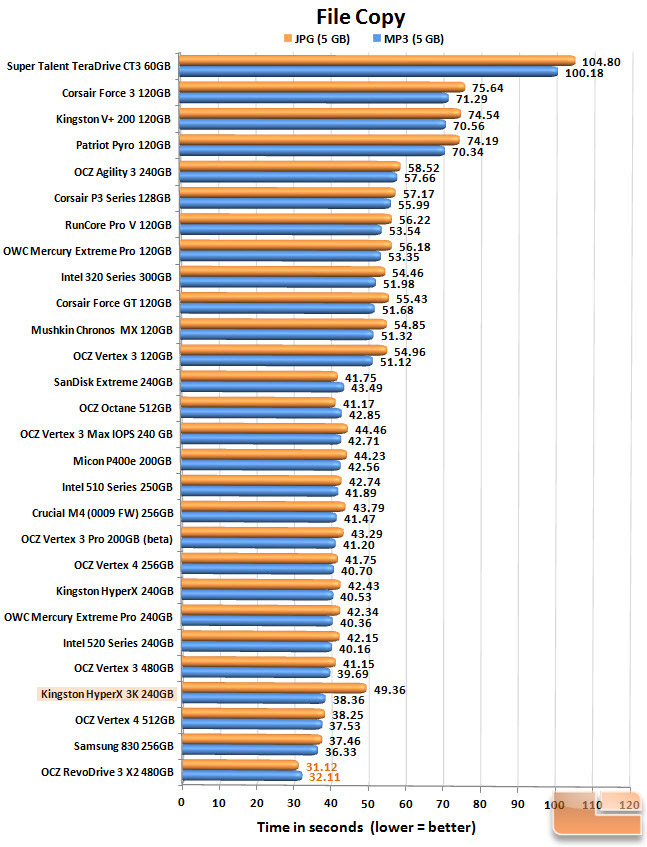
Here's a comparison chart for the SSDs:

filecopy-chart.jpg


boot-chart.jpg


AnandTech - Kingston HyperX 3K (240GB) SSD Review

There's not much in it between the 830 and the HyperX 3K, they're both really good SSDs.

I'd go for the 830, but at the end of the day it's your choice.

Tom
 

My Computer My Computer

At a glance

Windows 8.1 Pro x64Intel i7 3770K @4.5GHzCorsair Vengeance 2x4GB DDR3 1600MHz Low Prof...Gigabyte Radeon HD 7850 (2GB GDDR5)
Computer type
PC/Desktop
Computer Manufacturer/Model Number
Build #1
OS
Windows 8.1 Pro x64
CPU
Intel i7 3770K @4.5GHz
Motherboard
ASUS P8Z77-V PRO
Memory
Corsair Vengeance 2x4GB DDR3 1600MHz Low Profile (White)
Graphics Card(s)
Gigabyte Radeon HD 7850 (2GB GDDR5)
Sound Card
Integrated on motherboard
Monitor(s) Displays
23" LG LCD/LED IPS
Screen Resolution
1920*1080
Hard Drives
Samsung EVO 128GB SSD
Seagate Barracuda 2GB 7200rpm
2x Seagate FreeAgent [500gb]
PSU
Corsair TX650W V2 (80+ Bronze)
Case
NZXT Phantom 410 White
Cooling
Corsair H100 Water Cooler
Keyboard
Microsoft Desktop 2000 Wireless Keyboard
Mouse
Microsoft Desktop 2000 Wireless Mouse
Internet Speed
95 Mb/s Download 70 Mb/s Upload
Antivirus
MSE + MBAM Pro
Browser
Firefox
So I loose all my software and all the settings (and I had lot of sw installed for my hobbie...astyrophotography. I will need days to get everything working again...). I was really #$%& with that. Today I'm more calm :-)

To me the ability to recover is much more important than the hardware, manufacturer, or technology used.

No matter which approach you choose, you should learn and use a Backup and Restore Strategy.
For the OS partition use an Imaging program such as Acronis, Macrium, the Win 7 built in utility, etc.
If your system crashes you have a much better chance of restoring it without re-installing Windows and all installed Programs.

For Data backups, imaging is not the best choice.
There are alternatives suggested on this site for Data backups.

Having the OS and all programs on a different partition than User Data is preferred by most tech's.
It makes restoring the OS or Data much simpler and safer.

Some tutorials you should read:
http://www.sevenforums.com/tutorials/663-backup-complete-computer-create-image-backup.html
http://www.sevenforums.com/tutorials/675-system-image-recovery.html
http://www.sevenforums.com/tutorials/73828-imaging-free-macrium.html

hth,
David
 

My Computer My Computer

At a glance

Multi-Boot W7_Pro_x64 W8.1_Pro_x64 W10_Pro_x6...AMD Athlon II x4 6206GB GSkill DDR2 800AMD 4670 GPU + AMD 4200 IGP
Computer type
PC/Desktop
Computer Manufacturer/Model Number
home built
OS
Multi-Boot W7_Pro_x64 W8.1_Pro_x64 W10_Pro_x64 +Linux_VMs +Chromium_VM
CPU
AMD Athlon II x4 620
Motherboard
Gigabyte GA-MA785G-UD3H
Memory
6GB GSkill DDR2 800
Graphics Card(s)
AMD 4670 GPU + AMD 4200 IGP
Sound Card
on board Realtek ALC889A
Monitor(s) Displays
RCA 40" LCD TV, Insignia 32" LCD TV, HP 15" LCD monitor
Screen Resolution
1680 x 1050
Hard Drives
OCZ Vertex 3 120GB,
Samsung F3 1TB (3),
Several others - WD, Seagate, Hitachi, ...
PSU
Corsair 500 W
Case
Rosewill mid tower
Cooling
CM 90mm rifle
Keyboard
Gyration wireless, Logitech wireless, Dell USB wired
Mouse
Gyration wireless, Logitech wireless, V7 USB wired
Internet Speed
Spectrum - 100Mbps D / 10Mbps U
Antivirus
Avast, MBAM3, EMET, WinPatrol
Browser
Pale Moon, Firefox, IE
Other Info
2 multi-boot PC's
Mainly HTPC/Office/Gen purpose (no gaming).
Trendnet USB KVM.
LG DVD burner/Blue Ray Player.
Tray system for removable SATA backup drives.

Not currently OCd, under-volted.
I use Hybrid sleep, rarely re-boot or shutdown.

Hauppauge HD-PVR, Avermedia PCIe TV Tuner, Hauppauge PCI TV Tuner.
Thanks a lot for all the advice :-)
David, you are absolutely right! I should have a recovery plan! Could I ask you advice again? Your advice is to have one partition for OS+ SW and another for data! How do I create those partitions (newbie question)? Can I create those now or at the moment I reformat the disk? Tnanks, paulo
 

My Computer My Computer

At a glance

Windows 7 Professional 64 bitI7 2640M8 GBAMD Radeo HD 6450M
Computer Manufacturer/Model Number
Toshiba Tecra R840
OS
Windows 7 Professional 64 bit
CPU
I7 2640M
Memory
8 GB
Graphics Card(s)
AMD Radeo HD 6450M
Monitor(s) Displays
HD+ 14 inch
Hard Drives
HDD 500GB 7200 rpm

My Computer My Computer

At a glance

Vista, Windows7, Mint Mate, Zorin, Windows 8from 1.6GHz Duo to i7
Computer Manufacturer/Model Number
HP, Dell, Gateway, Toshiba - 4 laptops and 2 desktops
OS
Vista, Windows7, Mint Mate, Zorin, Windows 8
CPU
from 1.6GHz Duo to i7
Monitor(s) Displays
2x HP w2207
Hard Drives
5x HDD, 7x SSD, 12x Externals
Keyboard
with trackball - no mices
Mouse
Trackball mice
Internet Speed
DSL 6000
Thanks a lot for the tuto :-).
I saw you have an SSD in your system! Any advice? Should I replace my HDD for a SSD?

Regards,
paulo
 

My Computer My Computer

At a glance

Windows 7 Professional 64 bitI7 2640M8 GBAMD Radeo HD 6450M
Computer Manufacturer/Model Number
Toshiba Tecra R840
OS
Windows 7 Professional 64 bit
CPU
I7 2640M
Memory
8 GB
Graphics Card(s)
AMD Radeo HD 6450M
Monitor(s) Displays
HD+ 14 inch
Hard Drives
HDD 500GB 7200 rpm
That is a cost question. I have all my systems with SSDs - also the laptops. I use the HDDs in the desktops only for mass storage and backup. I would never again put an OS on a HDD - far too slow for my taste.
 

My Computer My Computer

At a glance

Vista, Windows7, Mint Mate, Zorin, Windows 8from 1.6GHz Duo to i7
Computer Manufacturer/Model Number
HP, Dell, Gateway, Toshiba - 4 laptops and 2 desktops
OS
Vista, Windows7, Mint Mate, Zorin, Windows 8
CPU
from 1.6GHz Duo to i7
Monitor(s) Displays
2x HP w2207
Hard Drives
5x HDD, 7x SSD, 12x Externals
Keyboard
with trackball - no mices
Mouse
Trackball mice
Internet Speed
DSL 6000
But if cost is not a problem...do you recommend? Tis laptop is to use basically for 2 thinks: control all my astronomy gear via software (cameras, mount, etc, etc...it is really an intensive job because the laptop is working from sunset to sunrise plus soome more hours) and for processim my data (via PS CS5 and some more specific astronomy processing sw). Of course it will run Office...:-). So I need reliability because a crash at the mid of an astrophotography session it is a very bad thing!
Until now (and for years) I used a Toshiba MX30 with XP and only 80GB HDD (4800rpm..!) and 2 GB RAM and almost without any fault! Now with this much more powerfull laptop I want it even better !
I saw many articles about SSD in the web but sometimes it seems that someone want to sell you something!
I really appreciate a SSD user opinion more!
So, since my laptop is at factory state now (all those GB of sw and settings are gone) it is a good time to take or not the big decision: stay with the HDD or move to a 240-480 GB SSD.

Cheers,
paulo
 

My Computer My Computer

At a glance

Windows 7 Professional 64 bitI7 2640M8 GBAMD Radeo HD 6450M
Computer Manufacturer/Model Number
Toshiba Tecra R840
OS
Windows 7 Professional 64 bit
CPU
I7 2640M
Memory
8 GB
Graphics Card(s)
AMD Radeo HD 6450M
Monitor(s) Displays
HD+ 14 inch
Hard Drives
HDD 500GB 7200 rpm
There is nothing magical about SSDs as far as the user experience goes.

Your PC will boot in about 30 seconds. Applications will open very quickly--less than 1 second for Word and about 4 seconds for Photoshop on my PC.

Any disk operations will be much quicker---virus scanning for instance.

I would not get a 240 GB SSD unless money is of little concern and ALL of your data will fit on it. The more common choice would be to get an SSD of perhaps 80 to 120 GB for the OS and ALL applications and then use another internal or external HDD for all data.

Good brands: Samsung, Intel, Crucial. They are probably the most reliable and all are much faster than any HDD.

Whether to get an SSD is purely a matter of preference, not necessity. If you have better uses for the money, don't do it. If you do switch, you may well find it worthwhile and would not likely want to go back to HDD for OS and applications.
 

My Computer My Computer

At a glance

Windows 7 Home Premium SP1, 64-bitIntel Skylake i5-6600K, not overclocked8 GB HyperX DDR4-2666 (2 x 4 GB)none; graphics are integrated on CPU
Computer type
PC/Desktop
Computer Manufacturer/Model Number
Ignatz Special; 4 speed manual gearbox; factory air conditioning; one of one
OS
Windows 7 Home Premium SP1, 64-bit
CPU
Intel Skylake i5-6600K, not overclocked
Motherboard
AsRock Z170M Extreme 4, micro ATX
Memory
8 GB HyperX DDR4-2666 (2 x 4 GB)
Graphics Card(s)
none; graphics are integrated on CPU
Sound Card
onboard: Realtek ALC1150; external: USB Behringer UF0-202
Monitor(s) Displays
Dell S2340M 23 inch IPS
Screen Resolution
1600 x 900
Hard Drives
System: Crucial MX100 series SSD, 128 GB;
Data: Samsung Spinpoint 103SJ, 1 TB;
Backup: WD Caviar Green WD30EZRX-00D8PB0, 3 TB
PSU
Rosewill SilentNight 500 watt fanless, semi-modular
Case
Antec Solo II
Cooling
Noctua NH-U12S; Noctua F12 intake, Noctua S12A exhaust
Keyboard
Microsoft 200 6JH-00001 USB
Mouse
Dell or Microsoft optical wired; USB
Antivirus
Microsoft Security Essentials and Malwarebytes Premium
Browser
Pale Moon
Other Info
All fans PWM; speeds at idle: CPU circa 500 rpm; intake circa 600 rpm; exhaust circa 600 rpm; CPU temps 27 idle and 47 C load in a warm room (27 C/81 F) when running Intel Extreme Tuning Utility stress test.
Thanks!
Now I'm deciding for a Intel 520!
Since I don't know much about this....is the swap tht easy?
My idea was: use the "factory image" that I have in my HDD to put my laptop in a "factory state". But how can I do this in the SSD? What are the option? (I think in one but maybe there is more simple ways..! I think in clone my system in the SSD, than install the SSD...I mean physically, and then restore the SSD to factory state. This would put a fresh install in the SSD and erse the initial "clone image", just in case!)

Cheers,
paulo
 

My Computer My Computer

At a glance

Windows 7 Professional 64 bitI7 2640M8 GBAMD Radeo HD 6450M
Computer Manufacturer/Model Number
Toshiba Tecra R840
OS
Windows 7 Professional 64 bit
CPU
I7 2640M
Memory
8 GB
Graphics Card(s)
AMD Radeo HD 6450M
Monitor(s) Displays
HD+ 14 inch
Hard Drives
HDD 500GB 7200 rpm
It really is a matter of personal choice. A SSD is a lot faster and especially in a laptop that you carry around it is a lot less prone to damage. There are no moving parts, thus it will not break when you knock the laptop.

The size of the SSD depends on your requirements, but 240GB should be ample for most people.
 

My Computer My Computer

At a glance

Vista, Windows7, Mint Mate, Zorin, Windows 8from 1.6GHz Duo to i7
Computer Manufacturer/Model Number
HP, Dell, Gateway, Toshiba - 4 laptops and 2 desktops
OS
Vista, Windows7, Mint Mate, Zorin, Windows 8
CPU
from 1.6GHz Duo to i7
Monitor(s) Displays
2x HP w2207
Hard Drives
5x HDD, 7x SSD, 12x Externals
Keyboard
with trackball - no mices
Mouse
Trackball mice
Internet Speed
DSL 6000
Thanks!
Now I'm deciding for a Intel 520!
Since I don't know much about this....is the swap tht easy?
My idea was: use the "factory image" that I have in my HDD to put my laptop in a "factory state". But how can I do this in the SSD? What are the option? (I think in one but maybe there is more simple ways..! I think in clone my system in the SSD, than install the SSD...I mean physically, and then restore the SSD to factory state. This would put a fresh install in the SSD and erse the initial "clone image", just in case!)

Cheers,
paulo

I just bought a intel 520 series 250gig for less than $300. Orem version.
 

My Computer My Computer

At a glance

Windows 7 Pro x64 SP1Intel Core I716 GigsNVIDIA GeForce GTX 670M
Computer type
Laptop
Computer Manufacturer/Model Number
Toshiba Laptop Qosimo X870
OS
Windows 7 Pro x64 SP1
CPU
Intel Core I7
Motherboard
Toshiba Qosmio
Memory
16 Gigs
Graphics Card(s)
NVIDIA GeForce GTX 670M
Monitor(s) Displays
17.7" laptop
Screen Resolution
1600 x 900
Hard Drives
256 Gig SanDisk SSD for C
256 Gig Intel SSD for D
Internet Speed
50/25 FIOS
Antivirus
Vipre (all you can eat for 10 machines)
Browser
IE and FF
Other Info
I have dos 6.22, wfwg 3.11, win98, 2000 and xp VHD's available for testing. MS's Virtual PC works great.
Thanks!
Now I'm deciding for a Intel 520!
Since I don't know much about this....is the swap tht easy?
My idea was: use the "factory image" that I have in my HDD to put my laptop in a "factory state". But how can I do this in the SSD? What are the option? (I think in one but maybe there is more simple ways..! I think in clone my system in the SSD, than install the SSD...I mean physically, and then restore the SSD to factory state. This would put a fresh install in the SSD and erse the initial "clone image", just in case!)

Cheers,
paulo

You have several choices:

1. Clean install to the SSD. This is no different than a clean install to HDD.

2. Make an image of your current system partitions and restore the image to SSD.

3. Clone the current system to the SSD, without using an image.

4. Buy Paragon Migrate software for $20 and use it to transfer existing system to SSD. It is highly reliable and fast.

5. Get your factory restore involved in the process. I don't see any reason to do this if your machine is working well now.

I'd do the clean install because I am a tightwad and don't mind doing it.

You may well prefer to use Paragon.

If you want to image or clone, Macrium is probably your best option and it's free.
 

My Computer My Computer

At a glance

Windows 7 Home Premium SP1, 64-bitIntel Skylake i5-6600K, not overclocked8 GB HyperX DDR4-2666 (2 x 4 GB)none; graphics are integrated on CPU
Computer type
PC/Desktop
Computer Manufacturer/Model Number
Ignatz Special; 4 speed manual gearbox; factory air conditioning; one of one
OS
Windows 7 Home Premium SP1, 64-bit
CPU
Intel Skylake i5-6600K, not overclocked
Motherboard
AsRock Z170M Extreme 4, micro ATX
Memory
8 GB HyperX DDR4-2666 (2 x 4 GB)
Graphics Card(s)
none; graphics are integrated on CPU
Sound Card
onboard: Realtek ALC1150; external: USB Behringer UF0-202
Monitor(s) Displays
Dell S2340M 23 inch IPS
Screen Resolution
1600 x 900
Hard Drives
System: Crucial MX100 series SSD, 128 GB;
Data: Samsung Spinpoint 103SJ, 1 TB;
Backup: WD Caviar Green WD30EZRX-00D8PB0, 3 TB
PSU
Rosewill SilentNight 500 watt fanless, semi-modular
Case
Antec Solo II
Cooling
Noctua NH-U12S; Noctua F12 intake, Noctua S12A exhaust
Keyboard
Microsoft 200 6JH-00001 USB
Mouse
Dell or Microsoft optical wired; USB
Antivirus
Microsoft Security Essentials and Malwarebytes Premium
Browser
Pale Moon
Other Info
All fans PWM; speeds at idle: CPU circa 500 rpm; intake circa 600 rpm; exhaust circa 600 rpm; CPU temps 27 idle and 47 C load in a warm room (27 C/81 F) when running Intel Extreme Tuning Utility stress test.
I also use acronis 2012 for image backups.
 

My Computer My Computer

At a glance

Windows 7 Pro x64 SP1Intel Core I716 GigsNVIDIA GeForce GTX 670M
Computer type
Laptop
Computer Manufacturer/Model Number
Toshiba Laptop Qosimo X870
OS
Windows 7 Pro x64 SP1
CPU
Intel Core I7
Motherboard
Toshiba Qosmio
Memory
16 Gigs
Graphics Card(s)
NVIDIA GeForce GTX 670M
Monitor(s) Displays
17.7" laptop
Screen Resolution
1600 x 900
Hard Drives
256 Gig SanDisk SSD for C
256 Gig Intel SSD for D
Internet Speed
50/25 FIOS
Antivirus
Vipre (all you can eat for 10 machines)
Browser
IE and FF
Other Info
I have dos 6.22, wfwg 3.11, win98, 2000 and xp VHD's available for testing. MS's Virtual PC works great.
Thanks again :-)
One more newbie question: as with HDD is it possible to have partitions with SSD? I mean, whs suggestion was to have one partition for OS and apps and another one for data which seems very wise! Is this possible with ssd?

paulo
 

My Computer My Computer

At a glance

Windows 7 Professional 64 bitI7 2640M8 GBAMD Radeo HD 6450M
Computer Manufacturer/Model Number
Toshiba Tecra R840
OS
Windows 7 Professional 64 bit
CPU
I7 2640M
Memory
8 GB
Graphics Card(s)
AMD Radeo HD 6450M
Monitor(s) Displays
HD+ 14 inch
Hard Drives
HDD 500GB 7200 rpm
Yes you can make more than one partition on a SSD.

You have gotten great advice, but don't forget about making a image after getting your new SSD up and running. Invest in a USB external hard drive and make images of your system and data regularly. If things go wrong in can restore the image with your system, programs and data. Most users recommend Macrium Reflect.
 

My Computer My Computer

At a glance

Windows 7 Home Premium 64biti3-5308 Gbonboard
Computer Manufacturer/Model Number
HP p6370t
OS
Windows 7 Home Premium 64bit
CPU
i3-530
Motherboard
MSI - IONA
Memory
8 Gb
Graphics Card(s)
onboard
Sound Card
onboard
Monitor(s) Displays
Dell ST2400
Screen Resolution
1920x1080
Hard Drives
Intell 520 SSD 120Gb, WD6400AAKS, 640Gb & WD USB MyBook 1Tb
Internet Speed
1.5 Mmbps, Hughes Satellite
Thanks again :-)
One more newbie question: as with HDD is it possible to have partitions with SSD? I mean, whs suggestion was to have one partition for OS and apps and another one for data which seems very wise! Is this possible with ssd?

paulo

Yes and most would consider that preferable IF you intend to put your data on the second partition.

If you are going to put your data on another hard drive, then there would be no reason to partition the SSD.

Having the 2 partitions simplifies backups, imaging, and reinstallations.

The installation per se does not differ from installing to an HDD, but there are a few things you should check when the install is done. Windows will realize it is being installed on an SSD and change a few things automatically.

If you get the Intel, be sure to download the "Intel SSD toolbox" from the Intel site. It's a great tool. You should use it to schedule "optimizations" every week or so.
 

My Computer My Computer

At a glance

Windows 7 Home Premium SP1, 64-bitIntel Skylake i5-6600K, not overclocked8 GB HyperX DDR4-2666 (2 x 4 GB)none; graphics are integrated on CPU
Computer type
PC/Desktop
Computer Manufacturer/Model Number
Ignatz Special; 4 speed manual gearbox; factory air conditioning; one of one
OS
Windows 7 Home Premium SP1, 64-bit
CPU
Intel Skylake i5-6600K, not overclocked
Motherboard
AsRock Z170M Extreme 4, micro ATX
Memory
8 GB HyperX DDR4-2666 (2 x 4 GB)
Graphics Card(s)
none; graphics are integrated on CPU
Sound Card
onboard: Realtek ALC1150; external: USB Behringer UF0-202
Monitor(s) Displays
Dell S2340M 23 inch IPS
Screen Resolution
1600 x 900
Hard Drives
System: Crucial MX100 series SSD, 128 GB;
Data: Samsung Spinpoint 103SJ, 1 TB;
Backup: WD Caviar Green WD30EZRX-00D8PB0, 3 TB
PSU
Rosewill SilentNight 500 watt fanless, semi-modular
Case
Antec Solo II
Cooling
Noctua NH-U12S; Noctua F12 intake, Noctua S12A exhaust
Keyboard
Microsoft 200 6JH-00001 USB
Mouse
Dell or Microsoft optical wired; USB
Antivirus
Microsoft Security Essentials and Malwarebytes Premium
Browser
Pale Moon
Other Info
All fans PWM; speeds at idle: CPU circa 500 rpm; intake circa 600 rpm; exhaust circa 600 rpm; CPU temps 27 idle and 47 C load in a warm room (27 C/81 F) when running Intel Extreme Tuning Utility stress test.
Thanks!
Now I will try to decide what one to choose (520, Sams 830, Kingston). More I read more confuse I stay! SandForce have BSOD (some says), Samsung is not that quick (?), Kingston only have 3k cycles...Price is not my problem now, I only would like to have a "no problem" one :-(.

Cheers,
paulo
 

My Computer My Computer

At a glance

Windows 7 Professional 64 bitI7 2640M8 GBAMD Radeo HD 6450M
Computer Manufacturer/Model Number
Toshiba Tecra R840
OS
Windows 7 Professional 64 bit
CPU
I7 2640M
Memory
8 GB
Graphics Card(s)
AMD Radeo HD 6450M
Monitor(s) Displays
HD+ 14 inch
Hard Drives
HDD 500GB 7200 rpm
Back
Top