Solved Freecom 1tb lost date needs formatting, recovery help

Zanty

New member
Local time
2:47 PM
Messages
26
I recently plugged in my hdd into a media player, it worked for a couple of times and then there was an error.

I plugged it into my laptop and it said
'you need to format the disc before you can use it'
and
'the volume does not contain a recognised filesystem'

I really don't wanna format it if at all possible
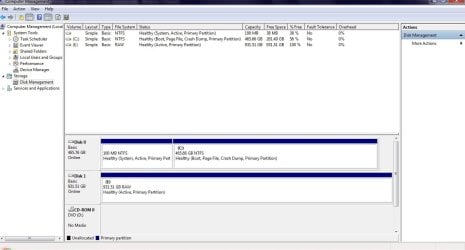
In disk management its showing as a healthy 931gb drive, in RAW format.

Any advice would be appreciated, thanks
 

My Computer My Computer

OS
32bit windows7
Hello Zanty, welcome to Seven Forums!


Don't format it yet though RAW doesn't look good.

In Windows disk management does it have a drive letter?
 

My Computer My Computer

Computer Manufacturer/Model Number
* BFK Customs *
OS
W 7 64-bit Ultimate
CPU
Intel Q9550 Yorkfield
Motherboard
ASUS P5Q Pro
Memory
8GB Dominator 8500C5D
Graphics Card(s)
ATI : XFX 5870
Sound Card
Realtek HD Audio 7-1
Monitor(s) Displays
1x 47" LCD HDMI & 3x 26" LCD HDMI
Screen Resolution
1920x1080P & 1920x1200
Hard Drives
1x 80GB Intel X25-M G2 SSD : 1x 500GB & 1x 640GB WD Caviar Black(s)
PSU
Corsair 620HX
Case
Cooler Master RC-690
Cooling
Tuniq Tower 120, 2x 140mm and 3x 120mm case fans
Keyboard
Microsoft 500
Mouse
Razer Diamondback 3G
Internet Speed
14 Mb/s
Other Info
1x Koutech 3Gb/s SATA HDD Hot Swap Rack
ok thanks, I came very close!
Its showing up as (I) showing up as healthy in disk management
 

My Computer My Computer

OS
32bit windows7
Anyone?
 

My Computer My Computer

OS
32bit windows7
Really hoping for some advice with this please
 

My Computer My Computer

OS
32bit windows7
Hi,

931GB suggests this is a 1TB drive with no data on it.......do you know how much data you had on it?

Please post a screen capture image of your Disk management window, so we can look at this.

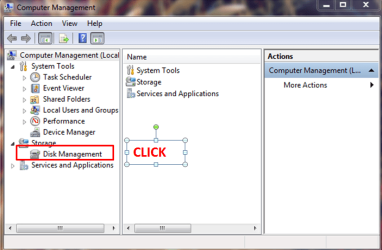
1. Click Start :orb:
2. Right-click on My Computer
3. Click Manage
4. Click Disk Management

management.PNG

Maximize the screen, then take a screen capture image and post it here in your next reply.

Regards,
Golden
 

My Computer My Computer

Computer type
PC/Desktop
Computer Manufacturer/Model Number
Golden Mk. I.4
OS
Windows 10 Pro x64 ; Xubuntu x64
CPU
Intel i7 860 @ 2.80 GHz O/C'ed to 4.0GHz
Motherboard
Gigabyte P55A-UD3R Rev.1. Award BIOS F13
Memory
16GB Corsair Vengance DDR3 @ 661 MHz Dual Channel (9-9-9-24)
Graphics Card(s)
EVGA NVidia GTX 560 1024MB
Sound Card
Realtek Integrated
Monitor(s) Displays
Dual Samsung SyncMaster 2494HS
Screen Resolution
1920*1080 and 1920*1080
Hard Drives
1*Samsung 840 EVO 120GB SSD;
1*OCZ Vertex 2 60GB SSD;
2*Samsung F3 SpinPoint 1TB in RAID0;
1*Samsung F1 SpinPoint 1TB;
2*Western Digital 1TB External USB 3.0
1*Western Digital 500GB External USB 3.0
1*Seagate 500GB External USB 2.0
PSU
Thermaltake ToughPower QFan 750W
Case
Thermaltake Element S VK60001W2Z
Cooling
Corsair H60 Water Cooling, 2*230mm and 2*80mm case fans
Keyboard
Logitech G110
Mouse
Logitech MX518
Hi Golden, thanks,
I had roughly 655gb data on it, mostly backups of my existing bluray collection so I could use with my boxee, which i'm guessing i'll have to start over with lolUntitled.jpg
 

My Computer My Computer

OS
32bit windows7
Anyone :)
 

My Computer My Computer

OS
32bit windows7
Hi,

The problem is the RAW format - I have no idea how to get around that, apart from formatting, but that means you lose the data.

Let me see if someone else can help - hold on. I've requested more help, but I did find this:

http://www.powerdatarecovery.com/fr.../how-to-recover-data-from-raw-hard-drive.html
http://www.powerdatarecovery.com/download.html

Its a utility from the makers of Partition Wizard (who are well known and recommended here) but I have never used this tool before. Have a look at that and see if its something you would like to try.

Regards,
Golden
 

My Computer My Computer

Computer type
PC/Desktop
Computer Manufacturer/Model Number
Golden Mk. I.4
OS
Windows 10 Pro x64 ; Xubuntu x64
CPU
Intel i7 860 @ 2.80 GHz O/C'ed to 4.0GHz
Motherboard
Gigabyte P55A-UD3R Rev.1. Award BIOS F13
Memory
16GB Corsair Vengance DDR3 @ 661 MHz Dual Channel (9-9-9-24)
Graphics Card(s)
EVGA NVidia GTX 560 1024MB
Sound Card
Realtek Integrated
Monitor(s) Displays
Dual Samsung SyncMaster 2494HS
Screen Resolution
1920*1080 and 1920*1080
Hard Drives
1*Samsung 840 EVO 120GB SSD;
1*OCZ Vertex 2 60GB SSD;
2*Samsung F3 SpinPoint 1TB in RAID0;
1*Samsung F1 SpinPoint 1TB;
2*Western Digital 1TB External USB 3.0
1*Western Digital 500GB External USB 3.0
1*Seagate 500GB External USB 2.0
PSU
Thermaltake ToughPower QFan 750W
Case
Thermaltake Element S VK60001W2Z
Cooling
Corsair H60 Water Cooling, 2*230mm and 2*80mm case fans
Keyboard
Logitech G110
Mouse
Logitech MX518
Ok many thanks
Will check it out
 

My Computer My Computer

OS
32bit windows7
Ran that program
It actually did recover files but no mkv ones at all.
It's almost like it skipped them and found files from a previous windows installation (before I owned it), which I found odd, it's like my files never existed.
So I'm guessing there's no hope of getting them back, unless anyone can suggest something else to try?
Thanks
 

My Computer My Computer

OS
32bit windows7
Hi,

Mmm. I'm all out of ideas I'm afraid Zanty. Are you able to look at the HDD in Windows now, or does it still show offline?

Regards,
Golden
 

My Computer My Computer

Computer type
PC/Desktop
Computer Manufacturer/Model Number
Golden Mk. I.4
OS
Windows 10 Pro x64 ; Xubuntu x64
CPU
Intel i7 860 @ 2.80 GHz O/C'ed to 4.0GHz
Motherboard
Gigabyte P55A-UD3R Rev.1. Award BIOS F13
Memory
16GB Corsair Vengance DDR3 @ 661 MHz Dual Channel (9-9-9-24)
Graphics Card(s)
EVGA NVidia GTX 560 1024MB
Sound Card
Realtek Integrated
Monitor(s) Displays
Dual Samsung SyncMaster 2494HS
Screen Resolution
1920*1080 and 1920*1080
Hard Drives
1*Samsung 840 EVO 120GB SSD;
1*OCZ Vertex 2 60GB SSD;
2*Samsung F3 SpinPoint 1TB in RAID0;
1*Samsung F1 SpinPoint 1TB;
2*Western Digital 1TB External USB 3.0
1*Western Digital 500GB External USB 3.0
1*Seagate 500GB External USB 2.0
PSU
Thermaltake ToughPower QFan 750W
Case
Thermaltake Element S VK60001W2Z
Cooling
Corsair H60 Water Cooling, 2*230mm and 2*80mm case fans
Keyboard
Logitech G110
Mouse
Logitech MX518
Hi Zanty,

Minitools or Easeus, the free versions have a limitation. These can recover only 1 GB of data.

Do have a look at my post here . Hope it helps.
 

My Computer My Computer

OS
Windows 7 Home Premium 32 bit
jumanji, thanks so much for you post! :)
I am happily recovering ALL of my lost data so another drive with this program
it's gonna take some time, but currently is about 1/3 of the way through recovering my data,
so i'm gonna go ahead and mark this as SOLVED :)
thanks for all your help guys, really really appreciate it :geek:
 

My Computer My Computer

OS
32bit windows7
Glad you got into recovery mode. After recovery, please do report whether the recovered files are in good shape and what % of files remained uncorrupted and useful. I am also interested in knowing whether you used PhotoRec or TestDisk and how easy or difficult the software is in your assessment. A matter of fact feedback will help us help others appropriately. Thanks.
 

My Computer My Computer

OS
Windows 7 Home Premium 32 bit
Nice one Jumanji - you should turn PhotoRec into a tutorial for easier access.
 

My Computer My Computer

Computer type
PC/Desktop
Computer Manufacturer/Model Number
Golden Mk. I.4
OS
Windows 10 Pro x64 ; Xubuntu x64
CPU
Intel i7 860 @ 2.80 GHz O/C'ed to 4.0GHz
Motherboard
Gigabyte P55A-UD3R Rev.1. Award BIOS F13
Memory
16GB Corsair Vengance DDR3 @ 661 MHz Dual Channel (9-9-9-24)
Graphics Card(s)
EVGA NVidia GTX 560 1024MB
Sound Card
Realtek Integrated
Monitor(s) Displays
Dual Samsung SyncMaster 2494HS
Screen Resolution
1920*1080 and 1920*1080
Hard Drives
1*Samsung 840 EVO 120GB SSD;
1*OCZ Vertex 2 60GB SSD;
2*Samsung F3 SpinPoint 1TB in RAID0;
1*Samsung F1 SpinPoint 1TB;
2*Western Digital 1TB External USB 3.0
1*Western Digital 500GB External USB 3.0
1*Seagate 500GB External USB 2.0
PSU
Thermaltake ToughPower QFan 750W
Case
Thermaltake Element S VK60001W2Z
Cooling
Corsair H60 Water Cooling, 2*230mm and 2*80mm case fans
Keyboard
Logitech G110
Mouse
Logitech MX518
Glad you got into recovery mode. After recovery, please do report whether the recovered files are in good shape and what % of files remained uncorrupted and useful. I am also interested in knowing whether you used PhotoRec or TestDisk and how easy or difficult the software is in your assessment. A matter of fact feedback will help us help others appropriately. Thanks.

It wasn't so much getting into recovery mode, just getting the right program to allow detailed RAW recovery.
I used the easeus program and, am very glad I did. It really was worth it.
I would say I safely recovered about 80% of the data - which is not a bad thing considering it was a 1tb drive.
The date recovered was a mixture of pictures and large mkv files, which were recovered. The images had lost their file names, however my mkv files hadn't, which was good, and, do far these all look undismayed.
With regards to the 20% unrecovered data - I say this, but it was recovered - it was all unusable. I had a mixture of program's and PDF files which (although intact in terms of directory name and structure), were totally corrupted and useless when I checked them, just to give you the complete picture.
I used complete recovery which took about 18hours to scan thr 1tb hdd, and then around 11hours to recover the data.
It's worth noting I've used a lot of data recovery of late, and, easeus, was simple, well set out, and, the program made it easy to choose between data to be recovered.
 

My Computer My Computer

OS
32bit windows7
Did you buy the EaseUs Data Recovery Wizard? It is clearly mentioned that the free version can only recover 1GB of data.

From your feedback, I also understand that you did not try PhotoRec or TestDisk. Am I right?
 

My Computer My Computer

OS
Windows 7 Home Premium 32 bit
Back
Top