
Hard Drive - Turn Off Hard Disk After Idle or Never

How to Turn Off Hard Disk After so many Minutes of being Idle or Never


   Information
This will show you how to have your hard disks to be either turned off after however many minutes you set of being idle, or to never be turned off in Vista, Windows 7, and Windows 8.

This setting will only affect internal HDDs and not for SSDs (solid state drives).

When set to turn off hard disks after idle, you will notice a brief delay of a few seconds when you try to access a turned off hard disk as it spins back up and is turned back on automatically as needed. Having your hard disks to be turned off after being idle can help save energy and extend a laptop's battery life.

   Note
Hard disks do not turn off after your computer has been idle

If you have the hard disks set to be turned off after X amount of minutes of being inactive, then this behavior can be caused if any disk activity occurs, whether it is caused by user input or system tasks. Disk activity of any type resets the hard disk idle timer, and this can increase the amount of time it takes for your hard disk to turn off.

Windows is designed to automatically perform maintenance tasks to improve performance and reliability. When your computer is on AC power and is idle, system maintenance tasks may be able to run for a few minutes. These system maintenance tasks include disk-layout optimization to improve performance and preparing automatic system restoration points to increase reliability. Typically, these tasks occur the first time you leave your computer idle after you start it. These tasks ensure that the system maintains its performance and reliability even after long use. Because these tasks involve reading and writing to the hard disk, the hard disk idle time is reset regularly during this maintenance period.

There are other items that can reset the hard disk idle timer. These items can include:
  • Paging operations.
  • Windows Update checking the system state.
  • Event logging.
  • Network detection such as DHCP or Autonet.
  • Third-party services such as quota software or an antivirus program.
  • Scheduled tasks.
  • The loading of services or drivers.
When these items either read from or write to the hard disk, the hard disk idle timer is reset.


Here's How:
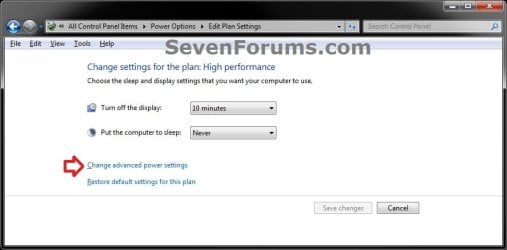
1. Open the advanced power settings in Windows 7 or Windows 8 for your selected power plan, and do step 2 or 3 below for what you would like to do. (see screenshot below)
Advanced.jpg
2. To Turn Off Hard Disks After Idle
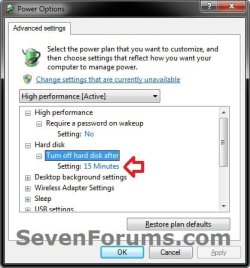
A) Expand Hard disk and Turn off hard disk after, set how many minutes you want the hard disks to be idle for before being turned off, click/tap on OK, and go to step 4. (see screenshot below)
NOTE: The default setting is with 20 minutes.
Power_Options.jpg
3. To Never Turn Off Hard Disks
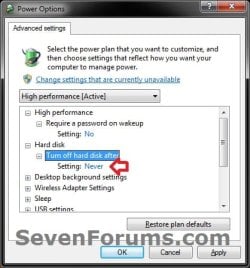
A) Expand Hard disk and Turn off hard disk after, set it to Never ( 0 minutes), click/tap on OK, and go to step 4. (see screenshot below)
Never.jpg
4. Close the Edit Plan Settings window. (see screenshot below step 1)
That's it,
Shawn


Last edited:
Was having trouble finding the "Never" option, finally figured it out; you must select Zero Minutes.
 

My Computer My Computer

Computer Manufacturer/Model Number
ASUS Labtop
OS
Windows 7 Home Premium 64 bit
Hello Ben, and welcome to Seven Forums.

Thank you for posting back your feedback. I have updated the tutorial to help others avoid having the same trouble.
 

My Computer My Computer

Computer type
PC/Desktop
Computer Manufacturer/Model Number
Self built custom
OS
64-bit Windows 11 Pro for Workstations
CPU
Intel i7-8700K OC'd to 5 GHz
Motherboard
ASUS ROG Maximus XI Formula Z390
Memory
64 GB (4x16GB) G.SKILL TridentZ RGB DDR4 3600 MHz
Graphics Card(s)
ASUS ROG-STRIX-GTX1080TI-O11G-GAMING
Sound Card
Integrated
Monitor(s) Displays
2 x Samsung Odyssey G7 27"
Screen Resolution
2560x1440
Hard Drives
1TB Samsung 990 PRO M.2,
4TB Samsung 990 PRO PRO M.2,
TerraMaster F8 SSD Plus NAS
PSU
Seasonic Prime Titanium 850W
Case
Thermaltake Core P3
Cooling
Corsair Hydro H115i
Keyboard
Logitech wireless K800
Mouse
Logitech MX Master 4
Internet Speed
2 Gb/s Download and 100 Mb/s Upload
Antivirus
Malwarebyte Anti-Malware Premium
Browser
Google Chrome
Other Info
Logitech Z625 speaker system,
Logitech BRIO 4K Pro webcam,
HP Color LaserJet Pro MFP M477fdn,
APC SMART-UPS RT 1000 XL - SURT1000XLI,
Galaxy S23 Plus phone
After reinstalling Windows today, I noticed this clicking sound coming from one of my HDDs. The clicking coinciding with a re-installation.... Must have been the power plan. I've now set my HDDs to never go to sleep.
It had me checking out SMART data and everything already, thinking it was a click of death at first. so I googled around for firmware updates, stumbling upon this topic by coincidence. I really can't remember I've also set my HDDs to never go to sleep last time I installed Windows. So thanks for reminding me, Brink!
From a power saving perspective, the default 20 minutes make sense. But it adds extra wear on the drive, if it needs to shutdown and bootup more.
 

My Computer My Computer

Computer Manufacturer/Model Number
Myself
OS
Windows 7 Ultimate 64 bit Retail
CPU
Intel Core i7 930
Motherboard
Gigabyte X58A UD3R 2.0
Memory
KHX1600C8D3K3/6GX
Graphics Card(s)
AMD Radeon 5870
Sound Card
Creative X-Fi Titanium
Monitor(s) Displays
Samsung PX2370
Screen Resolution
1920x1080
Hard Drives
2x Samsung HD103SJ Raid0 (windows, apps, games)
2x Samsung HD204UI Raid1
1x WD3200KS
PSU
Corsair HX850W
Case
CM690 II Advanced
Cooling
Case 2x front, 2x top, 1x bottom, 1x back CPU Mugen 2 rev.B
Keyboard
Logitech Illuminated
Mouse
Logitech G5
Other Info
Bipedal carbon based high-latency and small cache-sized biological operator behind the keyboard. What would you expect?!
You're welcome Trinitrotoluene.

Personally, setting the HDD's to turn off when idle is more useful if you let your computer run for long extended periods of time. If you are off and on the computer and put the computer to sleep inbetween, then setting the HDD's to turn off when idle will probably not be of much use.
 

My Computer My Computer

Computer type
PC/Desktop
Computer Manufacturer/Model Number
Self built custom
OS
64-bit Windows 11 Pro for Workstations
CPU
Intel i7-8700K OC'd to 5 GHz
Motherboard
ASUS ROG Maximus XI Formula Z390
Memory
64 GB (4x16GB) G.SKILL TridentZ RGB DDR4 3600 MHz
Graphics Card(s)
ASUS ROG-STRIX-GTX1080TI-O11G-GAMING
Sound Card
Integrated
Monitor(s) Displays
2 x Samsung Odyssey G7 27"
Screen Resolution
2560x1440
Hard Drives
1TB Samsung 990 PRO M.2,
4TB Samsung 990 PRO PRO M.2,
TerraMaster F8 SSD Plus NAS
PSU
Seasonic Prime Titanium 850W
Case
Thermaltake Core P3
Cooling
Corsair Hydro H115i
Keyboard
Logitech wireless K800
Mouse
Logitech MX Master 4
Internet Speed
2 Gb/s Download and 100 Mb/s Upload
Antivirus
Malwarebyte Anti-Malware Premium
Browser
Google Chrome
Other Info
Logitech Z625 speaker system,
Logitech BRIO 4K Pro webcam,
HP Color LaserJet Pro MFP M477fdn,
APC SMART-UPS RT 1000 XL - SURT1000XLI,
Galaxy S23 Plus phone
Ok What about if i have more than one hard .. and i want only one hard disk to sleep if it become idle and other not .. so how i could do that if the option not giving me any choice ??
 

My Computer My Computer

Computer type
PC/Desktop
Computer Manufacturer/Model Number
Custom Build
OS
Windows 7 Enterprise 64-Bit
Hello Exlans,

I'm sorry, but this is a all or none type setting. It would be nice to be able to select to apply this to only specified HDD's though. :(
 

My Computer My Computer

Computer type
PC/Desktop
Computer Manufacturer/Model Number
Self built custom
OS
64-bit Windows 11 Pro for Workstations
CPU
Intel i7-8700K OC'd to 5 GHz
Motherboard
ASUS ROG Maximus XI Formula Z390
Memory
64 GB (4x16GB) G.SKILL TridentZ RGB DDR4 3600 MHz
Graphics Card(s)
ASUS ROG-STRIX-GTX1080TI-O11G-GAMING
Sound Card
Integrated
Monitor(s) Displays
2 x Samsung Odyssey G7 27"
Screen Resolution
2560x1440
Hard Drives
1TB Samsung 990 PRO M.2,
4TB Samsung 990 PRO PRO M.2,
TerraMaster F8 SSD Plus NAS
PSU
Seasonic Prime Titanium 850W
Case
Thermaltake Core P3
Cooling
Corsair Hydro H115i
Keyboard
Logitech wireless K800
Mouse
Logitech MX Master 4
Internet Speed
2 Gb/s Download and 100 Mb/s Upload
Antivirus
Malwarebyte Anti-Malware Premium
Browser
Google Chrome
Other Info
Logitech Z625 speaker system,
Logitech BRIO 4K Pro webcam,
HP Color LaserJet Pro MFP M477fdn,
APC SMART-UPS RT 1000 XL - SURT1000XLI,
Galaxy S23 Plus phone
Hi Shawn,

You said "This setting will only affect internal HDD's and not SSD's "

I confused :confused:
SSD's uses another power settings independent from Windows or what? Can you explain please?
 

My Computer My Computer

Computer Manufacturer/Model Number
asus f3sv240dr
OS
vista
CPU
t7700
Memory
2 gb
Graphics Card(s)
8600M
Hard Drives
250 GB
Hi Shawn,

You said "This setting will only affect internal HDD's and not SSD's "

I confused :confused:
SSD's uses another power settings independent from Windows or what? Can you explain please?

I assume it has to do with the fact that SSDs have no moving parts and therefore can't "spin down" to save power. They are either in use or not in use---on or off.
 

My Computer My Computer

Computer type
PC/Desktop
Computer Manufacturer/Model Number
Ignatz Special; 4 speed manual gearbox; factory air conditioning; one of one
OS
Windows 7 Home Premium SP1, 64-bit
CPU
Intel Skylake i5-6600K, not overclocked
Motherboard
AsRock Z170M Extreme 4, micro ATX
Memory
8 GB HyperX DDR4-2666 (2 x 4 GB)
Graphics Card(s)
none; graphics are integrated on CPU
Sound Card
onboard: Realtek ALC1150; external: USB Behringer UF0-202
Monitor(s) Displays
Dell S2340M 23 inch IPS
Screen Resolution
1600 x 900
Hard Drives
System: Crucial MX100 series SSD, 128 GB;
Data: Samsung Spinpoint 103SJ, 1 TB;
Backup: WD Caviar Green WD30EZRX-00D8PB0, 3 TB
PSU
Rosewill SilentNight 500 watt fanless, semi-modular
Case
Antec Solo II
Cooling
Noctua NH-U12S; Noctua F12 intake, Noctua S12A exhaust
Keyboard
Microsoft 200 6JH-00001 USB
Mouse
Dell or Microsoft optical wired; USB
Antivirus
Microsoft Security Essentials and Malwarebytes Premium
Browser
Pale Moon
Other Info
All fans PWM; speeds at idle: CPU circa 500 rpm; intake circa 600 rpm; exhaust circa 600 rpm; CPU temps 27 idle and 47 C load in a warm room (27 C/81 F) when running Intel Extreme Tuning Utility stress test.
:ditto:

Yep, that would be why. :)
 

My Computer My Computer

Computer type
PC/Desktop
Computer Manufacturer/Model Number
Self built custom
OS
64-bit Windows 11 Pro for Workstations
CPU
Intel i7-8700K OC'd to 5 GHz
Motherboard
ASUS ROG Maximus XI Formula Z390
Memory
64 GB (4x16GB) G.SKILL TridentZ RGB DDR4 3600 MHz
Graphics Card(s)
ASUS ROG-STRIX-GTX1080TI-O11G-GAMING
Sound Card
Integrated
Monitor(s) Displays
2 x Samsung Odyssey G7 27"
Screen Resolution
2560x1440
Hard Drives
1TB Samsung 990 PRO M.2,
4TB Samsung 990 PRO PRO M.2,
TerraMaster F8 SSD Plus NAS
PSU
Seasonic Prime Titanium 850W
Case
Thermaltake Core P3
Cooling
Corsair Hydro H115i
Keyboard
Logitech wireless K800
Mouse
Logitech MX Master 4
Internet Speed
2 Gb/s Download and 100 Mb/s Upload
Antivirus
Malwarebyte Anti-Malware Premium
Browser
Google Chrome
Other Info
Logitech Z625 speaker system,
Logitech BRIO 4K Pro webcam,
HP Color LaserJet Pro MFP M477fdn,
APC SMART-UPS RT 1000 XL - SURT1000XLI,
Galaxy S23 Plus phone
Thanks guys :)
 

My Computer My Computer

Computer Manufacturer/Model Number
asus f3sv240dr
OS
vista
CPU
t7700
Memory
2 gb
Graphics Card(s)
8600M
Hard Drives
250 GB
Glad we could help. :)
 

My Computer My Computer

Computer type
PC/Desktop
Computer Manufacturer/Model Number
Self built custom
OS
64-bit Windows 11 Pro for Workstations
CPU
Intel i7-8700K OC'd to 5 GHz
Motherboard
ASUS ROG Maximus XI Formula Z390
Memory
64 GB (4x16GB) G.SKILL TridentZ RGB DDR4 3600 MHz
Graphics Card(s)
ASUS ROG-STRIX-GTX1080TI-O11G-GAMING
Sound Card
Integrated
Monitor(s) Displays
2 x Samsung Odyssey G7 27"
Screen Resolution
2560x1440
Hard Drives
1TB Samsung 990 PRO M.2,
4TB Samsung 990 PRO PRO M.2,
TerraMaster F8 SSD Plus NAS
PSU
Seasonic Prime Titanium 850W
Case
Thermaltake Core P3
Cooling
Corsair Hydro H115i
Keyboard
Logitech wireless K800
Mouse
Logitech MX Master 4
Internet Speed
2 Gb/s Download and 100 Mb/s Upload
Antivirus
Malwarebyte Anti-Malware Premium
Browser
Google Chrome
Other Info
Logitech Z625 speaker system,
Logitech BRIO 4K Pro webcam,
HP Color LaserJet Pro MFP M477fdn,
APC SMART-UPS RT 1000 XL - SURT1000XLI,
Galaxy S23 Plus phone
Brink i have a weird problem about this option...in the past all works good but now nothing work for me.even if i set the option to 5 minutes...i dont know why and is there no program i use that affect the disks i want to shutdown...i dont understand....
 

My Computer My Computer

OS
64
Hello bluescorpion, and welcome to Seven Forums.

It's most likely that something is using the HDD preventing it from being idle. You might double check the items at the MS KB link below to see if any of them may apply for why your HDDs are not being turned off when idle for the specified time.

Hard disks do not turn off after your computer has been idle

Hope this helps for now, :)
Shawn
 
Last edited:

My Computer My Computer

Computer type
PC/Desktop
Computer Manufacturer/Model Number
Self built custom
OS
64-bit Windows 11 Pro for Workstations
CPU
Intel i7-8700K OC'd to 5 GHz
Motherboard
ASUS ROG Maximus XI Formula Z390
Memory
64 GB (4x16GB) G.SKILL TridentZ RGB DDR4 3600 MHz
Graphics Card(s)
ASUS ROG-STRIX-GTX1080TI-O11G-GAMING
Sound Card
Integrated
Monitor(s) Displays
2 x Samsung Odyssey G7 27"
Screen Resolution
2560x1440
Hard Drives
1TB Samsung 990 PRO M.2,
4TB Samsung 990 PRO PRO M.2,
TerraMaster F8 SSD Plus NAS
PSU
Seasonic Prime Titanium 850W
Case
Thermaltake Core P3
Cooling
Corsair Hydro H115i
Keyboard
Logitech wireless K800
Mouse
Logitech MX Master 4
Internet Speed
2 Gb/s Download and 100 Mb/s Upload
Antivirus
Malwarebyte Anti-Malware Premium
Browser
Google Chrome
Other Info
Logitech Z625 speaker system,
Logitech BRIO 4K Pro webcam,
HP Color LaserJet Pro MFP M477fdn,
APC SMART-UPS RT 1000 XL - SURT1000XLI,
Galaxy S23 Plus phone
i am pretty sure no one of those items is runing.i have 5 hdds on pc.and even one is close :/
ty for your answer anyway
 

My Computer My Computer

OS
64
You might try booting into Safe Mode to see if they turn off after the set idle period. If they do, then something is preventing it from being idle when you are booted in normal mode.
 

My Computer My Computer

Computer type
PC/Desktop
Computer Manufacturer/Model Number
Self built custom
OS
64-bit Windows 11 Pro for Workstations
CPU
Intel i7-8700K OC'd to 5 GHz
Motherboard
ASUS ROG Maximus XI Formula Z390
Memory
64 GB (4x16GB) G.SKILL TridentZ RGB DDR4 3600 MHz
Graphics Card(s)
ASUS ROG-STRIX-GTX1080TI-O11G-GAMING
Sound Card
Integrated
Monitor(s) Displays
2 x Samsung Odyssey G7 27"
Screen Resolution
2560x1440
Hard Drives
1TB Samsung 990 PRO M.2,
4TB Samsung 990 PRO PRO M.2,
TerraMaster F8 SSD Plus NAS
PSU
Seasonic Prime Titanium 850W
Case
Thermaltake Core P3
Cooling
Corsair Hydro H115i
Keyboard
Logitech wireless K800
Mouse
Logitech MX Master 4
Internet Speed
2 Gb/s Download and 100 Mb/s Upload
Antivirus
Malwarebyte Anti-Malware Premium
Browser
Google Chrome
Other Info
Logitech Z625 speaker system,
Logitech BRIO 4K Pro webcam,
HP Color LaserJet Pro MFP M477fdn,
APC SMART-UPS RT 1000 XL - SURT1000XLI,
Galaxy S23 Plus phone
You might try booting into Safe Mode to see if they turn off after the set idle period. If they do, then something is preventing it from being idle when you are booted in normal mode.

i try it with safe mode and all works good.
now i dont find what affect from shutdown without safe mode...
 

My Computer My Computer

OS
64

My Computer My Computer

Computer type
PC/Desktop
Computer Manufacturer/Model Number
Self built custom
OS
64-bit Windows 11 Pro for Workstations
CPU
Intel i7-8700K OC'd to 5 GHz
Motherboard
ASUS ROG Maximus XI Formula Z390
Memory
64 GB (4x16GB) G.SKILL TridentZ RGB DDR4 3600 MHz
Graphics Card(s)
ASUS ROG-STRIX-GTX1080TI-O11G-GAMING
Sound Card
Integrated
Monitor(s) Displays
2 x Samsung Odyssey G7 27"
Screen Resolution
2560x1440
Hard Drives
1TB Samsung 990 PRO M.2,
4TB Samsung 990 PRO PRO M.2,
TerraMaster F8 SSD Plus NAS
PSU
Seasonic Prime Titanium 850W
Case
Thermaltake Core P3
Cooling
Corsair Hydro H115i
Keyboard
Logitech wireless K800
Mouse
Logitech MX Master 4
Internet Speed
2 Gb/s Download and 100 Mb/s Upload
Antivirus
Malwarebyte Anti-Malware Premium
Browser
Google Chrome
Other Info
Logitech Z625 speaker system,
Logitech BRIO 4K Pro webcam,
HP Color LaserJet Pro MFP M477fdn,
APC SMART-UPS RT 1000 XL - SURT1000XLI,
Galaxy S23 Plus phone

My Computer My Computer

OS
64
You're most welcome. What turned out to be the cause? :)
 

My Computer My Computer

Computer type
PC/Desktop
Computer Manufacturer/Model Number
Self built custom
OS
64-bit Windows 11 Pro for Workstations
CPU
Intel i7-8700K OC'd to 5 GHz
Motherboard
ASUS ROG Maximus XI Formula Z390
Memory
64 GB (4x16GB) G.SKILL TridentZ RGB DDR4 3600 MHz
Graphics Card(s)
ASUS ROG-STRIX-GTX1080TI-O11G-GAMING
Sound Card
Integrated
Monitor(s) Displays
2 x Samsung Odyssey G7 27"
Screen Resolution
2560x1440
Hard Drives
1TB Samsung 990 PRO M.2,
4TB Samsung 990 PRO PRO M.2,
TerraMaster F8 SSD Plus NAS
PSU
Seasonic Prime Titanium 850W
Case
Thermaltake Core P3
Cooling
Corsair Hydro H115i
Keyboard
Logitech wireless K800
Mouse
Logitech MX Master 4
Internet Speed
2 Gb/s Download and 100 Mb/s Upload
Antivirus
Malwarebyte Anti-Malware Premium
Browser
Google Chrome
Other Info
Logitech Z625 speaker system,
Logitech BRIO 4K Pro webcam,
HP Color LaserJet Pro MFP M477fdn,
APC SMART-UPS RT 1000 XL - SURT1000XLI,
Galaxy S23 Plus phone
Back
Top