
Asked 3 weeks ago- only got partial answer to multiple "Library" ?s
Hi,
3 weeks ago I posted a big thread/lots of questions. Someone was kind enough to answer a couple of them but I got no reply on the others...they are very complex to me, perhaps also to others- I am reposting them (I read forum rules and did not see anything stating I could not do this) as hopefully this will appear "fresh," someone will see it and be able to help me with the other questions I had, which follow- they are hard for me to explain, so if you need more info, please let me know and I'll do EVERYTHING I can to try to help you help me!
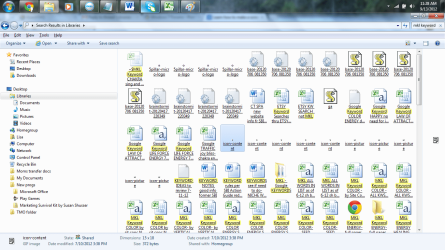
1) When looking at my "Document" folders I often see icons of gears or of yellow "scrolls" (like ancient text scrolls) inside rectangular boxes, and other things that make no sense at all...
Looking right now at some, I see that under some of the yellow scrolls, the so-called document reads, "base 2012076 0 81350"- there are about 5 of these, all with the same name as I look at just this one window- and in opening it this is part of what I see:
body{background:#FFF url(/common/static/img/global-bg.jpg) repeat-x;color:#333;font-family:"Lucida Grande", Geneva, Arial, Verdana, sans-serif;font-size:12px;margin:0;padding:0;}body.popup{background-image:url(/common/static/img/smallwin-bg.jpg);}#wrapper{margin:0 auto;position:relative;width:950px;}body.popup #wrapper{width:650px;}#moduleHeader,
#content,
body.wide #content,
body.popup #content,
#footer{margin-left:20px;}body.full{padding-left:0;padding-right:0;}
2. I also have "tiny icons" about 1/2 the size of most that appear out of nowhere- example, one that below it reads, "icon-content" and when I try to open it the computer opens a new window that opens Internet Explorer and gives me a popoup that says "a website wants to open web content using this program on your computer" to which I do NOT allow. In the upper left of that window, I see what SHOULD be a document file, but it says (for the example I'm using right now):
C:\Users\Lisa\Videos\MKL Keywords SEED GENERATOR...which is all I can see of that link. I do use a program within the website hosting company I am working with in which I am currently searching for a site concept, and which has something like a Google Keyword Toolbox of its own...and it uses the words MKL and SEED GENERATOR. I would have no reason to save any internet file like that, but I do extract info from my searches and put them into Excel documents. I don't know why I would have all these icons! Totally confused and wasting my space but I'm
a) afraid to delete them in case I mess up my computer (I'm no guru)
b) wonder how I can stop generating these in the future
I wanted to attach a couple screenshots - I hope the attachment shows up here.
PLEASE help!!!
Thanks bunches,
Lisa288
Hi,
3 weeks ago I posted a big thread/lots of questions. Someone was kind enough to answer a couple of them but I got no reply on the others...they are very complex to me, perhaps also to others- I am reposting them (I read forum rules and did not see anything stating I could not do this) as hopefully this will appear "fresh," someone will see it and be able to help me with the other questions I had, which follow- they are hard for me to explain, so if you need more info, please let me know and I'll do EVERYTHING I can to try to help you help me!
1) When looking at my "Document" folders I often see icons of gears or of yellow "scrolls" (like ancient text scrolls) inside rectangular boxes, and other things that make no sense at all...
Looking right now at some, I see that under some of the yellow scrolls, the so-called document reads, "base 2012076 0 81350"- there are about 5 of these, all with the same name as I look at just this one window- and in opening it this is part of what I see:
body{background:#FFF url(/common/static/img/global-bg.jpg) repeat-x;color:#333;font-family:"Lucida Grande", Geneva, Arial, Verdana, sans-serif;font-size:12px;margin:0;padding:0;}body.popup{background-image:url(/common/static/img/smallwin-bg.jpg);}#wrapper{margin:0 auto;position:relative;width:950px;}body.popup #wrapper{width:650px;}#moduleHeader,
#content,
body.wide #content,
body.popup #content,
#footer{margin-left:20px;}body.full{padding-left:0;padding-right:0;}
2. I also have "tiny icons" about 1/2 the size of most that appear out of nowhere- example, one that below it reads, "icon-content" and when I try to open it the computer opens a new window that opens Internet Explorer and gives me a popoup that says "a website wants to open web content using this program on your computer" to which I do NOT allow. In the upper left of that window, I see what SHOULD be a document file, but it says (for the example I'm using right now):
C:\Users\Lisa\Videos\MKL Keywords SEED GENERATOR...which is all I can see of that link. I do use a program within the website hosting company I am working with in which I am currently searching for a site concept, and which has something like a Google Keyword Toolbox of its own...and it uses the words MKL and SEED GENERATOR. I would have no reason to save any internet file like that, but I do extract info from my searches and put them into Excel documents. I don't know why I would have all these icons! Totally confused and wasting my space but I'm
a) afraid to delete them in case I mess up my computer (I'm no guru)
b) wonder how I can stop generating these in the future
I wanted to attach a couple screenshots - I hope the attachment shows up here.
PLEASE help!!!
Thanks bunches,
Lisa288
Attachments
My Computer
- OS
- 64
- Internet Speed
- 25 gig
- Other Info
- I don't know much of what you are requesting here.


