My files save as "read only" and also very strange, ~$...

Lisa288

New member
Local time
12:18 PM
Messages
24
Location
Florida
I can hardly explain how to ask these questions, but will try my best...:cry:

1. I do lots of document saving, where I write a Word page and save to Documents. Something happens in the computer where it saves as "Read Only" which I would never ever ever do. Why would this happen and how can I stop it in the future??

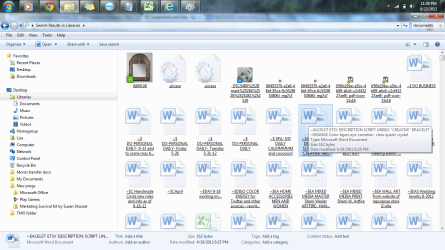
2. When looking at my "Document" folders I often see icons of gears or of yellow "scrolls" (like ancient text scrolls) inside rectangular boxes, and other things that make no sense at all...
Looking right now at some, I see that under some of the yellow scrolls, the so-called document reads, "base 2012076 0 81350"- there are about 5 of these, all with the same name as I look at just this one window- and in opening it this is part of what I see:

body{background:#FFF url(/common/static/img/global-bg.jpg) repeat-x;color:#333;font-family:"Lucida Grande", Geneva, Arial, Verdana, sans-serif;font-size:12px;margin:0;padding:0;}body.popup{background-image:url(/common/static/img/smallwin-bg.jpg);}#wrapper{margin:0 auto;position:relative;width:950px;}body.popup #wrapper{width:650px;}#moduleHeader,
#content,
body.wide #content,
body.popup #content,
#footer{margin-left:20px;}body.full{padding-left:0;padding-right:0;}

3. Also, at least 1/2 of my documents end up duplicated where I have documents that start with this: ~$(then the name I used to save it.) So far I've been able to find the actual document that I CAN open, but these, I am unable to and don't know how they exist in the first place. Each time I search for a document and see those scribbles (~$) before the words I used in saving them, I go into panic attack mode, worried that my "true" document is lost, never to be found again.

This happens when I am saving for the first time, or at times when I close my document after adding to it or simply reviewing it.

4. I also have "tiny icons" about 1/2 the size of most that appear out of nowhere- example, one that below it reads, "icon-content" and when I try to open it the computer opens a new window that opens Internet Explorer and gives me a popoup that says "a website wants to open web content using this program on your computer" to which I do NOT allow. In the upper left of that window, I see what SHOULD be a document file, but it says (for the example I'm using right now):
C:\Users\Lisa\Videos\MKL Keywords SEED GENERATOR
...which is all I can see of that link. I do use a program within the website hosting company I am working with in which I am currently searching for a site concept, and which has something like a Google Keyword Toolbox of its own...and it uses the words MKL and SEED GENERATOR. I would have no reason to save any internet file like that, but I do extract info from my searches and put them into Excel documents. I don't know why I would have all these icons! Totally confusing!

5. Another icon that shows up constantly is a picture of a camera with writing below that states, " icon-picture" and now that I'm thinking of this, I recall many other times that icons just seem to save themselves, e.g. logos of websites I have visited.

I think that this, for one thing is likely taking plenty of space on my computer, and for another thing, I don't know how to stop all this from happening in the future!

Can anyone help me get out of the mess I seem to find myself in? :huh: You probably need more information, but I don't know where to begin! I'm NOT computer knowledgeable to any decent extent, so please, if you'll be kind enough to reply to this, reply in layman's terms.

Thanks so much- in advance- for any help you can give to me! (I did manage to save a screenshot into "PAINT" of two library pages that have lots of what I am talking of...I hope the attachment opens here.)

Lisa
 

Attachments

  • DOCUMENT SAVING SCREWUPS.png
    DOCUMENT SAVING SCREWUPS.png
    71 KB · Views: 42
  • DOCUMENT SAVING SCREWUPS #2.png
    DOCUMENT SAVING SCREWUPS #2.png
    114.9 KB · Views: 33

My Computer My Computer

At a glance

64
OS
64
Internet Speed
25 gig
Other Info
I don't know much of what you are requesting here.
If you save your Word files in a .doc format and your Excel files in a .xls format, items 1 and 3 will be solved.
 

My Computer My Computer

At a glance

Windows 7 Home Premium 32-Bit - Build 7600 SP1Intel Core i3-2120 3.30GhzKingston 4 GB DDR3 1333 mhzAMD Radeon HD6670
Computer type
PC/Desktop
Computer Manufacturer/Model Number
Custom Build
OS
Windows 7 Home Premium 32-Bit - Build 7600 SP1
CPU
Intel Core i3-2120 3.30Ghz
Motherboard
Asus P8Z68-V LX Intel Z68 Socket H2 ATX
Memory
Kingston 4 GB DDR3 1333 mhz
Graphics Card(s)
AMD Radeon HD6670
Sound Card
Sound Blaster Audigy SE 24-Bit
Monitor(s) Displays
Asus VE228
Screen Resolution
1440 X 900
Hard Drives
OCZ Vertex 3 120 GB Sata 3 SSD ==
Kingston SH103/S3 120 G Hyper X 120 GB SSD ==
Western Digital 500 GB Caviar Green 7200 RPM ==
PSU
Corsair CX600M == 600 Watt
Case
NZXT Apollo - Silver with Clear Side Panel
Cooling
Three 120 mm Fans
Keyboard
Microsoft Natural 4000
Mouse
Microsoft Custom Optical 3000
Internet Speed
AT&T Fiber Optic Wireless Network
Antivirus
Microsoft Security Essentials
Browser
Chrome
Other Info
120 mm Blue LED Fan -- Three Blue LED Lazer Light Sticks
Hi BigMK...

I'm sorry it's taken SOOOOO long to write back! I have Norton and it kept trying to log me in under the wrong name/password etc...so I'd try, give up, try again, give up...finally went back to an OLD email sent to me and clicked on it to get in. Long, boring story but really, I do apologize.

I will try to be sure I save the way you suggested. I guess I'll repost the other questions I had and see if anyone can help me with those. I do, very much, appreciate your help with some of this!

Thanks bunches,
Lisa
 

My Computer My Computer

At a glance

64
OS
64
Internet Speed
25 gig
Other Info
I don't know much of what you are requesting here.
Before you post elsewhere, have you ever looked at buiding a website and what is in your folder "Videos"? i ask this as from what you posted I didn't think you were into website building and The reference to "MKL Keywords SEED GENERATOR" puzzles me a bit.
 

My Computer My Computer

At a glance

Microsoft Windows 7 Home Premium 64-bit 7601 ...Intel(R) Core(TM) i7-3770 CPU @ 3.40GHz8.00 GBIntel(R) HD Graphics 4000
Computer type
PC/Desktop
OS
Microsoft Windows 7 Home Premium 64-bit 7601 Multiprocessor Free Service Pack 1
CPU
Intel(R) Core(TM) i7-3770 CPU @ 3.40GHz
Motherboard
ASUSTeK COMPUTER INC. P8H77-M
Memory
8.00 GB
Graphics Card(s)
Intel(R) HD Graphics 4000
Sound Card
On Board
Monitor(s) Displays
Dell 24"
Screen Resolution
1920 x 1080
Hard Drives
(1) INTEL SSDSC2CT180A3 ATA Device (2) ST500DM002-1BD142 ATA Device (3) WDC WD3200AAKS-75L9A0 ATA Device (4) Generic- Compact Flash USB Device (5) Generic- MS/MS-Pro USB Device (6) Generic- SD/MMC USB Device (7) Generic- SM/xD-Picture USB
PSU
500w Corsair
Case
Cooler Master
Cooling
3 Fans
Keyboard
Logitech MK300
Mouse
Logitech WOM
Internet Speed
75Mb
Antivirus
Norton 360
Browser
Firefox, Opera, IE

My Computer My Computer

At a glance

XP / Win7 x64 ProIntel Quad-Core Q9450 @ 3.2GHz2x2GB GSkill DDR2NVIDIA GeForce 8600 GTS (EVGA)
OS
XP / Win7 x64 Pro
CPU
Intel Quad-Core Q9450 @ 3.2GHz
Motherboard
Asus P5-E
Memory
2x2GB GSkill DDR2
Graphics Card(s)
NVIDIA GeForce 8600 GTS (EVGA)
Monitor(s) Displays
Dell 2408WFP
Screen Resolution
1920x1200
~$(then the name I used to save it.)

Those files may just be for system use. When you use your program to open one of your files for editing/viewing, a temporary "lock" file associated with the file you've opened gets created, preventing other network users from modifying the same file while you're doing your work. When you close the file the temporary lock file is supposed to get deleted, but there are times it doesn't (program crashes, improper shutdowns, network disconnects, etc.).

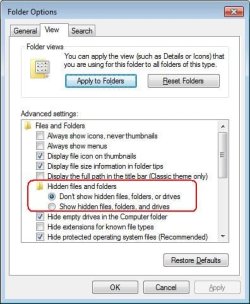
If Explorer's View Options are set to display hidden files you'll see these files get created/deleted as you open/close your data files. This setting allows you to see all other sorts of files as well, and may help to explain what you're now seeing.

If another user tries to open a file you've already got opened for editing, it'll let that other user open it, but in a read-only mode.
 

My Computer My Computer

At a glance

Windows 7 Ultimate x64
OS
Windows 7 Ultimate x64
I posted in your other thread http://www.sevenforums.com/general-...ly-got-partial-answer-multiple-library-s.html. You might want to consolidate to one thread for these.

I hope I'm answering this properly. After receiving no further replies I felt I should start a different thread for the answers I didn't get since it had been 3 weeks. I'm not sure what else you mean by consolidating to one thread. I asked my remaining questions in one thread. Perhaps you could clarify a bit?

Thanks,
Lisa 288

I do hope I'm writing back properly, as it didn't give me an option to reply to you individually that I'm aware of.
 

My Computer My Computer

At a glance

64
OS
64
Internet Speed
25 gig
Other Info
I don't know much of what you are requesting here.
~$(then the name I used to save it.)

Those files may just be for system use. When you use your program to open one of your files for editing/viewing, a temporary "lock" file associated with the file you've opened gets created, preventing other network users from modifying the same file while you're doing your work. When you close the file the temporary lock file is supposed to get deleted, but there are times it doesn't (program crashes, improper shutdowns, network disconnects, etc.).

If Explorer's View Options are set to display hidden files you'll see these files get created/deleted as you open/close your data files. This setting allows you to see all other sorts of files as well, and may help to explain what you're now seeing.

If another user tries to open a file you've already got opened for editing, it'll let that other user open it, but in a read-only mode.


Again, I'm not sure how to reply to you alone. But Will try here. If I get these files in the future may I just delete them? I have Norton backup and it picks up EVERYTHING I place into my Libraries, documents, photos, videos. I don't want to give then the opportunity to raise my rates again because these are being backe up as well as the documents I truly saved.
Also, I don't use Explorer, rather, Google Chrome. And I'd have to be getting hacked, as they say, for another user to be trying to rea my files, am I right? What would you do in my situation?

One last thing, I tend to miss seeing the $~ and waste time trying to open unreadable files. I just want them GONE! :(

Thank you for helping!
Lisa
 

My Computer My Computer

At a glance

64
OS
64
Internet Speed
25 gig
Other Info
I don't know much of what you are requesting here.
Before you post elsewhere, have you ever looked at buiding a website and what is in your folder "Videos"? i ask this as from what you posted I didn't think you were into website building and The reference to "MKL Keywords SEED GENERATOR" puzzles me a bit.

By the way, MKL Keywords SEED GENERATOR are one type of Master Keyword List keyword I use from the company in which I am building my website.

I see now that some of my files are saved under video, though I don't know why. Out of the 20 or so there, I had nothing to do with saving any of them but a few pics, but wouldn't think I'd save them under Videos- I never create videos. Not sure why that is happening. Also, I clicked on a couple of the white pages within those videose and it's asked me to choose the program I wish to use to open them. Everything I save is a document or photo, with but a few exceptions when I downlod a Hubspot e-book or something like that. I don't know why my computer would ask that.
I couldn't find a way to delete that, either.

Thanks again for your help!

Lisaw288
 

My Computer My Computer

At a glance

64
OS
64
Internet Speed
25 gig
Other Info
I don't know much of what you are requesting here.
Again, I'm not sure how to reply to you alone. But Will try here.

It's best not bothering to reply to only one individual. Just reply as you've been doing (within this thread) so that others that may be able to help have a chance to do so (and you just might get this issue resolved much more quickly). On top of that there may be others searching the internet for an answer to the same or similar problem, and conversing within the thread allows them to view all of the relevant info.

If I get these files in the future may I just delete them? I have Norton backup and it picks up EVERYTHING I place into my Libraries, documents, photos, videos. I don't want to give then the opportunity to raise my rates again because these are being backe up as well as the documents I truly saved.

I'm not sure how Norton's rates are determined but it may relieve you to know that if these really are the lock files I'm thinking they may be, they are very small in size (about 20 to 30 bytes or so).

Also, I don't use Explorer, rather, Google Chrome. And I'd have to be getting hacked, as they say, for another user to be trying to rea my files, am I right? What would you do in my situation?

I was referring to the Windows Explorer file browser rather than Internet Explorer in that statement I made.

One last thing, I tend to miss seeing the $~ and waste time trying to open unreadable files. I just want them GONE! :(

Can you post a screenshot of a sample of these files, as well as some of your document files, within a Windows Explorer window?

Thank you for helping!
Lisa

You're very welcome!
 

My Computer My Computer

At a glance

Windows 7 Ultimate x64
OS
Windows 7 Ultimate x64
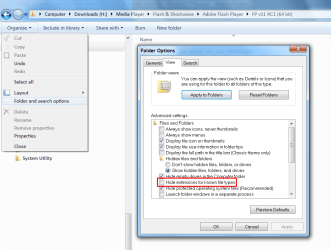
Confirm File Types

I suggest that you turn off "Hide extensions for known file types".

You will then be able to confirm that your files actually are Word documents, Excel spreadsheets, etc..
191378d1325643182-computer-system-reset-but-now-adobe-flash-player-not-working-hidden-extensions.png

Your first picture seems to show .js (JavaScript) and .css (Cascading Style Sheet) files (probably for your web page/site functions)
 
Last edited:

My Computer My Computer

At a glance

W7 Ultimate SP1, LM19.2 MATE, W10 Home 1703, ...AMD Phenom II x6 1100T, 3.3 GHz12GB DDR3 1333 G-Skill (4GB x 2), G-Skill (2G...NVIDIA GeForce GTX 660
Computer type
PC/Desktop
Computer Manufacturer/Model Number
n/a
OS
W7 Ultimate SP1, LM19.2 MATE, W10 Home 1703, W10 Pro 1703 VM, #All 64 bit
CPU
AMD Phenom II x6 1100T, 3.3 GHz
Motherboard
ASUS M4A88T-M/USB3 (AM3)
Memory
12GB DDR3 1333 G-Skill (4GB x 2), G-Skill (2GB x 2)
Graphics Card(s)
NVIDIA GeForce GTX 660
Sound Card
Realtek?
Monitor(s) Displays
Samsung S23B350
Screen Resolution
1920x1080
Hard Drives
WD Green 2TB (SATA), WD Green 3TB (SATA), WD Blue 4TB (SATA), WD Blue 6TB (SATA)
PSU
Cooler Master
Case
Antec GX300 Tower
Cooling
3x Antec TRICOOL 120mm Fans
Mouse
Wired Optical
Internet Speed
DSL
Antivirus
Avast
Browser
Pale Moon (64 bit)
Other Info
2018-12-27 Upgraded HDDs
2015-12-10 Upgraded case, graphics card, storage
2015-08-15 Upgraded motherboard & RAM
2015-07-15 Upgraded LM17.1 to LM17.2
~~~
One last thing, I tend to miss seeing the $~ and waste time trying to open unreadable files. I just want them GONE! :(

Can you post a screenshot of a sample of these files, as well as some of your document files, within a Windows Explorer window?

Thank you for helping!
Lisa

You're very welcome!
She transposed the characters ($~) in that post...
...but got them correct in the OP item #3 (~$)

They are just the temp files.
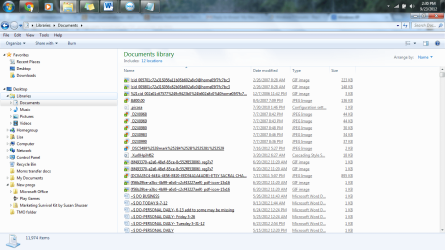
The right most screenshot in the OP is full of them.
She should hide those hidden files if she does not want to see them.
And probably run CCleaner :-)

hide.JPG

Edit: Doh! me and my slow typing :-)
 

My Computer My Computer

At a glance

W7 Pro SP1 64biti78GBIntel HD Graphics
Computer type
Laptop
Computer Manufacturer/Model Number
Employer provided Dell Latitude
OS
W7 Pro SP1 64bit
CPU
i7
Memory
8GB
Graphics Card(s)
Intel HD Graphics
Hard Drives
crappy SSD
Antivirus
Employer mandated Symantec Endpoint Protection
Browser
Pale Moon 64bit, IE11 64bit & Chrome 64bit
One last thing, I tend to miss seeing the $~ and waste time trying to open unreadable files. I just want them GONE! :(

Can you post a screenshot of a sample of these files, as well as some of your document files, within a Windows Explorer window?

I need to clarify this request. I'm looking for a Windows Explorer screenshot (screeny!) in details view rather than thumbnails/tiles, wanting to see modification dates.
 

My Computer My Computer

At a glance

Windows 7 Ultimate x64
OS
Windows 7 Ultimate x64
Hi,
F5ing, I fear this will be wrong, but today is the first ever that I've actually opened a "Windows Explorer" window. I've attached a screenshot from the "View- Details" of the screen. Is this what you need?

And as for document files...do you mean to do the same thing for documents that do not have the odd icons in front of them? Just a few that I've saved? (not attached until I think I understand better what you're looking for)

Also, from my understanding, UsernameIssues suggests I hide the files, while LehnerUS2000 suggests I open the files...right now it appears I am showing the files, lol yes it's kinda obvious, isn't it?

And UsernameIssues also said these are temp files...does that mean if I run CCleaner they should get kicked out of my computer completely vs. hidden or not hidden? That would be so so good!

I'm sorry if I sound dumb...I am just not at all tech savvy! Also sorry again for delay in getting back here, been/am quite sick and just saw that I got replies to this in with the other 1000 emails I'm trying to catch up with.

AGAIN, I THANK YOU ALL VERY VERY MUCH for your help!! I'm actually learning things, too- whether they'll stay in my head or not, who knows. but this has been a big issue for me so let's hope so!!

Lisa
 

Attachments

  • Computer probs-icons libraries 9-23 done thru WINDOWS EXPLORER.png
    Computer probs-icons libraries 9-23 done thru WINDOWS EXPLORER.png
    86 KB · Views: 18

My Computer My Computer

At a glance

64
OS
64
Internet Speed
25 gig
Other Info
I don't know much of what you are requesting here.
........And UsernameIssues also said these are temp files...does that mean if I run CCleaner they should get kicked out of my computer completely vs. hidden or not hidden? That would be so so good!.........
Actually, I was wrong about CCleaner removing those type of type files. I should not have posted that without testing.

I stuck my nose into the thread because I was not sure what F5ing wanted from you... since you provided a nice screenshot in your original post. F5ing clarified the request and you provided another nice screenshot. You are doing great.

We'll await F5ing's advice on how best to handle the issues shown in you latest screenshot.
 

My Computer My Computer

At a glance

W7 Pro SP1 64biti78GBIntel HD Graphics
Computer type
Laptop
Computer Manufacturer/Model Number
Employer provided Dell Latitude
OS
W7 Pro SP1 64bit
CPU
i7
Memory
8GB
Graphics Card(s)
Intel HD Graphics
Hard Drives
crappy SSD
Antivirus
Employer mandated Symantec Endpoint Protection
Browser
Pale Moon 64bit, IE11 64bit & Chrome 64bit
Some confusion

Also, from my understanding, UsernameIssues suggests I hide the files, while LehnerUS2000 suggests I open the files...right now it appears I am showing the files, lol yes it's kinda obvious, isn't it?

Sorry for the confusion.
UsernameIssues and I were talking about 2 different settings. :)

I was talking about confirming the File Extensions (not relying on the icons).
UsernameIssues was talking about hiding the files that were annoying/confusing you.

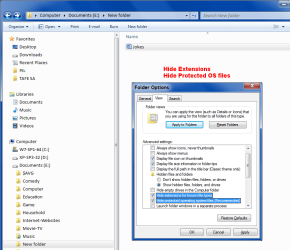
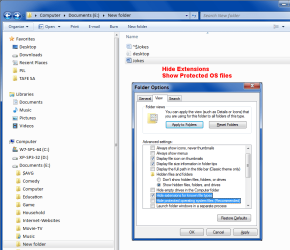
I have 4 pictures showing the options and their effects.
"Show hidden files, folders, and drives" is on in every picture.
WE-Ext_Off-Sys_Off 01.png WE-Ext_On-Sys_Off 01.png
WE-Ext_Off-Sys_On 01.png WE-Ext_On-Sys_On 01.png

"Show hidden files, folders, and drives" and "Hide protected operating system files (Recommended)" effect each other.

On my PC, to see the protected operating system files or files with the "Hidden" attribute selected:

  • "Show hidden files, folders, and drives" must be on
  • "Hide protected operating system files (Recommended)" must be off
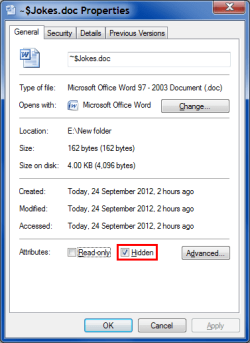
Hidden Attribute.png

"~$Jokes.doc" has the "Hidden" attribute selected.
 
Last edited:

My Computer My Computer

At a glance

W7 Ultimate SP1, LM19.2 MATE, W10 Home 1703, ...AMD Phenom II x6 1100T, 3.3 GHz12GB DDR3 1333 G-Skill (4GB x 2), G-Skill (2G...NVIDIA GeForce GTX 660
Computer type
PC/Desktop
Computer Manufacturer/Model Number
n/a
OS
W7 Ultimate SP1, LM19.2 MATE, W10 Home 1703, W10 Pro 1703 VM, #All 64 bit
CPU
AMD Phenom II x6 1100T, 3.3 GHz
Motherboard
ASUS M4A88T-M/USB3 (AM3)
Memory
12GB DDR3 1333 G-Skill (4GB x 2), G-Skill (2GB x 2)
Graphics Card(s)
NVIDIA GeForce GTX 660
Sound Card
Realtek?
Monitor(s) Displays
Samsung S23B350
Screen Resolution
1920x1080
Hard Drives
WD Green 2TB (SATA), WD Green 3TB (SATA), WD Blue 4TB (SATA), WD Blue 6TB (SATA)
PSU
Cooler Master
Case
Antec GX300 Tower
Cooling
3x Antec TRICOOL 120mm Fans
Mouse
Wired Optical
Internet Speed
DSL
Antivirus
Avast
Browser
Pale Moon (64 bit)
Other Info
2018-12-27 Upgraded HDDs
2015-12-10 Upgraded case, graphics card, storage
2015-08-15 Upgraded motherboard & RAM
2015-07-15 Upgraded LM17.1 to LM17.2
UsernameIssues and lehnerus2000 have provided some great info for you. It's a combination of those settings that need manipulating to provide you the info you want displayed when you open an Explorer window (whether it's a search as you had opened in your OP screenshots or a details window as you provided in your latest post).

Notice the modification dates of those "-$..." files shown in your last screenshot. Do those dates correspond to the dates for when you've opened the corresponding file? Notice how they're 1 KB in size? They may be really only 30 or so bytes in size. If you right click on one of them and select "Open with..." something like Notepad, and find that the contents only consist of text that represents the name of your computer and/or logon name, you can pretty much assume those are the locking files. They should be deleted automatically if the associated file is closed "properly". If they are "leftover" due to a network disconnect, system crash or some other reason, and therefore are no longer "valid" (the associated file is no longer opened) you can safely delete them. The file system may complain if you try to delete a "valid" lock file.

I'm not aware of any way to prevent the creation of the lock files. They are created automatically to prevent loss of data (two users trying to modify at the same time). If you implement the advice offered by UsernameIssues and lehnerus2000 you can hide these files from view. Add the attributes column to Explorer's detail view and you should see the "H" (representing "hidden") for these particular files. lehnerus2000 (rep if I could) provided some excellent screenshots that can be used to help you accomplish these sorts of things. The screenshot provided by UsernameIssues (rep) shows how to hide these specific files (the system already should have them marked as "hidden").
 
Last edited:

My Computer My Computer

At a glance

Windows 7 Ultimate x64
OS
Windows 7 Ultimate x64
Add the attributes column to Explorer's detail view and you should see the "H" (representing "hidden") for these particular files.

I set my folder templates to use the following Windows Explorer "Details" view columns:
Folder Templates.png
Regardless of the view you have currently selected, you can group/sort by the columns you have selected for "Details" view.

For example, I have my "Picture" folder template set to show "Large Icons" (in the Windows Explorer Main pane), but I can still group/sort by the columns I have selected (see picture above).

lehnerus2000 (rep if I could) provided some excellent screenshots that can be used to help you accomplish these sorts of things.

Thank you kind sir. :)
 

My Computer My Computer

At a glance

W7 Ultimate SP1, LM19.2 MATE, W10 Home 1703, ...AMD Phenom II x6 1100T, 3.3 GHz12GB DDR3 1333 G-Skill (4GB x 2), G-Skill (2G...NVIDIA GeForce GTX 660
Computer type
PC/Desktop
Computer Manufacturer/Model Number
n/a
OS
W7 Ultimate SP1, LM19.2 MATE, W10 Home 1703, W10 Pro 1703 VM, #All 64 bit
CPU
AMD Phenom II x6 1100T, 3.3 GHz
Motherboard
ASUS M4A88T-M/USB3 (AM3)
Memory
12GB DDR3 1333 G-Skill (4GB x 2), G-Skill (2GB x 2)
Graphics Card(s)
NVIDIA GeForce GTX 660
Sound Card
Realtek?
Monitor(s) Displays
Samsung S23B350
Screen Resolution
1920x1080
Hard Drives
WD Green 2TB (SATA), WD Green 3TB (SATA), WD Blue 4TB (SATA), WD Blue 6TB (SATA)
PSU
Cooler Master
Case
Antec GX300 Tower
Cooling
3x Antec TRICOOL 120mm Fans
Mouse
Wired Optical
Internet Speed
DSL
Antivirus
Avast
Browser
Pale Moon (64 bit)
Other Info
2018-12-27 Upgraded HDDs
2015-12-10 Upgraded case, graphics card, storage
2015-08-15 Upgraded motherboard & RAM
2015-07-15 Upgraded LM17.1 to LM17.2

My Computer My Computer

At a glance

Windows 7 Ultimate x64
OS
Windows 7 Ultimate x64
You're welcome!

I've been informed another member tried repping you as well (a user with name issues!). ;)

You are both in my "Latest Reputation Received" list, so I guess that you aren't allowed to Rep me.

Thanks to the "user with name issues" as well. :)
 

My Computer My Computer

At a glance

W7 Ultimate SP1, LM19.2 MATE, W10 Home 1703, ...AMD Phenom II x6 1100T, 3.3 GHz12GB DDR3 1333 G-Skill (4GB x 2), G-Skill (2G...NVIDIA GeForce GTX 660
Computer type
PC/Desktop
Computer Manufacturer/Model Number
n/a
OS
W7 Ultimate SP1, LM19.2 MATE, W10 Home 1703, W10 Pro 1703 VM, #All 64 bit
CPU
AMD Phenom II x6 1100T, 3.3 GHz
Motherboard
ASUS M4A88T-M/USB3 (AM3)
Memory
12GB DDR3 1333 G-Skill (4GB x 2), G-Skill (2GB x 2)
Graphics Card(s)
NVIDIA GeForce GTX 660
Sound Card
Realtek?
Monitor(s) Displays
Samsung S23B350
Screen Resolution
1920x1080
Hard Drives
WD Green 2TB (SATA), WD Green 3TB (SATA), WD Blue 4TB (SATA), WD Blue 6TB (SATA)
PSU
Cooler Master
Case
Antec GX300 Tower
Cooling
3x Antec TRICOOL 120mm Fans
Mouse
Wired Optical
Internet Speed
DSL
Antivirus
Avast
Browser
Pale Moon (64 bit)
Other Info
2018-12-27 Upgraded HDDs
2015-12-10 Upgraded case, graphics card, storage
2015-08-15 Upgraded motherboard & RAM
2015-07-15 Upgraded LM17.1 to LM17.2
Back
Top