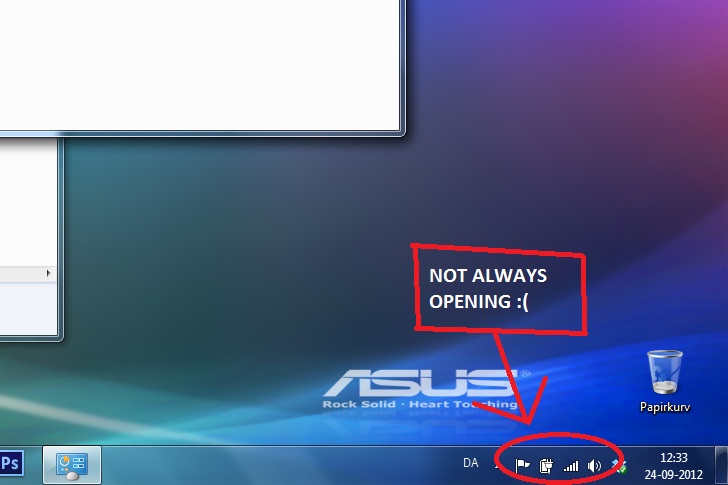
When i turn on my laptop, the Windows toolbar does not always open/show the speaker and wireless network icon, when explorer.exe is opening (only about 50% of the time). This means i cannot connect to the internet, when this happens. When i go to the network options, the wireless network adapter says it is "not connected", and it is not possible to make it connect. The only solution i have found, is to restart the laptop, and hope explorer.exe opens the wireless network icon this time.
I do not think it is a driver problem, as it seems like it is the Windows toolbar that is bugging. It is like it "forgets" to open half of the icons.. I have been searching different forums, but i can't seem to find a solution :/
I have embeddeda screenshot of the icons that do not open at startup:
My Computer
At a glance
Microsoft Windows 7 Home Premium 64-bit 7601 ...Intel(R) Core(TM) i7 CPU Q 720 @ 1.60GHz4,00 GBNVIDIA GeForce GT 240M
Computer Manufacturer/Model Number
ASUSTeK Computer Inc.
OS
Microsoft Windows 7 Home Premium 64-bit 7601 Multiprocessor Free Service Pack 1
CPU
Intel(R) Core(TM) i7 CPU Q 720 @ 1.60GHz
Motherboard
ASUSTeK Computer Inc. M60J
Memory
4,00 GB
Graphics Card(s)
NVIDIA GeForce GT 240M
Sound Card
(1) NVIDIA High Definition Audio (2) NVIDIA High Definitio
See how the icons are configured
Right click the taskbar
select properties
on the taskbar tab
in the notifications area section (middle of the dialog) - click the customize button
what are the Behaviors for Volume and Network?
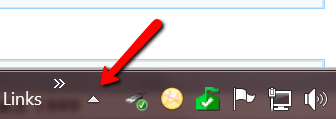
If you want them to always show - set the behavior to "Show icon and notifications"
there are two other things you might want to try on this dialog
1 - always show all icons and notifications
2 - restore default icon behavior
If those suggestions fail - try searching SevenForums tutorial section.
good luck.
My Computer
At a glance
x64 (6.3.9600) Win8.1 Pro & soon dual boot x6...AMD A6-3420M APU with Radeon(tm) HD Graphics6.00 GBAMD Radeon(TM) HD 6520G
It sure sounds and acts like a driver issue from what you describe or at the very least a corrupted driver. I would make sure that I have the latest drivers installed for all your hardware and that you have all you MS updates as well.
As a secondary action, have you checked to see if there are any router software/firmware updates. You could also try resetting your router.
My Computer
At a glance
Windows 7 Ultimate 64 bitAMD Phenom II X4 965 Black EditionGSkill 4 X 2 GB PC 8500XFX Radeon HD 6790 D
Computer Manufacturer/Model Number
Custom built
OS
Windows 7 Ultimate 64 bit
CPU
AMD Phenom II X4 965 Black Edition
Motherboard
Gigabyte GA-MA790X-DS4
Memory
GSkill 4 X 2 GB PC 8500
Graphics Card(s)
XFX Radeon HD 6790 D
Sound Card
On board RealTek HD
Monitor(s) Displays
Dual monitors:Samsung SyncMaster S20B300
Screen Resolution
1600 X 900
Hard Drives
Seagate Barracuda 1TB (primary)
Seagate Barracuda 2 X 320 GB
PSU
Ultra X4 750 watt fully modular
Case
Thermaltake Overseer RX 1 full tower
Cooling
Core-Contact 92 mm CPU Cooler
Keyboard
Logitech G510
Mouse
Razor DeathAdder
Internet Speed
50/5 Mbps UL/DL
Other Info
Optical: Super Muliti DVD burner w/lightscribe, Hauppauge WinTV HVR-1800
@WHS: that's what I think too, but Funkeeh states: "When i go to the network options, the wireless network adapter says it is 'not connected', and it is not possible to make it connect."
More information on "not possible to connect" might help. Any erros / dialog boxes, warnings? Anything in the event logs?
My Computer
At a glance
x64 (6.3.9600) Win8.1 Pro & soon dual boot x6...AMD A6-3420M APU with Radeon(tm) HD Graphics6.00 GBAMD Radeon(TM) HD 6520G
@WHS: that's what I think too, but Funkeeh states: "When i go to the network options, the wireless network adapter says it is 'not connected', and it is not possible to make it connect."
More information on "not possible to connect" might help. Any erros / dialog boxes, warnings? Anything in the event logs?
Understand, but that is another problem. The icons not showing up is one problem. His network connection not working is a seperate problem. Maybe he did not turn on the router or modem. Happens to the best of us, LOL.
My Computer
At a glance
Vista, Windows7, Mint Mate, Zorin, Windows 8from 1.6GHz Duo to i7
Computer Manufacturer/Model Number
HP, Dell, Gateway, Toshiba - 4 laptops and 2 desktops
@WHS: You are correct - one thing at a time. Just thought I'd add weight to bassfisher's suggestion. Happens to me all the time, and I'm hardly the best -ROTFLMAO
Hopefully, the icons are just hidden.
My Computer
At a glance
x64 (6.3.9600) Win8.1 Pro & soon dual boot x6...AMD A6-3420M APU with Radeon(tm) HD Graphics6.00 GBAMD Radeon(TM) HD 6520G
I realised i still needed about 60 updates. And it seems like the updates fixed the problem. I reinstalled windows some days ago, and thought i was done updating.. but i guess not
The problem was not driver-related or a router problem. The MS toolbar simply did not always open the program for the wifi adapter or the audio card, etc.
My Computer
At a glance
Microsoft Windows 7 Home Premium 64-bit 7601 ...Intel(R) Core(TM) i7 CPU Q 720 @ 1.60GHz4,00 GBNVIDIA GeForce GT 240M
Computer Manufacturer/Model Number
ASUSTeK Computer Inc.
OS
Microsoft Windows 7 Home Premium 64-bit 7601 Multiprocessor Free Service Pack 1
CPU
Intel(R) Core(TM) i7 CPU Q 720 @ 1.60GHz
Motherboard
ASUSTeK Computer Inc. M60J
Memory
4,00 GB
Graphics Card(s)
NVIDIA GeForce GT 240M
Sound Card
(1) NVIDIA High Definition Audio (2) NVIDIA High Definitio
Clean Reinstall - Factory OEM Windows 7 to get a perfect reinstall, including all Updates IMportant and Optional. Note that drivers are handled differently in Win7.