New Seagate Expansion External Drive not showing up in 'My Computer'

I just realized I never gave the model number of the Seagate External. It is: ST310005EXA101-RK
That does not help right now. Can you answer my previous question plse.
 

My Computer My Computer

At a glance

Vista, Windows7, Mint Mate, Zorin, Windows 8from 1.6GHz Duo to i7
Computer Manufacturer/Model Number
HP, Dell, Gateway, Toshiba - 4 laptops and 2 desktops
OS
Vista, Windows7, Mint Mate, Zorin, Windows 8
CPU
from 1.6GHz Duo to i7
Monitor(s) Displays
2x HP w2207
Hard Drives
5x HDD, 7x SSD, 12x Externals
Keyboard
with trackball - no mices
Mouse
Trackball mice
Internet Speed
DSL 6000
whs,

I have always appreciated the help you have tried to give me whether it be this post or one of my other ones.

I do not have near the expertise you do when it comes to the 'ins and outs' of computers.

However, I do know when I am getting in over my head. This Seagate External Drive is supposed to be 'plug and play' but up to this point it has done neither one.

That being said it is going back in the box and will be returned.

Hopefully I will find another plug and play and it will work the way the way it is supposed too ... right out of the box.

Thanks and regards,

2harts4ever
 

My Computer My Computer

At a glance

Windows 7 Pro x64 SP1AMD A6-36008 GBsAMD Radeon HD
Computer Manufacturer/Model Number
HP Pavilion p7-1157c
OS
Windows 7 Pro x64 SP1
CPU
AMD A6-3600
Motherboard
Pagatron 2ACF 1.01
Memory
8 GBs
Graphics Card(s)
AMD Radeon HD
Sound Card
Realtec High Definition Audio
Monitor(s) Displays
HP 2311 Wide LCD
Screen Resolution
1920 x 1080
Keyboard
HID Keyboard Device
Mouse
Microsoft USB Wireless Mouse (IntelliPoint)
Other Info
BIOS: AMI 7.06
Understand, your choice. But with the next bit you may have the same setup problems.

As you say, when you know that stuff it is simple. But setting up a disk is normally no rocket science. Sorry I could not get you going. See you when you have the replacement disk.
 

My Computer My Computer

At a glance

Vista, Windows7, Mint Mate, Zorin, Windows 8from 1.6GHz Duo to i7
Computer Manufacturer/Model Number
HP, Dell, Gateway, Toshiba - 4 laptops and 2 desktops
OS
Vista, Windows7, Mint Mate, Zorin, Windows 8
CPU
from 1.6GHz Duo to i7
Monitor(s) Displays
2x HP w2207
Hard Drives
5x HDD, 7x SSD, 12x Externals
Keyboard
with trackball - no mices
Mouse
Trackball mice
Internet Speed
DSL 6000
My Aluratek spoiled me. I simply plugged that sucker in and I was off to the races. It is only a 250 GB but it worked right out of the box.

Thanks again and good night ... :)
 

My Computer My Computer

At a glance

Windows 7 Pro x64 SP1AMD A6-36008 GBsAMD Radeon HD
Computer Manufacturer/Model Number
HP Pavilion p7-1157c
OS
Windows 7 Pro x64 SP1
CPU
AMD A6-3600
Motherboard
Pagatron 2ACF 1.01
Memory
8 GBs
Graphics Card(s)
AMD Radeon HD
Sound Card
Realtec High Definition Audio
Monitor(s) Displays
HP 2311 Wide LCD
Screen Resolution
1920 x 1080
Keyboard
HID Keyboard Device
Mouse
Microsoft USB Wireless Mouse (IntelliPoint)
Other Info
BIOS: AMI 7.06
I think that is problem with Windows - not with your new drive.

Had that before myself - can't recall how I fixed it - I think I may have booted one of my pe discs - done a bit of minor partitioning - then disk mgmt got it's act together at next restart.

Might be that uninstalling the usb drivers then restarting will do the trick.
 

My Computers My Computers

  • At a glance

    7 X64i5 84002x8gb 3200mhz
    Computer type
    PC/Desktop
    OS
    7 X64
    CPU
    i5 8400
    Motherboard
    gigabyte b365m ds3h
    Memory
    2x8gb 3200mhz
    Hard Drives
    various
    PSU
    pure power 11 400w cm
    Case
    Coolermaster
    Cooling
    cryorig m9i
  • At a glance

    7x64g54008gb ddr4 2400
    Computer type
    PC/Desktop
    OS
    7x64
    CPU
    g5400
    Motherboard
    ga b365m ds3h
    Memory
    8gb ddr4 2400
    PSU
    xfx pro 450w
SIW2,

I appreciate your follow-up but it is already back in the box and ready for the return trip back.

I connected my previous external drive (Aluratek) a few minutes ago and Disk Management seems to be reading it just the way it is supposed too with no problems.

However, I will keep what you said in mind should I have the same problem with the next one I get ... if I decide to take the plunge again and replace my current 250 GB Aluratek with a larger one.

Like whs I really appreciate the time and effort you have put in this thread too. It must be frustrating for both of you to come across the likes of me.

But the reasonI buy something advertised as 'plug and play' is because I expect it to do just that. If I had your expertise I wouldn't sweat it either.

Until the next time (and I am sure there will be ....lol) ,

Thanks and regards,

2harts4ever
 

My Computer My Computer

At a glance

Windows 7 Pro x64 SP1AMD A6-36008 GBsAMD Radeon HD
Computer Manufacturer/Model Number
HP Pavilion p7-1157c
OS
Windows 7 Pro x64 SP1
CPU
AMD A6-3600
Motherboard
Pagatron 2ACF 1.01
Memory
8 GBs
Graphics Card(s)
AMD Radeon HD
Sound Card
Realtec High Definition Audio
Monitor(s) Displays
HP 2311 Wide LCD
Screen Resolution
1920 x 1080
Keyboard
HID Keyboard Device
Mouse
Microsoft USB Wireless Mouse (IntelliPoint)
Other Info
BIOS: AMI 7.06
I am having the same problem as the OP was but with slightly different HDD. I could open up a new post but figured this was never answered completely and others (or even the OP) might find a solution in the future.

I am running an IBM T42 laptop but recently installed Win 7 Home Premium so I could use it with my HDTV. I also have the Seagate 2B FA Goflex external drive and it works ok on my rig and also when connected directly to my samsung hdtv but it refuses to initialize when plugged into the laptop.

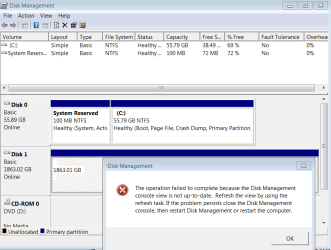
I can eject the drive but can not assign a letter to it, it gives me the same error reported by the op a few posts back so I won't bother with a new image.

if I right click on it under disk management, the only options (not greyed out) are:
Change drive letter and paths
Format
Delete Volume
Properties
Help

If I click on Properties, the same error message posted comes up.

I have tried restarting the laptop a few times, with and without the drive being plugged in.

I have also tried download and installing the seagate software to no avail. I did noticed that with the software installed all the lights light up, before installation, only 1 small round light would light up.

I have also tried plugging the drive to the laptop's usb port and plugging it directly to the mini docking station usb port and nothing.

Google does not help and the seagate forums less than google :D

I guess that if I resurrected an old post, adding another image won't hurt much :o
 

Attachments

  • 2TBgoFlex.PNG
    2TBgoFlex.PNG
    23 KB · Views: 40

My Computer My Computer

At a glance

Windows 7 x64 (Ultimate)Intel i5-4670K8GBs Ripjaws 2133MhzAsus GTX660 (2GBs)
Computer type
PC/Desktop
Computer Manufacturer/Model Number
Custom Built... Intel/Nvidia/ASRock
OS
Windows 7 x64 (Ultimate)
CPU
Intel i5-4670K
Motherboard
ASRock Z87 Extreme 6
Memory
8GBs Ripjaws 2133Mhz
Graphics Card(s)
Asus GTX660 (2GBs)
Sound Card
Onboard Realtek HD
Monitor(s) Displays
Acer AL2216W
Screen Resolution
1680 x 1050
Hard Drives
Samsung 840 SSD 120GBs
Samsung 750GB 32MB cache
1.5 TB
PSU
PC Cooling 750w Silencer
Case
Thermaltake Spedo Advance
Cooling
Std Cooler
Keyboard
Logitech G15
Mouse
Logitech G9
Internet Speed
Comcast 20Mbit
Antivirus
Avast
Browser
Firefox
Try right clicking the drive and select 'change drive letter or path' then select 'add' give it the letter windows suggests or one from the drop down list. If it wants to format it, don't or you will lose all data on the drive.
 

My Computers My Computers

  • At a glance

    Windows 11 ProRyzen 9 5900X32GB G Skill DDR4-3600EVGA RTX 3080 FTW 3 Ultra
    Computer type
    PC/Desktop
    Computer Manufacturer/Model Number
    ALWAYS UNDER CONSTRUCTION
    OS
    Windows 11 Pro
    CPU
    Ryzen 9 5900X
    Motherboard
    Asus X570 Crosshair Viii Hero
    Memory
    32GB G Skill DDR4-3600
    Graphics Card(s)
    EVGA RTX 3080 FTW 3 Ultra
    Sound Card
    On Board/Sennheiser PC37X Headset
    Monitor(s) Displays
    3 X Asus 27"
    Screen Resolution
    2560x1440
    Hard Drives
    2 X 1 TB NVME drives
    PSU
    EVGA 850
    Case
    Phanteks Eclipse P400A
    Cooling
    EVGA 280 AIO
    Keyboard
    Logitech G510s/ Logitech G13
    Mouse
    Logitech G502
    Internet Speed
    24/1
    Antivirus
    ESET/MBAM Pro/SAS Pro
    Browser
    Chrome/ Firefox/ Edge
  • At a glance

    Windows 11 ProIntel Ultra 9 288V32 GB LPDDR5X 8533
    Computer type
    Laptop
    System Manufacturer/Model Number
    Dell 16 Plus
    OS
    Windows 11 Pro
    CPU
    Intel Ultra 9 288V
    Memory
    32 GB LPDDR5X 8533
    Monitor(s) Displays
    16" Mini-LED HDR600 Touch 90 Hz
    Screen Resolution
    2560X1600
    Hard Drives
    1 TB NVME
Try right clicking the drive and select 'change drive letter or path' then select 'add' give it the letter windows suggests or one from the drop down list. If it wants to format it, don't or you will lose all data on the drive.
essenbe, as soon as I do that, the error message pops up (the one I have shown in my image above) and it does not let me continue.

You are also correct, I don't want to Format it, let alone Delete is because I loose all the info I have there.

Again, as soon as I plug the drive in my Samsung or my rig, everything comes up so I know the drive is working. Perhaps the lappy is to old and somehow is not able to initialize this big drives?
 

My Computer My Computer

At a glance

Windows 7 x64 (Ultimate)Intel i5-4670K8GBs Ripjaws 2133MhzAsus GTX660 (2GBs)
Computer type
PC/Desktop
Computer Manufacturer/Model Number
Custom Built... Intel/Nvidia/ASRock
OS
Windows 7 x64 (Ultimate)
CPU
Intel i5-4670K
Motherboard
ASRock Z87 Extreme 6
Memory
8GBs Ripjaws 2133Mhz
Graphics Card(s)
Asus GTX660 (2GBs)
Sound Card
Onboard Realtek HD
Monitor(s) Displays
Acer AL2216W
Screen Resolution
1680 x 1050
Hard Drives
Samsung 840 SSD 120GBs
Samsung 750GB 32MB cache
1.5 TB
PSU
PC Cooling 750w Silencer
Case
Thermaltake Spedo Advance
Cooling
Std Cooler
Keyboard
Logitech G15
Mouse
Logitech G9
Internet Speed
Comcast 20Mbit
Antivirus
Avast
Browser
Firefox
Perhaps that is correct. I really don't know what to tell you other than try updating your chipset drivers. It is obviously a problem with that computer as it works in others.
 

My Computers My Computers

  • At a glance

    Windows 11 ProRyzen 9 5900X32GB G Skill DDR4-3600EVGA RTX 3080 FTW 3 Ultra
    Computer type
    PC/Desktop
    Computer Manufacturer/Model Number
    ALWAYS UNDER CONSTRUCTION
    OS
    Windows 11 Pro
    CPU
    Ryzen 9 5900X
    Motherboard
    Asus X570 Crosshair Viii Hero
    Memory
    32GB G Skill DDR4-3600
    Graphics Card(s)
    EVGA RTX 3080 FTW 3 Ultra
    Sound Card
    On Board/Sennheiser PC37X Headset
    Monitor(s) Displays
    3 X Asus 27"
    Screen Resolution
    2560x1440
    Hard Drives
    2 X 1 TB NVME drives
    PSU
    EVGA 850
    Case
    Phanteks Eclipse P400A
    Cooling
    EVGA 280 AIO
    Keyboard
    Logitech G510s/ Logitech G13
    Mouse
    Logitech G502
    Internet Speed
    24/1
    Antivirus
    ESET/MBAM Pro/SAS Pro
    Browser
    Chrome/ Firefox/ Edge
  • At a glance

    Windows 11 ProIntel Ultra 9 288V32 GB LPDDR5X 8533
    Computer type
    Laptop
    System Manufacturer/Model Number
    Dell 16 Plus
    OS
    Windows 11 Pro
    CPU
    Intel Ultra 9 288V
    Memory
    32 GB LPDDR5X 8533
    Monitor(s) Displays
    16" Mini-LED HDR600 Touch 90 Hz
    Screen Resolution
    2560X1600
    Hard Drives
    1 TB NVME
Again, as soon as I plug the drive in my Samsung or my rig, everything comes up so I know the drive is working
What is this "rig" you speak of?? Is it a Windows machine?

If it's a Windows machine, please run DISKMGMT.MSC and go to full-screen, and then spread the columns in the upper pane so we can see everything that's in the cells. Then take a screenshot and post it here.

If this drive is usable when directly connected to your HDTV, I wonder if it's been formatted with a "foreign" (Linux?) file system unrecognizable to your Windows laptop (is that XP or Win7?).

Have you used the drive on a Mac?

The fact that it shows no drive letter and no file system in your earlier screenshots, but asks you to FORMAT it when you right-click, that suggests it's not formatted in a way familiar to Windows.

Or, perhaps it's an odd FAT32 or something. Certainly a screenshot from that "rig" of yours where it "works" would be very informative for us to be able to help you.
 

My Computer My Computer

At a glance

Windows 7 Pro x64 (1), Win7 Pro X64 (2)i5-3350p 3.1Ghz/6MB-cache (1); E8400 3.0Ghz/6...8GB PC3-12800 DDR3 (1); 4GB PC3-10600 DDR3 (2)ATI HD7750 (1), (see TV cards); ATI R7 250 (2)
Computer type
PC/Desktop
Computer Manufacturer/Model Number
Home-built, two systems (1) and (2)
OS
Windows 7 Pro x64 (1), Win7 Pro X64 (2)
CPU
i5-3350p 3.1Ghz/6MB-cache (1); E8400 3.0Ghz/6MB-cache (2)
Motherboard
ASUS P8Z77-V Pro (1); ASUS P5Q3 (2)
Memory
8GB PC3-12800 DDR3 (1); 4GB PC3-10600 DDR3 (2)
Graphics Card(s)
ATI HD7750 (1), (see TV cards); ATI R7 250 (2)
Sound Card
Realtek ALC892 HD Audio (1); Realtek ALC1200 HD Audio (2)
Monitor(s) Displays
Eizo HD2441W LCD, Eizo S2433W (1); Eizo 24" S2433W (2)
Screen Resolution
1920x1200, 1920x1200 (1); 1920x1200 (2)
Hard Drives
(1) 1TB SATA-II (7200RPM), 2x2TB SATA-III (7200RPM), 250GB SATA-III (10000RPM) for OS; 2x2TB external USB 3.0

(2) 320GB SATA-II (7200RPM), 750GB SATA-II (7200RPM), 150GB SATA-II (10000RPM) for OS; 2TB external USB 3.0
PSU
Nesteq ECS-6001 600W (1); Nesteq ECS-5001 500W (2)
Case
Acousti-Case 360 (1) and (2)
Cooling
Noctua NH-U12P SE2 for CPU, 2x120mm case fans (1) and (2)
Keyboard
IBM PS/2 (1) and (2)
Mouse
Logitech MX Revolution wireless (1); Microsoft wired (2)
Internet Speed
100mbps down / 10mbps up
Antivirus
Microsoft Security Essentials; Malwarebyte Anti-Malware Pro
Browser
Firefox
Other Info
Ceton InfiniTV 4-tuner cablecard-enabled TV card as well as Hauppauge HVR-2250 OTA/ATSC 2-tuner TV card in (1), running under Win7 WMC
Perhaps that is correct. I really don't know what to tell you other than try updating your chipset drivers. It is obviously a problem with that computer as it works in others.
I don't think there are new chipset drivers for the IBM T42 laptop but I will look into it.

Thank

Again, as soon as I plug the drive in my Samsung or my rig, everything comes up so I know the drive is working
What is this "rig" you speak of?? Is it a Windows machine?
My rig is my other Windows Desktop Computer... I also run Windows 7 on it but Ultimate and 64 bit.

My IBM T42 laptop run Win 7 Home Premium 32bit.

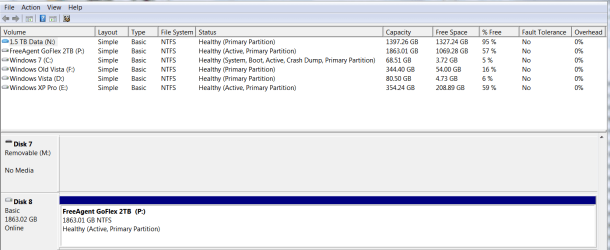
If it's a Windows machine, please run DISKMGMT.MSC and go to full-screen, and then spread the columns in the upper pane so we can see everything that's in the cells. Then take a screenshot and post it here.
OK... see image attached

If this drive is usable when directly connected to your HDTV, I wonder if it's been formatted with a "foreign" (Linux?) file system unrecognizable to your Windows laptop (is that XP or Win7?).
No linux, same drive I connect to my Win 7 Desktop gets connected to the HDTV, and it is also the same one connected to the laptop.

Have you used the drive on a Mac?
No, never... I don't own a Mac.

The fact that it shows no drive letter and no file system in your earlier screenshots, but asks you to FORMAT it when you right-click, that suggests it's not formatted in a way familiar to Windows.
I don't believe so, if I do the same on my Win 7 Desktop, the same choices or options are given. Well Open & Explore are also available and I don't have those when I plug it into the laptop.

Or, perhaps it's an odd FAT32 or something. Certainly a screenshot from that "rig" of yours where it "works" would be very informative for us to be able to help you.
Nope, it is also an NTFS as you will see on the new screenshot.

Thanks for the help guys.
 

Attachments

  • Ult64Win7.PNG
    Ult64Win7.PNG
    20.4 KB · Views: 54

My Computer My Computer

At a glance

Windows 7 x64 (Ultimate)Intel i5-4670K8GBs Ripjaws 2133MhzAsus GTX660 (2GBs)
Computer type
PC/Desktop
Computer Manufacturer/Model Number
Custom Built... Intel/Nvidia/ASRock
OS
Windows 7 x64 (Ultimate)
CPU
Intel i5-4670K
Motherboard
ASRock Z87 Extreme 6
Memory
8GBs Ripjaws 2133Mhz
Graphics Card(s)
Asus GTX660 (2GBs)
Sound Card
Onboard Realtek HD
Monitor(s) Displays
Acer AL2216W
Screen Resolution
1680 x 1050
Hard Drives
Samsung 840 SSD 120GBs
Samsung 750GB 32MB cache
1.5 TB
PSU
PC Cooling 750w Silencer
Case
Thermaltake Spedo Advance
Cooling
Std Cooler
Keyboard
Logitech G15
Mouse
Logitech G9
Internet Speed
Comcast 20Mbit
Antivirus
Avast
Browser
Firefox
Nope, it is also an NTFS as you will see on the new screenshot.
Hmmm...

Here's an interesting note I found:

"Windows 7 32-bit operating systems are not capable of using drives larger than 2TB as a boot drive. You MAY be able to use a 2TB and larger drive as a data disk as long as your motherboard can address that size of disk. The motherboard MUST be equipped with EFI BIOS. Check with the manufacturer of your specific motherboard or the manufacturer of your computer to verify High-Capacity Drive Support before purchasing this drive."

In contrast:

"Windows 6 64-bit operating systems may use 2TB and larger drives as both a boot disk and/or a data disk. If you wish to boot from the disk the motherboard must be equipped with EFI BIOS. EFI BIOS is not required to use a high-capacity disk as a data drive."
 

My Computer My Computer

At a glance

Windows 7 Pro x64 (1), Win7 Pro X64 (2)i5-3350p 3.1Ghz/6MB-cache (1); E8400 3.0Ghz/6...8GB PC3-12800 DDR3 (1); 4GB PC3-10600 DDR3 (2)ATI HD7750 (1), (see TV cards); ATI R7 250 (2)
Computer type
PC/Desktop
Computer Manufacturer/Model Number
Home-built, two systems (1) and (2)
OS
Windows 7 Pro x64 (1), Win7 Pro X64 (2)
CPU
i5-3350p 3.1Ghz/6MB-cache (1); E8400 3.0Ghz/6MB-cache (2)
Motherboard
ASUS P8Z77-V Pro (1); ASUS P5Q3 (2)
Memory
8GB PC3-12800 DDR3 (1); 4GB PC3-10600 DDR3 (2)
Graphics Card(s)
ATI HD7750 (1), (see TV cards); ATI R7 250 (2)
Sound Card
Realtek ALC892 HD Audio (1); Realtek ALC1200 HD Audio (2)
Monitor(s) Displays
Eizo HD2441W LCD, Eizo S2433W (1); Eizo 24" S2433W (2)
Screen Resolution
1920x1200, 1920x1200 (1); 1920x1200 (2)
Hard Drives
(1) 1TB SATA-II (7200RPM), 2x2TB SATA-III (7200RPM), 250GB SATA-III (10000RPM) for OS; 2x2TB external USB 3.0

(2) 320GB SATA-II (7200RPM), 750GB SATA-II (7200RPM), 150GB SATA-II (10000RPM) for OS; 2TB external USB 3.0
PSU
Nesteq ECS-6001 600W (1); Nesteq ECS-5001 500W (2)
Case
Acousti-Case 360 (1) and (2)
Cooling
Noctua NH-U12P SE2 for CPU, 2x120mm case fans (1) and (2)
Keyboard
IBM PS/2 (1) and (2)
Mouse
Logitech MX Revolution wireless (1); Microsoft wired (2)
Internet Speed
100mbps down / 10mbps up
Antivirus
Microsoft Security Essentials; Malwarebyte Anti-Malware Pro
Browser
Firefox
Other Info
Ceton InfiniTV 4-tuner cablecard-enabled TV card as well as Hauppauge HVR-2250 OTA/ATSC 2-tuner TV card in (1), running under Win7 WMC
Dang it... I knew I was better off installing ultimate 64 bit... oh well, I guess this is the end of the line for me.

I guess is time to invest on a small htpc and be done with this.

Thanks for the help.
 

My Computer My Computer

At a glance

Windows 7 x64 (Ultimate)Intel i5-4670K8GBs Ripjaws 2133MhzAsus GTX660 (2GBs)
Computer type
PC/Desktop
Computer Manufacturer/Model Number
Custom Built... Intel/Nvidia/ASRock
OS
Windows 7 x64 (Ultimate)
CPU
Intel i5-4670K
Motherboard
ASRock Z87 Extreme 6
Memory
8GBs Ripjaws 2133Mhz
Graphics Card(s)
Asus GTX660 (2GBs)
Sound Card
Onboard Realtek HD
Monitor(s) Displays
Acer AL2216W
Screen Resolution
1680 x 1050
Hard Drives
Samsung 840 SSD 120GBs
Samsung 750GB 32MB cache
1.5 TB
PSU
PC Cooling 750w Silencer
Case
Thermaltake Spedo Advance
Cooling
Std Cooler
Keyboard
Logitech G15
Mouse
Logitech G9
Internet Speed
Comcast 20Mbit
Antivirus
Avast
Browser
Firefox
Understand, your choice. But with the next bit you may have the same setup problems.

As you say, when you know that stuff it is simple. But setting up a disk is normally no rocket science. Sorry I could not get you going. See you when you have the replacement disk.

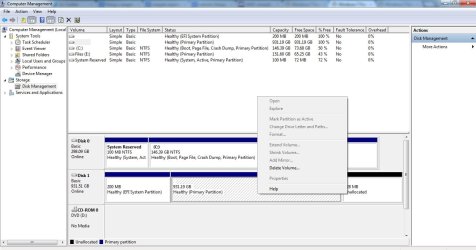
Hey there whs. Maybe you could help me. I'm having the same problem as the thread starter. I don't really want to reformat and lose any data on my 1TB Seagate Expansion external hard disk. All the forums didn't give me any help. I've found this thread the only ray of light for my problem (until the thread starter gave up on his). Here, let me give you a screenshot of my Disk Management Window.

Disk 1 seems to be my problematic external drive without a drive letter assignment. Right clicking it yields grayed out options except "Delete Volume" and "Help".

I'd appreciate your help with this. It's giving me a pretty sweet headache. Thanks!
 

Attachments

  • seagate 9-26-12.jpg
    seagate 9-26-12.jpg
    95.5 KB · Views: 31

My Computer My Computer

At a glance

Windows 7 Professional 64 bit
OS
Windows 7 Professional 64 bit
Hi ceesharp! Welcome to the forum!

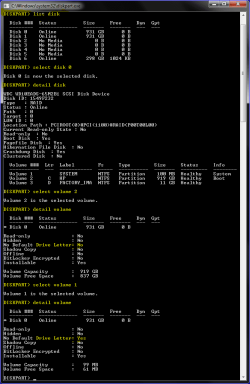
Try using Diskpart within a command prompt to see what it has to say about that disk/volume. Here's an example of using it to check out info for some disks/volumes:

214867d1338673131-drive-letter-disappear-after-reboot-capture4.png

Post a screenshot of what you get and we'll see if we can help you out.
 

My Computer My Computer

At a glance

Windows 7 Ultimate x64
OS
Windows 7 Ultimate x64
Will do that once I get back to my laptop/external drive. Thanks man!
 

My Computer My Computer

At a glance

Windows 7 Professional 64 bit
OS
Windows 7 Professional 64 bit
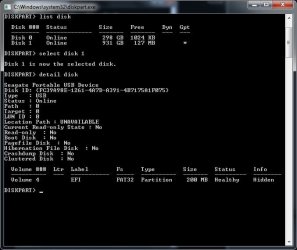
Hey. Here's the screenshot of the Diskpart windows I'm currently on. I stopped at the "detail disk" command at disk 1 since I can't see the full 1TB.

From what I understand, it can only see that empty little 200MB chunk of my external drive. That 200MB space can be partitioned and detected when I tried the other day, by the way.

seagate2 9-26-12.jpg
 

My Computer My Computer

At a glance

Windows 7 Professional 64 bit
OS
Windows 7 Professional 64 bit
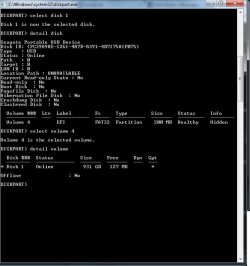
Here's the screenshot upon selecting "Volume 4" anyways. Hope this helps. Thank you for your support!

seagate3 9-26-12.jpg
 

My Computer My Computer

At a glance

Windows 7 Professional 64 bit
OS
Windows 7 Professional 64 bit
Hey. Here's the screenshot of the Diskpart windows I'm currently on. I stopped at the "detail disk" command at disk 1 since I can't see the full 1TB.

From what I understand, it can only see that empty little 200MB chunk of my external drive. That 200MB space can be partitioned and detected when I tried the other day, by the way.

View attachment 233683

Sorry. I just found out that the 200MB partition (Volume 4) is the EFI Partition. There's a 128MB unallocated space in the drive that can be partitioned but cannot be seen in the screenshot. Hope this helps. Thanks!
 

My Computer My Computer

At a glance

Windows 7 Professional 64 bit
OS
Windows 7 Professional 64 bit
Back
Top