
You are using an out of date browser. It may not display this or other websites correctly.
You should upgrade or use an alternative browser.
You should upgrade or use an alternative browser.
How do I change the selection button color in a theme?
- Thread starter Rakamy
- Start date


Welcome to the Seven Forums
Is this a custom third-party theme? If so post a link to it.
What were you going to use to edit the .msstyles a Resource Hacker or Window Style Builder?
Jerry
Is this a custom third-party theme? If so post a link to it.
What were you going to use to edit the .msstyles a Resource Hacker or Window Style Builder?
Jerry
My Computer
- Computer type
- Laptop
- Computer Manufacturer/Model Number
- Sager NP9170
- OS
- Win 7 Pro x64 / Win 10 Pro
- CPU
- Intel(R) Core(TM) i7-3630QM CPU @ 2.40GHz
- Motherboard
- CLEVO P170EM
- Memory
- 12 GB
- Graphics Card(s)
- (1) Intel(R) HD Graphics 4000 (2) NVIDIA GeForce GTX 675M
- Sound Card
- (1) Realtek High Definition Audio (2) Intel(R) Display Aud
- Monitor(s) Displays
- 17.3
- Screen Resolution
- 1920x1080
- Hard Drives
- (1) Samsung 860 EVO 500GB(OS) (1) Samsung 860 EVO 500GB(Data)
- Keyboard
- Backlite
- Antivirus
- MSE, Malwarebytes Pro
- Browser
- Firefox
- Other Info
- DESKTOP: Custom-built.
OS: Win 10 Pro x64.
CASE: Rosewill R5.
CPU: Intel I5 4670K CPU @ 3.40GHz.
CPU COOLER: Cool Master Hyper 212 EVO.
MOTHERBOARD: Asus Z87-A.
MEMORY: Kingston HyperX 2x4 GB.
GPU: Nvidia Geforce 650 TI.
PSU: Corsair TX750.
DRIVES: (1) Samsung 840 120 GB SSD (2) Western Digital blue 500 GB 7200 RPM.
Welcome to the Seven Forums
Is this a custom third-party theme? If so post a link to it.
What were you going to use to edit the .msstyles a Resource Hacker or Window Style Builder?
Jerry
It is a custom third-party theme, it was originally created by a friend of mine who is using it on there PC I liked some aspects of it so he emailed me a copy, and told me I could change what ever I wanted to. So I dont have a link for it but I can upload it to a hosting sight if you would like.
I have no idea what your talking about I was just looking for the option some place in the windows personalization options. I am guessing I need some type of 3rd party program in order to do it?
My Computer
- OS
- Windows 7 Ultimate x64
Go ahead and post it here in a zip folder if it's OK with your friend, I can tell you how to do it or I can do it for you.
Jerry
Jerry
My Computer
- Computer type
- Laptop
- Computer Manufacturer/Model Number
- Sager NP9170
- OS
- Win 7 Pro x64 / Win 10 Pro
- CPU
- Intel(R) Core(TM) i7-3630QM CPU @ 2.40GHz
- Motherboard
- CLEVO P170EM
- Memory
- 12 GB
- Graphics Card(s)
- (1) Intel(R) HD Graphics 4000 (2) NVIDIA GeForce GTX 675M
- Sound Card
- (1) Realtek High Definition Audio (2) Intel(R) Display Aud
- Monitor(s) Displays
- 17.3
- Screen Resolution
- 1920x1080
- Hard Drives
- (1) Samsung 860 EVO 500GB(OS) (1) Samsung 860 EVO 500GB(Data)
- Keyboard
- Backlite
- Antivirus
- MSE, Malwarebytes Pro
- Browser
- Firefox
- Other Info
- DESKTOP: Custom-built.
OS: Win 10 Pro x64.
CASE: Rosewill R5.
CPU: Intel I5 4670K CPU @ 3.40GHz.
CPU COOLER: Cool Master Hyper 212 EVO.
MOTHERBOARD: Asus Z87-A.
MEMORY: Kingston HyperX 2x4 GB.
GPU: Nvidia Geforce 650 TI.
PSU: Corsair TX750.
DRIVES: (1) Samsung 840 120 GB SSD (2) Western Digital blue 500 GB 7200 RPM.
OK, he gave me free rights to it so its not going to be a problem. The file is attached
You can do it, and if you don't mind the "status bar" I would like to be black and the button selection a dark blue (just not to dark I stil want to be able to see the text)
You can do it, and if you don't mind the "status bar" I would like to be black and the button selection a dark blue (just not to dark I stil want to be able to see the text)
Attachments
My Computer
- OS
- Windows 7 Ultimate x64
I am having some doubts about this theme I find the exact same one here Elegant-Glass-VS7 by ~Simply-The-Frankie on deviantART so is this person your friend?
Jerry
Jerry
My Computer
- Computer type
- Laptop
- Computer Manufacturer/Model Number
- Sager NP9170
- OS
- Win 7 Pro x64 / Win 10 Pro
- CPU
- Intel(R) Core(TM) i7-3630QM CPU @ 2.40GHz
- Motherboard
- CLEVO P170EM
- Memory
- 12 GB
- Graphics Card(s)
- (1) Intel(R) HD Graphics 4000 (2) NVIDIA GeForce GTX 675M
- Sound Card
- (1) Realtek High Definition Audio (2) Intel(R) Display Aud
- Monitor(s) Displays
- 17.3
- Screen Resolution
- 1920x1080
- Hard Drives
- (1) Samsung 860 EVO 500GB(OS) (1) Samsung 860 EVO 500GB(Data)
- Keyboard
- Backlite
- Antivirus
- MSE, Malwarebytes Pro
- Browser
- Firefox
- Other Info
- DESKTOP: Custom-built.
OS: Win 10 Pro x64.
CASE: Rosewill R5.
CPU: Intel I5 4670K CPU @ 3.40GHz.
CPU COOLER: Cool Master Hyper 212 EVO.
MOTHERBOARD: Asus Z87-A.
MEMORY: Kingston HyperX 2x4 GB.
GPU: Nvidia Geforce 650 TI.
PSU: Corsair TX750.
DRIVES: (1) Samsung 840 120 GB SSD (2) Western Digital blue 500 GB 7200 RPM.
I am having some doubts about this theme I find the exact same one here Elegant-Glass-VS7 by ~Simply-The-Frankie on deviantART so is this person your friend?
Jerry
Umm.....
So am I to be honest. My friend said it was his but now I am not so sure. I will deal with that aspect my self. He should not be stating it was his when someone else made it.
To be safe I sent a message to the person owning that profile asking if they would allow me to change that detail for my own use. I don't want to have you make any changes with out having there permission.....should have checked that out first my self
My Computer
- OS
- Windows 7 Ultimate x64
I have a response from the original owner letting me edit the theme as long as I don't redistribute it.....did you want/need to see a copy of the mail?
Yes I would like to see a copy of the e-mail. I may still contact them myself after looking at the e-mail.
Jerry
My Computer
- Computer type
- Laptop
- Computer Manufacturer/Model Number
- Sager NP9170
- OS
- Win 7 Pro x64 / Win 10 Pro
- CPU
- Intel(R) Core(TM) i7-3630QM CPU @ 2.40GHz
- Motherboard
- CLEVO P170EM
- Memory
- 12 GB
- Graphics Card(s)
- (1) Intel(R) HD Graphics 4000 (2) NVIDIA GeForce GTX 675M
- Sound Card
- (1) Realtek High Definition Audio (2) Intel(R) Display Aud
- Monitor(s) Displays
- 17.3
- Screen Resolution
- 1920x1080
- Hard Drives
- (1) Samsung 860 EVO 500GB(OS) (1) Samsung 860 EVO 500GB(Data)
- Keyboard
- Backlite
- Antivirus
- MSE, Malwarebytes Pro
- Browser
- Firefox
- Other Info
- DESKTOP: Custom-built.
OS: Win 10 Pro x64.
CASE: Rosewill R5.
CPU: Intel I5 4670K CPU @ 3.40GHz.
CPU COOLER: Cool Master Hyper 212 EVO.
MOTHERBOARD: Asus Z87-A.
MEMORY: Kingston HyperX 2x4 GB.
GPU: Nvidia Geforce 650 TI.
PSU: Corsair TX750.
DRIVES: (1) Samsung 840 120 GB SSD (2) Western Digital blue 500 GB 7200 RPM.
How about you try it yourself first, any custom theme you use you can customize it for your own use with no problems at all as long as you don't redistribute it.
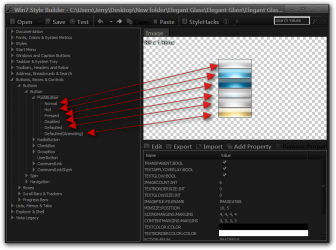
Look at Post #6 of this thread http://www.sevenforums.com/themes-s...ties-window-background-color.html#post2096369 in that thread I show someone how to edit a different part of a theme the only difference for you would be you would need to open up the Elegant Glass.msstyles in C:\Windows\Resources\Themes\Elegant Glass folder and edit these images instead, Button # 508 it has 6 states(see screenshot) each state is 89 Pixels x 26 Pixels.
The Progress bar is #692
If you need any help with this let me know.
Jerry
Look at Post #6 of this thread http://www.sevenforums.com/themes-s...ties-window-background-color.html#post2096369 in that thread I show someone how to edit a different part of a theme the only difference for you would be you would need to open up the Elegant Glass.msstyles in C:\Windows\Resources\Themes\Elegant Glass folder and edit these images instead, Button # 508 it has 6 states(see screenshot) each state is 89 Pixels x 26 Pixels.
The Progress bar is #692
If you need any help with this let me know.
Jerry
My Computer
- Computer type
- Laptop
- Computer Manufacturer/Model Number
- Sager NP9170
- OS
- Win 7 Pro x64 / Win 10 Pro
- CPU
- Intel(R) Core(TM) i7-3630QM CPU @ 2.40GHz
- Motherboard
- CLEVO P170EM
- Memory
- 12 GB
- Graphics Card(s)
- (1) Intel(R) HD Graphics 4000 (2) NVIDIA GeForce GTX 675M
- Sound Card
- (1) Realtek High Definition Audio (2) Intel(R) Display Aud
- Monitor(s) Displays
- 17.3
- Screen Resolution
- 1920x1080
- Hard Drives
- (1) Samsung 860 EVO 500GB(OS) (1) Samsung 860 EVO 500GB(Data)
- Keyboard
- Backlite
- Antivirus
- MSE, Malwarebytes Pro
- Browser
- Firefox
- Other Info
- DESKTOP: Custom-built.
OS: Win 10 Pro x64.
CASE: Rosewill R5.
CPU: Intel I5 4670K CPU @ 3.40GHz.
CPU COOLER: Cool Master Hyper 212 EVO.
MOTHERBOARD: Asus Z87-A.
MEMORY: Kingston HyperX 2x4 GB.
GPU: Nvidia Geforce 650 TI.
PSU: Corsair TX750.
DRIVES: (1) Samsung 840 120 GB SSD (2) Western Digital blue 500 GB 7200 RPM.
How about you try it yourself first, any custom theme you use you can customize it for your own use with no problems at all as long as you don't redistribute it.
Look at Post #6 of this thread http://www.sevenforums.com/themes-s...ties-window-background-color.html#post2096369 in that thread I show someone how to edit a different part of a theme the only difference for you would be you would need to open up the Elegant Glass.msstyles in C:\Windows\Resources\Themes\Elegant Glass folder and edit these images instead, Button # 508 it has 6 states(see screenshot) each state is 89 Pixels x 26 Pixels.
View attachment 234080
The Progress bar is #692
If you need any help with this let me know.
Jerry
So once I export the images I have to edit them to the colour I want?......also what program are you using to edit that (I hope its freeware) as I don't really want to drop 25-30 bucks on a program I am going to use once.
My Computer
- OS
- Windows 7 Ultimate x64
So once I export the images I have to edit them to the colour I want?......also what program are you using to edit that (I hope its freeware) as I don't really want to drop 25-30 bucks on a program I am going to use once.
Yes you need to edit the images, use Gimp it's free Download The Gimp 2.8.2 - FileHippo.com I will put some screenshots together showing how to change the color later, or use google if you don't want to wait.
Jerry
My Computer
- Computer type
- Laptop
- Computer Manufacturer/Model Number
- Sager NP9170
- OS
- Win 7 Pro x64 / Win 10 Pro
- CPU
- Intel(R) Core(TM) i7-3630QM CPU @ 2.40GHz
- Motherboard
- CLEVO P170EM
- Memory
- 12 GB
- Graphics Card(s)
- (1) Intel(R) HD Graphics 4000 (2) NVIDIA GeForce GTX 675M
- Sound Card
- (1) Realtek High Definition Audio (2) Intel(R) Display Aud
- Monitor(s) Displays
- 17.3
- Screen Resolution
- 1920x1080
- Hard Drives
- (1) Samsung 860 EVO 500GB(OS) (1) Samsung 860 EVO 500GB(Data)
- Keyboard
- Backlite
- Antivirus
- MSE, Malwarebytes Pro
- Browser
- Firefox
- Other Info
- DESKTOP: Custom-built.
OS: Win 10 Pro x64.
CASE: Rosewill R5.
CPU: Intel I5 4670K CPU @ 3.40GHz.
CPU COOLER: Cool Master Hyper 212 EVO.
MOTHERBOARD: Asus Z87-A.
MEMORY: Kingston HyperX 2x4 GB.
GPU: Nvidia Geforce 650 TI.
PSU: Corsair TX750.
DRIVES: (1) Samsung 840 120 GB SSD (2) Western Digital blue 500 GB 7200 RPM.
Open gimp and drag and drop the image into the work space, go to Color and try some of the options to change the color.
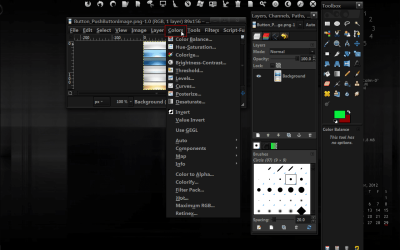
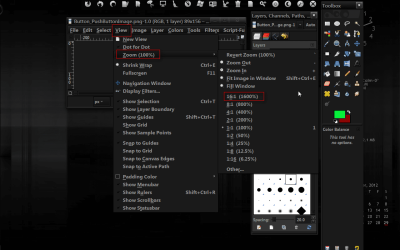
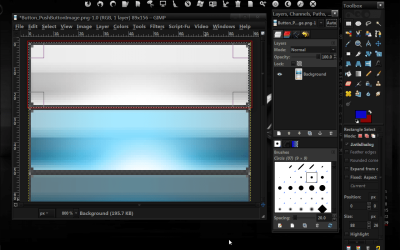
Or go to View and Zoom in and edit each button.
Jerry
Or go to View and Zoom in and edit each button.
Jerry
My Computer
- Computer type
- Laptop
- Computer Manufacturer/Model Number
- Sager NP9170
- OS
- Win 7 Pro x64 / Win 10 Pro
- CPU
- Intel(R) Core(TM) i7-3630QM CPU @ 2.40GHz
- Motherboard
- CLEVO P170EM
- Memory
- 12 GB
- Graphics Card(s)
- (1) Intel(R) HD Graphics 4000 (2) NVIDIA GeForce GTX 675M
- Sound Card
- (1) Realtek High Definition Audio (2) Intel(R) Display Aud
- Monitor(s) Displays
- 17.3
- Screen Resolution
- 1920x1080
- Hard Drives
- (1) Samsung 860 EVO 500GB(OS) (1) Samsung 860 EVO 500GB(Data)
- Keyboard
- Backlite
- Antivirus
- MSE, Malwarebytes Pro
- Browser
- Firefox
- Other Info
- DESKTOP: Custom-built.
OS: Win 10 Pro x64.
CASE: Rosewill R5.
CPU: Intel I5 4670K CPU @ 3.40GHz.
CPU COOLER: Cool Master Hyper 212 EVO.
MOTHERBOARD: Asus Z87-A.
MEMORY: Kingston HyperX 2x4 GB.
GPU: Nvidia Geforce 650 TI.
PSU: Corsair TX750.
DRIVES: (1) Samsung 840 120 GB SSD (2) Western Digital blue 500 GB 7200 RPM.
I have been trying over the last week to get this to work but I cant seem to get it to work right for me......I am following you instructions to the letter
Are you still up for doing the work for me?
Are you still up for doing the work for me?
My Computer
- OS
- Windows 7 Ultimate x64
I have been trying over the last week to get this to work but I cant seem to get it to work right for me......I am following you instructions to the letter
Are you still up for doing the work for me?
OK I got your e-mail showing you have permission to change it, so my question now is how much darker do you want it and for the buttons do you want all the buttons darker blue or do you want just the hover and pressed buttons only?
Jerry
My Computer
- Computer type
- Laptop
- Computer Manufacturer/Model Number
- Sager NP9170
- OS
- Win 7 Pro x64 / Win 10 Pro
- CPU
- Intel(R) Core(TM) i7-3630QM CPU @ 2.40GHz
- Motherboard
- CLEVO P170EM
- Memory
- 12 GB
- Graphics Card(s)
- (1) Intel(R) HD Graphics 4000 (2) NVIDIA GeForce GTX 675M
- Sound Card
- (1) Realtek High Definition Audio (2) Intel(R) Display Aud
- Monitor(s) Displays
- 17.3
- Screen Resolution
- 1920x1080
- Hard Drives
- (1) Samsung 860 EVO 500GB(OS) (1) Samsung 860 EVO 500GB(Data)
- Keyboard
- Backlite
- Antivirus
- MSE, Malwarebytes Pro
- Browser
- Firefox
- Other Info
- DESKTOP: Custom-built.
OS: Win 10 Pro x64.
CASE: Rosewill R5.
CPU: Intel I5 4670K CPU @ 3.40GHz.
CPU COOLER: Cool Master Hyper 212 EVO.
MOTHERBOARD: Asus Z87-A.
MEMORY: Kingston HyperX 2x4 GB.
GPU: Nvidia Geforce 650 TI.
PSU: Corsair TX750.
DRIVES: (1) Samsung 840 120 GB SSD (2) Western Digital blue 500 GB 7200 RPM.
Hover and pressed buttons only.....I would like to keep the same 3d style but have them black with white text when I hover-and press on them.
Also the Loading bars or what ever its called I would like black like the local disk storage space screen shot below.
And finally the check boxes I would like them to be windows default only with a black check mark incited of blue.

Also the Loading bars or what ever its called I would like black like the local disk storage space screen shot below.
And finally the check boxes I would like them to be windows default only with a black check mark incited of blue.
My Computer
- OS
- Windows 7 Ultimate x64
What DPI setting are you using http://www.sevenforums.com/tutorials/443-dpi-display-size-settings-change.html
The reason I asked is the theme maker made the small dpi with black checkmarks and not the medium and large.
Let me know.
Jerry
The reason I asked is the theme maker made the small dpi with black checkmarks and not the medium and large.
Let me know.
Jerry
My Computer
- Computer type
- Laptop
- Computer Manufacturer/Model Number
- Sager NP9170
- OS
- Win 7 Pro x64 / Win 10 Pro
- CPU
- Intel(R) Core(TM) i7-3630QM CPU @ 2.40GHz
- Motherboard
- CLEVO P170EM
- Memory
- 12 GB
- Graphics Card(s)
- (1) Intel(R) HD Graphics 4000 (2) NVIDIA GeForce GTX 675M
- Sound Card
- (1) Realtek High Definition Audio (2) Intel(R) Display Aud
- Monitor(s) Displays
- 17.3
- Screen Resolution
- 1920x1080
- Hard Drives
- (1) Samsung 860 EVO 500GB(OS) (1) Samsung 860 EVO 500GB(Data)
- Keyboard
- Backlite
- Antivirus
- MSE, Malwarebytes Pro
- Browser
- Firefox
- Other Info
- DESKTOP: Custom-built.
OS: Win 10 Pro x64.
CASE: Rosewill R5.
CPU: Intel I5 4670K CPU @ 3.40GHz.
CPU COOLER: Cool Master Hyper 212 EVO.
MOTHERBOARD: Asus Z87-A.
MEMORY: Kingston HyperX 2x4 GB.
GPU: Nvidia Geforce 650 TI.
PSU: Corsair TX750.
DRIVES: (1) Samsung 840 120 GB SSD (2) Western Digital blue 500 GB 7200 RPM.
I PMed you the link to the .msstyles
What you need to do is switch to the default Aero theme and then log off and then log on and then go to C:\Windows\Resources\Themes and open up that theme folder and either delete or move the .msstyles somewhere and replace it with the one I did.
I looked at the control panel and it looks like the default Aero theme to me I could change the size of the text if you would like let me know after you test the new one out.
Jerry
What you need to do is switch to the default Aero theme and then log off and then log on and then go to C:\Windows\Resources\Themes and open up that theme folder and either delete or move the .msstyles somewhere and replace it with the one I did.
I looked at the control panel and it looks like the default Aero theme to me I could change the size of the text if you would like let me know after you test the new one out.
Jerry
My Computer
- Computer type
- Laptop
- Computer Manufacturer/Model Number
- Sager NP9170
- OS
- Win 7 Pro x64 / Win 10 Pro
- CPU
- Intel(R) Core(TM) i7-3630QM CPU @ 2.40GHz
- Motherboard
- CLEVO P170EM
- Memory
- 12 GB
- Graphics Card(s)
- (1) Intel(R) HD Graphics 4000 (2) NVIDIA GeForce GTX 675M
- Sound Card
- (1) Realtek High Definition Audio (2) Intel(R) Display Aud
- Monitor(s) Displays
- 17.3
- Screen Resolution
- 1920x1080
- Hard Drives
- (1) Samsung 860 EVO 500GB(OS) (1) Samsung 860 EVO 500GB(Data)
- Keyboard
- Backlite
- Antivirus
- MSE, Malwarebytes Pro
- Browser
- Firefox
- Other Info
- DESKTOP: Custom-built.
OS: Win 10 Pro x64.
CASE: Rosewill R5.
CPU: Intel I5 4670K CPU @ 3.40GHz.
CPU COOLER: Cool Master Hyper 212 EVO.
MOTHERBOARD: Asus Z87-A.
MEMORY: Kingston HyperX 2x4 GB.
GPU: Nvidia Geforce 650 TI.
PSU: Corsair TX750.
DRIVES: (1) Samsung 840 120 GB SSD (2) Western Digital blue 500 GB 7200 RPM.
Similar threads

- Replies
- 2
- Views
- 4K
- Replies
- 2
- Views
- 2K
- Replies
- 1
- Views
- 2K
- Replies
- 3
- Views
- 4K


- Replies
- 2
- Views
- 8K