
New SSD System Restore and Windows Backup

Rockit

Space Cadet
Member
Local time
12:35 PM
Messages
93
Location
Space Station #5
Hello,

I finally was able to clone my Hd to a SSD 128 gb but the system restore and daily backup to a internal 320 Gb IDE Hd appears to not be working?

Am I missing something? Does the backup hard drive need to be formated to a different cluster size? I tried to do a system restore and a backup restore and they both failed.

The backup restore said something about partition size error.

Thank you very much for any info on what I need to do to get my daily backups and system restore working. I do use both features quite allot.

:sarc:
 

My Computer My Computer

Computer type
PC/Desktop
Computer Manufacturer/Model Number
Master Control (25 plus year old custom build)
OS
Windows 7 Premium 64 Bit
CPU
Opteron 185
Motherboard
DFI Lanparty N4 Ultra-d
Memory
4 gig OCZ High Performance Dual Channel @ 500 Mhz
Graphics Card(s)
ATI Radeon HD 5450 (Direct X11)
Sound Card
Creative SB Audigy Audio 2 ZS
Monitor(s) Displays
Dell 2208WFP (Digital)
Screen Resolution
1680 x 1050
Hard Drives
Plextor M3 Pro 128 Gb Sata 6 SSD (Main)

Western Digital Blue 320 Gb IDE 7200 RPM Internal Daily (Backup Drive)

Western Digital 2 TB RE4 SATA 3 Gb/s 7200 RPM 64 MB Cache Enterprise Hard Drive (External Data & Backup Drive).
PSU
OCZ GameXStream 850 Watt PSU.
Case
Antec Performance Series
Cooling
Working on it.
Keyboard
Saitek Eclipse II
Mouse
Kensington SlimBlade
Internet Speed
50 Gb
Antivirus
Microsoft Security Essentials
Browser
From Netscape to Internet Explorer.
Other Info
Got a mix of old and new hardware. Sound card hooked up to a 250 watt per channel Harman Kardon Amp to a pair of Dak 5 way old school acoustically suspended speakers.
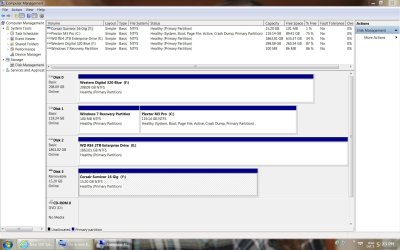
Post a screen shot of Windows Disk Management.

Are you using Windows built-in backup and restore for all of this?

I seriously doubt cluster size has anything to do with it, but your partition setup might. That's why the screen shot is needed.
 

My Computer My Computer

Computer type
PC/Desktop
Computer Manufacturer/Model Number
Ignatz Special; 4 speed manual gearbox; factory air conditioning; one of one
OS
Windows 7 Home Premium SP1, 64-bit
CPU
Intel Skylake i5-6600K, not overclocked
Motherboard
AsRock Z170M Extreme 4, micro ATX
Memory
8 GB HyperX DDR4-2666 (2 x 4 GB)
Graphics Card(s)
none; graphics are integrated on CPU
Sound Card
onboard: Realtek ALC1150; external: USB Behringer UF0-202
Monitor(s) Displays
Dell S2340M 23 inch IPS
Screen Resolution
1600 x 900
Hard Drives
System: Crucial MX100 series SSD, 128 GB;
Data: Samsung Spinpoint 103SJ, 1 TB;
Backup: WD Caviar Green WD30EZRX-00D8PB0, 3 TB
PSU
Rosewill SilentNight 500 watt fanless, semi-modular
Case
Antec Solo II
Cooling
Noctua NH-U12S; Noctua F12 intake, Noctua S12A exhaust
Keyboard
Microsoft 200 6JH-00001 USB
Mouse
Dell or Microsoft optical wired; USB
Antivirus
Microsoft Security Essentials and Malwarebytes Premium
Browser
Pale Moon
Other Info
All fans PWM; speeds at idle: CPU circa 500 rpm; intake circa 600 rpm; exhaust circa 600 rpm; CPU temps 27 idle and 47 C load in a warm room (27 C/81 F) when running Intel Extreme Tuning Utility stress test.
Thank You for the reply.

I have used my backups and system retore points quite frequently and this is the first time I have seen this type of error. Something seemed wrong with my daily f:\ IDE drive so I formatted it. I have not tried to do a restore since the last time that failed. I was able to use the "last good configuration" option. All this started after getting the SSD up and running. I use windows 7 built in backup and restore.

Here is a screen shoot.
Thanks Again
 

Attachments

  • 17-35-8.jpg
    17-35-8.jpg
    172.9 KB · Views: 44

My Computer My Computer

Computer type
PC/Desktop
Computer Manufacturer/Model Number
Master Control (25 plus year old custom build)
OS
Windows 7 Premium 64 Bit
CPU
Opteron 185
Motherboard
DFI Lanparty N4 Ultra-d
Memory
4 gig OCZ High Performance Dual Channel @ 500 Mhz
Graphics Card(s)
ATI Radeon HD 5450 (Direct X11)
Sound Card
Creative SB Audigy Audio 2 ZS
Monitor(s) Displays
Dell 2208WFP (Digital)
Screen Resolution
1680 x 1050
Hard Drives
Plextor M3 Pro 128 Gb Sata 6 SSD (Main)

Western Digital Blue 320 Gb IDE 7200 RPM Internal Daily (Backup Drive)

Western Digital 2 TB RE4 SATA 3 Gb/s 7200 RPM 64 MB Cache Enterprise Hard Drive (External Data & Backup Drive).
PSU
OCZ GameXStream 850 Watt PSU.
Case
Antec Performance Series
Cooling
Working on it.
Keyboard
Saitek Eclipse II
Mouse
Kensington SlimBlade
Internet Speed
50 Gb
Antivirus
Microsoft Security Essentials
Browser
From Netscape to Internet Explorer.
Other Info
Got a mix of old and new hardware. Sound card hooked up to a 250 watt per channel Harman Kardon Amp to a pair of Dak 5 way old school acoustically suspended speakers.
Windows Backup and System Restore on a SSD

Has anyone been able to do a complete windows 7 restore from a windows backup?

Has System restore worked for anyone after cloning from a hard drive to a SSD?

I deleted all previous backups and restore points after cloning but have not needed to recover from any problems yet.

Thank You :geek:
 

My Computer My Computer

Computer type
PC/Desktop
Computer Manufacturer/Model Number
Master Control (25 plus year old custom build)
OS
Windows 7 Premium 64 Bit
CPU
Opteron 185
Motherboard
DFI Lanparty N4 Ultra-d
Memory
4 gig OCZ High Performance Dual Channel @ 500 Mhz
Graphics Card(s)
ATI Radeon HD 5450 (Direct X11)
Sound Card
Creative SB Audigy Audio 2 ZS
Monitor(s) Displays
Dell 2208WFP (Digital)
Screen Resolution
1680 x 1050
Hard Drives
Plextor M3 Pro 128 Gb Sata 6 SSD (Main)

Western Digital Blue 320 Gb IDE 7200 RPM Internal Daily (Backup Drive)

Western Digital 2 TB RE4 SATA 3 Gb/s 7200 RPM 64 MB Cache Enterprise Hard Drive (External Data & Backup Drive).
PSU
OCZ GameXStream 850 Watt PSU.
Case
Antec Performance Series
Cooling
Working on it.
Keyboard
Saitek Eclipse II
Mouse
Kensington SlimBlade
Internet Speed
50 Gb
Antivirus
Microsoft Security Essentials
Browser
From Netscape to Internet Explorer.
Other Info
Got a mix of old and new hardware. Sound card hooked up to a 250 watt per channel Harman Kardon Amp to a pair of Dak 5 way old school acoustically suspended speakers.
Has anyone been able to do a complete windows 7 restore from a windows backup?

Has System restore worked for anyone after cloning from a hard drive to a SSD?

I deleted all previous backups and restore points after cloning but have not needed to recover from any problems yet.

Thank You :geek:

Yes to both of your questions. Many here have done complete restores from backups and had no issues with SR after cloning.

System Restore is problematic for some people in some situations---but I can't recall any correlation to SSDs, clonings, or image restorations. I have not paid a lot of attention to those threads where System Restore won't run, but it's a fairly common issue.
 

My Computer My Computer

Computer type
PC/Desktop
Computer Manufacturer/Model Number
Ignatz Special; 4 speed manual gearbox; factory air conditioning; one of one
OS
Windows 7 Home Premium SP1, 64-bit
CPU
Intel Skylake i5-6600K, not overclocked
Motherboard
AsRock Z170M Extreme 4, micro ATX
Memory
8 GB HyperX DDR4-2666 (2 x 4 GB)
Graphics Card(s)
none; graphics are integrated on CPU
Sound Card
onboard: Realtek ALC1150; external: USB Behringer UF0-202
Monitor(s) Displays
Dell S2340M 23 inch IPS
Screen Resolution
1600 x 900
Hard Drives
System: Crucial MX100 series SSD, 128 GB;
Data: Samsung Spinpoint 103SJ, 1 TB;
Backup: WD Caviar Green WD30EZRX-00D8PB0, 3 TB
PSU
Rosewill SilentNight 500 watt fanless, semi-modular
Case
Antec Solo II
Cooling
Noctua NH-U12S; Noctua F12 intake, Noctua S12A exhaust
Keyboard
Microsoft 200 6JH-00001 USB
Mouse
Dell or Microsoft optical wired; USB
Antivirus
Microsoft Security Essentials and Malwarebytes Premium
Browser
Pale Moon
Other Info
All fans PWM; speeds at idle: CPU circa 500 rpm; intake circa 600 rpm; exhaust circa 600 rpm; CPU temps 27 idle and 47 C load in a warm room (27 C/81 F) when running Intel Extreme Tuning Utility stress test.
Has anyone been able to do a complete windows 7 restore from a windows backup?

Has System restore worked for anyone after cloning from a hard drive to a SSD?

I deleted all previous backups and restore points after cloning but have not needed to recover from any problems yet.

Thank You :geek:

I and quite a few others here use Macrium Reflect FREE Edition - Information and download for our backups. I have an SSD and have used Macrium without any trouble. Why don't you give this a try and see how it works.
 

My Computer My Computer

Computer type
PC/Desktop
Computer Manufacturer/Model Number
Custom Build
OS
Windows 7 Home Premium 32-Bit - Build 7600 SP1
CPU
Intel Core i3-2120 3.30Ghz
Motherboard
Asus P8Z68-V LX Intel Z68 Socket H2 ATX
Memory
Kingston 4 GB DDR3 1333 mhz
Graphics Card(s)
AMD Radeon HD6670
Sound Card
Sound Blaster Audigy SE 24-Bit
Monitor(s) Displays
Asus VE228
Screen Resolution
1440 X 900
Hard Drives
OCZ Vertex 3 120 GB Sata 3 SSD ==
Kingston SH103/S3 120 G Hyper X 120 GB SSD ==
Western Digital 500 GB Caviar Green 7200 RPM ==
PSU
Corsair CX600M == 600 Watt
Case
NZXT Apollo - Silver with Clear Side Panel
Cooling
Three 120 mm Fans
Keyboard
Microsoft Natural 4000
Mouse
Microsoft Custom Optical 3000
Internet Speed
AT&T Fiber Optic Wireless Network
Antivirus
Microsoft Security Essentials
Browser
Chrome
Other Info
120 mm Blue LED Fan -- Three Blue LED Lazer Light Sticks
Back
Top