Hard Drive Error: Volume is dirty 0x80071AC3

lewisf182

New member
Local time
12:18 PM
Messages
7
Hi,
Sorry for this being my first post, but I am just lost as to what to do and even a trusty google search will not show me how to fix this!

So I was copying over some movies from my laptop onto my new 1TB external hard drive, was working fine and managed to copy over a fair amount, then all of a sudden the ones that were currently copying failed, so I took out the hard drive and plugged it back in. Now it says I dont have access to it? Iv tried the Chkdsk B thing but to no avail.

Any help much appreciated, I dont mind losing the movies that are already copied onto the External HDD I just want it back in working order (or will it just keep happening i.e. faulty HDD?)

Thankyou in advance guys!
 

My Computer My Computer

OS
64 bit
Could be the Dirty Bit.

Sometimes when a drive is disconnected without safely removing a file becomes corrupted and Windows flags the drive as "unreliable" (so to speak) by setting a single hex value for the drive as "dirty". Thus "the dirty bit".

To check if this is so, open an elevated Command Prompt and then type " fsutil dirty query m: " (with m being the drive letter for the external drive. This will tell you if the drive is marked dirty.

If it is, then do this: open the Command Prompt and type: " CHKNTFS /X m:
" . This will tell Windows NOT to check the drive on the next restart. Then manually restart the computer (keep the external connected).

You should get into Windows without an messages about the drive.

Once in Windows, now run chkdsk on the drive. At the Command Prompt type: " Chkdsk /f /r m: " . Chkdsk should go through all 5 stages of it's test.

When it's done then check the disk by running " fsutil dirty query m: " again. If all went well the Windows will confirm that the dirty bit is not set on that drive.

Sometimes chkdsk can not reset the bit. In than case you can go nuclear and copy all the files off the drive and then format it (that will definitely reset the bit).
Or you can do something like this with a Hex Editor: Manually Reset or Clear Dirty Bit in Windows without CHKDSK

I hope that helps. All this was based on your post title!


My Computer My Computer

Computer type
PC/Desktop
Computer Manufacturer/Model Number
Home Built - Jan 2013
OS
Windows 7 64 Bit Home Premium SP1
CPU
i7-3820
Motherboard
Asus P9X79-PRO - Bios 4608
Memory
GSkill F3-14900CL9Q - 16GB
Graphics Card(s)
EVGA GeForce GTX660 - Driver 352.86
Sound Card
On board Realtek ALC898
Monitor(s) Displays
Acer S271HL
Screen Resolution
1920 x 1080
Hard Drives
#1- Samsung 840 Pro Series
#2- Western Digital WD1002FAEX Sata3 Black
#3- Western Digital WD1002FAEX Sata3 Black
PSU
Corsair CMPSU-850TX-V2 - 850 watt (by Seasonic)
Case
Corsair Obsidian 550D
Cooling
Standard 3 120mm case fans, Cooler Master Hyper 212 EVO
Keyboard
MS KC-0405
Mouse
Intellimouse 5-button
Internet Speed
56 Mbits/Sec (on a good day)
Antivirus
Avast & Malwarebytes
Browser
Firefox
Other Info
Asus DVD - DRW-24B1ST 24X
Hi thanks for your advice. Firstly, when In elevated command prompt and i type the fsutil dirty query f: it says error: access is denied?
 

My Computer My Computer

OS
64 bit
Hi lewisf182,

Try this on the 1TB external hard drive.

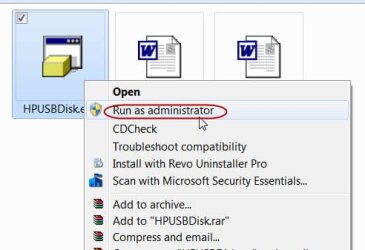
Download, install the HP USB Disk Storage Format Tool, right click and run as an administrator. It will format your drive and you should be able to regain the full functionality of your hard drive.

HP USB Disk Storage Format Tool - CNET Download.com

Report if successful.
 

My Computer My Computer

OS
Windows 7 Home Premium 32 bit
Hi, Update: restarted my laptop, the hard drive is fine and I can now access it. However I cannot delete files or change anything, it seems iv lost control over it? iv looked at permission but cant see how to regain control to be able to do stuff with it?

Thanks for the help guys.

Jumanji I will give that a try and report back
 

My Computer My Computer

OS
64 bit
I think I dont have administrator Rights, how can I gain these back?

Seem to be able to copy to and from hard drive now, but not allowed to delete anything.

Jumanji: Tried the HP USB programme, would'nt let me open it as it said I didnt have the rights as per above.... What does this mean?
 

My Computer My Computer

OS
64 bit
Did you right click on it and Run as Administrator?

runas administrator.jpg
 

My Computer My Computer

OS
Windows 7 Home Premium 32 bit
Got it to open now Jumanji.
Once I use it to format the drive should I be able to delete stuff etc again? Iv managed to transfer my files back off it so it doesnt matter if I lose my stuff
 

My Computer My Computer

OS
64 bit
Yes, you should be able to.

If not, report and we will get on to reinitialising the hard drive to the factory condition. I do not think it should be necessary and you should be able to write and delete as you would like after formatting it with the HP Tool.
 

My Computer My Computer

OS
Windows 7 Home Premium 32 bit
Once formatted is it possible this problem can happen again? I would rather just send the hard drive back than risk it happening again and losing all my data on there?

Will attempt a format tomorrow
 

My Computer My Computer

OS
64 bit
Hi Jumanji, when I try to format the disk via the HP tool it says the device is 'write protected'. How do I get around this?
 

My Computer My Computer

OS
64 bit
Once formatted is it possible this problem can happen again? I would rather just send the hard drive back than risk it happening again and losing all my data on there?

Will attempt a format tomorrow

Hi Jumanji, when I try to format the disk via the HP tool it says the device is 'write protected'. How do I get around this?

This is a last-ditch effort to get your drive initialised to the factory condition.

Download the Windows executable (works without installation) HDD Low-level Format Tool from HDDGURU: HDD LLF Low Level Format Tool

Right click on it, Run as administrator and try to low-level format the correct external drive.

The program will start writing zeros to each and every sector and reinitialise the hard disk to the factory condition (it will take a considerable amount of time since yours is a 2TB drive. So be patient.)

If it succeeds you need to format the drive using the usual format tools.

If it does not, and spits out an error message I will throw in the towel and RMA it.( unless someone else comes up with a resolution or a fix. It may well be a faulty electronics/controller in the drive.)
 

My Computer My Computer

OS
Windows 7 Home Premium 32 bit
Could be the Dirty Bit.

Sometimes when a drive is disconnected without safely removing a file becomes corrupted and Windows flags the drive as "unreliable" (so to speak) by setting a single hex value for the drive as "dirty". Thus "the dirty bit".

To check if this is so, open an elevated Command Prompt and then type " fsutil dirty query m: " (with m being the drive letter for the external drive. This will tell you if the drive is marked dirty.

If it is, then do this: open the Command Prompt and type: " CHKNTFS /X m:
" . This will tell Windows NOT to check the drive on the next restart. Then manually restart the computer (keep the external connected).

You should get into Windows without an messages about the drive.

Once in Windows, now run chkdsk on the drive. At the Command Prompt type: " Chkdsk /f /r m: " . Chkdsk should go through all 5 stages of it's test.

When it's done then check the disk by running " fsutil dirty query m: " again. If all went well the Windows will confirm that the dirty bit is not set on that drive.

Sometimes chkdsk can not reset the bit. In than case you can go nuclear and copy all the files off the drive and then format it (that will definitely reset the bit).
Or you can do something like this with a Hex Editor: Manually Reset or Clear Dirty Bit in Windows without CHKDSK

I hope that helps. All this was based on your post title!


Didn't want to reboot yet. So tried "chkdsk /r m:" without running "CHKNTFS /X m:" and without the reboot. It worked, the dirty bit is fixed even though chkdsk did not show any issue. Note that /f was not required as there was no issue found. Note also that "chkdsk m:" did not do the trick.
 

My Computer My Computer

Computer type
PC/Desktop
OS
Windows 7 Ultimate 32
I'm copying from a 4TB external hdd to a 64gb exFAT micro sd and it wont let me copy more than about 500mb and it'll pop up with this error. I've done it 10 times now. restart chkdsk /f /r g: afterwards. Every time starts off copying, then goes dirty. What can I do?
 

My Computer My Computer

Computer type
PC/Desktop
Computer Manufacturer/Model Number
Gateway ZX4931
OS
It Depends On How I Feel That DAY 64 bit
Screen Resolution
1920 x 1080
Hard Drives
250GB Samsung EVO SSD
I apologize for reopening this thread. I have followed the instructions but I believe I am having an issue with my HD. CMD says it is exFAT. I dont know what to do from here because it is not NTFS. Help is appreciated thank you.
 

My Computer My Computer

Computer type
PC/Desktop
Computer Manufacturer/Model Number
Custom Build
OS
Windows 7 Ultimate 64-bit Operating System
CPU
Intel(R)Core(TM)i7-3770K [email protected], 3501Mhz, 4Cores, 8 LP
Motherboard
Corsair
Memory
16GB
Graphics Card(s)
NVIDIA GTX 560ti (x2)
Hard Drives
1TB HD,
Antivirus
Windows Defender
Browser
Chrome
Now it's easy to fix automatically. This error i noticed that on windows version specific.

First i got error on Windows 7 only, After i checked on my windows 10 laptop. it's perfect no error on copy/ Past data from External Drive.

Get proof and Troubleshooting Steps from here: error 0x80071ac3 fixed
 

My Computer My Computer

Computer type
PC/Desktop
OS
Windows 10 Home
I have the exactly same issue at my external 1tb hdd exfat.

So what i can do now without loosing my data?

I already try to do "chkdsk /f" but it stuck tooooo long at this command.

So what can i do?
 

My Computer My Computer

Computer type
PC/Desktop
OS
Windows 7 sp1
CPU
Intel core2duo e8300
Motherboard
ECS G31T-M
Memory
2 x 2gb ddr2-800
Graphics Card(s)
Sapphire ati radeon hd 5450
Sound Card
Motherboard and graphic card
Monitor(s) Displays
Samsung q80t 4k tv
Screen Resolution
4k
PSU
450watt
Back
Top