Internet Connection keeps dropping every 5 mins!!

vinugupta09

New member
Local time
8:34 PM
Messages
3
HI guyz, i am having this prob with both wired and wireless connection. While browsing when i click on a link, internet connection drops suddenly. I have to reload the page 4-5 times to get the web page and even then it's like very poor indentation. This happens randomly but it keeps happening every third link or so.!!


I have had this issue with other browsers. Mostly i use Google chrome
I am in india & my ISP is airtel. Usually its the best broadband here and i never had any prob before.
This is the make of my router:
Beetel ADSL - 450 Four Port Wi Fi Modem Features

PS: Recently i had some prob so i called customer care guy and he made some changes to router. Since then my router is transmitting 2 ssid. One is my customized name and another is "MGMNT". I am unable to change any settings in SSID index 2. Its all greyed out. I have been having the above situation since about that time.

Thanx:-)

attachment.php


attachment.php
 
Last edited:

My Computer My Computer

OS
Windows 7 Ultimate x64
Microsoft Windows [Version 6.1.7600]
Copyright (c) 2009 Microsoft Corporation. All rights reserved.

C:\Users\Vineet>ipconfig /all

Windows IP Configuration

Host Name . . . . . . . . . . . . : Vineet-PC
Primary Dns Suffix . . . . . . . :
Node Type . . . . . . . . . . . . : Hybrid
IP Routing Enabled. . . . . . . . : No
WINS Proxy Enabled. . . . . . . . : No

Ethernet adapter Local Area Connection:

Connection-specific DNS Suffix . :
Description . . . . . . . . . . . : Realtek PCIe GBE Family Controller
Physical Address. . . . . . . . . : 90-2B-34-65-B6-AA
DHCP Enabled. . . . . . . . . . . : Yes
Autoconfiguration Enabled . . . . : Yes
Link-local IPv6 Address . . . . . : fe80::485e:6d96:b72d:e3d5%11(Preferred)
IPv4 Address. . . . . . . . . . . : 192.168.1.2(Preferred)
Subnet Mask . . . . . . . . . . . : 255.255.255.0
Lease Obtained. . . . . . . . . . : Friday, August 17, 2012 6:39:42 PM
Lease Expires . . . . . . . . . . : Monday, August 20, 2012 7:18:48 PM
Default Gateway . . . . . . . . . : 192.168.1.1
DHCP Server . . . . . . . . . . . : 192.168.1.1
DHCPv6 IAID . . . . . . . . . . . : 244329268
DHCPv6 Client DUID. . . . . . . . : 00-01-00-01-17-BF-E0-40-90-2B-34-65-B6-AA

DNS Servers . . . . . . . . . . . : 192.168.1.1
NetBIOS over Tcpip. . . . . . . . : Enabled

Tunnel adapter isatap.{49259AE6-F77B-4E18-8E9F-0B72D35D8D45}:

Media State . . . . . . . . . . . : Media disconnected
Connection-specific DNS Suffix . :
Description . . . . . . . . . . . : Microsoft ISATAP Adapter
Physical Address. . . . . . . . . : 00-00-00-00-00-00-00-E0
DHCP Enabled. . . . . . . . . . . : No
Autoconfiguration Enabled . . . . : Yes

Tunnel adapter Teredo Tunneling Pseudo-Interface:

Connection-specific DNS Suffix . :
Description . . . . . . . . . . . : Teredo Tunneling Pseudo-Interface
Physical Address. . . . . . . . . : 00-00-00-00-00-00-00-E0
DHCP Enabled. . . . . . . . . . . : No
Autoconfiguration Enabled . . . . : Yes
IPv6 Address. . . . . . . . . . . : 2001:0:9d38:953c:61:ace3:49bb:4332(Prefer
red)
Link-local IPv6 Address . . . . . : fe80::61:ace3:49bb:4332%13(Preferred)
Default Gateway . . . . . . . . . : ::
NetBIOS over Tcpip. . . . . . . . : Disabled

C:\Users\Vineet>
 

My Computer My Computer

OS
Windows 7 Ultimate x64
Only two things here I would try to change to see if it makes a difference. First is the channel 1, I would try channel 10 or 11 to see if there is less interference from neighbors or cordless phones. And on the encryption, I would try AES instead of TKIP if it is an option.
 

My Computer My Computer

Computer type
Laptop
Computer Manufacturer/Model Number
HP 17-ak0xx, dv7 3173nr
OS
Win7 Home Premium x64 W10Pro&Home
CPU
A12 9720p 4+8 TurionII M520
Motherboard
HP 3839
Memory
6GB 8GB
Graphics Card(s)
R7
Monitor(s) Displays
24" sa550
Screen Resolution
1600x900 1920x1080
Mouse
Logitechx2
Internet Speed
120Mb/s down 12up
THANX for the prompt reply. I tried both options but no effect.. guess the prob is with router only as i installed a fresh copy of windows on my system today with all drivers.. I am unable to make my router STOP transmitting multiple ssid..when i go to ssid index 2 everything gets greyed out except the option to change ssid index.
 

My Computer My Computer

OS
Windows 7 Ultimate x64
What's interesting to me is that the wireless adaptor "if you have one" isn't showing up in your ipconfig/all.

If the wired connection is cutting out then you might try changing the DNS server to a different one. The DNS settings will be somewhere in your routers set up page. Try using Google's DNS at 8.8.8.8 and 8.8.4.4

The second SSID may be from a guest account though I can't imagine why it was enabled in the first place.

I believe that resetting the router would be my first course of action. After that go through the routers settings and make sure everything is set up correctly.

As was mentioned by DMholt, using TKIP encryption is not the way to go with Windows 7 drivers. You will want to change to WPA2 security with AES encryption though it won't do you much good without a wireless device installed on your system.
 

My Computer My Computer

Computer type
PC/Desktop
Computer Manufacturer/Model Number
Home built
OS
Windows 7 Ult, Windows 8.1 Pro,
CPU
Q9650-4.275GHz, E8600 4.5GHz, E6750-3.8GHz
Motherboard
Evga 780i FTW
Memory
G.Skill PC2 9600 1200Mhz 5 5 5 15 2T
Graphics Card(s)
GTX480
Sound Card
Asus Xonar D2
Monitor(s) Displays
HannsG
Screen Resolution
1680X1050
Hard Drives
GSkill Phoenix Pro 120GB SSD
PSU
ThermalTake Toughpower 1000Watt modular
Case
ThermalTake XaserV
Cooling
Xigmatek S1283
Keyboard
Logitech G15
Mouse
Logitech G9
Internet Speed
T1
every 5 minutes, network issue

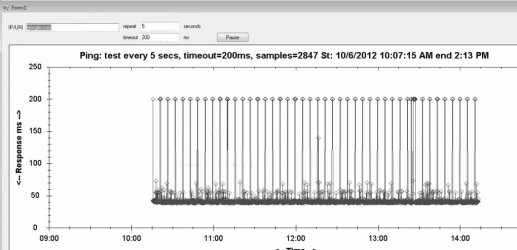
Just wanted to say that I'm seeing a similar problem, except on a wired connection. It's causing my VPN to drop out several times a day. So I wrote a graphic ping response time trace utility, ran it on 3 machines, each recording access times to the same 4 web sites (my website, google, the my VPN location and my IPS's web site). Every 5 seconds I would ping the web sites and chart the response times.

What I found, and this was only on the 23 Windows 7 machines, not the WinXP machine) was that every 5 minutes the pings to all 4 web sites would timeout (200 ms timeout) for 20-30 seconds then resume their normal response times of 20-50 ms.

Since all machines were pinging the same 4 servers, and only the Windows 7 machines had the response time problems NOT the Win XP, and they were all going through the same router, modem and ISP, And because the problem happens every 5 minutes, the problem can only be something that Windows 7 is doing.

But what is it doing?

Just wanted to say that I'm seeing a similar problem, except on a wired connection. It's causing my VPN to drop out several times a day. So I wrote a graphic ping response time trace utility, ran it on 3 machines, each recording access times to the same 4 web sites (my website, google, the my VPN location and my IPS's web site). Every 5 seconds I would ping the web sites and chart the response times.

What I found, and this was only on the 23 Windows 7 machines, not the WinXP machine) was that every 5 minutes the pings to all 4 web sites would timeout (200 ms timeout) for 20-30 seconds then resume their normal response times of 20-50 ms.

Since all machines were pinging the same 4 servers, and only the Windows 7 machines had the response time problems NOT the Win XP, and they were all going through the same router, modem and ISP, And because the problem happens every 5 minutes, the problem can only be something that Windows 7 is doing.

But what is it doing?

I'm attaching a the Google ping chart
 

Attachments

  • GooglePing.jpg
    GooglePing.jpg
    46.7 KB · Views: 11

My Computer My Computer

OS
Win 7, 64 bit
Just wanted to say that I'm seeing a similar problem, except on a wired connection. It's causing my VPN to drop out several times a day. So I wrote a graphic ping response time trace utility, ran it on 3 machines, each recording access times to the same 4 web sites (my website, google, the my VPN location and my IPS's web site). Every 5 seconds I would ping the web sites and chart the response times.

What I found, and this was only on the 23 Windows 7 machines, not the WinXP machine) was that every 5 minutes the pings to all 4 web sites would timeout (200 ms timeout) for 20-30 seconds then resume their normal response times of 20-50 ms.

Since all machines were pinging the same 4 servers, and only the Windows 7 machines had the response time problems NOT the Win XP, and they were all going through the same router, modem and ISP, And because the problem happens every 5 minutes, the problem can only be something that Windows 7 is doing.

But what is it doing?

Just wanted to say that I'm seeing a similar problem, except on a wired connection. It's causing my VPN to drop out several times a day. So I wrote a graphic ping response time trace utility, ran it on 3 machines, each recording access times to the same 4 web sites (my website, google, the my VPN location and my IPS's web site). Every 5 seconds I would ping the web sites and chart the response times.

What I found, and this was only on the 23 Windows 7 machines, not the WinXP machine) was that every 5 minutes the pings to all 4 web sites would timeout (200 ms timeout) for 20-30 seconds then resume their normal response times of 20-50 ms.

Since all machines were pinging the same 4 servers, and only the Windows 7 machines had the response time problems NOT the Win XP, and they were all going through the same router, modem and ISP, And because the problem happens every 5 minutes, the problem can only be something that Windows 7 is doing.

But what is it doing?

I'm attaching a the Google ping chart

The following registry adjustment may work to solve this problem.

HKEY_LOCAL_MACHINE\SYSTEM\CurrentControlSet\Services\lanmanserver\parameters\size
Your choices for this registry key are 1,2 and 3.
1 = Minimize Memory Used
2 = Balance
3 = Maximize Throughput for File Sharing and Maximize Throughput for Network Applications

Be sure to set this to (3). By default it is configured to 1.
 

My Computer My Computer

Computer type
PC/Desktop
Computer Manufacturer/Model Number
Home built
OS
Windows 7 Ult, Windows 8.1 Pro,
CPU
Q9650-4.275GHz, E8600 4.5GHz, E6750-3.8GHz
Motherboard
Evga 780i FTW
Memory
G.Skill PC2 9600 1200Mhz 5 5 5 15 2T
Graphics Card(s)
GTX480
Sound Card
Asus Xonar D2
Monitor(s) Displays
HannsG
Screen Resolution
1680X1050
Hard Drives
GSkill Phoenix Pro 120GB SSD
PSU
ThermalTake Toughpower 1000Watt modular
Case
ThermalTake XaserV
Cooling
Xigmatek S1283
Keyboard
Logitech G15
Mouse
Logitech G9
Internet Speed
T1
Back
Top