Latest NVIDIA ForceWare Video Drivers Windows 7

Has the underclock glitch been fixed? Got hit with it last time I updated and am reluctant to update again.

Key Fixes
  • Fixes an intermittent vsync stuttering issue with GeForce GTX 600-series GPUs.
  • Fixes an issue where some manufacturer's factory overclocked cards default to and run at lower clocks.
  • Fixes a performance issue in Total War: Shogun 2 with the latest game patch.

is this the fix you are talking about?
its clearly written in release notes if you would like to read them.
 

My Computer My Computer

Computer type
PC/Desktop
Computer Manufacturer/Model Number
Self Built PC
OS
Windows 7 pro 64bit. (SP1)
CPU
Intel core I5 2400
Motherboard
Gigabyte H61
Memory
8GB DDR3 Kingston
Graphics Card(s)
Gigabyte GF GTX650OC
Sound Card
Realtek HD audio
Monitor(s) Displays
LCD 20"
Screen Resolution
1600x900
Hard Drives
INTEL SSD 320 80GB +Seagate 7200.12 1TBx3
PSU
Coolermaster RX450W
Case
Coolermaster atx case
Cooling
stock cooler
Keyboard
logitech
Mouse
logitech
Internet Speed
FTTD 100mbps
GeForce 306.23 Driver WHQL
recommended.jpg

Release Date September 13, 2012
Release Highlights:
This is the first WHQL-certified driver from the R304 family of drivers (304.xx to 306.xx) and the first WHQL-certified GeForce driver to combine support for Windows 8, Windows 7, and Windows Vista into a single driver package.
This is the recommended driver for the upcoming blockbuster PC games Borderlands 2 with PhysX and 3D Vision technology and World of Warcraft: Mists of Pandaria with 3D Vision and DirectX 11 support.
New in R304 Drivers:

  • GPU Support
    • Adds support for GeForce GTX 660 Ti, GeForce GTX 660, and GeForce GTX 650.
    • Legacy Support Notification: GeForce 6-series and GeForce 7-series GPUs will be moved to legacy support after GeForce R304 drivers. GeForce R310 drivers (the next major family of drivers) will not support these products.

  • Adds support for NVIDIA TXAA
    • NVIDIA TXAA is new film-style anti-aliasing technique designed specifically to reduce temporal aliasing (crawling and flickering in motion) through a combination of hardware AA, custom CG film style AA resolve, and a temporal filter.
    • The Secret World is the first game to support TXAA. Read about it on GeForce.com.
    • TXAA is supported on GeForce GTX 600-series Kepler-based GPUs.
    • Learn more about TXAA on GeForce.com.

  • Performance Boost – Increases performance for GeForce 400/500/600 Series GPUs in several PC games vs. GeForce 301.42 WHQL-certified drivers. Results will vary depending on your GPU and system configuration:
GeForce GTX 680:

    • Up to 18% in Batman: Arkham City
    • Up to 15% in Dragon Age II
    • Up to 10% in S.T.A.L.K.E.R.: Call of Pripyat
    • Up to 60% in Total War: Shogun 2 (fixes performance issue with latest game patch)
GeForce GTX 560:

    • Up to 14% in Batman: Arkham City
    • Up to 5% in Battlefield 3 with SLI
    • Up to 4% in Dragon Age II
    • Up to 8% in The Witcher 2: Assassins of Kings with SLI
    • Up to 7% in Lost Planet 2

  • NVIDIA SLI Technology Adds or updates the following SLI profiles:
    • Alan Wake's American Nightmare – added
    • Borderlands 2 – added
    • Darksiders 2 – added
    • End of Nations - added
    • F1 2011 – updated
    • F1 2012 – added
    • Final Fantasy XIV – updated
    • Nexuiz - added
    • Orcs Must Die! 2 – added
    • PlanetSide 2 - updated
    • Saints Row: The Third – updated
    • Shogun 2: Total War – updated
    • Sleeping Dogs – updated from latest beta
    • Spec Ops: The Line - added
    • The Secret World - updated
    • Torchlight II - added
    • Tom Clancy's Ghost Recon Future Soldier - added
    • Tornado Force - added
    • Tribes: Ascend – updated

  • NVIDIA 3D Vision Adds or updates the following 3D Vision profiles:
    • Alan Wake's American Nightmare – rated Not Recommended
    • A New Dawn – rated Fair
    • All Zombies Must Die! Scorepocalypse – rated Good
    • ARMA 2: Operation Arrowhead – rated Fair
    • Bang Bang Racing – rated Excellent
    • Borderlands 2 – updated profile with new convergence settings
    • Brave – rated 3D Vision Ready
    • Devil May Cry 4- rated Fair
    • Depth Hunter – updated rating to 3D Vision Ready
    • Dishonored – rated Good
    • End of Nations – rated Good
    • London 2012 The Official Video Game – rated Fair
    • Mad Doc Jr.'s Doom Rails – rated Excellent
    • Mass Effect 3 – updated in-game compatibility message and profile to be more compatible with community 3D mods
    • Max Payne 3 – updated rating to Excellent and updated in-game compatibility message to inform users to use DirectX 11, disable MSAA and use SSA0.
    • Raiderz – rated Fair
    • Roller Coaster Rampage – rated 3D Vision Ready
    • SCANIA Truck Driving Simulator – rated Fair
    • Street Fighter X Tekken – rated 3D Vision Ready
    • Test Drive: Ferrari Racing Legends – rated Good
    • Tiger Woods PGA 12: The Masters – rated Good
    • Tribes: Ascend – rated Fair
    • The Secret World – rated Good
    • The Walking Dead – rating Good
    • World of Warcraft: Mists of Pandaria – rated Excellent

  • Other Profile Updates
    • Added NVIDIA Control Panel antialiasing support for Diablo III
    • Added NVIDIA Control Panel antialiasing support for L.A. Noire
    • Added NVIDIA Control Panel antialiasing support for Rayman Origins
    • Added NVIDIA Control Panel ambient occlusion support for Star Wars: The Old Republic
    • Added NVIDIA Control Panel ambient occlusion support Counter-strike: Global Offensive
    • Added NVIDIA Control Panel ambient occlusion support MechWarrior Online
    • Disabled FXAA for several Windows programs like Media Player and Movie Maker.

  • NVIDIA Surround
    • Surround settings now persisted after new driver overinstall.


  • Key Fixes
    • Fixes an intermittent vsync stuttering issue with GeForce GTX 600-series GPUs.
    • Fixes an issue where some manufacturer’s factory overclocked cards default to and run at lower clocks.
    • Fixes a performance issue in Total War: Shogun 2 with the latest game patch.
Additional Details

  • Installs PhysX System Software v9.12.0604.
  • Installs HD Audio v1.3.18.0.
  • Supports DisplayPort 1.2 for GeForce GTX 600 series GPUs.
  • Supports multiple languages and APIs for GPU computing: CUDA C, CUDA C++, CUDA Fortran, OpenCL, DirectCompute, and Microsoft C++ AMP.
  • Supports single GPU and NVIDIA SLI technology on DirectX 9, DirectX 10, DirectX 11, and OpenGL, including 3-way SLI, Quad SLI, and SLI support on SLI-certified Intel and AMD motherboards.

 

My Computer My Computer

Computer type
PC/Desktop
OS
The 8.1 OS made by Billy Microsoft
Thank you Catalin. First post updated. :)
 

My Computer My Computer

Computer type
PC/Desktop
Computer Manufacturer/Model Number
Self built custom
OS
64-bit Windows 11 Pro for Workstations
CPU
Intel i7-8700K OC'd to 5 GHz
Motherboard
ASUS ROG Maximus XI Formula Z390
Memory
64 GB (4x16GB) G.SKILL TridentZ RGB DDR4 3600 MHz
Graphics Card(s)
ASUS ROG-STRIX-GTX1080TI-O11G-GAMING
Sound Card
Integrated
Monitor(s) Displays
2 x Samsung Odyssey G7 27"
Screen Resolution
2560x1440
Hard Drives
1TB Samsung 990 PRO M.2,
4TB Samsung 990 PRO PRO M.2,
TerraMaster F8 SSD Plus NAS
PSU
Seasonic Prime Titanium 850W
Case
Thermaltake Core P3
Cooling
Corsair Hydro H115i
Keyboard
Logitech wireless K800
Mouse
Logitech MX Master 4
Internet Speed
2 Gb/s Download and 100 Mb/s Upload
Antivirus
Malwarebyte Anti-Malware Premium
Browser
Google Chrome
Other Info
Logitech Z625 speaker system,
Logitech BRIO 4K Pro webcam,
HP Color LaserJet Pro MFP M477fdn,
APC SMART-UPS RT 1000 XL - SURT1000XLI,
Galaxy S23 Plus phone
I never felt the need to post in this thread but i do this time. My Index score jumped 2 points and i do feel thing are working better overall. Certainly not any worse as of yet.
 

My Computer My Computer

Computer Manufacturer/Model Number
Sager NP2096
OS
7 Ultimate 64 bit Service Pack 1
CPU
Intel Core 2 Duo P9500 @ 2.53GHz (lower wattage chip)
Motherboard
JHL 90 (U2E1)
Memory
4.0GB Dual-Channel DDR 2 @ 398MHz (5-5-5-18)
Graphics Card(s)
512MB GeForce 9600M GT
Sound Card
Realtek High Definition Audio
Monitor(s) Displays
Generic PnP Monitor
Screen Resolution
1680x1050
Hard Drives
Hitachi 244GB @ 7200rpm (IDE)
Cooling
nature
Keyboard
generic
Mouse
Microsoft Wireless Mobile Mouse 3500
Internet Speed
30 megabits down, 5 megabits up
Other Info
1.)Staples 4-Port USB 2.0 Mobile Hub
2.)WNDR3700 - NETGEAR RangeMax Dual Band Wireless-N Gigabit Router
3.)Logitech Webcam C250
4.)Logitech M570
I just updated Drivers to GeForce 306.23 Driver. I'm getting very bad Video playback in IE & FF. Video is flickering non-stop while trying to play in both Browsers. In FF it's flickering from the video to "green screen" and in IE it's "black screen". It's only in Browser.....videos on Youtube, Yahoo, and here. I can play videos with vlc just fine.

If I can not figure it out I'll be jumping back to old Driver.

Anyone else getting this after updating??


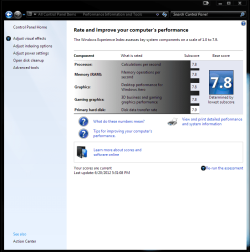
EDIT: I just refreshed WEI and I have gone from 7.8 to 7.5!!
 

Attachments

  • WEI  latest.PNG
    WEI latest.PNG
    49.3 KB · Views: 33
  • WEI  latest2 BS.PNG
    WEI latest2 BS.PNG
    80.8 KB · Views: 26

My Computer My Computer

Computer type
PC/Desktop
Computer Manufacturer/Model Number
Jeepmann/Custom Built
OS
Windows 7 Ultimate 64bit
CPU
Intel Core i7-2600K Sandy Bridge 3.4GHz (@[email protected])
Motherboard
Asus Maximus IV Extreme LGA 1155 Intel P67
Memory
G.SKILL Ripjaws X Series 16GB 1600Mhz (4 x 4GB) (Stock)
Graphics Card(s)
x2 EVGA GeForce GTX 760's w/ACXCoolers in SLI Surround
Sound Card
On-Board
Monitor(s) Displays
3x Acer 24" HDMI Widescreen LCD Monitor
Screen Resolution
3@ 1920x1080 (5760x1080 In Surround)
Hard Drives
Samsung 830 128gb ssd
Western Digital Caviar Black 640GB 7200 RPM
Western Digital Caviar Black 500GB 7200 RPM
Seagate 2tb 7200 RPM
PSU
COOLER MASTER Silent Pro 1000W
Case
COOLER MASTER HAF X Black
Cooling
CORSAIR Hydro H70
Keyboard
Logitech G510
Mouse
Zalman M300
Internet Speed
100mbps-ish Down & 5mbps-ish Up
Other Info
I installed the stock 140mm case fan outside of case then installed the H70+ 1 of its 120mm fans inside case. Used the 2nd 120mm from the H70 to go in the Gpu tunnel.
230mm Front,200mm side,200mm top,120mm Gpu tunnel,120mm&140mm on H70.
You don't seem to be having much luck with drivers lately Jeepman do ya! iirc you score dropped by 1 point last time and now a further 3 points!

The new drivers are working fine for me, videos just fine on youtube and yahoo.
 

My Computer My Computer

OS
Windows 7 Professional 64 bit
Hi Jeepman, I updated to them yesterday I have noticed scan lines flickering in WMC up to now. I did get a.2 boost in WEI.

I was using the beta version of that driver set and no problem whatsoever :huh: I may reinstall the beta version by the end of today!!

I guess that's the trade off for the Higher WEI Results. I'd rather it work than have Higher WEI results :mad:

Thanks for the feedback - Ant
 

My Computer My Computer

Computer type
PC/Desktop
Computer Manufacturer/Model Number
Self Build
OS
MS Windows 7 Professional 64-bit SP1
CPU
AMD FX(tm)-6100 Six-Core Processor Socket AM3+ (942)
Motherboard
ASUSTeK COMPUTER INC. SABERTOOTH 990FX (AM3r2)
Memory
8.00 GB Dual-Channel DDR3 @ 802MHz (11-11-11-36) 1.5Volts
Graphics Card(s)
NVIDIA GeForce GTX 560 Ti
Sound Card
Onboard Realtek HD
Monitor(s) Displays
shimian (1920x1080@60Hz)
Screen Resolution
1920*1080
Hard Drives
OCZ-AGIL ITY3 SATA Disk Device 120GB
PSU
Corsair TX 750
Case
Corsair
Cooling
WaterCooled
Keyboard
Microsoft Wired
Mouse
Logitech USB Optical TiltWheel Mouse
Internet Speed
Realtek PCIe GBE Family Controller 20MB*1MB
Antivirus
Avast
Browser
Firefox
Other Info
150GB Internal Hard Drive for Backing Up Important Files -
Hauppauge Nova-DT Dual DVB-T Tuner Device (+IR) -
USB PC Camera with Mic (SN9C105)
You don't seem to be having much luck with drivers lately Jeepman do ya! iirc you score dropped by 1 point last time and now a further 3 points!

The new drivers are working fine for me, videos just fine on youtube and yahoo.

Yup lately that is my luck..... You do recall right, it was 2 point last time but I got 1 back by switching my cards to both x16 slots instead of the x8/x16 I ran at first. Never got the other 1 back but things were running good so I let it go. (It's just a wei score)

Now this time I've dropped 3 points :confused: . So in all I've now dropped 4 points :sick: from 7.9 to 7.5.

I'm in the process of uninstalling, sweeping and re-installing the NEW Drivers to see if it was a glitch or not. So we will see in a few......


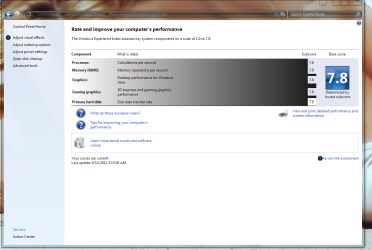
EDIT: So after the uninstall/sweep/install of the NEW Drivers...... My WEI is now back at 7.8 (see pic).


Now what I have figured out is.... Everything works fine on 1 monitor, everything works fine running SLI on 3 monitors(setting: "Activate All Displays") but if I run SLI "Nvidia Surround" I get all the video flickering? :confused:

I'm gonna let it go for now and see what happens:sick: (Tired of messing with it)

Anyone one else run Nvidia Surround?
Any ideas?
 

Attachments

  • WEI  latest.PNG
    WEI latest.PNG
    108.4 KB · Views: 24
Last edited:

My Computer My Computer

Computer type
PC/Desktop
Computer Manufacturer/Model Number
Jeepmann/Custom Built
OS
Windows 7 Ultimate 64bit
CPU
Intel Core i7-2600K Sandy Bridge 3.4GHz (@[email protected])
Motherboard
Asus Maximus IV Extreme LGA 1155 Intel P67
Memory
G.SKILL Ripjaws X Series 16GB 1600Mhz (4 x 4GB) (Stock)
Graphics Card(s)
x2 EVGA GeForce GTX 760's w/ACXCoolers in SLI Surround
Sound Card
On-Board
Monitor(s) Displays
3x Acer 24" HDMI Widescreen LCD Monitor
Screen Resolution
3@ 1920x1080 (5760x1080 In Surround)
Hard Drives
Samsung 830 128gb ssd
Western Digital Caviar Black 640GB 7200 RPM
Western Digital Caviar Black 500GB 7200 RPM
Seagate 2tb 7200 RPM
PSU
COOLER MASTER Silent Pro 1000W
Case
COOLER MASTER HAF X Black
Cooling
CORSAIR Hydro H70
Keyboard
Logitech G510
Mouse
Zalman M300
Internet Speed
100mbps-ish Down & 5mbps-ish Up
Other Info
I installed the stock 140mm case fan outside of case then installed the H70+ 1 of its 120mm fans inside case. Used the 2nd 120mm from the H70 to go in the Gpu tunnel.
230mm Front,200mm side,200mm top,120mm Gpu tunnel,120mm&140mm on H70.
I'm still on 285.62 driver's with my GTX 560 as when i tried the 301's in the past they caused my graphics card to reach temps of 100 degrees C when gaming. Instantly removed them and went back to these 285's and not had a single problem since.

I know it wasn't a fan profile problem because the first thing i always do is check that my EVGA Precision software is up to date and working correctly. It just seemed strange that even though the right profile was running for my card it reached such temps. Now with these 285 driver's i'm using i never see temps go over 60 degrees no matter what i do.

I'll stick to what i know works for me and my hardware and even if the newer one's did supply a little bit of an FPS boost in some games i can't say i'm all that fussed :)
 

My Computer My Computer

Computer type
PC/Desktop
Computer Manufacturer/Model Number
Self Built
OS
Windows 10 Pro x64
CPU
Intel i7 2600K @ 4.4GHz
Motherboard
Asus P8Z77-V LX2
Memory
16GB Corsair Vengeance Pro DDR3 1600 MHz
Graphics Card(s)
ZOTAC GTX 1070 AMP Edition
Sound Card
Asus Xonar D2
Monitor(s) Displays
Viewsonic 24" VX2439WM LCD/LG 22" W2261VP LCD
Screen Resolution
1920x1080 DVI 1080p 16:9 on both screens
Hard Drives
1x SanDisk Extreme 120GB SSD SATA III (OS), 1x Samsung EVO 250GB SSD SATA III (Games), 1x Seagate Barracuda 1TB SATA III (Storage)
PSU
Corsair TX850W
Case
Corsair Carbide 200R
Cooling
3x 120mm Fans (Front, Bottom and Rear)
Keyboard
Roccat Isku
Mouse
Corsair M65 RGB
Internet Speed
Virgin Media 100Mb
Antivirus
Windows Defender
Browser
Firefox
Other Info
Logitech Z640 5.1 Speakers. Kingston HyperX Cloud Headset. M-Audio Oxygen 25/88 Keystation ES Midi Keyboard's
I gave up on the NEW 306.23 Drivers...:cry: and just went back to my trusted 301.42 Drivers... Oh well maybe next time...:rolleyes:
 

My Computer My Computer

Computer type
PC/Desktop
Computer Manufacturer/Model Number
Jeepmann/Custom Built
OS
Windows 7 Ultimate 64bit
CPU
Intel Core i7-2600K Sandy Bridge 3.4GHz (@[email protected])
Motherboard
Asus Maximus IV Extreme LGA 1155 Intel P67
Memory
G.SKILL Ripjaws X Series 16GB 1600Mhz (4 x 4GB) (Stock)
Graphics Card(s)
x2 EVGA GeForce GTX 760's w/ACXCoolers in SLI Surround
Sound Card
On-Board
Monitor(s) Displays
3x Acer 24" HDMI Widescreen LCD Monitor
Screen Resolution
3@ 1920x1080 (5760x1080 In Surround)
Hard Drives
Samsung 830 128gb ssd
Western Digital Caviar Black 640GB 7200 RPM
Western Digital Caviar Black 500GB 7200 RPM
Seagate 2tb 7200 RPM
PSU
COOLER MASTER Silent Pro 1000W
Case
COOLER MASTER HAF X Black
Cooling
CORSAIR Hydro H70
Keyboard
Logitech G510
Mouse
Zalman M300
Internet Speed
100mbps-ish Down & 5mbps-ish Up
Other Info
I installed the stock 140mm case fan outside of case then installed the H70+ 1 of its 120mm fans inside case. Used the 2nd 120mm from the H70 to go in the Gpu tunnel.
230mm Front,200mm side,200mm top,120mm Gpu tunnel,120mm&140mm on H70.
I'm still on 285.62 driver's

Same here :). No issues at all with this version so sticking with it.

Everytime I upgrade theres always something not right. The last time it would freeze a second and the screen go black everytime the monitor came out of sleep.


But, haven't tried the newest yet, and probably won't. ATM, theres no need to.
 

My Computer My Computer

Computer Manufacturer/Model Number
Custom (Self Build)
OS
Windows 7 Home Premium 64bit
CPU
Intel Core i7 2700k
Motherboard
eVGA P67 SLI
Memory
8GB Mushkin Redline Ridgebacks @1866
Graphics Card(s)
EVGA GTX570 SC
Sound Card
XiFi Titanium HD
Monitor(s) Displays
LG W2453V
Screen Resolution
1920x1080
Hard Drives
Intel 320 80GB -- Intel X25-V 40GB --WD Black 1TB x2 -- WD Blue 640GB
PSU
Seasonic x750
Case
Corsair 600T SE White
Cooling
eVGA Superclocked CPU Cooler
Keyboard
Saitek Cyborg
Antivirus
Kaspersky
Browser
IE
Other Info
LG BD/DVD
Could anyone check if video decoding acceleration is still working on Flash videos on Nvidia graphics? I have an Optimus sistem, and it works on Intel but falls back to software on Nvidia. It's been like that the last couple of Flash versions.

Btw., 301.42 remains the best driver for me.
 

My Computer My Computer

Computer Manufacturer/Model Number
Asus N73SV
OS
Windows 7 x64 Ultimate SP1
CPU
Core i7-2630QM
Motherboard
Intel HM 65
Memory
6 GB DDR3
Graphics Card(s)
Nvidia GT 540M / Intel HD 3000 - Optimus switching
Sound Card
HD Audio (Intel Azalia/Realtek) ALC269
Monitor(s) Displays
LED flat panel
Screen Resolution
1920 x 1080
Hard Drives
2x Seagate Momentus 640 GB - 1,28 TB in total
Internet Speed
4 MB/256 kbps
Other Info
External HDs

WD Elements 1,5 TB
WD MyBook 500 GB
Another driver; 306.97, another ridiculous drop in WEI for me, from 6,7 to 5,1 in gaming graphics. I didn't even bother to test it in games. Back to 301.42.
 

My Computer My Computer

Computer Manufacturer/Model Number
Asus N73SV
OS
Windows 7 x64 Ultimate SP1
CPU
Core i7-2630QM
Motherboard
Intel HM 65
Memory
6 GB DDR3
Graphics Card(s)
Nvidia GT 540M / Intel HD 3000 - Optimus switching
Sound Card
HD Audio (Intel Azalia/Realtek) ALC269
Monitor(s) Displays
LED flat panel
Screen Resolution
1920 x 1080
Hard Drives
2x Seagate Momentus 640 GB - 1,28 TB in total
Internet Speed
4 MB/256 kbps
Other Info
External HDs

WD Elements 1,5 TB
WD MyBook 500 GB
Another driver; 306.97, another ridiculous drop in WEI for me, from 6,7 to 5,1 in gaming graphics. I didn't even bother to test it in games. Back to 301.42.


Thanks for the link, my WEI stayed the same, will test on some games later.
 

My Computer My Computer

OS
Windows 7 Professional 64 bit
Another driver; 306.97, another ridiculous drop in WEI for me, from 6,7 to 5,1 in gaming graphics. I didn't even bother to test it in games. Back to 301.42.


Thanks for the link, my WEI stayed the same, will test on some games later.

Did you clear the old results?

The reason why it falled on its face on my system is because it failed the DX10 batch test completely, result being 0 fps. Other than that, other tests are good. Can anyone confirm that? Maybe it was an one-off glitch... but I would prefer not to reinstall drivers again before someone else checked this.

I have an Optimus system btw.
 
Last edited:

My Computer My Computer

Computer Manufacturer/Model Number
Asus N73SV
OS
Windows 7 x64 Ultimate SP1
CPU
Core i7-2630QM
Motherboard
Intel HM 65
Memory
6 GB DDR3
Graphics Card(s)
Nvidia GT 540M / Intel HD 3000 - Optimus switching
Sound Card
HD Audio (Intel Azalia/Realtek) ALC269
Monitor(s) Displays
LED flat panel
Screen Resolution
1920 x 1080
Hard Drives
2x Seagate Momentus 640 GB - 1,28 TB in total
Internet Speed
4 MB/256 kbps
Other Info
External HDs

WD Elements 1,5 TB
WD MyBook 500 GB
No, in fact I didn't even re run the whole assessment, I just refreshed the score and it just re ran the graphics tests.
 

My Computer My Computer

OS
Windows 7 Professional 64 bit
Another driver; 306.97, another ridiculous drop in WEI for me, from 6,7 to 5,1 in gaming graphics. I didn't even bother to test it in games. Back to 301.42.

Thank you Tomislav. First post updated. :)
 

My Computer My Computer

Computer type
PC/Desktop
Computer Manufacturer/Model Number
Self built custom
OS
64-bit Windows 11 Pro for Workstations
CPU
Intel i7-8700K OC'd to 5 GHz
Motherboard
ASUS ROG Maximus XI Formula Z390
Memory
64 GB (4x16GB) G.SKILL TridentZ RGB DDR4 3600 MHz
Graphics Card(s)
ASUS ROG-STRIX-GTX1080TI-O11G-GAMING
Sound Card
Integrated
Monitor(s) Displays
2 x Samsung Odyssey G7 27"
Screen Resolution
2560x1440
Hard Drives
1TB Samsung 990 PRO M.2,
4TB Samsung 990 PRO PRO M.2,
TerraMaster F8 SSD Plus NAS
PSU
Seasonic Prime Titanium 850W
Case
Thermaltake Core P3
Cooling
Corsair Hydro H115i
Keyboard
Logitech wireless K800
Mouse
Logitech MX Master 4
Internet Speed
2 Gb/s Download and 100 Mb/s Upload
Antivirus
Malwarebyte Anti-Malware Premium
Browser
Google Chrome
Other Info
Logitech Z625 speaker system,
Logitech BRIO 4K Pro webcam,
HP Color LaserJet Pro MFP M477fdn,
APC SMART-UPS RT 1000 XL - SURT1000XLI,
Galaxy S23 Plus phone
Hmm... Weird, I found the driver on geforce.com but not on nvidia.com

Anyway, I'll be testing it before going to class... Let's see what's going on with this release :)
 

My Computer My Computer

Computer type
PC/Desktop
OS
Windows
Hmm... Weird, I found the driver on geforce.com but not on nvidia.com

Anyway, I'll be testing it before going to class... Let's see what's going on with this release :)

I guess they haven't fully updated the download links there yet. I had to look under 300 series or less for 306.97 to show.
 

My Computer My Computer

Computer type
PC/Desktop
Computer Manufacturer/Model Number
Self built custom
OS
64-bit Windows 11 Pro for Workstations
CPU
Intel i7-8700K OC'd to 5 GHz
Motherboard
ASUS ROG Maximus XI Formula Z390
Memory
64 GB (4x16GB) G.SKILL TridentZ RGB DDR4 3600 MHz
Graphics Card(s)
ASUS ROG-STRIX-GTX1080TI-O11G-GAMING
Sound Card
Integrated
Monitor(s) Displays
2 x Samsung Odyssey G7 27"
Screen Resolution
2560x1440
Hard Drives
1TB Samsung 990 PRO M.2,
4TB Samsung 990 PRO PRO M.2,
TerraMaster F8 SSD Plus NAS
PSU
Seasonic Prime Titanium 850W
Case
Thermaltake Core P3
Cooling
Corsair Hydro H115i
Keyboard
Logitech wireless K800
Mouse
Logitech MX Master 4
Internet Speed
2 Gb/s Download and 100 Mb/s Upload
Antivirus
Malwarebyte Anti-Malware Premium
Browser
Google Chrome
Other Info
Logitech Z625 speaker system,
Logitech BRIO 4K Pro webcam,
HP Color LaserJet Pro MFP M477fdn,
APC SMART-UPS RT 1000 XL - SURT1000XLI,
Galaxy S23 Plus phone
Installed the latest driver 306.97 on my wife's computer. She has a Giga Byte GT450 and dual boots between 7 64 bit and XP. 7 was easy no issues at all. XP update was a nightmare. Had to fight with it for 3 hours to get the driver to install correctly. The install software would quit. I had to uninstall the driver from the control panel, reboot then stop the auto install of the driver by the found new hardware wizard. Boot to safe mode, use Drive Sweeper 2.1 to clean away everything and finally got the driver installed correctly. Just the basic driver, the updater and other software installer still quit and she does not use it so I quit fooling with it too. It never used to be this hard. If you are still on XP (my wife loves it...don't ask) and you are not a serious gamer, leave well alone.

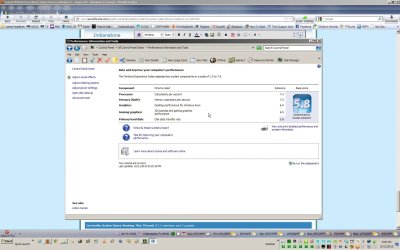
Forgot to mention on my machine with a GT9800 the windows score is 5.8 and the install was fine on the 64 bit versions of 7 but hung on the 32 bit but seemed to have installed everything.
 

Attachments

  • ScreenShot001.jpg
    ScreenShot001.jpg
    150.1 KB · Views: 18
Last edited:

My Computer My Computer

Computer type
PC/Desktop
Computer Manufacturer/Model Number
Bluethunder II
OS
Windows 7 x64 Ultimate and numerous virtual machines
CPU
AMD FX-8350 Vishera 32nm Technology @ 4.2 GHz default
Motherboard
ASUSTeK COMPUTER INC. SABERTOOTH 990FX R2.0 (Socket 942)
Memory
G Skill 32.0GB Dual-Channel DDR3 @ 1204MHz (11-13-13-31)
Graphics Card(s)
EVGA GeForce GTX 960 4GB Super SC ACX 2.0+ with Back Plate
Sound Card
Creative X-Fi Titanium HD Audiophile PCIe
Monitor(s) Displays
LG L227WTG x 3
Screen Resolution
1680 x 1050 16:10
Hard Drives
238GB Samsung850 PRO SATA Disk Device (SSD)
1863GB Seagate ST2000DM 001-1CH164 (SATA)
1397GB Seagate ST1500DL 003-9VT16L(SATA)
466GB Western Digital WDC WD50 03AZEX-00K1GA0 (SATA) x 2
932GB Seagate ST310005 28AS SATA Disk Device (SATA)
PSU
Enermax Revolution87+ 1000 Watts Gold Certified Power Supply
Case
Rocketfish Full Tower
Cooling
Cooler Master Hyper 212 EVO Push Pull 120mm Fans
Keyboard
Logitech K740
Mouse
Logitech G100S Laser LED + Logitech Gamepad F310
Internet Speed
500 mbs down and 30mbs up
Antivirus
Malwarebytes Pro & Avast and MSE on certain Virtual Machines
Browser
Firefox (Main) Chrome, Internet Explorer (Back Up)
Other Info
Logitech X 230 2.1 Stereo System and 5.1 Yamaha RX V2090
B&W DM6 Monitor Speakers + Center and Surround Speakers
Using Mouse Without Borders (Google it)
Back
Top