System is creating a non-existing drive after startup

tomon

New member
Local time
8:11 PM
Messages
7
Location
The Netherlands
Hello,
I am new to this forum and I hope someone can help me with the following:

A week ago I deleted some files and folders on an old external hard disk, restored one of the folders from the recycle bin as I was not sure about it, and then deleted it once again. Maybe this caused the behavior of the system after that time.


When I start my computer, 3 out of 4 times after finishing the start, there is an additional drive G (or an additional drive H if my external hard disk is connected) and the system is in a loop trying to autorun this not existing drive. In this situation it is almost impossible to do anything on the computer as the autorun flashes over the screen and takes a lot of processing power. Also the non-existing drive is appearing and disappearing like crazy in the display


Computer
> External Disk (G) <------- appears and disappears like crazy

> Local Disk (C)
> RECOVERY (D)
> HP_TOOLS (E)
> DVD RW Drive (F)
>

This is happening more and more often, I am afraid at some time it will be permanent at the start. Until now, it does not happen after I shut down the system with the power button, so while booting it says: windows was not shut down properly, would you like to start normally? - and I respond with Yes.

A final remark: when everything is working fine, there are no problems with connecting and disconnecting of external hard drives, so after a good start, everything stays fine.

Thanks in advance,
Tomon.
 

My Computer My Computer

At a glance

Windows 7 Home Premium 64bitIntel I54 GBNvidia Gforce G105M
Computer Manufacturer/Model Number
HP Pavilion DV7 Notebook PC
OS
Windows 7 Home Premium 64bit
CPU
Intel I5
Motherboard
M 430 2.27GHZ
Memory
4 GB
Graphics Card(s)
Nvidia Gforce G105M
Monitor(s) Displays
Pnp display
Hello tomon and welcome to Seven Forums.

If I'm understanding the problem correctly, sometimes when you start your computer a "phantom" G: drive will show up. I'm guessing that you're seeing this drive because you're either getting a popup autorun dialog box, or you've clicked the Start buton > Computer and it shows up there.

Does the drive also appear in Disk Managment? If yes, is it labeled as active, logical, primary, or something else? If you're not sure you could post a screenshot of your Disk Managment.

How To Access Disk Management in Windows 7

Since you've apparently used the power button to shut down your computer, it's possible that you have damaged or corrupt system files. Run a system file checker scan from an elevated command prompt (option two.) If problems are found, run the scan 3 times and reboot the computer in between each scan.

http://www.sevenforums.com/tutorials/1538-sfc-scannow-command-system-file-checker.html
 

My Computer My Computer

At a glance

Win 7 Pro 64-bitIntel i5 2.4 Ghz8GB DDR3Intel HD 3000
Computer type
Laptop
Computer Manufacturer/Model Number
Sony Vaio VPCEB47GM Laptop
OS
Win 7 Pro 64-bit
CPU
Intel i5 2.4 Ghz
Memory
8GB DDR3
Graphics Card(s)
Intel HD 3000
Sound Card
IDT High Definition
Monitor(s) Displays
15.6 WGXA Anti-Glare LED
Screen Resolution
1280x800
Hard Drives
640Gb 7200rpm
Antivirus
MSE
Browser
Opera (primary) with IE9 backup
Hello Marsmimar,
thanks for your reaction.
After the startup I see that the error is occurring because of some very fast flashing of probably autorun pop-ups. Then I get steady autorun pop-ups, I can close them but they keep reappearing very fast. Then I check the Start-> Computer and there I see a nervous flashing of the G drive appearing and disappearing.

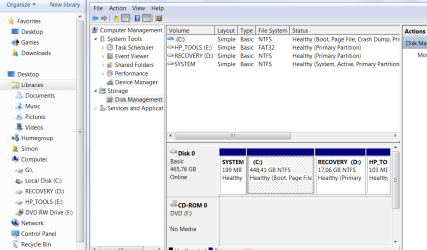
I ran the Disk Management, see picture, but it does not appear there, you can see the G drive at the left. When I right-click on it, you get what you see in the second picture.

I must say that for the first time, after running Disk Management, the G drive 'relaxed', no more autoruns, so at the moment it is not causing any problems.

I also did the file checker scan several times, booted twice, but it did not find any integrity violations.
 

Attachments

  • Capture.PNG
    Capture.PNG
    37.3 KB · Views: 27
  • Capture1.PNG
    Capture1.PNG
    31.4 KB · Views: 19

My Computer My Computer

At a glance

Windows 7 Home Premium 64bitIntel I54 GBNvidia Gforce G105M
Computer Manufacturer/Model Number
HP Pavilion DV7 Notebook PC
OS
Windows 7 Home Premium 64bit
CPU
Intel I5
Motherboard
M 430 2.27GHZ
Memory
4 GB
Graphics Card(s)
Nvidia Gforce G105M
Monitor(s) Displays
Pnp display
That's a good sign that SFC did not find any integrity violations. Your system files should be OK. I'd like to ask you to do something. Please post another screenshot of your Disk Management. But this time, expand it so all of the partitions on Disk 0 are visible. (You accidentally cut it off at the "HP_TO" partition.) We need to see if the G: drive is another partition.

dskmsgt.JPG

In the screenshot above, put your cursor on the vertical line where the red arrow is. The cursor should change to a double arrow and you can drag the screen to the right to show the rest of the partitions on Disk 0.
 

My Computer My Computer

At a glance

Win 7 Pro 64-bitIntel i5 2.4 Ghz8GB DDR3Intel HD 3000
Computer type
Laptop
Computer Manufacturer/Model Number
Sony Vaio VPCEB47GM Laptop
OS
Win 7 Pro 64-bit
CPU
Intel i5 2.4 Ghz
Memory
8GB DDR3
Graphics Card(s)
Intel HD 3000
Sound Card
IDT High Definition
Monitor(s) Displays
15.6 WGXA Anti-Glare LED
Screen Resolution
1280x800
Hard Drives
640Gb 7200rpm
Antivirus
MSE
Browser
Opera (primary) with IE9 backup
I have noticed that your G drive has a funny flag on it (in the left pane of your second picture). Unfortunately the posted picture is too blurry to make it out. Maybe you can have a closer look what that is.
 

Attachments

  • 2012-10-13_1722.png
    2012-10-13_1722.png
    12.7 KB · Views: 2

My Computer My Computer

At a glance

Vista, Windows7, Mint Mate, Zorin, Windows 8from 1.6GHz Duo to i7
Computer Manufacturer/Model Number
HP, Dell, Gateway, Toshiba - 4 laptops and 2 desktops
OS
Vista, Windows7, Mint Mate, Zorin, Windows 8
CPU
from 1.6GHz Duo to i7
Monitor(s) Displays
2x HP w2207
Hard Drives
5x HDD, 7x SSD, 12x Externals
Keyboard
with trackball - no mices
Mouse
Trackball mice
Internet Speed
DSL 6000
WHS: it is a small blue question mark.

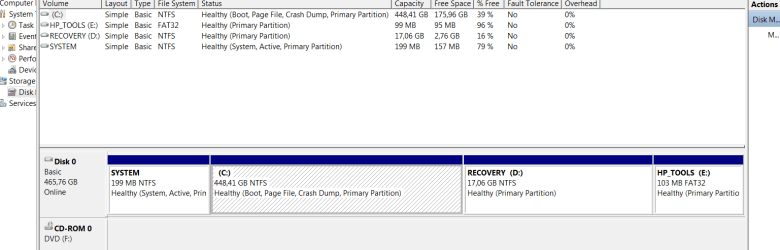
Marsmimar: I made a new screenshot, although it is not the whole screen,
there is nothing more to see than this. I cannot expand the text on the E drive
further, but I assume it only says 'Primary Portion'
 

Attachments

  • Capture2.PNG
    Capture2.PNG
    19.1 KB · Views: 17

My Computer My Computer

At a glance

Windows 7 Home Premium 64bitIntel I54 GBNvidia Gforce G105M
Computer Manufacturer/Model Number
HP Pavilion DV7 Notebook PC
OS
Windows 7 Home Premium 64bit
CPU
Intel I5
Motherboard
M 430 2.27GHZ
Memory
4 GB
Graphics Card(s)
Nvidia Gforce G105M
Monitor(s) Displays
Pnp display
Hmm, next time it appears, check in Device Manager > Disk Drives whether it appears. But first enable "Show hidden devices" under the View tab.
 

My Computer My Computer

At a glance

Vista, Windows7, Mint Mate, Zorin, Windows 8from 1.6GHz Duo to i7
Computer Manufacturer/Model Number
HP, Dell, Gateway, Toshiba - 4 laptops and 2 desktops
OS
Vista, Windows7, Mint Mate, Zorin, Windows 8
CPU
from 1.6GHz Duo to i7
Monitor(s) Displays
2x HP w2207
Hard Drives
5x HDD, 7x SSD, 12x Externals
Keyboard
with trackball - no mices
Mouse
Trackball mice
Internet Speed
DSL 6000
Hmm, next time it appears, check in Device Manager > Disk Drives whether it appears. But first enable "Show hidden devices" under the View tab.

Wolfgang, do you think this mystery G: drive might be a card reader?
 

My Computer My Computer

At a glance

Win 7 Pro 64-bitIntel i5 2.4 Ghz8GB DDR3Intel HD 3000
Computer type
Laptop
Computer Manufacturer/Model Number
Sony Vaio VPCEB47GM Laptop
OS
Win 7 Pro 64-bit
CPU
Intel i5 2.4 Ghz
Memory
8GB DDR3
Graphics Card(s)
Intel HD 3000
Sound Card
IDT High Definition
Monitor(s) Displays
15.6 WGXA Anti-Glare LED
Screen Resolution
1280x800
Hard Drives
640Gb 7200rpm
Antivirus
MSE
Browser
Opera (primary) with IE9 backup
Hello Whs,
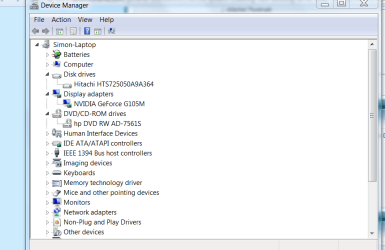
herewith the Disk Drives of the Device Manager, Show hidden devices is enabled.

Marsmimar,
I don't have a cardreader.
 

Attachments

  • Capture3.PNG
    Capture3.PNG
    26.5 KB · Views: 15

My Computer My Computer

At a glance

Windows 7 Home Premium 64bitIntel I54 GBNvidia Gforce G105M
Computer Manufacturer/Model Number
HP Pavilion DV7 Notebook PC
OS
Windows 7 Home Premium 64bit
CPU
Intel I5
Motherboard
M 430 2.27GHZ
Memory
4 GB
Graphics Card(s)
Nvidia Gforce G105M
Monitor(s) Displays
Pnp display

My Computer My Computer

At a glance

Windows 7 Pro x64 SP1Intel Core I716 GigsNVIDIA GeForce GTX 670M
Computer type
Laptop
Computer Manufacturer/Model Number
Toshiba Laptop Qosimo X870
OS
Windows 7 Pro x64 SP1
CPU
Intel Core I7
Motherboard
Toshiba Qosmio
Memory
16 Gigs
Graphics Card(s)
NVIDIA GeForce GTX 670M
Monitor(s) Displays
17.7" laptop
Screen Resolution
1600 x 900
Hard Drives
256 Gig SanDisk SSD for C
256 Gig Intel SSD for D
Internet Speed
50/25 FIOS
Antivirus
Vipre (all you can eat for 10 machines)
Browser
IE and FF
Other Info
I have dos 6.22, wfwg 3.11, win98, 2000 and xp VHD's available for testing. MS's Virtual PC works great.
Hi Rich,
could it be possible that the Card Reader Port produces a short circuit randomly while booting? So that it is a hardware problem ?
 

My Computer My Computer

At a glance

Windows 7 Home Premium 64bitIntel I54 GBNvidia Gforce G105M
Computer Manufacturer/Model Number
HP Pavilion DV7 Notebook PC
OS
Windows 7 Home Premium 64bit
CPU
Intel I5
Motherboard
M 430 2.27GHZ
Memory
4 GB
Graphics Card(s)
Nvidia Gforce G105M
Monitor(s) Displays
Pnp display
Tomon, that is a possibility but most computers with card readers sometimes show as a drive letter. Are you sure you don't have a card in the slot..

Rich
 

My Computer My Computer

At a glance

Windows 7 Pro x64 SP1Intel Core I716 GigsNVIDIA GeForce GTX 670M
Computer type
Laptop
Computer Manufacturer/Model Number
Toshiba Laptop Qosimo X870
OS
Windows 7 Pro x64 SP1
CPU
Intel Core I7
Motherboard
Toshiba Qosmio
Memory
16 Gigs
Graphics Card(s)
NVIDIA GeForce GTX 670M
Monitor(s) Displays
17.7" laptop
Screen Resolution
1600 x 900
Hard Drives
256 Gig SanDisk SSD for C
256 Gig Intel SSD for D
Internet Speed
50/25 FIOS
Antivirus
Vipre (all you can eat for 10 machines)
Browser
IE and FF
Other Info
I have dos 6.22, wfwg 3.11, win98, 2000 and xp VHD's available for testing. MS's Virtual PC works great.
If you have a printer with a built in card reader, it will show up as a drive and use the next available letter.

Also some software will make a VHD, it will show up as a mystery drive. A while ago, I remember reading about someone with your problem, and the VHD was created by some feature in MS Office. I could be wrong about Office, but I'm thinking I read it on this forum.
 

My Computer My Computer

At a glance

Windows 7 Home Premium 64biti3-5308 Gbonboard
Computer Manufacturer/Model Number
HP p6370t
OS
Windows 7 Home Premium 64bit
CPU
i3-530
Motherboard
MSI - IONA
Memory
8 Gb
Graphics Card(s)
onboard
Sound Card
onboard
Monitor(s) Displays
Dell ST2400
Screen Resolution
1920x1080
Hard Drives
Intell 520 SSD 120Gb, WD6400AAKS, 640Gb & WD USB MyBook 1Tb
Internet Speed
1.5 Mmbps, Hughes Satellite
Rich, Bumpkin,
I am quite sure, the problem started 11 days ago, since then I have only connected external hard disks to the laptop, no printer, no card. I will try to get a card and see what it will do.
And I use Openoffice, no MS Office.
I'll keep you informed,
Simon.
 

My Computer My Computer

At a glance

Windows 7 Home Premium 64bitIntel I54 GBNvidia Gforce G105M
Computer Manufacturer/Model Number
HP Pavilion DV7 Notebook PC
OS
Windows 7 Home Premium 64bit
CPU
Intel I5
Motherboard
M 430 2.27GHZ
Memory
4 GB
Graphics Card(s)
Nvidia Gforce G105M
Monitor(s) Displays
Pnp display
Well, a week had passed, I entered a card in the card reader, but the result was the same, randomly the extra drive appeared, but the most important thing is, the extra drive has 'come to rest'.
I mean, no autoruns anymore, and if the drive appears in computer> after the startup, it is gone when I close computer> and open it a second time. And even the appearance of the extra drive is getting rarer by the days.

Thank you all for the support and the time you took to help me!
 

My Computer My Computer

At a glance

Windows 7 Home Premium 64bitIntel I54 GBNvidia Gforce G105M
Computer Manufacturer/Model Number
HP Pavilion DV7 Notebook PC
OS
Windows 7 Home Premium 64bit
CPU
Intel I5
Motherboard
M 430 2.27GHZ
Memory
4 GB
Graphics Card(s)
Nvidia Gforce G105M
Monitor(s) Displays
Pnp display
Back
Top