dynamic disk

chrisjb517

New member
Local time
5:01 AM
Messages
4
I started a new partition and realized i dont need it now i just want to delete the partition, what is the best course of action here..:mad:
 

My Computer My Computer

At a glance

windows 7 home premium 64bit
OS
windows 7 home premium 64bit
Is the problem that you converted your HD to Dynamic which is only meant to be used to span a partition across multiple HD's? Apparently you didn't see the warning message.

If so the solution to solve this non-destructively is to boot free Partition Wizard CD version 4.2 which is the last one which offers this as a free feature: pw422.zip ISO - Windows Live.

Download the ISO, rightclick to burn it to CD using Windows Image Burner, or use ImgBurn.

Boot CD. You will need to delete the extra partition(s) you created which tipped it to convert to Dynamic before it will convert back to Basic.

Then follow these video steps: How to convert dynamic disk to basic disk with Partition Wizard?

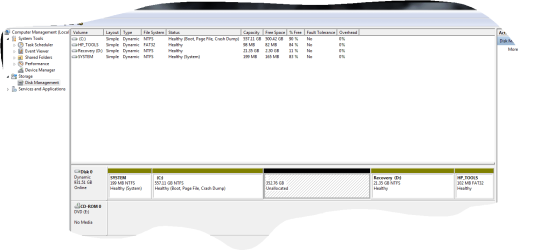
After conversion if you want help adding a partition post back a screenshot of your maximized Disk Mgmt drive map with listings, using the Snipping Tool in Start Menu, attached using paper clip in Reply Box.

If you're not sure whether you did this then post back the screenshot now.
 
it was already dynamic..just stated that fact in case it made difference. i just added a partition which isn't needed. want to remove.
 

My Computer My Computer

At a glance

windows 7 home premium 64bit
OS
windows 7 home premium 64bit
Why do you have a Dynamic disk? Did you read what I wrote? You should not have one unless you have a partition spanning multiple Hard Drives. I would follow the steps to convert it now.
 
it is a brand new computer and has a couple drives setup, one for backup, i want to keep it how it is just delete the partition
 

Attachments

  • Capture.PNG
    Capture.PNG
    22.3 KB · Views: 10

My Computer My Computer

At a glance

windows 7 home premium 64bit
OS
windows 7 home premium 64bit
it is a brand new computer and has a couple drives setup, one for backup, i want to keep it how it is just delete the partition

You can't keep it Dynamic and expect it to operate properly. Use Partition Wizard as was suggested above to convert the disks back to basic.
 

My Computer My Computer

At a glance

Windows 7 Home Premium 32-Bit - Build 7600 SP1Intel Core i3-2120 3.30GhzKingston 4 GB DDR3 1333 mhzAMD Radeon HD6670
Computer type
PC/Desktop
Computer Manufacturer/Model Number
Custom Build
OS
Windows 7 Home Premium 32-Bit - Build 7600 SP1
CPU
Intel Core i3-2120 3.30Ghz
Motherboard
Asus P8Z68-V LX Intel Z68 Socket H2 ATX
Memory
Kingston 4 GB DDR3 1333 mhz
Graphics Card(s)
AMD Radeon HD6670
Sound Card
Sound Blaster Audigy SE 24-Bit
Monitor(s) Displays
Asus VE228
Screen Resolution
1440 X 900
Hard Drives
OCZ Vertex 3 120 GB Sata 3 SSD ==
Kingston SH103/S3 120 G Hyper X 120 GB SSD ==
Western Digital 500 GB Caviar Green 7200 RPM ==
PSU
Corsair CX600M == 600 Watt
Case
NZXT Apollo - Silver with Clear Side Panel
Cooling
Three 120 mm Fans
Keyboard
Microsoft Natural 4000
Mouse
Microsoft Custom Optical 3000
Internet Speed
AT&T Fiber Optic Wireless Network
Antivirus
Microsoft Security Essentials
Browser
Chrome
Other Info
120 mm Blue LED Fan -- Three Blue LED Lazer Light Sticks
ok

will do that and see what happens thanx guys
 

My Computer My Computer

At a glance

windows 7 home premium 64bit
OS
windows 7 home premium 64bit
With HP to keep Win7, Recovery and HP Tools partitions bootable you should leave them Primary, but convert C to Logical so you can add as many adjacent Logicals as you want.

So after converting the disk to Basic using the steps I gave you in my first post, from Partition Wizard CD click on C to Modify>Set to Logical, click OK. Then right click on the Unallocated Space to Create a new Logical partition, OK, Apply both steps.

How to set partition as Primary or Logical.
Partition Wizard Create Partition Video Help
 
Back
Top