PC Keeps on Hanging after "Overclock Fail" message in BIOS

crusher25

New member
Member
Local time
10:11 AM
Messages
76
Location
New York
I had my RAM RMA-ed recently because the first one kept my PC hanging and restarting. After I got the new RAM, there were no restarts, hangs or BSODs for 3 days. I even left my PC downloading overnight to check and it was fine. It did not hang or restart. Then yesterday, while I was browsing the web, my PC hung. Then after I restarted it, a message in BIOS displayed saying "Overclock Failed" so I pressed F2 to load the defaults. Ever since that happened, my PC kept on hanging for unknown reasons. I don't know why. I already updated my BIOS because I searched in Google and found out that it was an issue with ASUS Motherboards wherein even though you haven't overclocked your PC, a message like that appears. But my PC is still hanging and I don't know now what the problem is. :( Sometimes it will work for a few hours then it will hang. This never happened during the past 3 days when I got the new RAM. It happened after that "overclock fail" incident.

Processor: Intel Core i7 860 @ 2.80 Ghz
Motherboard: Asus P7P55D LE
Video Card: Palit GeForce GTX 550 Ti
RAM: 2 x 4 GB G.Skill RipjawsX DDR3 1600Mhz (F3-12800CL9D) (But I set it to 1333Mhz because I thought it won't hang if I use that)
Power Supply: FSP Aurum 650W
Hard Drive: 1 x 1 TB Seagate

Note:

I never tried overclocking my PC before this happened because I don't know how to overlock.
I updated my BIOS from the ASUS Website.
I already tried removing the CMOS battery and putting it back.
I don't have any minidumps because a BSOD did not happen.
 
Last edited:

My Computer My Computer

Computer type
PC/Desktop
OS
Windows 10 Pro 64-bit
CPU
AMD Ryzen 5 1600
Motherboard
ASRock AB350 Pro4
Memory
2 x 8 GB G.Skill Ripjaws V DDR4 3000Mhz (F4-30000C15D)
Graphics Card(s)
EVGA GeForce GTX 1060 SSC GAMING ACX 3.0 6GB
Monitor(s) Displays
ViewSonic XG3202-C
Screen Resolution
1920x1080 (144hz)
Hard Drives
Main: Crucial MX200 500 GB
Sub: Seagate Barracuda 1 TB
PSU
Corsair TX650M
Case
NZXT S340 Elite (Matte Black/Red)
Keyboard
Razer BlackWidow Ultimate 2016
Mouse
Razer DeathAdder Chroma
Internet Speed
1000 Mbps
Antivirus
Norton Internet Security
Browser
Google Chrome, Mozilla Firefox
Have you runned memtest86 to see that the rams are working? or maybe its some of the cables, and what settings in the bios are you running the rams in? also checked what slots your using on the motherboard, im using the P7P55D and my computer wont even boot if I use the 2nd and 4th ram slot
 

My Computer My Computer

Computer type
PC/Desktop
OS
Windows 7 Home Premium x64
CPU
Intel Core i7 860 (Lynnfield)
Motherboard
Asus P7P55D (LGA1156)
Memory
Corsair Vengeance 9,9,9,24 1600Mhz 1.50v 2x4G
Graphics Card(s)
Asus nVidia 560 GTX
Sound Card
Asus Xonar DG
Monitor(s) Displays
Acer P235H & NEC E201W
Screen Resolution
1920x1080 & 900x1600
Hard Drives
2
PSU
Corsair 650 Modular
Case
Corsair 800D
Cooling
Corsair H80 with Noctua fans
Keyboard
Ducky Shine
Mouse
tT Theron
Internet Speed
100/100
Browser
IE10
Have you runned memtest86 to see that the rams are working? or maybe its some of the cables, and what settings in the bios are you running the rams in? also checked what slots your using on the motherboard, im using the P7P55D and my computer wont even boot if I use the 2nd and 4th ram slot

I'm using the 1st and 3rd I think. Those are the blue slots.

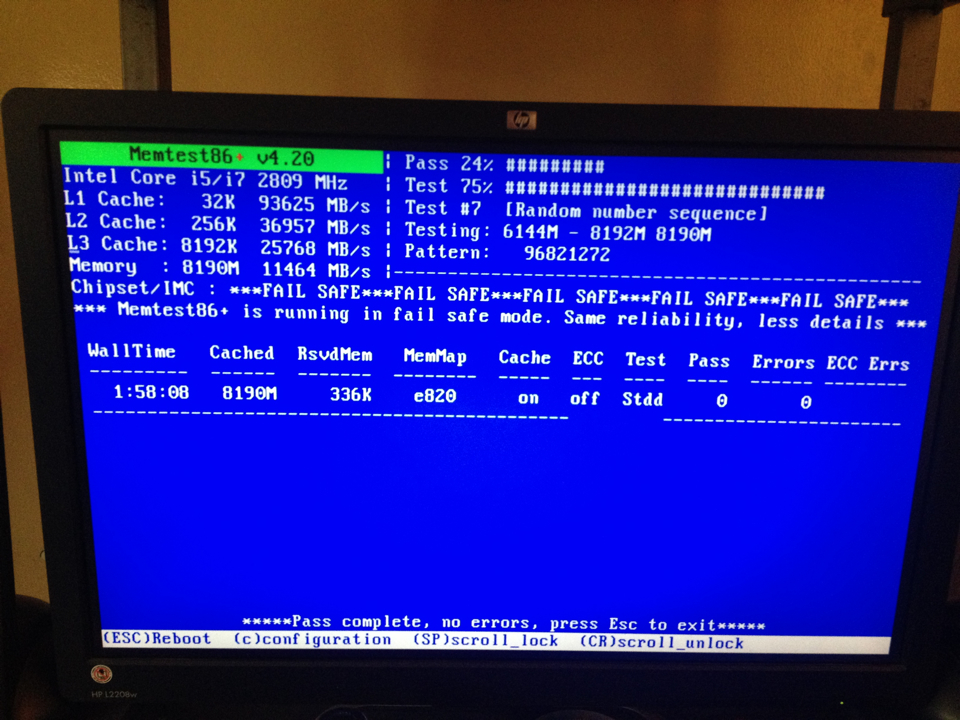
I've been running memtest86 for almost 2 hours:
abs3Qgsz.jpg
 

My Computer My Computer

Computer type
PC/Desktop
OS
Windows 10 Pro 64-bit
CPU
AMD Ryzen 5 1600
Motherboard
ASRock AB350 Pro4
Memory
2 x 8 GB G.Skill Ripjaws V DDR4 3000Mhz (F4-30000C15D)
Graphics Card(s)
EVGA GeForce GTX 1060 SSC GAMING ACX 3.0 6GB
Monitor(s) Displays
ViewSonic XG3202-C
Screen Resolution
1920x1080 (144hz)
Hard Drives
Main: Crucial MX200 500 GB
Sub: Seagate Barracuda 1 TB
PSU
Corsair TX650M
Case
NZXT S340 Elite (Matte Black/Red)
Keyboard
Razer BlackWidow Ultimate 2016
Mouse
Razer DeathAdder Chroma
Internet Speed
1000 Mbps
Antivirus
Norton Internet Security
Browser
Google Chrome, Mozilla Firefox
Have you runned memtest86 to see that the rams are working? or maybe its some of the cables, and what settings in the bios are you running the rams in? also checked what slots your using on the motherboard, im using the P7P55D and my computer wont even boot if I use the 2nd and 4th ram slot

I'm using the 1st and 3rd I think. Those are the blue slots.

I've been running memtest86 for almost 2 hours:
abs3Qgsz.jpg

Run it for 6-8 passes and if no errors I doubt its the memory, what timings and volts are you using on them?
 

My Computer My Computer

Computer type
PC/Desktop
OS
Windows 7 Home Premium x64
CPU
Intel Core i7 860 (Lynnfield)
Motherboard
Asus P7P55D (LGA1156)
Memory
Corsair Vengeance 9,9,9,24 1600Mhz 1.50v 2x4G
Graphics Card(s)
Asus nVidia 560 GTX
Sound Card
Asus Xonar DG
Monitor(s) Displays
Acer P235H & NEC E201W
Screen Resolution
1920x1080 & 900x1600
Hard Drives
2
PSU
Corsair 650 Modular
Case
Corsair 800D
Cooling
Corsair H80 with Noctua fans
Keyboard
Ducky Shine
Mouse
tT Theron
Internet Speed
100/100
Browser
IE10
Have you runned memtest86 to see that the rams are working? or maybe its some of the cables, and what settings in the bios are you running the rams in? also checked what slots your using on the motherboard, im using the P7P55D and my computer wont even boot if I use the 2nd and 4th ram slot

I'm using the 1st and 3rd I think. Those are the blue slots.

I've been running memtest86 for almost 2 hours:
abs3Qgsz.jpg

Run it for 6-8 passes and if no errors I doubt its the memory, what timings and volts are you using on them?

I think the timing is 9-9-9-24 and the voltage is set to auto in the BIOS.
 

My Computer My Computer

Computer type
PC/Desktop
OS
Windows 10 Pro 64-bit
CPU
AMD Ryzen 5 1600
Motherboard
ASRock AB350 Pro4
Memory
2 x 8 GB G.Skill Ripjaws V DDR4 3000Mhz (F4-30000C15D)
Graphics Card(s)
EVGA GeForce GTX 1060 SSC GAMING ACX 3.0 6GB
Monitor(s) Displays
ViewSonic XG3202-C
Screen Resolution
1920x1080 (144hz)
Hard Drives
Main: Crucial MX200 500 GB
Sub: Seagate Barracuda 1 TB
PSU
Corsair TX650M
Case
NZXT S340 Elite (Matte Black/Red)
Keyboard
Razer BlackWidow Ultimate 2016
Mouse
Razer DeathAdder Chroma
Internet Speed
1000 Mbps
Antivirus
Norton Internet Security
Browser
Google Chrome, Mozilla Firefox
I'm using the 1st and 3rd I think. Those are the blue slots.

I've been running memtest86 for almost 2 hours:
abs3Qgsz.jpg

Run it for 6-8 passes and if no errors I doubt its the memory, what timings and volts are you using on them?

I think the timing is 9-9-9-24 and the voltage is set to auto in the BIOS.

The timins are right, but manualy set them at their rated voltage that is 1.5 volt, and see if that changes anything
 

My Computer My Computer

Computer type
PC/Desktop
OS
Windows 7 Home Premium x64
CPU
Intel Core i7 860 (Lynnfield)
Motherboard
Asus P7P55D (LGA1156)
Memory
Corsair Vengeance 9,9,9,24 1600Mhz 1.50v 2x4G
Graphics Card(s)
Asus nVidia 560 GTX
Sound Card
Asus Xonar DG
Monitor(s) Displays
Acer P235H & NEC E201W
Screen Resolution
1920x1080 & 900x1600
Hard Drives
2
PSU
Corsair 650 Modular
Case
Corsair 800D
Cooling
Corsair H80 with Noctua fans
Keyboard
Ducky Shine
Mouse
tT Theron
Internet Speed
100/100
Browser
IE10
Run it for 6-8 passes and if no errors I doubt its the memory, what timings and volts are you using on them?

I think the timing is 9-9-9-24 and the voltage is set to auto in the BIOS.

The timins are right, but manualy set them at their rated voltage that is 1.5 volt, and see if that changes anything

Okay I'll do that but I never had problems with the auto thing. By the way, memtest is now done with 2 passes and still no errors. It's already in 40% with the 3rd pass. Should I stop it now?
 

My Computer My Computer

Computer type
PC/Desktop
OS
Windows 10 Pro 64-bit
CPU
AMD Ryzen 5 1600
Motherboard
ASRock AB350 Pro4
Memory
2 x 8 GB G.Skill Ripjaws V DDR4 3000Mhz (F4-30000C15D)
Graphics Card(s)
EVGA GeForce GTX 1060 SSC GAMING ACX 3.0 6GB
Monitor(s) Displays
ViewSonic XG3202-C
Screen Resolution
1920x1080 (144hz)
Hard Drives
Main: Crucial MX200 500 GB
Sub: Seagate Barracuda 1 TB
PSU
Corsair TX650M
Case
NZXT S340 Elite (Matte Black/Red)
Keyboard
Razer BlackWidow Ultimate 2016
Mouse
Razer DeathAdder Chroma
Internet Speed
1000 Mbps
Antivirus
Norton Internet Security
Browser
Google Chrome, Mozilla Firefox
I think the timing is 9-9-9-24 and the voltage is set to auto in the BIOS.

The timins are right, but manualy set them at their rated voltage that is 1.5 volt, and see if that changes anything

Okay I'll do that but I never had problems with the auto thing. By the way, memtest is now done with 2 passes and still no errors. It's already in 40% with the 3rd pass. Should I stop it now?

Hmm, just to be on the safe side run it a bit longer, I believe their site says 6-8 passes recommended, and if thats done and no errors you can tick that off and move on to the next thing, after 8 passes is done change the volt to manual, because it can be that they get to much volt, for an example my ram is also rated for 1.5 I was doing some overclocking and changed them to 1.6 everything worked great and I passed all stress tests, but after 3-4 days of running I got a BSOD, I am not saying you have the same problem but it could be and its better to run all the volts as manual if not the cpu will increase them to much and in the end make something melt, so if your running your vcore and vtt/imc on auto also do not start any stress related programs like IBT(intel burn test),Prime95 etc because your voltages will probably go way above safe settings
 

My Computer My Computer

Computer type
PC/Desktop
OS
Windows 7 Home Premium x64
CPU
Intel Core i7 860 (Lynnfield)
Motherboard
Asus P7P55D (LGA1156)
Memory
Corsair Vengeance 9,9,9,24 1600Mhz 1.50v 2x4G
Graphics Card(s)
Asus nVidia 560 GTX
Sound Card
Asus Xonar DG
Monitor(s) Displays
Acer P235H & NEC E201W
Screen Resolution
1920x1080 & 900x1600
Hard Drives
2
PSU
Corsair 650 Modular
Case
Corsair 800D
Cooling
Corsair H80 with Noctua fans
Keyboard
Ducky Shine
Mouse
tT Theron
Internet Speed
100/100
Browser
IE10
Can you give me a list of the voltages that I should change? :)
 

My Computer My Computer

Computer type
PC/Desktop
OS
Windows 10 Pro 64-bit
CPU
AMD Ryzen 5 1600
Motherboard
ASRock AB350 Pro4
Memory
2 x 8 GB G.Skill Ripjaws V DDR4 3000Mhz (F4-30000C15D)
Graphics Card(s)
EVGA GeForce GTX 1060 SSC GAMING ACX 3.0 6GB
Monitor(s) Displays
ViewSonic XG3202-C
Screen Resolution
1920x1080 (144hz)
Hard Drives
Main: Crucial MX200 500 GB
Sub: Seagate Barracuda 1 TB
PSU
Corsair TX650M
Case
NZXT S340 Elite (Matte Black/Red)
Keyboard
Razer BlackWidow Ultimate 2016
Mouse
Razer DeathAdder Chroma
Internet Speed
1000 Mbps
Antivirus
Norton Internet Security
Browser
Google Chrome, Mozilla Firefox
For your RAM its called DRAM Voltage set it 1.5, for your cpu its called Vcore set it at 1.00, for your VTT/IMC set it at 1.10, PLL = 1.8, PCH = 1.05, and the 2 last settings for the DRAM DATA on CHA/B set those 2 on Auto, this is taken from memory so there is a chance that I have forgotten something, but considering your using the same motherboard like me just that you have the higher version or something you might have some extra settings just set those on default, you have a list on the rigth side showing the default voltages, If you do get BSOD with these settings increase the Vcore with 1 incline each time, RAM is already configed manualy right? Set your CPU speed manually also it should be 21 multiplier x 133 for 2.8 Ghz. After this lets see what happens
 

My Computer My Computer

Computer type
PC/Desktop
OS
Windows 7 Home Premium x64
CPU
Intel Core i7 860 (Lynnfield)
Motherboard
Asus P7P55D (LGA1156)
Memory
Corsair Vengeance 9,9,9,24 1600Mhz 1.50v 2x4G
Graphics Card(s)
Asus nVidia 560 GTX
Sound Card
Asus Xonar DG
Monitor(s) Displays
Acer P235H & NEC E201W
Screen Resolution
1920x1080 & 900x1600
Hard Drives
2
PSU
Corsair 650 Modular
Case
Corsair 800D
Cooling
Corsair H80 with Noctua fans
Keyboard
Ducky Shine
Mouse
tT Theron
Internet Speed
100/100
Browser
IE10
Make sure XMP is not being used.
 

My Computer My Computer

Computer type
PC/Desktop
Computer Manufacturer/Model Number
Home made Desktop
OS
Windows 10 Pro. 64/ version 1709 Windows 7 Pro/64
CPU
Intel i7-6800K @ 4.3
Motherboard
ASUS X-99 Deluxe II
Memory
Corsair Platinum 16 gig @2400
Graphics Card(s)
EVGA GTX 1070 OC
Monitor(s) Displays
Asus 27" LED LCD/VE278Q
Screen Resolution
1920-1080 or 1280-720 HDMI
Hard Drives
INTEL SSD 730-240 Gb Sata 3.0/
PSU
EVGA Platium 1200W
Case
Phanteks Luxe Tempered Glass 8 fans/ one radiator
Cooling
XSPC/ Water Cooled CPU
Keyboard
Das 4 Professional
Mouse
Logitech M705/MX Anywhere 2-S
Internet Speed
100 mbits
Antivirus
Microsoft Security Essentials/ Malwarebytes Premium 3.0/ SAS
Browser
I.E. 11 default/Firefox/ ISP Time Warner Cable/Spectrum
Other Info
LG BluRay Burner/
Sound system-KLipsch-THX/
Icy Dock ssd Hot Swap bays.
Back
Top