Clarifications on Windows 7 backup options

hawkeye10

New member
Local time
3:18 PM
Messages
8
Hi Guys,
Good day.

I need a more simple and straight suggestions regarding backing up my laptop.
I recently reformat my laptop and currently running win7 home, then installed few software and needed drivers.

What I wanted to do is

1. Create a recovery partition drive just like what I have in my laptop, I dont have recovery disk just a recovery partition which is already present when I bought the laptop. This time, I want to create additional recovery of my current windows with the software I already installed.
And actually I dont know yet how to use the recovery hd in my laptop, can you also guide me on this.

2. Just in case my HDD fails, is it possible to create a backup disc that contains all windows, setup, software, data is not necessary. Just like a windows installer CD but this time an installer that already includes all the drivers and softwares i backed up. I am getting tired of reinstalling everything everytime I format may laptop.


I actually tried to read first and search about this topics but I am getting more confused the more I read, i am maybe not good at it. I hope someone can help me understand this in a simple way.

Thank you.
 

My Computer

OS
Windows 7 Home 64bit

My Computer

Computer type
Laptop
Computer Manufacturer/Model Number
ACER ASPIRE 5742G
OS
Microsoft Windows 7 Home Premium 64-bits 7601 Multiprocessor Free Service Pack 1
CPU
Intel(R) Core(TM) i3 CPU M 370 @ 2.40GHz
Motherboard
Acer Aspire 5742G
Memory
4,00 GB
Graphics Card(s)
ATI Mobility Radeon HD 5400 Series
Sound Card
(1) AMD High Definition Audio Device (2) Realtek High Defi
Screen Resolution
1366 x 768 x 32 bits (4294967296 colors) @ 60 Hz
Hard Drives
WDC WD5000BEVT-22ZAT0
As kaktussoft said making an image to an external HDD is your best bet and Macrium Free is a good choice. You may want to consider moving your data onto a separate partition from Windows and your installed programs so that the image is smaller. You can then back up your data separately using either the windows built in backup or a free third party file backup program such as SyncToy or FreeFileSync.
 

My Computer

Computer type
Laptop
Computer Manufacturer/Model Number
Hewlett-Packard/G62-107SA Notebook
OS
Microsoft Windows 7 Home Premium 64-bit Service Pack 1
CPU
Intel(R) Core(TM) i3 CPU M 330 @ 2.13GHz
Motherboard
Hewlett-Packard 1425
Memory
8 GB DDR3
Graphics Card(s)
Intel(R) HD Graphics
Sound Card
Realtek High Definition Audio
Monitor(s) Displays
Builtin
Screen Resolution
1366 x 768 x 32 bits (4294967296 colors) @ 60 Hz
Hard Drives
250 GB SATA Hard Disk Drive 7200 rpm
2TB Seagate GoFlex USB 2 Drive
1TB Iomega Prestige USB 2 Drive
1.5TB Iomega Prestige USB 2 Drive (Samsung)
2TB WD MyBook Live NAS.
Mouse
Logitech Anywhere MX
Internet Speed
152 Mbs download 10 Mbs upload
Antivirus
Norton 360
Browser
Chrome
Make backups using Macrium Reflect FREE Edition - Information and download very easy and straight forward. Put backups on an external usb drive. Create a rescue CD with the program (winpe is the most flexible). For the rescue CD you can boot and restore the backup to the same disk or new disk.... very flexible

http://www.sevenforums.com/tutorials/73828-imaging-free-macrium.html
v5: How to restore a backup image (Restore, v5)

more info needed?


As kaktussoft said making an image to an external HDD is your best bet and Macrium Free is a good choice. You may want to consider moving your data onto a separate partition from Windows and your installed programs so that the image is smaller. You can then back up your data separately using either the windows built in backup or a free third party file backup program such as SyncToy or FreeFileSync.

actually, I already read and installed macrium, but when I want to restore my windows image, I need an image on my external hdd or in my main hdd and I need a running windows to run macrium. This case, I dont want to include the image in my hdd or external partition since i might neglect or mess it up.

that is why I wanted to create a backup partition just like the one included my laptop (hidden recovery partition called the HDD Recovery Utility) so I can reimage my laptop anytime anywhere even when my windows wont boot.

and regarding sa rescue disc using winPE, is the whole image of my laptop be included? I dont need any other files from hdd when i run the rescue disk? I think I read something that i will run a rescue disk but it will locate an image in your HDD. I want a stand alone rescue disk.

Thank you.
 

My Computer

OS
Windows 7 Home 64bit
The best place to store an image, any image, not just Macrium is on an external hard disk drive. It will not allow you to store it on the partition you are imaging for obvious reasons and it is not a good idea to use a partition on the same drive because if one partition on a drive fails it is likely that the others will also.

The WinPE disk that was mentioned is not the backup, it is a cut down version of Windows that can be booted directly from the disk. This is necessary because you can't restore an image to a running partition.

BTW welcome to Seven Forums.
 

My Computer

Computer type
Laptop
Computer Manufacturer/Model Number
Hewlett-Packard/G62-107SA Notebook
OS
Microsoft Windows 7 Home Premium 64-bit Service Pack 1
CPU
Intel(R) Core(TM) i3 CPU M 330 @ 2.13GHz
Motherboard
Hewlett-Packard 1425
Memory
8 GB DDR3
Graphics Card(s)
Intel(R) HD Graphics
Sound Card
Realtek High Definition Audio
Monitor(s) Displays
Builtin
Screen Resolution
1366 x 768 x 32 bits (4294967296 colors) @ 60 Hz
Hard Drives
250 GB SATA Hard Disk Drive 7200 rpm
2TB Seagate GoFlex USB 2 Drive
1TB Iomega Prestige USB 2 Drive
1.5TB Iomega Prestige USB 2 Drive (Samsung)
2TB WD MyBook Live NAS.
Mouse
Logitech Anywhere MX
Internet Speed
152 Mbs download 10 Mbs upload
Antivirus
Norton 360
Browser
Chrome
The best place to store an image, any image, not just Macrium is on an external hard disk drive. It will not allow you to store it on the partition you are imaging for obvious reasons and it is not a good idea to use a partition on the same drive because if one partition on a drive fails it is likely that the others will also.

The WinPE disk that was mentioned is not the backup, it is a cut down version of Windows that can be booted directly from the disk. This is necessary because you can't restore an image to a running partition.

BTW welcome to Seven Forums.


Hi thanks for the welcome.

Yes,basically that is the most common and best option on what I read,to make image on external.

But that is why I wanted to do this two options,

First. backup on the same drive but different partition,
- this is just for an occasional system reimage considering that all are working well (windows,hdd,etc)
- with this i dont need any external hdd or cd, since I wont be carrying my external hdd or cd everytime.

Second. Create a backup CD/DVD.
- A bootable CD that includes windows with my pre-installed drivers and softwares. Just like the recovery disc of most laptops.
- this just in case my windows wont boot or my hdd fails.
- a stand alone cd that dont need any other sources(e.g. hdd,external,usb)

I have read about macrium, acronis and windows backup/restore options, but I cant find the exact thing I wanted. Or maybe I coudnt understand it well.
and I have to be cautious, I dont wanna make mistakes or lose files. :)

Thank you.
 

My Computer

OS
Windows 7 Home 64bit
1. Creating an image on a second partition on the same drive is a good idea if it is not your only backup.

2. It would be difficult to create a bootable CD with Windows, drivers and all your installed software. You can create an image to DVD but the image would span many DVDs (maybe 10 or more) and it it not a good solution as DVDs are not very reliable. It only takes one to fail and the whole image is hosed.

3. I understand your caution about not wanting to lose files. All the major imaging programs are very reliable but like any software will contain bugs so cannot be 100% secure. I have found Macrium to be reliable and have done several restores with it, but in the end the choice is yours. As a backstop I also have an image done with Windows built in backup program.
 

My Computer

Computer type
Laptop
Computer Manufacturer/Model Number
Hewlett-Packard/G62-107SA Notebook
OS
Microsoft Windows 7 Home Premium 64-bit Service Pack 1
CPU
Intel(R) Core(TM) i3 CPU M 330 @ 2.13GHz
Motherboard
Hewlett-Packard 1425
Memory
8 GB DDR3
Graphics Card(s)
Intel(R) HD Graphics
Sound Card
Realtek High Definition Audio
Monitor(s) Displays
Builtin
Screen Resolution
1366 x 768 x 32 bits (4294967296 colors) @ 60 Hz
Hard Drives
250 GB SATA Hard Disk Drive 7200 rpm
2TB Seagate GoFlex USB 2 Drive
1TB Iomega Prestige USB 2 Drive
1.5TB Iomega Prestige USB 2 Drive (Samsung)
2TB WD MyBook Live NAS.
Mouse
Logitech Anywhere MX
Internet Speed
152 Mbs download 10 Mbs upload
Antivirus
Norton 360
Browser
Chrome
So you want to create a separate recovery partition on same physcial harddrive.
Post screenshot of disk mangement and I'll tell you what to do.

Mainly the steps to do are:
  • create a backup using macrium from partitions you want and put backup image on recovery partition
  • copy contents of winpe macrium CD to that partition
but there's more to do!
 

My Computer

Computer type
Laptop
Computer Manufacturer/Model Number
ACER ASPIRE 5742G
OS
Microsoft Windows 7 Home Premium 64-bits 7601 Multiprocessor Free Service Pack 1
CPU
Intel(R) Core(TM) i3 CPU M 370 @ 2.40GHz
Motherboard
Acer Aspire 5742G
Memory
4,00 GB
Graphics Card(s)
ATI Mobility Radeon HD 5400 Series
Sound Card
(1) AMD High Definition Audio Device (2) Realtek High Defi
Screen Resolution
1366 x 768 x 32 bits (4294967296 colors) @ 60 Hz
Hard Drives
WDC WD5000BEVT-22ZAT0
So you want to create a separate recovery partition on same physcial harddrive.
Post screenshot of disk mangement and I'll tell you what to do.

Mainly the steps to do are:
  • create a backup using macrium from partitions you want and put backup image on recovery partition
  • copy contents of winpe macrium CD to that partition
but there's more to do!

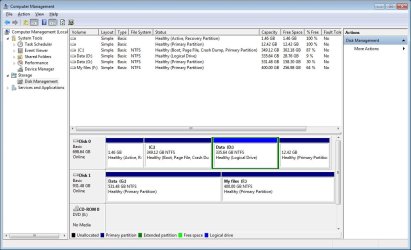
Hi, I attached the screen shot of disk management. (I will free up some space on my drive D later)
are there no software that can automatically create that partition backup? anyway, give me instructions i'll try it first.:)

btw, i think i should drop the 2nd option since it will eat up to many DVDs. Maybe i should use an external drive for the second option. can you suggest me the best method to do that?

and i am still confused with rescue disc, why would I create that if I already have backups in hdd?
 

Attachments

  • New Bitmap Image.jpg
    New Bitmap Image.jpg
    62.2 KB · Views: 5
Last edited:

My Computer

OS
Windows 7 Home 64bit

My Computer

Computer type
Laptop
Computer Manufacturer/Model Number
Hewlett-Packard/G62-107SA Notebook
OS
Microsoft Windows 7 Home Premium 64-bit Service Pack 1
CPU
Intel(R) Core(TM) i3 CPU M 330 @ 2.13GHz
Motherboard
Hewlett-Packard 1425
Memory
8 GB DDR3
Graphics Card(s)
Intel(R) HD Graphics
Sound Card
Realtek High Definition Audio
Monitor(s) Displays
Builtin
Screen Resolution
1366 x 768 x 32 bits (4294967296 colors) @ 60 Hz
Hard Drives
250 GB SATA Hard Disk Drive 7200 rpm
2TB Seagate GoFlex USB 2 Drive
1TB Iomega Prestige USB 2 Drive
1.5TB Iomega Prestige USB 2 Drive (Samsung)
2TB WD MyBook Live NAS.
Mouse
Logitech Anywhere MX
Internet Speed
152 Mbs download 10 Mbs upload
Antivirus
Norton 360
Browser
Chrome
Hi, I attached the screen shot of disk management. (I will free up some space on my drive D later)
are there no software that can automatically create that partition backup? anyway, give me instructions i'll try it first.:)

btw, i think i should drop the 2nd option since it will eat up to many DVDs. Maybe i should use an external drive for the second option. can you suggest me the best method to do that?

and i am still confused with rescue disc, why would I create that if I already have backups in hdd?
a rescue disk is for restoring in case win7 partition is corrupted or just doesn't start
 

My Computer

Computer type
Laptop
Computer Manufacturer/Model Number
ACER ASPIRE 5742G
OS
Microsoft Windows 7 Home Premium 64-bits 7601 Multiprocessor Free Service Pack 1
CPU
Intel(R) Core(TM) i3 CPU M 370 @ 2.40GHz
Motherboard
Acer Aspire 5742G
Memory
4,00 GB
Graphics Card(s)
ATI Mobility Radeon HD 5400 Series
Sound Card
(1) AMD High Definition Audio Device (2) Realtek High Defi
Screen Resolution
1366 x 768 x 32 bits (4294967296 colors) @ 60 Hz
Hard Drives
WDC WD5000BEVT-22ZAT0
ah.i got it now, i also saw a video a while ago about using rescue disc and restoring an image from hdd.

but are there no other options that i wont be needing this rescue disc, just an external disc perhaps?is it possible? like restoring from external hdd?
 

My Computer

OS
Windows 7 Home 64bit
The paid for version of Macrium allows you to do that. It gives you the option on Windows start up of booting either to the Macrium recovery environment or Windows. The problem with this is that if your Windows disk is hosed you have no way of booting. It should therefore only be considered as a convenience and not an alternative to a bootable CD.
 

My Computer

Computer type
Laptop
Computer Manufacturer/Model Number
Hewlett-Packard/G62-107SA Notebook
OS
Microsoft Windows 7 Home Premium 64-bit Service Pack 1
CPU
Intel(R) Core(TM) i3 CPU M 330 @ 2.13GHz
Motherboard
Hewlett-Packard 1425
Memory
8 GB DDR3
Graphics Card(s)
Intel(R) HD Graphics
Sound Card
Realtek High Definition Audio
Monitor(s) Displays
Builtin
Screen Resolution
1366 x 768 x 32 bits (4294967296 colors) @ 60 Hz
Hard Drives
250 GB SATA Hard Disk Drive 7200 rpm
2TB Seagate GoFlex USB 2 Drive
1TB Iomega Prestige USB 2 Drive
1.5TB Iomega Prestige USB 2 Drive (Samsung)
2TB WD MyBook Live NAS.
Mouse
Logitech Anywhere MX
Internet Speed
152 Mbs download 10 Mbs upload
Antivirus
Norton 360
Browser
Chrome
There are some problems:
  • partition DATA is almost full
  • win7 partition is almost empty
You wanna backup C-drive only I assume? But where do you want to put the backup on?
 

My Computer

Computer type
Laptop
Computer Manufacturer/Model Number
ACER ASPIRE 5742G
OS
Microsoft Windows 7 Home Premium 64-bits 7601 Multiprocessor Free Service Pack 1
CPU
Intel(R) Core(TM) i3 CPU M 370 @ 2.40GHz
Motherboard
Acer Aspire 5742G
Memory
4,00 GB
Graphics Card(s)
ATI Mobility Radeon HD 5400 Series
Sound Card
(1) AMD High Definition Audio Device (2) Realtek High Defi
Screen Resolution
1366 x 768 x 32 bits (4294967296 colors) @ 60 Hz
Hard Drives
WDC WD5000BEVT-22ZAT0
Are you willing to take an usb stick with you, so you can boot from that? If so I can give you instructions to make it bootable with macrium winpe on it
 
Last edited:

My Computer

Computer type
Laptop
Computer Manufacturer/Model Number
ACER ASPIRE 5742G
OS
Microsoft Windows 7 Home Premium 64-bits 7601 Multiprocessor Free Service Pack 1
CPU
Intel(R) Core(TM) i3 CPU M 370 @ 2.40GHz
Motherboard
Acer Aspire 5742G
Memory
4,00 GB
Graphics Card(s)
ATI Mobility Radeon HD 5400 Series
Sound Card
(1) AMD High Definition Audio Device (2) Realtek High Defi
Screen Resolution
1366 x 768 x 32 bits (4294967296 colors) @ 60 Hz
Hard Drives
WDC WD5000BEVT-22ZAT0
There are some problems:
  • partition DATA is almost full
  • win7 partition is almost empty
You wanna backup C-drive only I assume? But where do you want to put the backup on?

I actually reformat this laptop few days ago.no problem at all, i just want a fresh install. that is why I came up with this post,since i reformat, reinstall everything,download software, etc. too much hassle.

I dumped most files on D:Data. But i'll free up some space later.

yes, i dont need to backup data, I just need the windows partition C.
I will create another partition from drive C to place the backup..


Are you willing to take on usb stick with you, so you can boot from that? If so I can give you instructions to make it a bootable one with macrium winpe on it

ahm, i was reading a while ago, about the rescue disc and also the use of winPE. so it is almost clear to me how it works. (boot from cd to run winPE, then restore the image from an external drive, that is if my main hdd fails or windows wont boot)

but my main concern now is,i wanted to use just one,
either a full dvd that will restore everything, but as per previous reply, that will need to many DVDs,so it isnt a good option..
or use an external hdd alone, that will restore my image without needing a Cd or bootable usb.
since I will only be using this recovery just in case everything fails,(that is maybe months, or maybe years from now)that is why i am worried that i might misplace the recovery cd or erase the usb. so even if I have the image on my external hdd then it is no use.

I hope that this is possible..:)

Thanks.
 

My Computer

OS
Windows 7 Home 64bit
Don't create an extyra partition on your physical harddrive!! It already has 4 partitions.... win7 will change it to "dynamic" if you make more!!


So you want the following:
  • Only backup C
  • put the backup image on external usb disk
  • the same external usb disk must be bootable and must autostart macrium reflect
Correct? You already have an external usb disk with lots of free space?
 

My Computer

Computer type
Laptop
Computer Manufacturer/Model Number
ACER ASPIRE 5742G
OS
Microsoft Windows 7 Home Premium 64-bits 7601 Multiprocessor Free Service Pack 1
CPU
Intel(R) Core(TM) i3 CPU M 370 @ 2.40GHz
Motherboard
Acer Aspire 5742G
Memory
4,00 GB
Graphics Card(s)
ATI Mobility Radeon HD 5400 Series
Sound Card
(1) AMD High Definition Audio Device (2) Realtek High Defi
Screen Resolution
1366 x 768 x 32 bits (4294967296 colors) @ 60 Hz
Hard Drives
WDC WD5000BEVT-22ZAT0
Don't create an extyra partition on your physical harddrive!! It already has 4 partitions.... win7 will change it to "dynamic" if you make more!!


So you want the following:
  • Only backup C
  • put the backup image on external usb disk
  • the same external usb disk must be bootable and must autostart macrium reflect
Correct? You already have an external usb disk with lots of free space?

Thanks for the warning,because I know nothing about dynamic partition and its risk.

yes,exactly.
yes, I have here 1TB external hdd with lot of free space. It wont affect its purpose as external storage even I make it bootable right? before, I thought that when I make a drive bootable I cant use it as storage anymore.:)
 

My Computer

OS
Windows 7 Home 64bit
Because you are not a computer specialist, I give you the steps to do one by one.

first attach the 1TB external to the system. Then post a screenshot of disk management.
 

My Computer

Computer type
Laptop
Computer Manufacturer/Model Number
ACER ASPIRE 5742G
OS
Microsoft Windows 7 Home Premium 64-bits 7601 Multiprocessor Free Service Pack 1
CPU
Intel(R) Core(TM) i3 CPU M 370 @ 2.40GHz
Motherboard
Acer Aspire 5742G
Memory
4,00 GB
Graphics Card(s)
ATI Mobility Radeon HD 5400 Series
Sound Card
(1) AMD High Definition Audio Device (2) Realtek High Defi
Screen Resolution
1366 x 768 x 32 bits (4294967296 colors) @ 60 Hz
Hard Drives
WDC WD5000BEVT-22ZAT0
Drive G and F is my external drive.
Thanks
 

Attachments

  • New Bitmap Image (2).jpg
    New Bitmap Image (2).jpg
    94.8 KB · Views: 4

My Computer

OS
Windows 7 Home 64bit
Back
Top