trojan rootkit and virus prevention

This is a ready-made Macrium WinPE rescue boot ISO - it will allow you to both create & restore images, without the need to install Macrium, or download the 1.7GB WAIK to create your own WinPE.

Index of /~badeco

^^^ :thumbsup:
 

My Computer My Computer

Computer type
Laptop
Computer Manufacturer/Model Number
Sony Vaio VPCEB47GM Laptop
OS
Win 7 Pro 64-bit
CPU
Intel i5 2.4 Ghz
Memory
8GB DDR3
Graphics Card(s)
Intel HD 3000
Sound Card
IDT High Definition
Monitor(s) Displays
15.6 WGXA Anti-Glare LED
Screen Resolution
1280x800
Hard Drives
640Gb 7200rpm
Antivirus
MSE
Browser
Opera (primary) with IE9 backup
This is a ready-made Macrium WinPE rescue boot ISO - it will allow you to both create & restore images, without the need to install Macrium, or download the 1.7GB WAIK to create your own WinPE.

Index of /~badeco

thank you very much Golden.

I clicked on that link.

the window that opens shows 2 more links.

one says parent directory. the other Macrum Win PE 5.0.

would you please tell me which one to click on?

(I'm guessing its the Macrium Win PE 5.0. but I want to make sure. this is new stuff for me.)


thanks alot.
 

My Computer My Computer

Computer Manufacturer/Model Number
sony vaio vpcsc31fm
OS
Microsoft Windows 7 Home Premium 64-bit 7601 Multiprocessor Free Service Pack 1
CPU
Intel(R) Core(TM) i5-2430M CPU @ 2.40GHz
Motherboard
Sony Corporation VAIO
Memory
6.00 GB
Graphics Card(s)
Intel(R) HD Graphics Family
Sound Card
(1) High Definition Audio Device (2) Bluetooth Hands-free
Screen Resolution
1366 x 768 x 32 bits (4294967296 colors) @ 59 Hz
Hard Drives
ST95005620AS
Macrium Win PE 5.0
 

My Computer My Computer

Computer type
PC/Desktop
Computer Manufacturer/Model Number
Golden Mk. I.4
OS
Windows 10 Pro x64 ; Xubuntu x64
CPU
Intel i7 860 @ 2.80 GHz O/C'ed to 4.0GHz
Motherboard
Gigabyte P55A-UD3R Rev.1. Award BIOS F13
Memory
16GB Corsair Vengance DDR3 @ 661 MHz Dual Channel (9-9-9-24)
Graphics Card(s)
EVGA NVidia GTX 560 1024MB
Sound Card
Realtek Integrated
Monitor(s) Displays
Dual Samsung SyncMaster 2494HS
Screen Resolution
1920*1080 and 1920*1080
Hard Drives
1*Samsung 840 EVO 120GB SSD;
1*OCZ Vertex 2 60GB SSD;
2*Samsung F3 SpinPoint 1TB in RAID0;
1*Samsung F1 SpinPoint 1TB;
2*Western Digital 1TB External USB 3.0
1*Western Digital 500GB External USB 3.0
1*Seagate 500GB External USB 2.0
PSU
Thermaltake ToughPower QFan 750W
Case
Thermaltake Element S VK60001W2Z
Cooling
Corsair H60 Water Cooling, 2*230mm and 2*80mm case fans
Keyboard
Logitech G110
Mouse
Logitech MX518
roger that. thank you Golden. :)

and thank you again marsmimar.


when downloading Macrium 5.0, I clicked on open (not save).

is that good and correct? (or should I have clicked on save?)
 

My Computer My Computer

Computer Manufacturer/Model Number
sony vaio vpcsc31fm
OS
Microsoft Windows 7 Home Premium 64-bit 7601 Multiprocessor Free Service Pack 1
CPU
Intel(R) Core(TM) i5-2430M CPU @ 2.40GHz
Motherboard
Sony Corporation VAIO
Memory
6.00 GB
Graphics Card(s)
Intel(R) HD Graphics Family
Sound Card
(1) High Definition Audio Device (2) Bluetooth Hands-free
Screen Resolution
1366 x 768 x 32 bits (4294967296 colors) @ 59 Hz
Hard Drives
ST95005620AS
Do the following:

1. Save it to your local drive.
2. Unzip it using 7ZIP or similar zipping software.
3. Download YUMI to enable you to install the WinPE to a bootable USB flash drive or CD or DVD (use the "Try an unlisted ISO" option in YUMI (see below)

Capture.PNG

To run Macrium, boot from the USB. YUMI will open - browse to the WinPE file, and hit enter. Macrium will now boot.

   Tip
If you decided to rename the ISO file, make sure it has no spaces in the name or it will not boot
 

My Computer My Computer

Computer type
PC/Desktop
Computer Manufacturer/Model Number
Golden Mk. I.4
OS
Windows 10 Pro x64 ; Xubuntu x64
CPU
Intel i7 860 @ 2.80 GHz O/C'ed to 4.0GHz
Motherboard
Gigabyte P55A-UD3R Rev.1. Award BIOS F13
Memory
16GB Corsair Vengance DDR3 @ 661 MHz Dual Channel (9-9-9-24)
Graphics Card(s)
EVGA NVidia GTX 560 1024MB
Sound Card
Realtek Integrated
Monitor(s) Displays
Dual Samsung SyncMaster 2494HS
Screen Resolution
1920*1080 and 1920*1080
Hard Drives
1*Samsung 840 EVO 120GB SSD;
1*OCZ Vertex 2 60GB SSD;
2*Samsung F3 SpinPoint 1TB in RAID0;
1*Samsung F1 SpinPoint 1TB;
2*Western Digital 1TB External USB 3.0
1*Western Digital 500GB External USB 3.0
1*Seagate 500GB External USB 2.0
PSU
Thermaltake ToughPower QFan 750W
Case
Thermaltake Element S VK60001W2Z
Cooling
Corsair H60 Water Cooling, 2*230mm and 2*80mm case fans
Keyboard
Logitech G110
Mouse
Logitech MX518
Do the following:

1. Save it to your local drive.
2. Unzip it using 7ZIP or similar zipping software.
3. Download YUMI to enable you to install the WinPE to a bootable USB flash drive or CD or DVD (use the "Try an unlisted ISO" option in YUMI (see below)

View attachment 237851

To run Macrium, boot from the USB. YUMI will open - browse to the WinPE file, and hit enter. Macrium will now boot.

   Tip
If you decided to rename the ISO file, make sure it has no spaces in the name or it will not boot


hey Golden,

a little confused by step 3.

I created a system image for my sony vaio laptop using the internal windows 7 backup feature. I created the image on to my external hard drive.

to do macrium (I want to create an image for my desktop computer. the internal windows 7 thing will not allow me to just create an image for C drive), I am not sure of what to do with YUMI. (I have 7zip. I am not really super clear on using 7zip.)

would you please give me a couple thoughts on how to proceed?

I have looked over YUMI before asking you for advice. I am still not clear here.
 

My Computer My Computer

Computer Manufacturer/Model Number
sony vaio vpcsc31fm
OS
Microsoft Windows 7 Home Premium 64-bit 7601 Multiprocessor Free Service Pack 1
CPU
Intel(R) Core(TM) i5-2430M CPU @ 2.40GHz
Motherboard
Sony Corporation VAIO
Memory
6.00 GB
Graphics Card(s)
Intel(R) HD Graphics Family
Sound Card
(1) High Definition Audio Device (2) Bluetooth Hands-free
Screen Resolution
1366 x 768 x 32 bits (4294967296 colors) @ 59 Hz
Hard Drives
ST95005620AS
OK. Follow these steps:

1. Install 7ZIP if it is not already installed.
2. Create a folder on your C: called MACRIUM
3. Save Macrium_WinPE_5.0.4995.7z to C:\MACRIUM
4. Right-click on Macrium_WinPE_5.0.4995.7z, then click on 7ZIP, then click extract here
5. Insert your USB flash drive and format it to FAT32 by right-clicking on it in Explorer and choosing Format
6. Open YUMI by double-clicking it
7. Replicate the panel I posted earlier, then click next. Make sure you select the correct flash drive!!!
8. The Macrium WinPE will be installed to the USB flash drive.
9. When finished, boot your PC from the flash drive.

Follow the Macrium tutorial to image your PC:
http://www.sevenforums.com/tutorials/73828-imaging-free-macrium.html
 

My Computer My Computer

Computer type
PC/Desktop
Computer Manufacturer/Model Number
Golden Mk. I.4
OS
Windows 10 Pro x64 ; Xubuntu x64
CPU
Intel i7 860 @ 2.80 GHz O/C'ed to 4.0GHz
Motherboard
Gigabyte P55A-UD3R Rev.1. Award BIOS F13
Memory
16GB Corsair Vengance DDR3 @ 661 MHz Dual Channel (9-9-9-24)
Graphics Card(s)
EVGA NVidia GTX 560 1024MB
Sound Card
Realtek Integrated
Monitor(s) Displays
Dual Samsung SyncMaster 2494HS
Screen Resolution
1920*1080 and 1920*1080
Hard Drives
1*Samsung 840 EVO 120GB SSD;
1*OCZ Vertex 2 60GB SSD;
2*Samsung F3 SpinPoint 1TB in RAID0;
1*Samsung F1 SpinPoint 1TB;
2*Western Digital 1TB External USB 3.0
1*Western Digital 500GB External USB 3.0
1*Seagate 500GB External USB 2.0
PSU
Thermaltake ToughPower QFan 750W
Case
Thermaltake Element S VK60001W2Z
Cooling
Corsair H60 Water Cooling, 2*230mm and 2*80mm case fans
Keyboard
Logitech G110
Mouse
Logitech MX518
OK. Follow these steps:

1. Install 7ZIP if it is not already installed.
2. Create a folder on your C: called MACRIUM
3. Save Macrium_WinPE_5.0.4995.7z to C:\MACRIUM
4. Right-click on Macrium_WinPE_5.0.4995.7z, then click on 7ZIP, then click extract here
5. Insert your USB flash drive and format it to FAT32 by right-clicking on it in Explorer and choosing Format
6. Open YUMI by double-clicking it
7. Replicate the panel I posted earlier, then click next. Make sure you select the correct flash drive!!!
8. The Macrium WinPE will be installed to the USB flash drive.
9. When finished, boot your PC from the flash drive.

Follow the Macrium tutorial to image your PC:
http://www.sevenforums.com/tutorials/73828-imaging-free-macrium.html

my external hard drive is formatted in ntfs.

I have my system image for my sony vaio laptop on it. any thoughts as to how I should proceed?

does this mean that I should buy another external hard drive to use for the desktop?
 

My Computer My Computer

Computer Manufacturer/Model Number
sony vaio vpcsc31fm
OS
Microsoft Windows 7 Home Premium 64-bit 7601 Multiprocessor Free Service Pack 1
CPU
Intel(R) Core(TM) i5-2430M CPU @ 2.40GHz
Motherboard
Sony Corporation VAIO
Memory
6.00 GB
Graphics Card(s)
Intel(R) HD Graphics Family
Sound Card
(1) High Definition Audio Device (2) Bluetooth Hands-free
Screen Resolution
1366 x 768 x 32 bits (4294967296 colors) @ 59 Hz
Hard Drives
ST95005620AS
It depends on how much space is required and available on your external USB. You can store both images to the external if there is enough space.

Read the instructions again: you do NOT format your external USB! You need a separate USB flash drive or thumb drive to do the YUMI part. If you are unsure, find a friend to help you.
 

My Computer My Computer

Computer type
PC/Desktop
Computer Manufacturer/Model Number
Golden Mk. I.4
OS
Windows 10 Pro x64 ; Xubuntu x64
CPU
Intel i7 860 @ 2.80 GHz O/C'ed to 4.0GHz
Motherboard
Gigabyte P55A-UD3R Rev.1. Award BIOS F13
Memory
16GB Corsair Vengance DDR3 @ 661 MHz Dual Channel (9-9-9-24)
Graphics Card(s)
EVGA NVidia GTX 560 1024MB
Sound Card
Realtek Integrated
Monitor(s) Displays
Dual Samsung SyncMaster 2494HS
Screen Resolution
1920*1080 and 1920*1080
Hard Drives
1*Samsung 840 EVO 120GB SSD;
1*OCZ Vertex 2 60GB SSD;
2*Samsung F3 SpinPoint 1TB in RAID0;
1*Samsung F1 SpinPoint 1TB;
2*Western Digital 1TB External USB 3.0
1*Western Digital 500GB External USB 3.0
1*Seagate 500GB External USB 2.0
PSU
Thermaltake ToughPower QFan 750W
Case
Thermaltake Element S VK60001W2Z
Cooling
Corsair H60 Water Cooling, 2*230mm and 2*80mm case fans
Keyboard
Logitech G110
Mouse
Logitech MX518
oh wow.

ok, I was thinking (since yesterday), that people use the terms USB flash drive and external hard drive interchangeably.

and then I thought that you meant to boot with macrium just to see if creating an image worked.


it seems that there are a couple more steps involved here than I thought.
 

My Computer My Computer

Computer Manufacturer/Model Number
sony vaio vpcsc31fm
OS
Microsoft Windows 7 Home Premium 64-bit 7601 Multiprocessor Free Service Pack 1
CPU
Intel(R) Core(TM) i5-2430M CPU @ 2.40GHz
Motherboard
Sony Corporation VAIO
Memory
6.00 GB
Graphics Card(s)
Intel(R) HD Graphics Family
Sound Card
(1) High Definition Audio Device (2) Bluetooth Hands-free
Screen Resolution
1366 x 768 x 32 bits (4294967296 colors) @ 59 Hz
Hard Drives
ST95005620AS
The steps are easy - the Macrium WinPE that you install to the USB using YUMI can:

1. Create system images, and also
2. Restore previously created system images

without the need to install Macrium to your hard disk of your computer. It is, by far, one the the most valuable tools you can have in your possession.
 

My Computer My Computer

Computer type
PC/Desktop
Computer Manufacturer/Model Number
Golden Mk. I.4
OS
Windows 10 Pro x64 ; Xubuntu x64
CPU
Intel i7 860 @ 2.80 GHz O/C'ed to 4.0GHz
Motherboard
Gigabyte P55A-UD3R Rev.1. Award BIOS F13
Memory
16GB Corsair Vengance DDR3 @ 661 MHz Dual Channel (9-9-9-24)
Graphics Card(s)
EVGA NVidia GTX 560 1024MB
Sound Card
Realtek Integrated
Monitor(s) Displays
Dual Samsung SyncMaster 2494HS
Screen Resolution
1920*1080 and 1920*1080
Hard Drives
1*Samsung 840 EVO 120GB SSD;
1*OCZ Vertex 2 60GB SSD;
2*Samsung F3 SpinPoint 1TB in RAID0;
1*Samsung F1 SpinPoint 1TB;
2*Western Digital 1TB External USB 3.0
1*Western Digital 500GB External USB 3.0
1*Seagate 500GB External USB 2.0
PSU
Thermaltake ToughPower QFan 750W
Case
Thermaltake Element S VK60001W2Z
Cooling
Corsair H60 Water Cooling, 2*230mm and 2*80mm case fans
Keyboard
Logitech G110
Mouse
Logitech MX518
roger that. thank you so much Golden.

I will work on this. I will figure out how to do it. I believe that you know what you are talking about.

thank you for helping me.
if I get stuck, I will post back.
 

My Computer My Computer

Computer Manufacturer/Model Number
sony vaio vpcsc31fm
OS
Microsoft Windows 7 Home Premium 64-bit 7601 Multiprocessor Free Service Pack 1
CPU
Intel(R) Core(TM) i5-2430M CPU @ 2.40GHz
Motherboard
Sony Corporation VAIO
Memory
6.00 GB
Graphics Card(s)
Intel(R) HD Graphics Family
Sound Card
(1) High Definition Audio Device (2) Bluetooth Hands-free
Screen Resolution
1366 x 768 x 32 bits (4294967296 colors) @ 59 Hz
Hard Drives
ST95005620AS
No worries. Read the steps carefully.

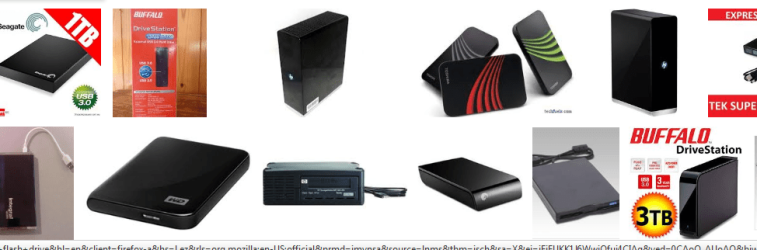
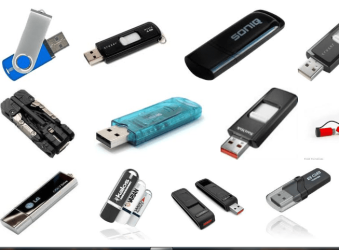
Just for clarity:

Typical external USB drives:
Capture1.PNG

Typical USB flash drives:
Capture.PNG
 

My Computer My Computer

Computer type
PC/Desktop
Computer Manufacturer/Model Number
Golden Mk. I.4
OS
Windows 10 Pro x64 ; Xubuntu x64
CPU
Intel i7 860 @ 2.80 GHz O/C'ed to 4.0GHz
Motherboard
Gigabyte P55A-UD3R Rev.1. Award BIOS F13
Memory
16GB Corsair Vengance DDR3 @ 661 MHz Dual Channel (9-9-9-24)
Graphics Card(s)
EVGA NVidia GTX 560 1024MB
Sound Card
Realtek Integrated
Monitor(s) Displays
Dual Samsung SyncMaster 2494HS
Screen Resolution
1920*1080 and 1920*1080
Hard Drives
1*Samsung 840 EVO 120GB SSD;
1*OCZ Vertex 2 60GB SSD;
2*Samsung F3 SpinPoint 1TB in RAID0;
1*Samsung F1 SpinPoint 1TB;
2*Western Digital 1TB External USB 3.0
1*Western Digital 500GB External USB 3.0
1*Seagate 500GB External USB 2.0
PSU
Thermaltake ToughPower QFan 750W
Case
Thermaltake Element S VK60001W2Z
Cooling
Corsair H60 Water Cooling, 2*230mm and 2*80mm case fans
Keyboard
Logitech G110
Mouse
Logitech MX518
ok. thanks Golden.


roger that on the difference between a flash drive and an external hard drive.


I just watched the Macrium tutorial.
 
Last edited:

My Computer My Computer

Computer Manufacturer/Model Number
sony vaio vpcsc31fm
OS
Microsoft Windows 7 Home Premium 64-bit 7601 Multiprocessor Free Service Pack 1
CPU
Intel(R) Core(TM) i5-2430M CPU @ 2.40GHz
Motherboard
Sony Corporation VAIO
Memory
6.00 GB
Graphics Card(s)
Intel(R) HD Graphics Family
Sound Card
(1) High Definition Audio Device (2) Bluetooth Hands-free
Screen Resolution
1366 x 768 x 32 bits (4294967296 colors) @ 59 Hz
Hard Drives
ST95005620AS
where should I download YUMI too?

my desktop? downloads folder? or doesn't it matter?
 

My Computer My Computer

Computer Manufacturer/Model Number
sony vaio vpcsc31fm
OS
Microsoft Windows 7 Home Premium 64-bit 7601 Multiprocessor Free Service Pack 1
CPU
Intel(R) Core(TM) i5-2430M CPU @ 2.40GHz
Motherboard
Sony Corporation VAIO
Memory
6.00 GB
Graphics Card(s)
Intel(R) HD Graphics Family
Sound Card
(1) High Definition Audio Device (2) Bluetooth Hands-free
Screen Resolution
1366 x 768 x 32 bits (4294967296 colors) @ 59 Hz
Hard Drives
ST95005620AS
Desktop is fine
 

My Computer My Computer

Computer type
PC/Desktop
Computer Manufacturer/Model Number
Golden Mk. I.4
OS
Windows 10 Pro x64 ; Xubuntu x64
CPU
Intel i7 860 @ 2.80 GHz O/C'ed to 4.0GHz
Motherboard
Gigabyte P55A-UD3R Rev.1. Award BIOS F13
Memory
16GB Corsair Vengance DDR3 @ 661 MHz Dual Channel (9-9-9-24)
Graphics Card(s)
EVGA NVidia GTX 560 1024MB
Sound Card
Realtek Integrated
Monitor(s) Displays
Dual Samsung SyncMaster 2494HS
Screen Resolution
1920*1080 and 1920*1080
Hard Drives
1*Samsung 840 EVO 120GB SSD;
1*OCZ Vertex 2 60GB SSD;
2*Samsung F3 SpinPoint 1TB in RAID0;
1*Samsung F1 SpinPoint 1TB;
2*Western Digital 1TB External USB 3.0
1*Western Digital 500GB External USB 3.0
1*Seagate 500GB External USB 2.0
PSU
Thermaltake ToughPower QFan 750W
Case
Thermaltake Element S VK60001W2Z
Cooling
Corsair H60 Water Cooling, 2*230mm and 2*80mm case fans
Keyboard
Logitech G110
Mouse
Logitech MX518
thank you Golden.


when I click on download at the YUMI website, I get a large warning message from web of trust, it says that this site had a poor reputation. all red donuts, for everything.

what should I do?

(I have watched the Macrium video twice.)

and when I do step 4 from post #47,

4. Right-click on Macrium_WinPE_5.0.4995.7z, then click on 7ZIP, then click extract here.........

it creates a file in the same folder (says its an imaging file) with about the same name.

does that sound like what its supposed to do?
I would think that it is supposed to extract on to the flash drive.

any help greatly appreciated.

thanks guys.

would someone please reply here??
 
Last edited:

My Computer My Computer

Computer Manufacturer/Model Number
sony vaio vpcsc31fm
OS
Microsoft Windows 7 Home Premium 64-bit 7601 Multiprocessor Free Service Pack 1
CPU
Intel(R) Core(TM) i5-2430M CPU @ 2.40GHz
Motherboard
Sony Corporation VAIO
Memory
6.00 GB
Graphics Card(s)
Intel(R) HD Graphics Family
Sound Card
(1) High Definition Audio Device (2) Bluetooth Hands-free
Screen Resolution
1366 x 768 x 32 bits (4294967296 colors) @ 59 Hz
Hard Drives
ST95005620AS
I have found WoT to be quite unreliable - ignore the warnings and download YUMI. Its quite safe and is used extensively. Scan the download with your AV for piece of mind.

Yes, the extract here feature of 7ZIP extracts the same name with a .ISO file extension. It does not extract to the flash drive - you need to read the steps again : YUMI writes the extracted .ISO to the flashdrive, not 7ZIP. Read the steps.
 

My Computer My Computer

Computer type
PC/Desktop
Computer Manufacturer/Model Number
Golden Mk. I.4
OS
Windows 10 Pro x64 ; Xubuntu x64
CPU
Intel i7 860 @ 2.80 GHz O/C'ed to 4.0GHz
Motherboard
Gigabyte P55A-UD3R Rev.1. Award BIOS F13
Memory
16GB Corsair Vengance DDR3 @ 661 MHz Dual Channel (9-9-9-24)
Graphics Card(s)
EVGA NVidia GTX 560 1024MB
Sound Card
Realtek Integrated
Monitor(s) Displays
Dual Samsung SyncMaster 2494HS
Screen Resolution
1920*1080 and 1920*1080
Hard Drives
1*Samsung 840 EVO 120GB SSD;
1*OCZ Vertex 2 60GB SSD;
2*Samsung F3 SpinPoint 1TB in RAID0;
1*Samsung F1 SpinPoint 1TB;
2*Western Digital 1TB External USB 3.0
1*Western Digital 500GB External USB 3.0
1*Seagate 500GB External USB 2.0
PSU
Thermaltake ToughPower QFan 750W
Case
Thermaltake Element S VK60001W2Z
Cooling
Corsair H60 Water Cooling, 2*230mm and 2*80mm case fans
Keyboard
Logitech G110
Mouse
Logitech MX518
I have found WoT to be quite unreliable - ignore the warnings and download YUMI. Its quite safe and is used extensively. Scan the download with your AV for piece of mind.

Yes, the extract here feature of 7ZIP extracts the same name with a .ISO file extension. It does not extract to the flash drive - you need to read the steps again : YUMI writes the extracted .ISO to the flashdrive, not 7ZIP. Read the steps.


thank you very much Golden. I am getting rid of WOT.

I have read the steps many times. I just did not understand them.

I will try again.
 

My Computer My Computer

Computer Manufacturer/Model Number
sony vaio vpcsc31fm
OS
Microsoft Windows 7 Home Premium 64-bit 7601 Multiprocessor Free Service Pack 1
CPU
Intel(R) Core(TM) i5-2430M CPU @ 2.40GHz
Motherboard
Sony Corporation VAIO
Memory
6.00 GB
Graphics Card(s)
Intel(R) HD Graphics Family
Sound Card
(1) High Definition Audio Device (2) Bluetooth Hands-free
Screen Resolution
1366 x 768 x 32 bits (4294967296 colors) @ 59 Hz
Hard Drives
ST95005620AS
Since you already extracted the ISO from the 7z file using 7ZIP, you can now start at Step 5.
 

My Computer My Computer

Computer type
PC/Desktop
Computer Manufacturer/Model Number
Golden Mk. I.4
OS
Windows 10 Pro x64 ; Xubuntu x64
CPU
Intel i7 860 @ 2.80 GHz O/C'ed to 4.0GHz
Motherboard
Gigabyte P55A-UD3R Rev.1. Award BIOS F13
Memory
16GB Corsair Vengance DDR3 @ 661 MHz Dual Channel (9-9-9-24)
Graphics Card(s)
EVGA NVidia GTX 560 1024MB
Sound Card
Realtek Integrated
Monitor(s) Displays
Dual Samsung SyncMaster 2494HS
Screen Resolution
1920*1080 and 1920*1080
Hard Drives
1*Samsung 840 EVO 120GB SSD;
1*OCZ Vertex 2 60GB SSD;
2*Samsung F3 SpinPoint 1TB in RAID0;
1*Samsung F1 SpinPoint 1TB;
2*Western Digital 1TB External USB 3.0
1*Western Digital 500GB External USB 3.0
1*Seagate 500GB External USB 2.0
PSU
Thermaltake ToughPower QFan 750W
Case
Thermaltake Element S VK60001W2Z
Cooling
Corsair H60 Water Cooling, 2*230mm and 2*80mm case fans
Keyboard
Logitech G110
Mouse
Logitech MX518
Back
Top