
You are using an out of date browser. It may not display this or other websites correctly.
You should upgrade or use an alternative browser.
You should upgrade or use an alternative browser.
Suddenly Windows 7 is not genuine
- Thread starter elimak
- Start date


Let's try this another (more aggressive) way:
It is essential that you don't skip a step!
Backing Up Your Registry
Registry Modifications
Batch File
REBOOT YOUR COMPUTER
Batch File
This will open a Notepad window. Copy and paste this text into your next post please!
Tom
It is essential that you don't skip a step!
Backing Up Your Registry
- The steps that I am about to suggest involve modifying the registry. Modifying the registry can be dangerous so we will make a backup of the registry first.
Modification of the registry can be EXTREMELY dangerous if you do not know exactly what you are doing so follow the steps that are listed below EXACTLY. if you cannot perform some of these steps or if you have ANY questions please ask BEFORE proceeding.
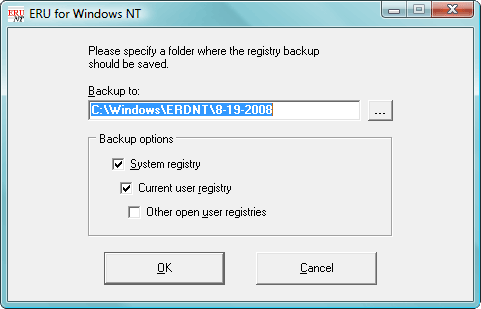
- Download ERUNT
(ERUNT (Emergency Recovery Utility NT) is a free program that allows you to keep a complete backup of your registry and restore it when needed.) - Install ERUNT by following the prompts
(use the default install settings but say no to the portion that asks you to add ERUNT to the start-up folder, if you like you can enable this option later) - Start ERUNT
(either by double clicking on the desktop icon or choosing to start the program at the end of the setup) - Choose a location for the backup
(the default location is C:\WINDOWS\ERDNT which is acceptable). - Make sure that at least the first two check boxes are ticked
- Press OK
- Press YES to create the folder.
Registry Modifications
- Go to Start > Run to bring up the run box
- In the box, type notepad.exe and press OK to open Notepad
- Copy (Ctrl+C) all of the text in the following box and paste (Ctrl+V) it into Notepad
Code:Windows Registry Editor Version 5.00 [-HKEY_LOCAL_MACHINE\Software\Microsoft\EventSystem\{26c409cc-ae86-11d1-b616-00805fc79216}\Subscriptions] - Go to File > Save As... and save it to your Desktop named Fix.reg. Make sure you change the Save as type to All Files (*.*)
- Locate Fix.reg on your Desktop and double-click on it to merge it with your registry
- Answer Yes when prompted about merging with the registry
Batch File
- Click on the Start button and in the search box, type Notepad and click on it

- Copy (Ctrl+C) all of the text in the following box and paste (Ctrl+V) it into Notepad
Code:
net stop “System Event Notification Service” net stop “COM+ Event System” net stop “Microsoft Software Shadow Copy Provider” net stop “Volume Shadow Copy” cd /d %windir%\system32 net stop vss net stop swprv regsvr32 /s ole32.dll regsvr32 /s oleaut32.dll regsvr32 /s vss_ps.dll vssvc /register regsvr32 /s /i swprv.dll regsvr32 /s /i eventcls.dll regsvr32 /s es.dll regsvr32 /s stdprov.dll regsvr32 /s vssui.dll regsvr32 /s msxml3.dll net start “System Event Notification Service” net start “COM+ Event System” net start “Microsoft Software Shadow Copy Provider” net start “Volume Shadow Copy” - Go to File > Save As... and save it to your Desktop named fix.bat. Make sure you change the Save as type to All Files (*.*)
- Locate fix.bat on your Desktop and right click then select Run as administrator
REBOOT YOUR COMPUTER
Batch File
- Click on the Start button and in the search box, type Notepad and click on it
- Copy (Ctrl+C) all of the text in the following box and paste (Ctrl+V) it into Notepad
Code:
cd /d %windir%\system32 net stop vss net stop swprv regsvr32 ole32.dll regsvr32 oleaut32.dll regsvr32 /i eventcls.dll regsvr32 vss_ps.dll vssvc /register regsvr32 /i swprv.dll regsvr32 es.dll regsvr32 stdprov.dll regsvr32 vssui.dll regsvr32 msxml.dll regsvr32 msxml3.dll regsvr32 msxml4.dll vssadmin list writers > 0 & start notepad 0 - Go to File > Save As... and save it to your Desktop named fix.bat. Make sure you change the Save as type to All Files (*.*)
- Locate fix.bat on your Desktop and right click then select Run as administrator
This will open a Notepad window. Copy and paste this text into your next post please!
Tom
My Computer
At a glance
Windows 8.1 Pro x64Intel i7 3770K @4.5GHzCorsair Vengeance 2x4GB DDR3 1600MHz Low Prof...Gigabyte Radeon HD 7850 (2GB GDDR5)
- Computer type
- PC/Desktop
- Computer Manufacturer/Model Number
- Build #1
- OS
- Windows 8.1 Pro x64
- CPU
- Intel i7 3770K @4.5GHz
- Motherboard
- ASUS P8Z77-V PRO
- Memory
- Corsair Vengeance 2x4GB DDR3 1600MHz Low Profile (White)
- Graphics Card(s)
- Gigabyte Radeon HD 7850 (2GB GDDR5)
- Sound Card
- Integrated on motherboard
- Monitor(s) Displays
- 23" LG LCD/LED IPS
- Screen Resolution
- 1920*1080
- Hard Drives
- Samsung EVO 128GB SSD
Seagate Barracuda 2GB 7200rpm
2x Seagate FreeAgent [500gb]
- PSU
- Corsair TX650W V2 (80+ Bronze)
- Case
- NZXT Phantom 410 White
- Cooling
- Corsair H100 Water Cooler
- Keyboard
- Microsoft Desktop 2000 Wireless Keyboard
- Mouse
- Microsoft Desktop 2000 Wireless Mouse
- Internet Speed
- 95 Mb/s Download 70 Mb/s Upload
- Antivirus
- MSE + MBAM Pro
- Browser
- Firefox
Thank you for this long instruction...
So the following errors appeared when running the second fix.bat


And this is the output of my notepad:
vssadmin 1.1 - Volume Shadow Copy Service administrative command-line tool
(C) Copyright 2001-2005 Microsoft Corp.
So the following errors appeared when running the second fix.bat
And this is the output of my notepad:
vssadmin 1.1 - Volume Shadow Copy Service administrative command-line tool
(C) Copyright 2001-2005 Microsoft Corp.
My Computer
At a glance
Windows 7 Home Premium 64bits
- OS
- Windows 7 Home Premium 64bits

I *think* ASR twriter is actually part of Windows much-forgotten Automated System Recovery - which is one reason I picked it (the other is that it was first on the list!  )
)
WMI Writer should be a safe one -
The other 'Default' ones are
BITS Writer
SPP
System Writer
SystemRestore
VolSnap
and
MSSearchService Writer
)WMI Writer should be a safe one -
The other 'Default' ones are
BITS Writer
SPP
System Writer
SystemRestore
VolSnap
and
MSSearchService Writer
My Computer
At a glance
Win 7 x64 Home Premium (and x86 VirtualBox VM...i3 370M/i7 6500U8GB - finally :)/8GBit's an i3, dude!/dual Intel&nVidia
- Computer type
- Laptop
- Computer Manufacturer/Model Number
- Asus K52F or Lenovo B51-80
- OS
- Win 7 x64 Home Premium (and x86 VirtualBox VM)/Win10
- CPU
- i3 370M/i7 6500U
- Motherboard
- Asus/Lenovo
- Memory
- 8GB - finally :)/8GB
- Graphics Card(s)
- it's an i3, dude!/dual Intel&nVidia
- Sound Card
- onboard
- Monitor(s) Displays
- 15.6" built-in
- Screen Resolution
- 1366x768/1920x1080
- Hard Drives
- 750GB Seagate internal
Sundry external drives attached to other computers on the local network
1TB SSD on the Lenovo
- PSU
- n/a
- Internet Speed
- as much as I can get - usually on a dongle/phone, so <1MB/s
- Antivirus
- MSE/Defender
- Browser
- IE11/12/Edge/Chrome/FF(if I must)
I *think* ASR twriter is actually part of Windows much-forgotten Automated System Recovery - which is one reason I picked it (the other is that it was first on the list!
WMI Writer should be a safe one -
The other 'Default' ones are
BITS Writer
SPP
System Writer
SystemRestore
VolSnap
and
MSSearchService Writer
Ooh, thanks. Never knew that
It wasn't on my list so I (wrongly!) assumed it wasn't a Windows thing.@elimak,
That's a lot of errors! Let's see if those DLL files are okay:
SFC Scan
- Click on the Start button and in the search box, type Command Prompt
- When you see Command Prompt on the list, right-click on it and select Run as administrator
- When command prompt opens, copy and paste the following commands into it, press enter after each
sfc /scannow
Wait for this to finish before you continue
copy %windir%\logs\cbs\cbs.log %userprofile%\Desktop\cbs.txt
- This will create a file, cbs.txt on your Desktop. Please attach this to your next post.
Tom
My Computer
At a glance
Windows 8.1 Pro x64Intel i7 3770K @4.5GHzCorsair Vengeance 2x4GB DDR3 1600MHz Low Prof...Gigabyte Radeon HD 7850 (2GB GDDR5)
- Computer type
- PC/Desktop
- Computer Manufacturer/Model Number
- Build #1
- OS
- Windows 8.1 Pro x64
- CPU
- Intel i7 3770K @4.5GHz
- Motherboard
- ASUS P8Z77-V PRO
- Memory
- Corsair Vengeance 2x4GB DDR3 1600MHz Low Profile (White)
- Graphics Card(s)
- Gigabyte Radeon HD 7850 (2GB GDDR5)
- Sound Card
- Integrated on motherboard
- Monitor(s) Displays
- 23" LG LCD/LED IPS
- Screen Resolution
- 1920*1080
- Hard Drives
- Samsung EVO 128GB SSD
Seagate Barracuda 2GB 7200rpm
2x Seagate FreeAgent [500gb]
- PSU
- Corsair TX650W V2 (80+ Bronze)
- Case
- NZXT Phantom 410 White
- Cooling
- Corsair H100 Water Cooler
- Keyboard
- Microsoft Desktop 2000 Wireless Keyboard
- Mouse
- Microsoft Desktop 2000 Wireless Mouse
- Internet Speed
- 95 Mb/s Download 70 Mb/s Upload
- Antivirus
- MSE + MBAM Pro
- Browser
- Firefox
Those arrors are pretty much standard, AFAIK - try it on your own m/c
we already tried SFC ealrlier with no problems.
we already tried SFC ealrlier with no problems.
My Computer
At a glance
Win 7 x64 Home Premium (and x86 VirtualBox VM...i3 370M/i7 6500U8GB - finally :)/8GBit's an i3, dude!/dual Intel&nVidia
- Computer type
- Laptop
- Computer Manufacturer/Model Number
- Asus K52F or Lenovo B51-80
- OS
- Win 7 x64 Home Premium (and x86 VirtualBox VM)/Win10
- CPU
- i3 370M/i7 6500U
- Motherboard
- Asus/Lenovo
- Memory
- 8GB - finally :)/8GB
- Graphics Card(s)
- it's an i3, dude!/dual Intel&nVidia
- Sound Card
- onboard
- Monitor(s) Displays
- 15.6" built-in
- Screen Resolution
- 1366x768/1920x1080
- Hard Drives
- 750GB Seagate internal
Sundry external drives attached to other computers on the local network
1TB SSD on the Lenovo
- PSU
- n/a
- Internet Speed
- as much as I can get - usually on a dongle/phone, so <1MB/s
- Antivirus
- MSE/Defender
- Browser
- IE11/12/Edge/Chrome/FF(if I must)
Your file of 4.99 MB bytes exceeds the forum's limit of 1.00 MB for this
so using dropbox instead:
https://dl.dropbox.com/u/6744155/cbs.txt
so using dropbox instead:
https://dl.dropbox.com/u/6744155/cbs.txt
My Computer
At a glance
Windows 7 Home Premium 64bits
- OS
- Windows 7 Home Premium 64bits
That seems to have done a fair amount of work!
Something must have tripped, somewhere?
- and there's no record of any earlier SFC scan
Please run another scan, and post the new log - it'll tell us if anything remains to be done.
Something must have tripped, somewhere?
- and there's no record of any earlier SFC scan
Please run another scan, and post the new log - it'll tell us if anything remains to be done.
My Computer
At a glance
Win 7 x64 Home Premium (and x86 VirtualBox VM...i3 370M/i7 6500U8GB - finally :)/8GBit's an i3, dude!/dual Intel&nVidia
- Computer type
- Laptop
- Computer Manufacturer/Model Number
- Asus K52F or Lenovo B51-80
- OS
- Win 7 x64 Home Premium (and x86 VirtualBox VM)/Win10
- CPU
- i3 370M/i7 6500U
- Motherboard
- Asus/Lenovo
- Memory
- 8GB - finally :)/8GB
- Graphics Card(s)
- it's an i3, dude!/dual Intel&nVidia
- Sound Card
- onboard
- Monitor(s) Displays
- 15.6" built-in
- Screen Resolution
- 1366x768/1920x1080
- Hard Drives
- 750GB Seagate internal
Sundry external drives attached to other computers on the local network
1TB SSD on the Lenovo
- PSU
- n/a
- Internet Speed
- as much as I can get - usually on a dongle/phone, so <1MB/s
- Antivirus
- MSE/Defender
- Browser
- IE11/12/Edge/Chrome/FF(if I must)
My Computer
At a glance
Windows 7 Home Premium 64bits
- OS
- Windows 7 Home Premium 64bits
Good.
.....
It found nothing to repair this time.
Begs the question of what a CheckSUR may find (I don't think we ran one yet?)
Please run the CheckSUR tool from http://support.microsoft.com/kb/947821
(you'll need to look in the details for Method 2)
Then zip the CheckSUR.log and upload it to your public SkyDrive so I can take a look - post a link in your reply.
The tool can take anywhere from 5 mins to a couple of hours to run (or 'Install') depending on how much it has to do, and may exit silently - it may appear to freeze for most of that time, but be patient.
.....
Code:
POQ 121 ends.
2012-11-02 13:12:24, Info                  CSI    000002e4 [SR] Verify complete
2012-11-02 13:12:24, Info                  CSI    000002e5 [SR] Repairing 0 components
2012-11-02 13:12:24, Info                  CSI    000002e6 [SR] Beginning Verify and Repair transaction
2012-11-02 13:12:24, Info                  CSI    000002e7 Repair results created:
POQ 122 starts:

POQ 122 ends.
2012-11-02 13:12:24, Info                  CSI    000002e8 [SR] Repair complete
It found nothing to repair this time.
Begs the question of what a CheckSUR may find (I don't think we ran one yet?)
Please run the CheckSUR tool from http://support.microsoft.com/kb/947821
(you'll need to look in the details for Method 2)
Then zip the CheckSUR.log and upload it to your public SkyDrive so I can take a look - post a link in your reply.
The tool can take anywhere from 5 mins to a couple of hours to run (or 'Install') depending on how much it has to do, and may exit silently - it may appear to freeze for most of that time, but be patient.
My Computer
At a glance
Win 7 x64 Home Premium (and x86 VirtualBox VM...i3 370M/i7 6500U8GB - finally :)/8GBit's an i3, dude!/dual Intel&nVidia
- Computer type
- Laptop
- Computer Manufacturer/Model Number
- Asus K52F or Lenovo B51-80
- OS
- Win 7 x64 Home Premium (and x86 VirtualBox VM)/Win10
- CPU
- i3 370M/i7 6500U
- Motherboard
- Asus/Lenovo
- Memory
- 8GB - finally :)/8GB
- Graphics Card(s)
- it's an i3, dude!/dual Intel&nVidia
- Sound Card
- onboard
- Monitor(s) Displays
- 15.6" built-in
- Screen Resolution
- 1366x768/1920x1080
- Hard Drives
- 750GB Seagate internal
Sundry external drives attached to other computers on the local network
1TB SSD on the Lenovo
- PSU
- n/a
- Internet Speed
- as much as I can get - usually on a dongle/phone, so <1MB/s
- Antivirus
- MSE/Defender
- Browser
- IE11/12/Edge/Chrome/FF(if I must)
MS really messed around with that page - it used to be simple flat-formatted.
click on the Method2 + sign (under the Resolution header) - it expands to a list of downloads.
You want the Windows 7 x64 version
While it's downloading (it's a big file!) read the 'more information' section.
click on the Method2 + sign (under the Resolution header) - it expands to a list of downloads.
You want the Windows 7 x64 version
While it's downloading (it's a big file!) read the 'more information' section.
My Computer
At a glance
Win 7 x64 Home Premium (and x86 VirtualBox VM...i3 370M/i7 6500U8GB - finally :)/8GBit's an i3, dude!/dual Intel&nVidia
- Computer type
- Laptop
- Computer Manufacturer/Model Number
- Asus K52F or Lenovo B51-80
- OS
- Win 7 x64 Home Premium (and x86 VirtualBox VM)/Win10
- CPU
- i3 370M/i7 6500U
- Motherboard
- Asus/Lenovo
- Memory
- 8GB - finally :)/8GB
- Graphics Card(s)
- it's an i3, dude!/dual Intel&nVidia
- Sound Card
- onboard
- Monitor(s) Displays
- 15.6" built-in
- Screen Resolution
- 1366x768/1920x1080
- Hard Drives
- 750GB Seagate internal
Sundry external drives attached to other computers on the local network
1TB SSD on the Lenovo
- PSU
- n/a
- Internet Speed
- as much as I can get - usually on a dongle/phone, so <1MB/s
- Antivirus
- MSE/Defender
- Browser
- IE11/12/Edge/Chrome/FF(if I must)
ok done... the checkSUR.log was rather small, so I just copied/pasted its content:
=================================
Checking System Update Readiness.
Binary Version 6.1.7601.21645
Package Version 16.0
2012-11-02 15:20
Checking Windows Servicing Packages
Checking Package Manifests and Catalogs
Checking Package Watchlist
Checking Component Watchlist
Checking Packages
Checking Component Store
Summary:
Seconds executed: 321
No errors detected
=================================
Checking System Update Readiness.
Binary Version 6.1.7601.21645
Package Version 16.0
2012-11-02 15:20
Checking Windows Servicing Packages
Checking Package Manifests and Catalogs
Checking Package Watchlist
Checking Component Watchlist
Checking Packages
Checking Component Store
Summary:
Seconds executed: 321
No errors detected
My Computer
At a glance
Windows 7 Home Premium 64bits
- OS
- Windows 7 Home Premium 64bits
Those arrors are pretty much standard, AFAIK - try it on your own m/c
we already tried SFC ealrlier with no problems.
So they are, my mistake. I wonder why though.
That seems to have done a fair amount of work!
Something must have tripped, somewhere?
- and there's no record of any earlier SFC scan
Please run another scan, and post the new log - it'll tell us if anything remains to be done.
Well that was lucky!
My Computer
At a glance
Windows 8.1 Pro x64Intel i7 3770K @4.5GHzCorsair Vengeance 2x4GB DDR3 1600MHz Low Prof...Gigabyte Radeon HD 7850 (2GB GDDR5)
- Computer type
- PC/Desktop
- Computer Manufacturer/Model Number
- Build #1
- OS
- Windows 8.1 Pro x64
- CPU
- Intel i7 3770K @4.5GHz
- Motherboard
- ASUS P8Z77-V PRO
- Memory
- Corsair Vengeance 2x4GB DDR3 1600MHz Low Profile (White)
- Graphics Card(s)
- Gigabyte Radeon HD 7850 (2GB GDDR5)
- Sound Card
- Integrated on motherboard
- Monitor(s) Displays
- 23" LG LCD/LED IPS
- Screen Resolution
- 1920*1080
- Hard Drives
- Samsung EVO 128GB SSD
Seagate Barracuda 2GB 7200rpm
2x Seagate FreeAgent [500gb]
- PSU
- Corsair TX650W V2 (80+ Bronze)
- Case
- NZXT Phantom 410 White
- Cooling
- Corsair H100 Water Cooler
- Keyboard
- Microsoft Desktop 2000 Wireless Keyboard
- Mouse
- Microsoft Desktop 2000 Wireless Mouse
- Internet Speed
- 95 Mb/s Download 70 Mb/s Upload
- Antivirus
- MSE + MBAM Pro
- Browser
- Firefox
[OK, Mr Smug  ]
]
It's Friday, and my local has changed landladies.....
Even I'm not brave enough to try posting anything sensible ATM!
]It's Friday, and my local has changed landladies.....
Even I'm not brave enough to try posting anything sensible ATM!
My Computer
At a glance
Win 7 x64 Home Premium (and x86 VirtualBox VM...i3 370M/i7 6500U8GB - finally :)/8GBit's an i3, dude!/dual Intel&nVidia
- Computer type
- Laptop
- Computer Manufacturer/Model Number
- Asus K52F or Lenovo B51-80
- OS
- Win 7 x64 Home Premium (and x86 VirtualBox VM)/Win10
- CPU
- i3 370M/i7 6500U
- Motherboard
- Asus/Lenovo
- Memory
- 8GB - finally :)/8GB
- Graphics Card(s)
- it's an i3, dude!/dual Intel&nVidia
- Sound Card
- onboard
- Monitor(s) Displays
- 15.6" built-in
- Screen Resolution
- 1366x768/1920x1080
- Hard Drives
- 750GB Seagate internal
Sundry external drives attached to other computers on the local network
1TB SSD on the Lenovo
- PSU
- n/a
- Internet Speed
- as much as I can get - usually on a dongle/phone, so <1MB/s
- Antivirus
- MSE/Defender
- Browser
- IE11/12/Edge/Chrome/FF(if I must)
[OK, Mr Smug
The times where I'm right are limited, so I'll enjoy it whilst I can

It's Friday, and my local has changed landladies.....
Even I'm not brave enough to try posting anything sensible ATM!
I'm impressed you managed to spell everything correctly! Or was it autocorrect?
My Computer
At a glance
Windows 8.1 Pro x64Intel i7 3770K @4.5GHzCorsair Vengeance 2x4GB DDR3 1600MHz Low Prof...Gigabyte Radeon HD 7850 (2GB GDDR5)
- Computer type
- PC/Desktop
- Computer Manufacturer/Model Number
- Build #1
- OS
- Windows 8.1 Pro x64
- CPU
- Intel i7 3770K @4.5GHz
- Motherboard
- ASUS P8Z77-V PRO
- Memory
- Corsair Vengeance 2x4GB DDR3 1600MHz Low Profile (White)
- Graphics Card(s)
- Gigabyte Radeon HD 7850 (2GB GDDR5)
- Sound Card
- Integrated on motherboard
- Monitor(s) Displays
- 23" LG LCD/LED IPS
- Screen Resolution
- 1920*1080
- Hard Drives
- Samsung EVO 128GB SSD
Seagate Barracuda 2GB 7200rpm
2x Seagate FreeAgent [500gb]
- PSU
- Corsair TX650W V2 (80+ Bronze)
- Case
- NZXT Phantom 410 White
- Cooling
- Corsair H100 Water Cooler
- Keyboard
- Microsoft Desktop 2000 Wireless Keyboard
- Mouse
- Microsoft Desktop 2000 Wireless Mouse
- Internet Speed
- 95 Mb/s Download 70 Mb/s Upload
- Antivirus
- MSE + MBAM Pro
- Browser
- Firefox
Similar threads
- Replies
- 8
- Views
- 5K
- Replies
- 3
- Views
- 7K

- Replies
- 19
- Views
- 10K
