No sound, video game controller in device manager. No audio full stop.

sambolero

New member
Local time
6:34 AM
Messages
9
I was rudely interrupted during a truly hilarious episode of Curb Your Enthusiasm to the cruel sound... of silence.

I know this is an old problem, I've searched high and low for a fix for hours, but none seem to pertain to my specific set of circumstances. Any help would be great.

Situation as follows; watching media on VLC, audio stops, laptop goes all crashy, I reboot, still no audio, red 'x' on volume icon, troubleshooting results in message reading "hardware changes might not have been detected".

I check device manager to see whats going on, there is no sound/video/game line visible. There are no unknown devices, exclamation marks, yellow triangles or anything. I hooked in my external soundcard to see if that was ok an sure enough it showed up fine. But still no sign of the onboard Realtek one that came installed.

I go to the Toshiba website to try and get updated audio drivers for my model laptop but apparently the only drivers available since 2009 are a bluetooth stack, a bios update, and a DVD update checker.

I've tried anything I could based on others' findings and successes but still no joy.

My laptop specs are

Toshiba Satellite U300-15p PSU30E
Windows 7 Ultimate 64bit

I apologize to be yet another repeater of this same issue, but I can't figure it out and would be grateful for some assistance.

Cheers!
 

My Computer My Computer

At a glance

Windows 7 Ultimate 64 bit
Computer Manufacturer/Model Number
Toshiba U300-15p
OS
Windows 7 Ultimate 64 bit
This is just a few things that I want you to try to determine what the issue might be.


  • Install the latest Realtek AC97 or HD Audio audio codec/driver software from Realtek.
  • Open up the Device Manager, right click, and press Scan for device changes.
If a device isn't shown or prompted to be installed, then Windows is not detecting a device at all and we may have a very big problem here.

Booting in to your BIOS, are you able to determine whether AC97 or HD Audio is turned on in your integrated devices (or similar) configuration?
If there is a known issue with the internal audio for your laptop, you may need to run the BIOS update, but only do this if it is listed to have solved all audio related issues in the update.
 

My Computer My Computer

At a glance

Windows 8 Pro x64i7 3820 @ 4.68GHzF3-12800CL9D-8GBXL (32GB)GTX 480 SLI
Computer type
PC/Desktop
OS
Windows 8 Pro x64
CPU
i7 3820 @ 4.68GHz
Motherboard
ASUS Rampage IV Extreme RoG BF3
Memory
F3-12800CL9D-8GBXL (32GB)
Graphics Card(s)
GTX 480 SLI
Sound Card
Auzentech X-Fi HomeTheater HD
Monitor(s) Displays
Sony 32V5500
Screen Resolution
1920 x 1080
Hard Drives
LSI MR9260-4i (RAID10):
Toshiba DT01ACA300 x 4
iaStorA:
OCZ Vertex Enterprise 120GB
ST3500320AS 500GB
Intel 520 Series 120GB
PSU
OCZ ZX 1250W
Case
HAF X
Cooling
H80
Keyboard
Cyborg V.7
Mouse
Razer Lachesis 3.5G 5600dpi
Internet Speed
23296kbps ds / 812kbps us ADSL2+
Browser
Mozilla/5.0 (Windows NT 6.3; Win64; x64; rv:32.0) Gecko/2010
Other Info
AverMedia C127 Game Broadcaster HD
Thanks for getting back to me. I downloaded AC97 driver, installed and rebooted, to no avail. The laptop is 4 years+ old, could it be possible that the internal soundcard is dead?

Booting in to your BIOS, are you able to determine whether AC97 or HD Audio is turned on in your integrated devices (or similar) configuration?
If there is a known issue with the internal audio for your laptop, you may need to run the BIOS update, but only do this if it is listed to have solved all audio related issues in the update.

I'm unfamiliar with anything BIOS related... any chance you could elaborate on how I can determine what you asked?

Thanks again for the help.
 

My Computer My Computer

At a glance

Windows 7 Ultimate 64 bit
Computer Manufacturer/Model Number
Toshiba U300-15p
OS
Windows 7 Ultimate 64 bit
Ok some updated info:

Turned on laptop this morning, the little 'searching for new hardware' icon in the bottom right corner was whirring away (this is a first since the problem started) and sure enough it was installing something to do with Realtek.

Now the little red 'x' over the vol icon is gone (yay), 'sound/video/game' shows up in device manager, and in its dropdown: 'Realtek high defenition audio' is there.... sounds perfect right? doesn't sound like anything actually... still no sound at all in fact :cry:

This is exactly what happened prior to the initial 'no audio output device' issue.

Anybody got insights into how I can resolve it?

Cheers! :shock:
 

My Computer My Computer

At a glance

Windows 7 Ultimate 64 bit
Computer Manufacturer/Model Number
Toshiba U300-15p
OS
Windows 7 Ultimate 64 bit
Right, new update:

I restarted the laptop.... Now I'm back to square one. Read first in thread for details....
 

My Computer My Computer

At a glance

Windows 7 Ultimate 64 bit
Computer Manufacturer/Model Number
Toshiba U300-15p
OS
Windows 7 Ultimate 64 bit

My Computer My Computer

At a glance

Windows 8 Pro x64i7 3820 @ 4.68GHzF3-12800CL9D-8GBXL (32GB)GTX 480 SLI
Computer type
PC/Desktop
OS
Windows 8 Pro x64
CPU
i7 3820 @ 4.68GHz
Motherboard
ASUS Rampage IV Extreme RoG BF3
Memory
F3-12800CL9D-8GBXL (32GB)
Graphics Card(s)
GTX 480 SLI
Sound Card
Auzentech X-Fi HomeTheater HD
Monitor(s) Displays
Sony 32V5500
Screen Resolution
1920 x 1080
Hard Drives
LSI MR9260-4i (RAID10):
Toshiba DT01ACA300 x 4
iaStorA:
OCZ Vertex Enterprise 120GB
ST3500320AS 500GB
Intel 520 Series 120GB
PSU
OCZ ZX 1250W
Case
HAF X
Cooling
H80
Keyboard
Cyborg V.7
Mouse
Razer Lachesis 3.5G 5600dpi
Internet Speed
23296kbps ds / 812kbps us ADSL2+
Browser
Mozilla/5.0 (Windows NT 6.3; Win64; x64; rv:32.0) Gecko/2010
Other Info
AverMedia C127 Game Broadcaster HD

My Computer My Computer

At a glance

Windows 7 Ultimate 64 bit
Computer Manufacturer/Model Number
Toshiba U300-15p
OS
Windows 7 Ultimate 64 bit
Are you certain your system requires the AC97 driver? I would think it would be the HD Audio one from Realtek.
Please try this driver:
http://support1.toshiba-tro.de/tedd-files2/0/sound-20091027160155.zip
Restart to complete the installation, and then double check your devices.

Problem solved. Installed that driver and rebooted; beautiful tinny laptop quality audio! Hopefully no recurrences now... Very grateful for your help amigo :)

Apologies to re-open the inquiry, but I've noticed that although the audio is now working, there is a very giltchy feel to the volume 'up/down' fader. When I click the vol icon and drag the fader up or down there is a delay of several seconds before the volume increases or decreases (about 15 seconds). Then the mixer/fader icon goes blank for a while...

Could this be related somehow? It's pretty laggy... Any further ideas?

Thanks again
 

My Computer My Computer

At a glance

Windows 7 Ultimate 64 bit
Computer Manufacturer/Model Number
Toshiba U300-15p
OS
Windows 7 Ultimate 64 bit
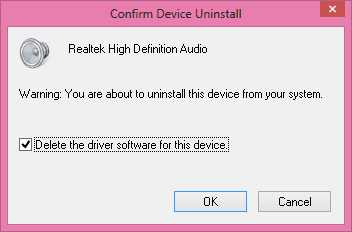
I would recommend doing a clean install of the driver. That is removing the device and deleting all associated driver files with it (in device manager, ticking the box), and then installing the device driver and rebooting.

If it is actually just the Realtek HD Audio driver packaged for your laptop you may be able to install the latest Realtek HD Audio codec driver software from the Realtek website on top of your driver set... this might offer some better compatibility. Windows Updates might also populate something for your audio driver under the optional category.

To do this you only have to open up Device Manager and right click the audio device to click on Uninstall.
example device uninstall.png
You'll be shown something like this. Tick the box as demonstrated in this image and then follow through with a reboot before you reinstall the drivers.
(Don't mind that I am on Windows 8. The instructions are identical.)
 

My Computer My Computer

At a glance

Windows 8 Pro x64i7 3820 @ 4.68GHzF3-12800CL9D-8GBXL (32GB)GTX 480 SLI
Computer type
PC/Desktop
OS
Windows 8 Pro x64
CPU
i7 3820 @ 4.68GHz
Motherboard
ASUS Rampage IV Extreme RoG BF3
Memory
F3-12800CL9D-8GBXL (32GB)
Graphics Card(s)
GTX 480 SLI
Sound Card
Auzentech X-Fi HomeTheater HD
Monitor(s) Displays
Sony 32V5500
Screen Resolution
1920 x 1080
Hard Drives
LSI MR9260-4i (RAID10):
Toshiba DT01ACA300 x 4
iaStorA:
OCZ Vertex Enterprise 120GB
ST3500320AS 500GB
Intel 520 Series 120GB
PSU
OCZ ZX 1250W
Case
HAF X
Cooling
H80
Keyboard
Cyborg V.7
Mouse
Razer Lachesis 3.5G 5600dpi
Internet Speed
23296kbps ds / 812kbps us ADSL2+
Browser
Mozilla/5.0 (Windows NT 6.3; Win64; x64; rv:32.0) Gecko/2010
Other Info
AverMedia C127 Game Broadcaster HD
I would recommend doing a clean install of the driver. That is removing the device and deleting all associated driver files with it (in device manager, ticking the box), and then installing the device driver and rebooting.

If it is actually just the Realtek HD Audio driver packaged for your laptop you may be able to install the latest Realtek HD Audio codec driver software from the Realtek website on top of your driver set... this might offer some better compatibility. Windows Updates might also populate something for your audio driver under the optional category.

To do this you only have to open up Device Manager and right click the audio device to click on Uninstall.
View attachment 239770
You'll be shown something like this. Tick the box as demonstrated in this image and then follow through with a reboot before you reinstall the drivers.
(Don't mind that I am on Windows 8. The instructions are identical.)

Hello again,

Followed all instructions but after rebooting, the red 'x' is back over the vol icon. Tried all of the previous suggestions again, plus the above to no avail. The only difference between your instructions and what I experienced was that there was no box to tick when uninstalling... don't know whether this makes a difference.

Current status is pretty much the same as the original: no audio, red 'x' over vol, no sound/video/game line in device manager...

Flummoxed!

Any idea where I go from here? Really appreciate all the help regardless of outcome.
 

My Computer My Computer

At a glance

Windows 7 Ultimate 64 bit
Computer Manufacturer/Model Number
Toshiba U300-15p
OS
Windows 7 Ultimate 64 bit
Ok, Windows Updates had been shut off by Tune Up Utilities; turned it on and after about 60 updates later I tried all of the above again and voila, sounds back on and no lagging to boot. Hopefully the last you'll hear from little old me... We'll see...
 

My Computer My Computer

At a glance

Windows 7 Ultimate 64 bit
Computer Manufacturer/Model Number
Toshiba U300-15p
OS
Windows 7 Ultimate 64 bit
Problem has started again up again. I was making music so had the external Edirol soundcard outputting audio. All was fine until after I finished, disconnected laptop from card, little red 'x' back with a vengeance. Any ideas short of reinstalling Windows will be gratefully received. On that topic, would a clean reinstall of Windows usually resolve this type of nonsense?
 

My Computer My Computer

At a glance

Windows 7 Ultimate 64 bit
Computer Manufacturer/Model Number
Toshiba U300-15p
OS
Windows 7 Ultimate 64 bit
Problem has started again up again. I was making music so had the external Edirol soundcard outputting audio. All was fine until after I finished, disconnected laptop from card, little red 'x' back with a vengeance. Any ideas short of reinstalling Windows will be gratefully received. On that topic, would a clean reinstall of Windows usually resolve this type of nonsense?

No because it seems like you had found a solution but other software has caused the issue to occur again, so it looks like a problem with your software and I think it would just happen again eventually, even with a fresh install.

You need to rectify what is causing it with some careful documenting of your processes.
 

My Computer My Computer

At a glance

Windows 8 Pro x64i7 3820 @ 4.68GHzF3-12800CL9D-8GBXL (32GB)GTX 480 SLI
Computer type
PC/Desktop
OS
Windows 8 Pro x64
CPU
i7 3820 @ 4.68GHz
Motherboard
ASUS Rampage IV Extreme RoG BF3
Memory
F3-12800CL9D-8GBXL (32GB)
Graphics Card(s)
GTX 480 SLI
Sound Card
Auzentech X-Fi HomeTheater HD
Monitor(s) Displays
Sony 32V5500
Screen Resolution
1920 x 1080
Hard Drives
LSI MR9260-4i (RAID10):
Toshiba DT01ACA300 x 4
iaStorA:
OCZ Vertex Enterprise 120GB
ST3500320AS 500GB
Intel 520 Series 120GB
PSU
OCZ ZX 1250W
Case
HAF X
Cooling
H80
Keyboard
Cyborg V.7
Mouse
Razer Lachesis 3.5G 5600dpi
Internet Speed
23296kbps ds / 812kbps us ADSL2+
Browser
Mozilla/5.0 (Windows NT 6.3; Win64; x64; rv:32.0) Gecko/2010
Other Info
AverMedia C127 Game Broadcaster HD
Back
Top