Need to fix drivers for my W7 x64, help?

alien2xx

New member
Local time
9:20 AM
Messages
6
Hi,

I have a Minolta QMS laser printer (GDI) and I really like and I was able to use it with Windows Vista 32bit and also Windows 7 32bit. I changed to Windows 7 64 bit because I wanted to do Virtualization and added more memory to my PC so I can do this, everything I installed worked just fine except for my printer.

The last drivers Minolta got out for this printer is for Windows XP but I was able to use until now with no problems at all, even with windows 7 32bit works great.

Here is where my problem comes, I believe its possible to make the correct changes to the inf file for the driver to work with 64bit but I dont know about programing drivers, I tried and no luck with my lack of knowledge, so I am asking for help here for someone that knows this stuff, this driver package is very small (2.44mb) and I think it should be easy to fix.

I contacted Minolta but because this is a faced-out printer they dont want to do anything about it. I really love this printer and I need to keep it...:shock:

Can someone help?:o:o

The driver in question can be downloaded from here:

Konica Minolta PagePro 4110W GDI Driver download for Windows XP

I also have uploaded it as an attachment, not sure if this is the correct place to request this, if its not please move it to the appropriate place.

Please if you can I really appreciate it...

Thanks!:geek:
 

My Computer My Computer

At a glance

windows vista
OS
windows vista
Its extremely hard to modify a driver like that to 64 bit lol
only the hardware manufacturer can do something like that
My only suggestion MIGHT work but then again might fail lol
this only might work if you have two computers. Set up the homegroup between the two computers. Make sure they are on same network. Make one of the computer a 32 bit windows 7 and the second computer a 64 bit windows 7. Connect the printer to the 32 bit windows 7. Use the printer sharing in homegroups so that the 64 bit windows 7 is able to use the 32 bit windows as a connector for the printer.
THIS MIGHT NOT WORK NEVER TRIED IT B4
but in any case good luck
 

My Computer My Computer

At a glance

Windows 7 64 bit build 7600Intel Core i5 750/Intel Pentium Duo T4200 2.0...6 gig/4 gigATI Radeon HD 4350/Intel Graphics Media Accel...
Computer Manufacturer/Model Number
Dell XPS 8000/HP G70 258US
OS
Windows 7 64 bit build 7600
CPU
Intel Core i5 750/Intel Pentium Duo T4200 2.00 ghz
Memory
6 gig/4 gig
Graphics Card(s)
ATI Radeon HD 4350/Intel Graphics Media Accelerator 4500MHD
Sound Card
Realtek/Conexant Smartaudio High Definition Device
Monitor(s) Displays
Two
Screen Resolution
1920x1080/1440x900
Hard Drives
750/250 gig
Internet Speed
24 mb
Hi alien2xx, welcome to the forums.

You may want to try disabling Driver enforcment (or similar) from the boot options. Press F8 when booting & select a (similar souding) option.

This should allow for installation of non 64bit drivers on a 64bit machine. Aos, try right-clicking the main setup file & running it incompatability mode for XP.

Hope this helps :)

P.S i'm not 64bit savvy but i've read that disabling driver enforcment has help others in the past.


OS
 

My Computer My Computer

At a glance

Windows 7 Ultimate x64AMD Sempron Dual Core3GBNVIDIA GeForce 6150SE nForce 430
Computer Manufacturer/Model Number
Compaq Desktop
OS
Windows 7 Ultimate x64
CPU
AMD Sempron Dual Core
Memory
3GB
Graphics Card(s)
NVIDIA GeForce 6150SE nForce 430
Screen Resolution
1024x768
Hard Drives
150GB Sata
Hi,

Thanks for your suggestions, I tried compatibility mode and no go, also I dont see that option in my bios.. still trying to ficgure something close to it..:(

This is a netwrok printer, I shared it on a windows vista 32-bit machine and tried to connect to it that way but it complains there are no 64-bit drivers available..

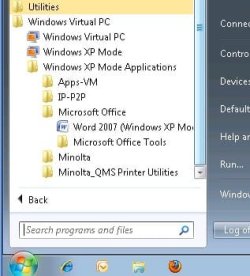
Playing around I loaded Windows virtual PC with Windows XP mode (which is 32-bit) into my Windows 7 64-bit machine and installed the printer under XP, also installed MS word and I added notepad shortcut to the start Menu where the shortcut for Word is.
In my main Windows 7 I have now these 2 programs showing under virtual pc and when I open Word or Notepad from here I can see the printer and print to it just fine.
If I use my win7 ms word then I dont see that printer so it has to be the 'virtual' xp word.

My next move is to share "My DOcuments" folder in W7 so WxpMode can see it - and print docs from there if I need to... This is just to get around on the basic printing problem for now - but the optimum would be to be able to get the correct drivers. I dont need a 'perfect' printing form (like graphics, pictures, etc) since I mosly do documents or some web site paragraph so maybe if I find a more or less compatible printer model on 64bit maybe, maybe I can use it that way..

I am still hoping that these drivers can be fixed :huh:...

btw, this Windows virtual PC with windows mode is prety cool - and its beta! - hopeng to get the final soon...:p


Thanks guys for your suggestions

The only problem with this that I cnat print lest say from Firefox or IE or any other unless I load the same program under XP...
 

Attachments

  • one.jpg
    one.jpg
    20.3 KB · Views: 27
  • one1.jpg
    one1.jpg
    44.4 KB · Views: 17

My Computer My Computer

At a glance

windows vista
OS
windows vista
...The only problem with this that I cnat print lest say from Firefox or IE or any other unless I load the same program under XP...
Still no fix, but an add-on to your workaraound. Print to XPS/PDF in 7, print the XPS/PDF from vXP.
 
Cool!

I'll try it when I get back home, this can solve the problem for now if I need to print something from a firefox page..

Thanks!
 

My Computer My Computer

At a glance

windows vista
OS
windows vista
Update:

I installed firefox to the virtual xp and I can print pages just fine, heck! I can even browse the windows 7 drives without even sharing them! I can select any document from there using Word and print! well... this is a nice workaround!!:p - so far so good...
 

My Computer My Computer

At a glance

windows vista
OS
windows vista
Back
Top