- Local time
- 7:06 AM
- Messages
- 75
Win 7 Pro
i7 2600K Integrated Graphics
Monitor 1: HP ZR24W
Monitor 2: Dell U2311H
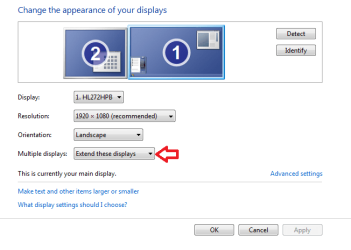
Why can't I extend the desktop onto my second monitor?
After Right Click on the Desktop (Control Panel/Appearance and Personalization/Display)/Screen Resolution, clicking "Detect" does not detect the second monitor.
The second monitor is working, but it is just duplicating what shows on the first monitor.
I just reloaded a new copy of Windows on a new hard drive and then added the second monitor.
I had these same two monitors working on this computer before Win 7 got corrupted and I added a new hard drive and installed a fresh copy of Windows 7.
i7 2600K Integrated Graphics
Monitor 1: HP ZR24W
Monitor 2: Dell U2311H
Why can't I extend the desktop onto my second monitor?
After Right Click on the Desktop (Control Panel/Appearance and Personalization/Display)/Screen Resolution, clicking "Detect" does not detect the second monitor.
The second monitor is working, but it is just duplicating what shows on the first monitor.
I just reloaded a new copy of Windows on a new hard drive and then added the second monitor.
I had these same two monitors working on this computer before Win 7 got corrupted and I added a new hard drive and installed a fresh copy of Windows 7.
My Computer
At a glance
Win 7 ProIntel i7 2600K16 GB 1333 Crucial Hyper-X Blu I thinkIntegrated
- Computer Manufacturer/Model Number
- Home Built
- OS
- Win 7 Pro
- CPU
- Intel i7 2600K
- Motherboard
- Asus P8Z68-V LX
- Memory
- 16 GB 1333 Crucial Hyper-X Blu I think
- Graphics Card(s)
- Integrated
- Sound Card
- Integrated
- Monitor(s) Displays
- Dual LCD IPS panels
- Screen Resolution
- 1980x1200, 1980x1080
- Hard Drives
- 3 SATA: 250, 160, 2000 GB, External USB 3TB
- PSU
- OCZ modular 500W
- Case
- Antec 300
- Cooling
- Case: 2 Stock fans, CPU: CoolerMaster Evo 212; PSU: fan
- Keyboard
- Dell Logitech wireless
- Mouse
- Logitech Wireless 510
- Internet Speed
- 1.0 Mbps down, 448 Kbps up
- Other Info
- Case is too small.