Solved How to do clean Win7 install on ASUS UX32A

dewilaz

New member
Local time
12:16 PM
Messages
14
Hello guys. Today I have found this nice forum, so I am new here and sorry for my bad english.

I have big problem with my ASUS UX32A. I bought it today with Win7 Home Premium 64bit with a lot of bloatware. All I wanted to do is a clean instal of Win7 64bit which ended up in dead spot.

I did install Win7 a lot of times to my old ASUS, but this time was different because of ASUS UX32A hybrid drive 320GB HDD/24GB SSD.
First of all I made bootable USB which helped me to enter setup of Windows install.
There I deleted two partitions, one had old Win7 in it, and another was empty. But then I realized that there are a lot of more partitions, I and didn't know what to do with them
dsc0499yx.jpg
and another
dsc0500q.jpg


As you see there are a lot of partitions and I cant merge them all. As I understand one of them should be SSD for faster cache or something? I don't know which partitions I should delete and format which I should leave, to safe my SSD for fast cache. Moreover when I try to install Win7 on ANY partition I got this:
dsc0502ih.jpg


Now I am stuck here, because I cant log in to my old Win7 and I can't do clean install. It's my new PC and I need it to work very much. Btw I found in google that there are some system recovery thing, after I press F9 at boot time, I could restore factory settings, but it doesn't work..
Please guys, help me.
 

My Computer My Computer

At a glance

Windows 7 64bit
OS
Windows 7 64bit
One more question, as you see from pictures there is DISK 0 Partition 2: Recovery. Could I do Windows recovery from that disk? Or this is not Win recovery?
 

My Computer My Computer

At a glance

Windows 7 64bit
OS
Windows 7 64bit

My Computer My Computer

At a glance

Windows 7 64bit
OS
Windows 7 64bit

My Computer My Computer

At a glance

ME/XP/Vista/Win7
OS
ME/XP/Vista/Win7
When I tried to use this guide, I didn't find that my Win is instaled as UEFI. What should I do?

"Confirm UEFI installation
Here's a simple method to check if Windows is installed as UEFI:
1. Open an administrative command prompt
2. Type
Code:
bcdedit /enum
3. You should see that the path on both Windows Boot Manager and Windows Boot Loader entries has a .efi extension. (i.e. \Windows\system32\winload.efi)"
 

My Computer My Computer

At a glance

Windows 7 64bit
OS
Windows 7 64bit
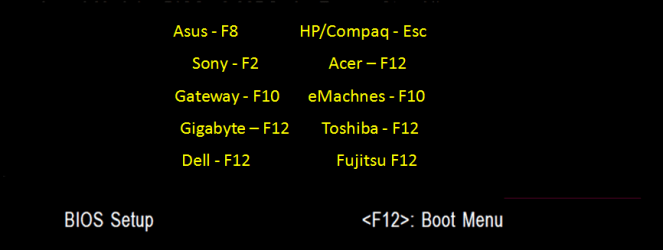
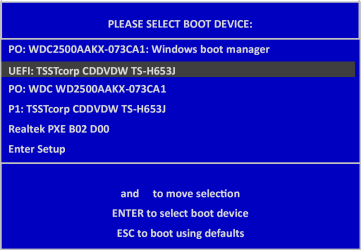
Unplug all other HD's and peripherals, Boot into BIOS setup to see if there is an EFI Boot Disk in BIOS Boot order. If so remove it, set DVD drive first to boot. If EFI BIOS also set to Legacy BIOS. Then set SATA controller to AHCI. Save changes and Exit.

Then boot into installer DVD or flash stick burned or written using tool and latest ISO here. How to Boot your Computer from a Bootable CD or DVD

At first screen Press Shift + F10 to open a Command Box, type:

DISKPART
LIST DISK
SEL DIS 0 (after confirming Windows 7 target HD #)
CLEAN
CREATE PARTITION PRIMARY SIZE=102400
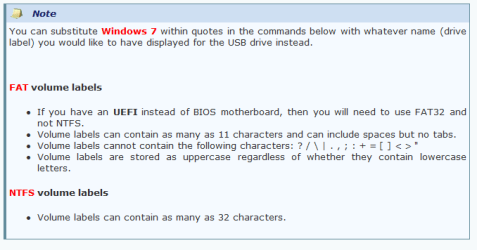
FORMAT FS=NTFS LABEL="WINDOWS 7"
ACTIVE
EXIT

Next click Install Now to Clean Install Windows 7 to the partition you created. If it fails then report back at which step and the verbatim error message.

In addition read over these steps to understand the tools and methods which work best to get and maintain a perfect Clean Reinstall - Factory OEM Windows 7. The steps are the same for retail.
 
Thanks, I will try.

According to one guide, I had to format USB to FAT32, but then it doesn't boot. I'll try to do format it with NTFS
 

My Computer My Computer

At a glance

Windows 7 64bit
OS
Windows 7 64bit
At first screen Press Shift + F10 to open a Command Box, type:

DISKPART
LIST DISK
SEL DIS 0 (after confirming Windows 7 target HD #)
CLEAN
CREATE PARTITION PRIMARY SIZE=102400
FORMAT FS=NTFS LABEL="WINDOWS 7"
ACTIVE
EXIT

This will delete HD in which I have win7 now?
 

My Computer My Computer

At a glance

Windows 7 64bit
OS
Windows 7 64bit
Yes, back up your files first.

You said you tried to run Asus Factory Recovery using the F9 key. Is this the key given on the first screen to run Recovery? Most Asus' use the F8 key for Factory Recovery, on the Repair My Computer menu. Have you tried that?
 
Ye, noting happened. I went to warranty, they restored factory asus win7 with all bloatware wich I don't want to, so now I will try to do clean install
 

My Computer My Computer

At a glance

Windows 7 64bit
OS
Windows 7 64bit
Follow the steps closely in the Clean Reinstall tutorial and you will have a perfect install. :geek:
 
At first screen Press Shift + F10 to open a Command Box, type:

DISKPART
LIST DISK
SEL DIS 0 (after confirming Windows 7 target HD #)
CLEAN
CREATE PARTITION PRIMARY SIZE=102400
FORMAT FS=NTFS LABEL="WINDOWS 7"
ACTIVE
EXIT

When I try do clean, it reports error:
"Virtual Disk Service error:
Clean is not allowed on the disk containing the current boot, system, pagefile, crashdump or hibernation volume. "
 

My Computer My Computer

At a glance

Windows 7 64bit
OS
Windows 7 64bit
Are you running the commands from within the OS?

The commands are to be run from the Win7 installer's Command Line as stated.

Please follow the instructions carefully, reading every step thoroughly.
 
Yes. I booted from USB, I am in Win7 setup

Ok, I cleaned it.
 

My Computer My Computer

At a glance

Windows 7 64bit
OS
Windows 7 64bit
Did you confirm you have EFI BIOS?

If so you have been given the steps to install in EFI mode, and how to remove EFI mode to install normally.
 

My Computer My Computer

At a glance

ME/XP/Vista/Win7
OS
ME/XP/Vista/Win7
Back
Top