Trying to do clean install on new ssd but error keeps coming up.

bigmck, the install disk has service pack 1 already on it.


AddRam, I used the iso burn too and made a new disk with it, the disk boots fine so I must've messed up the other one somehow, though when the new disk boots it goes to a screen where it asks me if I want to launch from the disk or a local drive so I chose the disk. After choosing the disk it goes to a black screen where it loads two things and fills the page with little squares (which I assume are meant to signify that it's loading. After the squares stop however the screen goes completely black and my monitor auctomatically goes to sleep because it isnt receiving any output images or anything.
 

My Computer My Computer

At a glance

Windows 7 Professional x64Intel i5Crucial 4GB x2 DDR3EVGA GeForce GTX 550 Ti
Computer type
PC/Desktop
Computer Manufacturer/Model Number
Custom Build
OS
Windows 7 Professional x64
CPU
Intel i5
Motherboard
ASRock Z77 Pro4 - M
Memory
Crucial 4GB x2 DDR3
Graphics Card(s)
EVGA GeForce GTX 550 Ti
Hard Drives
240GB - PNY SSD

2TB - Seagate Barracuda HDD
Antivirus
AVG + Advanced System Care
Browser
Mozilla Firefox
bigmck, the install disk has service pack 1 already on it.


AddRam, I used the iso burn too and made a new disk with it, the disk boots fine so I must've messed up the other one somehow, though when the new disk boots it goes to a screen where it asks me if I want to launch from the disk or a local drive so I chose the disk. After choosing the disk it goes to a black screen where it loads two things and fills the page with little squares (which I assume are meant to signify that it's loading. After the squares stop however the screen goes completely black and my monitor auctomatically goes to sleep because it isnt receiving any output images or anything.

Just because the screen goes black does not mean nothing is happening. == Right click on the Desktop and select "Personalize". In the bottom right hand corner you will see "Screen Saver". Click on Screen Saver and change it NONE. == Reboot and you should continue to see the Little Squares until something happens.
 

My Computer My Computer

At a glance

Windows 7 Home Premium 32-Bit - Build 7600 SP1Intel Core i3-2120 3.30GhzKingston 4 GB DDR3 1333 mhzAMD Radeon HD6670
Computer type
PC/Desktop
Computer Manufacturer/Model Number
Custom Build
OS
Windows 7 Home Premium 32-Bit - Build 7600 SP1
CPU
Intel Core i3-2120 3.30Ghz
Motherboard
Asus P8Z68-V LX Intel Z68 Socket H2 ATX
Memory
Kingston 4 GB DDR3 1333 mhz
Graphics Card(s)
AMD Radeon HD6670
Sound Card
Sound Blaster Audigy SE 24-Bit
Monitor(s) Displays
Asus VE228
Screen Resolution
1440 X 900
Hard Drives
OCZ Vertex 3 120 GB Sata 3 SSD ==
Kingston SH103/S3 120 G Hyper X 120 GB SSD ==
Western Digital 500 GB Caviar Green 7200 RPM ==
PSU
Corsair CX600M == 600 Watt
Case
NZXT Apollo - Silver with Clear Side Panel
Cooling
Three 120 mm Fans
Keyboard
Microsoft Natural 4000
Mouse
Microsoft Custom Optical 3000
Internet Speed
AT&T Fiber Optic Wireless Network
Antivirus
Microsoft Security Essentials
Browser
Chrome
Other Info
120 mm Blue LED Fan -- Three Blue LED Lazer Light Sticks
there's no desktop to right-click on, and it isn't a screen saver or anything the monitor is just going to sleep and nothing ever happens, earlier I let it sit at that black screen after the squares disappeared for almost 20 minutes and nothing ever happened.
 

My Computer My Computer

At a glance

Windows 7 Professional x64Intel i5Crucial 4GB x2 DDR3EVGA GeForce GTX 550 Ti
Computer type
PC/Desktop
Computer Manufacturer/Model Number
Custom Build
OS
Windows 7 Professional x64
CPU
Intel i5
Motherboard
ASRock Z77 Pro4 - M
Memory
Crucial 4GB x2 DDR3
Graphics Card(s)
EVGA GeForce GTX 550 Ti
Hard Drives
240GB - PNY SSD

2TB - Seagate Barracuda HDD
Antivirus
AVG + Advanced System Care
Browser
Mozilla Firefox
I have come to the conclusion that the only thing left is a bad SSD. I know yours is new, but if there is any way that you can exchange it for another, that would have to be the answer. We have tried everything else. Is there anyway you can exchange your SSD for another?
 

My Computer My Computer

At a glance

Windows 7 Home Premium 32-Bit - Build 7600 SP1Intel Core i3-2120 3.30GhzKingston 4 GB DDR3 1333 mhzAMD Radeon HD6670
Computer type
PC/Desktop
Computer Manufacturer/Model Number
Custom Build
OS
Windows 7 Home Premium 32-Bit - Build 7600 SP1
CPU
Intel Core i3-2120 3.30Ghz
Motherboard
Asus P8Z68-V LX Intel Z68 Socket H2 ATX
Memory
Kingston 4 GB DDR3 1333 mhz
Graphics Card(s)
AMD Radeon HD6670
Sound Card
Sound Blaster Audigy SE 24-Bit
Monitor(s) Displays
Asus VE228
Screen Resolution
1440 X 900
Hard Drives
OCZ Vertex 3 120 GB Sata 3 SSD ==
Kingston SH103/S3 120 G Hyper X 120 GB SSD ==
Western Digital 500 GB Caviar Green 7200 RPM ==
PSU
Corsair CX600M == 600 Watt
Case
NZXT Apollo - Silver with Clear Side Panel
Cooling
Three 120 mm Fans
Keyboard
Microsoft Natural 4000
Mouse
Microsoft Custom Optical 3000
Internet Speed
AT&T Fiber Optic Wireless Network
Antivirus
Microsoft Security Essentials
Browser
Chrome
Other Info
120 mm Blue LED Fan -- Three Blue LED Lazer Light Sticks
The dots are exactly what it`s supposed to do, just let it run, patience my young padawan :)

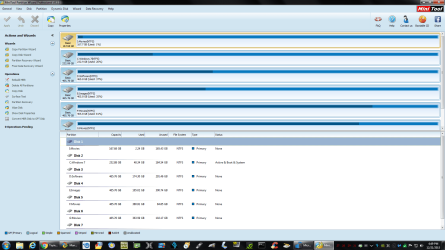
It will eventually bring you to this page, it may or may not ask you what screen resolution you want to use first, just choose option #1
 

Attachments

  • Untitled.png
    Untitled.png
    83.7 KB · Views: 2

My Computer My Computer

At a glance

Windows 10 Pro x64Intel Core i7 6700KGSkill TridentZ RGB 16GB 3600 16-16-16-36EVGA GTX 980 Ti SC x2
Computer type
PC/Desktop
Computer Manufacturer/Model Number
Skylake Special #666
OS
Windows 10 Pro x64
CPU
Intel Core i7 6700K
Motherboard
Asus Sabertooth Z170 Mark 1
Memory
GSkill TridentZ RGB 16GB 3600 16-16-16-36
Graphics Card(s)
EVGA GTX 980 Ti SC x2
Sound Card
Realtek High Definition
Monitor(s) Displays
AOC G2460PG
Screen Resolution
1920 x 1080 144Hz
Hard Drives
Samsung 860 Pro 256GB, Seagate Barracuda 4TB x2
PSU
EVGA 1000 P2, EVGA White Custom Braided Cables
Case
Corsair Vengeance C70 Gunmetal Black
Cooling
Corsair H100i v2, Corsair ML120 x2, Thermal Grizzly Kryonaut
Keyboard
Logitech G910 Orion Spectrum
Mouse
Logitech G700s
Internet Speed
Verizon Fios Quantum Gateway 75/75
Antivirus
Windows Defender, Malwarebytes Free 3.8.3
Browser
Chrome
Other Info
Corsair SP120 x4, LG Blu-ray Drive, Durabrand HT-395 100 Watt Dolby Digital Amp, Corsair H2100 Wireless 7.1 Headset
Two things. First is possible, Clean and set up SSD with Diskpart. Second is a really WAG. Since partition wiz boot screen shows all DOTS and you say it showed SQUARES, and it also quit exactly where it asks for video screen choice, perhaps try different vid card ?
Art.
 

My Computer My Computer

At a glance

Win7 sp1 Pro 64bit / XP sp2 Pro (games only)Intel Core 2 Duo E8400 @ 3.00GHz8.00 GB Dual-Channel DDR2 @ 400MHz (5-5-5-18)1024MB GeForce GTX 560
Computer type
PC/Desktop
Computer Manufacturer/Model Number
Home built
OS
Win7 sp1 Pro 64bit / XP sp2 Pro (games only)
CPU
Intel Core 2 Duo E8400 @ 3.00GHz
Motherboard
Intel Corporation DP35DP (CPU1)
Memory
8.00 GB Dual-Channel DDR2 @ 400MHz (5-5-5-18)
Graphics Card(s)
1024MB GeForce GTX 560
Sound Card
NVIDIA High Definition Audio
Monitor(s) Displays
SyncMaster (2048x1152@60Hz)
Hard Drives
240GB Sandisc Extreme Pro SSD
244GB Seagate ST3250410AS
488GB Seagate ST500DM002-1BD142
931GB Western Digital WDC WD1003FZEX
PSU
Corsair 720
Case
ATX
Keyboard
HID Keyboard Device Logitech
Mouse
HID-compliant mouse Microsoft
Other Info
TSSTcorp CDDVDW SH-S223L

HL-DT-ST BD-RE BH12LS35
Okay, so I don't know what the difference is between today and Sunday but for some reason the partition wizard doesn't just quit after a few minutes and I got to a new screen. The screen had tons of information about the hardware in the computer and everything seemed fine until a little spot caught my eye, the reason the partition wizard couldn't load like it should was there was a bus port error on the motherboard. After a couple tries I found a bus port that works perfectly and the partition wizard and loads to the screen AddRAM has attached.

Though there are a few problems I've encountered so far, during the launch of the wizard it never asked me what resolution I wanted and picked on for me so now I can only see part of the wizard window (approx 80%) and after some manual adjustments on the monitor I have shifted its H axis as far as it goes to see more of the window (approx 95-ish%) so I can see a lot more but still can't quite make out some of the sidebar stuff.

The other problem I now have is that my mouse does not work while in this window, the cursor is present but will not move, this is most likely due to the fact I use a wireless mouse with a USB dongle that needs a quick software installation to be used and I don't think I have a wired mouse. On the other hand my keyboard works just fine and I select between the entire drive, the system reserve partition, and the free space partition but alas I cannot do anything other than toggle between them using the arrow keys, I have pressed every single button on the keyboard and none of them do anything so I can"t select any of the options related to the drive and its partitions.


Side note:

bigmck, I'm unaware if I'm able to get a replacement for this drive in case things don't work out, since this drive is because of a direct replacement of my last drive that failed and I do not know if PNY would be willing to send me yet another replacement drive.


Wandering one, I called them squares because they are square not rounded so it felt wrong to call them dots, in the same sense that if you press the period key to end your sentence you will notice (if you look close enough) that it is indeed a tiny square and not a circle. But either way they're dots, squares, specs, loading signifiers, whatever you wish to call them lol. As to your suggestion to use another video card, the only other one I have is the integrated one on the motherboard.
 

My Computer My Computer

At a glance

Windows 7 Professional x64Intel i5Crucial 4GB x2 DDR3EVGA GeForce GTX 550 Ti
Computer type
PC/Desktop
Computer Manufacturer/Model Number
Custom Build
OS
Windows 7 Professional x64
CPU
Intel i5
Motherboard
ASRock Z77 Pro4 - M
Memory
Crucial 4GB x2 DDR3
Graphics Card(s)
EVGA GeForce GTX 550 Ti
Hard Drives
240GB - PNY SSD

2TB - Seagate Barracuda HDD
Antivirus
AVG + Advanced System Care
Browser
Mozilla Firefox
Back
Top