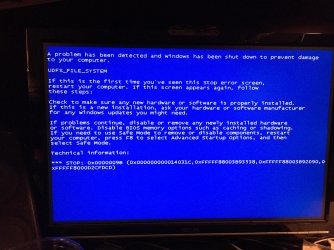
Trying to do clean install on new ssd but error keeps coming up.

Lonelylunar

New member
Local time
1:20 PM
Messages
34
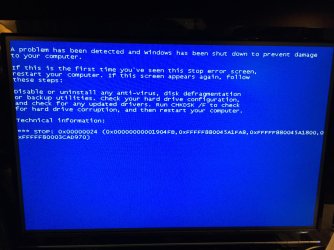
About a month ago my ssd failed and I sent it in to get a new one, I recently got a replacement and have been trying to do a clean install on the new drive but keep running into errors. I kept getting two different bluescreen errors and a text error telling me the drive was setup as GPT and as such windows cannot install onto it, so I converted it to MBR through the command prompt but still keep getting the bluescreen errors during the installation. I've attached pictures of the two errors below.
 

Attachments
  • image1.jpg
    image1.jpg
    806.5 KB · Views: 1
  • image3.jpg
    image3.jpg
    811.7 KB · Views: 1

My Computer My Computer

At a glance

Windows 7 Professional x64Intel i5Crucial 4GB x2 DDR3EVGA GeForce GTX 550 Ti
Computer type
PC/Desktop
Computer Manufacturer/Model Number
Custom Build
OS
Windows 7 Professional x64
CPU
Intel i5
Motherboard
ASRock Z77 Pro4 - M
Memory
Crucial 4GB x2 DDR3
Graphics Card(s)
EVGA GeForce GTX 550 Ti
Hard Drives
240GB - PNY SSD

2TB - Seagate Barracuda HDD
Antivirus
AVG + Advanced System Care
Browser
Mozilla Firefox
Hi -- Are you using a Win 7 System Builders disk for the installation? If not what are you using?
 

My Computer My Computer

At a glance

Windows 7 Home Premium 32-Bit - Build 7600 SP1Intel Core i3-2120 3.30GhzKingston 4 GB DDR3 1333 mhzAMD Radeon HD6670
Computer type
PC/Desktop
Computer Manufacturer/Model Number
Custom Build
OS
Windows 7 Home Premium 32-Bit - Build 7600 SP1
CPU
Intel Core i3-2120 3.30Ghz
Motherboard
Asus P8Z68-V LX Intel Z68 Socket H2 ATX
Memory
Kingston 4 GB DDR3 1333 mhz
Graphics Card(s)
AMD Radeon HD6670
Sound Card
Sound Blaster Audigy SE 24-Bit
Monitor(s) Displays
Asus VE228
Screen Resolution
1440 X 900
Hard Drives
OCZ Vertex 3 120 GB Sata 3 SSD ==
Kingston SH103/S3 120 G Hyper X 120 GB SSD ==
Western Digital 500 GB Caviar Green 7200 RPM ==
PSU
Corsair CX600M == 600 Watt
Case
NZXT Apollo - Silver with Clear Side Panel
Cooling
Three 120 mm Fans
Keyboard
Microsoft Natural 4000
Mouse
Microsoft Custom Optical 3000
Internet Speed
AT&T Fiber Optic Wireless Network
Antivirus
Microsoft Security Essentials
Browser
Chrome
Other Info
120 mm Blue LED Fan -- Three Blue LED Lazer Light Sticks
Answer bigmck's question first.

Are you trying to install Windows on your new SSD from within a Windows itself. If so you cannot do it that way.

Disconnect all hard drives except the new SSD & then start the computer & repeatedly hit one of the keyboard keys, usually f8, f12 or the Del key, which should open up the BIOS screen. Check to see if the SSD is recognised, set the DVD as the first boot device, then if necessary set Legacy mode for the installation. Save your BIOS settings & the computer will then shut down & restart, insert the DVD & the installation process should begin.
 

My Computer My Computer

At a glance

Windows 7 Home Premium 64 bit sp1Intel i5 3570 3.4Ghz Ivy Bridge SKT 1155 quad...G-Skill Rip Jaws 16Gb (8x2) DDR3 -1600 PC3 12...Gigabyte NVIDIA GT610 1Gb DDR3 810/1200 PCI-E...
Computer type
PC/Desktop
Computer Manufacturer/Model Number
Self built using existing case
OS
Windows 7 Home Premium 64 bit sp1
CPU
Intel i5 3570 3.4Ghz Ivy Bridge SKT 1155 quad core
Motherboard
Gigabyte Z77-HD3 SKT 1155 2xSata 3, 4x USB 3.0
Memory
G-Skill Rip Jaws 16Gb (8x2) DDR3 -1600 PC3 12800 CL 10 red
Graphics Card(s)
Gigabyte NVIDIA GT610 1Gb DDR3 810/1200 PCI-E 2.0 Silent
Sound Card
NVIDIA High Definition & Realtech High Definition Audio
Monitor(s) Displays
2 x Philips 226V4L 16:9 aspect ratio
Screen Resolution
1920 x 1080 HD
Hard Drives
Samsung 840 Pro 256gb SSD, SATA 3.
Hitachi Touro Portable 1tb, USB 3.0 HDD used for image b/ups.
PSU
Corsair VS450
Case
Codeng
Cooling
PSU fan & CPU fan
Keyboard
Logitech
Mouse
Logitech Wireless trackball M570
Internet Speed
Wireless 3G. 3mg down & 550kb up.
Antivirus
Bitdefender Internet Security 2020
Browser
Opera (Current Version) & Firefox
Other Info
MS Office 2013 Pro. Davis weather station software. MGE Nova 600 avr UPS.
Yes it's a win 7 pro systems builders disk
 

My Computer My Computer

At a glance

Windows 7 Professional x64Intel i5Crucial 4GB x2 DDR3EVGA GeForce GTX 550 Ti
Computer type
PC/Desktop
Computer Manufacturer/Model Number
Custom Build
OS
Windows 7 Professional x64
CPU
Intel i5
Motherboard
ASRock Z77 Pro4 - M
Memory
Crucial 4GB x2 DDR3
Graphics Card(s)
EVGA GeForce GTX 550 Ti
Hard Drives
240GB - PNY SSD

2TB - Seagate Barracuda HDD
Antivirus
AVG + Advanced System Care
Browser
Mozilla Firefox
Ranger4, I am not trying to install from within windows, it was a factory sealed drive and never before used. I have already disconnected my storage drive and only the ssd remains plugged in, I have already checked and yes the drive is recognised by bios. The dvd drive is already the first boot device, just checked and bios is in legacy mode already.
 

My Computer My Computer

At a glance

Windows 7 Professional x64Intel i5Crucial 4GB x2 DDR3EVGA GeForce GTX 550 Ti
Computer type
PC/Desktop
Computer Manufacturer/Model Number
Custom Build
OS
Windows 7 Professional x64
CPU
Intel i5
Motherboard
ASRock Z77 Pro4 - M
Memory
Crucial 4GB x2 DDR3
Graphics Card(s)
EVGA GeForce GTX 550 Ti
Hard Drives
240GB - PNY SSD

2TB - Seagate Barracuda HDD
Antivirus
AVG + Advanced System Care
Browser
Mozilla Firefox
Then you should be ready to install & all should go ahead. If the installation refuses to start then check the Windows DVD for scratches or other damage.
 

My Computer My Computer

At a glance

Windows 7 Home Premium 64 bit sp1Intel i5 3570 3.4Ghz Ivy Bridge SKT 1155 quad...G-Skill Rip Jaws 16Gb (8x2) DDR3 -1600 PC3 12...Gigabyte NVIDIA GT610 1Gb DDR3 810/1200 PCI-E...
Computer type
PC/Desktop
Computer Manufacturer/Model Number
Self built using existing case
OS
Windows 7 Home Premium 64 bit sp1
CPU
Intel i5 3570 3.4Ghz Ivy Bridge SKT 1155 quad core
Motherboard
Gigabyte Z77-HD3 SKT 1155 2xSata 3, 4x USB 3.0
Memory
G-Skill Rip Jaws 16Gb (8x2) DDR3 -1600 PC3 12800 CL 10 red
Graphics Card(s)
Gigabyte NVIDIA GT610 1Gb DDR3 810/1200 PCI-E 2.0 Silent
Sound Card
NVIDIA High Definition & Realtech High Definition Audio
Monitor(s) Displays
2 x Philips 226V4L 16:9 aspect ratio
Screen Resolution
1920 x 1080 HD
Hard Drives
Samsung 840 Pro 256gb SSD, SATA 3.
Hitachi Touro Portable 1tb, USB 3.0 HDD used for image b/ups.
PSU
Corsair VS450
Case
Codeng
Cooling
PSU fan & CPU fan
Keyboard
Logitech
Mouse
Logitech Wireless trackball M570
Internet Speed
Wireless 3G. 3mg down & 550kb up.
Antivirus
Bitdefender Internet Security 2020
Browser
Opera (Current Version) & Firefox
Other Info
MS Office 2013 Pro. Davis weather station software. MGE Nova 600 avr UPS.
If you system is over clocked try using default settings in bios.
 

My Computer My Computer

At a glance

Windows 10 Pro. 64/ version 1709 Windows 7 Pr...Intel i7-6800K @ 4.3Corsair Platinum 16 gig @2400EVGA GTX 1070 OC
Computer type
PC/Desktop
Computer Manufacturer/Model Number
Home made Desktop
OS
Windows 10 Pro. 64/ version 1709 Windows 7 Pro/64
CPU
Intel i7-6800K @ 4.3
Motherboard
ASUS X-99 Deluxe II
Memory
Corsair Platinum 16 gig @2400
Graphics Card(s)
EVGA GTX 1070 OC
Monitor(s) Displays
Asus 27" LED LCD/VE278Q
Screen Resolution
1920-1080 or 1280-720 HDMI
Hard Drives
INTEL SSD 730-240 Gb Sata 3.0/
PSU
EVGA Platium 1200W
Case
Phanteks Luxe Tempered Glass 8 fans/ one radiator
Cooling
XSPC/ Water Cooled CPU
Keyboard
Das 4 Professional
Mouse
Logitech M705/MX Anywhere 2-S
Internet Speed
100 mbits
Antivirus
Microsoft Security Essentials/ Malwarebytes Premium 3.0/ SAS
Browser
I.E. 11 default/Firefox/ ISP Time Warner Cable/Spectrum
Other Info
LG BluRay Burner/
Sound system-KLipsch-THX/
Icy Dock ssd Hot Swap bays.
Ranger4, the disk looks perfectly fine and there aren't any issues with installation until part way through the install. error images are posted above.

Layback Bear, the system is not overclocked in any way and the bios is already in default settings.
 

My Computer My Computer

At a glance

Windows 7 Professional x64Intel i5Crucial 4GB x2 DDR3EVGA GeForce GTX 550 Ti
Computer type
PC/Desktop
Computer Manufacturer/Model Number
Custom Build
OS
Windows 7 Professional x64
CPU
Intel i5
Motherboard
ASRock Z77 Pro4 - M
Memory
Crucial 4GB x2 DDR3
Graphics Card(s)
EVGA GeForce GTX 550 Ti
Hard Drives
240GB - PNY SSD

2TB - Seagate Barracuda HDD
Antivirus
AVG + Advanced System Care
Browser
Mozilla Firefox
Try taking one of your sticks of RAM out and see what happens. If you get the same error, try only the other stick of RAM. I found a couple references to bad RAM causing this problem. == I think the next thing that you should consider is that your Windows DVD is bad. You can download an ISO from a Torrent site just to see if that might be the problem. Download Windows 7 ISOs, Legally and for Free | PCsteps.com Stay in touch.
 

My Computer My Computer

At a glance

Windows 7 Home Premium 32-Bit - Build 7600 SP1Intel Core i3-2120 3.30GhzKingston 4 GB DDR3 1333 mhzAMD Radeon HD6670
Computer type
PC/Desktop
Computer Manufacturer/Model Number
Custom Build
OS
Windows 7 Home Premium 32-Bit - Build 7600 SP1
CPU
Intel Core i3-2120 3.30Ghz
Motherboard
Asus P8Z68-V LX Intel Z68 Socket H2 ATX
Memory
Kingston 4 GB DDR3 1333 mhz
Graphics Card(s)
AMD Radeon HD6670
Sound Card
Sound Blaster Audigy SE 24-Bit
Monitor(s) Displays
Asus VE228
Screen Resolution
1440 X 900
Hard Drives
OCZ Vertex 3 120 GB Sata 3 SSD ==
Kingston SH103/S3 120 G Hyper X 120 GB SSD ==
Western Digital 500 GB Caviar Green 7200 RPM ==
PSU
Corsair CX600M == 600 Watt
Case
NZXT Apollo - Silver with Clear Side Panel
Cooling
Three 120 mm Fans
Keyboard
Microsoft Natural 4000
Mouse
Microsoft Custom Optical 3000
Internet Speed
AT&T Fiber Optic Wireless Network
Antivirus
Microsoft Security Essentials
Browser
Chrome
Other Info
120 mm Blue LED Fan -- Three Blue LED Lazer Light Sticks
Set the bios to defaults by hitting the F5 key, save and exit by hitting the F10 key.

Setup the new drive by making and using a Partition Wizard Boot CD.

Boot from the disc.

Create a Primary install Partition, align it, mark it Active, Format it and remove the disc.

Drop your install disc in the tray and try your install again.
 

My Computer My Computer

At a glance

Windows 10 Pro x64Intel Core i7 6700KGSkill TridentZ RGB 16GB 3600 16-16-16-36EVGA GTX 980 Ti SC x2
Computer type
PC/Desktop
Computer Manufacturer/Model Number
Skylake Special #666
OS
Windows 10 Pro x64
CPU
Intel Core i7 6700K
Motherboard
Asus Sabertooth Z170 Mark 1
Memory
GSkill TridentZ RGB 16GB 3600 16-16-16-36
Graphics Card(s)
EVGA GTX 980 Ti SC x2
Sound Card
Realtek High Definition
Monitor(s) Displays
AOC G2460PG
Screen Resolution
1920 x 1080 144Hz
Hard Drives
Samsung 860 Pro 256GB, Seagate Barracuda 4TB x2
PSU
EVGA 1000 P2, EVGA White Custom Braided Cables
Case
Corsair Vengeance C70 Gunmetal Black
Cooling
Corsair H100i v2, Corsair ML120 x2, Thermal Grizzly Kryonaut
Keyboard
Logitech G910 Orion Spectrum
Mouse
Logitech G700s
Internet Speed
Verizon Fios Quantum Gateway 75/75
Antivirus
Windows Defender, Malwarebytes Free 3.8.3
Browser
Chrome
Other Info
Corsair SP120 x4, LG Blu-ray Drive, Durabrand HT-395 100 Watt Dolby Digital Amp, Corsair H2100 Wireless 7.1 Headset
bigmck, I took out the the pieces of ram to see if either was bad and there was no change, I'm a little hesitant to resort to using a torrent just yet, though I should note that earlier this year I used the same disk and it worked fine on another drive.


AddRam, I set everything to defaults and burned the wizard partition boot CD, but when trying to boot from it I get a black screen saying BOOTMGR is missing and tells me to restart.
 

My Computer My Computer

At a glance

Windows 7 Professional x64Intel i5Crucial 4GB x2 DDR3EVGA GeForce GTX 550 Ti
Computer type
PC/Desktop
Computer Manufacturer/Model Number
Custom Build
OS
Windows 7 Professional x64
CPU
Intel i5
Motherboard
ASRock Z77 Pro4 - M
Memory
Crucial 4GB x2 DDR3
Graphics Card(s)
EVGA GeForce GTX 550 Ti
Hard Drives
240GB - PNY SSD

2TB - Seagate Barracuda HDD
Antivirus
AVG + Advanced System Care
Browser
Mozilla Firefox
bigmck, I took out the the pieces of ram to see if either was bad and there was no change, I'm a little hesitant to resort to using a torrent just yet, though I should note that earlier this year I used the same disk and it worked fine on another drive.


AddRam, I set everything to defaults and burned the wizard partition boot CD, but when trying to boot from it I get a black screen saying BOOTMGR is missing and tells me to restart.

So neither the Win 7 CD nor the Partition Wizard Book Disc will boot. That eliminates something wrong with the Win 7 CD. Let me think about this. == Just to confirm, your CD/DVD is your first boot in your Bios. == When you tried to boot the Partition Wizard disc, what happened? Did you get a blue screen or just not much of anything? == Does your CD drive turn the Win 7 disc (or any disc)? You can tell by putting the disc where you can read the writing. After you try the boot, has it turned any?
 

My Computer My Computer

At a glance

Windows 7 Home Premium 32-Bit - Build 7600 SP1Intel Core i3-2120 3.30GhzKingston 4 GB DDR3 1333 mhzAMD Radeon HD6670
Computer type
PC/Desktop
Computer Manufacturer/Model Number
Custom Build
OS
Windows 7 Home Premium 32-Bit - Build 7600 SP1
CPU
Intel Core i3-2120 3.30Ghz
Motherboard
Asus P8Z68-V LX Intel Z68 Socket H2 ATX
Memory
Kingston 4 GB DDR3 1333 mhz
Graphics Card(s)
AMD Radeon HD6670
Sound Card
Sound Blaster Audigy SE 24-Bit
Monitor(s) Displays
Asus VE228
Screen Resolution
1440 X 900
Hard Drives
OCZ Vertex 3 120 GB Sata 3 SSD ==
Kingston SH103/S3 120 G Hyper X 120 GB SSD ==
Western Digital 500 GB Caviar Green 7200 RPM ==
PSU
Corsair CX600M == 600 Watt
Case
NZXT Apollo - Silver with Clear Side Panel
Cooling
Three 120 mm Fans
Keyboard
Microsoft Natural 4000
Mouse
Microsoft Custom Optical 3000
Internet Speed
AT&T Fiber Optic Wireless Network
Antivirus
Microsoft Security Essentials
Browser
Chrome
Other Info
120 mm Blue LED Fan -- Three Blue LED Lazer Light Sticks
Yes the CD drive is first to boot, when trying to boot the partition wizard disk I get a black screen saying BOOTMGR is missing and asks me to reboot and even after rebooting and trying again I get the same black screen about BOOTMGR. Yes the CD drive turns both disks.
 

My Computer My Computer

At a glance

Windows 7 Professional x64Intel i5Crucial 4GB x2 DDR3EVGA GeForce GTX 550 Ti
Computer type
PC/Desktop
Computer Manufacturer/Model Number
Custom Build
OS
Windows 7 Professional x64
CPU
Intel i5
Motherboard
ASRock Z77 Pro4 - M
Memory
Crucial 4GB x2 DDR3
Graphics Card(s)
EVGA GeForce GTX 550 Ti
Hard Drives
240GB - PNY SSD

2TB - Seagate Barracuda HDD
Antivirus
AVG + Advanced System Care
Browser
Mozilla Firefox
Yes the CD drive is first to boot, when trying to boot the partition wizard disk I get a black screen saying BOOTMGR is missing and asks me to reboot and even after rebooting and trying again I get the same black screen about BOOTMGR. Yes the CD drive turns both disks.

The reason I ask about the CD drive being the first boot is that the "No Bootmgr" sounds just like it is going to the SSD first. == When you put the CD in the drive and boot, do you ever see the prompt "Press any Key to boot from CD/DVD"? == About how long does it take before you see the Black Screen?
 

My Computer My Computer

At a glance

Windows 7 Home Premium 32-Bit - Build 7600 SP1Intel Core i3-2120 3.30GhzKingston 4 GB DDR3 1333 mhzAMD Radeon HD6670
Computer type
PC/Desktop
Computer Manufacturer/Model Number
Custom Build
OS
Windows 7 Home Premium 32-Bit - Build 7600 SP1
CPU
Intel Core i3-2120 3.30Ghz
Motherboard
Asus P8Z68-V LX Intel Z68 Socket H2 ATX
Memory
Kingston 4 GB DDR3 1333 mhz
Graphics Card(s)
AMD Radeon HD6670
Sound Card
Sound Blaster Audigy SE 24-Bit
Monitor(s) Displays
Asus VE228
Screen Resolution
1440 X 900
Hard Drives
OCZ Vertex 3 120 GB Sata 3 SSD ==
Kingston SH103/S3 120 G Hyper X 120 GB SSD ==
Western Digital 500 GB Caviar Green 7200 RPM ==
PSU
Corsair CX600M == 600 Watt
Case
NZXT Apollo - Silver with Clear Side Panel
Cooling
Three 120 mm Fans
Keyboard
Microsoft Natural 4000
Mouse
Microsoft Custom Optical 3000
Internet Speed
AT&T Fiber Optic Wireless Network
Antivirus
Microsoft Security Essentials
Browser
Chrome
Other Info
120 mm Blue LED Fan -- Three Blue LED Lazer Light Sticks
It's also possible to get that message from having a non bootable disc, how did you burn the CD?
 

My Computer My Computer

At a glance

Win 10 Pro x64Intel I5-2500K @3.3GHz16GB G.Skill Ripjaws X (4x4GB)EVGA GeForce 750 Ti SC 2GB
Computer type
PC/Desktop
Computer Manufacturer/Model Number
Self Built
OS
Win 10 Pro x64
CPU
Intel I5-2500K @3.3GHz
Motherboard
Asrock P67 Extreme4
Memory
16GB G.Skill Ripjaws X (4x4GB)
Graphics Card(s)
EVGA GeForce 750 Ti SC 2GB
Sound Card
ASUS Xonar DG 5.1 Channels 24-bit 96KHz PCI Interface Sound
Monitor(s) Displays
auria eq2367
Screen Resolution
1920 x 1080
Hard Drives
250GB Samsung 850 EVO SSD
1TB WD Blue
1TB Hitachi
PSU
SeaSonic X 650W 80 Plus Gold
Case
Corsair Obsidian 750D
Cooling
Corsair H60, Three 140mm case fans
Keyboard
Logitech Wireless Keyboard K520
Mouse
Logitech Wireless Mouse M310
Internet Speed
Wave Broadband ~ 100 dn 5 up
Antivirus
Windows Defender, Malwarebytes Premium
Browser
Edge, IE11, Chrome
Other Info
Laptop specs: HP g7-1365dx /
CPU: AMD A6-3420M APU with Radeon(tm) HD Graphics /
RAM: Crucial 8Gb (2x4Gb) /
SSD: Crucial M4-CT128M4SSD2 ATA Device/ FW 000F /
GFX: AMD Radeon HD 6520G /
OS: Windows 10 Pro x64
bigmck, I see the "press any key to boot from CD/DVD" every time I use the win7 install disk but not the partition wizard disk, with the partition wizard disk I get the BOOTMGR i missing screen.


Derekimo, I inserted the disk into my laptop when asked what to do I set up the "burn files to disk" option and picked the "as a bootable CD/DVD" option (the other option was "as a usb"), once I placed the partition wizard file onto the disk I went up to "manage" and selected "finish disk burn".
 

My Computer My Computer

At a glance

Windows 7 Professional x64Intel i5Crucial 4GB x2 DDR3EVGA GeForce GTX 550 Ti
Computer type
PC/Desktop
Computer Manufacturer/Model Number
Custom Build
OS
Windows 7 Professional x64
CPU
Intel i5
Motherboard
ASRock Z77 Pro4 - M
Memory
Crucial 4GB x2 DDR3
Graphics Card(s)
EVGA GeForce GTX 550 Ti
Hard Drives
240GB - PNY SSD

2TB - Seagate Barracuda HDD
Antivirus
AVG + Advanced System Care
Browser
Mozilla Firefox
Let's try getting into the System Recovery Menu -- Use this tutorial http://www.sevenforums.com/tutorials/668-system-recovery-options.html You will be using Option Two because you have a Win 7 Install Disc. Follow the tutorial closely and see if the Repair works.
== Continue with the Partition Recovery disc that you are working with Derekimo. I don't want you to "Stretch you into Different Ways". If that does not work, then try the System Recovery.
 

My Computer My Computer

At a glance

Windows 7 Home Premium 32-Bit - Build 7600 SP1Intel Core i3-2120 3.30GhzKingston 4 GB DDR3 1333 mhzAMD Radeon HD6670
Computer type
PC/Desktop
Computer Manufacturer/Model Number
Custom Build
OS
Windows 7 Home Premium 32-Bit - Build 7600 SP1
CPU
Intel Core i3-2120 3.30Ghz
Motherboard
Asus P8Z68-V LX Intel Z68 Socket H2 ATX
Memory
Kingston 4 GB DDR3 1333 mhz
Graphics Card(s)
AMD Radeon HD6670
Sound Card
Sound Blaster Audigy SE 24-Bit
Monitor(s) Displays
Asus VE228
Screen Resolution
1440 X 900
Hard Drives
OCZ Vertex 3 120 GB Sata 3 SSD ==
Kingston SH103/S3 120 G Hyper X 120 GB SSD ==
Western Digital 500 GB Caviar Green 7200 RPM ==
PSU
Corsair CX600M == 600 Watt
Case
NZXT Apollo - Silver with Clear Side Panel
Cooling
Three 120 mm Fans
Keyboard
Microsoft Natural 4000
Mouse
Microsoft Custom Optical 3000
Internet Speed
AT&T Fiber Optic Wireless Network
Antivirus
Microsoft Security Essentials
Browser
Chrome
Other Info
120 mm Blue LED Fan -- Three Blue LED Lazer Light Sticks
when clicking the "repair your computer" option on the install disk from option two I get an error massage saying "This version of system recovery options is not compatible with the version of windows you are trying to repair."
 

My Computer My Computer

At a glance

Windows 7 Professional x64Intel i5Crucial 4GB x2 DDR3EVGA GeForce GTX 550 Ti
Computer type
PC/Desktop
Computer Manufacturer/Model Number
Custom Build
OS
Windows 7 Professional x64
CPU
Intel i5
Motherboard
ASRock Z77 Pro4 - M
Memory
Crucial 4GB x2 DDR3
Graphics Card(s)
EVGA GeForce GTX 550 Ti
Hard Drives
240GB - PNY SSD

2TB - Seagate Barracuda HDD
Antivirus
AVG + Advanced System Care
Browser
Mozilla Firefox
when clicking the "repair your computer" option on the install disk from option two I get an error massage saying "This version of system recovery options is not compatible with the version of windows you are trying to repair."

The install disc is the same one that you installed Windows with, is that correct? == Does the Install Disc have SP 1 on it or was SP 1 added later through Updates later? If the disc does not have SP1, this is a possible reason it did not work. If your disc does not have SP1, go to this site and download your version which does have SP1 and we can hope this will work to repair you PC.
Official Windows 7 SP1 ISO Image Downloads | Windows 7 Forums
 

My Computer My Computer

At a glance

Windows 7 Home Premium 32-Bit - Build 7600 SP1Intel Core i3-2120 3.30GhzKingston 4 GB DDR3 1333 mhzAMD Radeon HD6670
Computer type
PC/Desktop
Computer Manufacturer/Model Number
Custom Build
OS
Windows 7 Home Premium 32-Bit - Build 7600 SP1
CPU
Intel Core i3-2120 3.30Ghz
Motherboard
Asus P8Z68-V LX Intel Z68 Socket H2 ATX
Memory
Kingston 4 GB DDR3 1333 mhz
Graphics Card(s)
AMD Radeon HD6670
Sound Card
Sound Blaster Audigy SE 24-Bit
Monitor(s) Displays
Asus VE228
Screen Resolution
1440 X 900
Hard Drives
OCZ Vertex 3 120 GB Sata 3 SSD ==
Kingston SH103/S3 120 G Hyper X 120 GB SSD ==
Western Digital 500 GB Caviar Green 7200 RPM ==
PSU
Corsair CX600M == 600 Watt
Case
NZXT Apollo - Silver with Clear Side Panel
Cooling
Three 120 mm Fans
Keyboard
Microsoft Natural 4000
Mouse
Microsoft Custom Optical 3000
Internet Speed
AT&T Fiber Optic Wireless Network
Antivirus
Microsoft Security Essentials
Browser
Chrome
Other Info
120 mm Blue LED Fan -- Three Blue LED Lazer Light Sticks

My Computer My Computer

At a glance

Windows 10 Pro x64Intel Core i7 6700KGSkill TridentZ RGB 16GB 3600 16-16-16-36EVGA GTX 980 Ti SC x2
Computer type
PC/Desktop
Computer Manufacturer/Model Number
Skylake Special #666
OS
Windows 10 Pro x64
CPU
Intel Core i7 6700K
Motherboard
Asus Sabertooth Z170 Mark 1
Memory
GSkill TridentZ RGB 16GB 3600 16-16-16-36
Graphics Card(s)
EVGA GTX 980 Ti SC x2
Sound Card
Realtek High Definition
Monitor(s) Displays
AOC G2460PG
Screen Resolution
1920 x 1080 144Hz
Hard Drives
Samsung 860 Pro 256GB, Seagate Barracuda 4TB x2
PSU
EVGA 1000 P2, EVGA White Custom Braided Cables
Case
Corsair Vengeance C70 Gunmetal Black
Cooling
Corsair H100i v2, Corsair ML120 x2, Thermal Grizzly Kryonaut
Keyboard
Logitech G910 Orion Spectrum
Mouse
Logitech G700s
Internet Speed
Verizon Fios Quantum Gateway 75/75
Antivirus
Windows Defender, Malwarebytes Free 3.8.3
Browser
Chrome
Other Info
Corsair SP120 x4, LG Blu-ray Drive, Durabrand HT-395 100 Watt Dolby Digital Amp, Corsair H2100 Wireless 7.1 Headset
Back
Top